automatic TOYOTA 4RUNNER 2022 Service Manual
[x] Cancel search | Manufacturer: TOYOTA, Model Year: 2022, Model line: 4RUNNER, Model: TOYOTA 4RUNNER 2022Pages: 616, PDF Size: 12.01 MB
Page 235 of 616
2354-3. Operating the lights and wipers
4
Driving
4RUNNER (U)
Ty p e B
Wiper intervals can be adjusted for intermittent operation (whe n
is selected).
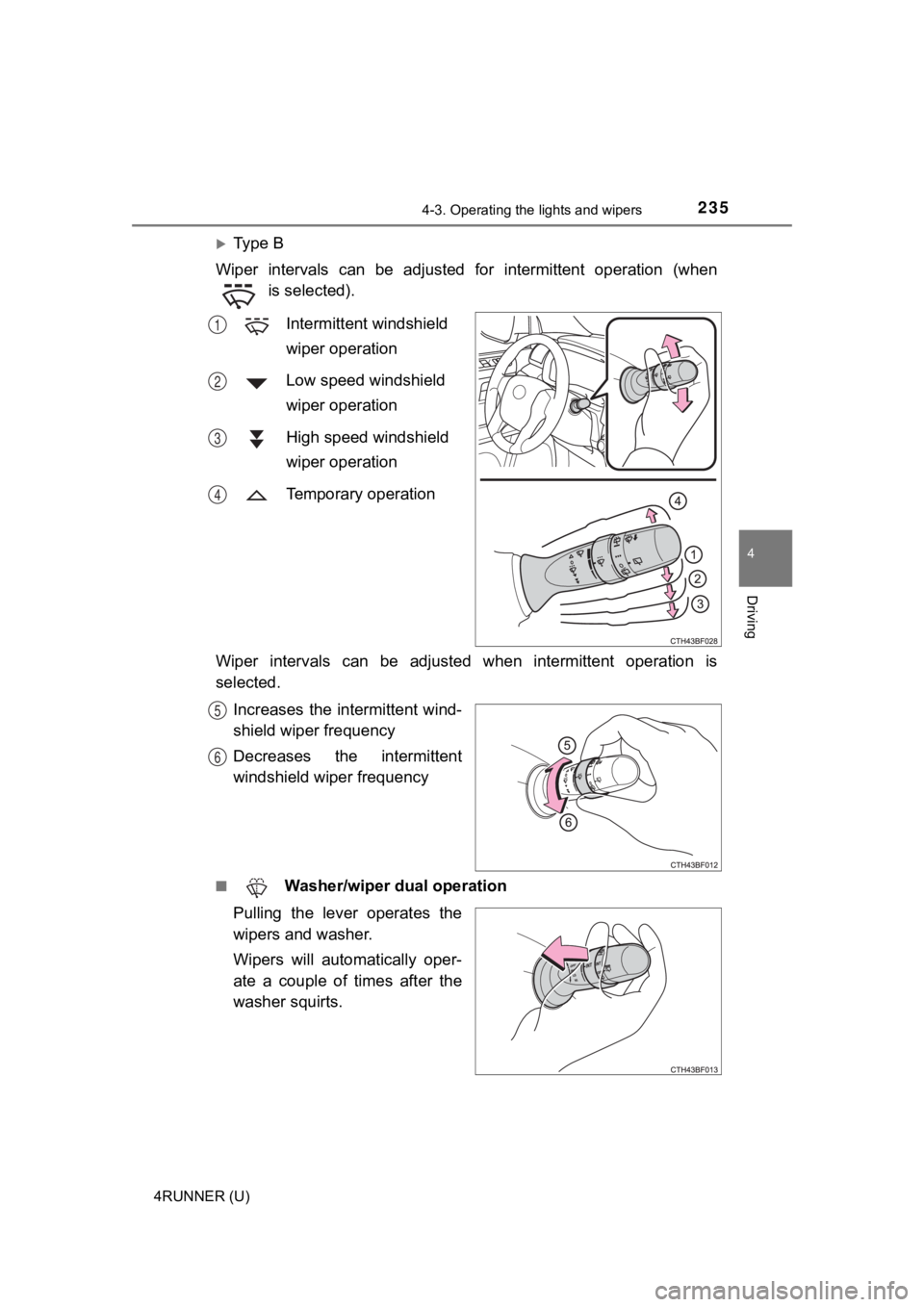
Intermittent windshield
wiper operation
Low speed windshield
wiper operation
High speed windshield
wiper operation
Temporary operation
Wiper intervals can be adjusted when intermittent operation is
selected. Increases the intermittent wind-
shield wiper frequency
Decreases the intermittent
windshield wiper frequency
■ Washer/wiper dual operation
Pulling the lever operates the
wipers and washer.
Wipers will automatically oper-
ate a couple of times after the
washer squirts.
1
2
3
4
5
6
Page 237 of 616
2374-3. Operating the lights and wipers
4
Driving
4RUNNER (U)
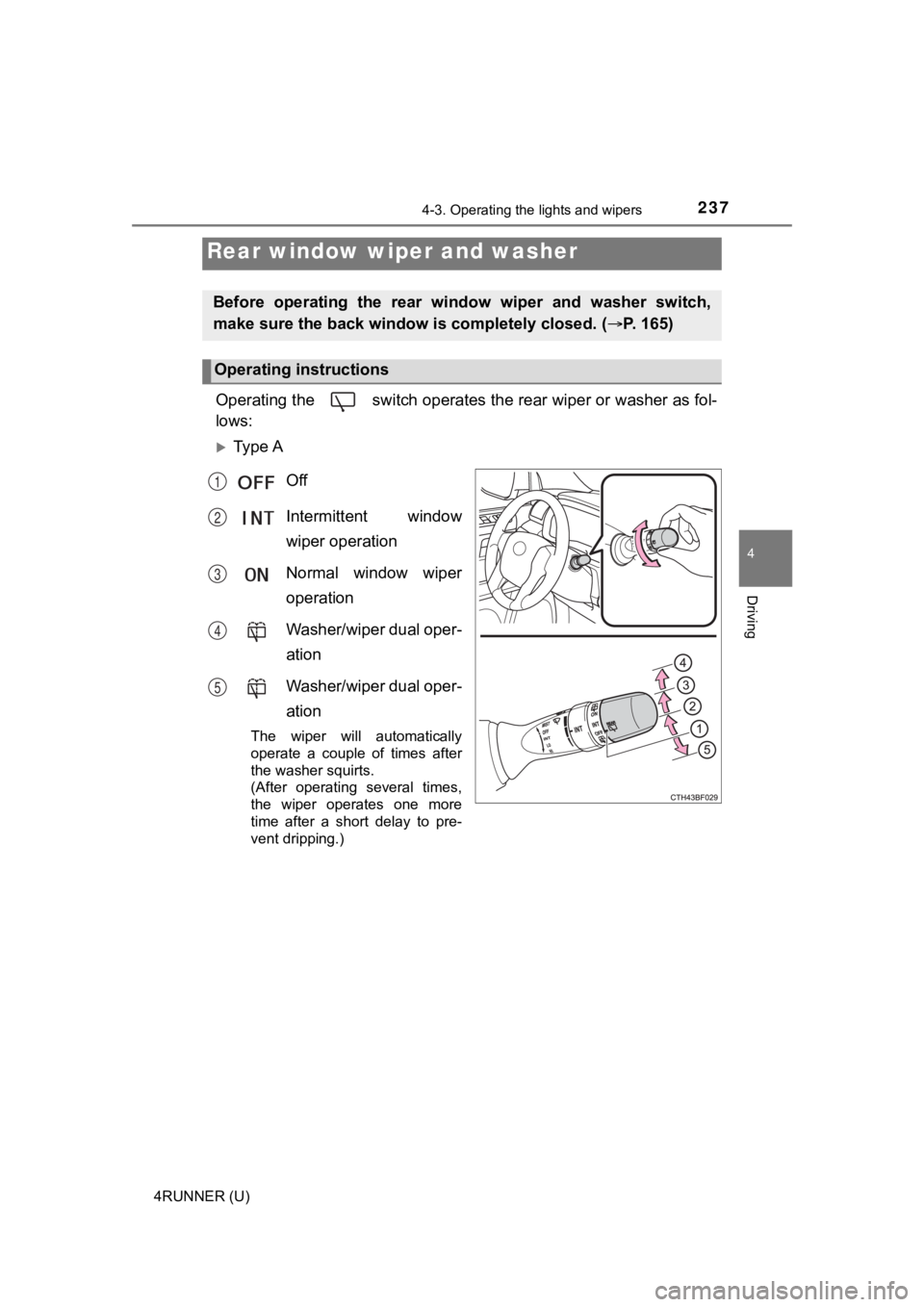
Operating the switch operates the rear wiper or washer as fol-
lows:
Ty p e A
Off
Intermittent window
wiper operation
Normal window wiper
operation
Washer/wiper dual oper-
ation
Washer/wiper dual oper-
ation
The wiper will automatically
operate a couple of times after
the washer squirts.
(After operating several times,
the wiper operates one more
time after a short delay to pre-
vent dripping.)
Rear window wiper and washer
Before operating the rear wi ndow wiper and washer switch,
make sure the back window is completely closed. ( P. 165)
Operating instructions
1
2
3
4
5
Page 238 of 616
2384-3. Operating the lights and wipers
4RUNNER (U)
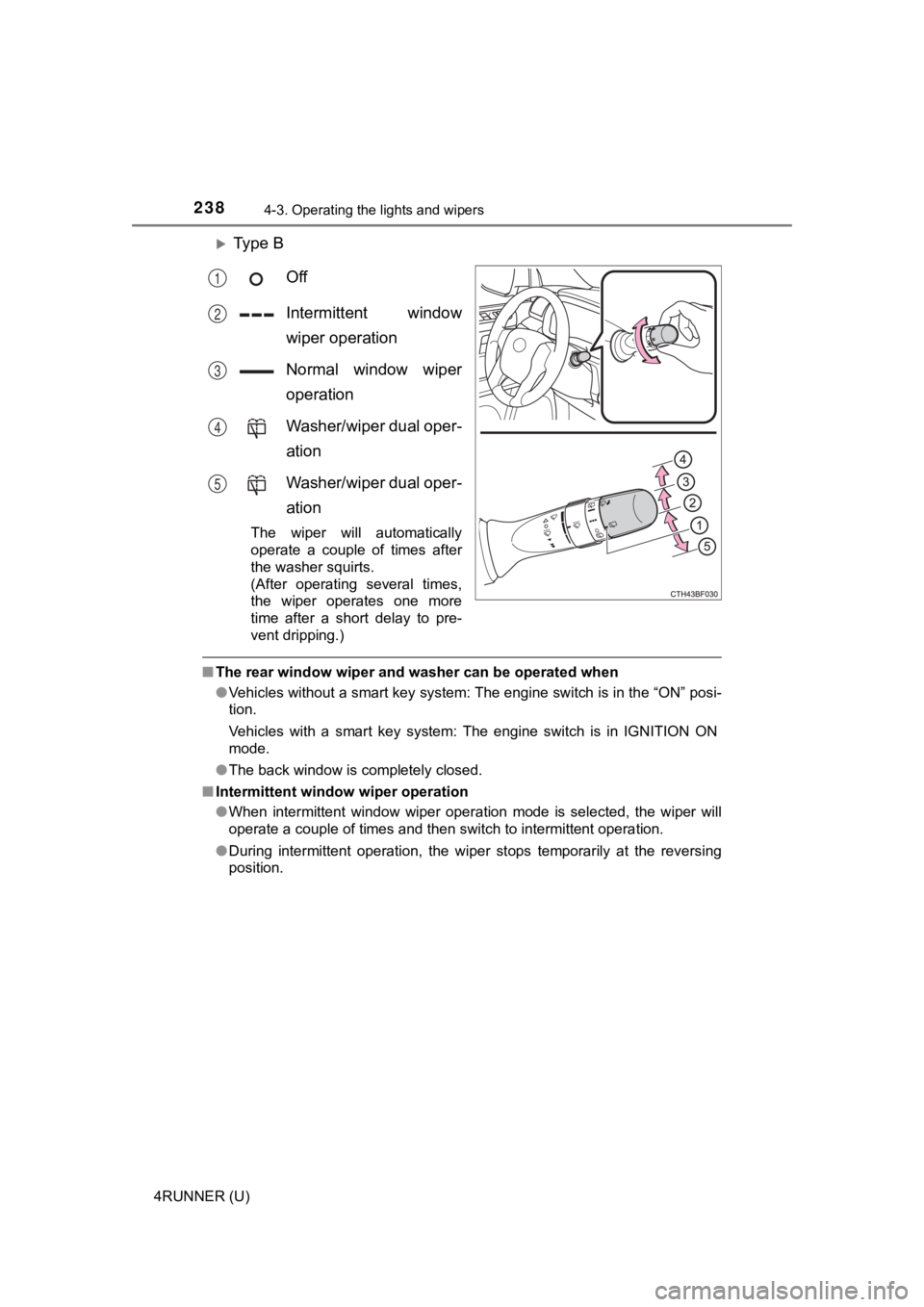
Ty p e BOff
Intermittent window
wiper operation
Normal window wiper
operation
Washer/wiper dual oper-
ation
Washer/wiper dual oper-
ation
The wiper will automatically
operate a couple of times after
the washer squirts.
(After operating several times,
the wiper operates one more
time after a short delay to pre-
vent dripping.)
■The rear window wiper and washer can be operated when
●Vehicles without a smart key system: The engine switch is in th e “ON” posi-
tion.
Vehicles with a smart key system: The engine switch is in IGNIT ION ON
mode.
● The back window is completely closed.
■ Intermittent window wiper operation
●When intermittent window wiper operation mode is selected, the wiper will
operate a couple of times and then switch to intermittent opera tion.
● During intermittent operation, the wiper stops temporarily at the reversing
position.
1
2
3
4
5
Page 241 of 616
2414-4. Refueling
4
Driving
4RUNNER (U)
WARNING
■When refueling the vehicle
Observe the following precautions while refueling the vehicle. Failure to do
so may result in death or serious injury.
● After exiting the vehicle and before opening the fuel door, touch an
unpainted metal surface to discharge any static electricity. It is important to
discharge static electricity before refueling because sparks resulting from
static electricity can cause fuel vapors to ignite while refueling.
● Always hold the grips on the fuel tank cap and turn it slowly t o remove it.
A whooshing sound may be heard when the fuel tank cap is loosened.
Wait until the sound cannot be heard before fully removing the cap. In hot
weather, pressurized fuel may spray out the filler neck and cau se injury.
● Do not allow anyone that has not discharged static electricity from their
body to come close to an open fuel tank.
● Do not inhale vaporized fuel.
Fuel contains substances that are harmful if inhaled.
● Do not smoke while refueling the vehicle.
Doing so may cause the fuel to ignite and cause a fire.
● Do not return to the vehicle or touch any person or object that is statically
charged.
This may cause static electricity to build up, resulting in a p ossible ignition
hazard.
■ When refueling
Observe the following precautions to prevent fuel overflowing from the fuel
tank:
● Securely insert the fuel nozzle into the fuel filler neck.
● Stop filling the tank after the fuel nozzle automatically click s off.
● Do not top off the fuel tank.
NOTICE
■Refueling
Do not spill fuel during refueling.
Doing so may damage the vehicle, such as causing the emission c ontrol
system to operate abnormally or damaging fuel system components or the
vehicle’s painted surface.
Page 243 of 616
243
4
Driving
4RUNNER (U)
4-5. Using the driving support systems
◆PCS (Pre-Collision System)
P. 2 5 0
◆LDA (Lane Departure Alert)
P. 2 6 0
◆AHB (Automatic High Beam)
P. 2 2 8
◆Dynamic radar cruise control
P. 2 6 8
Toyota Safety Sense P
The Toyota Safety Sense P consists of the following drive assis t
systems and contributes to a safe and comfortable driving expe-
rience:
Driving assist system
WARNING
■ Toyota Safety Sense P
The Toyota Safety Sense P is designed to operate under the assumption
that the driver will drive safely, and is designed to help reduce the impact to
the occupants and the vehicle in the case of a collision or assist the driver in
normal driving conditions.
As there is a limit to the degree of recognition accuracy and control perfor-
mance that this system can provide, do not overly rely on this system. The
driver is always responsible for paying attention to the vehicle's surround-
ings and driving safely.
Page 250 of 616
2504-5. Using the driving support systems
4RUNNER (U)
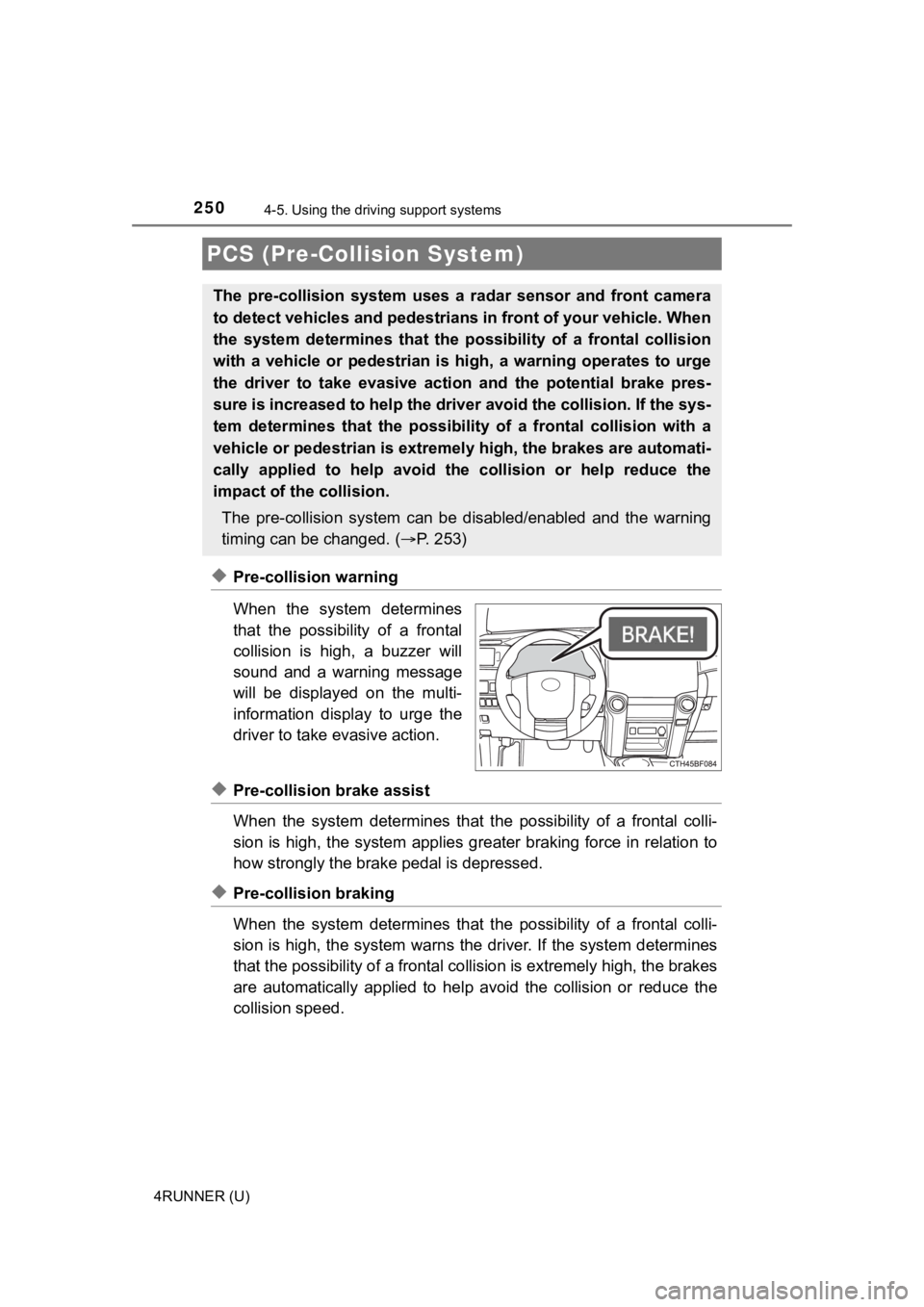
◆Pre-collision warning
When the system determines
that the possibility of a frontal
collision is high, a buzzer will
sound and a warning message
will be displayed on the multi-
information display to urge the
driver to take evasive action.
◆Pre-collision brake assist
When the system determines that the possibility of a frontal colli-
sion is high, the system applies greater braking force in relat ion to
how strongly the brake pedal is depressed.
◆Pre-collision braking
When the system determines that the possibility of a frontal colli-
sion is high, the system warns the driver. If the system determ ines
that the possibility of a frontal collision is extremely high, the brakes
are automatically applied to hel p avoid the collision or reduce the
collision speed.
PCS (Pre-Collision System)
The pre-collision system uses a radar sensor and front camera
to detect vehicles and pedestrians in front of your vehicle. Wh en
the system determines that the possibility of a frontal collisi on
with a vehicle or pedestrian i s high, a warning operates to urg e
the driver to take evasive action and the potential brake pres-
sure is increased to help the driver avoid the collision. If the sys-
tem determines that the possibi lity of a frontal collision with a
vehicle or pedestrian is extremely high, the brakes are automat i-
cally applied to hel p avoid the collision or help reduce the
impact of the collision.
The pre-collision system can b e disabled/enabled and the warnin g
timing can be changed. ( P. 2 5 3 )
Page 253 of 616
2534-5. Using the driving support systems
4
Driving
4RUNNER (U)■
Enabling/disabling th
e pre-collision system
The pre-collision sy stem can be enabled/disabled on ( P. 9 8 )
of the multi-information display.
The system is automatically enabled each time the engine switch is
turned to the “ON” position (vehicles without a smart key syste m) or the
engine switch is turned to IGNITION ON mode (vehicles with a sm art
key system).
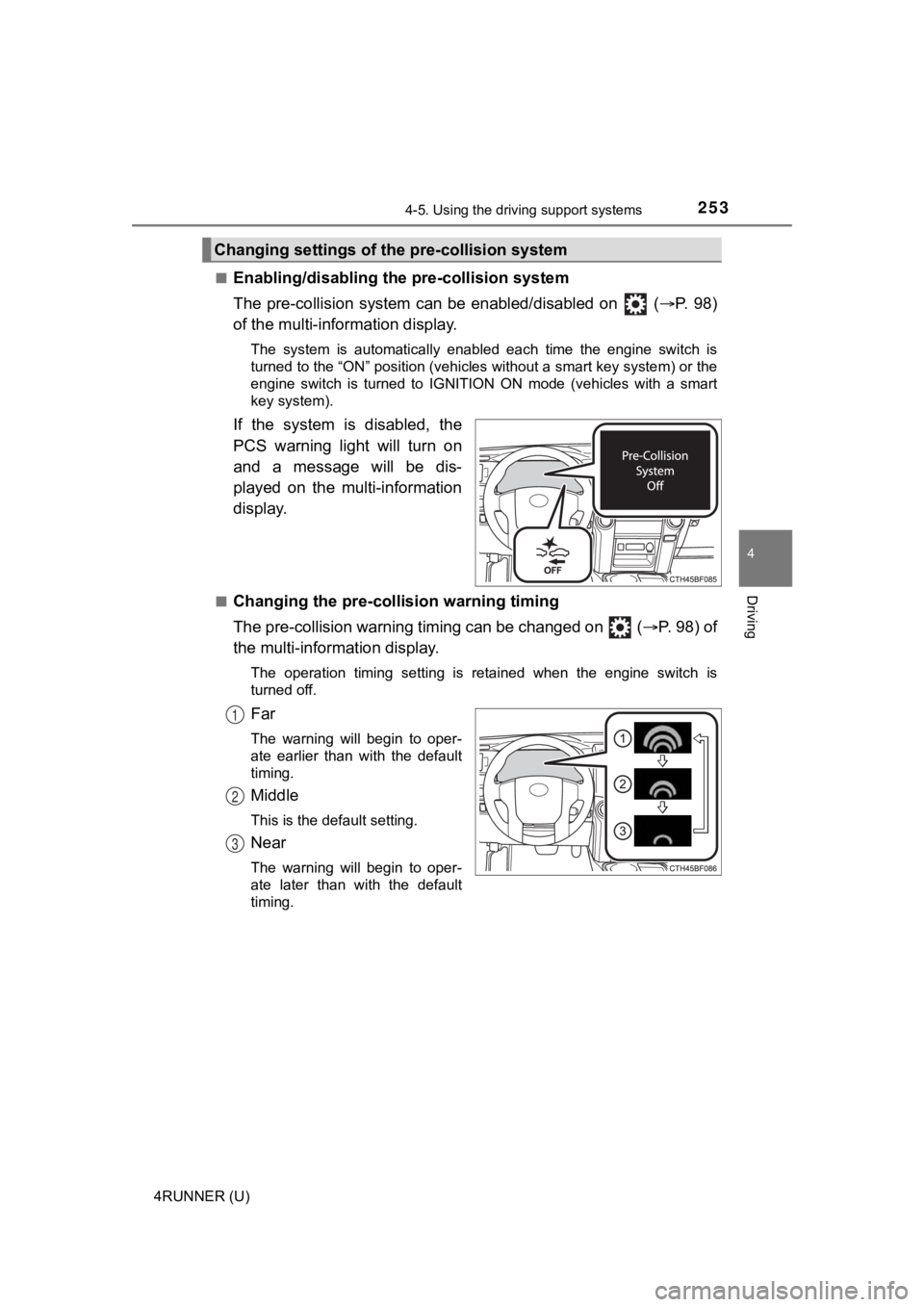
If the system is disabled, the
PCS warning light will turn on
and a message will be dis-
played on the multi-information
display.
■Changing the pre-colli sion warning timing
The pre-collision warning timing can be changed on ( P. 98) of
the multi-inform ation display.
The operation timing setting is retained when the engine switch is
turned off.
Far
The warning will begin to oper-
ate earlier than with the default
timing.
Middle
This is the default setting.
Near
The warning will begin to oper-
ate later than with the default
timing.
Changing settings of the pre-collision system
1
2
3
Page 256 of 616
2564-5. Using the driving support systems
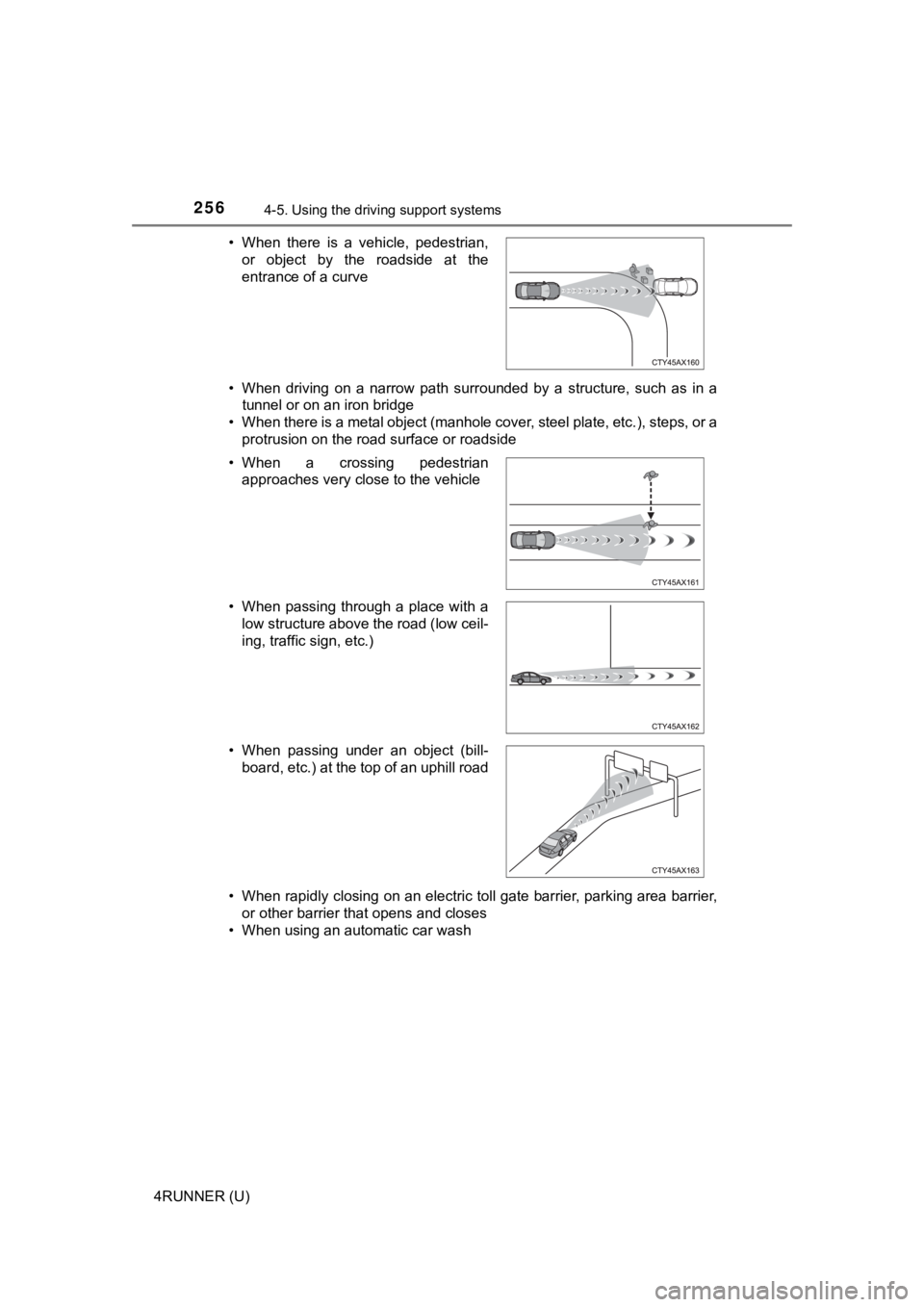
4RUNNER (U)• When driving on a narrow path surrounded by a structure, such as in a
tunnel or on an iron bridge
• When there is a metal object (manhole cover, steel plate, etc. ), steps, or a
protrusion on the road surface or roadside
• When rapidly closing on an electric toll gate barrier, parking area barrier, or other barrier that opens and closes
• When using an automatic car wash • When there is a vehicle, pedestrian,
or object by the roadside at the
entrance of a curve
• When a crossing pedestrian approaches very close to the vehicle
• When passing through a place with a low structure above the road (low ceil-
ing, traffic sign, etc.)
• When passing under an object (bill- board, etc.) at the top of an uphill road
Page 265 of 616
2654-5. Using the driving support systems
4
Driving
4RUNNER (U)
■Operation conditions of each function
●Lane departure alert function
This function operates when all of the following conditions are met.
• LDA is turned on.
• Vehicle speed is approximately 32 mph (50 km/h) or more.
• System recognizes white (yellow) lines.
• Width of traffic lane is approximately 9.8 ft. (3 m) or more.
• Turn signal lever is not operated.
• Vehicle is driven on a straight road or around a gentle curve with a radius
of more than approximately 492 ft. (150 m).
• No system malfunctions are detected. ( P. 267)
● Vehicle sway warning function
This function operates when all of the following conditions are met.
• Setting for “Sway Warning” in of the multi-information display is set to “On”. ( P. 98)
• Vehicle speed is approximately 32 mph (50 km/h) or more.
• Width of traffic lane is approximately 9.8 ft. (3 m) or more.
• No system malfunctions are detected. ( P. 267)
■ Temporary cancellation of functions
When the operation conditions are no longer met, a function may be tempo-
rarily canceled. However, when the operation conditions are met again, oper-
ation of the function is automatically restored. ( P. 265)
■ Lane departure alert function
The warning buzzer may be difficult to hear due to external noi se, audio play-
back, etc.
■ Vehicle sway warning function
Depending on the vehicle and road conditions, the warning may n ot operate.
■ White (yellow) lines are only on one side of road
The LDA system will not operate for the side on which white (yellow) lines
could not be recognized.
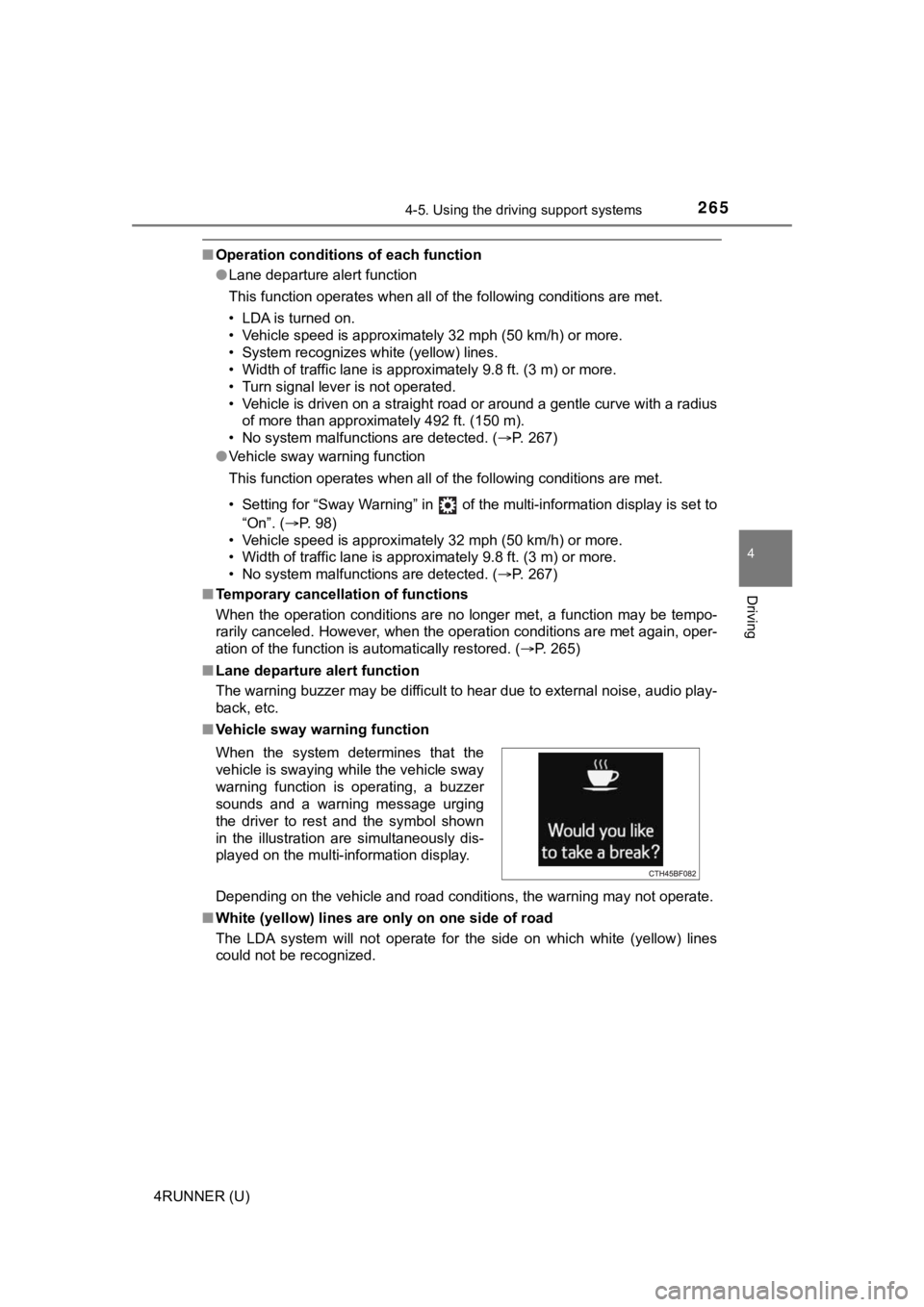
When the system determines that the
vehicle is swaying while the vehicle sway
warning function is operating, a buzzer
sounds and a warning message urging
the driver to rest and the symbol shown
in the illustration are simultaneously dis-
played on the multi-information display.
Page 272 of 616
2724-5. Using the driving support systems
4RUNNER (U)
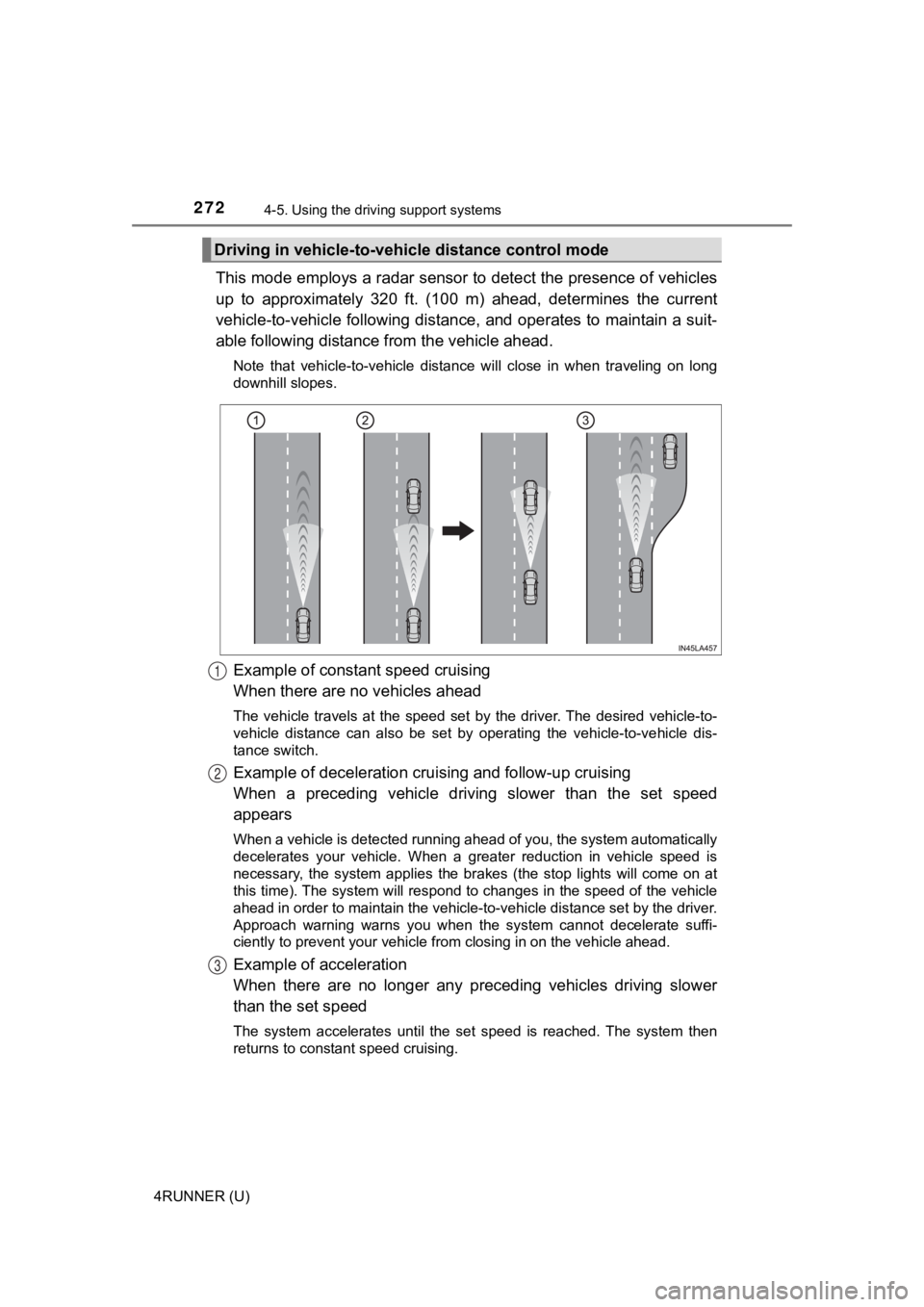
This mode employs a radar sensor to detect the presence of vehi cles
up to approximately 320 ft. (100 m) ahead, determines the curre nt
vehicle-to-vehicle following distance, and operates to maintain a suit-
able following distance from the vehicle ahead.
Note that vehicle-to-vehicle distance will close in when traveling on long
downhill slopes.
Example of constant speed cruising
When there are no vehicles ahead
The vehicle travels at the speed set by the driver. The desired vehicle-to-
vehicle distance can also be set by operating the vehicle-to-ve hicle dis-
tance switch.
Example of deceleration crui sing and follow-up cruising
When a preceding vehicle driving slower than the set speed
appears
When a vehicle is detected running ahead of you, the system automatically
decelerates your vehicle. When a greater reduction in vehicle s peed is
necessary, the system applies the brakes (the stop lights will come on at
this time). The system will respond to changes in the speed of the vehicle
ahead in order to maintain the vehicle-to-vehicle distance set by the driver.
Approach warning warns you when the system cannot decelerate su ffi-
ciently to prevent your vehicle fr om closing in on the vehicle ahead.
Example of acceleration
When there are no longer any preceding vehicles driving slower
than the set speed
The system accelerates until the set speed is reached. The syst em then
returns to constant speed cruising.
Driving in vehicle-to-vehi cle distance control mode
1
2
3