wheel TOYOTA 4RUNNER 2022 Service Manual
[x] Cancel search | Manufacturer: TOYOTA, Model Year: 2022, Model line: 4RUNNER, Model: TOYOTA 4RUNNER 2022Pages: 616, PDF Size: 12.01 MB
Page 261 of 616
2614-5. Using the driving support systems
4
Driving
4RUNNER (U)
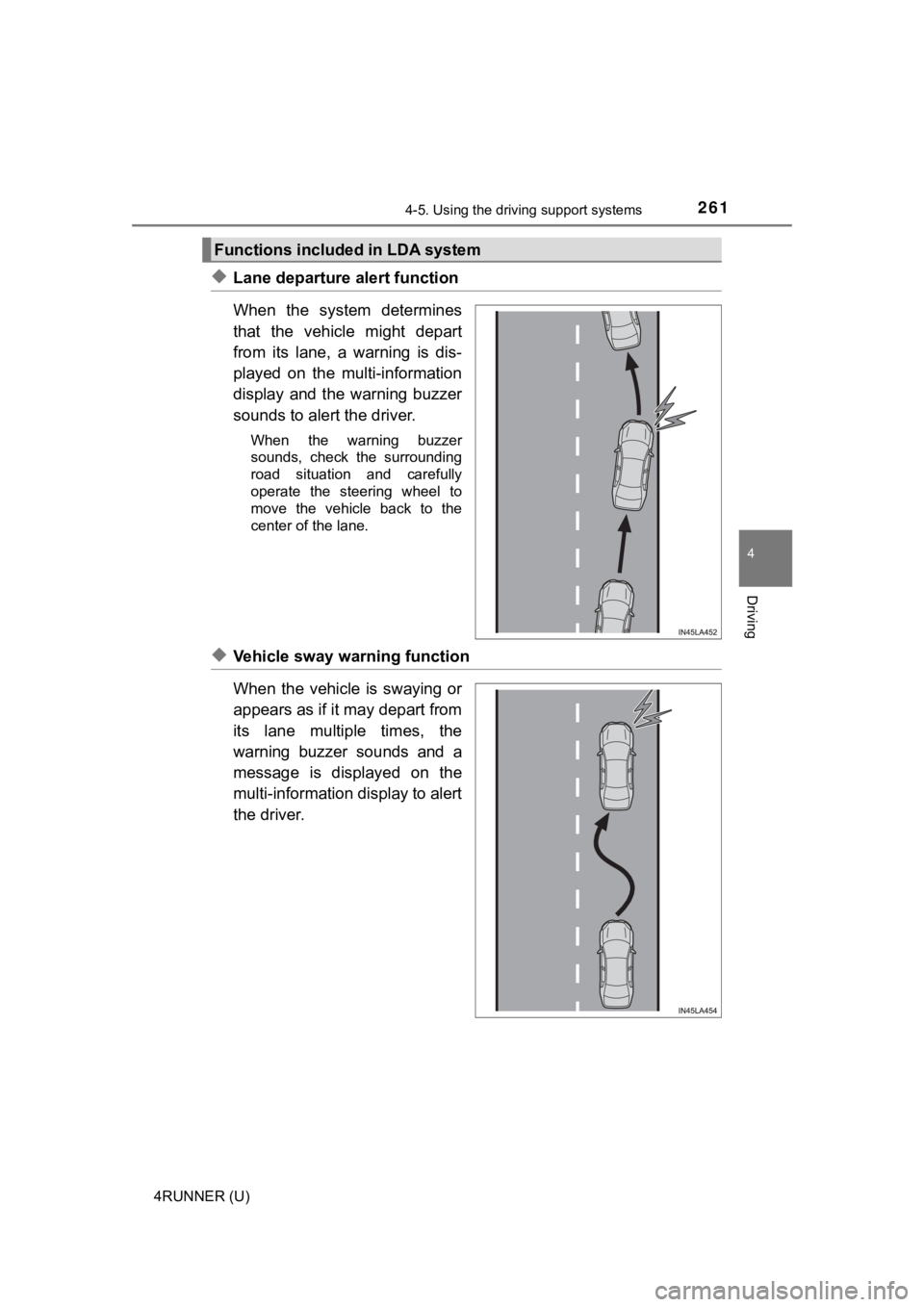
◆Lane departure alert function
When the system determines
that the vehicle might depart
from its lane, a warning is dis-
played on the multi-information
display and the warning buzzer
sounds to alert the driver.
When the warning buzzer
sounds, check the surrounding
road situation and carefully
operate the steering wheel to
move the vehicle back to the
center of the lane.
◆Vehicle sway warning function
When the vehicle is swaying or
appears as if it may depart from
its lane multiple times, the
warning buzzer sounds and a
message is displayed on the
multi-information display to alert
the driver.
Functions included in LDA system
Page 262 of 616
2624-5. Using the driving support systems
4RUNNER (U)
WARNING
■Before using LDA system
Do not rely solely upon the LDA system. The LDA system does not auto-
matically drive the vehicle or reduce the amount of attention that must be
paid to the area in front of the vehicle. The driver must always assume full
responsibility for driving safely by paying careful attention to the surround-
ing conditions and operating the steering wheel to correct the path of the
vehicle. Also, the driver must take adequate breaks when fatigu ed, such as
from driving for a long period of time.
Failure to perform appropriate driving operations and pay careful attention
may lead to an accident, resulting in death or serious injury.
■ To avoid operating LDA system by mistake
When not using the LDA system, use the LDA switch to turn the system off.
■ Situations unsuitable for LDA system
Do not use the LDA system in the following situations.
The system may not operate properly and lead to an accident, re sulting in
death or serious injury.
● A spare tire, tire chains, etc. are equipped.
● Objects or patterns that could be mistaken for white (yellow) l ines are
present on the side of the road (guardrails, curbs, reflective poles, etc.).
● Vehicle is driven on a snow-covered road.
● White (yellow) lines are difficult to see due to rain, snow, fog, dust, etc.
● Asphalt repair marks, white (yellow) line marks, etc. are prese nt due to
road repair.
● Vehicle is driven in a temporary lane or restricted lane due to construction
work.
● Vehicle is driven in a construction zone.
■ Preventing LDA system malfunctions and operations performed by
mistake
● Do not modify the headlights or place stickers, etc. on the sur face of the
lights.
● Do not modify the suspension etc. If the suspension etc. needs to be
replaced, contact your Toyota dealer.
● Do not install or place anything on the hood or grille. Also, d o not install a
grille guard (bull bars, kangaroo bar, etc.).
● If your windshield needs repairs, contact your Toyota dealer.
Page 280 of 616
2804-5. Using the driving support systems
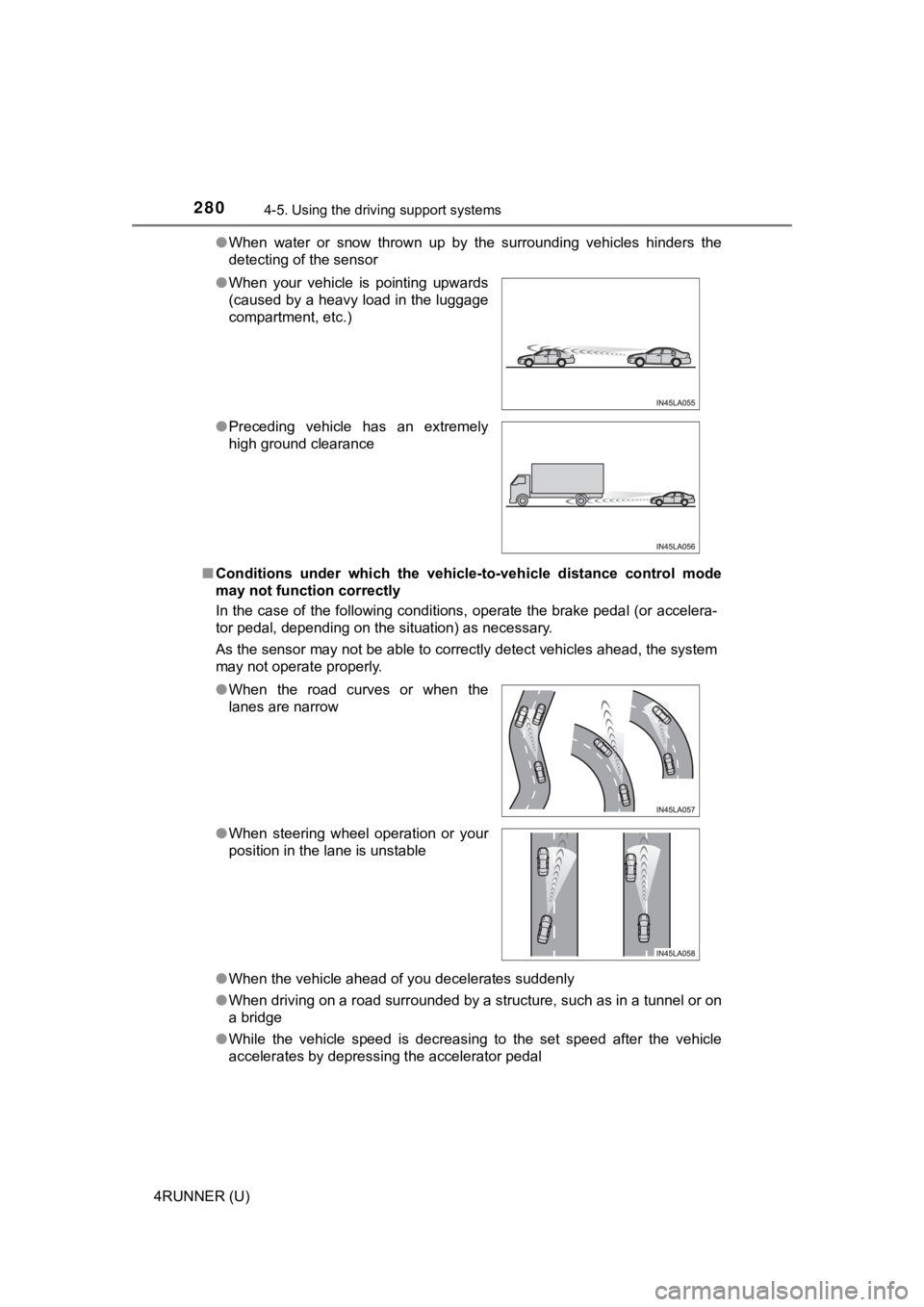
4RUNNER (U)●
When water or snow thrown up by the surrounding vehicles hinders the
detecting of the sensor
■ Conditions under which the vehic le-to-vehicle distance control mode
may not function correctly
In the case of the following conditions, operate the brake peda l (or accelera-
tor pedal, depending on the situation) as necessary.
As the sensor may not be able to correctly detect vehicles ahead, the system
may not operate properly.
● When the vehicle ahead of you decelerates suddenly
● When driving on a road surrounded by a structure, such as in a tunnel or on
a bridge
● While the vehicle speed is decreasing to the set speed after th e vehicle
accelerates by depressing the accelerator pedal
●
When your vehicle is pointing upwards
(caused by a heavy load in the luggage
compartment, etc.)
● Preceding vehicle has an extremely
high ground clearance
●When the road curves or when the
lanes are narrow
● When steering wheel operation or your
position in the lane is unstable
Page 305 of 616
3054-5. Using the driving support systems
4
Driving
4RUNNER (U)
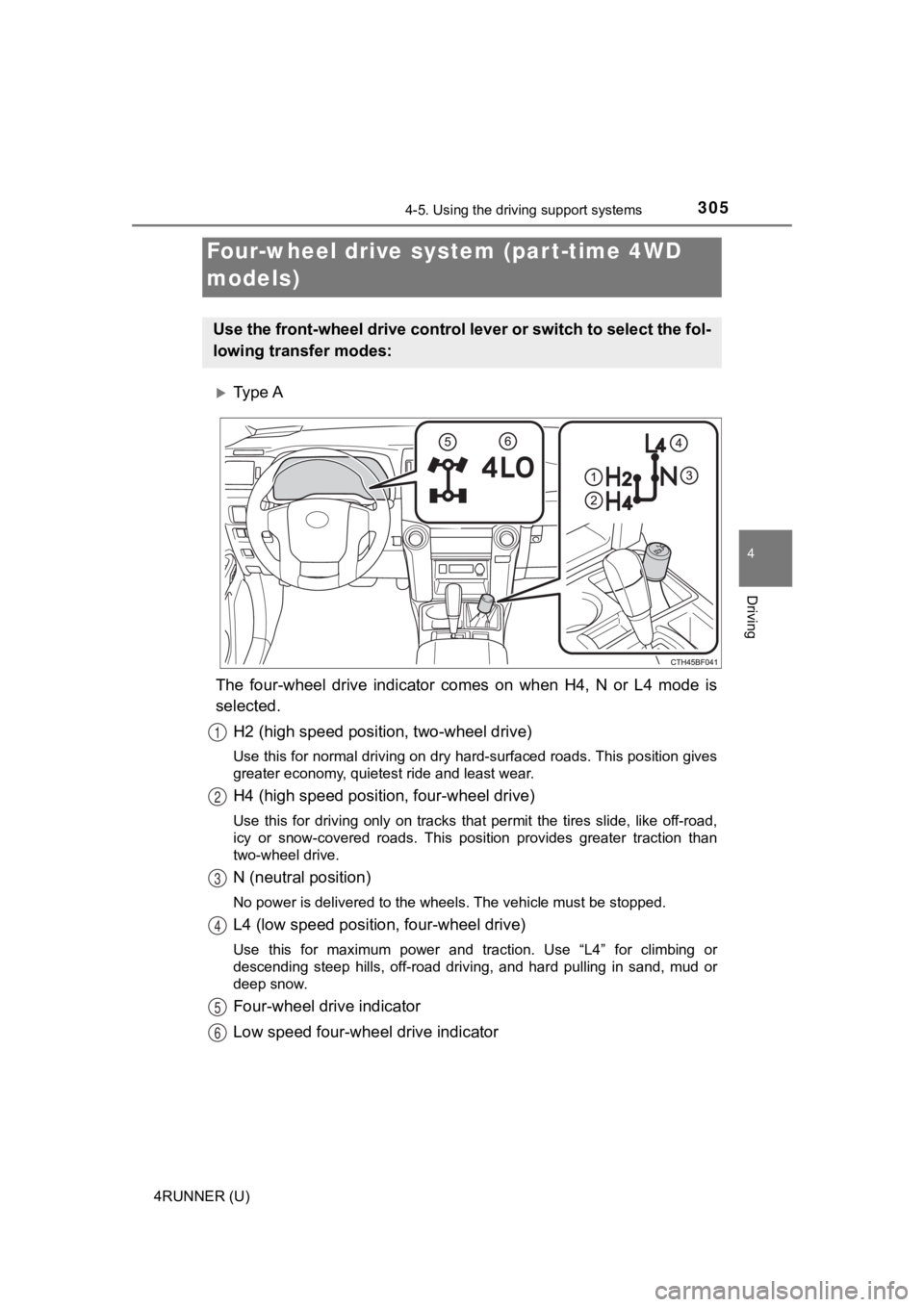
Ty p e A
The four-wheel drive indicator comes on when H4, N or L4 mode i s
selected.
H2 (high speed position, two-wheel drive)
Use this for normal driving on dry hard-surfaced roads. This po sition gives
greater economy, quietest ride and least wear.
H4 (high speed positi on, four-wheel drive)
Use this for driving only on tracks that permit the tires slide , like off-road,
icy or snow-covered roads. This position provides greater tract ion than
two-wheel drive.
N (neutral position)
No power is delivered to the wheels. The vehicle must be stoppe d.
L4 (low speed position, four-wheel drive)
Use this for maximum power and traction. Use “L4” for climbing or
descending steep hills, off-road driving, and hard pulling in s and, mud or
deep snow.
Four-wheel drive indicator
Low speed four-whe el drive indicator
Four-wheel drive system (par t-time 4WD
models)
Use the front-wheel drive control lever or switch to select the fol-
lowing transfer modes:
1
2
3
4
5
6
Page 306 of 616
3064-5. Using the driving support systems
4RUNNER (U)
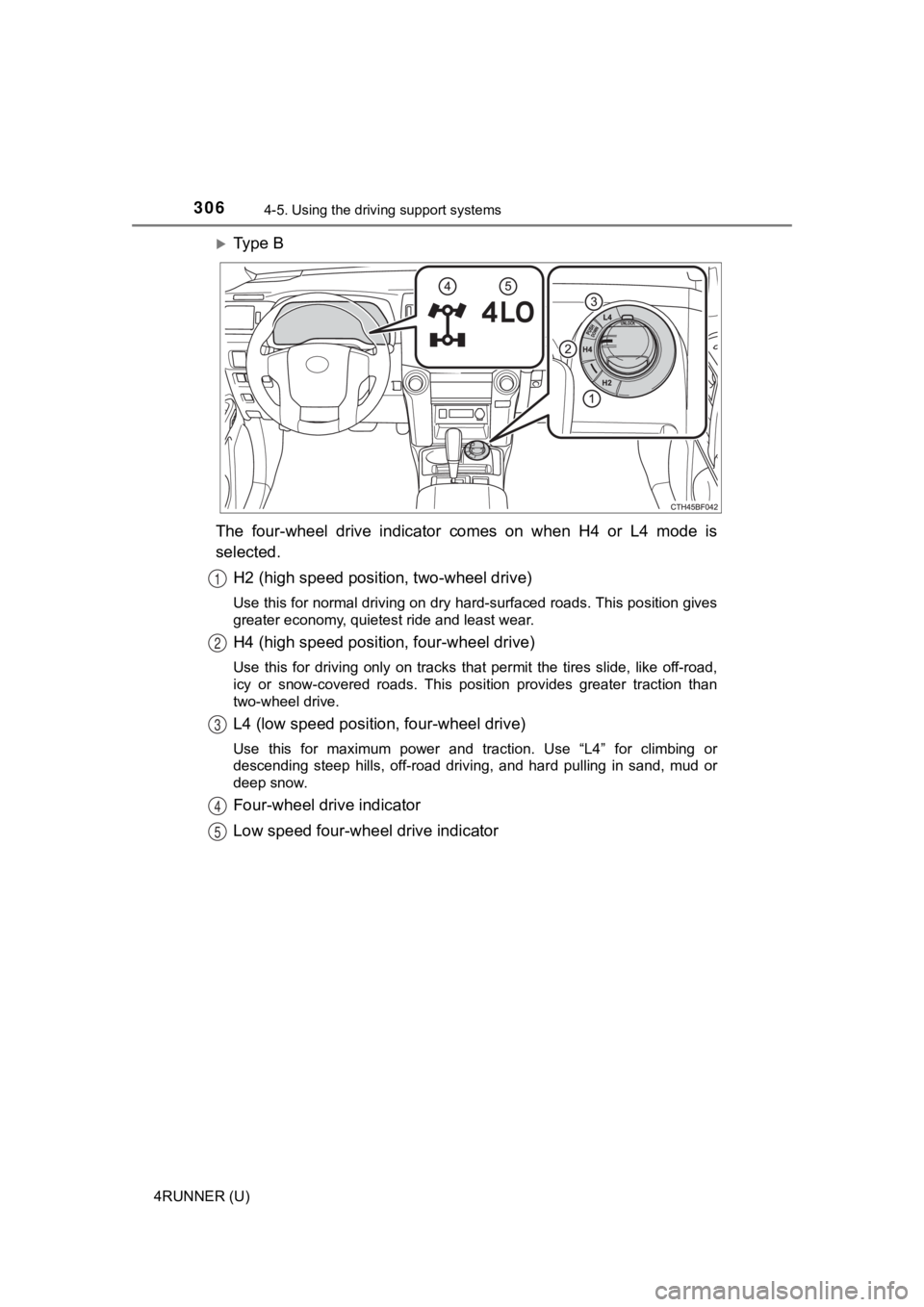
Ty p e B
The four-wheel drive indicator comes on when H4 or L4 mode is
selected. H2 (high speed position, two-wheel drive)
Use this for normal driving on dry hard-surfaced roads. This po sition gives
greater economy, quietest ride and least wear.
H4 (high speed positi on, four-wheel drive)
Use this for driving only on tracks that permit the tires slide , like off-road,
icy or snow-covered roads. This position provides greater tract ion than
two-wheel drive.
L4 (low speed position, four-wheel drive)
Use this for maximum power and traction. Use “L4” for climbing or
descending steep hills, off-road driving, and hard pulling in s and, mud or
deep snow.
Four-wheel drive indicator
Low speed four-whe el drive indicator
1
2
3
4
5
Page 307 of 616
3074-5. Using the driving support systems
4
Driving
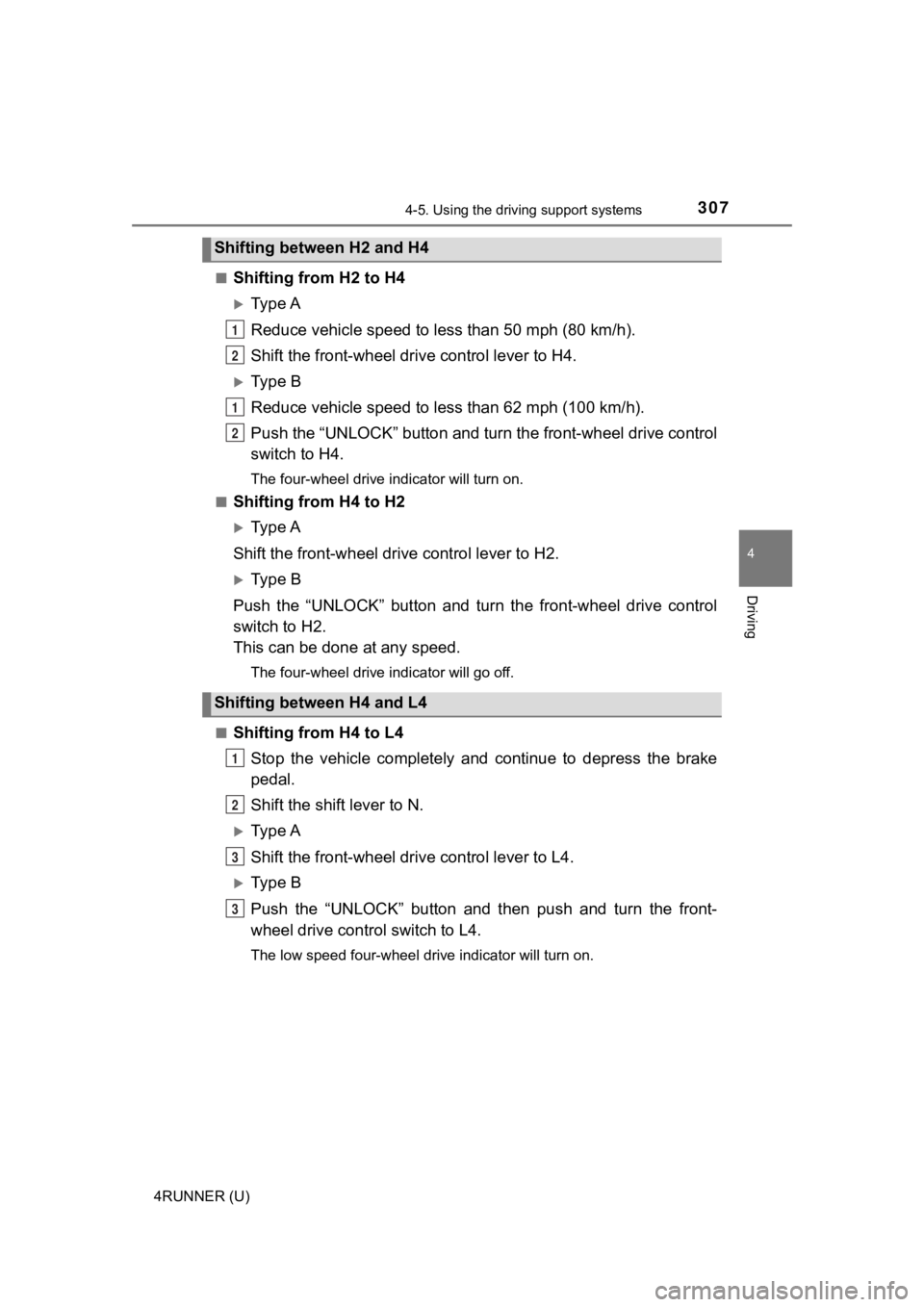
4RUNNER (U)■
Shifting from H2 to H4
Ty p e A
Reduce vehicle sp
eed to less than 50 mph (80 km/h).
Shift the front-wheel drive control lever to H4.
Ty p e B
Reduce vehicle speed to less than 62 mph (100 km/h).
Push the “UNLOCK” button and turn the front-wheel drive control
switch to H4.
The four-wheel drive indicator will turn on.
■
Shifting from H4 to H2
Ty p e A
Shift the front-wheel drive control lever to H2.
Ty p e B
Push the “UNLOCK” button and turn the front-wheel drive control
switch to H2.
This can be done at any speed.
The four-wheel drive indicator will go off.
■
Shifting from H4 to L4 Stop the vehicle completely and continue to depress the brake
pedal.
Shift the shift lever to N.
Ty p e A
Shift the front-wheel dri ve control lever to L4.
Ty p e B
Push the “UNLOCK” button and then push and turn the front-
wheel drive control switch to L4.
The low speed four-wheel drive indicator will turn on.
Shifting between H2 and H4
Shifting between H4 and L4
1
2
1
2
1
2
3
3
Page 308 of 616

3084-5. Using the driving support systems
4RUNNER (U)■
Shifting from L4 to H4
Stop the vehicle completely and continue to depress the brake
pedal.
Shift the shift lever to N.
Ty p e A
Shift the front-wheel drive control lever to H4.
Ty p e B
Push the “UNLOCK” button and turn the front-wheel drive control
switch to H4.
The low speed four-wheel drive indicator will go off.
■When the front-wheel drive control lever or switch is shifted t o L4
VSC and TRAC are automatically turned off.
■ If the four-wheel drive indicator flashes
The transfer mode may not successfully change. Drive straight ahead while
accelerating or decelerating, or drive in reverse.
■ If the low speed four-wheel drive indicator continues to flash
The transfer mode may not successfully change. Operate the four-wheel
drive control switch again.
■ If the low speed four-wheel drive indicator continues to flash and a
buzzer sounds
The shift lever is not in N and/or the vehicle is moving. Stop the vehicle com-
pletely, shift the shift lever to N and make sure that the indi cator stops flash-
ing.
■ If the four-wheel drive or low speed four-wheel drive indicator flashes
rapidly
There may be a malfunction in the four-wheel drive system. Have the vehicle
inspected by your Toyota dealer immediately.
■ Four-wheel drive usage frequency
You should drive in four-wheel drive for at least 10 miles (16 km) each month.
This will assure that the front drive components are lubricated .
WARNING
■Shifting the front-wheel drive co ntrol lever or switch from H2 to H4
while driving
Never operate the front-wheel drive control lever or switch if the wheels are
slipping.
Stop the slipping or spinning before shifting.
1
2
3
3
Page 309 of 616
3094-5. Using the driving support systems
4
Driving
4RUNNER (U)
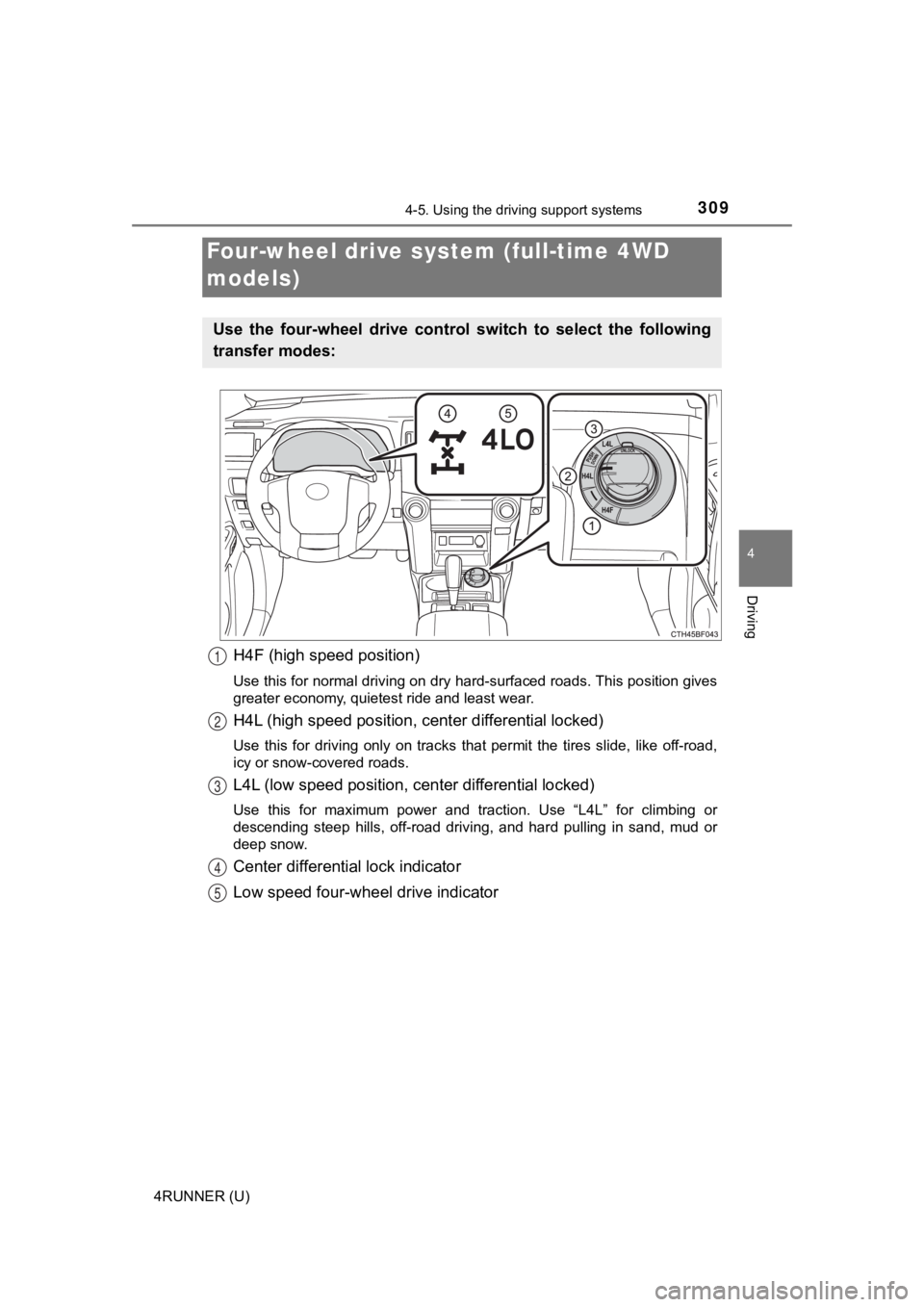
H4F (high speed position)
Use this for normal driving on dry hard-surfaced roads. This position gives
greater economy, quietest ride and least wear.
H4L (high speed position, cent er differential locked)
Use this for driving only on tracks that permit the tires slide , like off-road,
icy or snow-covered roads.
L4L (low speed position, c enter differential locked)
Use this for maximum power and traction. Use “L4L” for climbing or
descending steep hills, off-road driving, and hard pulling in s and, mud or
deep snow.
Center differential lock indicator
Low speed four-whe el drive indicator
Four-wheel drive system (full-time 4WD
models)
Use the four-wheel drive contro l switch to select the following
transfer modes:
1
2
3
4
5
Page 310 of 616
3104-5. Using the driving support systems
4RUNNER (U)
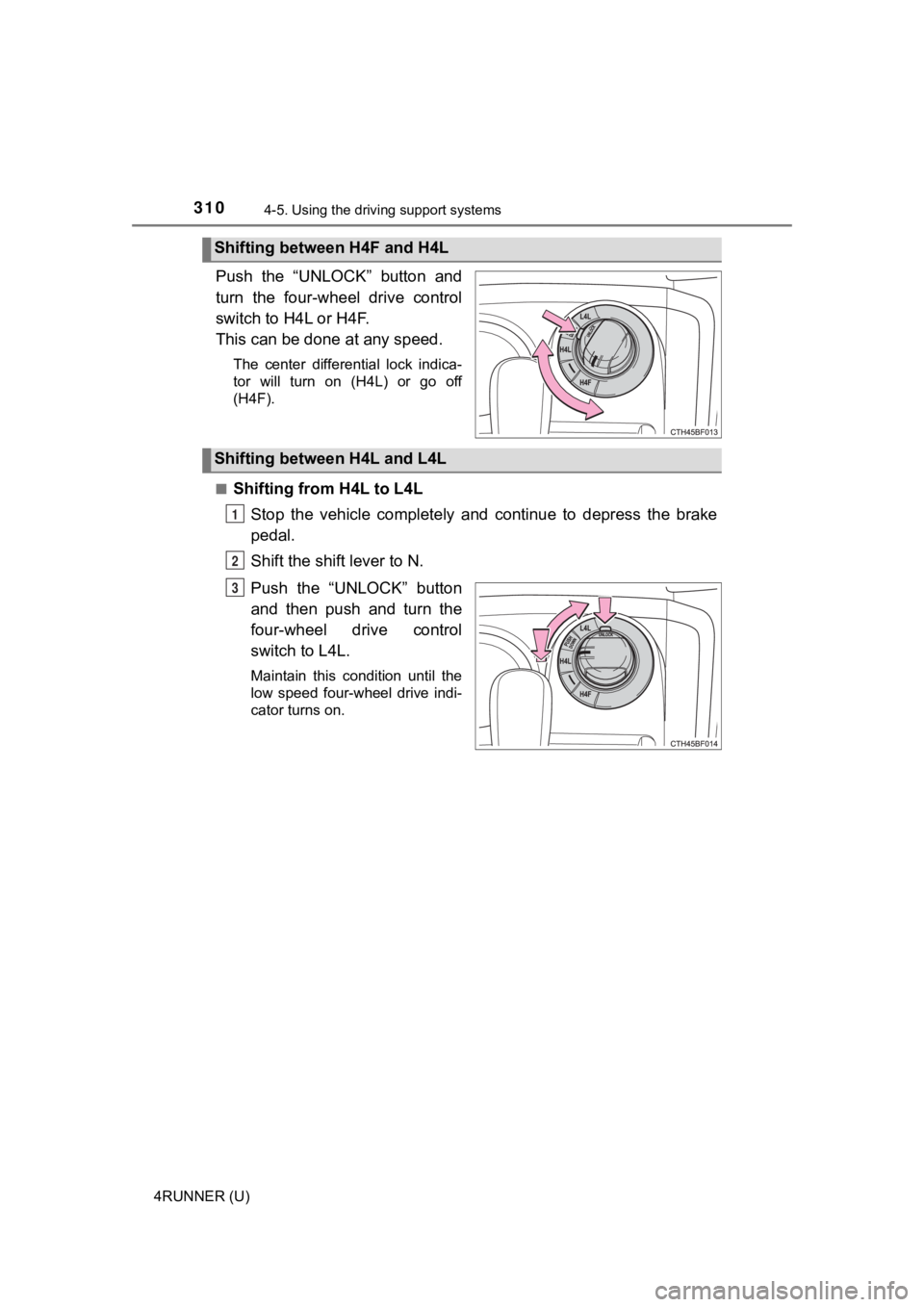
Push the “UNLOCK” button and
turn the four-wheel drive control
switch to H4L or H4F.
This can be done at any speed.
The center differential lock indica-
tor will turn on (H4L) or go off
(H4F).
■
Shifting from H4L to L4L Stop the vehicle completely and continue to depress the brake
pedal.
Shift the shift lever to N.
Push the “UNLOCK” button
and then push and turn the
four-wheel drive control
switch to L4L.
Maintain this condition until the
low speed four-wheel drive indi-
cator turns on.
Shifting between H4F and H4L
Shifting between H4L and L4L
1
2
3
Page 311 of 616
3114-5. Using the driving support systems
4
Driving
4RUNNER (U)■
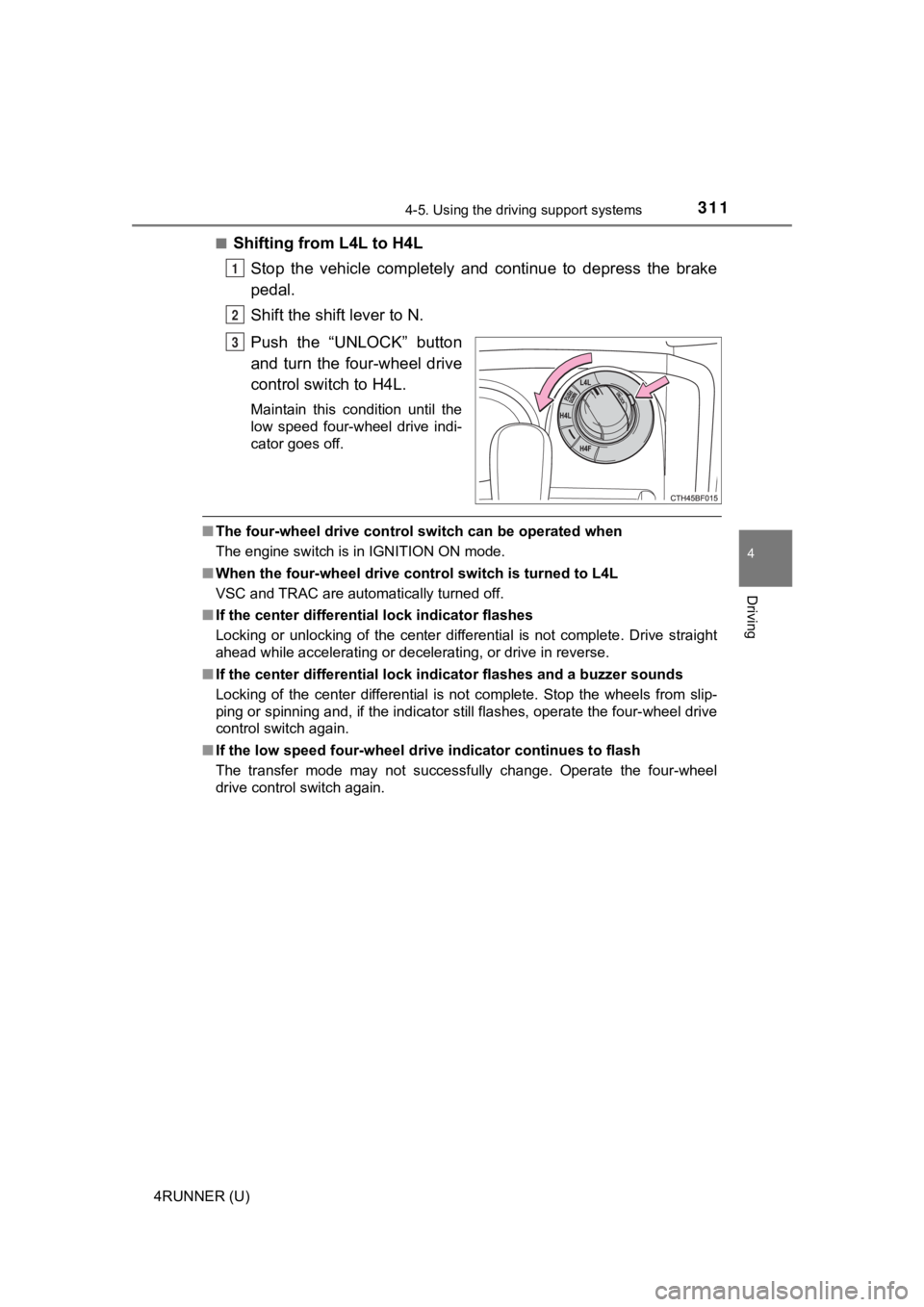
Shifting from L4L to H4L
Stop the vehicle completely and continue to depress the brake
pedal.
Shift the shift lever to N.
Push the “UNLOCK” button
and turn the four-wheel drive
control switch to H4L.
Maintain this condition until the
low speed four-wheel drive indi-
cator goes off.
■The four-wheel drive control sw itch can be operated when
The engine switch is in IGNITION ON mode.
■ When the four-wheel d rive control switch is turned to L4L
VSC and TRAC are automatically turned off.
■ If the center differential lock indicator flashes
Locking or unlocking of the center differential is not complete . Drive straight
ahead while accelerating or decelerating, or drive in reverse.
■ If the center differential lock indicator flashes and a buzzer sounds
Locking of the center differential is not complete. Stop the wh eels from slip-
ping or spinning and, if the indicator still flashes, operate the four-wheel drive
control switch again.
■ If the low speed four-wheel dri ve indicator continues to flash
The transfer mode may not successfully change. Operate the four -wheel
drive control switch again.
1
2
3