change time TOYOTA 86 2022 User Guide
[x] Cancel search | Manufacturer: TOYOTA, Model Year: 2022, Model line: 86, Model: TOYOTA 86 2022Pages: 449, PDF Size: 8.5 MB
Page 147 of 449
1474-2. Driving procedures
4
Driving
Automatic transmission
1 Stop the vehicle completely.
2 Set the parking brake
( P.156), and shift the shift
lever to P.
Check the parking brake indicator
is illuminated.
3 Press the engine switch.
The engine will stop, and the meter
display will be extinguished.
4Release the brake pedal and
check that “ACCESSORY” or
“IGNITION ON” is not shown
on the meters.
Manual transmission
1 Stop the vehicle completely.
2 Set the parking brake.
( P.156)
Check the parking brake indicator
is illuminated.
3Shift the shift lever to N.
( P.153)
4 Press the engine switch.
The engine will stop, and the meter
display will be extinguished.
5Release the brake pedal and
check that “ACCESSORY” or
“IGNITION ON” is not shown
on the meters.
Modes can be changed by NOTICE
■Symptoms indicating a mal-
function with the engine
switch
If the engine switch seems to be
operating somewh at differently
than usual, such as the switch
sticking slightly, there may be a
malfunction. Contact your Toyota
dealer immediately.
Stopping the engine
WARNING
■Stopping the engine in an
emergency
If you want to stop the engine in
an emergency while driving the
vehicle, press and hold the engine
switch for more than 2 seconds,
or press it briefly 3 times or more
in succession. ( P.338)
However, do not touch the engine
switch while driving except in an
emergency. Turning the engine off
while driving will not cause loss of
steering or braking control, but the
power assist to these systems will
be lost. This will make it more dif-
ficult to steer a nd brake, so you
should pull over and stop the
vehicle as soon as it is safe to do
so.
●If the engine switch is operated
while the vehicle is running, a
warning message will be shown
on the multi-information display
and a buzzer sounds.
●Vehicles with an automatic
transmission: To restart the
engine after performing an
emergency shutdown, shift the
shift lever to N and then press
the engine switch.
●Vehicles with a manual trans-
mission: To restart the engine
after performing an emergency
shutdown, depress the clutch
pedal and then press the engine
switch.
Changing engine switch
modes
Page 148 of 449
1484-2. Driving procedures
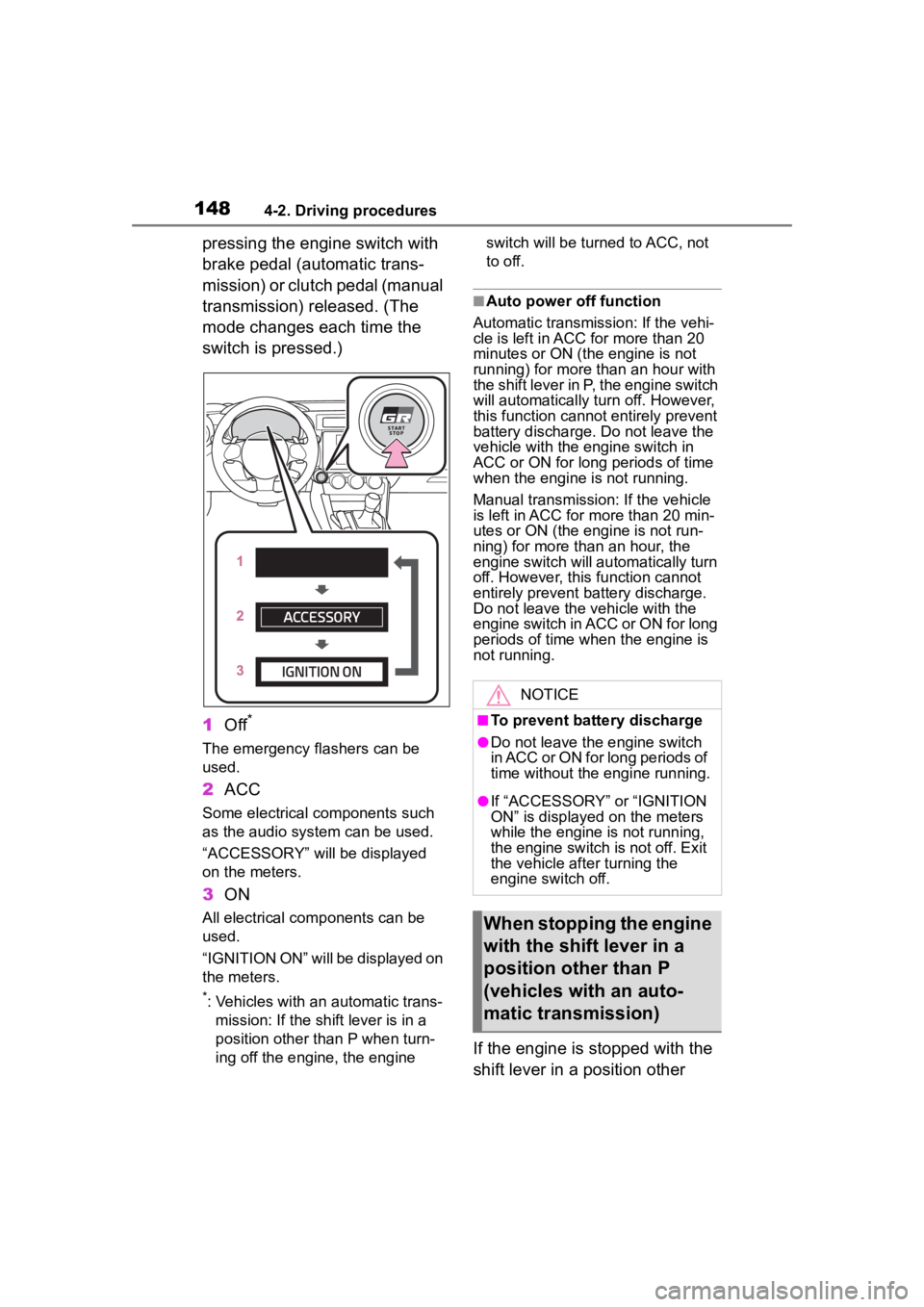
pressing the engine switch with
brake pedal (automatic trans-
mission) or clutch pedal (manual
transmission) released. (The
mode changes each time the
switch is pressed.)
1Off
*
The emergency flashers can be
used.
2ACC
Some electrical components such
as the audio system can be used.
“ACCESSORY” will be displayed
on the meters.
3ON
All electrical com ponents can be
used.
“IGNITION ON” will be displayed on
the meters.
*: Vehicles with an automatic trans- mission: If the shift lever is in a
position other than P when turn-
ing off the engine, the engine switch will be turned to ACC, not
to off.
■Auto power off function
Automatic transmission: If the vehi-
cle is left in ACC for more than 20
minutes or ON (the engine is not
running) for more than an hour with
the shift lever in P, the engine switch
will automatically turn off. However,
this function cannot entirely prevent
battery discharge. Do not leave the
vehicle with the engine switch in
ACC or ON for long periods of time
when the engine is not running.
Manual transmission: If the vehicle
is left in ACC for more than 20 min-
utes or ON (the engine is not run-
ning) for more than an hour, the
engine switch will automatically turn
off. However, this function cannot
entirely prevent b attery discharge.
Do not leave the v ehicle with the
engine switch in ACC or ON for long
periods of time when the engine is
not running.
If the engine is stopped with the
shift lever in a position other
NOTICE
■To prevent battery discharge
●Do not leave the engine switch
in ACC or ON for long periods of
time without the engine running.
●If “ACCESSORY” or “IGNITION
ON” is displayed on the meters
while the engine is not running,
the engine switch is not off. Exit
the vehicle after turning the
engine switch off.
When stopping the engine
with the shift lever in a
position other than P
(vehicles with an auto-
matic transmission)
Page 152 of 449
1524-2. Driving procedures
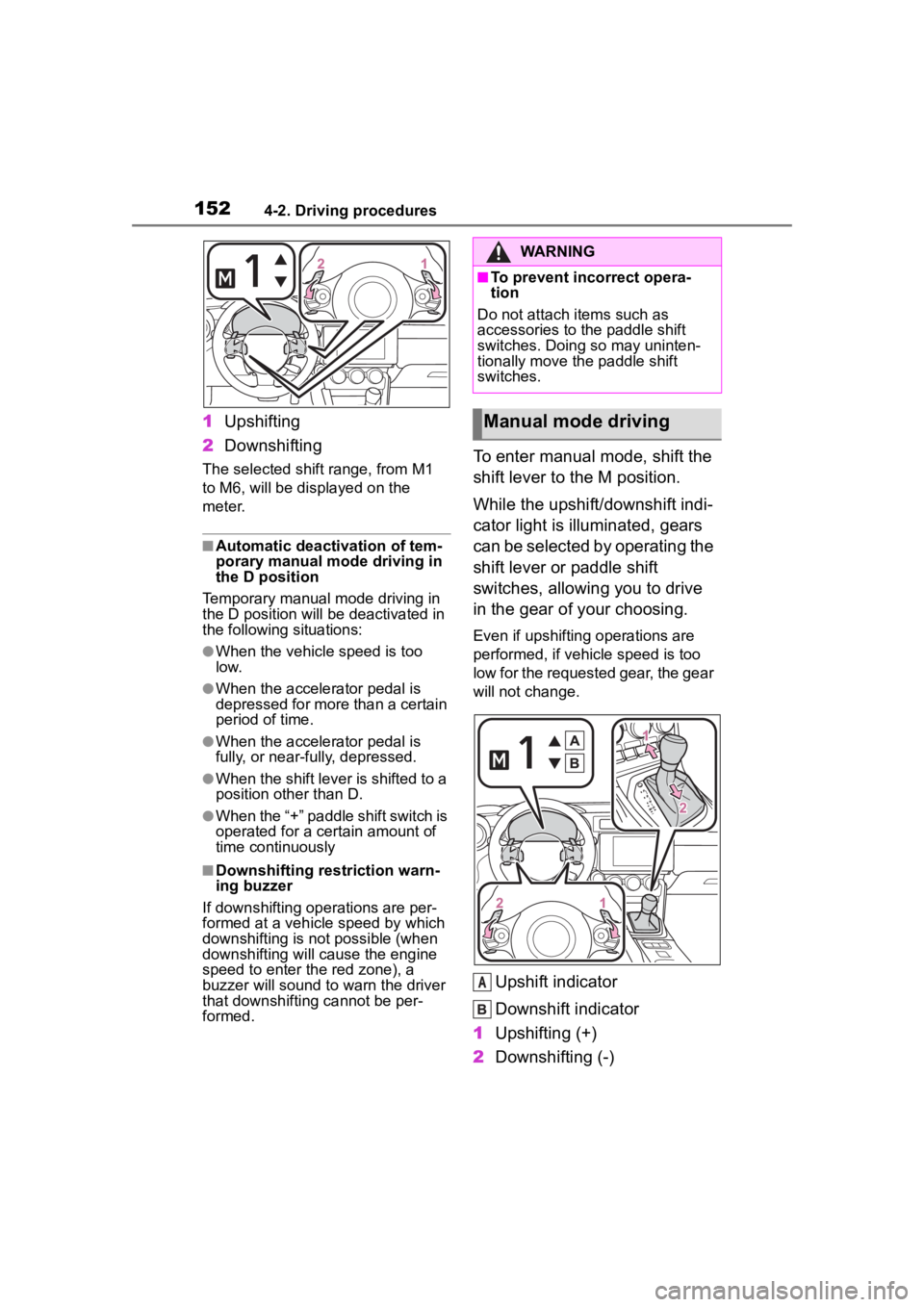
1Upshifting
2 Downshifting
The selected shift range, from M1
to M6, will be dis played on the
meter.
■Automatic deactivation of tem-
porary manual mode driving in
the D position
Temporary manual mode driving in
the D position will be deactivated in
the following situations:
●When the vehicle speed is too
low.
●When the accelerator pedal is
depressed for more than a certain
period of time.
●When the accelerator pedal is
fully, or near-fully, depressed.
●When the shift lever is shifted to a
position other than D.
●When the “+” paddle shift switch is
operated for a certain amount of
time continuously
■Downshifting restriction warn-
ing buzzer
If downshifting operations are per-
formed at a vehicle speed by which
downshifting is not possible (when
downshifting will cause the engine
speed to enter the red zone), a
buzzer will sound to w arn the driver
that downshifting cannot be per-
formed.
To enter manual mode, shift the
shift lever to the M position.
While the upshift/downshift indi-
cator light is illuminated, gears
can be selected by operating the
shift lever or paddle shift
switches, allowing you to drive
in the gear of your choosing.
Even if upshifting operations are
performed, if vehicle speed is too
low for the requested gear, the gear
will not change.
Upshift indicator
Downshift indicator
1 Upshifting (+)
2 Downshifting (-)
WARNING
■To prevent inc orrect opera-
tion
Do not attach items such as
accessories to the paddle shift
switches. Doing so may uninten-
tionally move the paddle shift
switches.
Manual mode driving
A
Page 153 of 449
1534-2. Driving procedures
4
Driving
Each time the shift lever or paddle
shift switches are operated, the
gear changes up or down one gear
and the selected gear, “1” through
“6”, will be set.
The selected gear, from M1 to M6,
will be fixed and displayed on the
meter.
When in manual mode, the gear
will not change unless the shift
lever or paddle shift switches
are operated.
However, even when in the
manual mode, the gears will be
automatically changed in the fol-
lowing situation:
When vehicle speed drops
(downshift only).
When engine oil temperature
is high and engine speed
rises close to the red zone.
■Downshifting restriction warn-
ing buzzer
If downshifting operations are per-
formed at a vehicle speed by which
downshifting is not possible (when
downshifting will cause the engine
speed to enter the red zone), a
buzzer will sound to w arn the driver
that downshifting cannot be per-
formed.
*: If equipped
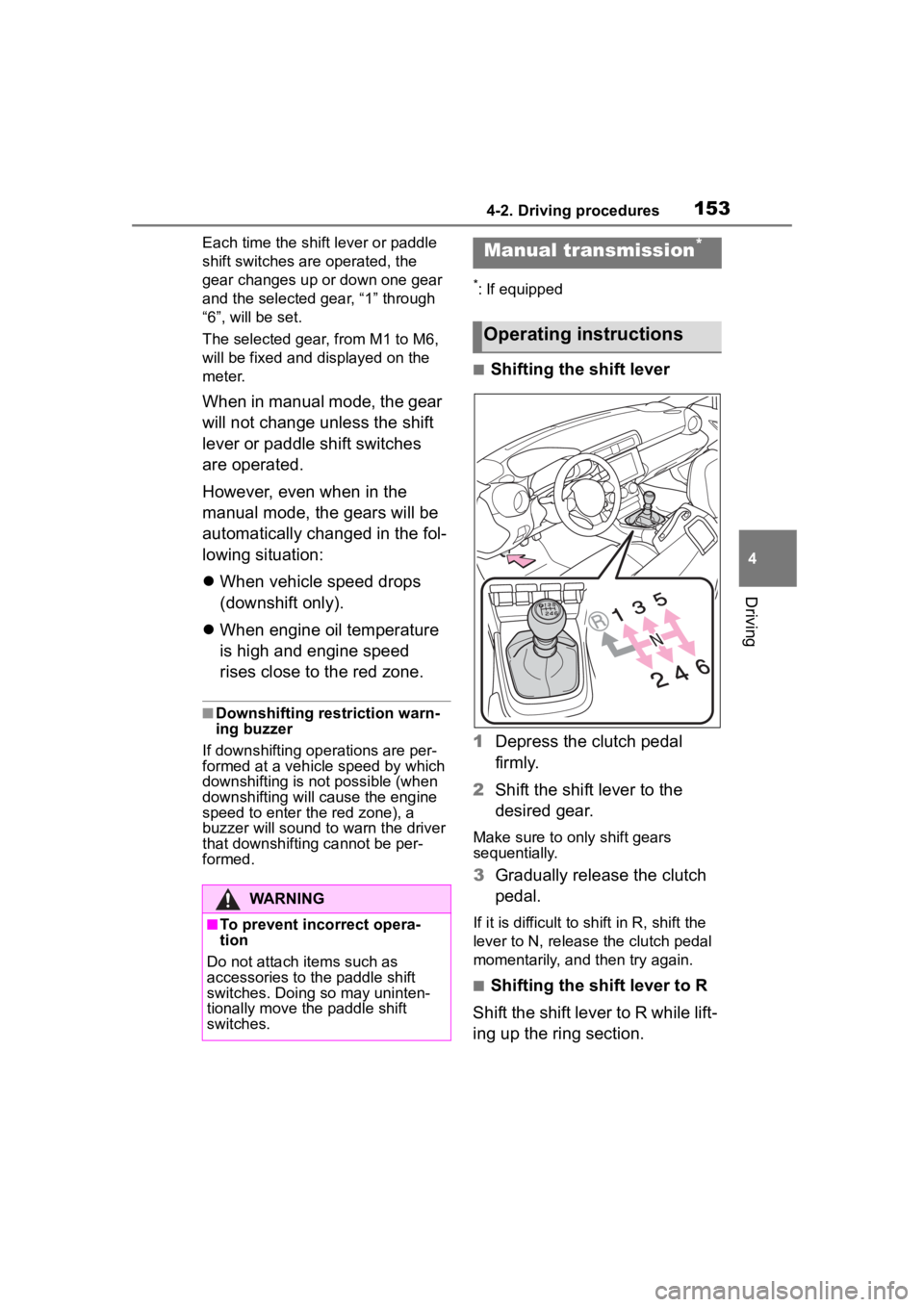
■Shifting the shift lever
1 Depress the clutch pedal
firmly.
2 Shift the shift lever to the
desired gear.
Make sure to only shift gears
sequentially.
3Gradually release the clutch
pedal.
If it is difficult to shift in R, shift the
lever to N, release the clutch pedal
momentarily, and then try again.
■Shifting the shift lever to R
Shift the shift lever to R while lift-
ing up the ring section.
WARNING
■To prevent incorrect opera-
tion
Do not attach items such as
accessories to the paddle shift
switches. Doing so may uninten-
tionally move the paddle shift
switches.
Manual transmission*
Operating instructions
Page 156 of 449
1564-2. Driving procedures
turn signal lights will blink 3 times.
■If the turn signals do not
stop flashing after turning
left or right, or if you want
to stop them flashing
Operate the lever in the oppo-
site direction to either position 2
or 3. If you move the lever to
either position 1 or 4, the
selected turn signals will flash.
■Turn signals can be operated
when
The engine switch is in ON.
■If the indicator flashes faster
than usual
Check that a light bulb in the front or
rear turn signal lights has not
burned out.
■If the turn signals stop flashing
before a lane change has been
performed
Operate the lever again.
■Customization
Some functions can be customized.
( P.400)
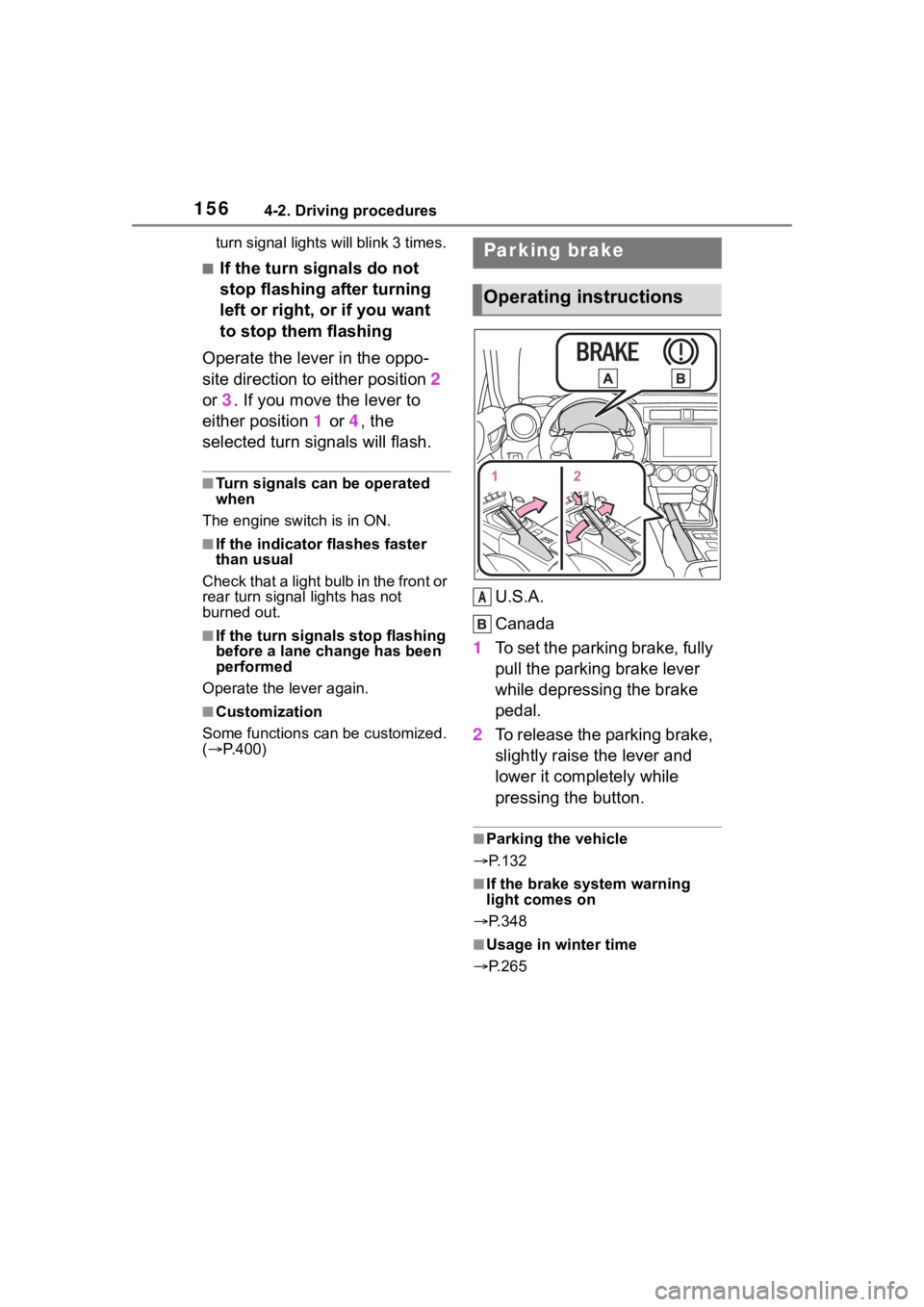
U.S.A.
Canada
1 To set the parking brake, fully
pull the parking brake lever
while depressing the brake
pedal.
2 To release the parking brake,
slightly raise the lever and
lower it completely while
pressing the button.
■Parking the vehicle
P.132
■If the brake system warning
light comes on
P.348
■Usage in winter time
P.265
Parking brake
Operating instructions
A
Page 163 of 449
1634-3. Operating the lights and wipers
4
Driving
detected due to repeated curves,
road dividers or roadside trees
• When vehicles ahead appear in a
faraway lane on a wide road
• When the lights of vehicles ahead are not on
●The high beams may be turned off
if a vehicle ahead that is using fog
lights without its headlights turned
on is detected.
●House lights, street lights, traffic
signals, and illumi nated billboards
or signs and other reflective
objects may cause the high
beams to change to the low
beams, or the low beams to
remain on.
●The following factors may affect
the amount of time taken for the
high beams to turn on or off:
• The brightness of the headlights,
fog lights, and ta il lights of vehi-
cles ahead
• The movement and direction of
vehicles ahead
• When a vehicle ahead only has operational lights on one side
• When a vehicle ahead is a two-wheeled vehicle
• The condition of the road (gradi-
ent, curve, condi tion of the road
surface, etc.)
• The number of passengers and
amount of luggage in the vehicle
• When there is a lag in response due to the limitat ions of the detec-
tion range of the stereo camera
●The high beams may turn on or off
unexpectedly.
●Bicycles or similar vehicles may
not be detected.
●In the following situations the sys-
tem may not be abl e to correctly
detect the surrounding brightness
level. This may cause the low
beams to remain on or the high
beams to flash or dazzle pedestri-
ans or vehicles ahead. In such a
case, it is necess ary to manually
switch between the high and low
beams.
• When driving in inclement weather (heavy rain, snow, fog, sand-
storms, etc.)
• When the windshi eld is obscured
by fog, mist, ice, dirt, etc.
• When the windshield is cracked or damaged
• When the stereo camera is deformed or dirty
• When the temperature of the ste-
reo camera is extremely high
• When the surrounding brightness level is equal to that of headlights,
tail lights or fog lights
• When headlights or tail lights of vehicles ahead are turned off,
dirty, changing color, or not aimed
properly
• When the vehicle is hit by water,
snow, dust, etc. from a preceding
vehicle
• When driving through an area of
intermittently changing brightness
and darkness
• When frequently and repeatedly
driving ascending/descending
roads, or roads with rough, bumpy
or uneven surfaces (such as
stone-paved roads, gravel roads,
etc.)
• When frequently and repeatedly
taking curves or driving on a wind-
ing road
• When there is a h ighly reflective
object ahead of the vehicle, such
as a sign or mirror
• When the back of a preceding
vehicle is highly reflective, such as
a container on a truck
• When the vehicle’s headlights are
damaged or dirty, or are not aimed
properly
• When the vehicle is listing or titling
due to a flat tire, a trailer being
towed, etc.
• Immediately after the engine is
started
• When the headlights are changed between the high beams and low
beams repeatedly in an abnormal
manner
• When the driver believes that the high beams may be flashing or
dazzling pedestrians or other driv-
ers
Page 175 of 449
1754-5. EyeSight
4
Driving
NOTICE
●The stereo camera monitors
and detects smears or blurs on
the front of the camera. How-
ever, detection is not 100%
accurate.
Under certain conditions, the
function may fail to detect
smears or blurs on the front of
the stereo camera accurately. In
addition, this function may not
detect that there is snow or ice
on the windshield close to the
stereo camera. In such condi-
tions, be sure to keep the wind-
shield clean at all times
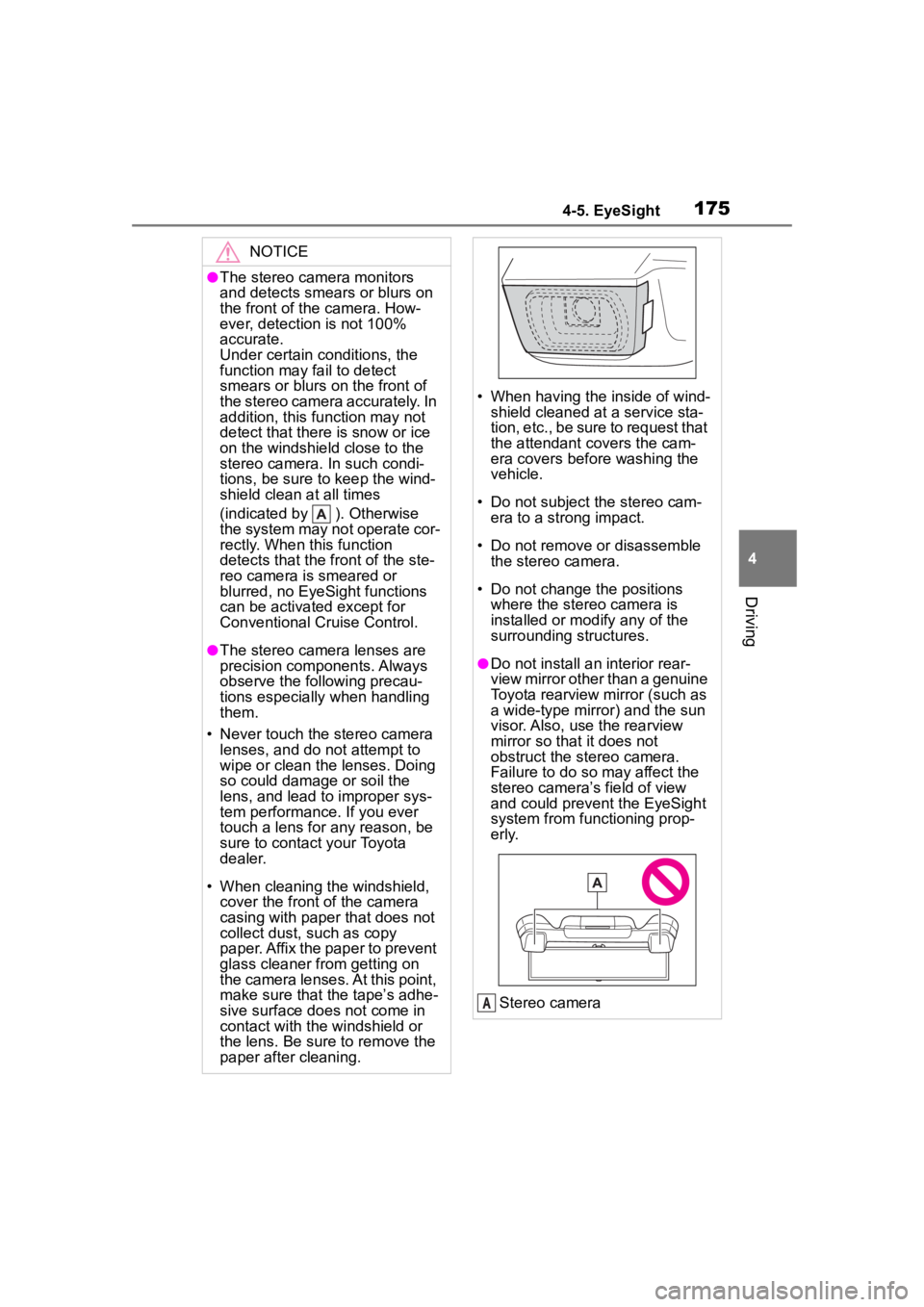
(indicated by ). Otherwise
the system may not operate cor-
rectly. When this function
detects that the front of the ste-
reo camera is smeared or
blurred, no EyeSight functions
can be activated except for
Conventional Cruise Control.
●The stereo camera lenses are
precision components. Always
observe the following precau-
tions especially when handling
them.
• Never touch the stereo camera lenses, and do not attempt to
wipe or clean the lenses. Doing
so could damage or soil the
lens, and lead to improper sys-
tem performance. If you ever
touch a lens for any reason, be
sure to contact your Toyota
dealer.
• When cleaning the windshield, cover the front of the camera
casing with paper that does not
collect dust, such as copy
paper. Affix the paper to prevent
glass cleaner from getting on
the camera lenses. At this point,
make sure that the tape’s adhe-
sive surface does not come in
contact with the windshield or
the lens. Be sure to remove the
paper after cleaning.
• When having the inside of wind- shield cleaned at a service sta-
tion, etc., be sure to request that
the attendant covers the cam-
era covers before washing the
vehicle.
• Do not subject the stereo cam- era to a strong impact.
• Do not remove or disassemble the stereo camera.
• Do not change the positions where the stereo camera is
installed or mod ify any of the
surrounding structures.
●Do not install an interior rear-
view mirror other than a genuine
Toyota rearview mirror (such as
a wide-type mirror) and the sun
visor. Also, use the rearview
mirror so that it does not
obstruct the stereo camera.
Failure to do so may affect the
stereo camera’s field of view
and could prevent the EyeSight
system from functioning prop-
erly.
Stereo camera
A
Page 177 of 449
1774-5. EyeSight
4
Driving
EyeSight includes the following
functions.
■Pre-Collision Braking Sys-
tem
This function uses a following
distance warning feature to
warn the driver to take evasive
action when there is the possi-
bility of a collision with a vehicle,
pedestrian or obstacle in front of
you. If the driver does not take
evasive action, the brakes are
applied automatically to help
reduce vehicle collision dam-
age or, if possible, help prevent
a collision. ( P.179)
■Adaptive Cruise Control
This function maintains the set
vehicle speed and when there is
a vehicle in front in the same
traffic lane, it follows the speed
of the vehicle in front up to the
maximum of the set vehicle
speed. ( P.190)
■Conventional Cruise Con-
trol
In this mode, the system main-
tains a constant vehicle speed.
It does not follow the vehicle in
front. This function can be used
even when the stereo camera
has temporarily stopped operat-
ing ( P.228). This function is
used by switching from Adaptive
Cruise Control to Conventional
Cruise Control. ( P.207)
NOTICE
●Keep the windshield (outside
and inside) clean at all times.
When the windshield has
become fogged, or it has a dirt
or an oil film on it, the stereo
camera may not detect objects
accurately and the EyeSight
system may not operate cor-
rectly. Never mount any device
to the center air vent, as any air-
flow change may impact Eye-
Sight performance.
●Do not place any stickers or
accessories on the windshield
(outside or inside). If you have
to do so (for example, legally
required or electronic toll tag),
avoid the area directly in front of
the camera. Otherwise, it may
adversely affect the field of view
of the stereo camera and can
cause improper operation of the
system. For details, contact a
Toyota dealer.
●Do not use any glass coating
agents or similar substances on
the windshield. Doing so may
interfere with the proper opera-
tion of the system.
●Do not install any film or an
additional layer of glass on the
windshield. The system may not
operate correctly.
●If there are scratches or cracks
on the windshield, contact a
Toyota dealer.
●To have the windshield replaced
or repaired, contact a Toyota
dealer. Do not install a wind-
shield other than a genuine Toy-
ota windshield. The stereo
camera may not be able to
detect objects accurately and
the EyeSight system may not
operate properly.
EyeSight functions
Page 187 of 449
1874-5. EyeSight
4
Driving
If the system then determines that the risk of collision is ext remely high, the
alert changes to a continuous beeping sound and stronger brakin g control
is activated. Despite any evasive action taken by the driver, if the system
subsequently determine s that a collision is unavoidable, brakin g and
engine output are con trolled by the system.
When the vehicle is completely stopped by the automatic braking system, a
short tone “3 intermittent beeps , 1 short beep and 1 long beep” will sound
and braking will be gradually released and the vehicle will sta rt creeping. To
stop the vehicle completely, d epress the brake pedal after the vehicle has
stopped.
●Neither first braking nor secondary braki ng will operate in the following
cases.
• The vehicle speed is approximately 1 mph (1 km/h) or less (Whe n the shift
lever is in the N position and your vehicle speed is approximat ely 2 mph (4
km/h) or less) or 100 mph (160 km/h) or more.
• VSC is active.
●If the system detects the stop lights of the vehicle in front, your vehicle will
start decelerating earlier than if it does not.
●There are some cases where the first braking is applied for a l onger period
of time. One of the reasons for t his is due to a large speed difference with
an obstacle in front. In those cases, stronger or weaker brakin g control
may be activated.
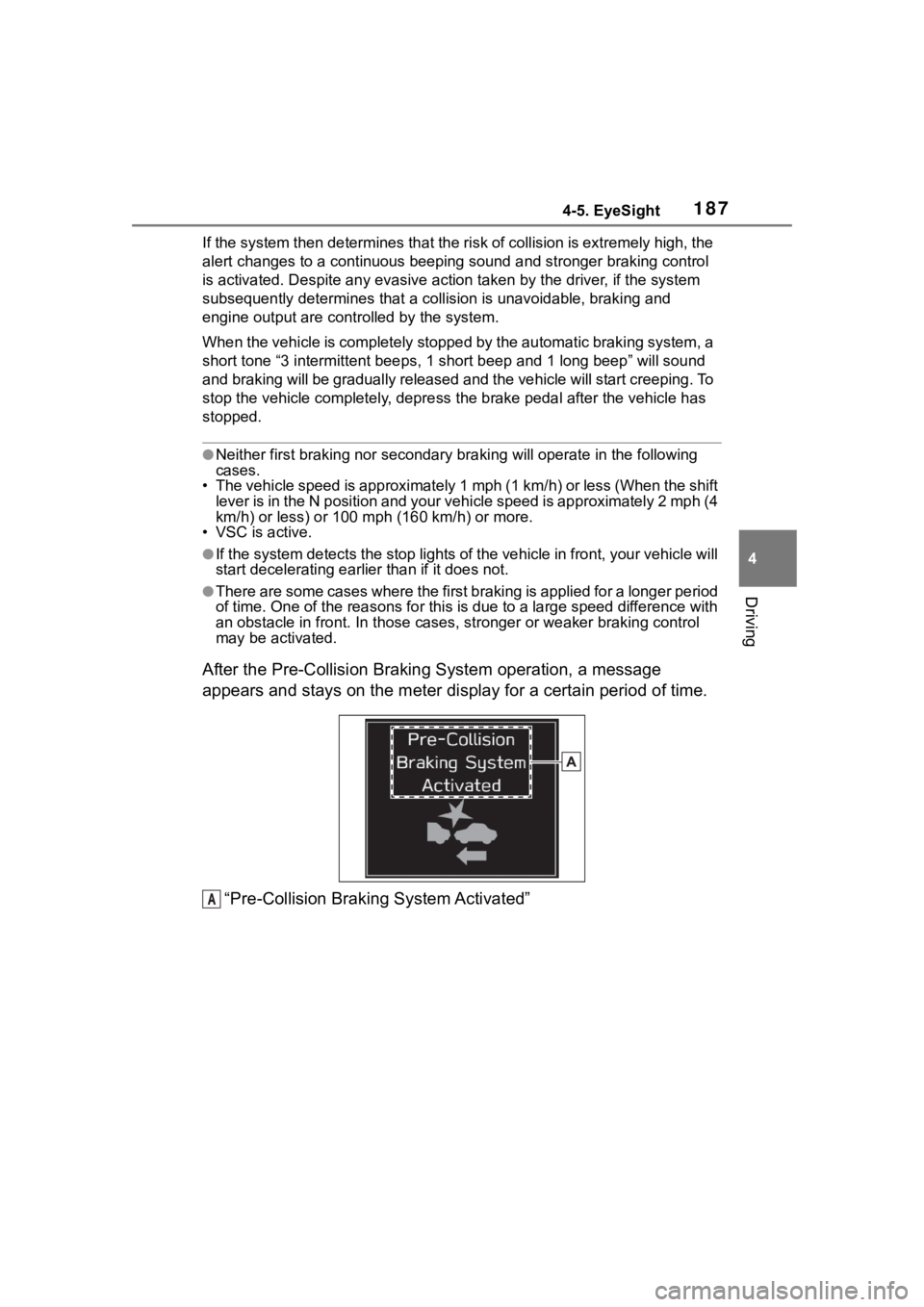
After the Pre-Collision Braki ng System operation, a message
appears and stays on the meter display for a certain period of time.
“Pre-Collision Braking System Activated”
A
Page 197 of 449
1974-5. EyeSight
4
Driving
• Pre-Collision Braking System is not turned off during
TRACK mode. ( P.189, 262)
• TRAC and VSC system are not set to off. ( P.262)
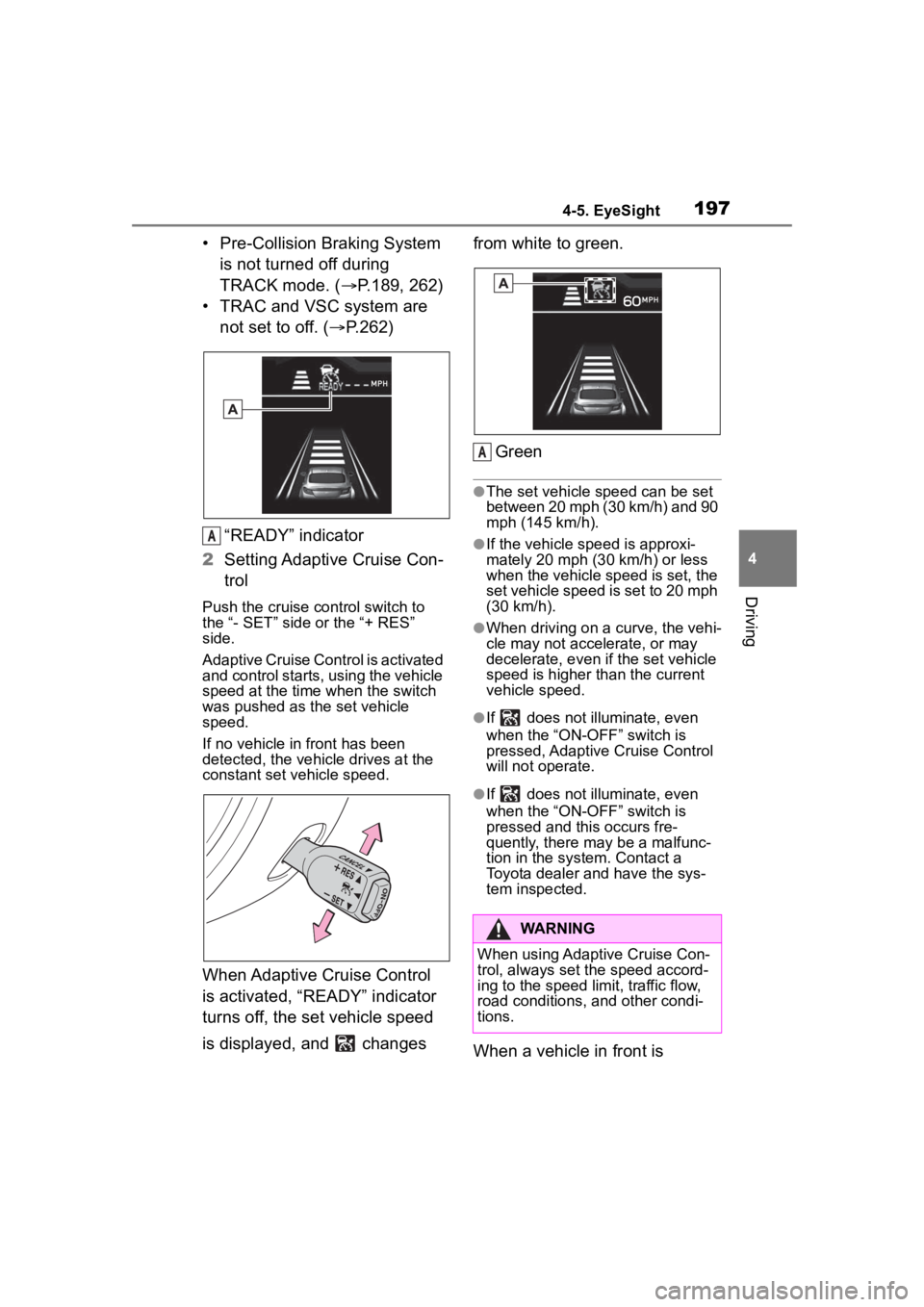
“READY” indicator
2 Setting Adaptive Cruise Con-
trol
Push the cruise co ntrol switch to
the “- SET” side or the “+ RES”
side.
Adaptive Cruise Control is activated
and control starts, using the vehicle
speed at the time when the switch
was pushed as the set vehicle
speed.
If no vehicle in front has been
detected, the vehicle drives at the
constant set vehicle speed.
When Adaptive Cruise Control
is activated, “READY” indicator
turns off, the set vehicle speed
is displayed, and changes from white to green.
Green
●The set vehicle speed can be set
between 20 mph (30 km/h) and 90
mph (145 km/h).
●If the vehicle speed is approxi-
mately 20 mph (30 km/h) or less
when the vehicle speed is set, the
set vehicle speed is set to 20 mph
(30 km/h).
●When driving on a curve, the vehi-
cle may not accelerate, or may
decelerate, e ven if the set vehicle
speed is higher than the current
vehicle speed.
●If does not illu minate, even
when the “ON-OFF” switch is
pressed, Adaptive Cruise Control
will not operate.
●If does not illu minate, even
when the “ON-OFF” switch is
pressed and this occurs fre-
quently, there may be a malfunc-
tion in the system. Contact a
Toyota dealer and have the sys-
tem inspected.
When a vehicle in front is
A
WARNING
When using Adaptive Cruise Con-
trol, always set the speed accord-
ing to the speed limit, traffic flow,
road conditions, and other condi-
tions.
A