ECO mode TOYOTA 86 2022 Owner's Guide
[x] Cancel search | Manufacturer: TOYOTA, Model Year: 2022, Model line: 86, Model: TOYOTA 86 2022Pages: 449, PDF Size: 8.5 MB
Page 273 of 449
2735-1. Using the air conditioning system
5
Interior features
■When driving on dusty roads
Close all windows. If dust thrown up
by the vehicle is still drawn into the
vehicle after closing the windows, it
is recommended that the air intake
mode be set to outside air mode and
the fan speed to any setting except
off.
■Outside/recirculated air mode
●Setting to the r ecirculated air
mode temporarily is recom-
mended in preventing dirty air
from entering the vehicle interior
and helping to c ool the vehicle
when the outside air temperature
is high.
●Outside/recirculated air mode may
automatically switch depending on
the temperature setting or the
inside temperature.
■When the outside temperature
falls to nearly 32°F (0°C)
The dehumidification function may
not operate even when “A/C” switch
is pressed.
■Ventilation and air conditioning
odors
●To let fresh air in, set the air condi-
tioning system to the outside air
mode.
●During use, various odors from
inside and outside the vehicle may
enter into and a ccumulate in the
air conditioning system. This may
then cause odor to be emitted
from the vents.
●To reduce potential odors from
occurring:
• It is recommended that the air conditioning system be set to out-
side air mode prior to turning the
vehicle off.
• The start timing of the blower may
be delayed for a short period of
time immediately after the air con-
ditioning system is started in auto-
matic mode.
●When the engine switch is
changed to the OFF or ACC posi- tion from ON, the air inlet mode
will automatically change to the
outside air mode regardless of
whether it is th
e auto mode or
manual mode.
■Air conditioning filter
P.327
■Air conditioning system refrig-
erant
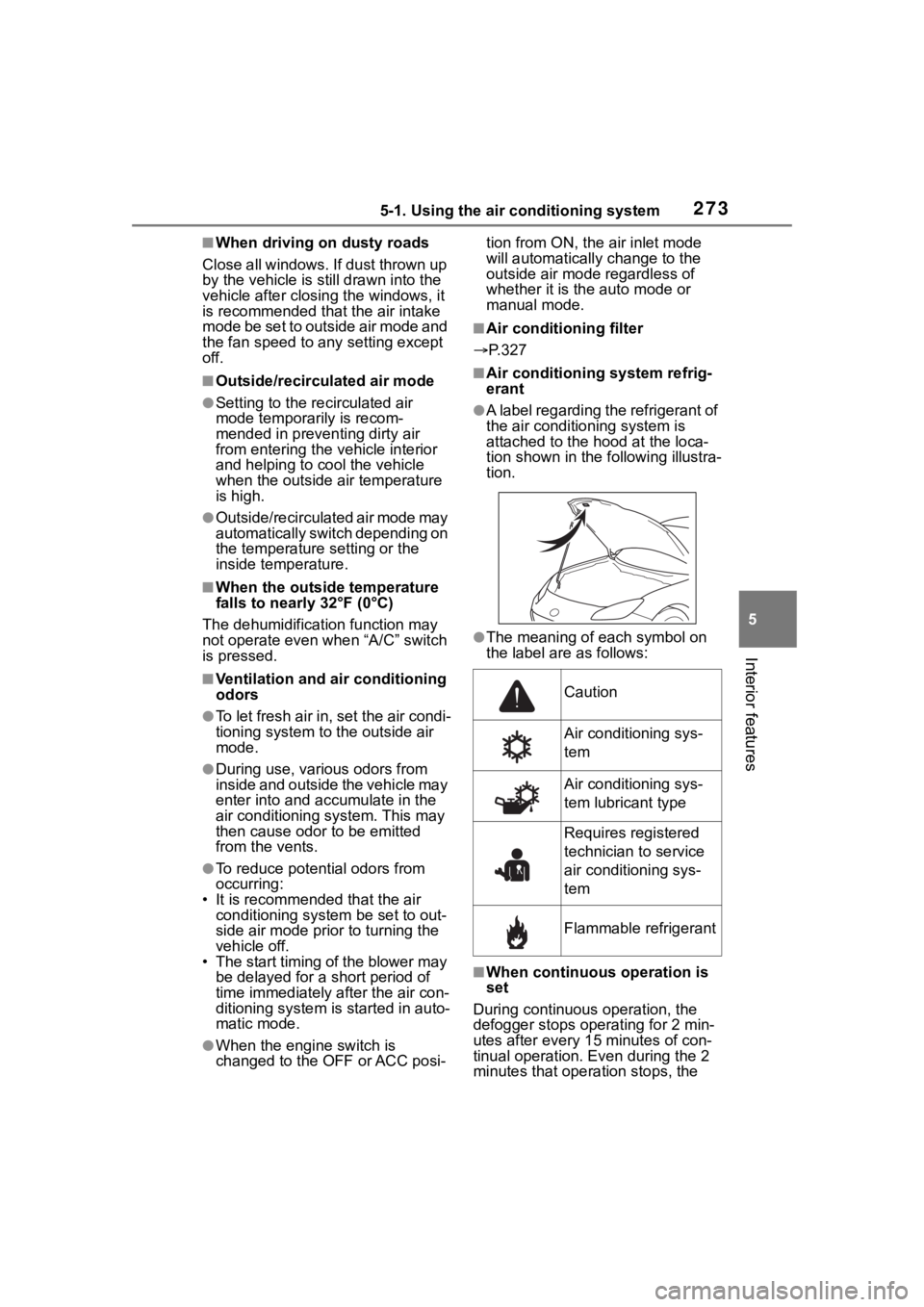
●A label regarding the refrigerant of
the air conditioning system is
attached to the h ood at the loca-
tion shown in the following illustra-
tion.
●The meaning of each symbol on
the label are as follows:
■When continuous operation is
set
During continuous operation, the
defogger stops operating for 2 min-
utes after every 15 minutes of con-
tinual operation. Even during the 2
minutes that operation stops, the
Caution
Air conditioning sys-
tem
Air conditioning sys-
tem lubricant type
Requires registered
technician to service
air conditioning sys-
tem
Flammable refrigerant
Page 274 of 449
2745-1. Using the air conditioning system
operating light remains illuminated.
The rear window defogger will con-
tinue to operate in this cycle until it
is turned off.
■Customization
Some functions can be customized.
( P.400)
1 Press the automatic mode
switch.
2 Adjust the temperature set-
ting.
3 To stop the operation, press
the “ON/OFF” switch.
If the fan speed setting or air
flow modes are operated, the
automatic mode indicator goes
off. However, automatic mode
for functions other than that
operated is maintained.
■Using automatic mode
Fan speed is adjusted automati-
cally according to the temperature
setting and the ambient conditions.
Therefore, the fan may stop for a
while until warm or cool air is ready
to flow immediately after the auto-
matic mode switch pressed.
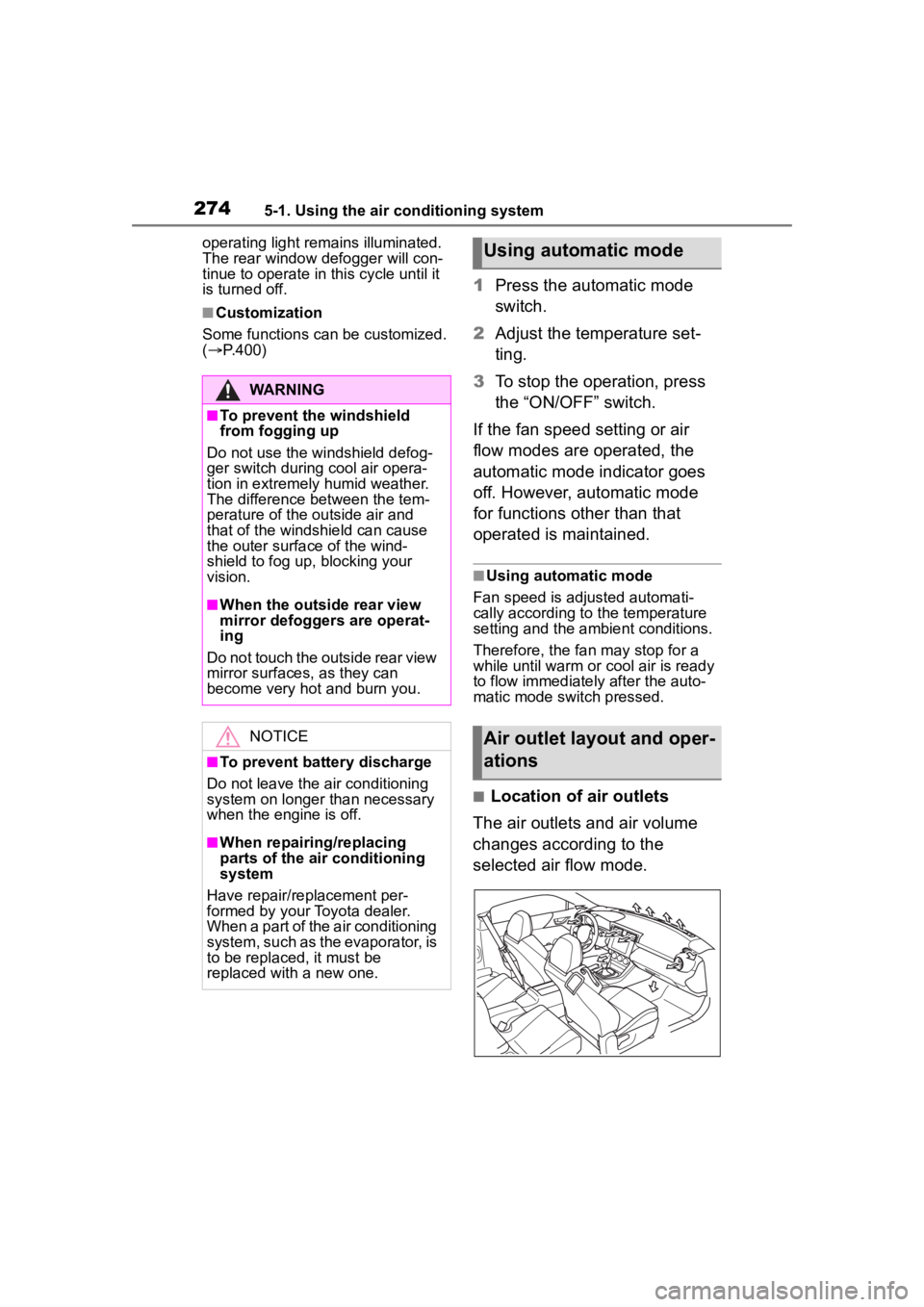
■Location of air outlets
The air outlets and air volume
changes according to the
selected air flow mode.
WARNING
■To prevent the windshield
from fogging up
Do not use the windshield defog-
ger switch during cool air opera-
tion in extremely humid weather.
The difference between the tem-
perature of the outside air and
that of the windshield can cause
the outer surface of the wind-
shield to fog up, blocking your
vision.
■When the outside rear view
mirror defoggers are operat-
ing
Do not touch the outside rear view
mirror surfaces, as they can
become very hot and burn you.
NOTICE
■To prevent battery discharge
Do not leave the air conditioning
system on longer than necessary
when the engine is off.
■When repairing/replacing
parts of the air conditioning
system
Have repair/replacement per-
formed by your Toyota dealer.
When a part of the air conditioning
system, such as the evaporator, is
to be replaced, it must be
replaced with a new one.
Using automatic mode
Air outlet layout and oper-
ations
Page 288 of 449
2886-1. Maintenance and care
6-1.Maintenance and care
Working from top to bottom,
liberally apply water to the
vehicle body, wheel wells and
underside of the vehicle to
remove any dirt and dust.
Wash the vehicle body using
a sponge or soft cloth, such
as a chamois.
If very dirty, use a car wash
soap that does not contain
abrasives and then thor-
oughly rinse with water.
Wipe away any water.
Wax the vehicle when the
waterproof coating deterio-
rates.
If water does not bead on a clean
surface, apply wax when the vehi-
cle body is cool.
■Automatic car washes
●Fold the mirrors before washing
the vehicle. Start washing from the
front of the vehicle. Make sure to
extend the mirrors before driving.
●Brushes used in automatic car
washes may scratch the vehicle
surface, parts (wheel, etc.) and
harm your vehicle’s paint.
■High pressure car washes
As water may enter the cabin, do
not bring the nozzle tip near the
gaps around the doors or perimeter
of the windows, or spray these
areas continuously.
■When using a car wash
If the door handle becomes wet
while the electronic key is within the
effective range, the door may lock
and unlock repeatedly. In that case,
follow the following correction pro-
cedures to wash the vehicle:
●Place the key in a position 6 ft. (2
m) or more separate from the
vehicle while the vehicle is being
washed. (Take care to ensure that
the key is not stolen.)
●Set the electronic key to bat-
tery-saving mode to disable the
smart key system. ( P. 1 1 1 )
■Wheels and wheel ornaments
●Remove any dirt immediately by
using a neutral detergent.
●Wash detergent off with water
immediately after use.
●To protect the paint from damage,
make sure to obs erve the follow-
ing precautions.
• Do not use acidic, alkaline or abrasive detergent
• Do not use hard brushes
• Do not use detergent on the wheels when they are hot, such
as after driving or parking in hot
weather
■Wheels and wheel ornaments
(vehicles with matte painted
wheels)
As matte painted wheels require dif-
ferent cleaning methods than con-
ventional wheels, be sure to
observe the following. For details,
consult your Toyota dealer.
●Remove dirt using water. If the
wheels are excessively dirty, use
a sponge or soft cloth dampened
with a diluted neutral detergent to
remove the dirt.
Cleaning and protect-
ing the vehicle exte-
rior
Perform cleaning in a man-
ner appropriate to each
component and its material.
Cleaning instructions
Page 310 of 449
3106-3. Do-it-yourself maintenance
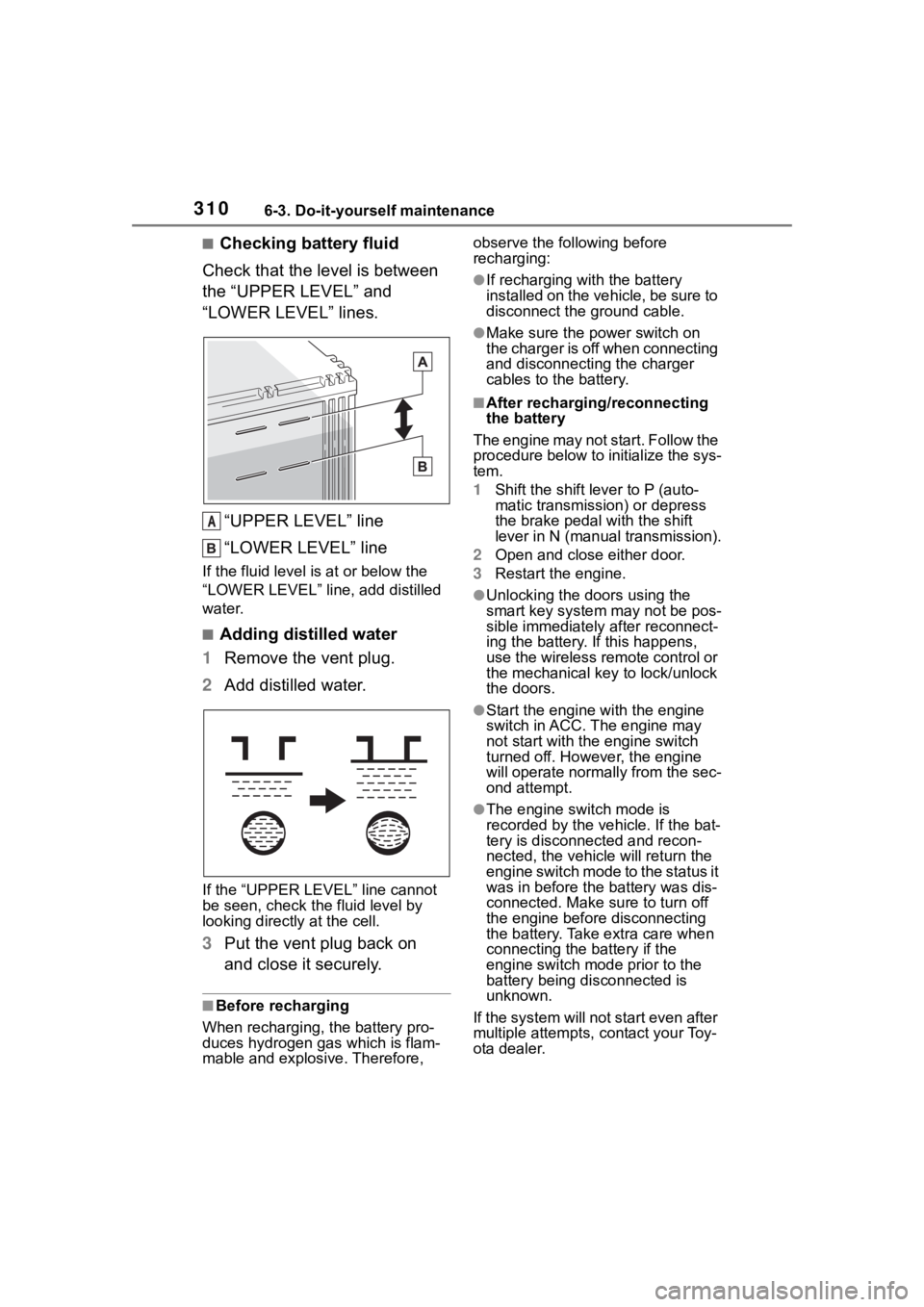
■Checking battery fluid
Check that the level is between
the “UPPER LEVEL” and
“LOWER LEVEL” lines.
“UPPER LEVEL” line
“LOWER LEVEL” line
If the fluid level is at or below the
“LOWER LEVEL” line, add distilled
water.
■Adding distilled water
1 Remove the vent plug.
2 Add distilled water.
If the “UPPER LEVEL ” line cannot
be seen, check the fluid level by
looking directly at the cell.
3 Put the vent plug back on
and close it securely.
■Before recharging
When recharging, t he battery pro-
duces hydrogen ga s which is flam-
mable and explosive. Therefore, observe the following before
recharging:
●If recharging with the battery
installed on the vehicle, be sure to
disconnect the ground cable.
●Make sure the power switch on
the charger is off when connecting
and disconnecting the charger
cables to the battery.
■After recharging/reconnecting
the battery
The engine may not start. Follow the
procedure below to initialize the sys-
tem.
1 Shift the shift lever to P (auto-
matic transmission) or depress
the brake pedal with the shift
lever in N (manual transmission).
2 Open and close either door.
3 Restart the engine.
●Unlocking the doors using the
smart key system may not be pos-
sible immediately after reconnect-
ing the battery. If this happens,
use the wireless remote control or
the mechanical key to lock/unlock
the doors.
●Start the engine with the engine
switch in ACC. T he engine may
not start with th e engine switch
turned off. However, the engine
will operate normally from the sec-
ond attempt.
●The engine switch mode is
recorded by the vehicle. If the bat-
tery is disconnected and recon-
nected, the vehi cle will return the
engine switch mode to the status it
was in before the battery was dis-
connected. Make sure to turn off
the engine before disconnecting
the battery. Take extra care when
connecting the battery if the
engine switch mode prior to the
battery being disconnected is
unknown.
If the system will not start even after
multiple attempts, contact your Toy-
ota dealer.
A
Page 371 of 449
3717-2. Steps to take in an emergency
7
When trouble arises
■Changing engine switch modes
Release the brake pedal (automatic
transmission) or clutch pedal (man-
ual transmission) and press the
engine switch in step 3 above.
The engine does not start and
modes will be cha nged each time
the switch is pressed. ( P.147)
If you have a set of jumper (or
booster) cables and a second
vehicle with a 12-volt battery,
you can jump start your vehicle
by following the steps below.
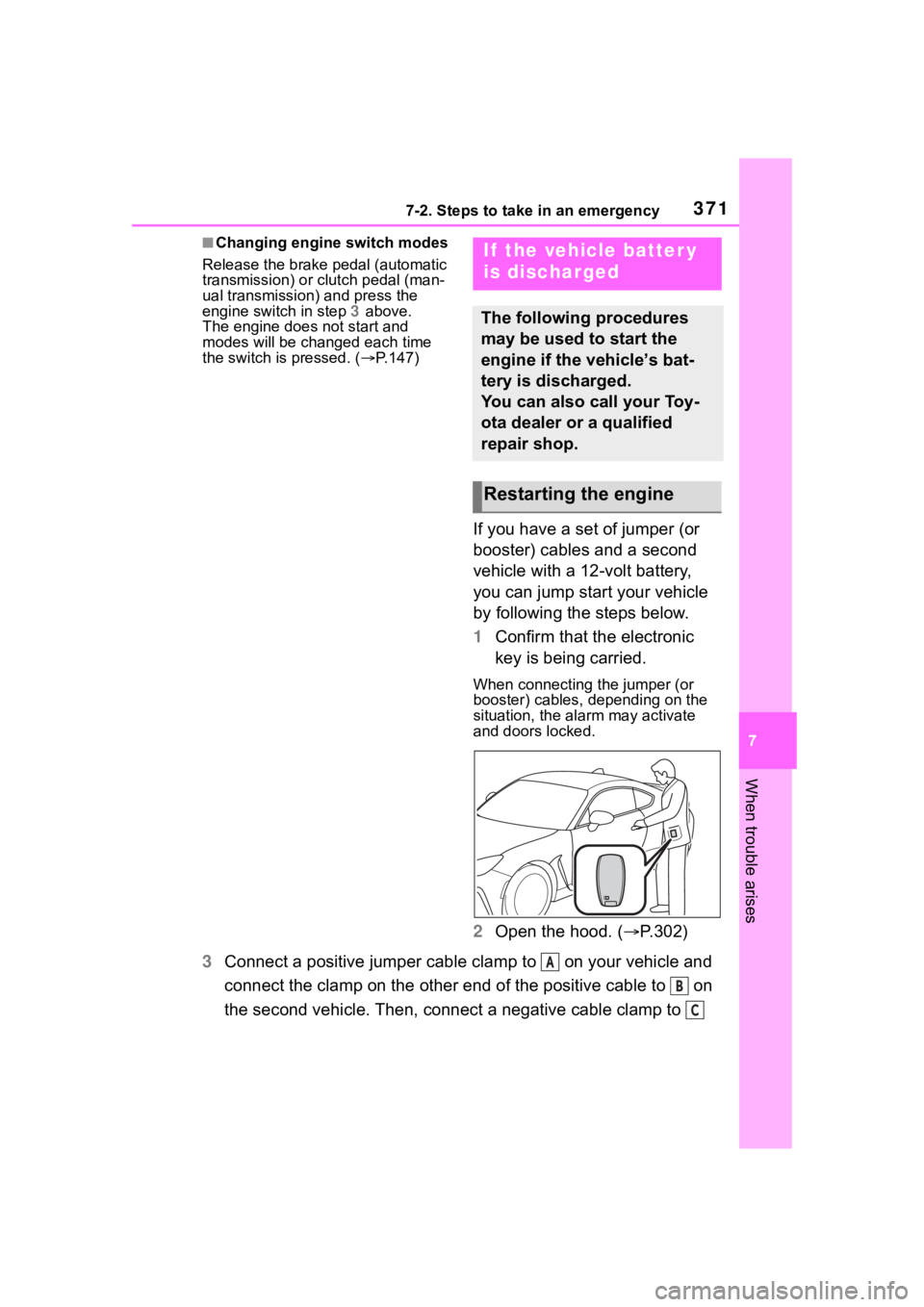
1Confirm that the electronic
key is being carried.
When connecting the jumper (or
booster) cables, depending on the
situation, the alarm may activate
and doors locked.
2Open the hood. ( P.302)
3 Connect a positive jumper cable clamp to on your vehicle and
connect the clamp on the other end of the positive cable to on
the second vehicle. Then, connect a negative cable clamp to
If the vehicle batter y
is discharged
The following procedures
may be used to start the
engine if the vehicle’s bat-
tery is discharged.
You can also call your Toy-
ota dealer or a qualified
repair shop.
Restarting the engine
A
B
C
Page 373 of 449
3737-2. Steps to take in an emergency
7
When trouble arises
■When the battery is removed or
discharged
Information stored in the ECU is
cleared. When the battery is
depleted, have the vehicle
inspected at your Toyota dealer.
■When removing the battery ter-
minals
When the battery terminals are
removed, the information stored in
the ECU is cleared . Before remov-
ing the battery terminals, contact
your Toyota dealer.
■Charging the battery
The electricity stor ed in the battery
will discharge gradu ally even when
the vehicle is not in use, due to nat-
ural discharge and the draining
effects of certain electrical appli-
ances. If the vehicle is left for a long
time, the battery may discharge,
and the engine ma y be unable to
start. (The battery recharges auto-
matically during driving.)
■When recharging or replacing
the battery
●In some cases, it may not be pos-
sible to unlock the doors using the
smart key system when the bat-
tery is discharged. Use the wire-
less remote control or the
mechanical key to lock or unlock
the doors.
●The engine may not start on the
first attempt after the battery has
recharged but will start normally
after the second attempt. This is
not a malfunction.
●The engine switch mode is memo-
rized by the vehicle. When the
battery is reconnected, the system
will return to the mode it was in
before the battery was dis-
charged. Before disconnecting the
battery, turn the engine switch off.
If you are unsure what mode the
engine switch was in before the
battery discharged, be especially
careful when reconnecting the
battery.
WARNING
■When removing the battery
terminals
Always remove the negative (-)
terminal first. If the positive (+) ter-
minal contacts any metal in the
surrounding area when the posi-
tive (+) terminal is removed, a
spark may occur, leading to a fire
in addition to ele ctrical shocks
and death or serious injury.
■Avoiding battery fires or
explosions
Observe the following precautions
to prevent accidentally igniting the
flammable gas that may be emit-
ted from the battery:
●Make sure each jumper cable is
connected to the correct termi-
nal and that it is not unintention-
ally in contact with any other
than the intended terminal.
●Do not allow the + and - clamps
of the jumper cables to come
into contact with each other.
●Do not smoke, use matches,
cigarette lighter s or allow open
flame near the battery.
■Battery precautions
The battery contains poisonous
and corrosive acidic electrolyte,
while related parts contain lead
and lead compounds. Observe
the following precautions when
handling the battery:
●When working with the battery,
always wear safety glasses and
take care not to allow any bat-
tery fluids (acid) to come into
contact with skin, clothing or the
vehicle body.
●Do not lean over the battery.
Page 420 of 449
4209-1. For owners
AVERTISSEMENT
• Installation de volants person-nalisés
• Fixation de matériaux de garni- ture supplémentaires au tableau
de bord
• Installation de sièges person- nalisés
• Remplacement du tissu ou du cuir de siège
• Installation de tissu ou de cuir supplémentaire sur le siège
avant
• Ne fixez pas un microphone mains libres ou de tout autre
accessoire sur un montant
avant, un montan t central, un
montant arrière, le pare-brise,
une vitre latérale, une poignée
d’assistance ou toute autre sur-
face de l’habitacle qui se trou-
verait à proximité d’un coussin
gonflable rideau SRS qui se
déploie.
• Il est déconseillé d’installer un équipement électrique/électro-
nique supplémentaire, tel
qu’une radio mobile bidirection-
nelle, sur ou à proximité des
composants et/ou du câblage
du système de coussins gonfla-
bles SRS. Cela pourrait nuire au
bon fonctionnement du système
de coussins gonflables SRS.
• Modifications sur ou à l’intérieur des panneaux de porte en vue
du remplacement d’un
haut-parleur ou de l’isolation
acoustique
●Les capteurs d’impact, qui
détectent la pression d’un
impact, sont situés dans les
portes. Ne modifiez aucun élé-
ment des portes ou des garni-
tures de porte, comme l’ajout de
haut-parleurs de porte par
exemple. Toute modification des
portes entraîne un risque de
dysfonctionnement du système
de coussins gonflables ou de
déploiement involontaire de
coussins gonflables.
●N’effectuez pas l’une des opéra-
tions suivantes. De telles modi-
fications peuvent nuire au bon
fonctionnement du système de
coussins gonflables SRS.
• Fixation d’un équipement (barre d’appui, treuils, chasse-neige,
plaque de protection, etc.) autre
que des pièces accessoires
Toyota d’origine sur le train
avant.
• Modification du système de sus- pension ou de la structure
avant.
• Installation d’un pneu de taille et de construction différentes des
pneus spécifiés sur la plaque
d’identification du véhicule fixée
au montant central du conduc-
teur ou spécifiés pour les
modèles de véhicules individu-
els dans ce Manuel du pro-
priétaire.
• Fixation de tout équipement (marchepieds latéraux ou pro-
tections de bas de caisse, etc.)
autre que des pièces acces-
soires d’origine Toyota sur la
carrosserie latérale.
Consultez toujours votre conces-
sionnaire Toyota si vous souhai-
tez installer des pièces
accessoires sur votre véhicule.
Page 430 of 449

430Alphabetical Index
Fixed with a seat belt ............. 66
Front passenger occupant clas-sification system ................... 55
Points to remember ................ 63
Riding with children ................ 62
Types of child restraint system installation met hod ............... 65
Using an anchor bracket ........ 72
Child safety Battery precautions ...... 311, 373
Child restraint system............. 65
How your child should wear the seat belt................................ 24
Power window lock switch.... 130
Removed electronic key battery precautions......................... 330
Seat belt precautions ............. 62
Seat heater precautions ....... 276
Trunk precautions................. 107
Cleaning Exterior ................................. 288
Interior .......................... 291, 293
Seat belts ............................. 291
Wheels and wheel ornaments........................................... 288
Clock ................................... 88, 91
Condenser .............................. 308
Console box ............................ 280
Conventional Cruise Control207, 254
Cooling system ...................... 307 Engine overheating .............. 374
Cruise control Adaptive Cruise Control ....... 190
Conventional Cruise Control207, 254
Cup holders ............................ 281
Current fuel consumption ....... 94
Curtain shield airbags ............. 27
Customizable features ........... 400D
Daytime running light system158
Daytime running lights Replacing light bulbs ............334
Defogger Outside rear view mirrors .....272
Rear window.........................272
Windshield ............................272
Dimension ...............................380
Dinghy towing .........................144
Display Driving information .................94
Multi-information display.........93
Display change button .............90
Do-it-yourself maintenance ...296
Door courtesy lights...............277
Door lock Doors ....................................105
Smart key system ................. 111
Wireless remote control........103
Doors Door glasses ........................129
Door lock ..............................105
Open door warning buzzer ...106
Open door warning light .......351
Outside rear view mirrors .....127
Driving Break-in tips .........................133
Correct driving posture ...........21
Driving mode select switch ...257
Procedures ...........................132
Winter drive tips....................265
Driving distance........................94
Driving information ..................94
Driving information display .....94
Driving range ............................94
Driving time ...............................94
E
EDR (Event data recorder) .........7
Page 431 of 449

431Alphabetical Index
Electric Power Steering (EPS)............................................... 261Warning light ........................ 350
Electronic key ......................... 102 Battery-saving fun ction......... 112
If the electronic key does not operate properly ................. 369
Replacing the battery ........... 329
Emergency flashers ............... 338
Emergency tire puncture ....... 358
Emergency, in case of If a warning buzzer sounds .. 348
If a warning light turns on ..... 348
If a warning message is dis-played................................. 357
If the battery is discharged ... 371
If the electronic key does not operate properly ................. 369
If the engin e will not start ..... 367
If the fuel filler door cannot be opened ............................... 369
If the vehicle is submerged or water on the road is rising .. 339
If you have a flat tire ............. 358
If you lose your keys ............ 368
If you think something is wrong ........................................... 346
If your vehicle becomes stuck ........................................... 376
If your vehicle has to be stopped in an emergency................. 338
If your vehicle needs to be towed ........................................... 341
If your vehicle overheats ...... 374
Engine ACCESSORY mode ............. 147
Compartment ....................... 305
Engine switch ....................... 145
Fuel pump shut off system ... 347
Hood..................................... 302
How to start the engine ........ 145
Identification number ............ 381 If the engine will not start......367
If your vehicle has to be stopped
in an emergency .................338
Ignition switch (engine switch) ...........................................145
Overheating ..........................374
Tachometer.............................88
Engine coolant Capacity ...............................383
Checking ..............................307
Preparing and checking before winter ..................................265
Engine coolant temperature gauge .......................................88
Engine immobilizer system .....79
Engine oil Capacity ...............................382
Checking ..............................305
Preparing and checking before winter ..................................265
Warning light.........................349
Engine oil temperature gauge .94
Engine switch .........................145 Auto power off fun ction .........148
Changing the engine switch modes.................................147
If your vehicle has to be stopped in an emergency .................338
EPS (Electric Po wer Steering)
...............................................261 Warning light.........................350
Event data recorder (EDR) .........7
EyeSight ..................................170 Adaptive Cruise Control .......190
Conventional Cruise Control 207
Lane Departure Warning ......219
Lane Sway Warning .............221
Lead Vehicle Start Alert ........223
Malfunction ...........................227
Pre-Collision Braking System...........................................179
Page 436 of 449

436Alphabetical Index
Side turn signal lightsTurn signal lever ................... 155
Wattage ................................ 387
Side windows ...... ................... 129
Smart key system Antenna location .................. 111
Entry functions ..................... 105
Starting the engine ............... 145
Warning message ................ 357
Snow tires ............................... 265
Specifications ......................... 380
Speedometer ............................ 88
Steering lock Column lock release............. 145
Steering lock system warning message............................. 145
Steering wheel Adjustment ........................... 125
Meter control switches ........... 94
Stop lights Replacing light bulbs ............ 334
Wattage ................................ 387
Stopwatch ................................. 96
Storage features ..................... 279
Stuck If the vehicle becomes stuck 376
Sun visors ............................... 284
Switch Meter control switches ........... 94
Switches Display change button............ 90
Door lock switches ............... 106
Driving mode select switch... 257
Emergency flashers switch .. 338
Engine switch ....................... 145
Ignition switch....................... 145
Instrument panel light control switches ............................... 91
Light switches....................... 158
Outside rear view mirror switches ............................. 127
Paddle shift switches.... 151, 152 Power door lock switch.........106
Power window switches .......129
Rear window and outside rear
view mirror defoggers switch...........................................270
Seat heater switches ............276
“SOS” button ..........................74
Tilt and telescopic steering con- trol switch ...........................125
Tire pressure warning reset switch .................................317
Trunk opener switch .............109
VSC OFF switch ...................261
Window lock switch ..............130
Windshield wiper and washer switch .................................165
T
Tachometer ...............................88 REV indicator .........................89
Tail lights Light switch...........................158
Replacing light bulbs ............334
Wattage ................................387
Theft deterrent system Alarm ......................................80
Engine immobilizer system .....79
Tire inflation pressure Maintenance data .................386
Tire inflation pressure display function ...............................315
Warning light.........................354
Tire information ......................390 Glossary ...............................393
Size ......................................391
Tire identification number .....391
Uniform Tire Quality Grading 392
Tire pressure display .............315