ECO mode TOYOTA 86 2022 User Guide
[x] Cancel search | Manufacturer: TOYOTA, Model Year: 2022, Model line: 86, Model: TOYOTA 86 2022Pages: 449, PDF Size: 8.5 MB
Page 114 of 449

1143-2. Opening, closing and locking the doors and trunk
formed using the lock sensor, rec-
ognition signals will be shown up
to three consecuti ve times. After
this, no recogniti on signals will be
given.
●If the door handle becomes wet
while the electronic key is within
the effective ran ge, the door may
lock and unlock repeatedly. In this
case, follow the fo llowing correc-
tion procedures to wash the vehi-
cle:
• Place the electronic key in a loca- tion 6 ft. (2 m) or more away from
the vehicle. (Take care to ensure
that the key is not stolen.)
• Set the electronic key to bat-
tery-saving mode to disable the
smart key system. ( P. 1 1 2 )
●If the electronic key is inside the
vehicle and a door handle
becomes wet during a car wash, a
message may be shown on the
multi-information display and a
buzzer will sound outside the vehi-
cle. To turn off the alarm, lock both
side doors.
●The lock sensor may not work
properly if it com es into contact
with ice, snow, mud, etc. Clean
the lock sensor and attempt to
operate it again.
●A sudden handle operation or a
handle operation immediately
after entering the effective range
may prevent the doors from being
unlocked. Touch the door unlock
sensor and check that the doors
are unlocked bef ore pulling the
door handle again.
●Unlocking the vehicle may take
more time if another electronic key
is within the effective range.
■When the vehicle is not driven
for extended periods
●To prevent theft of the vehicle, do
not leave the electronic key within
6 ft. (2 m) of the vehicle.
●The smart key system can be
deactivated in advance. ( P. 1 1 5 )
●Setting the electronic key to bat-
tery-saving mode helps to reduce
key battery depletion. ( P. 1 1 2 )
■To operate the system properly
●Make sure to carry the electronic
key when operating the system.
Do not get the electronic key too
close to the vehicle when operat-
ing the system from the outside of
the vehicle.
Depending on the position and hold-
ing condition of the electronic key,
the key may not be detected cor-
rectly and the system may not oper-
ate properly. (The alarm may go off
accidentally, or the door lock pre-
vention function m ay not operate.)
●Do not leave the electronic key
inside the trunk.
The key confinement prevention
function may not operate, depend-
ing on the location of the key (the
inside edge of the Trunk), condi-
tions (inside a metal bag, close to
metallic objects) and the radio
waves in the surrounding area.
( P. 111 )
■If the smart key system does
not operate properly
●Locking and unlocking the doors:
P. 3 6 9
●Starting the engine: P. 3 7 0
■Customization
Some functions can be customized.
( P.400)
■If the smart key system has
been disabled
●Locking and unlocking the doors:
Use the wireless remote control or
mechanical key. ( P.105, 369)
●Starting the engi ne and changing
engine switch modes: P. 3 7 0
●Stopping the engine: P. 1 4 7
Page 145 of 449

1454-2. Driving procedures
4
Driving
4-2.Driving procedures
1Check that the parking brake
is set.
2 Check that the shift lever is in
P (automatic transmission) or
N (manual transmission).
3 Firmly depress the brake
pedal (automatic transmis-
sion) or clutch pedal (manual
transmission).
, and a mess age will be dis-
played on the multi-information dis-
play.
If it is not displayed, the engine
cannot be started.
4 Press the engine switch
shortly and firmly.
When operating the engine switch,
one short, firm press is enough. It is
not necessary to press and hold the
switch.
The engine will crank until it starts
or for up to 10 seco nds, whichever
is less.
Continue depressing the brake
pedal (automatic tr ansmission) or
clutch pedal (manual transmission)
until the engine is completely
started.
The engine can be started from any engine switch mode.
■If the engine does not start
●The engine immobilizer system
may not have been deactivated.
(
P. 7 9 )
Contact your Toyota dealer.
●If a message related to start-up is
shown on the multi-information
display, read the message and fol-
low the instructions.
■If the battery is discharged
The engine cannot be started using
the smart key system. Refer to
P.371to restart the engine.
■Electronic key battery depletion
P.102
■Conditions affecting operation
P. 1 1 2
■Notes for the entry function
P. 1 1 3
■Steering lock function
●After turning the engine switch off
and opening and closing the
doors, the steeri ng wheel will be
locked due to the steering lock
function. Operating the engine
switch again automatically can-
cels the steering lock.
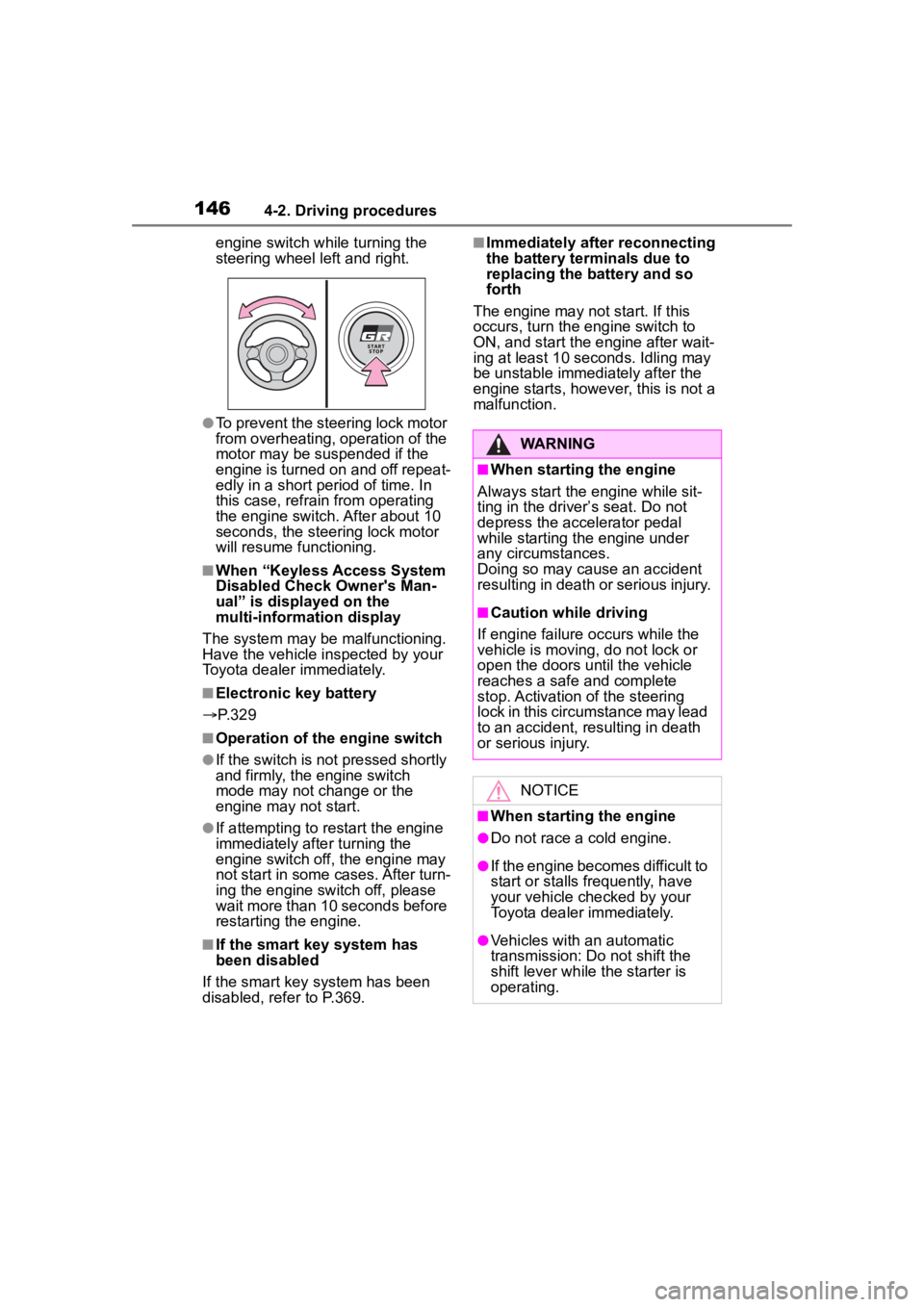
●When the steering lock cannot be
released, “Locked. Push Ignition
Switch While Turning Steering
Wheel” will be dis played on the
multi-information display.
Check that the shift lever is in P
(automatic transmission) or N
(manual transmission). Press the
Engine (ignition)
switch
Performing the following
operations when carrying
the electronic key on your
person starts the engine or
changes engine switch
modes.
Starting the engine
Page 146 of 449
1464-2. Driving procedures
engine switch while turning the
steering wheel left and right.
●To prevent the steering lock motor
from overheating, operation of the
motor may be suspended if the
engine is turned on and off repeat-
edly in a short period of time. In
this case, refrain from operating
the engine switch. After about 10
seconds, the steering lock motor
will resume functioning.
■When “Keyless Access System
Disabled Check Owner's Man-
ual” is displayed on the
multi-information display
The system may be malfunctioning.
Have the vehicle inspected by your
Toyota dealer immediately.
■Electronic key battery
P. 3 2 9
■Operation of the engine switch
●If the switch is not pressed shortly
and firmly, the engine switch
mode may not change or the
engine may not start.
●If attempting to restart the engine
immediately after turning the
engine switch off, the engine may
not start in some cases. After turn-
ing the engine switch off, please
wait more than 10 seconds before
restarting the engine.
■If the smart key system has
been disabled
If the smart key system has been
disabled, refer to P.369.
■Immediately after reconnecting
the battery terminals due to
replacing the battery and so
forth
The engine may not start. If this
occurs, turn the engine switch to
ON, and start the engine after wait-
ing at least 10 seconds. Idling may
be unstable immedi ately after the
engine starts, however, this is not a
malfunction.
WARNING
■When starting the engine
Always start the engine while sit-
ting in the driver’s seat. Do not
depress the accelerator pedal
while starting the engine under
any circumstances.
Doing so may cause an accident
resulting in death o r serious injury.
■Caution while driving
If engine failure occurs while the
vehicle is moving, do not lock or
open the doors until the vehicle
reaches a safe and complete
stop. Activation of the steering
lock in this circumstance may lead
to an accident, resulting in death
or serious injury.
NOTICE
■When starting the engine
●Do not race a cold engine.
●If the engine becomes difficult to
start or stalls frequently, have
your vehicle checked by your
Toyota dealer immediately.
●Vehicles with an automatic
transmission: Do not shift the
shift lever while the starter is
operating.
Page 147 of 449
1474-2. Driving procedures
4
Driving
Automatic transmission
1 Stop the vehicle completely.
2 Set the parking brake
( P.156), and shift the shift
lever to P.
Check the parking brake indicator
is illuminated.
3 Press the engine switch.
The engine will stop, and the meter
display will be extinguished.
4Release the brake pedal and
check that “ACCESSORY” or
“IGNITION ON” is not shown
on the meters.
Manual transmission
1 Stop the vehicle completely.
2 Set the parking brake.
( P.156)
Check the parking brake indicator
is illuminated.
3Shift the shift lever to N.
( P.153)
4 Press the engine switch.
The engine will stop, and the meter
display will be extinguished.
5Release the brake pedal and
check that “ACCESSORY” or
“IGNITION ON” is not shown
on the meters.
Modes can be changed by NOTICE
■Symptoms indicating a mal-
function with the engine
switch
If the engine switch seems to be
operating somewh at differently
than usual, such as the switch
sticking slightly, there may be a
malfunction. Contact your Toyota
dealer immediately.
Stopping the engine
WARNING
■Stopping the engine in an
emergency
If you want to stop the engine in
an emergency while driving the
vehicle, press and hold the engine
switch for more than 2 seconds,
or press it briefly 3 times or more
in succession. ( P.338)
However, do not touch the engine
switch while driving except in an
emergency. Turning the engine off
while driving will not cause loss of
steering or braking control, but the
power assist to these systems will
be lost. This will make it more dif-
ficult to steer a nd brake, so you
should pull over and stop the
vehicle as soon as it is safe to do
so.
●If the engine switch is operated
while the vehicle is running, a
warning message will be shown
on the multi-information display
and a buzzer sounds.
●Vehicles with an automatic
transmission: To restart the
engine after performing an
emergency shutdown, shift the
shift lever to N and then press
the engine switch.
●Vehicles with a manual trans-
mission: To restart the engine
after performing an emergency
shutdown, depress the clutch
pedal and then press the engine
switch.
Changing engine switch
modes
Page 150 of 449
1504-2. Driving procedures
vehicle will go into transmission pro-
tection mode automatically. Have
the vehicle inspected by your Toyota
dealer.
■When driving with Adaptive
Cruise Control or Conventional
Cruise Control activated
Downshifting can be performed
even when using Adaptive Cruise
Control or Conventional Cruise Con-
trol. After downshifting, the set
speed continues. ( P.151, 152)
■Automatic gear selection when
the vehicle is stopped
When the vehicle is idling at high
rpm in order to warm up, and the
vehicle is on a slippery road, the
transmission may automatically shift
to 2nd gear for stopping and starting
off.
■AI-SHIFT
●The AI-SHIFT automatically
selects the suitable gear accord-
ing to driver performance and driv-
ing conditions. The AI-SHIFT
automatically operates when the
shift lever is in D. (Shifting the shift
lever to the M position cancels the
function.)
●G AI-SHIFT automat ically selects
a suitable gear for sporty driving
according to dri ver’s input and
driving conditions. G AI-SHIFT
operates automatically when the
shift lever is in D and sport mode
is selected for t he driving mode.
(Selecting normal mode with the
driving mode select switch or shift-
ing the shift lever to the M position
cancels this function.)
■After recharging/reconnecting
the battery
P. 3 7 3
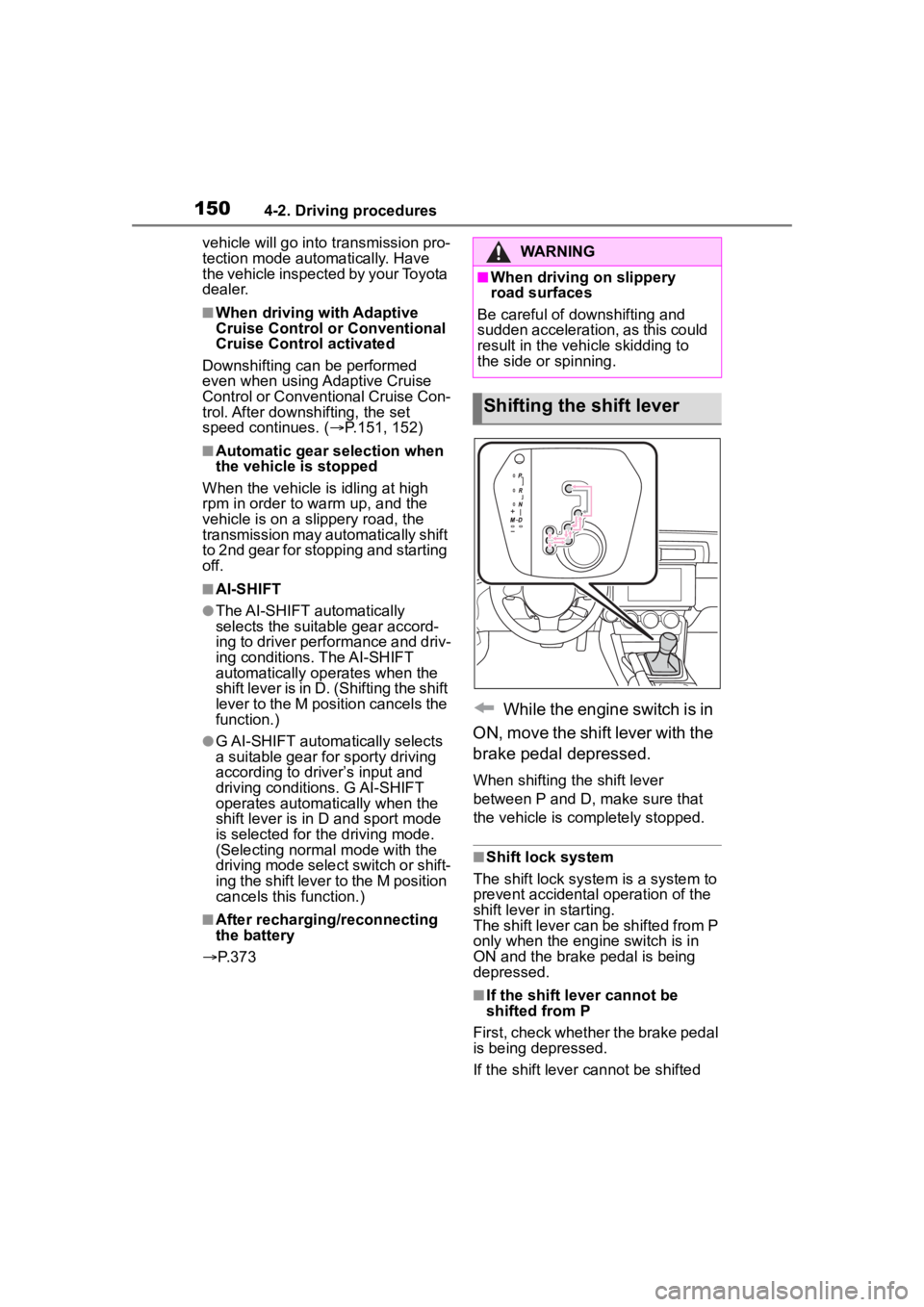
While the engine switch is in
ON, move the shift lever with the
brake pedal depressed.
When shifting the shift lever
between P and D, make sure that
the vehicle is completely stopped.
■Shift lock system
The shift lock system is a system to
prevent accidental operation of the
shift lever in starting.
The shift lever can be shifted from P
only when the engi ne switch is in
ON and the brake pedal is being
depressed.
■If the shift lever cannot be
shifted from P
First, check whether the brake pedal
is being depressed.
If the shift lever cannot be shifted
WARNING
■When driving on slippery
road surfaces
Be careful of downshifting and
sudden acceleration, as this could
result in the vehicle skidding to
the side or spinning.
Shifting the shift lever
Page 157 of 449
1574-2. Driving procedures
4
Driving
■When changing the driving
mode (vehicles with an auto-
matic transmission)
When the driving mode is changed,
the sound of the active sound con-
trol will be stopped for approxi-
mately 1 second, this is not a
malfunction.
■Customization
Some functions can be customized.
( P.400)
NOTICE
■When parking the vehicle
Before you leave the vehicle, set
the parking brake, shift the shift
lever to P (automatic transmis-
sion) or N (manual transmission)
and make sure that the vehicle
does not move.
■Before driving
Fully release the parking brake.
Driving the vehicle with the park-
ing brake set will lead to brake
components overheating, which
may affect braking performance
and increase brake wear.
ASC (Active Sound
Control)
The active sound control
provides dynamic engine
sounds. When driving with
sport mode
* ( P.257)
selected, the engine sounds
will be particularly loud.
*: If equipped
Page 177 of 449
1774-5. EyeSight
4
Driving
EyeSight includes the following
functions.
■Pre-Collision Braking Sys-
tem
This function uses a following
distance warning feature to
warn the driver to take evasive
action when there is the possi-
bility of a collision with a vehicle,
pedestrian or obstacle in front of
you. If the driver does not take
evasive action, the brakes are
applied automatically to help
reduce vehicle collision dam-
age or, if possible, help prevent
a collision. ( P.179)
■Adaptive Cruise Control
This function maintains the set
vehicle speed and when there is
a vehicle in front in the same
traffic lane, it follows the speed
of the vehicle in front up to the
maximum of the set vehicle
speed. ( P.190)
■Conventional Cruise Con-
trol
In this mode, the system main-
tains a constant vehicle speed.
It does not follow the vehicle in
front. This function can be used
even when the stereo camera
has temporarily stopped operat-
ing ( P.228). This function is
used by switching from Adaptive
Cruise Control to Conventional
Cruise Control. ( P.207)
NOTICE
●Keep the windshield (outside
and inside) clean at all times.
When the windshield has
become fogged, or it has a dirt
or an oil film on it, the stereo
camera may not detect objects
accurately and the EyeSight
system may not operate cor-
rectly. Never mount any device
to the center air vent, as any air-
flow change may impact Eye-
Sight performance.
●Do not place any stickers or
accessories on the windshield
(outside or inside). If you have
to do so (for example, legally
required or electronic toll tag),
avoid the area directly in front of
the camera. Otherwise, it may
adversely affect the field of view
of the stereo camera and can
cause improper operation of the
system. For details, contact a
Toyota dealer.
●Do not use any glass coating
agents or similar substances on
the windshield. Doing so may
interfere with the proper opera-
tion of the system.
●Do not install any film or an
additional layer of glass on the
windshield. The system may not
operate correctly.
●If there are scratches or cracks
on the windshield, contact a
Toyota dealer.
●To have the windshield replaced
or repaired, contact a Toyota
dealer. Do not install a wind-
shield other than a genuine Toy-
ota windshield. The stereo
camera may not be able to
detect objects accurately and
the EyeSight system may not
operate properly.
EyeSight functions
Page 188 of 449
1884-5. EyeSight
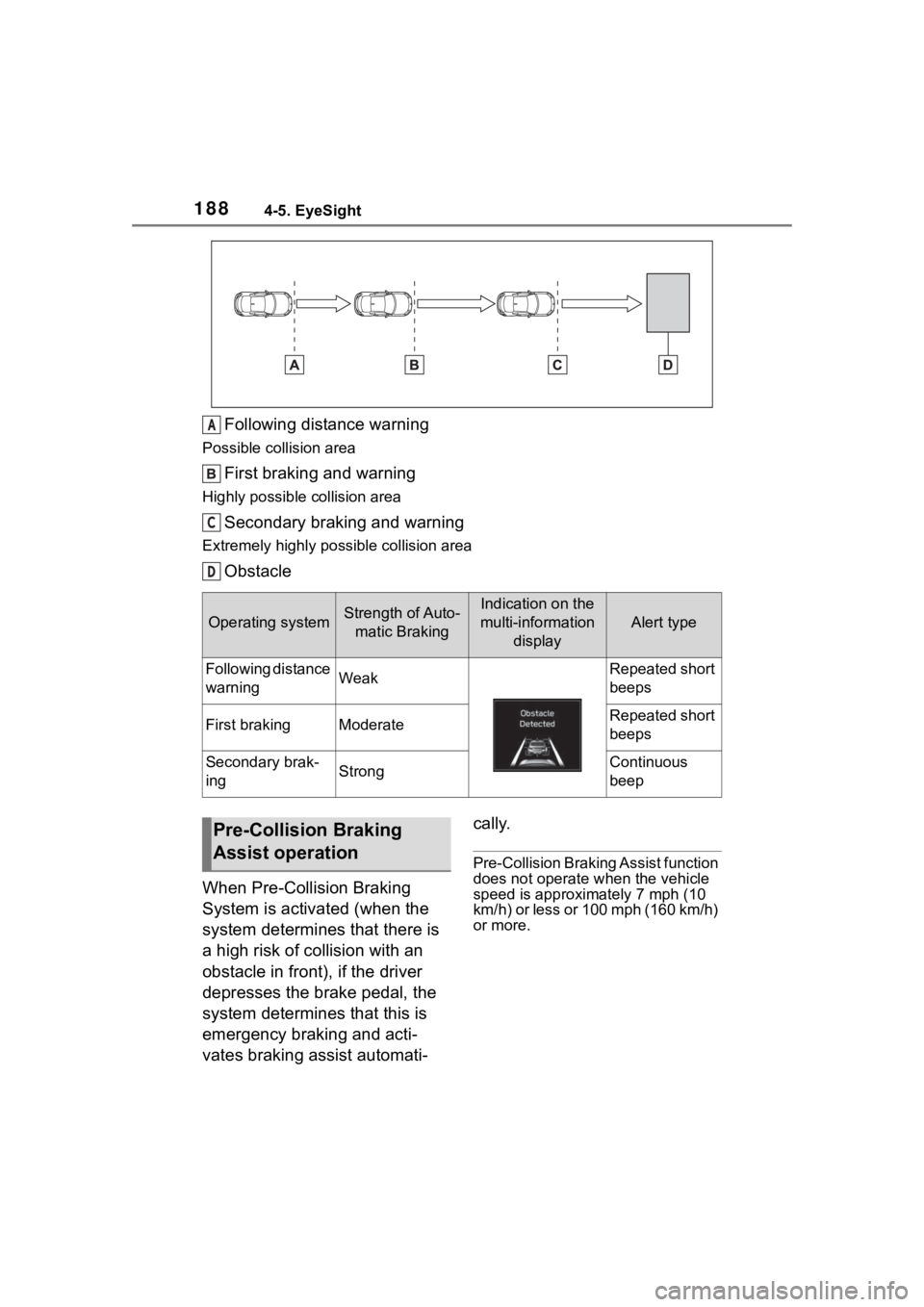
Following distance warning
Possible collision area
First braking and warning
Highly possible collision area
Secondary braking and warning
Extremely highly possible collision area
Obstacle
When Pre-Collision Braking
System is activated (when the
system determines that there is
a high risk of collision with an
obstacle in front), if the driver
depresses the brake pedal, the
system determines that this is
emergency braking and acti-
vates braking assist automati- cally.
Pre-Collision Braking Assist function
does not operate when the vehicle
speed is approximately 7 mph (10
km/h) or less or 100 mph (160 km/h)
or more.
Operating systemStrength of Auto-
matic BrakingIndication on the
multi-information display
Alert type
Following distance
warningWeakRepeated short
beeps
First brakingModerateRepeated short
beeps
Secondary brak-
ingStrongContinuous
beep
A
C
D
Pre-Collision Braking
Assist operation
Page 196 of 449
1964-5. EyeSight
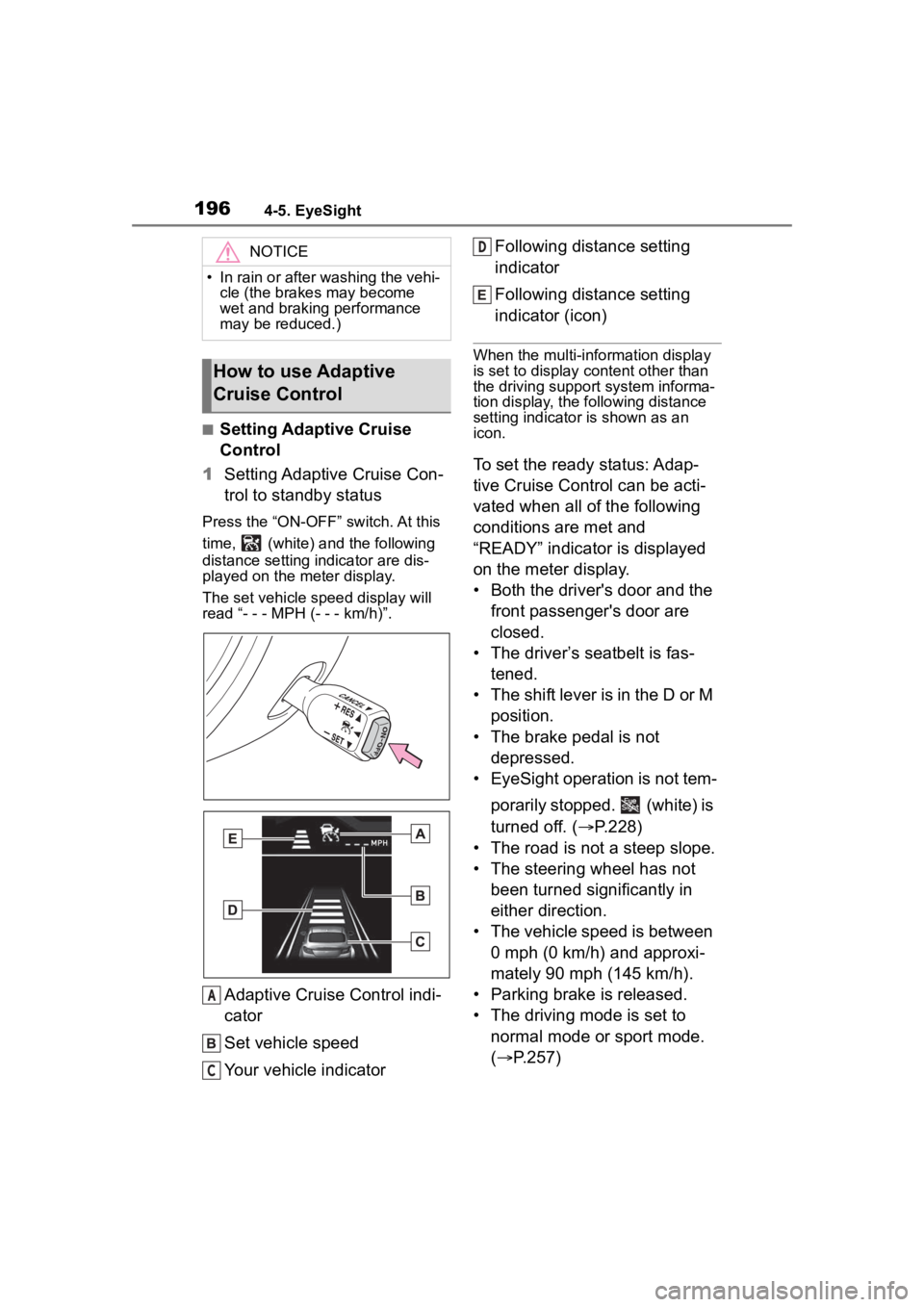
■Setting Adaptive Cruise
Control
1 Setting Adaptive Cruise Con-
trol to standby status
Press the “ON-OFF” switch. At this
time, (white) a nd the following
distance setting indicator are dis-
played on the meter display.
The set vehicle speed display will
read “- - - MPH (- - - km/h)”.
Adaptive Cruise Control indi-
cator
Set vehicle speed
Your vehicle indicator Following distance setting
indicator
Following distance setting
indicator (icon)
When the multi-information display
is set to display content other than
the driving support system informa-
tion display, the following distance
setting indicator is shown as an
icon.
To set the ready status: Adap-
tive Cruise Control can be acti-
vated when all of the following
conditions are met and
“READY” indicator is displayed
on the meter display.
• Both the driver's door and the
front passenger's door are
closed.
• The driver’s seatbelt is fas- tened.
• The shift lever is in the D or M position.
• The brake pedal is not depressed.
• EyeSight operation is not tem-
porarily stopped. (white) is
turned off. ( P.228)
• The road is not a steep slope.
• The steering wheel has not been turned significantly in
either direction.
• The vehicle speed is between 0 mph (0 km/h) and approxi-
mately 90 mph (145 km/h).
• Parking brake is released.
• The driving mode is set to normal mode or sport mode.
( P.257)
NOTICE
• In rain or after washing the vehi-
cle (the brakes may become
wet and braking performance
may be reduced.)
How to use Adaptive
Cruise Control
A
C
D
Page 204 of 449
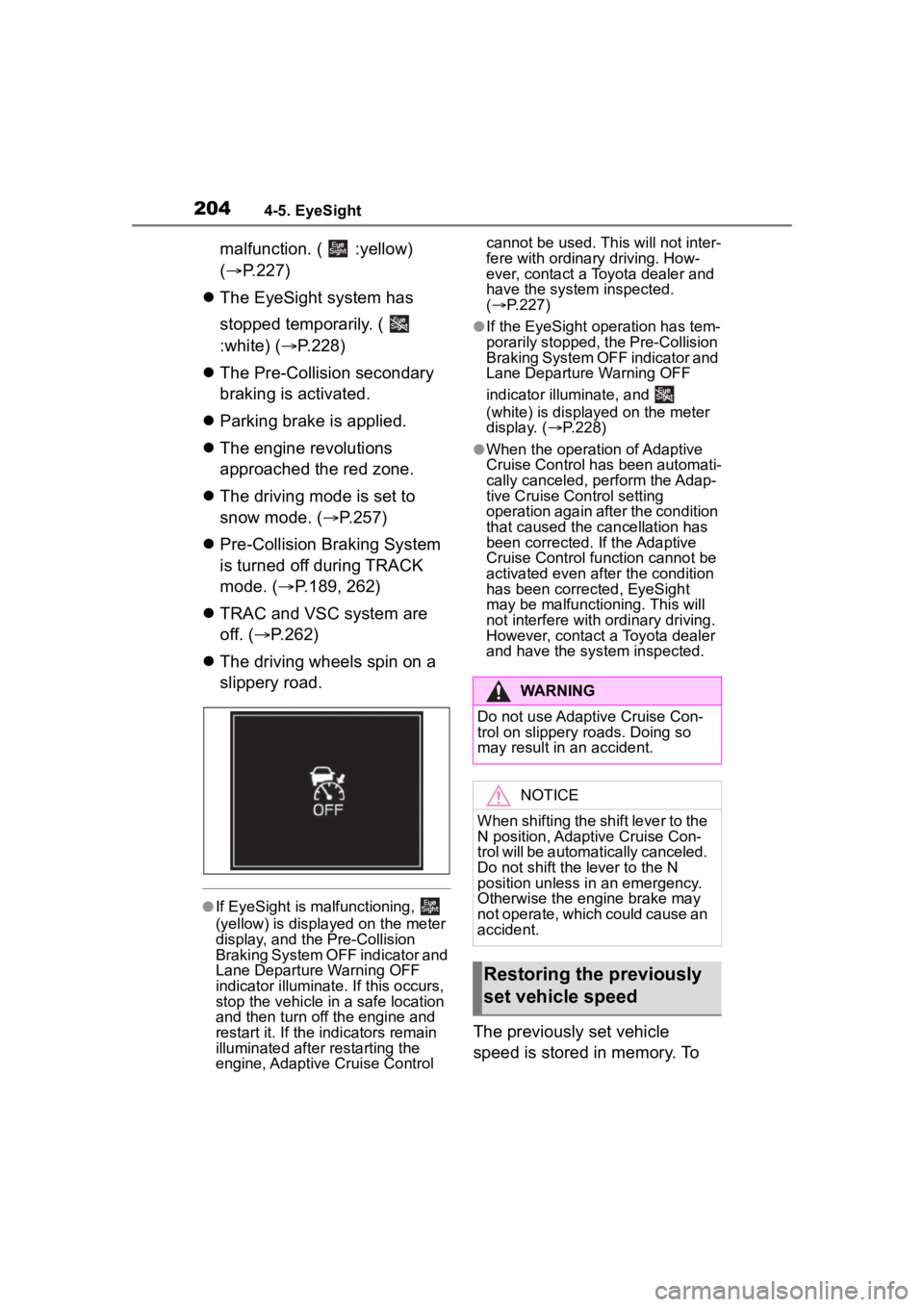
2044-5. EyeSight
malfunction. ( :yellow)
(P.227)
The EyeSight system has
stopped temporarily. (
:white) ( P.228)
The Pre-Collision secondary
braking is activated.
Parking brake is applied.
The engine revolutions
approached the red zone.
The driving mode is set to
snow mode. ( P.257)
Pre-Collision Braking System
is turned off during TRACK
mode. ( P.189, 262)
TRAC and VSC system are
off. ( P.262)
The driving wheels spin on a
slippery road.
●If EyeSight is m alfunctioning,
(yellow) is displayed on the meter
display, and the Pre-Collision
Braking System OFF indicator and
Lane Departure Warning OFF
indicator illuminate. If this occurs,
stop the vehicle in a safe location
and then turn off the engine and
restart it. If the indicators remain
illuminated after restarting the
engine, Adaptive Cruise Control cannot be used. Th
is will not inter-
fere with ordinary driving. How-
ever, contact a Toyota dealer and
have the system inspected.
( P.227)
●If the EyeSight operation has tem-
porarily stopped, the Pre-Collision
Braking System OFF indicator and
Lane Departure Warning OFF
indicator illuminate, and
(white) is displayed on the meter
display. ( P.228)
●When the operation of Adaptive
Cruise Control has been automati-
cally canceled, perform the Adap-
tive Cruise Control setting
operation again after the condition
that caused the cancellation has
been corrected. If the Adaptive
Cruise Control function cannot be
activated even after the condition
has been corrected, EyeSight
may be malfunctioning. This will
not interfere with ordinary driving.
However, contact a Toyota dealer
and have the system inspected.
The previously set vehicle
speed is stored in memory. To
WARNING
Do not use Adaptive Cruise Con-
trol on slippery roads. Doing so
may result in an accident.
NOTICE
When shifting the shift lever to the
N position, Adaptive Cruise Con-
trol will be automatically canceled.
Do not shift the lever to the N
position unless in an emergency.
Otherwise the engine brake may
not operate, which could cause an
accident.
Restoring the previously
set vehicle speed