engine TOYOTA 86 2023 Owners Manual
[x] Cancel search | Manufacturer: TOYOTA, Model Year: 2023, Model line: 86, Model: TOYOTA 86 2023Pages: 449, PDF Size: 8.5 MB
Page 223 of 449
2234-5. EyeSight
4
Driving
screen to turn on/off Lane Sway
Warning. (P.400)
Multi-information display
Also you can turn on/off Lane
Sway Warning using the meter
operation switch. ( P.400)
If Lane Sway Warning is turned
off, the Lane Departure Warning
OFF indicator illuminates.
●The on/off setting for Lane Sway
Warning operates in cooperation
with Lane Departure Warning.
●The on/off status of Lane Sway
Warning is restored when you
restart the engine.
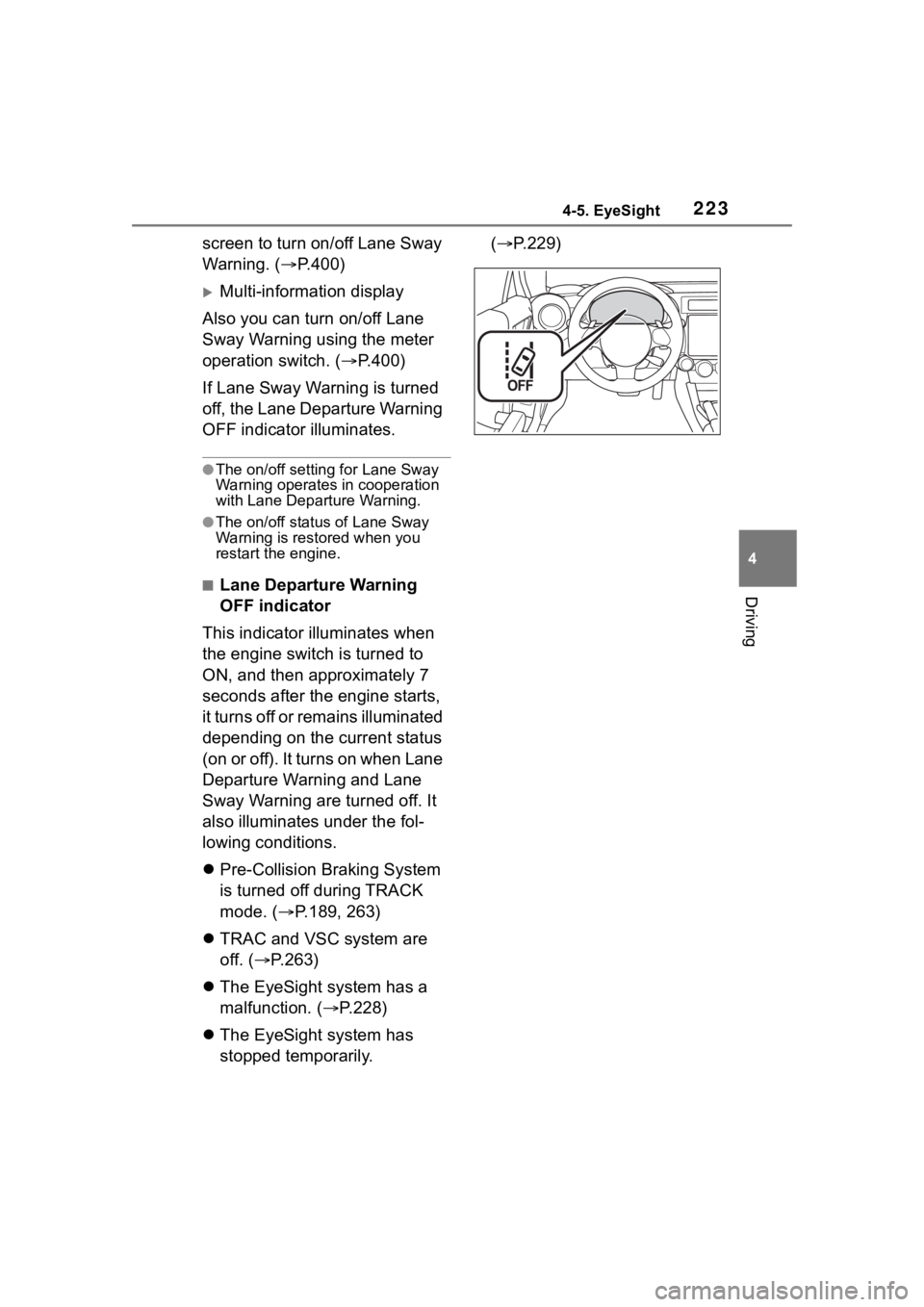
■Lane Departure Warning
OFF indicator
This indicator illuminates when
the engine switch is turned to
ON, and then approximately 7
seconds after the engine starts,
it turns off or remains illuminated
depending on the current status
(on or off). It turns on when Lane
Departure Warning and Lane
Sway Warning are turned off. It
also illuminates under the fol-
lowing conditions.
Pre-Collision Braking System
is turned off during TRACK
mode. ( P.189, 263)
TRAC and VSC system are
off. ( P.263)
The EyeSight system has a
malfunction. ( P.228)
The EyeSight system has
stopped temporarily. (
P.229)
Page 228 of 449
2284-5. EyeSight
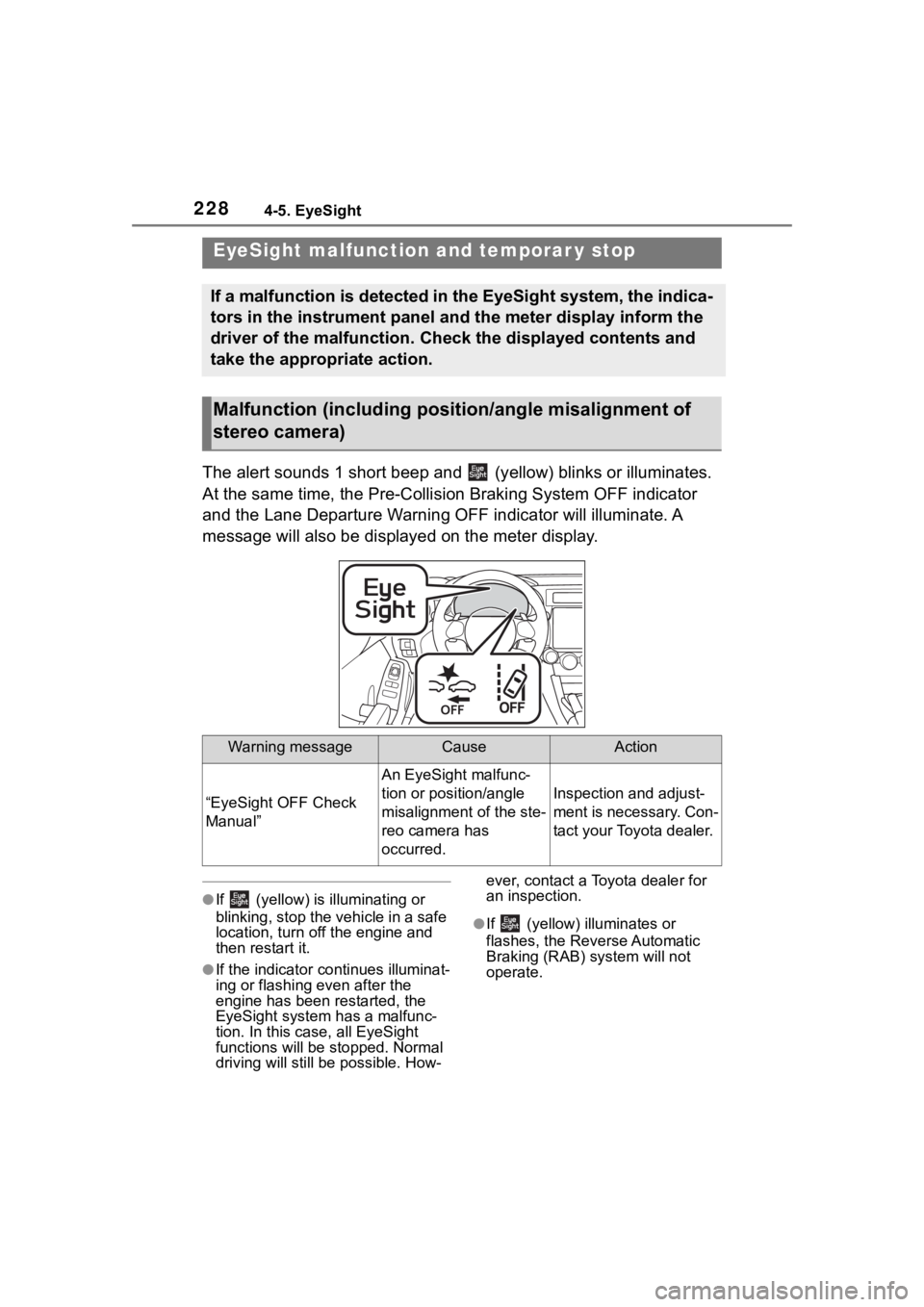
The alert sounds 1 short beep and (yellow) blinks or illuminates.
At the same time, the Pre-Collision Braking System OFF indicato r
and the Lane Departure Warning OFF indicator will illuminate. A
message will also be displayed on the meter display.
●If (yellow) is illuminating or
blinking, stop the vehicle in a safe
location, turn off the engine and
then restart it.
●If the indicator co ntinues illuminat-
ing or flashing even after the
engine has been restarted, the
EyeSight system has a malfunc-
tion. In this case, all EyeSight
functions will be stopped. Normal
driving will still be possible. How- ever, contact a Toyota dealer for
an inspection.
●If (yellow) illuminates or
flashes, the Reverse Automatic
Braking (RAB) system will not
operate.
EyeSight malfuncti
on and temporar y stop
If a malfunction is detected in the EyeSight system, the indica -
tors in the instrument panel and the meter display inform the
driver of the malfunction. Check the displayed contents and
take the appropriate action.
Malfunction (including posit ion/angle misalignment of
stereo camera)
Warning messageCauseAction
“EyeSight OFF Check
Manual”
An EyeSight malfunc-
tion or position/angle
misalignment of the ste-
reo camera has
occurred.
Inspection and adjust-
ment is necessary. Con-
tact your Toyota dealer.
Page 229 of 449
2294-5. EyeSight
4
Driving
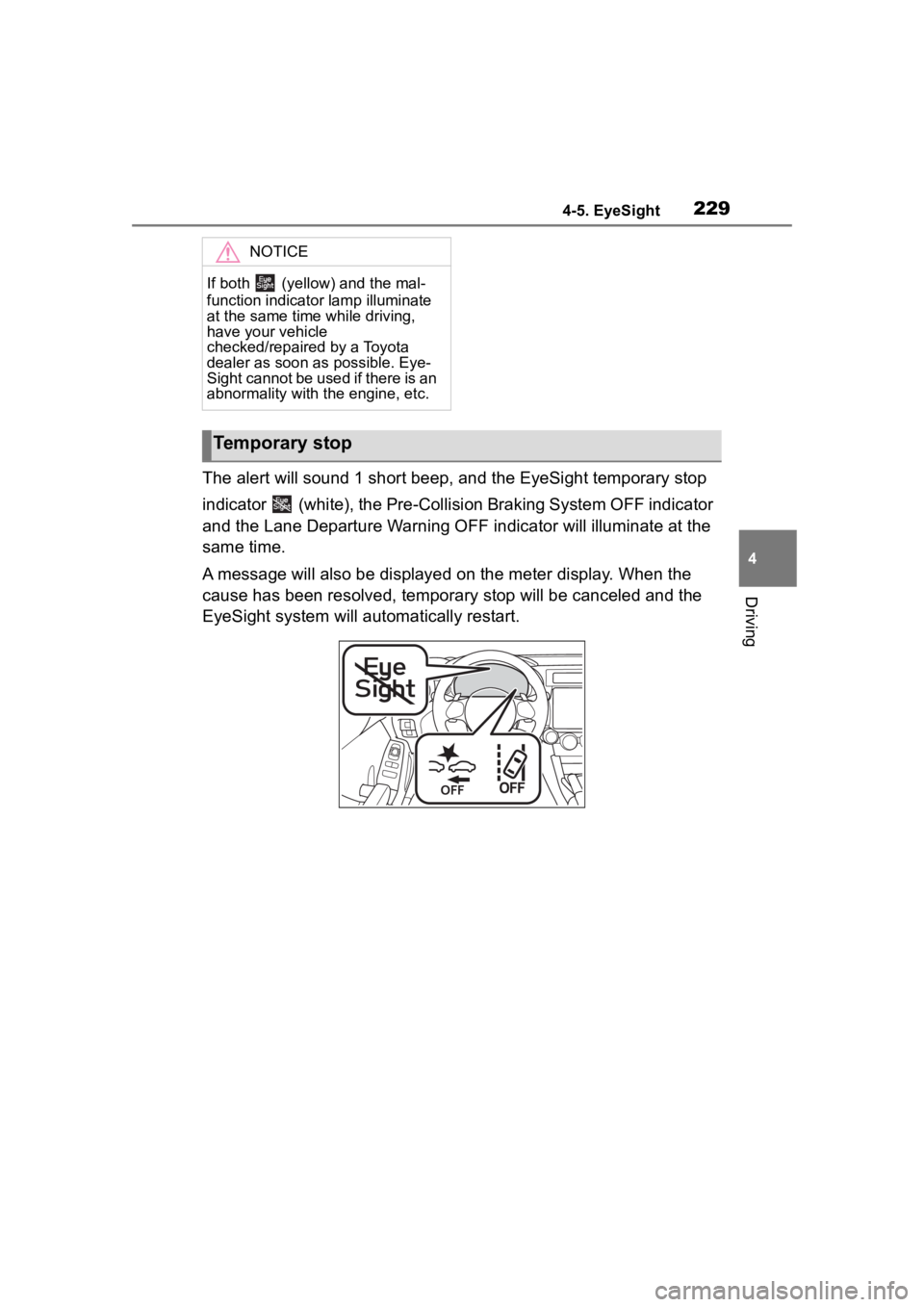
The alert will sound 1 short beep, and the EyeSight temporary stop
indicator (white), the Pre-Collision Braking System OFF indicator
and the Lane Departure Warning OFF indicator will illuminate at the
same time.
A message will also be displayed on the meter display. When the
cause has been resolved, temporary stop will be canceled and the
EyeSight system will automatically restart.
NOTICE
If both (yellow) and the mal-
function indicator lamp illuminate
at the same time while driving,
have your vehicle
checked/repaired by a Toyota
dealer as soon as possible. Eye-
Sight cannot be used if there is an
abnormality with the engine, etc.
Temporary stop
Page 231 of 449
2314-5. EyeSight
4
Driving
●When (white) is illuminated,
no EyeSight functions can be
used except for Conventional
Cruise Control.
●When (white) is illuminated,
the Reverse Automatic Braking
(RAB) system may not operate.
“EyeSight Disabled
Temp Range”In low or high tempera-
tures
The system will restart
once the temperature is
within the operational
range of the EyeSight
system. If the system
does not restart, even
when the temperature
inside the vehicle is
within the operational
range, contact your Toy-
ota dealer for an inspec-
tion.
“EyeSight Disabled
Check Manual”
• The EyeSight system is starting up.
• The system has determined that the
vehicle is extremely
inclined.
• The Pre-Collision sec- ondary braking has
operated 3 times after
the engine was
started.
• The engine has stopped.The system w ill restart
once the cause has
been resolved. At this
time, it may take some
time for the system to
restart. If the system
does not restart, even
after the co nditions
have improved and a
period of time has
elapsed, contact your
Toyota dealer for an
inspection.
Warning messageCauseAction
Page 234 of 449
2344-6. Using other driving systems
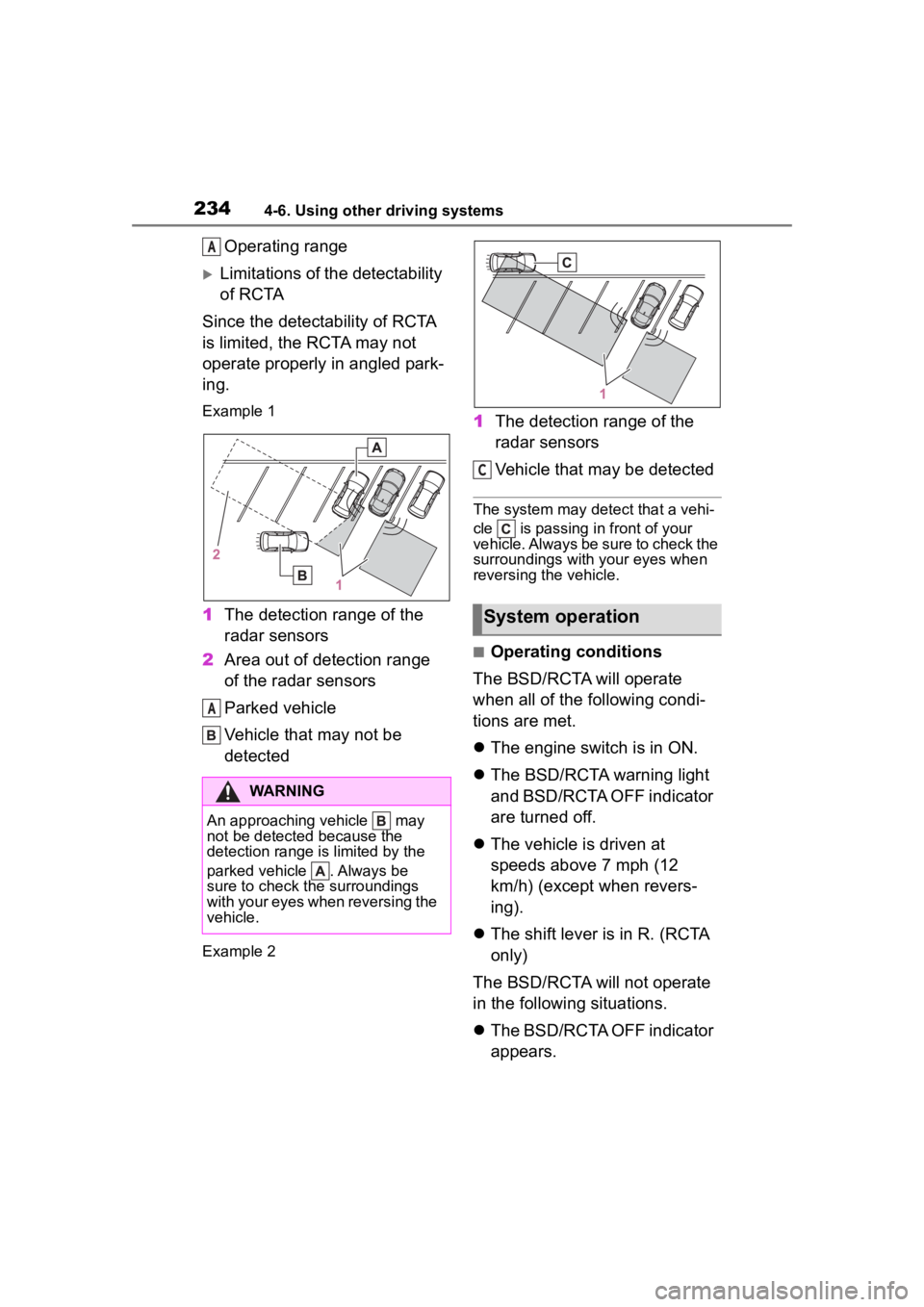
Operating range
Limitations of the detectability
of RCTA
Since the detectability of RCTA
is limited, the RCTA may not
operate properly in angled park-
ing.
Example 1
1 The detection range of the
radar sensors
2 Area out of detection range
of the radar sensors
Parked vehicle
Vehicle that may not be
detected
Example 2
1The detection range of the
radar sensors
Vehicle that may be detected
The system may detect that a vehi-
cle is passing in front of your
vehicle. Always be sure to check the
surroundings with your eyes when
reversing the vehicle.
■Operating conditions
The BSD/RCTA will operate
when all of the following condi-
tions are met.
The engine switch is in ON.
The BSD/RCTA warning light
and BSD/RCTA OFF indicator
are turned off.
The vehicle is driven at
speeds above 7 mph (12
km/h) (except when revers-
ing).
The shift lever is in R. (RCTA
only)
The BSD/RCTA will not operate
in the following situations.
The BSD/RCTA OFF indicator
appears.
WARNING
An approaching vehicle may
not be detected because the
detection range is limited by the
parked vehicle . Always be
sure to check the surroundings
with your eyes when reversing the
vehicle.
A
A
System operation
C
Page 239 of 449
2394-6. Using other driving systems
4
Driving
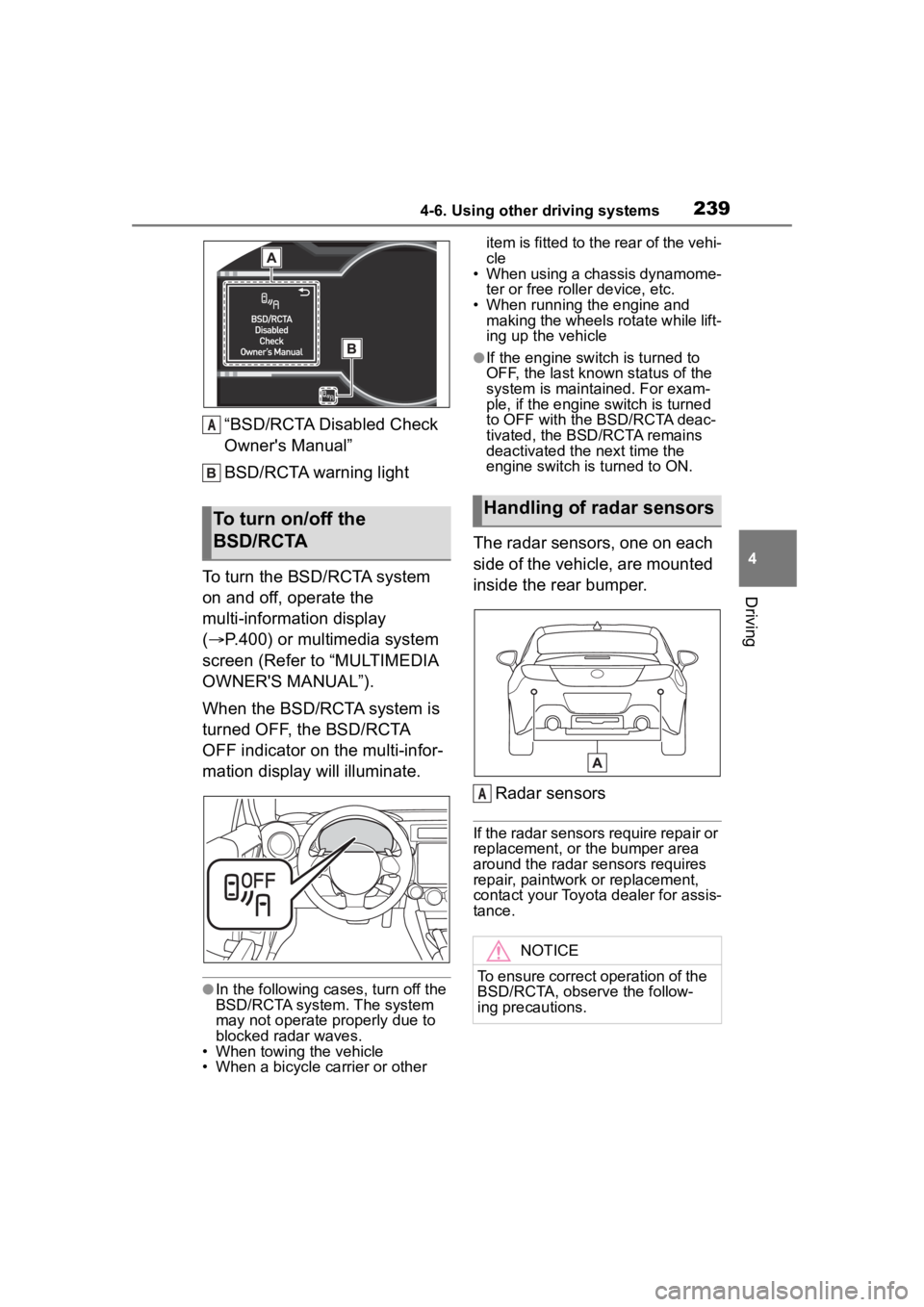
“BSD/RCTA Disabled Check
Owner's Manual”
BSD/RCTA warning light
To turn the BSD/RCTA system
on and off, operate the
multi-information display
( P.400) or multimedia system
screen (Refer to “MULTIMEDIA
OWNER'S MANUAL”).
When the BSD/RCTA system is
turned OFF, the BSD/RCTA
OFF indicator on the multi-infor-
mation display will illuminate.
●In the following cases, turn off the
BSD/RCTA system. The system
may not operate properly due to
blocked radar waves.
• When towing the vehicle
• When a bicycle carrier or other item is fitted to the rear of the vehi-
cle
• When using a chassis dynamome-
ter or free rolle r device, etc.
• When running the engine and making the wheels rotate while lift-
ing up the vehicle
●If the engine switch is turned to
OFF, the last known status of the
system is maintained. For exam-
ple, if the engine switch is turned
to OFF with the BSD/RCTA deac-
tivated, the BSD/RCTA remains
deactivated the next time the
engine switch is turned to ON.
The radar sensors, one on each
side of the vehicle, are mounted
inside the rear bumper.
Radar sensors
If the radar sensors require repair or
replacement, or the bumper area
around the radar sensors requires
repair, paintwork or replacement,
contact your Toyota dealer for assis-
tance.
To turn on/off the
BSD/RCTA
A
Handling of radar sensors
NOTICE
To ensure correct operation of the
BSD/RCTA, observe the follow-
ing precautions.
A
Page 242 of 449
2424-6. Using other driving systems
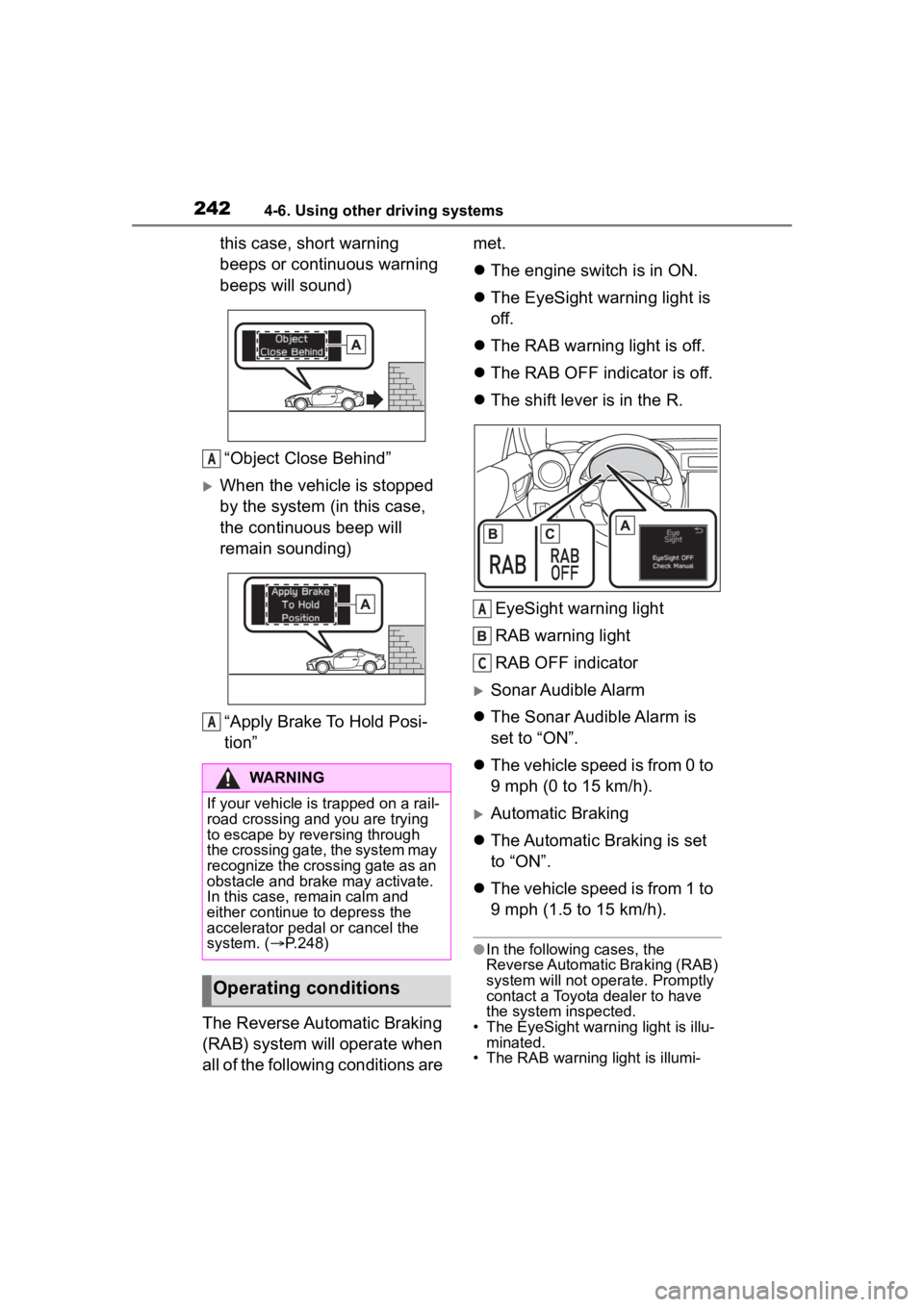
this case, short warning
beeps or continuous warning
beeps will sound)“Object Close Behind”
When the vehicle is stopped
by the system (in this case,
the continuous beep will
remain sounding)“Apply Brake To Hold Posi-
tion”
The Reverse Automatic Braking
(RAB) system will operate when
all of the following conditions are met.
The engine switch is in ON.
The EyeSight warning light is
off.
The RAB warning light is off.
The RAB OFF indicator is off.
The shift lever is in the R.
EyeSight warning light
RAB warning light
RAB OFF indicator
Sonar Audible Alarm
The Sonar Audible Alarm is
set to “ON”.
The vehicle speed is from 0 to
9 mph (0 to 15 km/h).
Automatic Braking
The Automatic Braking is set
to “ON”.
The vehicle speed is from 1 to
9 mph (1.5 to 15 km/h).
●In the following cases, the
Reverse Automatic Braking (RAB)
system will not oper ate. Promptly
contact a Toyota dealer to have
the system inspected.
• The EyeSight warning light is illu- minated.
• The RAB warning light is illumi-
WARNING
If your vehicle is trapped on a rail-
road crossing and you are trying
to escape by reve rsing through
the crossing gate, the system may
recognize the crossing gate as an
obstacle and brake may activate.
In this case, rem ain calm and
either continue to depress the
accelerator pedal or cancel the
system. ( P.248)
Operating conditions
A
A
A
C
Page 243 of 449
2434-6. Using other driving systems
4
Driving
nated.
●In the following cases, the
Reverse Automatic Braking (RAB)
system cannot be operated.
• The RAB OFF indicator is illumi-
nated.
●In the following cases, the func-
tions may not be able to properly
work. Promptly contact a Toyota
dealer to have the system
inspected.
• A sticker, paint, or a chemical is applied to the sonar sensors or
the rear bumper near the sonar
sensor.
• The rear bumper is modified.
• The rear bumper has been
removed and attached.
• The ground clearance is changed
due to the vehicle’s loading condi-
tion or modification.
• There is damage to the sonar sen-
sors or the rear bumper near the
sonar sensor.
• The rear bumper is exposed to
strong impact, or the rear bumper
is deformed.
●On a steep hill, t he system’s auto-
matic braking ability will be
reduced.
●The system is designed to avoid
collisions by automatic hard brak-
ing when the vehicle’s reversing
speed is less than approximately
3 mph (5 km/h). However, the sys-
tem does not guarantee that the
vehicle will be able to avoid colli-
sions in any situation.
●If the vehicle is reversed at an
extremely slow speed, the driver’s
operation may be prioritized. In
this case, automatic braking will
not operate.
●The system may not be able to
detect and apply the brake with
the following objects.
• Sharp or thin objects such as poles, fences and ropes which
may not reflect the sound wave
emitted from the sonar sensor.
• Objects that are t oo close to the
rear bumper when the shift lever is set to R.
• Objects with a su rface which may
not reflect the sound wave emitted
from the sonar sensor such as a
chain link fence.
●Objects the system is not
designed to detect and apply
brake.
• Pedestrians.
• Moving objects including moving vehicles.
• Objects which absorbs sound waves such as cloth or snow.
• Objects whose surface has a
diagonal angle.
• Objects that are low to the ground such as parking blocks.
• Objects that are high above the ground such as objects hanging
from above.
• Objects that are out of range of
the center of the vehicle in the
horizontal direction.
• Objects that are n ot in a vertical
direction.
• Objects which are not perpendicu-
lar to the ground.
• Objects which are not directly in the traveling direction of the vehi-
cle.
• Objects which a re uneven or
wavy.
●When reversing the vehicle, the
functions may not be able to work
properly or may cause a system
malfunction if the following condi-
tions exist.
High frequency so und from other
sources are nearby:
• Horn sound from another vehicle.
• Engine sound from other vehicles.
• Sound of an air brake.
• Vehicle detection equipment or a
sonar from another vehicle.
• A sound wave with a frequency similar to the veh icle’s system is
transmitted near by.
• A vehicle equipped with the same system is reversing toward your
reversing direction.
●Weather conditions:
• Extremely high or extremely low
Page 245 of 449
2454-6. Using other driving systems
4
Driving
●In circumstances such as the fol-
lowing, it may not be possible to
avoid a collision even when the
system operate s normally.
• Roads are slippery.
• The tire air pressure is not correct.
• The tires have become worn.
• Tire chains are installed.
• Tires which are not the designated size are installed.
• Emergency repairs were per- formed using a puncture repair kit.
• The suspension was modified.
• Vehicle driving is unstable due to accident or malfunction.
• The brake system warning light is
illuminated.
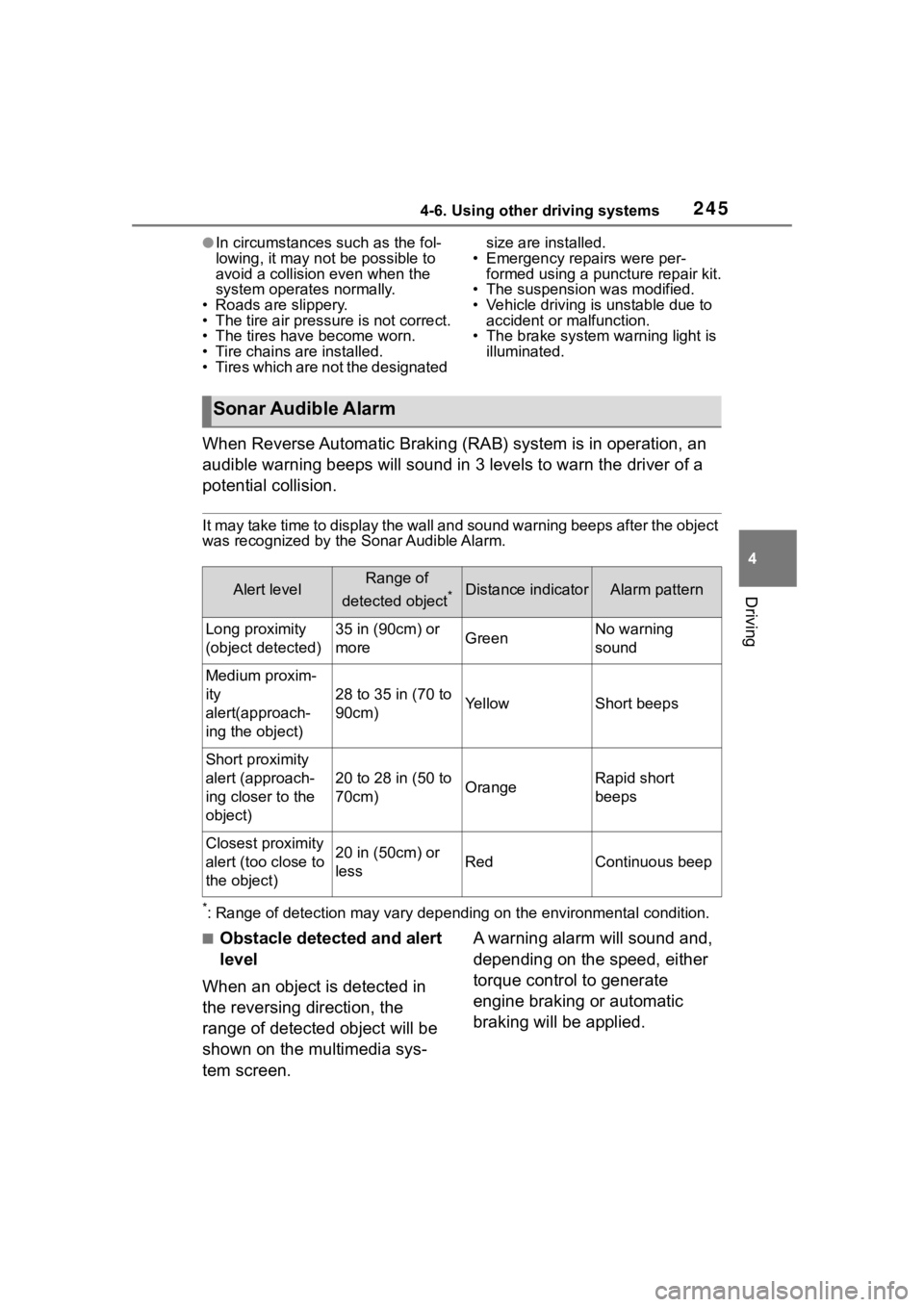
When Reverse Automatic Braking (RAB) system is in operation, an
audible warning beeps will sound in 3 levels to warn the driver of a
potential collision.
It may take time to display the wall and sound warning beeps af ter the object
was recognized by the Sonar Audible Alarm.
*: Range of detection may vary d epending on the environmental condition.
■Obstacle detected and alert
level
When an object is detected in
the reversing direction, the
range of detected object will be
shown on the multimedia sys-
tem screen. A warning alarm will sound and,
depending on the speed, either
torque control to generate
engine braking or automatic
braking will be applied.
Sonar Audible Alarm
Alert levelRange of
detected object
*Distance indicatorAlarm pattern
Long proximity
(object detected)35 in (90cm) or
moreGreenNo warning
sound
Medium proxim-
ity
alert(approach-
ing the object)
28 to 35 in (70 to
90cm)YellowShort beeps
Short proximity
alert (approach-
ing closer to the
object)
20 to 28 in (50 to
70cm)OrangeRapid short
beeps
Closest proximity
alert (too close to
the object)20 in (50cm) or
lessRedContinuous beep
Page 250 of 449
2504-6. Using other driving systems
●Do not wipe the camera with alco-
hol, benzine or paint thinner.
Otherwise, discoloration may
occur. To remove contamination,
wipe the camera with a cloth
moistened with a diluted neutral
detergent. Then wipe it with a soft,
dry cloth.
●When waxing the vehicle, be care-
ful not to apply the wax to the
camera. If it comes in contact with
the camera, moisten a clean cloth
with a diluted neutral detergent to
remove the wax.
●The camera lens has a hard coat-
ing to help prevent scratches.
However, when washing the vehi-
cle or cleaning the camera lens,
be careful not to scratch the cam-
era lens. Do not use a washing
brush directly on the camera lens.
The image quality of the rear view
camera may deteriorate.
●Strong light shined on the camera lens may develop vertical lines
around the light source. This is not
a malfunction.
●Under the fluore
scent light, the
display may flicker. However, this
is not a malfunction.
●The image of the rear view cam-
era may be slightly different from
the actual color of the objects.
●If there is a mal function on the
multimedia system screen, refer to
“MULTIMEDIA OWNER'S MAN-
UAL”.
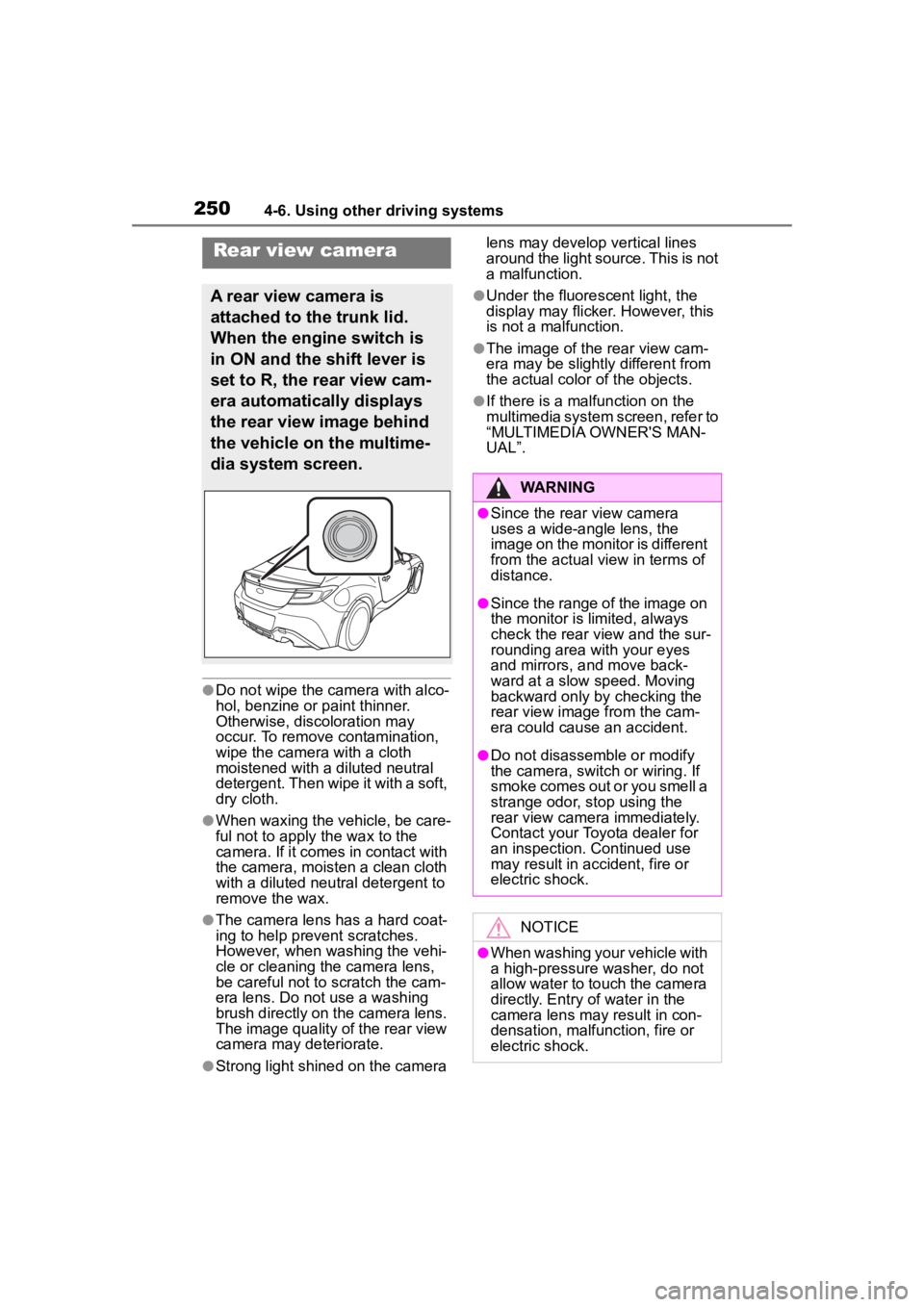
Rear view camera
A rear view camera is
attached to the trunk lid.
When the engine switch is
in ON and the shift lever is
set to R, the rear view cam-
era automatically displays
the rear view image behind
the vehicle on the multime-
dia system screen.
WARNING
●Since the rear view camera
uses a wide-angle lens, the
image on the monitor is different
from the actual view in terms of
distance.
●Since the range of the image on
the monitor is limited, always
check the rear view and the sur-
rounding area with your eyes
and mirrors, and move back-
ward at a slow speed. Moving
backward only by checking the
rear view image from the cam-
era could cause an accident.
●Do not disassemble or modify
the camera, switch or wiring. If
smoke comes out or you smell a
strange odor, stop using the
rear view camera immediately.
Contact your Toyota dealer for
an inspection. Continued use
may result in accident, fire or
electric shock.
NOTICE
●When washing your vehicle with
a high-pressure washer, do not
allow water to touch the camera
directly. Entry of water in the
camera lens may result in con-
densation, malfunction, fire or
electric shock.