engine TOYOTA 86 2023 Owners Manual
[x] Cancel search | Manufacturer: TOYOTA, Model Year: 2023, Model line: 86, Model: TOYOTA 86 2023Pages: 449, PDF Size: 8.5 MB
Page 251 of 449
2514-6. Using other driving systems
4
Driving
When the shift lever is set to R,
the rear view camera automati-
cally displays the rear view
image from the vehicle. When
the lever is set to other posi-
tions, the image before setting
to R is displayed.
1Set the engine switch to ON.
2 Set the shift lever to R.
●The image of the rear view cam-
era is horizontally reversed as is
the case with the vehicle inside mirror or the outside mirror.
●When “Rear Camera Delay Con-
trol” is on, the r
ear view image
from the r ear view camera will be
displayed on the multimedia sys-
tem screen for a certain amount of
time after the shift lever is shifted
from R to another position. When
any of the following conditions are
met, the rear view image will be
canceled:
• The shift lever is shifted to P (vehi- cles with an automatic transmis-
sion)
• The vehicle speed becomes approximately 5 mph (8 km/h) or
more
• The parking brake is engaged
• 9 seconds have elapsed since the shift lever was shifted from R to
another position
To turn the function on and off, refer
to “MULTIMEDIA OWNER’S MAN-
UAL”.
●It may be difficult to see the image
of the rear view camera in the fol-
lowing cases. This is not a mal-
function of the camera.
• The vehicle is in a dark place (at night, in a tunnel, etc.).
• The vehicle is in an extremely hot or cold place.
• An object (such as raindrops,
snow, dirt, etc.) that disturbs the
view of the rear view camera
sticks to the lens of the camera.
• Strong light is shining directly on the camera lens ( occasionally,
there are vertical lines on the
screen).
The area from the rear end of
the bumper can be viewed.
Areas at both ends of the
bumper and areas just under the
bumper cannot be viewed.
NOTICE
●Since the camera is a precision
device, do not subject it to
strong impacts. Otherwise, mal-
function, fire or electric shock
may occur.
●If mud or snow sticks to or is fro-
zen on the camera, you must be
very careful when removing it.
Otherwise, damage to the cam-
era may cause a fire or electric
shock. Pour water or lukewarm
water over the camera to
remove mud and ice, and wipe
it with a soft, dry cloth.
●Do not put a flame close to the
camera or wirin g. Otherwise,
damage or fire may occur.
●When replacing the fuse, be
sure to use a fuse with the spec-
ified rating. Use of a fuse with a
different rating may result in a
malfunction.
●If you use the rear view camera
for a long time while the engine
is not operated, the battery may
become completely discharged.
How to use the rear view
camera
Viewing range on the
screen
Page 253 of 449
2534-6. Using other driving systems
4
Driving
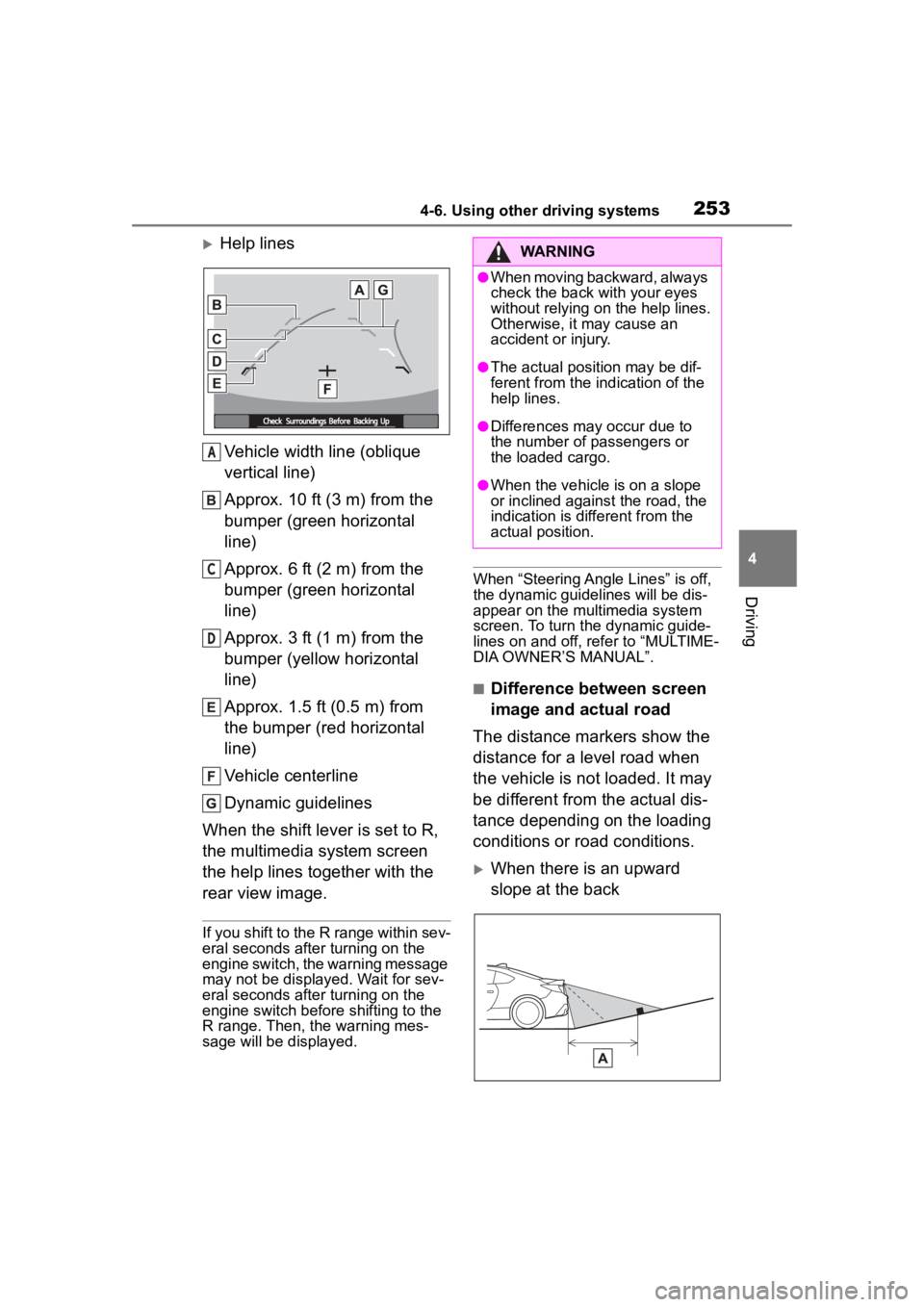
Help linesVehicle width line (oblique
vertical line)
Approx. 10 ft (3 m) from the
bumper (green horizontal
line)
Approx. 6 ft (2 m) from the
bumper (green horizontal
line)
Approx. 3 ft (1 m) from the
bumper (yellow horizontal
line)
Approx. 1.5 ft (0.5 m) from
the bumper (red horizontal
line)
Vehicle centerline
Dynamic guidelines
When the shift lever is set to R,
the multimedia system screen
the help lines together with the
rear view image.
If you shift to the R range within sev-
eral seconds after turning on the
engine switch, the warning message
may not be displayed. Wait for sev-
eral seconds after turning on the
engine switch before shifting to the
R range. Then, the warning mes-
sage will be displayed.
When “Steering Angle Lines” is off,
the dynamic guidelines will be dis-
appear on the multimedia system
screen. To turn the dynamic guide-
lines on and off, refer to “MULTIME-
DIA OWNER’S MANUAL”.
■Difference between screen
image and actual road
The distance markers show the
distance for a level road when
the vehicle is not loaded. It may
be different from the actual dis-
tance depending on the loading
conditions or road conditions.
When there is an upward
slope at the back
A
C
D
WARNING
●When moving backward, always
check the back with your eyes
without relying on the help lines.
Otherwise, it may cause an
accident or injury.
●The actual position may be dif-
ferent from the in dication of the
help lines.
●Differences may occur due to
the number of passengers or
the loaded cargo.
●When the vehicle is on a slope
or inclined against the road, the
indication is dif ferent from the
actual position.
Page 255 of 449
2554-6. Using other driving systems
4
Driving
●Conventional Cruise Control
enables you to maintain a con-
stant vehicle speed without hold-
ing your foot on the accelerator
pedal and it is operative when the
vehicle speed is 20 mph (30 km/h)
or more.
●Make sure the Conventional
Cruise Control system is turned
off when the Conventional Cruise
Control is not in use to avoid unin-
tentionally setting of the Conven-
tional Cruise Control.
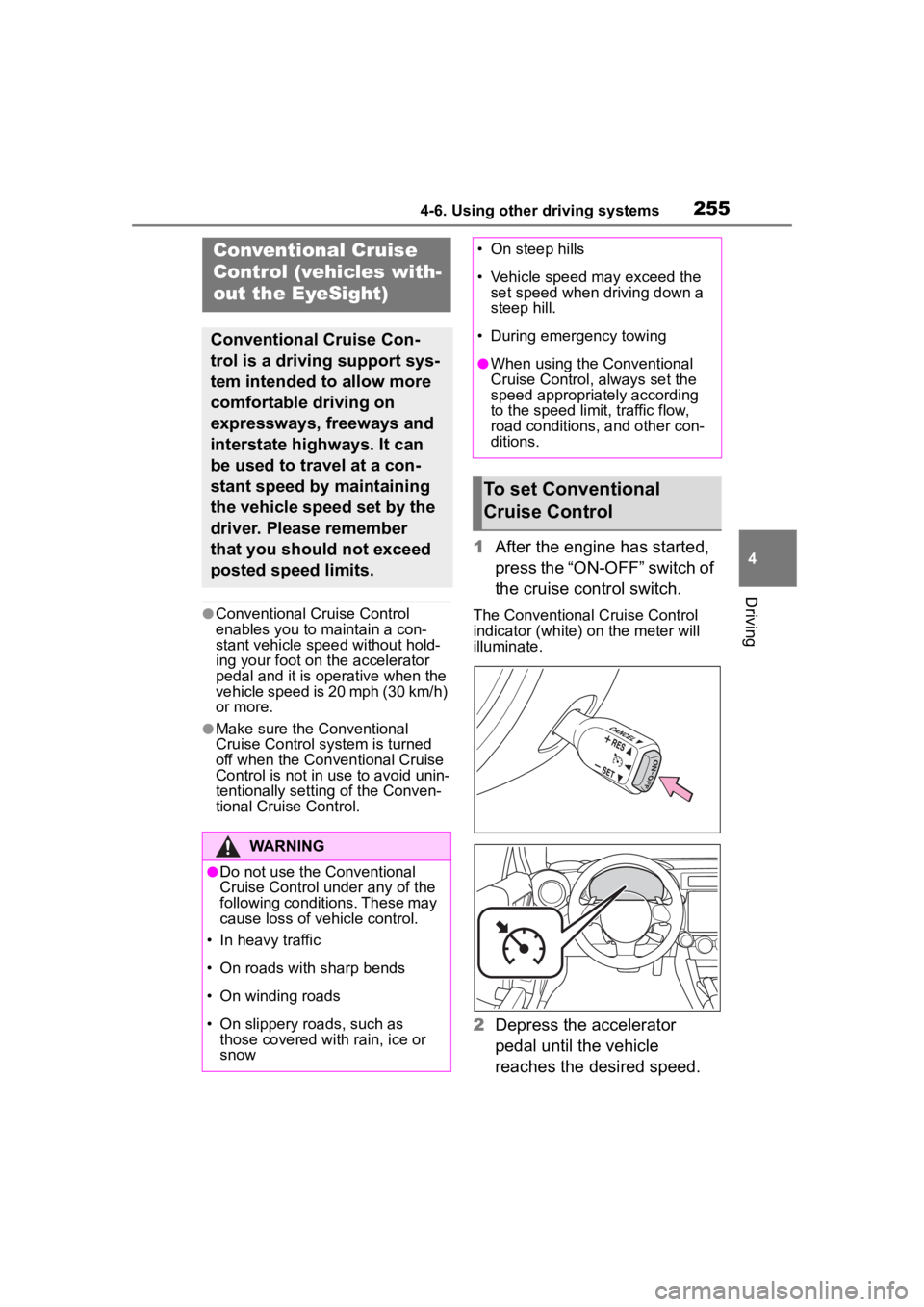
1After the engine has started,
press the “ON-OFF” switch of
the cruise control switch.
The Conventional Cruise Control
indicator (white) on the meter will
illuminate.
2Depress the accelerator
pedal until the vehicle
reaches the desired speed.
Conventional Cruise
Control (vehicles with-
out the EyeSight)
Conventional Cruise Con-
trol is a driving support sys-
tem intended to allow more
comfortable driving on
expressways, freeways and
interstate highways. It can
be used to travel at a con-
stant speed by maintaining
the vehicle speed set by the
driver. Please remember
that you should not exceed
posted speed limits.
WARNING
●Do not use the Conventional
Cruise Control under any of the
following conditions. These may
cause loss of vehicle control.
• In heavy traffic
• On roads with sharp bends
• On winding roads
• On slippery roads, such as those covered with rain, ice or
snow
• On steep hills
• Vehicle speed may exceed the set speed when d riving down a
steep hill.
• During emergency towing
●When using the Conventional
Cruise Control, always set the
speed appropriately according
to the speed limit, traffic flow,
road conditions, and other con-
ditions.
To set Conventional
Cruise Control
Page 257 of 449
2574-6. Using other driving systems
4
Driving
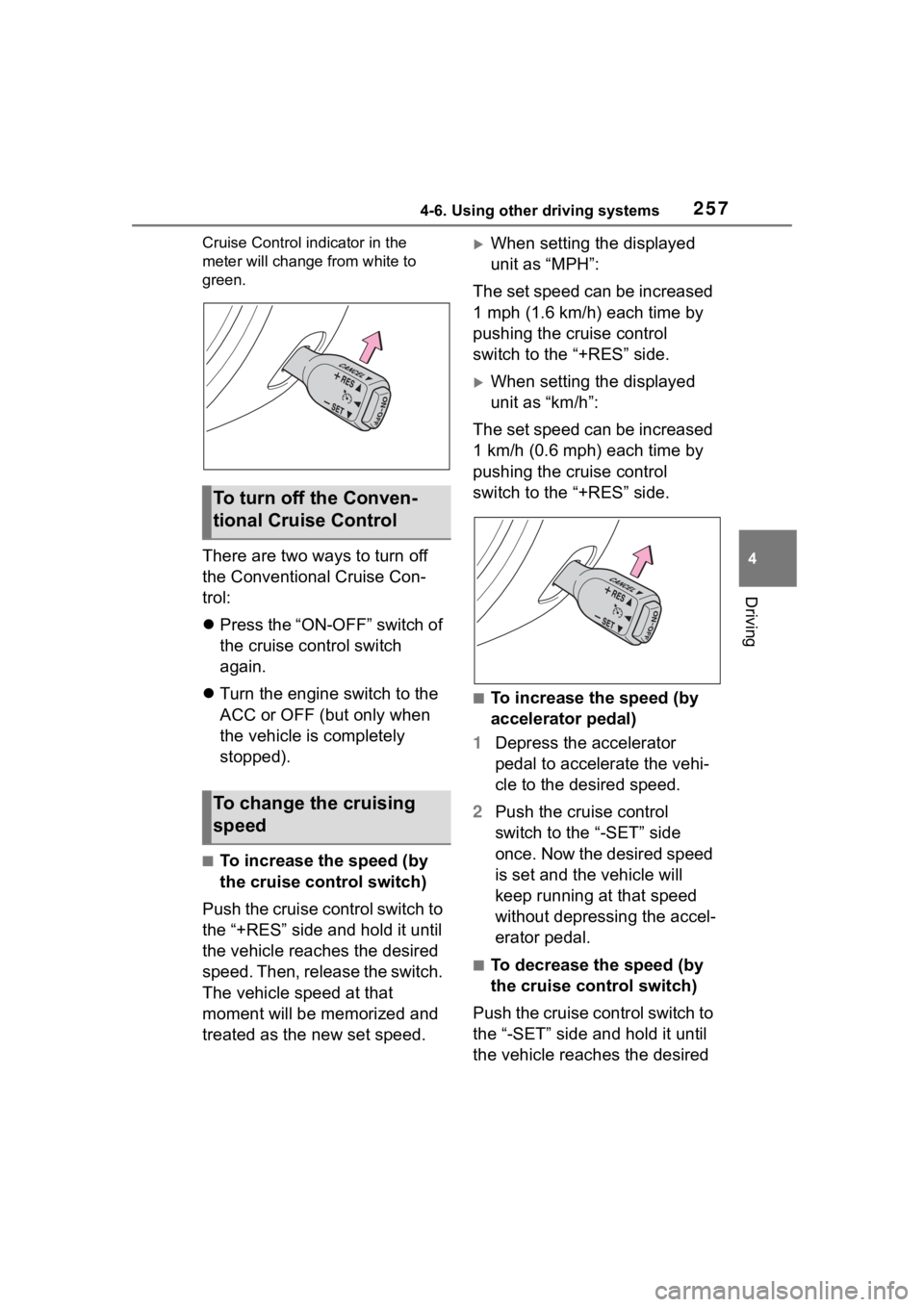
Cruise Control indicator in the
meter will change from white to
green.
There are two ways to turn off
the Conventional Cruise Con-
trol:
Press the “ON-OFF” switch of
the cruise control switch
again.
Turn the engine switch to the
ACC or OFF (but only when
the vehicle is completely
stopped).
■To increase the speed (by
the cruise control switch)
Push the cruise control switch to
the “+RES” side and hold it until
the vehicle reaches the desired
speed. Then, release the switch.
The vehicle speed at that
moment will be memorized and
treated as the new set speed.
When setting the displayed
unit as “MPH”:
The set speed can be increased
1 mph (1.6 km/h) each time by
pushing the cruise control
switch to the “+RES” side.
When setting the displayed
unit as “km/h”:
The set speed can be increased
1 km/h (0.6 mph) each time by
pushing the cruise control
switch to the “+RES” side.
■To increase the speed (by
accelerator pedal)
1 Depress the accelerator
pedal to accelerate the vehi-
cle to the desired speed.
2 Push the cruise control
switch to the “-SET” side
once. Now the desired speed
is set and the vehicle will
keep running at that speed
without depressing the accel-
erator pedal.
■To decrease the speed (by
the cruise control switch)
Push the cruise control switch to
the “-SET” side and hold it until
the vehicle reaches the desired
To turn off the Conven-
tional Cruise Control
To change the cruising
speed
Page 259 of 449
2594-6. Using other driving systems
4
Driving
Use snow mode for accelerating
and driving on slippery road sur-
faces such as snow.
The snow mode indicator comes
on.
■Sport mode
●In sport mode, lower gears are
used and gears change at a
higher engine speed.
●In the following situations, it may
not be possible to change to sport
mode. When the mode cannot be
changed to sport mode, a buzzer
will sound and a message will be
displayed on the multi-information
display.
• When the Adaptive Cruise Control or Conventional Cruise Control is
operating
• When the engine is cold
■Snow mode
To prevent slipping, 1st gear cannot
be selected when in snow mode.
■Automatic deactivation of sport
mode and snow mode
In the following si tuations, the driv-
ing mode is autom atically deacti-
vated:
●When the engine is turned off after
driving in sport mode or snow
mode.
●When the Adaptive Cruise Control
or Conventional Cruise Control is
activated while driving in sport
mode.
●When in sport mode and stop-
ping/starting off is automatically
performed in second gear.
( P.150)
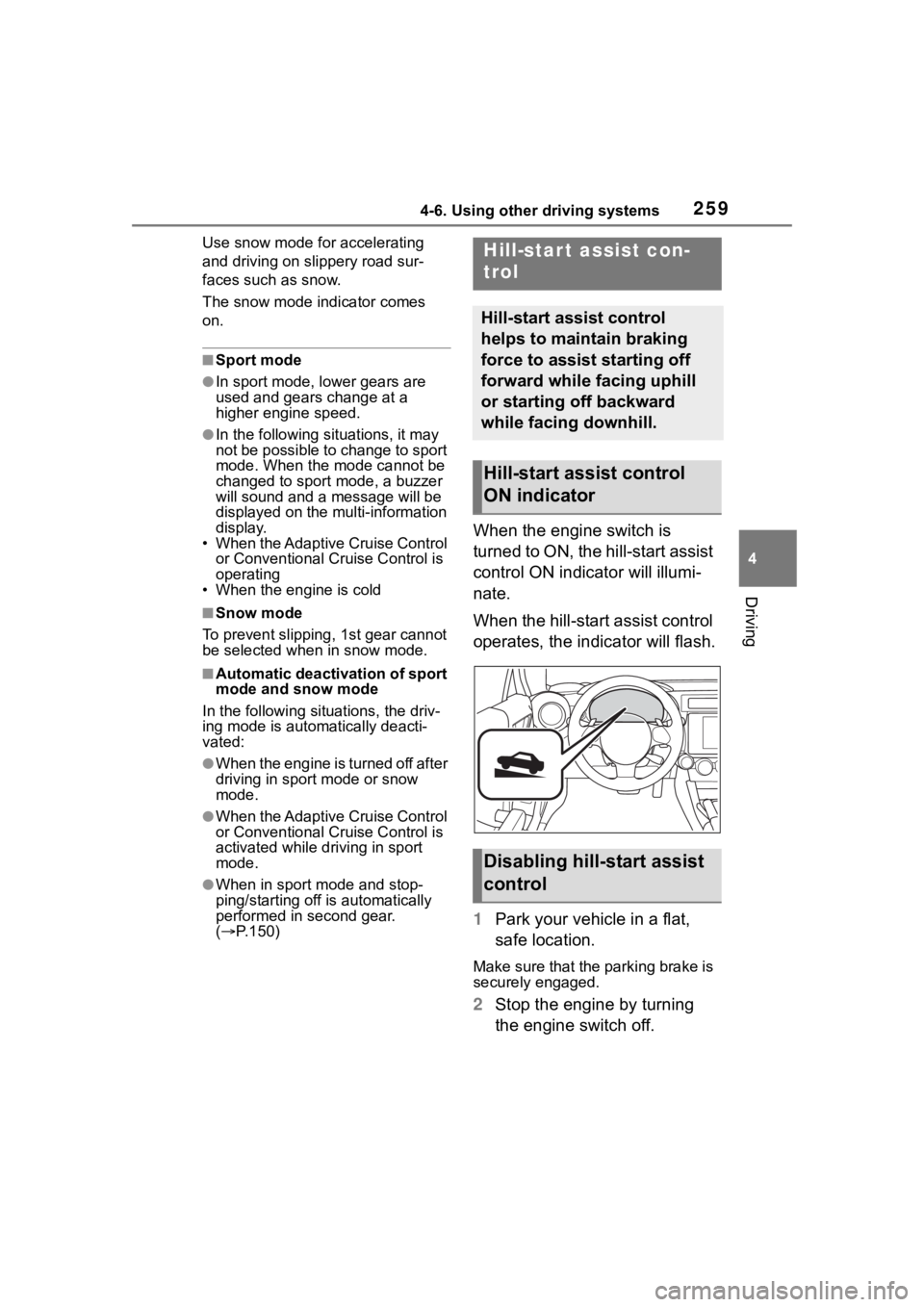
When the engine switch is
turned to ON, the hill-start assist
control ON indicator will illumi-
nate.
When the hill-start assist control
operates, the indicator will flash.
1 Park your vehicle in a flat,
safe location.
Make sure that the parking brake is
securely engaged.
2Stop the engine by turning
the engine switch off.
Hill-star t assist con-
trol
Hill-start assist control
helps to maintain braking
force to assist starting off
forward while facing uphill
or starting off backward
while facing downhill.
Hill-start assist control
ON indicator
Disabling hill-start assist
control
Page 260 of 449
2604-6. Using other driving systems
3Start the engine and check
that the ABS warning light
and slip indicator are off.
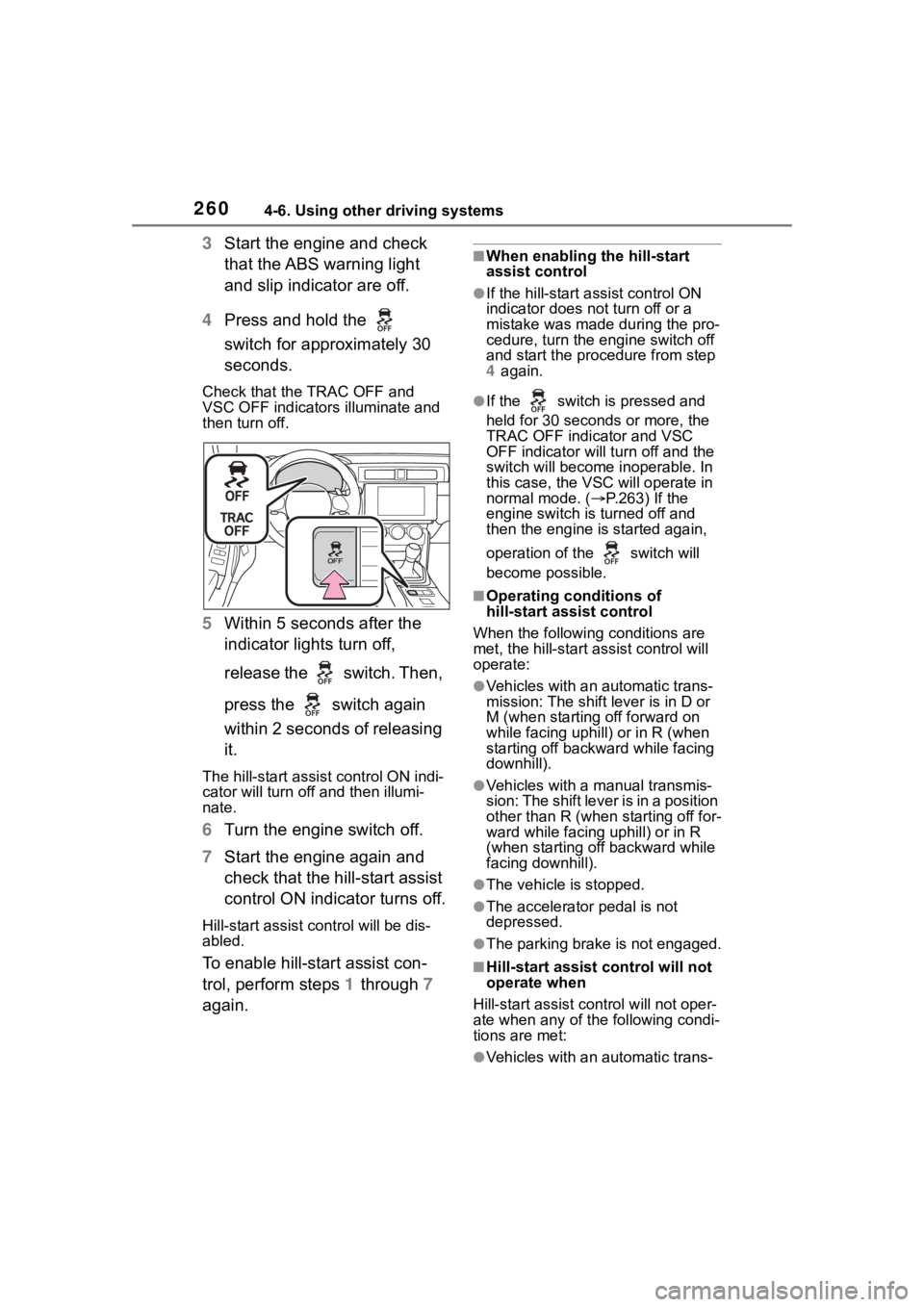
4 Press and hold the
switch for approximately 30
seconds.
Check that the TRAC OFF and
VSC OFF indicators illuminate and
then turn off.
5 Within 5 seconds after the
indicator lights turn off,
release the switch. Then,
press the switch again
within 2 seconds of releasing
it.
The hill-start assis t control ON indi-
cator will turn off and then illumi-
nate.
6 Turn the engine switch off.
7 Start the engine again and
check that the hill-start assist
control ON indicator turns off.
Hill-start assist control will be dis-
abled.
To enable hill-start assist con-
trol, perform steps 1 through 7
again.
■When enabling the hill-start
assist control
●If the hill-start assist control ON
indicator does n ot turn off or a
mistake was made during the pro-
cedure, turn the e ngine switch off
and start the procedure from step
4 again.
●If the switch is pressed and
held for 30 seconds or more, the
TRAC OFF indicator and VSC
OFF indicator will tu rn off and the
switch will become inoperable. In
this case, the VSC will operate in
normal mode. ( P.263) If the
engine switch is turned off and
then the engine is started again,
operation of the switch will
become possible.
■Operating conditions of
hill-start assist control
When the following conditions are
met, the hill-start assist control will
operate:
●Vehicles with an automatic trans-
mission: The shift lever is in D or
M (when starting off forward on
while facing uphill) or in R (when
starting off backward while facing
downhill).
●Vehicles with a manual transmis-
sion: The shift lever is in a position
other than R (when starting off for-
ward while facing uphill) or in R
(when starting off backward while
facing downhill).
●The vehicle is stopped.
●The accelerator pedal is not
depressed.
●The parking brake is not engaged.
■Hill-start assist control will not
operate when
Hill-start assist cont rol will not oper-
ate when any of the following condi-
tions are met:
●Vehicles with an automatic trans-
Page 261 of 449
2614-6. Using other driving systems
4
Driving
mission: The shift lever is in a
position other than D or M (when
facing uphill) or in a position other
than R (when facing downhill).
●Vehicles with a manual transmis-
sion: The shift lever is in R (when
facing uphill) or in a position other
than R (when facing downhill).
●Vehicles with an automatic trans-
mission: The accelerator pedal is
depressed.
●The parking brake is applied.
●Vehicles with a manual transmis-
sion: The clutch is engaged.
●Approximately 2 seconds have
elapsed since the brake pedal
was released.
●The hill-start assist control ON
indicator is not illuminated.
●The engine switch is turned to
ACC or OFF.
■Notes for hill-start assist con-
trol
●A slight jolt may be felt when start-
ing off backward with the shift
lever in R and then moving for-
ward.
●If the braking po wer of hill-start
assist control is insufficient,
depress the brake pedal.
●While the vehicle is stopped,
make sure to depress the brake
pedal.
■The system may be malfunc-
tioning when
In the following si tuations, the sys-
tem may be malfunctioning. Have
the vehicle inspected by your Toyota
dealer.
●The slip indicat or is illuminated.
●The hill-start assist control ON
indicator turns off and a buzzer
sounds.
WARNING
■Hill-start assist control pre-
cautions
●Do not overly rely on hill-start
assist control. Hill-start assist
control may not operate effec-
tively on steep inclines and
roads covered with ice.
●Unlike the parking brake,
hill-start assist control is not
intended to hold the vehicle sta-
tionary for an extended period
of time. Do not attempt to use
hill-start assist control to hold
the vehicle on an incline, as
doing so may lead to an acci-
dent.
●Do not stop the engine while
hill-start assist control is operat-
ing, as hill-start assist control
will stop operating, possibly
leading to an accident.
Page 262 of 449
2624-6. Using other driving systems
■ABS (Anti-lock Brake Sys-
tem)
Helps to prevent wheel lock
when the brakes are applied
suddenly, or if the brakes are
applied while driving on a slip-
pery road surface
■Brake assist
Generates an increased level of
braking force after the brake
pedal is depressed when the
system detects a panic stop sit-
uation
■VSC (Vehicle Stability Con-
trol)
Helps the driver to control skid-
ding when swerving suddenly or
turning on slippery road sur-
faces
■TRAC (Traction Control)
Helps to maintain drive power and prevent the drive wheels
from spinning when starting the
vehicle or accelerating on slip-
pery roads
The TRAC system is also
equipped with the brake LSD
function.
■Hill-start assist control
P.259
■EPS (Electric Power Steer-
ing)
Employs an electric motor to
reduce the amount of effort
needed to turn the steering
wheel
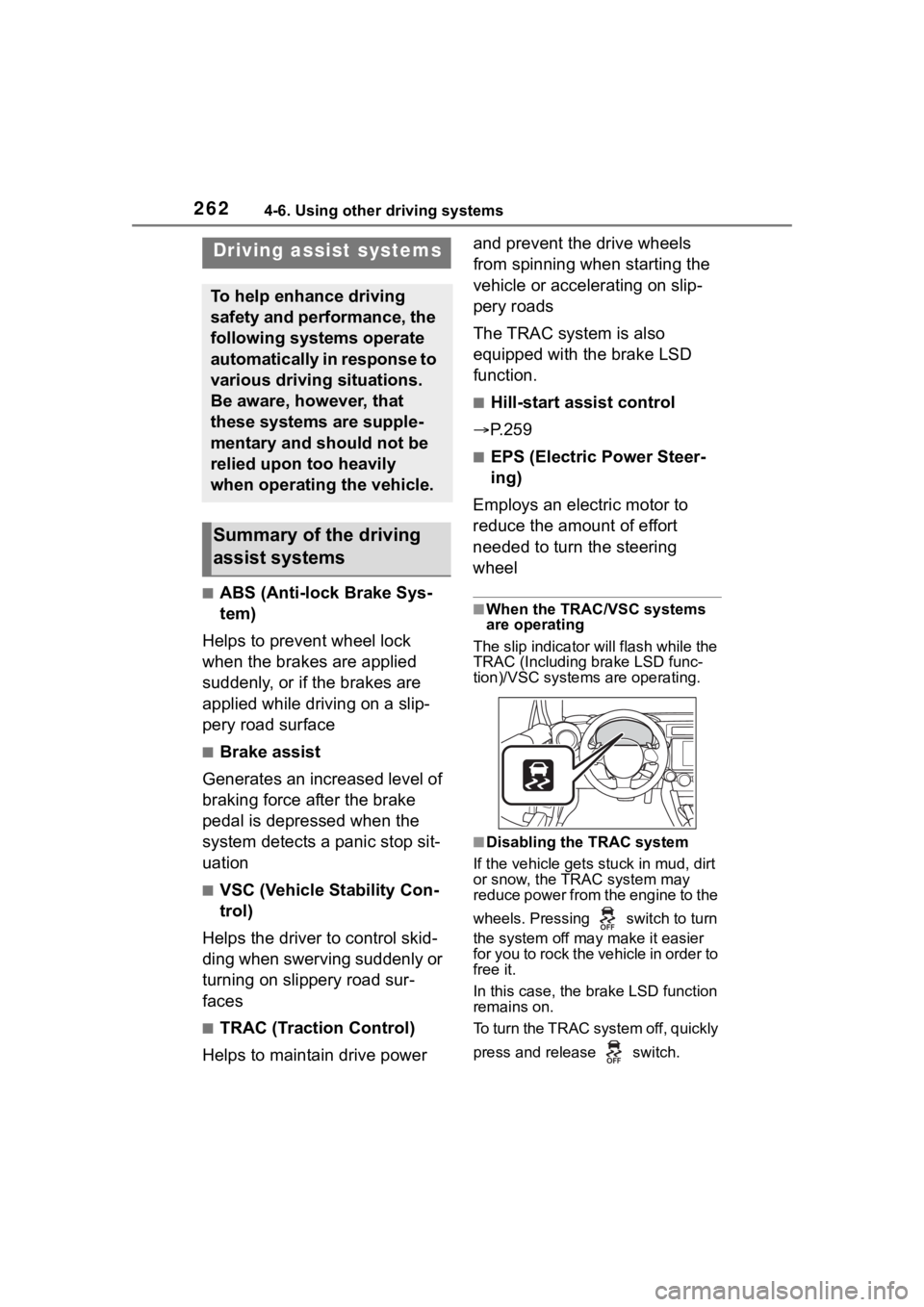
■When the TRAC/VSC systems
are operating
The slip indicator will flash while the
TRAC (Including brake LSD func-
tion)/VSC systems are operating.
■Disabling the TRAC system
If the vehicle gets stuck in mud, dirt
or snow, the TRAC system may
reduce power from the engine to the
wheels. Pressing switch to turn
the system off may make it easier
for you to rock the vehicle in order to
free it.
In this case, the brake LSD function
remains on.
To turn the TRAC system off, quickly
press and release switch.
Driving assist systems
To help enhance driving
safety and performance, the
following systems operate
automatically in response to
various driving situations.
Be aware, however, that
these systems are supple-
mentary and should not be
relied upon too heavily
when operating the vehicle.
Summary of the driving
assist systems
Page 264 of 449
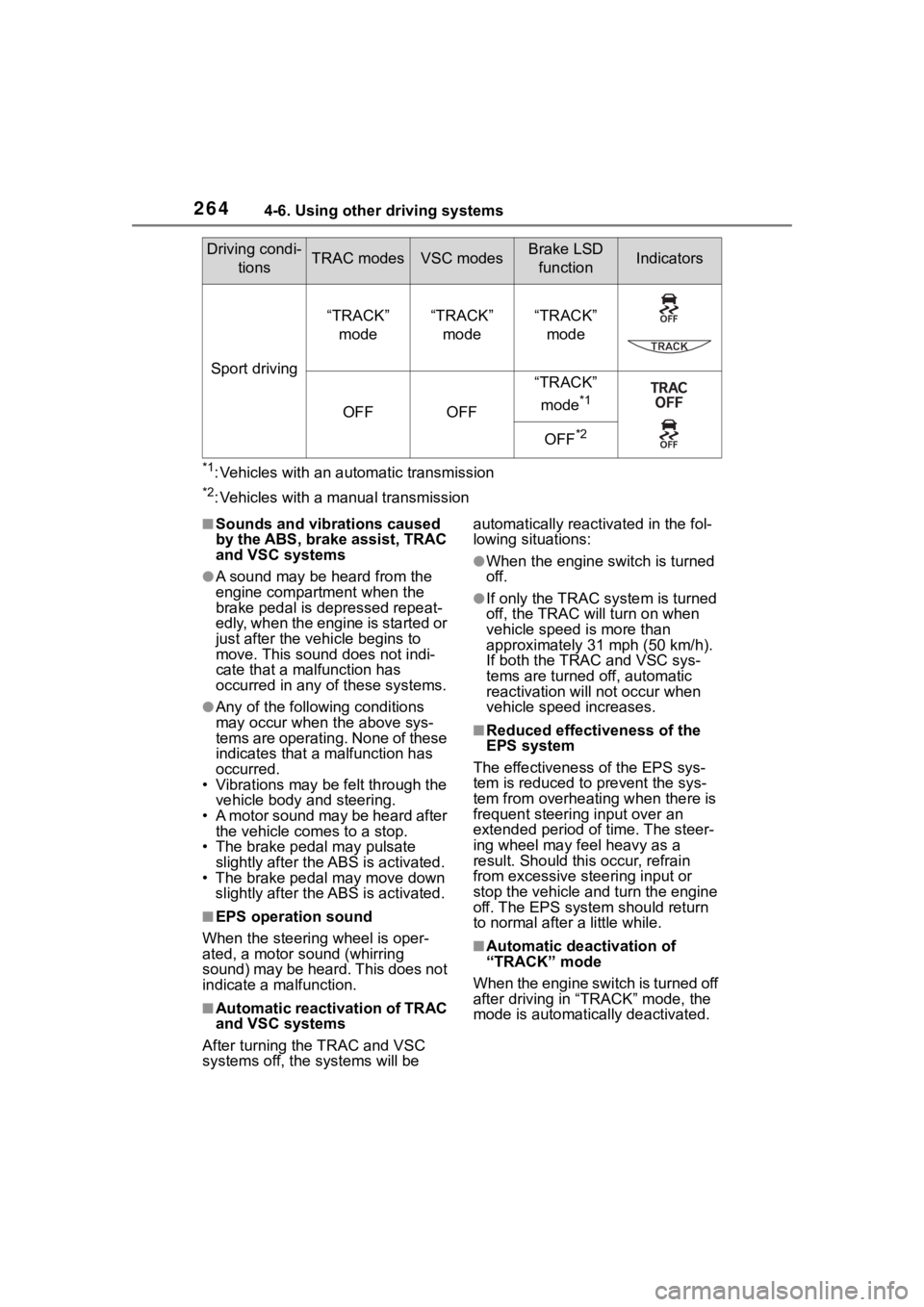
2644-6. Using other driving systems
*1: Vehicles with an automatic transmission
*2: Vehicles with a manual transmission
■Sounds and vibrations caused
by the ABS, brake assist, TRAC
and VSC systems
●A sound may be heard from the
engine compartment when the
brake pedal is depressed repeat-
edly, when the engine is started or
just after the vehicle begins to
move. This sound does not indi-
cate that a malfunction has
occurred in any of these systems.
●Any of the following conditions
may occur when t he above sys-
tems are operating. None of these
indicates that a malfunction has
occurred.
• Vibrations may be felt through the vehicle body and steering.
• A motor sound may be heard after the vehicle comes to a stop.
• The brake pedal may pulsate
slightly after the ABS is activated.
• The brake pedal may move down slightly after the ABS is activated.
■EPS operation sound
When the steering wheel is oper-
ated, a motor sou nd (whirring
sound) may be heard. This does not
indicate a malfunction.
■Automatic reactivation of TRAC
and VSC systems
After turning the TRAC and VSC
systems off, the systems will be automatically reactivated in the fol-
lowing situations:
●When the engine switch is turned
off.
●If only the TRAC sy
stem is turned
off, the TRAC will turn on when
vehicle speed is more than
approximately 31 mph (50 km/h).
If both the TRAC and VSC sys-
tems are turned o ff, automatic
reactivation will not occur when
vehicle speed increases.
■Reduced effectiveness of the
EPS system
The effectiveness of the EPS sys-
tem is reduced to prevent the sys-
tem from overheating when there is
frequent steering input over an
extended period o f time. The steer-
ing wheel may f eel heavy as a
result. Should this occur, refrain
from excessive steering input or
stop the vehicle and turn the engine
off. The EPS system should return
to normal after a little while.
■Automatic deactivation of
“TRACK” mode
When the engine switch is turned off
after driving in “ TRACK” mode, the
mode is automatically deactivated.
Sport driving
“TRACK”
mode“TRACK” mode“TRACK” mode
OFFOFF
“TRACK”
mode
*1
OFF*2
Driving condi- tionsTRAC modesVSC modesBrake LSD functionIndicators
Page 266 of 449
2664-7. Driving tips
4-7.Driving tips
Use fluids that are appropriate
to the prevailing outside tem-
peratures.
• Engine oil
• Engine coolant
• Washer fluid
Have a service technician
inspect the condition of the
battery.
Have the vehicle fitted with
four snow tires.
Make sure to install 4 tires that are
of the specified size, and that all 4
tires are the sa me size, same
maker, same brand and tread pat-
tern.
Perform the following according
to the driving conditions:
Do not try to forcibly open a
window or move a wiper that
is frozen. Pour warm water
over the frozen area to melt
the ice. Wipe away the water
immediately to prevent it from
freezing.
To ensure proper operation of
the climate control system
fan, remove any snow that
has accumulated on the air
inlet vents in front of the wind-
shield.
Check for and remove any
excess ice or snow that may
have accumulated on the
exterior lights, vehicle’s roof,
Winter driving tips
Carry out the necessary
preparations and inspec-
tions before driving the
vehicle in winter. Always
drive the vehicle in a man-
ner appropriate to the pre-
vailing weather conditions.
Preparation for winter
WARNING
■Driving with snow tires
Observe the following precautions
to reduce the risk of accidents.
Failure to do so m ay result in a
loss of vehicle control and cause
death or serious injury.
●Use tires of the specified size,
and that are the same size,
same maker, same brand and
tread pattern.
●Maintain the recommended
level of air pressure.
●Do not drive in excess of 75
mph (120 km/h), regardless of
the type of snow tires being
used.
●Use snow tires on all, not just
some wheels.
NOTICE
■Repairing or replacing snow
tires
Request repairs or replacement of
snow tires from Toyota dealers or
legitimate tire retailers.
This is because the removal and
attachment of snow tires affects
the operation of the tire pressure
warning valves and transmitters.
Before driving the vehicle