engine TOYOTA 86 2023 Owners Manual
[x] Cancel search | Manufacturer: TOYOTA, Model Year: 2023, Model line: 86, Model: TOYOTA 86 2023Pages: 449, PDF Size: 8.5 MB
Page 310 of 449
3106-3. Do-it-yourself maintenance
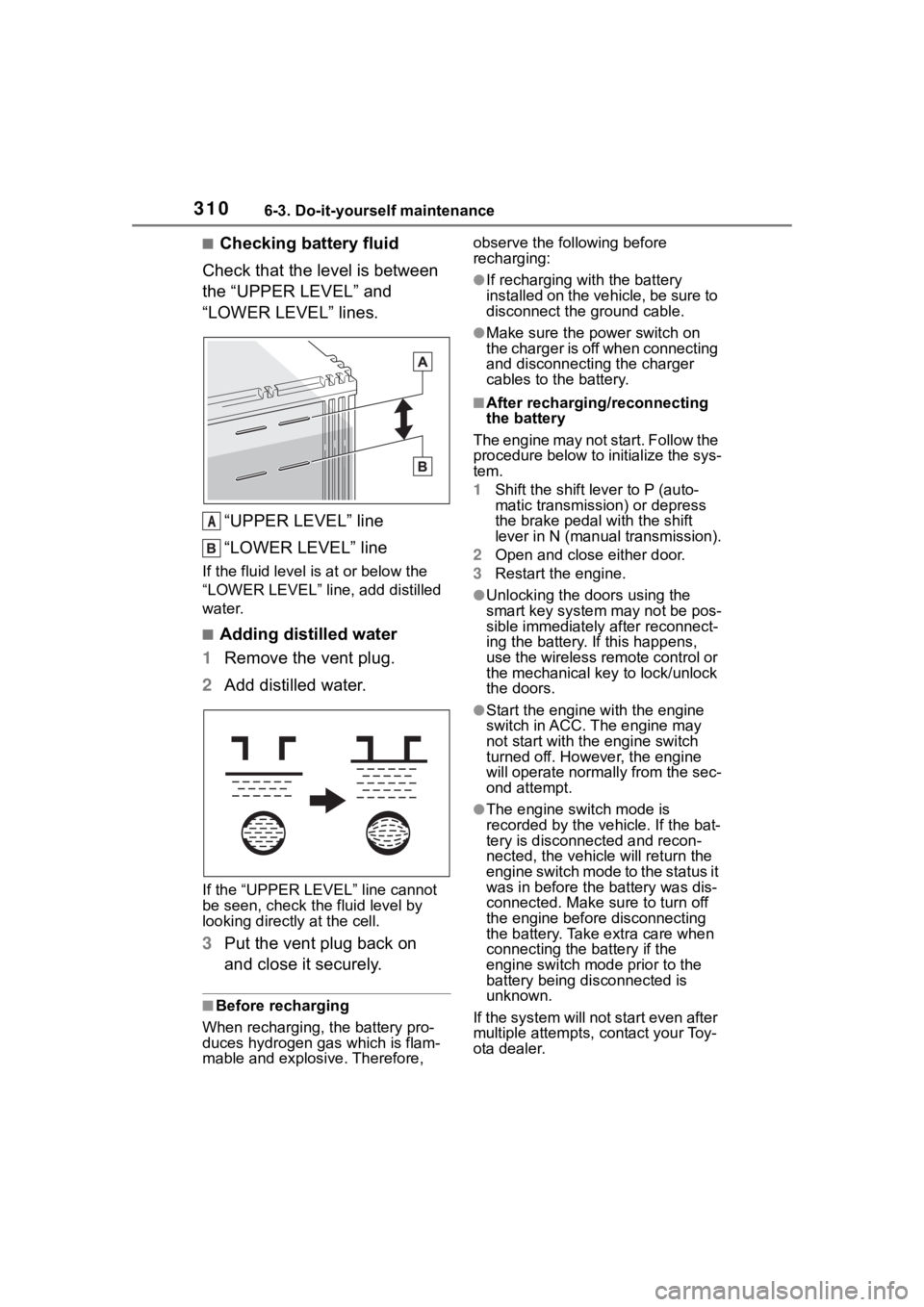
■Checking battery fluid
Check that the level is between
the “UPPER LEVEL” and
“LOWER LEVEL” lines.
“UPPER LEVEL” line
“LOWER LEVEL” line
If the fluid level is at or below the
“LOWER LEVEL” line, add distilled
water.
■Adding distilled water
1 Remove the vent plug.
2 Add distilled water.
If the “UPPER LEVEL ” line cannot
be seen, check the fluid level by
looking directly at the cell.
3 Put the vent plug back on
and close it securely.
■Before recharging
When recharging, t he battery pro-
duces hydrogen ga s which is flam-
mable and explosive. Therefore, observe the following before
recharging:
●If recharging with the battery
installed on the vehicle, be sure to
disconnect the ground cable.
●Make sure the power switch on
the charger is off when connecting
and disconnecting the charger
cables to the battery.
■After recharging/reconnecting
the battery
The engine may not start. Follow the
procedure below to initialize the sys-
tem.
1 Shift the shift lever to P (auto-
matic transmission) or depress
the brake pedal with the shift
lever in N (manual transmission).
2 Open and close either door.
3 Restart the engine.
●Unlocking the doors using the
smart key system may not be pos-
sible immediately after reconnect-
ing the battery. If this happens,
use the wireless remote control or
the mechanical key to lock/unlock
the doors.
●Start the engine with the engine
switch in ACC. T he engine may
not start with th e engine switch
turned off. However, the engine
will operate normally from the sec-
ond attempt.
●The engine switch mode is
recorded by the vehicle. If the bat-
tery is disconnected and recon-
nected, the vehi cle will return the
engine switch mode to the status it
was in before the battery was dis-
connected. Make sure to turn off
the engine before disconnecting
the battery. Take extra care when
connecting the battery if the
engine switch mode prior to the
battery being disconnected is
unknown.
If the system will not start even after
multiple attempts, contact your Toy-
ota dealer.
A
Page 311 of 449
3116-3. Do-it-yourself maintenance
6
Maintenance and care
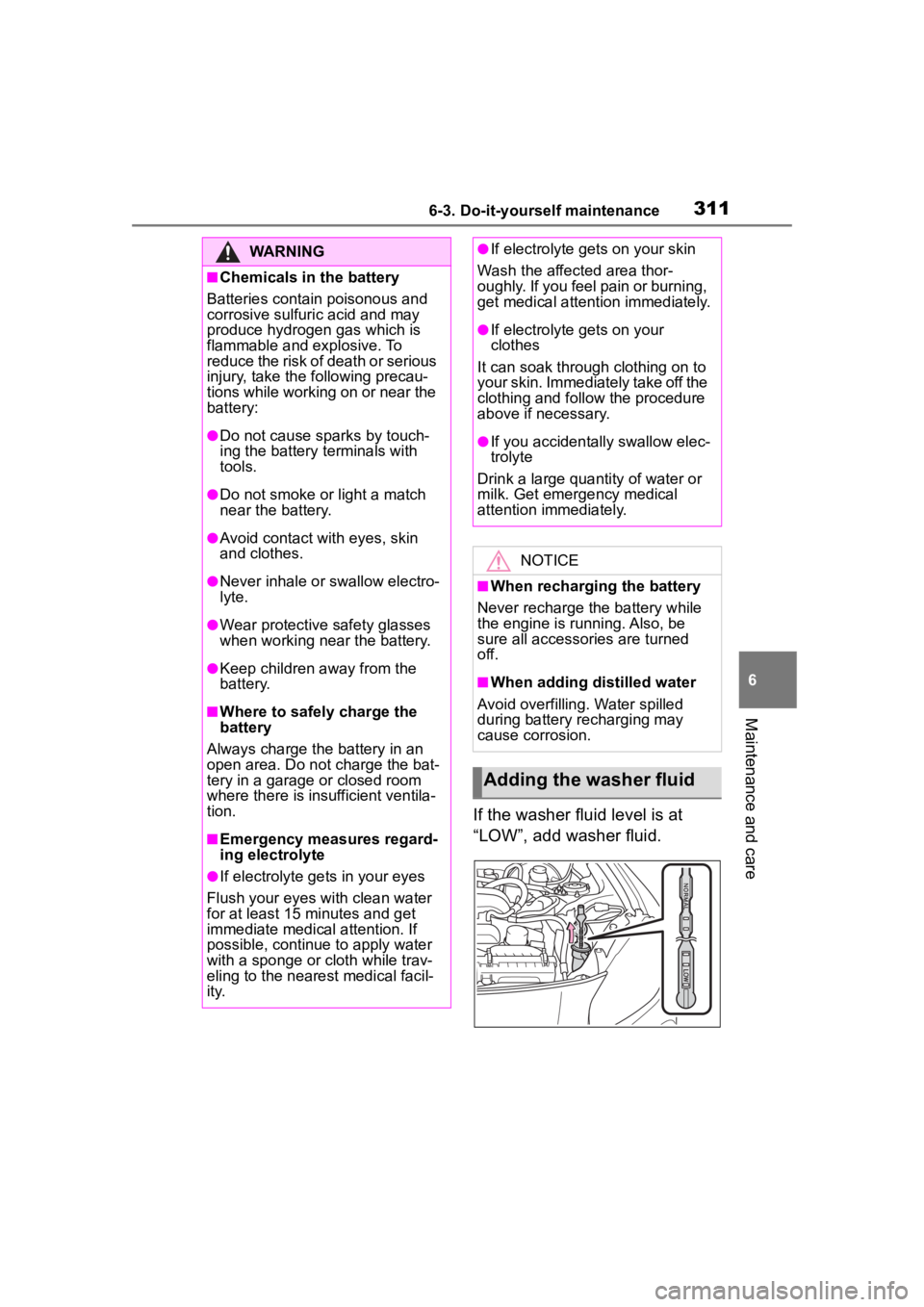
If the washer fluid level is at
“LOW”, add washer fluid.
WARNING
■Chemicals in the battery
Batteries contai n poisonous and
corrosive sulfuric acid and may
produce hydrogen gas which is
flammable and explosive. To
reduce the risk of death or serious
injury, take the following precau-
tions while working on or near the
battery:
●Do not cause sparks by touch-
ing the battery terminals with
tools.
●Do not smoke or light a match
near the battery.
●Avoid contact with eyes, skin
and clothes.
●Never inhale or swallow electro-
lyte.
●Wear protective safety glasses
when working near the battery.
●Keep children away from the
battery.
■Where to safely charge the
battery
Always charge the battery in an
open area. Do not charge the bat-
tery in a garage or closed room
where there is insufficient ventila-
tion.
■Emergency measures regard-
ing electrolyte
●If electrolyte gets in your eyes
Flush your eyes with clean water
for at least 15 minutes and get
immediate medical attention. If
possible, continue to apply water
with a sponge or cloth while trav-
eling to the nearest medical facil-
ity.
●If electrolyte gets on your skin
Wash the affected area thor-
oughly. If you feel pain or burning,
get medical attention immediately.
●If electrolyte gets on your
clothes
It can soak through clothing on to
your skin. Immediately take off the
clothing and follow the procedure
above if necessary.
●If you accidentally swallow elec-
trolyte
Drink a large quantity of water or
milk. Get emergency medical
attention immediately.
NOTICE
■When recharging the battery
Never recharge the battery while
the engine is running. Also, be
sure all accessories are turned
off.
■When adding distilled water
Avoid overfilling. Water spilled
during battery recharging may
cause corrosion.
Adding the washer fluid
Page 312 of 449
3126-3. Do-it-yourself maintenance
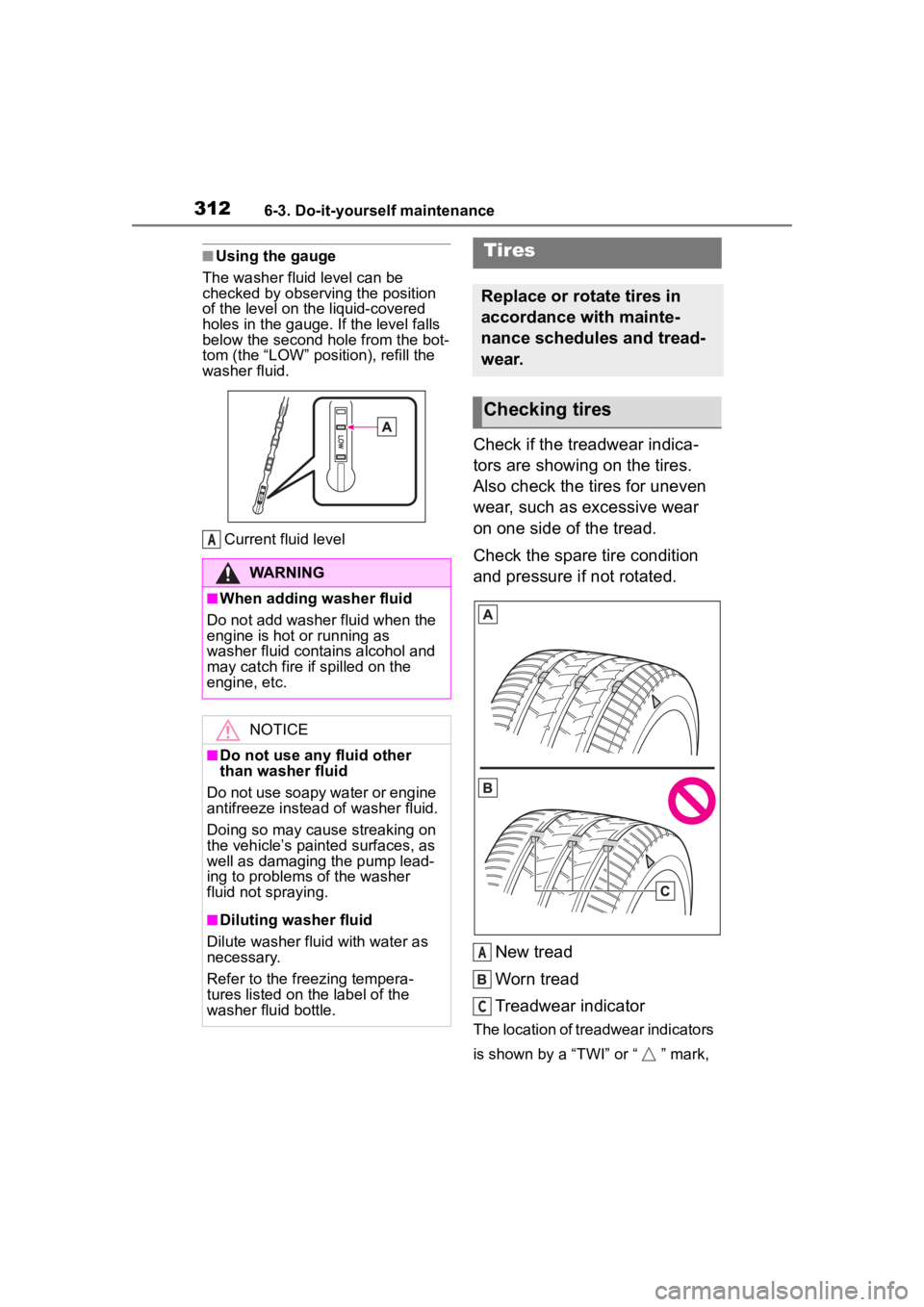
■Using the gauge
The washer fluid level can be
checked by observing the position
of the level on the liquid-covered
holes in the gauge. If the level falls
below the second hole from the bot-
tom (the “LO W” position), refill the
washer fluid.
Current fluid level
Check if the treadwear indica-
tors are showing on the tires.
Also check the tires for uneven
wear, such as excessive wear
on one side of the tread.
Check the spare tire condition
and pressure if not rotated.
New tread
Worn tread
Treadwear indicator
The location of treadwear indicators
is shown by a “TWI” or “ ” mark,
WARNING
■When adding washer fluid
Do not add washer fluid when the
engine is hot or running as
washer fluid contains alcohol and
may catch fire if spilled on the
engine, etc.
NOTICE
■Do not use any fluid other
than washer fluid
Do not use soapy water or engine
antifreeze instead of washer fluid.
Doing so may cause streaking on
the vehicle’s painted surfaces, as
well as damaging the pump lead-
ing to problems of the washer
fluid not spraying.
■Diluting washer fluid
Dilute washer fluid with water as
necessary.
Refer to the freezing tempera-
tures listed on the label of the
washer fluid bottle.
A
Tires
Replace or rotate tires in
accordance with mainte-
nance schedules and tread-
wear.
Checking tires
A
C
Page 315 of 449
3156-3. Do-it-yourself maintenance
6
Maintenance and care
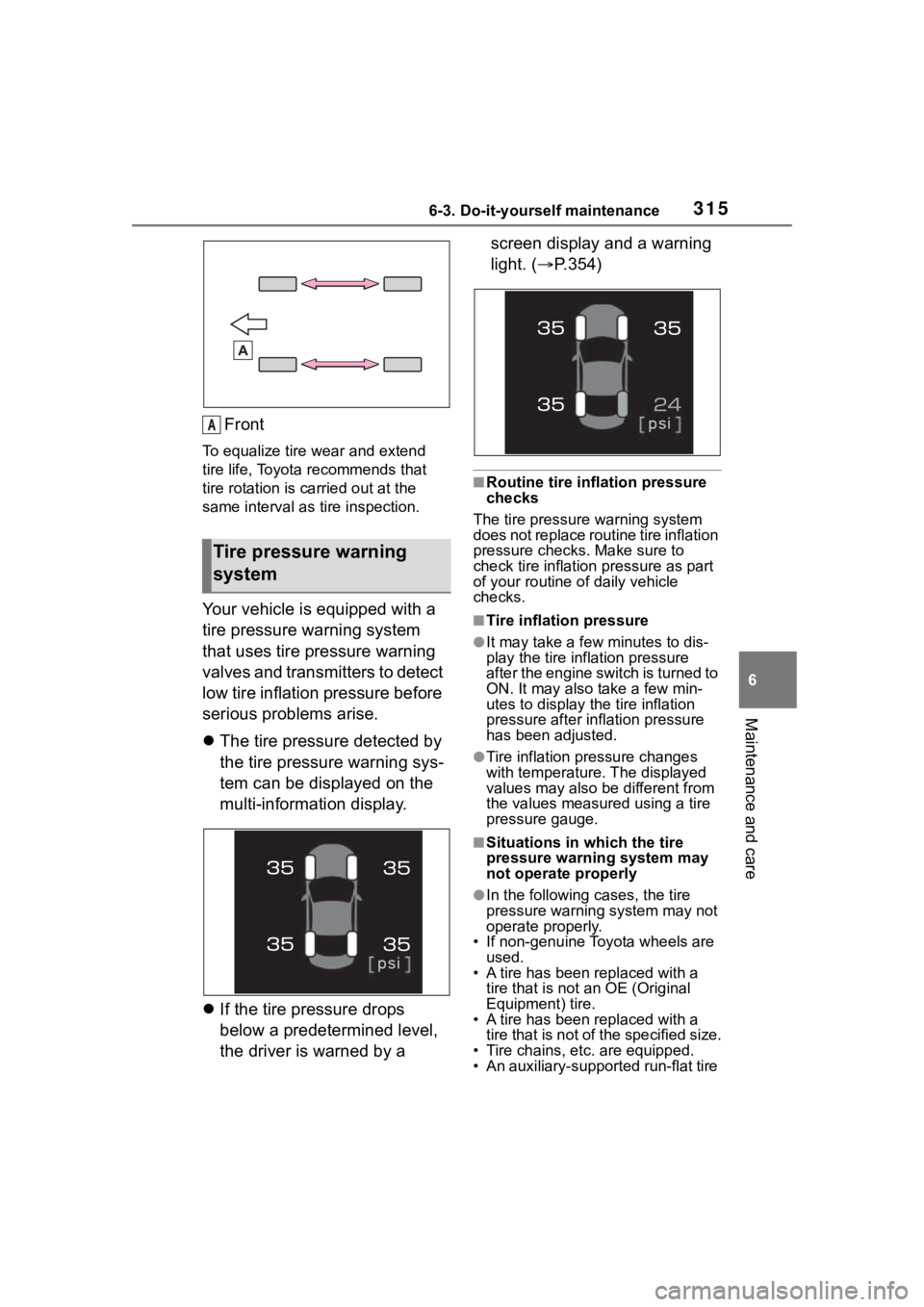
Front
To equalize tire wear and extend
tire life, Toyota recommends that
tire rotation is carried out at the
same interval as tire inspection.
Your vehicle is equipped with a
tire pressure warning system
that uses tire pressure warning
valves and transmitters to detect
low tire inflation pressure before
serious problems arise.
The tire pressure detected by
the tire pressure warning sys-
tem can be displayed on the
multi-information display.
If the tire pressure drops
below a predetermined level,
the driver is warned by a screen display and a warning
light. (
P.354)
■Routine tire inflation pressure
checks
The tire pressure warning system
does not replace routine tire inflation
pressure checks . Make sure to
check tire inflation pressure as part
of your routine o f daily vehicle
checks.
■Tire inflation pressure
●It may take a few minutes to dis-
play the tire inflation pressure
after the engine switch is turned to
ON. It may also take a few min-
utes to display the tire inflation
pressure after infl ation pressure
has been adjusted.
●Tire inflation pressure changes
with temperature. The displayed
values may also be different from
the values measured using a tire
pressure gauge.
■Situations in which the tire
pressure warning system may
not operate properly
●In the following cases, the tire
pressure warning system may not
operate properly.
• If non-genuine Toyota wheels are used.
• A tire has been replaced with a
tire that is not an OE (Original
Equipment) tire.
• A tire has been replaced with a
tire that is not of the specified size.
• Tire chains, etc. are equipped.
• An auxiliary-support ed run-flat tire
Tire pressure warning
system
A
Page 317 of 449
3176-3. Do-it-yourself maintenance
6
Maintenance and care
■The tire pressure warning
system must be initialized
in the following circum-
stances:
When rotating the tires.
When the tire inflation pres-
sure is changed such as
when changing traveling
speed.
When changing the tire size.
When the tire pressure warning
system is initialized, the current
tire inflation pressure is set as
the benchmark pressure.
■How to initialize the tire
pressure warning system
1 Park the vehicle in a safe
place and turn the engine
switch off.
Initialization cannot be performed
while the vehicle is moving.
2Adjust the tire inflation pres-
sure to the specified cold tire
inflation pressure level.
Make sure to adjust the tire pres-
sure to the specifie d cold tire infla-
tion pressure level. The tire
pressure warning system will oper-
ate based on this pressure level.
3Turn the engine switch to
ON.
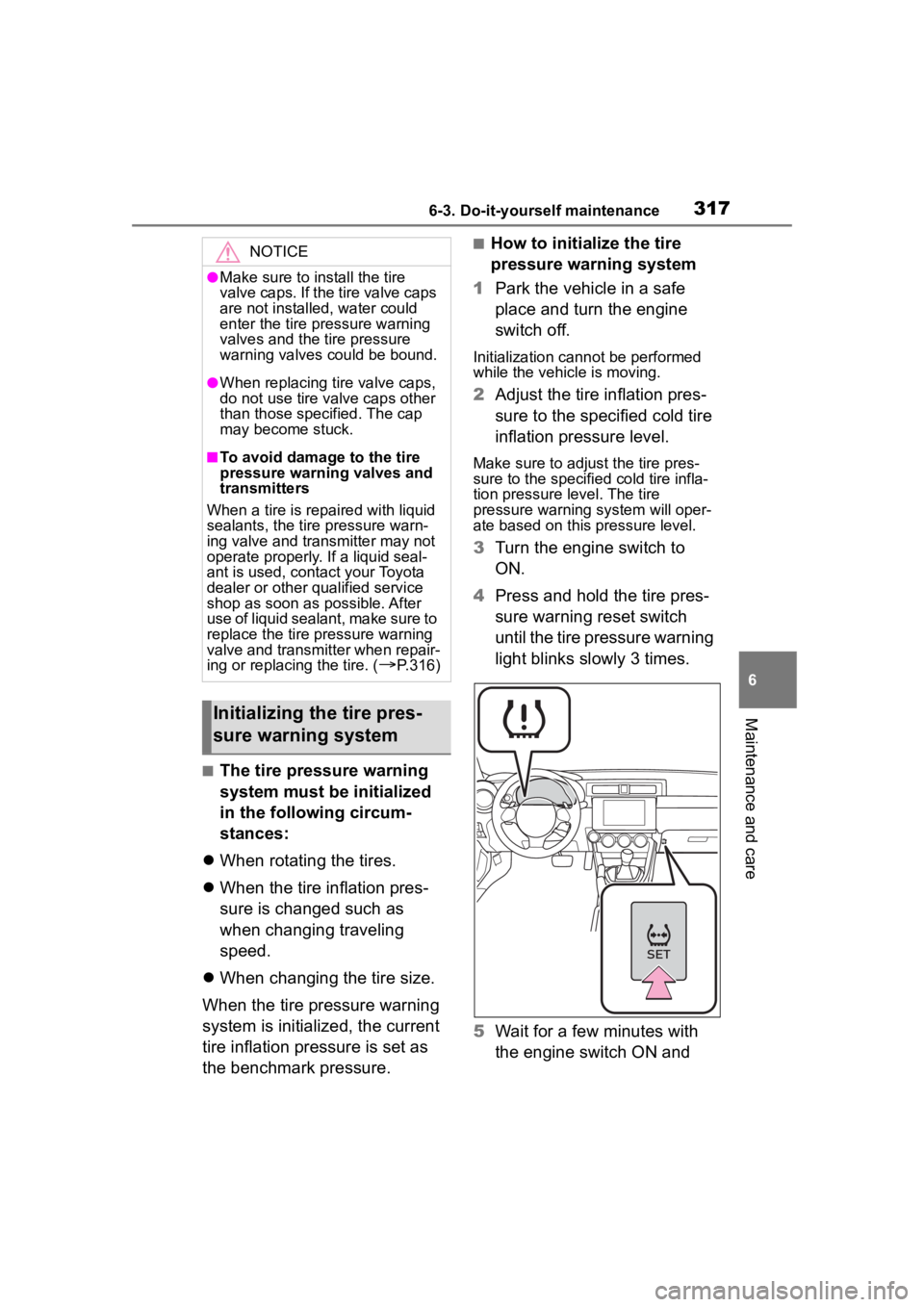
4 Press and hold the tire pres-
sure warning reset switch
until the tire pressure warning
light blinks slowly 3 times.
5 Wait for a few minutes with
the engine switch ON and
NOTICE
●Make sure to install the tire
valve caps. If the tire valve caps
are not installed, water could
enter the tire pressure warning
valves and the tire pressure
warning valves could be bound.
●When replacing ti re valve caps,
do not use tire valve caps other
than those specified. The cap
may become stuck.
■To avoid damage to the tire
pressure warning valves and
transmitters
When a tire is repaired with liquid
sealants, the tire pressure warn-
ing valve and transmitter may not
operate properly. If a liquid seal-
ant is used, contact your Toyota
dealer or other qualified service
shop as soon as possible. After
use of liquid sealant, make sure to
replace the tire pressure warning
valve and transmitter when repair-
ing or replacing the tire. (
P.316)
Initializing the tire pres-
sure warning system
Page 318 of 449
3186-3. Do-it-yourself maintenance
then turn the engine switch
off.
■If you press the tire pressure
warning reset switch acciden-
tally
If initialization is performed, adjust
the tire inflation pressure to the
specified level and initialize the tire
pressure warning system again.
■Initialization procedure
●Make sure to carry out initializa-
tion after adjusting the tire inflation
pressure.
Also, make sure the tires are cold
before carrying out initialization or
tire inflation pressure adjustment.
●If you have accidentally turned the
engine switch off during initializa-
tion, it is not necessary to press
the reset switch again as initializa-
tion will restart aut omatically when
the engine switch has been turned
to ON for the next time.
●If you accidentally press the reset
switch when initialization is not
necessary, adjust the tire inflation
pressure to the specified level
when the tires are cold, and con-
duct initialization again.
■When initialization of the tire
pressure warning system has
failed
Initialization can be completed in a
few minutes. However, in the follow-
ing cases, the set tings have not
been recorded an d the system will
not operate properly. If repeated
attempts to record tire inflation pres-
sure settings are unsuccessful,
have the vehicle inspected by your
Toyota dealer.
●When operating the tire pressure
warning reset switch, tire pressure
warning light doe s not blink 3
times.
●After carrying out the initialization
procedure, the tir e pressure warn-
ing light blinks for 1 minute then stays on after driving for 20 min-
utes.
The tire pressure warning valve
and transmitter is equipped with
a unique ID code. When replac-
ing a tire pressure warning valve
and transmitter, it is necessary
to register the ID code. Have the
ID code registered by your Toy-
ota dealer.
■Registering ID codes
The ID codes of t he tire pressure
warning valve and transmitters for
two sets of whee ls can be regis-
tered.
It is not necessary to register the ID
codes when replacing normal tires
with snow tires, if the ID codes for
the wheels of both normal tires and
snow tires are registered before-
hand.
In addition to the set of tire pressure
warning system sensor ID codes ini-
tially registered to the vehicle, a sec-
ond set of ID codes can be
registered.
A second set of tire pressure warn-
ing system sensor ID codes can be
registered at your Toyota dealer.
WARNING
■When initializing the tire pres-
sure warning system
Do not operate the tire pressure
warning reset switch without first
adjusting the tire inflation pres-
sure to the specif ied level. Other-
wise, the tire pressure warning
light may not come on even if the
tire inflation press ure is low, or it
may come on when the tire infla-
tion pressure is actually normal.
Registering ID codes
Page 319 of 449
3196-3. Do-it-yourself maintenance
6
Maintenance and care
When 2 sets of ID codes have been
registered, either ID code set can be
selected.
1Park the vehicle in a safe
place and turn the engine
switch to ON.
2 Press the tire pressure warn-
ing reset switch 3 times
within 3 seconds.
3 The tire pressure warning
light will illuminate for 3 sec-
onds and then blink 3 times.
4 The tire pressure warning
light will blink for 1 minute
and then illuminate.
5 When the ID code change
has completed, the tire pres-
sure warning light will turn off.
Check that tire pressures are dis-
played on the multi-information dis-
play.
Stop the vehicle in a safe
place on a hard, flat surface.
Set the parking brake.
Shift the shift lever to P (auto-
matic transmission) or R
(manual transmission).
Stop the engine.
■Jack and Jack handle
As your vehicle is equipped with an
emergency tire puncture repair kit, a
jack and jack handle for replacing a
tire are not include d with your vehi-
cle. To purchase a jack and jack
handle, contact your Toyota dealer.
●Jack
●Jack handle
Changing the ID code set
Replacing the tire
When raising your vehicle
with a jack, position the jack
correctly.
Improper placement may
damage your vehicle or
cause injury.
If necessary tire replace-
ment seems difficult to per-
form, contact your Toyota
dealer.
Before jacking up the
vehicle
Page 320 of 449
3206-3. Do-it-yourself maintenance
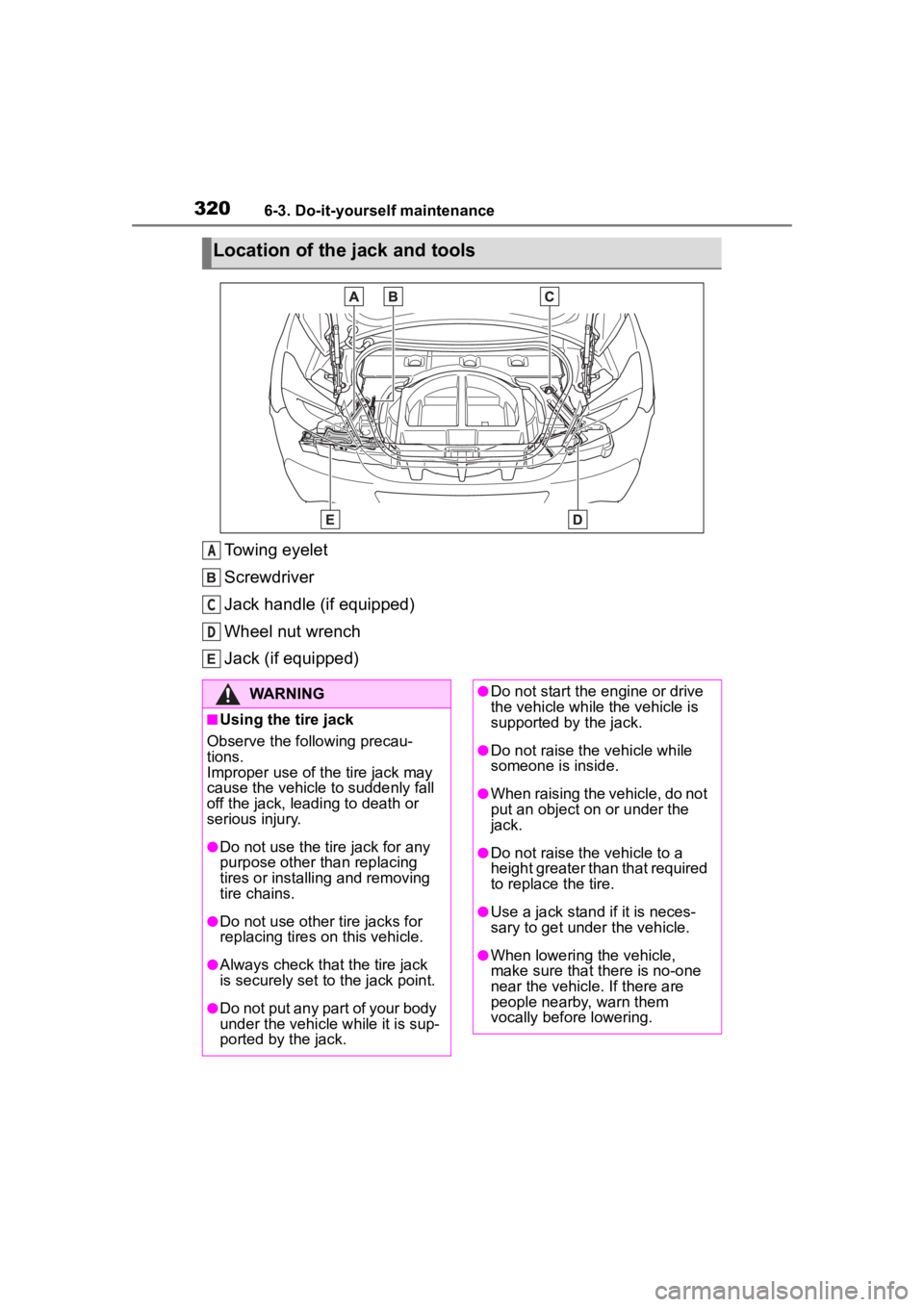
Towing eyelet
Screwdriver
Jack handle (if equipped)
Wheel nut wrench
Jack (if equipped)
Location of the jack and tools
A
C
D
WARNING
■Using the tire jack
Observe the following precau-
tions.
Improper use of the tire jack may
cause the vehicle to suddenly fall
off the jack, leading to death or
serious injury.
●Do not use the tire jack for any
purpose other than replacing
tires or installing and removing
tire chains.
●Do not use other tire jacks for
replacing tires on this vehicle.
●Always check that the tire jack
is securely set to the jack point.
●Do not put any part of your body
under the vehicle while it is sup-
ported by the jack.
●Do not start the engine or drive
the vehicle while the vehicle is
supported by the jack.
●Do not raise the vehicle while
someone is inside.
●When raising the vehicle, do not
put an object on or under the
jack.
●Do not raise the vehicle to a
height greater than that required
to replace the tire.
●Use a jack stand if it is neces-
sary to get under the vehicle.
●When lowering the vehicle,
make sure that there is no-one
near the vehicle. If there are
people nearby, warn them
vocally before lowering.
Page 327 of 449
3276-3. Do-it-yourself maintenance
6
Maintenance and care
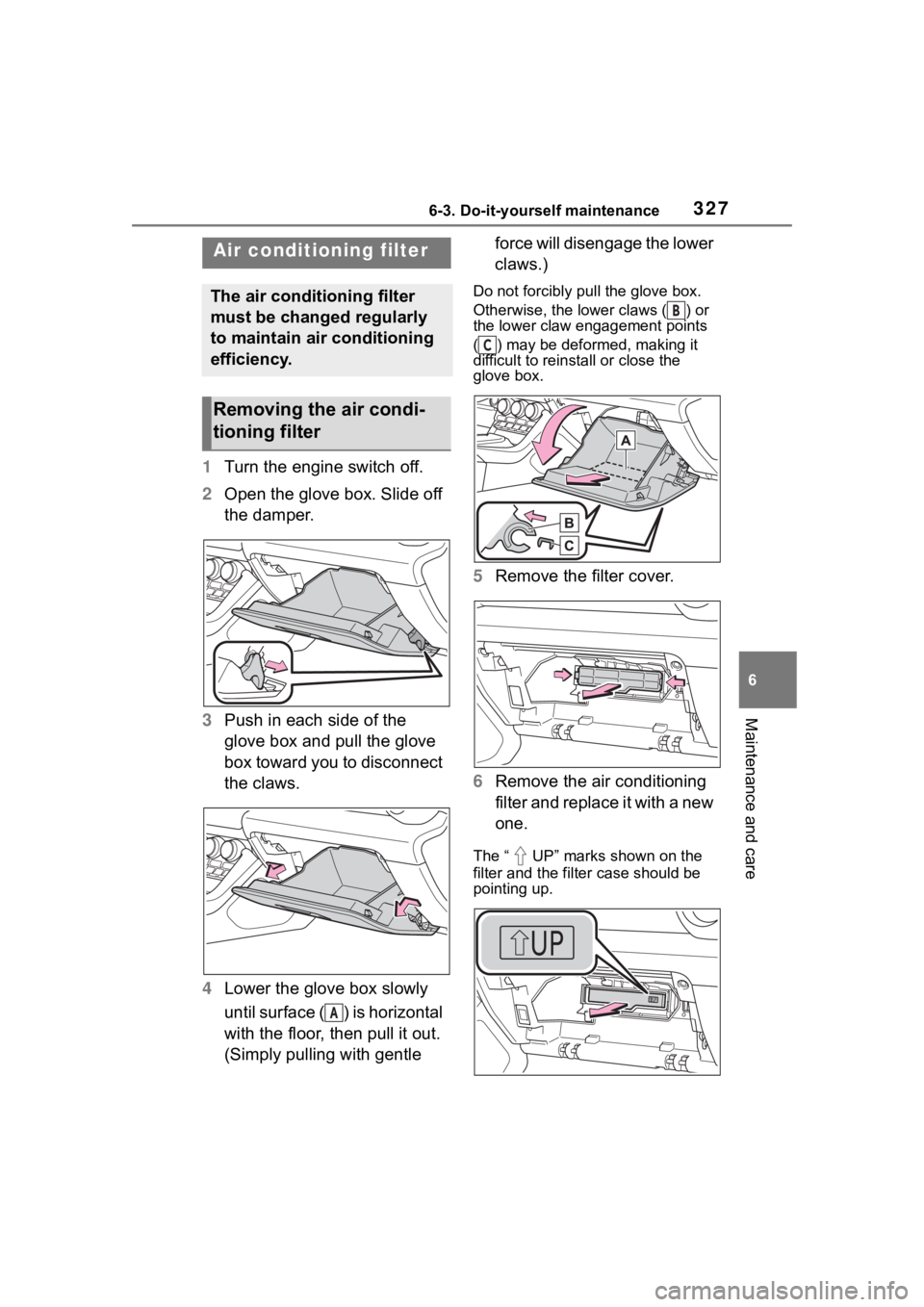
1Turn the engine switch off.
2 Open the glove box. Slide off
the damper.
3 Push in each side of the
glove box and pull the glove
box toward you to disconnect
the claws.
4 Lower the glove box slowly
until surface ( ) is horizontal
with the floor, then pull it out.
(Simply pulling with gentle force will disengage the lower
claws.)
Do not forcibly pull the glove box.
Otherwise, the lower claws ( ) or
the lower claw engagement points
( ) may be deformed, making it
difficult to reinstall or close the
glove box.
5
Remove the filter cover.
6 Remove the air conditioning
filter and replace it with a new
one.
The “ UP” marks shown on the
filter and the filter case should be
pointing up.
Air condition ing filter
The air conditioning filter
must be changed regularly
to maintain air conditioning
efficiency.
Removing the air condi-
tioning filter
A
B
C
Page 330 of 449
3306-3. Do-it-yourself maintenance
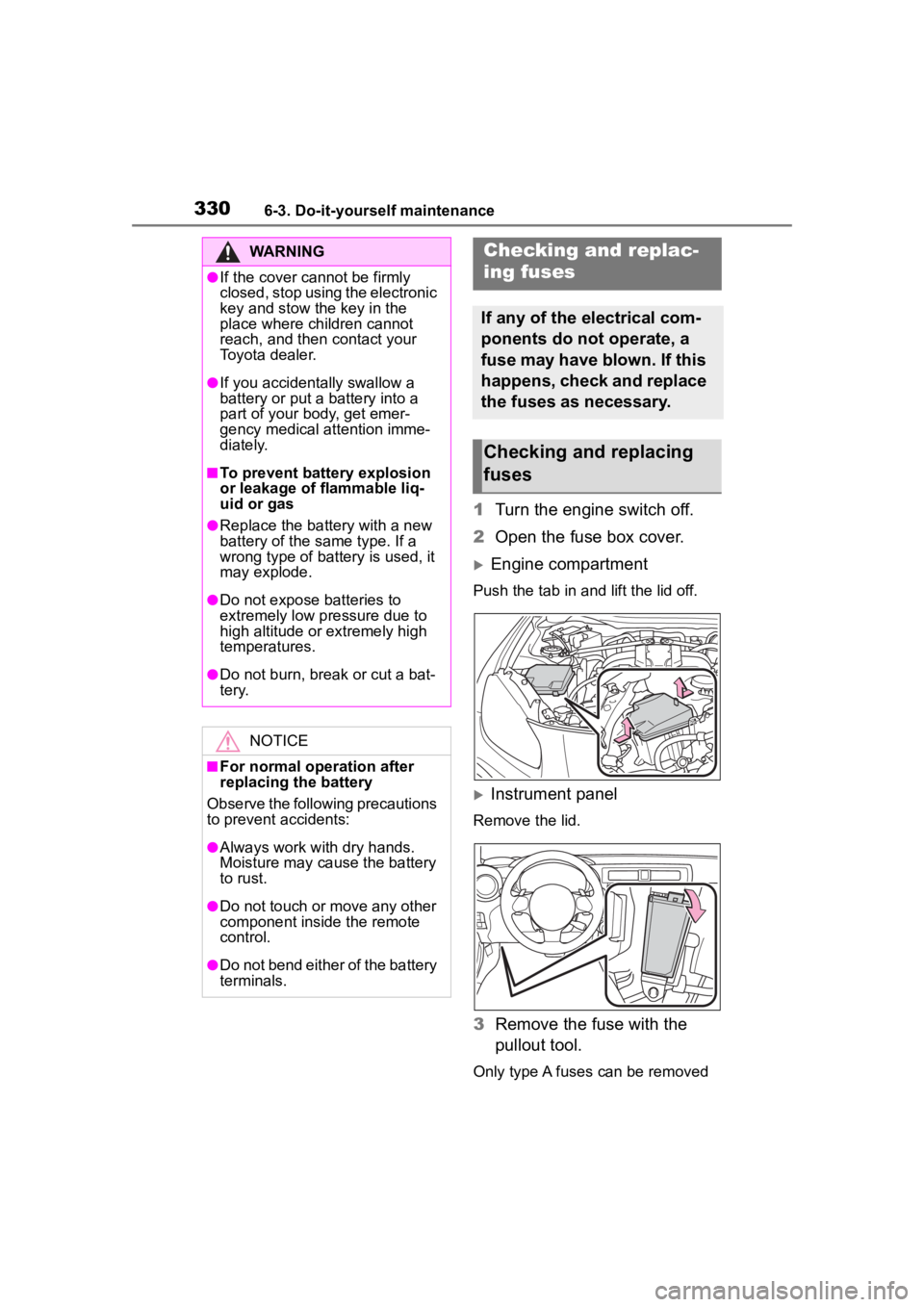
1Turn the engine switch off.
2 Open the fuse box cover.
Engine compartment
Push the tab in and lift the lid off.
Instrument panel
Remove the lid.
3Remove the fuse with the
pullout tool.
Only type A fuses can be removed
WARNING
●If the cover cannot be firmly
closed, stop using the electronic
key and stow the key in the
place where children cannot
reach, and then contact your
Toyota dealer.
●If you accidentally swallow a
battery or put a b attery into a
part of your body, get emer-
gency medical attention imme-
diately.
■To prevent battery explosion
or leakage of flammable liq-
uid or gas
●Replace the battery with a new
battery of the same type. If a
wrong type of battery is used, it
may explode.
●Do not expose batteries to
extremely low pressure due to
high altitude or extremely high
temperatures.
●Do not burn, bre ak or cut a bat-
tery.
NOTICE
■For normal operation after
replacing the battery
Observe the following precautions
to prevent accidents:
●Always work with dry hands.
Moisture may cau se the battery
to rust.
●Do not touch or move any other
component inside the remote
control.
●Do not bend either of the battery
terminals.
Checking a nd replac-
ing fuses
If any of the electrical com-
ponents do not operate, a
fuse may have blown. If this
happens, check and replace
the fuses as necessary.
Checking and replacing
fuses