stop start TOYOTA 86 2023 Owner's Guide
[x] Cancel search | Manufacturer: TOYOTA, Model Year: 2023, Model line: 86, Model: TOYOTA 86 2023Pages: 449, PDF Size: 8.5 MB
Page 214 of 449
2144-5. EyeSight
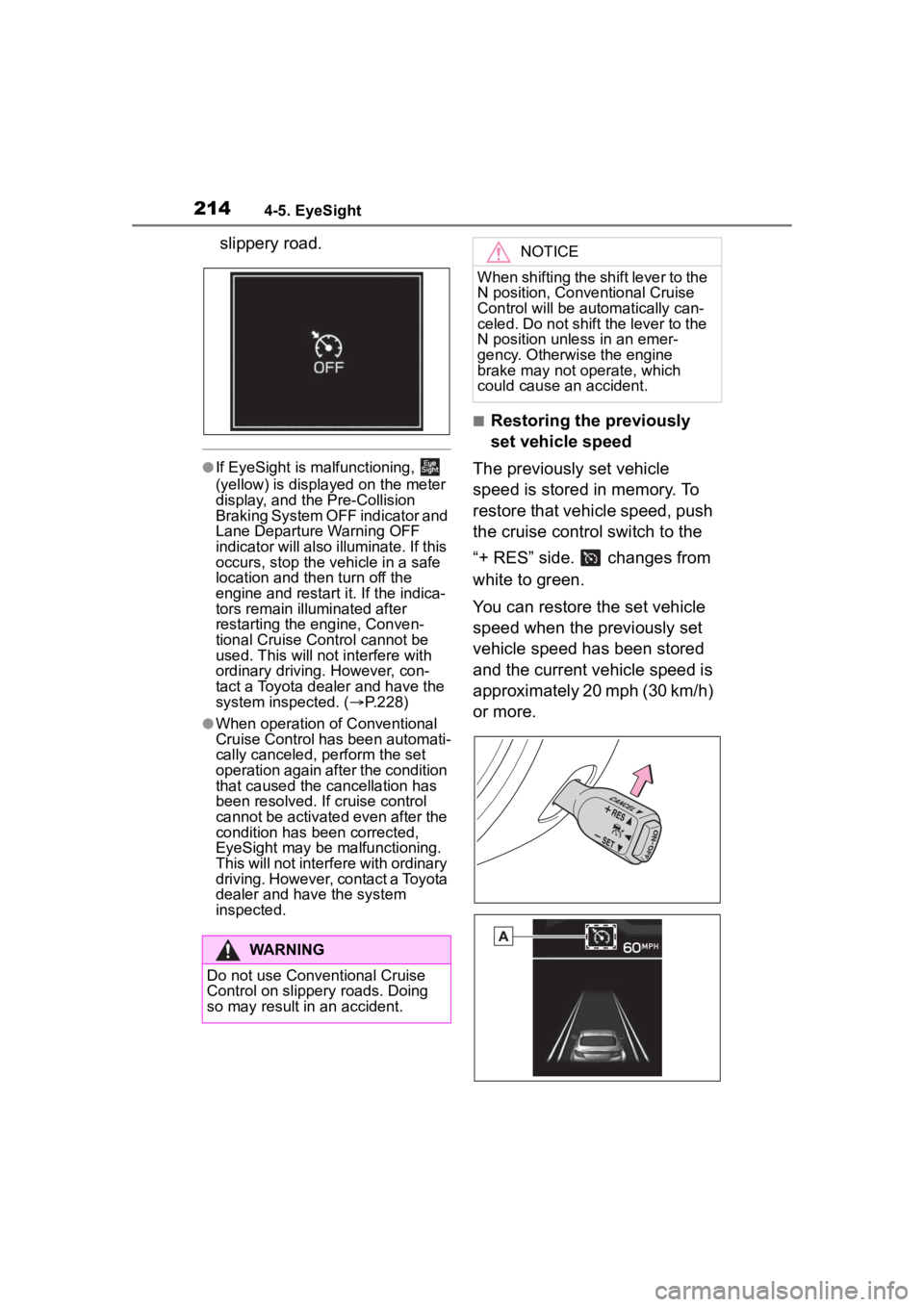
slippery road.
●If EyeSight is malfunctioning,
(yellow) is displayed on the meter
display, and the Pre-Collision
Braking System OFF indicator and
Lane Departure Warning OFF
indicator will also illuminate. If this
occurs, stop the vehicle in a safe
location and then turn off the
engine and restart it. If the indica-
tors remain illuminated after
restarting the engine, Conven-
tional Cruise Control cannot be
used. This will not interfere with
ordinary driving. However, con-
tact a Toyota dealer and have the
system inspected. ( P.228)
●When operation of Conventional
Cruise Control has been automati-
cally canceled, perform the set
operation again after the condition
that caused the cancellation has
been resolved. If cruise control
cannot be activated even after the
condition has been corrected,
EyeSight may be malfunctioning.
This will not interfere with ordinary
driving. However, contact a Toyota
dealer and have the system
inspected.
■Restoring the previously
set vehicle speed
The previously set vehicle
speed is stored in memory. To
restore that vehicle speed, push
the cruise control switch to the
“+ RES” side. changes from
white to green.
You can restore the set vehicle
speed when the previously set
vehicle speed has been stored
and the current vehicle speed is
approximately 20 mph (30 km/h)
or more.
WARNING
Do not use Conventional Cruise
Control on slippery roads. Doing
so may result in an accident.
NOTICE
When shifting the shift lever to the
N position, Conventional Cruise
Control will be aut omatically can-
celed. Do not shift the lever to the
N position unless in an emer-
gency. Otherwise the engine
brake may not operate, which
could cause an accident.
Page 216 of 449
2164-5. EyeSight
seconds, Pre-Collision Throttle
Management will be released
gradually.
●When Pre-Collision Braking Sys-
tem is turned off, Pre-Collision
Throttle Management is also
turned off. ( P.219)
WARNING
Do not rely excessively on
Pre-Collision Throttle Manage-
ment. Pre-Collisi on Throttle Man-
agement is not designed to help
you avoid collisions in all situa-
tions. Always check the shift lever
and pedal positions as well as the
surrounding environment before
starting and operating the vehicle.
Relying only on Pre-Collision
Throttle Management could result
in an accident.
●Pre-Collision Throttle Manage-
ment is not designed to main-
tain the vehicle in a stopped
condition.
●Pre-Collision Throttle Manage-
ment will not reduce accelera-
tion under all conditions. It is
also not designed to prevent
collisions.
●Pre-Collision Throttle Manage-
ment will operate when an
obstacle is detected in front.
However, this function will not
reduce accelera tion in cases
where no obstacle is detected
(for example when approaching
a cliff, etc.).
●Do not intentionally depress the
accelerator pedal excessively
when there are obstacles
nearby. If the driv er relies only
on Pre-Collision Throttle Man-
agement to control acceleration,
collisions may occur.
●If your vehicle is trapped on a
railroad crossing and you are
trying to escape by driving
through the crossing gate, the
stereo camera may recognize
the crossing gate as an obstacle
and Pre-Collision Throttle Man-
agement system may activate.
In this case, rem ain calm and
either continue to depress the
accelerator pedal or turn off the
Pre-Collision Throttle Manage-
ment system. (
P.219)
Pre-Collision Throttle Manage-
ment may not activate depending
on the following conditions:
●The distance between your
vehicle and the obstacle, speed
difference, and horizontal offset
●Recognition status of the stereo
camera
In particular, the function may not
activate in the following cases:
• Bad weather (for example heavy rain, a blizzard or thick
fog)
• Visibility is poor due to sand or
smoke in the air.
• Light is poor in the evening, early morning, or at night.
• In a dark area (indoor parking area, etc.)
• There is an obstacle outside the area illuminated by the head-
lights.
• Strong light is coming from the front (for example sunlight at
sunrise or sunset headlight
beams, etc.).
Page 218 of 449
2184-5. EyeSight
NOTICE
●A chassis dynamometer,
free-rollers or similar equip-
ment is being used.
●A mechanic lifts up the vehicle,
starts the engine and allows the
wheels to spin freely.
●Driving on a race track
●Passing hanging banners, flags
or branches
●Thick/tall vegeta tion is touching
the vehicle.
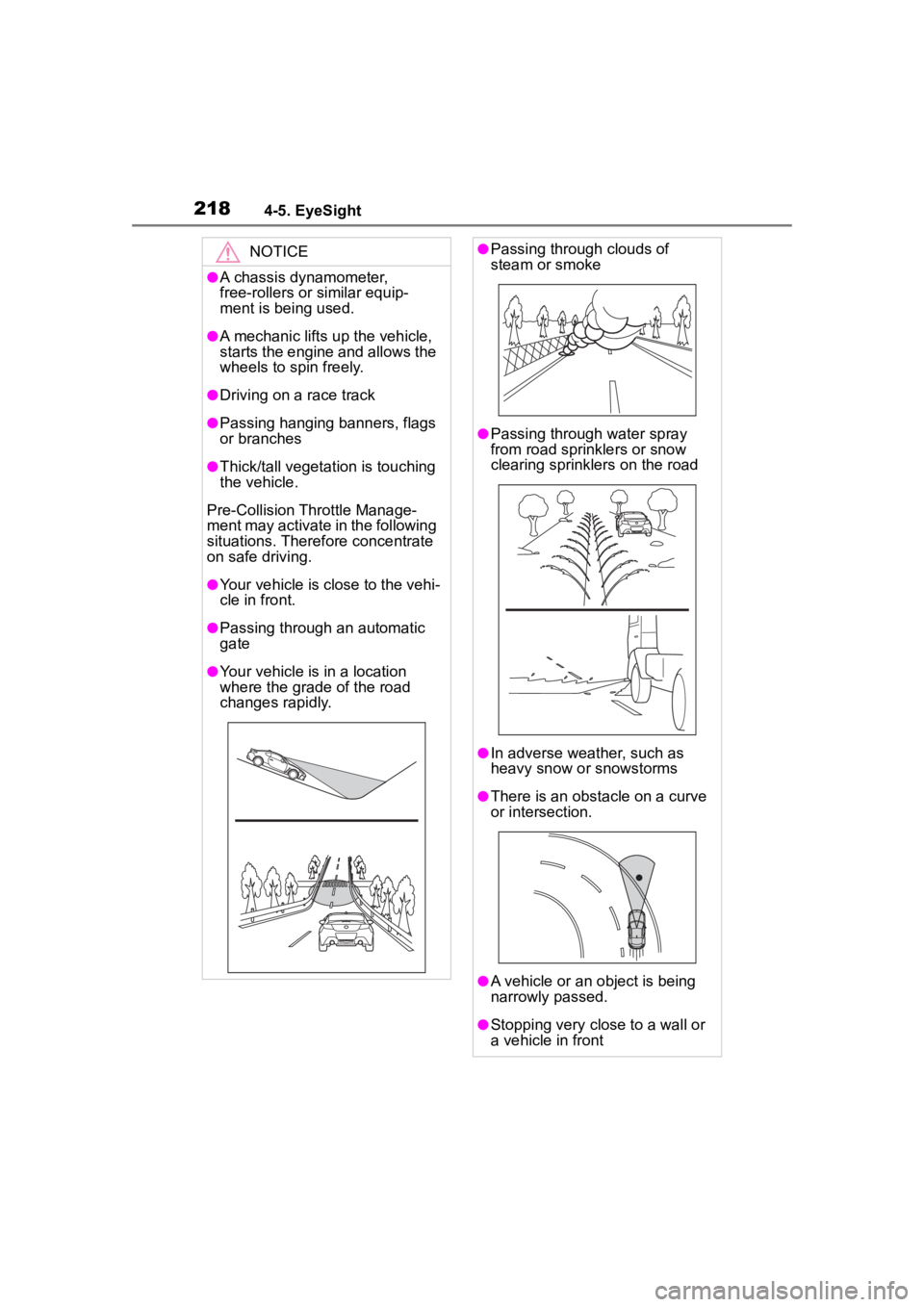
Pre-Collision Throttle Manage-
ment may activate in the following
situations. Theref ore concentrate
on safe driving.
●Your vehicle is close to the vehi-
cle in front.
●Passing through an automatic
gate
●Your vehicle is in a location
where the grade of the road
changes rapidly.
●Passing through clouds of
steam or smoke
●Passing through water spray
from road sprinklers or snow
clearing sprinklers on the road
●In adverse weather, such as
heavy snow or snowstorms
●There is an obstacle on a curve
or intersection.
●A vehicle or an object is being
narrowly passed.
●Stopping very close to a wall or
a vehicle in front
Page 219 of 449
2194-5. EyeSight
4
Driving
Multimedia system screen
Operate the multimedia system
screen to turn on/off Pre-Colli-
sion Throttle Management.
( P.400)
Multi-information display
Also you can turn on/off
Pre-Collision Throttle Manage-
ment using the meter operation
switch. ( P.400)
If Pre-Collision Throttle Manage-
ment is turned off, the Pre-Colli-
sion Braking System OFF
indicator illuminates.
●The on/off setting for Pre-Collision
Throttle Management operates in
cooperation with Pre-Collision
Braking System.
●Even when Pre-Collision Throttle
Management is turned off, if the
engine switch is turned off and
then restarted , Pre-Collision
Throttle Management will be
turned on. The system default set-
ting when the vehicle is restarted
is on.
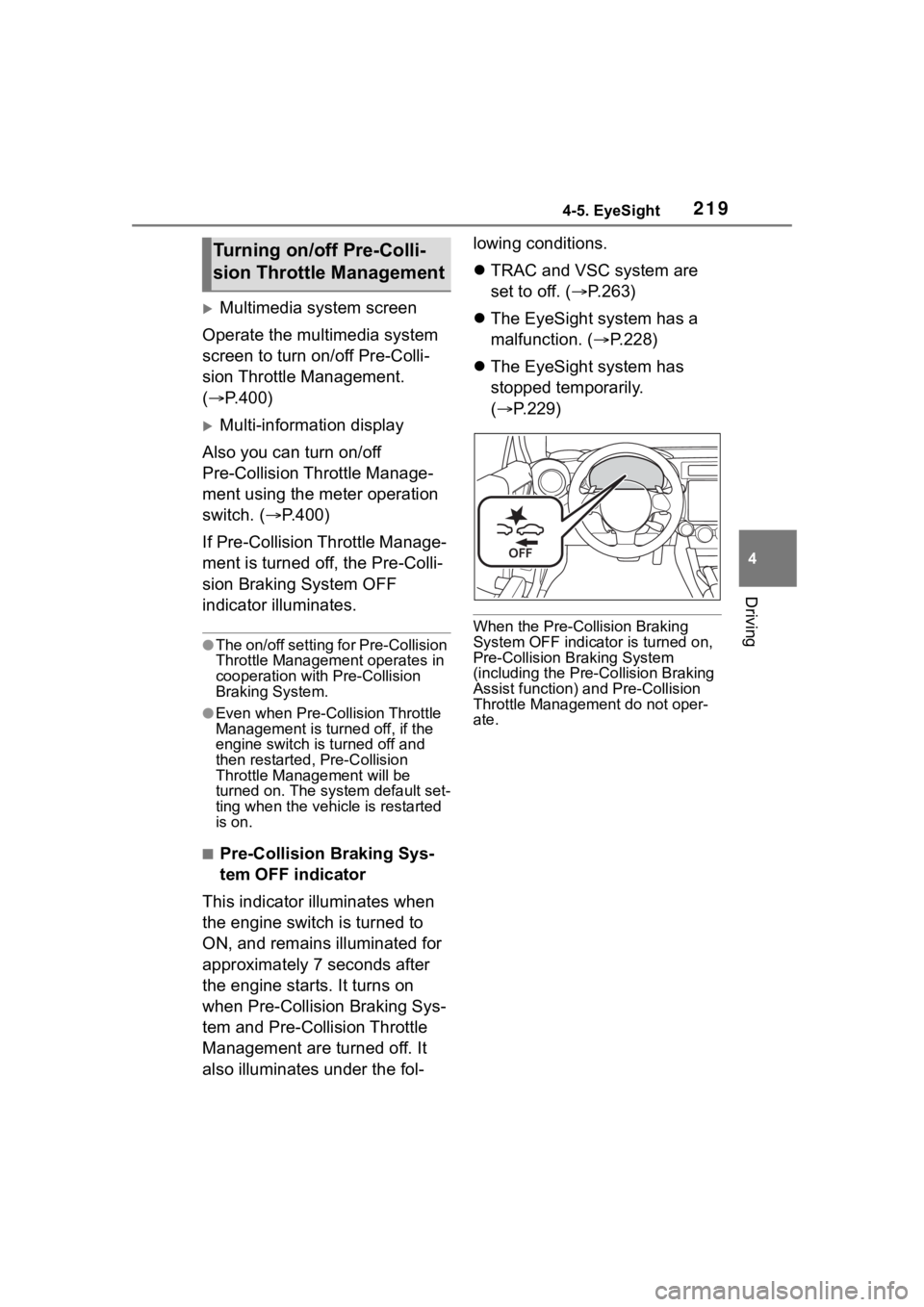
■Pre-Collision Braking Sys-
tem OFF indicator
This indicator illuminates when
the engine switch is turned to
ON, and remains illuminated for
approximately 7 seconds after
the engine starts. It turns on
when Pre-Collision Braking Sys-
tem and Pre-Collision Throttle
Management are turned off. It
also illuminates under the fol- lowing conditions.
TRAC and VSC system are
set to off. ( P.263)
The EyeSight system has a
malfunction. ( P.228)
The EyeSight system has
stopped temporarily.
( P.229)
When the Pre-Collision Braking
System OFF indicato r is turned on,
Pre-Collision Braking System
(including the Pre -Collision Braking
Assist function) and Pre-Collision
Throttle Managemen t do not oper-
ate.
Turning on/off Pre-Colli-
sion Throttle Management
Page 221 of 449
2214-5. EyeSight
4
Driving
Multimedia system screen
Operate the multimedia system
screen to turn on/off Lane
Departure Warning. ( P.400)
Multi-information display
Also you can turn on/off Lane
Departure Warning using the
meter operation switch.
( P.400)
If Lane Departure Warning is
turned off, the Lane Departure
Warning OFF indicator illumi-
nates.
●The on/off setting for Lane Depar-
ture Warning operates in coopera-
tion with Lane Sway Warning.
●The on/off status of Lane Depar-
ture Warning is restored when you
restart the engine.
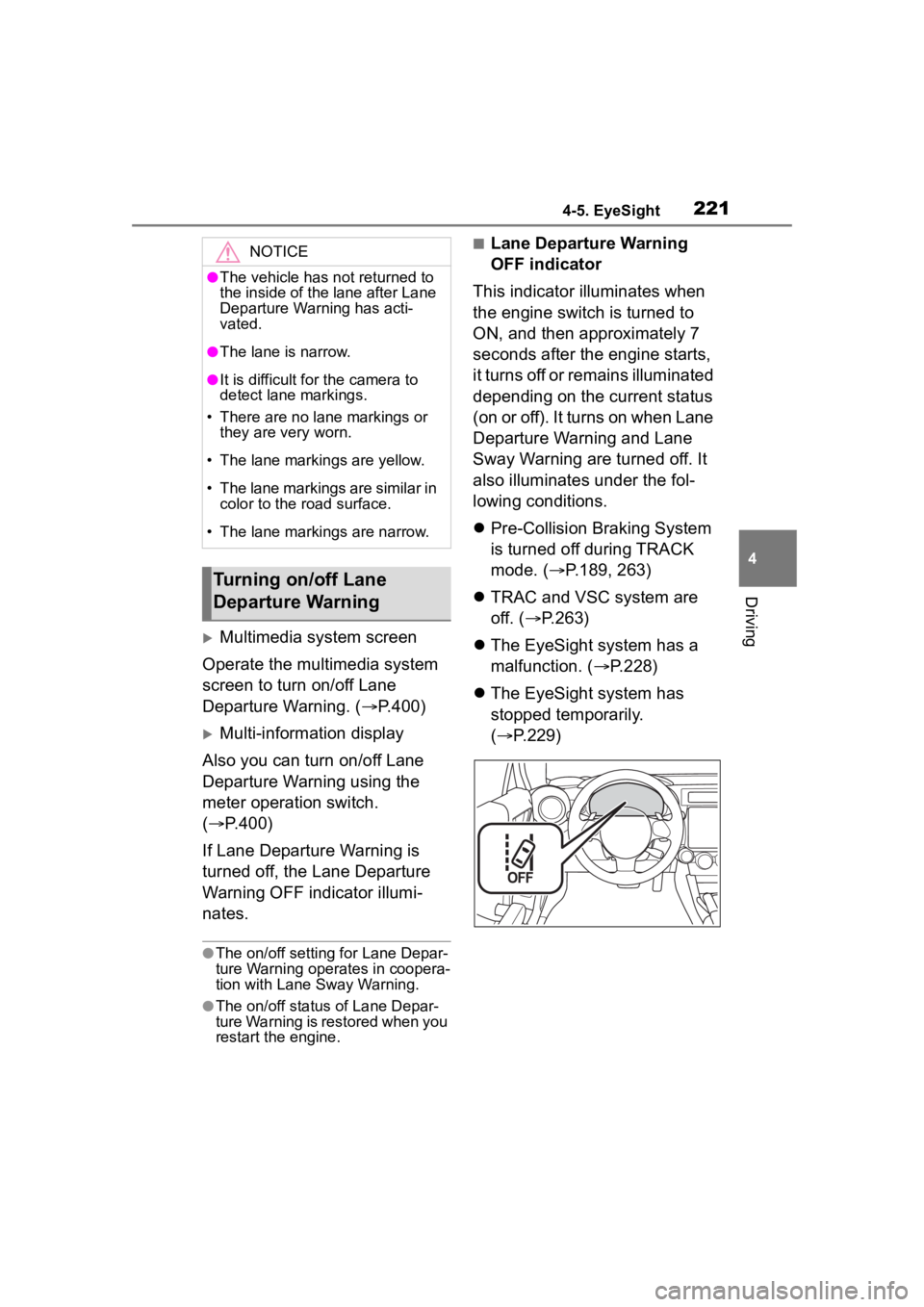
■Lane Departure Warning
OFF indicator
This indicator illuminates when
the engine switch is turned to
ON, and then approximately 7
seconds after the engine starts,
it turns off or remains illuminated
depending on the current status
(on or off). It turns on when Lane
Departure Warning and Lane
Sway Warning are turned off. It
also illuminates under the fol-
lowing conditions.
Pre-Collision Braking System
is turned off during TRACK
mode. ( P.189, 263)
TRAC and VSC system are
off. ( P.263)
The EyeSight system has a
malfunction. ( P.228)
The EyeSight system has
stopped temporarily.
( P.229)NOTICE
●The vehicle has not returned to
the inside of the lane after Lane
Departure Warning has acti-
vated.
●The lane is narrow.
●It is difficult for the camera to
detect lane markings.
• There are no lane markings or they are very worn.
• The lane markings are yellow.
• The lane markings are similar in color to the road surface.
• The lane markings are narrow.
Turning on/off Lane
Departure Warning
Page 222 of 449
2224-5. EyeSight
*: If equipped
●Swaying detection is based on
several minutes of prior driving
data. Swaying will not be detected
immediately after the vehicle
starts to sway. In addition, the
warning may continue for some
time even after swaying stops.
●Lane Sway Warning is just a func-
tion that warns the driver. When the driver is tired, not concentrat-
ing on the road or not paying ade-
quate attention to driving, be sure
to take rest breaks as often as
needed.
●When the Lane Departure Warn-
ing OFF indicator is illuminated,
Lane Sway Warning will not oper-
ate. (
P.223)
Multimedia system screen
Operate the multimedia system
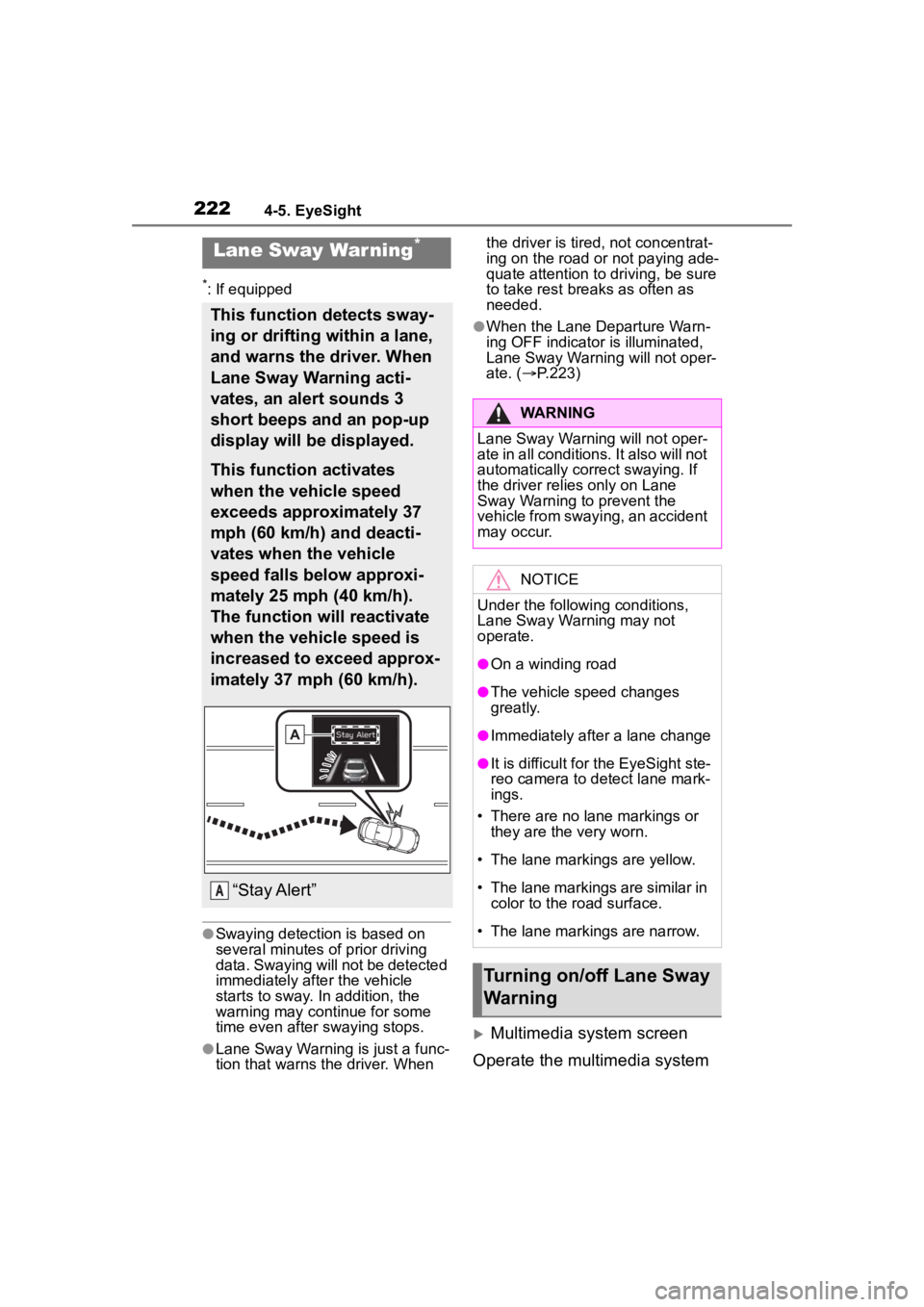
Lane Sway War ning*
This function detects sway-
ing or drifting within a lane,
and warns the driver. When
Lane Sway Warning acti-
vates, an alert sounds 3
short beeps and an pop-up
display will be displayed.
This function activates
when the vehicle speed
exceeds approximately 37
mph (60 km/h) and deacti-
vates when the vehicle
speed falls below approxi-
mately 25 mph (40 km/h).
The function will reactivate
when the vehicle speed is
increased to exceed approx-
imately 37 mph (60 km/h).
“Stay Alert”A
WARNING
Lane Sway Warning will not oper-
ate in all conditions. It also will not
automatically correct swaying. If
the driver relies only on Lane
Sway Warning to prevent the
vehicle from swaying, an accident
may occur.
NOTICE
Under the following conditions,
Lane Sway Warning may not
operate.
●On a winding road
●The vehicle s peed changes
greatly.
●Immediately after a lane change
●It is difficult for the EyeSight ste-
reo camera to detect lane mark-
ings.
• There are no lane markings or they are the very worn.
• The lane markings are yellow.
• The lane markings are similar in
color to the road surface.
• The lane markings are narrow.
Turning on/off Lane Sway
Warning
Page 223 of 449
2234-5. EyeSight
4
Driving
screen to turn on/off Lane Sway
Warning. (P.400)
Multi-information display
Also you can turn on/off Lane
Sway Warning using the meter
operation switch. ( P.400)
If Lane Sway Warning is turned
off, the Lane Departure Warning
OFF indicator illuminates.
●The on/off setting for Lane Sway
Warning operates in cooperation
with Lane Departure Warning.
●The on/off status of Lane Sway
Warning is restored when you
restart the engine.
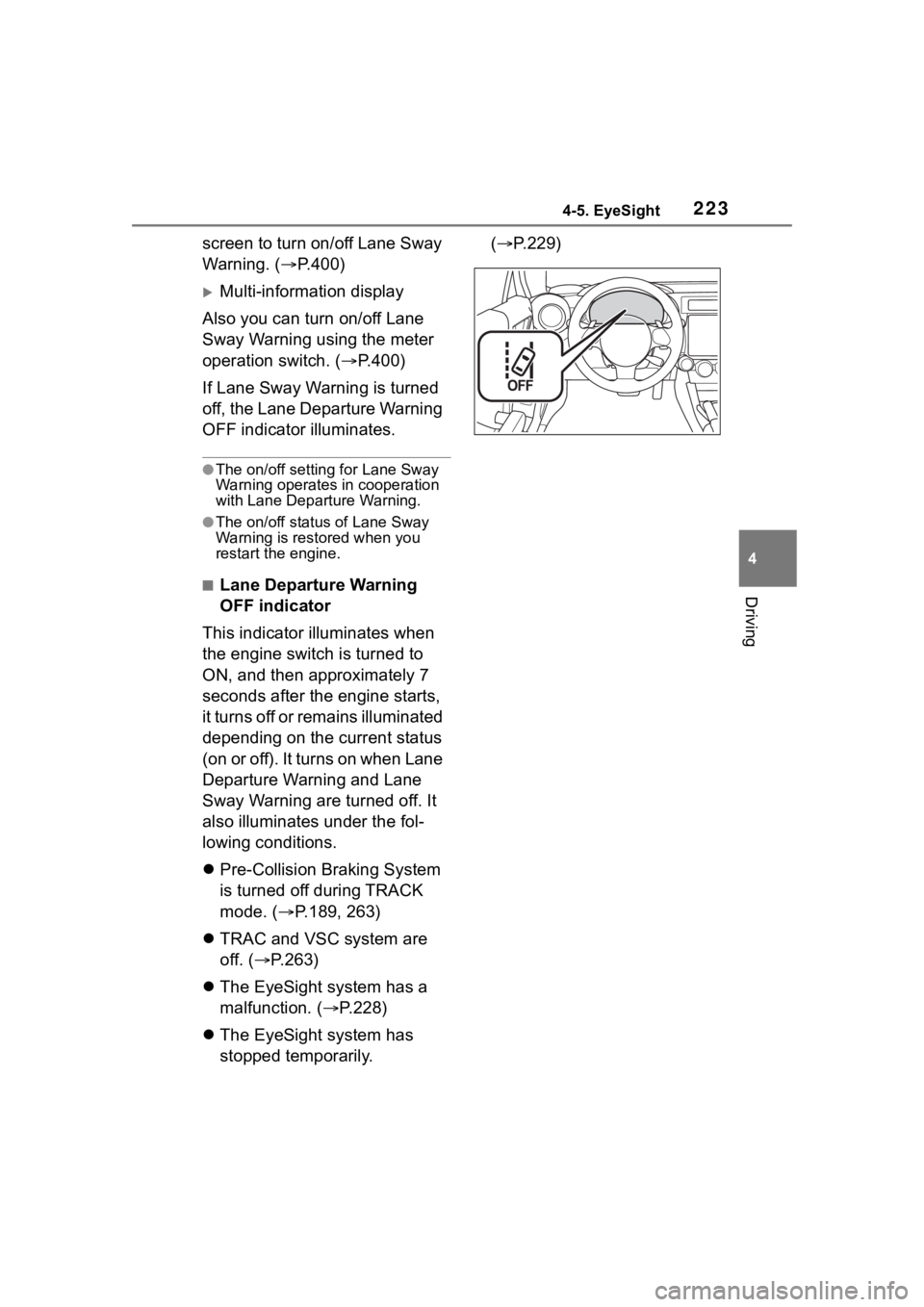
■Lane Departure Warning
OFF indicator
This indicator illuminates when
the engine switch is turned to
ON, and then approximately 7
seconds after the engine starts,
it turns off or remains illuminated
depending on the current status
(on or off). It turns on when Lane
Departure Warning and Lane
Sway Warning are turned off. It
also illuminates under the fol-
lowing conditions.
Pre-Collision Braking System
is turned off during TRACK
mode. ( P.189, 263)
TRAC and VSC system are
off. ( P.263)
The EyeSight system has a
malfunction. ( P.228)
The EyeSight system has
stopped temporarily. (
P.229)
Page 224 of 449
2244-5. EyeSight
*: If equipped
●The Lead Vehicle Start Alert set-
ting can be turned on or off.
( P.400)
●Under the follo wing conditions,
Lead Vehicle Start Alert may acti-
vate even when th e vehicle in
front has not start ed to move, or
may not activate even after the
vehicle in front has started to
move:
• A motorcycle or similar object cuts
in between your vehicle and the
stopped vehicle in front.
• Weather or road conditions may
interfere with the detection of the
vehicle in front.
• The EyeSight stereo camera loses
detection of the v ehicle in front.
●Under the following conditions,
Lead Vehicle Start Alert will not
activate.
• Pre-Collision Braking System is
turned off during TRACK mode.
( P.189, 263)
• TRAC and VSC system are off.
( P.263)
• The EyeSight system has a mal- function. ( P.228)
• The EyeSight system has stopped
temporarily. ( P.229)
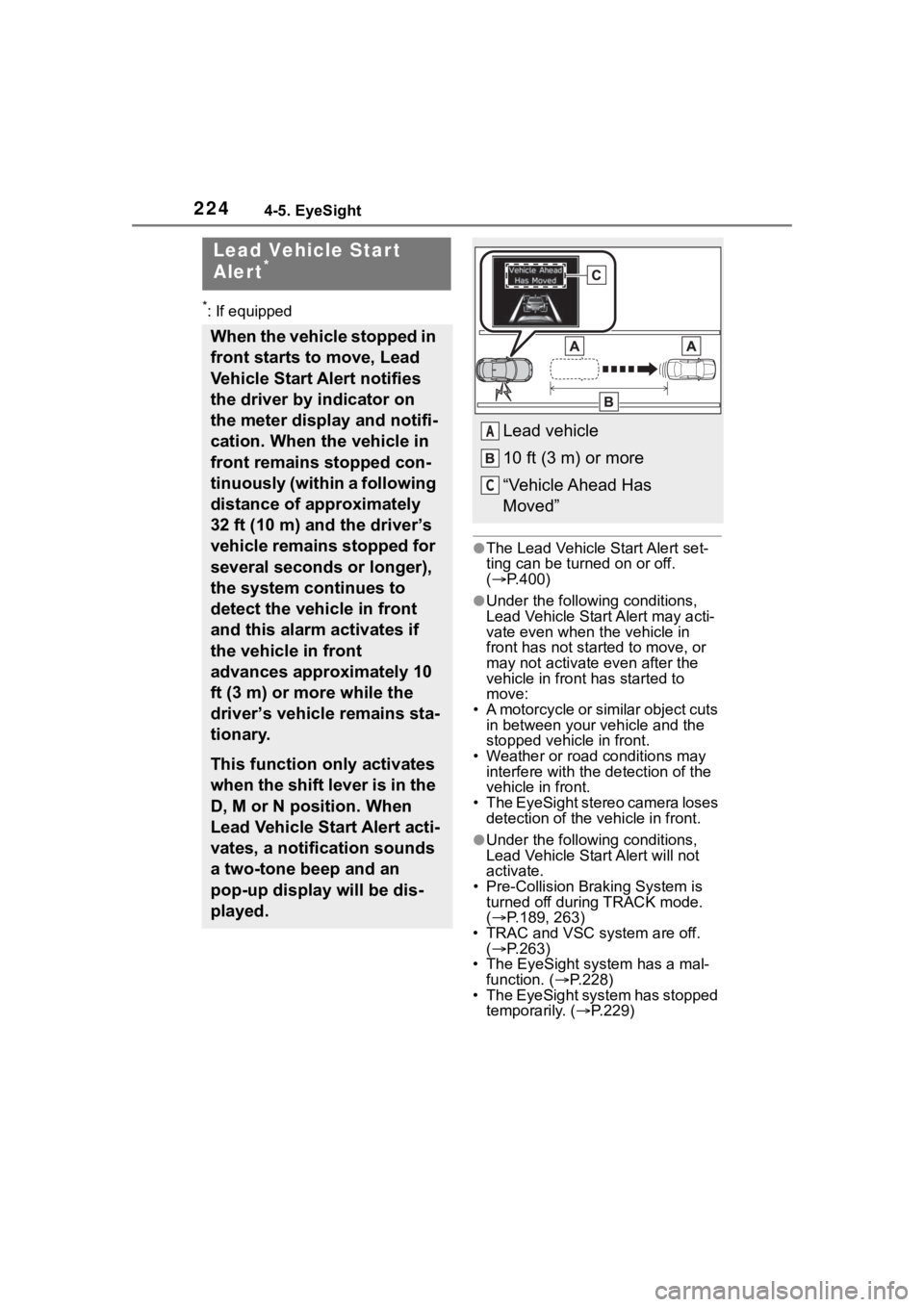
Lead Vehicle Star t
Alert*
When the vehicle stopped in
front starts to move, Lead
Vehicle Start Alert notifies
the driver by indicator on
the meter display and notifi-
cation. When the vehicle in
front remains stopped con-
tinuously (within a following
distance of approximately
32 ft (10 m) and the driver’s
vehicle remains stopped for
several seconds or longer),
the system continues to
detect the vehicle in front
and this alarm activates if
the vehicle in front
advances approximately 10
ft (3 m) or more while the
driver’s vehicle remains sta-
tionary.
This function only activates
when the shift lever is in the
D, M or N position. When
Lead Vehicle Start Alert acti-
vates, a notification sounds
a two-tone beep and an
pop-up display will be dis-
played.
Lead vehicle
10 ft (3 m) or more
“Vehicle Ahead Has
Moved”A
C
Page 227 of 449
2274-5. EyeSight
4
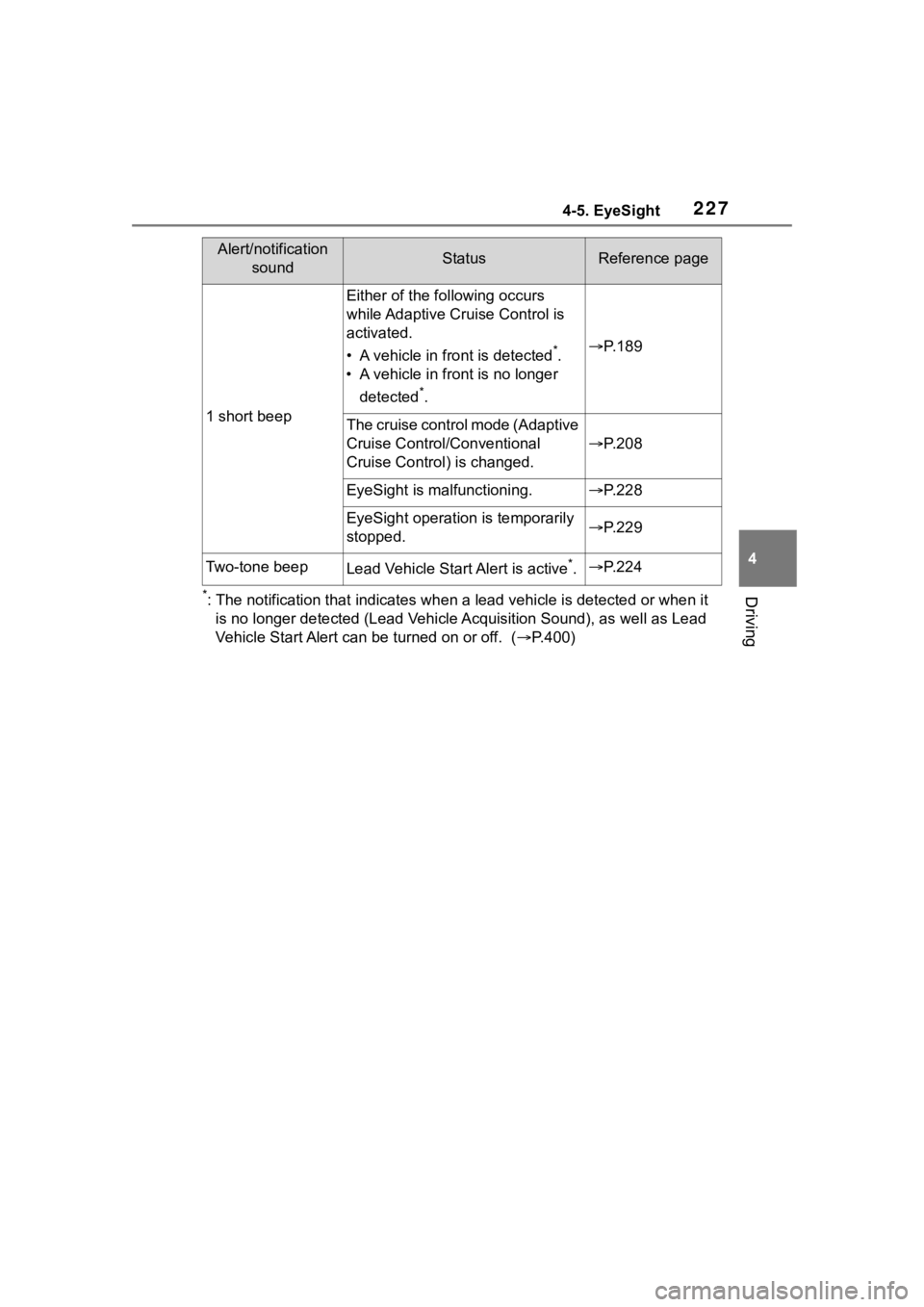
Driving*: The notification that indicates when a lead vehicle is detected or when it
is no longer detected (Lead Vehicle Acquisition Sound), as well as Lead
Vehicle Start Alert can be turned on or off. ( P.400)
1 short beep
Either of the fo llowing occurs
while Adaptive Cru ise Control is
activated.
• A vehicle in fr ont is detected
*.
• A vehicle in fron t is no longer
detected
*.
P. 1 8 9
The cruise control mode (Adaptive
Cruise Control/Conventional
Cruise Control) is changed.
P. 2 0 8
EyeSight is malfunctioning.P. 2 2 8
EyeSight operation is temporarily
stopped.P. 2 2 9
Two-tone beepLead Vehicle Start Alert is active*.P. 2 2 4
Alert/notification
soundStatusReference page
Page 228 of 449
2284-5. EyeSight
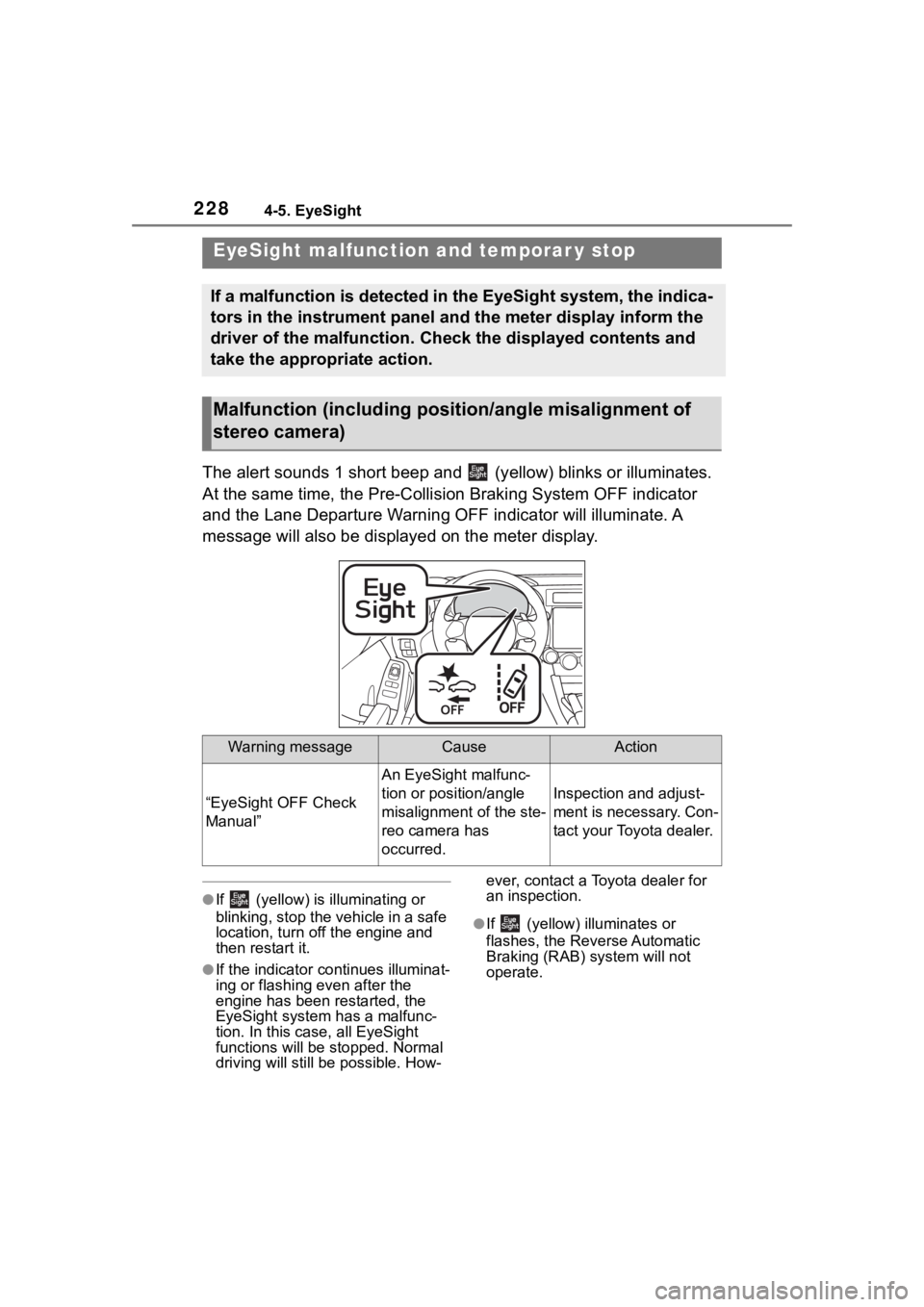
The alert sounds 1 short beep and (yellow) blinks or illuminates.
At the same time, the Pre-Collision Braking System OFF indicato r
and the Lane Departure Warning OFF indicator will illuminate. A
message will also be displayed on the meter display.
●If (yellow) is illuminating or
blinking, stop the vehicle in a safe
location, turn off the engine and
then restart it.
●If the indicator co ntinues illuminat-
ing or flashing even after the
engine has been restarted, the
EyeSight system has a malfunc-
tion. In this case, all EyeSight
functions will be stopped. Normal
driving will still be possible. How- ever, contact a Toyota dealer for
an inspection.
●If (yellow) illuminates or
flashes, the Reverse Automatic
Braking (RAB) system will not
operate.
EyeSight malfuncti
on and temporar y stop
If a malfunction is detected in the EyeSight system, the indica -
tors in the instrument panel and the meter display inform the
driver of the malfunction. Check the displayed contents and
take the appropriate action.
Malfunction (including posit ion/angle misalignment of
stereo camera)
Warning messageCauseAction
“EyeSight OFF Check
Manual”
An EyeSight malfunc-
tion or position/angle
misalignment of the ste-
reo camera has
occurred.
Inspection and adjust-
ment is necessary. Con-
tact your Toyota dealer.