tow TOYOTA AURIS 2015 (in English) Owner's Manual
[x] Cancel search | Manufacturer: TOYOTA, Model Year: 2015, Model line: AURIS, Model: TOYOTA AURIS 2015Pages: 632, PDF Size: 17.65 MB
Page 192 of 632
1924-1. Before driving
Auris Touring Sports_EE (OM12G98E)
Your vehicle will handle differently when towing a trailer. In order to
avoid accident, death or serious injury, keep the following in mind
when towing:
Checking connections between trailer and lights
Stop the vehicle and check the operation of the connection between
the trailer and lights after driving for a brief period as well as before
starting off.
Practicing driving with a coupled trailer
Get the feel for turning, stopping and reversing with the trailer
coupled by practicing in an area with no or light traffic.
When reversing with a coupled trailer, hold the section of the
steering wheel nearest to you and rotate clockwise to turn the
trailer left or counterclockwise to turn it right. Always rotate a little
at a time to prevent steering error. Have someone guide you
when reversing to lessen the risk of an accident.
Increasing vehicle-to-vehicle distance
At a speed of 10 km/h (6 mph), the distance to the vehicle running
ahead of you should be equivalent to or greater than the combined
length of your vehicle and trailer. Avoid sudden braking that may
cause skidding. Otherwise, the vehicle may spin out of control. This
is especially true when driving on wet or slippery road surfaces.
Sudden acceleration/steering input/cornering
Executing sharp turns when towing may result in the trailer colliding
with your vehicle. Decelerate well in advance when approaching
turns and take them slowly and carefully to avoid sudden braking.
Important points regarding turning
The wheels of the trailer will travel closer to the inside of the curve
than the wheels of the vehicle. To make allowance for this, take the
turns wider than you would normally do.
Guidance
Page 193 of 632
1934-1. Before driving
Auris Touring Sports_EE (OM12G98E)
4
Driving
Important points regarding stability
Vehicle movement resulting from uneven road surfaces and strong
crosswinds will affect handling. The vehicle may also be rocked by
passing buses or large trucks. Frequently check behind when mov-
ing alongside such vehicles. As soon as such vehicle movement
occurs, immediately start to decelerate smoothly by slowly applying
the brakes. Always steer the vehicle straight ahead while braking.
Passing other vehicles
Consider the total combined length of your vehicle and trailer and
ensure that the vehicle-to-vehicle distance is sufficient before exe-
cuting lane changes.
Transmission information
Multidrive
To maintain engine braking efficiency and charging system perfor-
mance when using engine braking, do not use the transmission in
D, must be in M and select gear step 4 or lower. (P. 212)
Manual transmission
Refrain from driving in 6th gear to maintain the effectiveness of
engine braking and to maintain charging system performance.
If the engine overheats
Towing a loaded trailer up a long, steep incline in temperatures
exceeding 30C (85F) may result in the engine overheating. If the
engine coolant temperature gauge indicates that the engine is over-
heating, turn the air conditioning off immediately, leave the road and
stop the vehicle in a safe place. (P. 577)
When parking the vehicle
Always place wheel chocks under the wheels of both the vehicle
and trailer. Firmly set the parking brake and shift the shift lever to P
(Multidrive) and 1 or R (manual transmission).
Page 194 of 632
1944-1. Before driving
Auris Touring Sports_EE (OM12G98E)
CAUTION
Follow all the instructions described in this section. Failure to do so could
cause an accident resulting in death or serious injury.
Trailer towing precautions
When towing, make sure that none of the weight limits are exceeded.
(P. 187)
Vehicle speed in towing
Observe the legal maximum speeds for trailer towing.
Before descending hills or long declines
Reduce speed and downshift. However, never downshift suddenly while
descending steep or long downhill grades.
Operation of the brake pedal
Do not hold the brake pedal depressed often or for long periods of time.
Doing so may result in the brake overheating or reduce braking effects.
To avoid accident or injury
Vehicles with a cruise control: Do not use cruise control when you are tow-
ing.
Vehicles with a compact spare tire: Do not tow a trailer when the compact
spare tire is installed on your vehicle.
Vehicles with an emergency tire puncture repair kit: Do not tow a trailer
when the tire installed is repaired with the emergency tire puncture repair
kit.
NOTICE
Do not directly splice trailer lights
Directly splicing trailer lights may damage your vehicle's electrical system
and cause a malfunction.
Page 221 of 632
2214-3. Operating the lights and wipers
Auris Touring Sports_EE (OM12G98E)
4
Driving
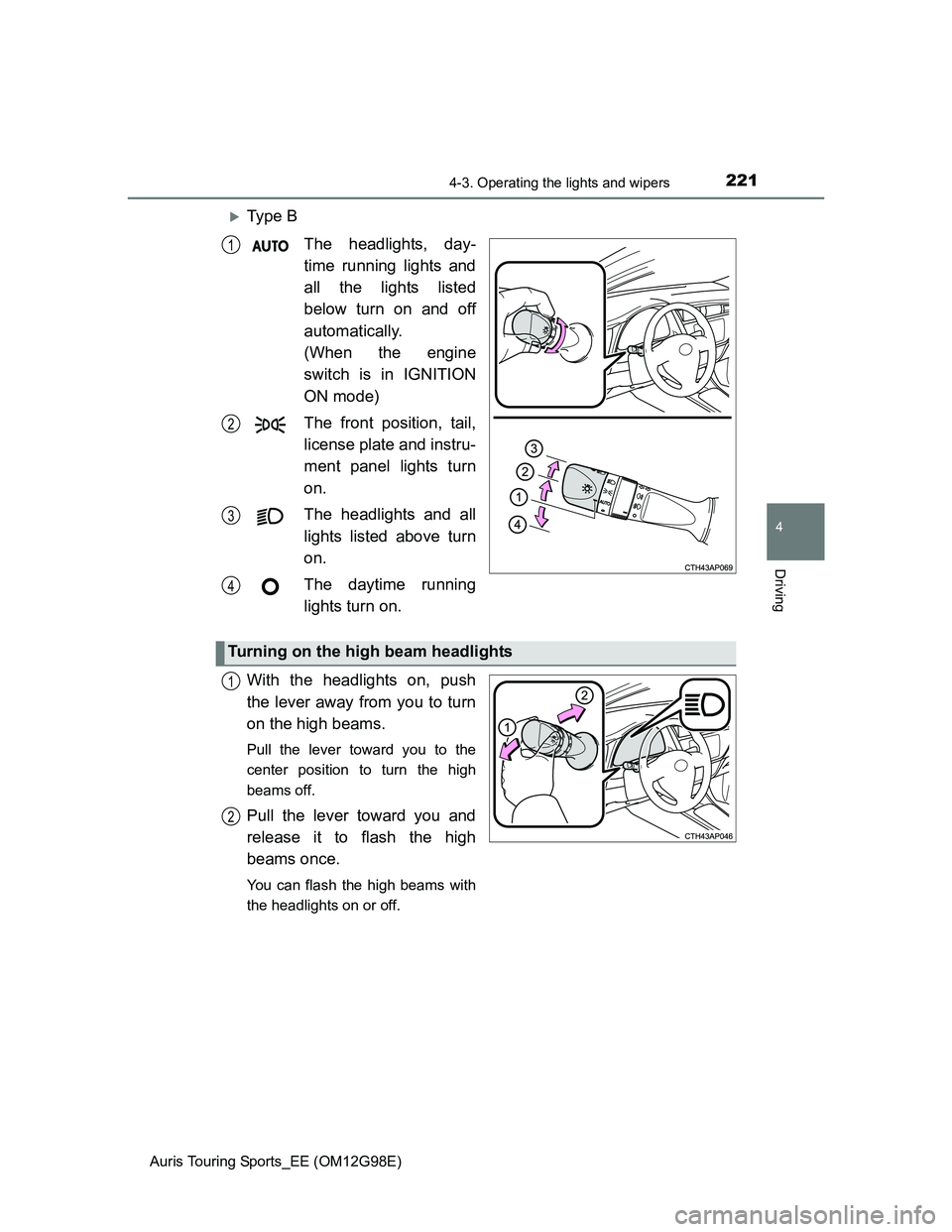
Ty p e B
The headlights, day-
time running lights and
all the lights listed
below turn on and off
automatically.
(When the engine
switch is in IGNITION
ON mode)
The front position, tail,
license plate and instru-
ment panel lights turn
on.
The headlights and all
lights listed above turn
on.
The daytime running
lights turn on.
With the headlights on, push
the lever away from you to turn
on the high beams.
Pull the lever toward you to the
center position to turn the high
beams off.
Pull the lever toward you and
release it to flash the high
beams once.
You can flash the high beams with
the headlights on or off.
1
2
3
4
Turning on the high beam headlights
1
2
Page 222 of 632
2224-3. Operating the lights and wipers
Auris Touring Sports_EE (OM12G98E)
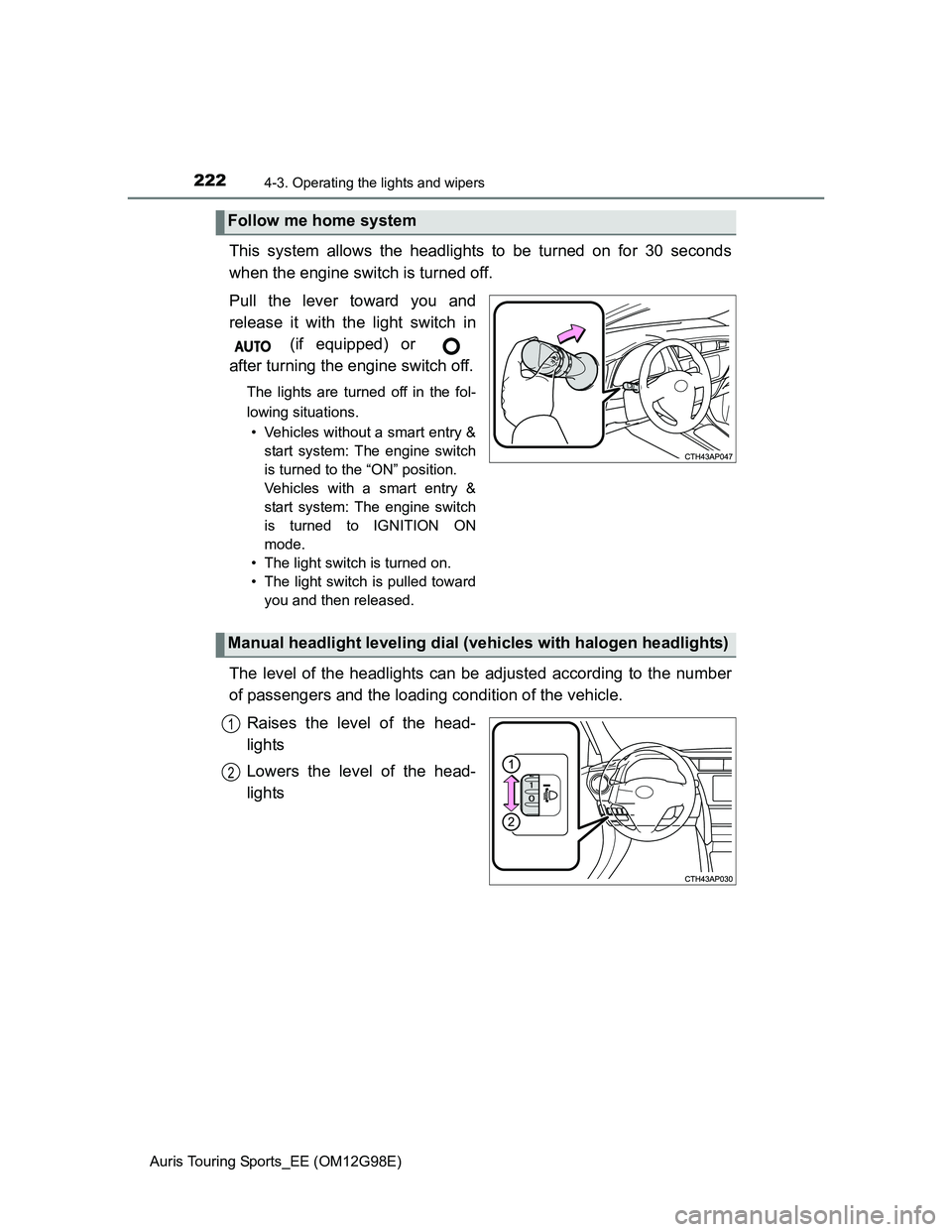
This system allows the headlights to be turned on for 30 seconds
when the engine switch is turned off.
Pull the lever toward you and
release it with the light switch in
(if equipped) or
after turning the engine switch off.
The lights are turned off in the fol-
lowing situations.
• Vehicles without a smart entry &
start system: The engine switch
is turned to the “ON” position.
Vehicles with a smart entry &
start system: The engine switch
is turned to IGNITION ON
mode.
• The light switch is turned on.
• The light switch is pulled toward
you and then released.
The level of the headlights can be adjusted according to the number
of passengers and the loading condition of the vehicle.
Raises the level of the head-
lights
Lowers the level of the head-
lights
Follow me home system
Manual headlight leveling dial (vehicles with halogen headlights)
1
2
Page 228 of 632
2284-3. Operating the lights and wipers
Auris Touring Sports_EE (OM12G98E)The following factors may affect the amount of time taken to turn high beam
on or off:
• The brightness of headlights, fog lights, and tail lights of oncoming and
preceding vehicles
• The movement and direction of oncoming and preceding vehicles
• When a oncoming or preceding vehicle only has operational lights on one
side
• When a oncoming or preceding vehicle is a two-wheeled vehicle
• The condition of the road (gradient, curve, condition of the road surface
etc.)
• The number of passengers and amount of luggage
High beam may be turned on or off when unexpected by the driver.
In the situations below, the system may not be able to correctly detect the
surrounding brightness levels, and may flash or expose nearby pedestrians
to the high beam. Therefore, you should consider turning the high beams on
or off manually rather than relying on the Automatic High Beam system.
• In bad weather (rain, snow, fog, sandstorms etc.)
• The windshield is obscured by fog, mist, ice, dirt etc.
• The windshield is cracked or damaged.
• The inside rear view mirror or camera sensor is deformed or dirty.
• Surrounding brightness levels are equal to those of headlights, tail lights
or fog lights.
• Vehicles ahead have headlights that are either switched off, dirty, are
changing color, or have are not aimed properly.
• When driving through an area of intermittently changing brightness and
darkness.
• When frequently and repeatedly driving ascending/descending roads, or
roads with rough, bumpy or uneven surfaces (such as stone-paved
roads, gravel tracks etc.).
• When frequently and repeatedly taking curves or driving on a winding
road.
• There is a highly reflective object ahead of the vehicle, such as a sign or
a mirror.
• The vehicle’s headlights are damaged or dirty.
• The vehicle is listing or tilting, due to a flat tire, a trailer being towed etc.
• The driver believes that the high beam may be causing problems or dis-
tress to other drivers or pedestrians nearby.
Customization
The Automatic High Beam can be turned off.
(Customizable features: P. 604)
Page 235 of 632
2354-3. Operating the lights and wipers
Auris Touring Sports_EE (OM12G98E)
4
Driving
If no windshield washer fluid sprays
Check that the washer nozzles are not blocked if there is washer fluid in the
windshield washer fluid reservoir.
CAUTION
Caution regarding the use of washer fluid
When it is cold, do not use the washer fluid until the windshield becomes
warm. The fluid may freeze on the windshield and cause low visibility. This
may lead to an accident, resulting in death or serious injury.
Caution regarding the use of windshield wipers in “AUTO” mode (vehi-
cles with rain-sensing windshield wipers)
The windshield wipers may operate unexpectedly if the sensor is touched or
the windshield is subject to vibration in “AUTO” mode. Take care that your
fingers etc. do not become caught in the windshield wipers.
NOTICE
When the windshield is dry
Do not use the wipers, as they may damage the windshield.
When there is no washer fluid spray from the nozzle
Damage to the washer fluid pump may be caused if the lever is pulled
toward you and held continually.
When a nozzle becomes blocked
In this case, contact any authorized Toyota dealer or repairer, or another
duly qualified and equipped professional.
Do not try to clear it with a pin or other object. The nozzle will be damaged.
Page 244 of 632
2444-5. Using the driving support systems
Auris Touring Sports_EE (OM12G98E)
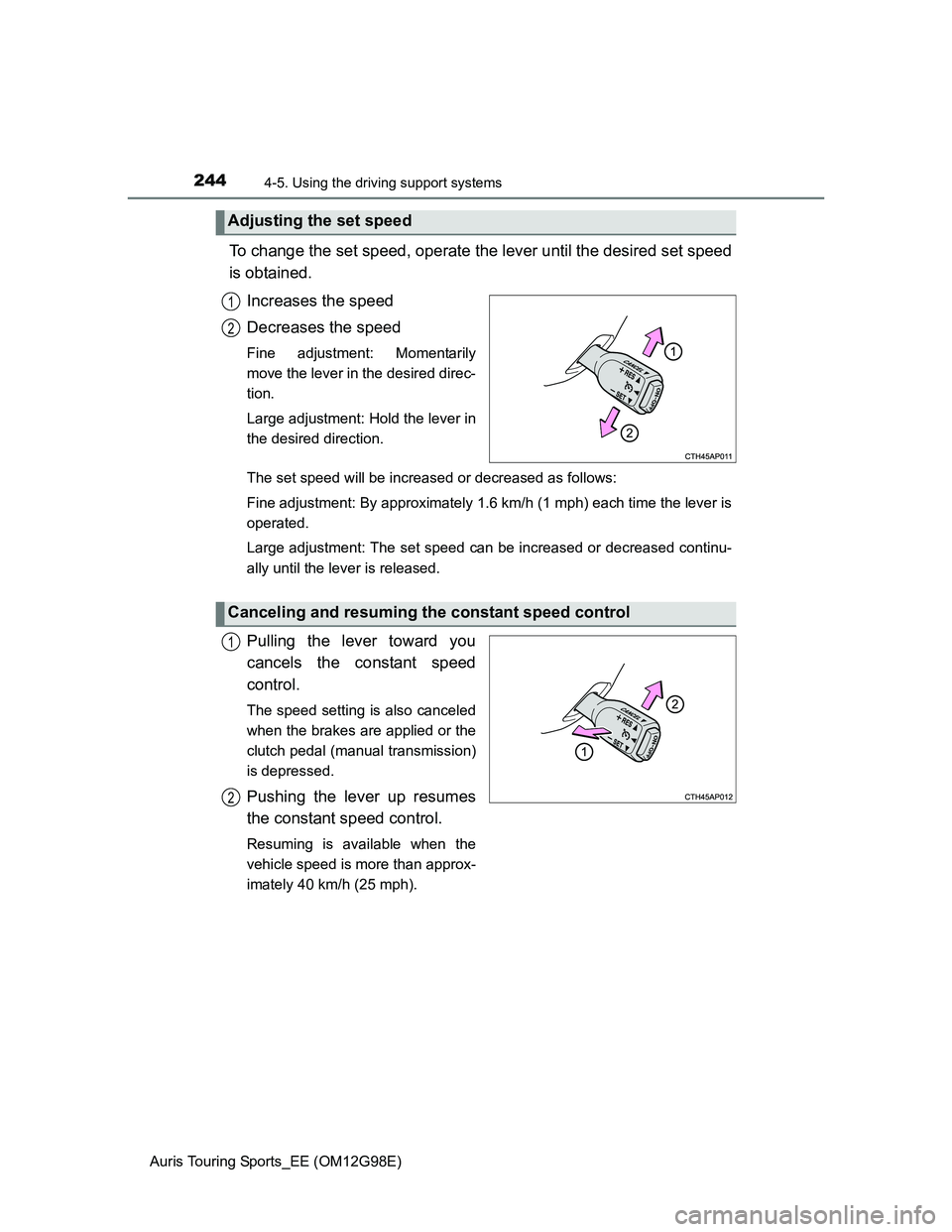
To change the set speed, operate the lever until the desired set speed
is obtained.
Increases the speed
Decreases the speed
Fine adjustment: Momentarily
move the lever in the desired direc-
tion.
Large adjustment: Hold the lever in
the desired direction.
The set speed will be increased or decreased as follows:
Fine adjustment: By approximately 1.6 km/h (1 mph) each time the lever is
operated.
Large adjustment: The set speed can be increased or decreased continu-
ally until the lever is released.
Pulling the lever toward you
cancels the constant speed
control.
The speed setting is also canceled
when the brakes are applied or the
clutch pedal (manual transmission)
is depressed.
Pushing the lever up resumes
the constant speed control.
Resuming is available when the
vehicle speed is more than approx-
imately 40 km/h (25 mph).
Adjusting the set speed
1
2
Canceling and resuming the constant speed control
1
2
Page 246 of 632
2464-5. Using the driving support systems
Auris Touring Sports_EE (OM12G98E)
CAUTION
To avoid operating the cruise control by mistake
Switch the cruise control off using the “ON-OFF” button when not in use.
Situations unsuitable for cruise control
Do not use cruise control in any of the following situations.
Doing so may result in loss of control and could cause an accident resulting
in death or serious injury.
In heavy traffic
On roads with sharp bends
On winding roads
On slippery roads, such as those covered with rain, ice or snow
On steep hills
Vehicle speed may exceed the set speed when driving down a steep hill.
When your vehicle is towing a trailer or during emergency towing
Page 249 of 632
2494-5. Using the driving support systems
Auris Touring Sports_EE (OM12G98E)
4
Driving
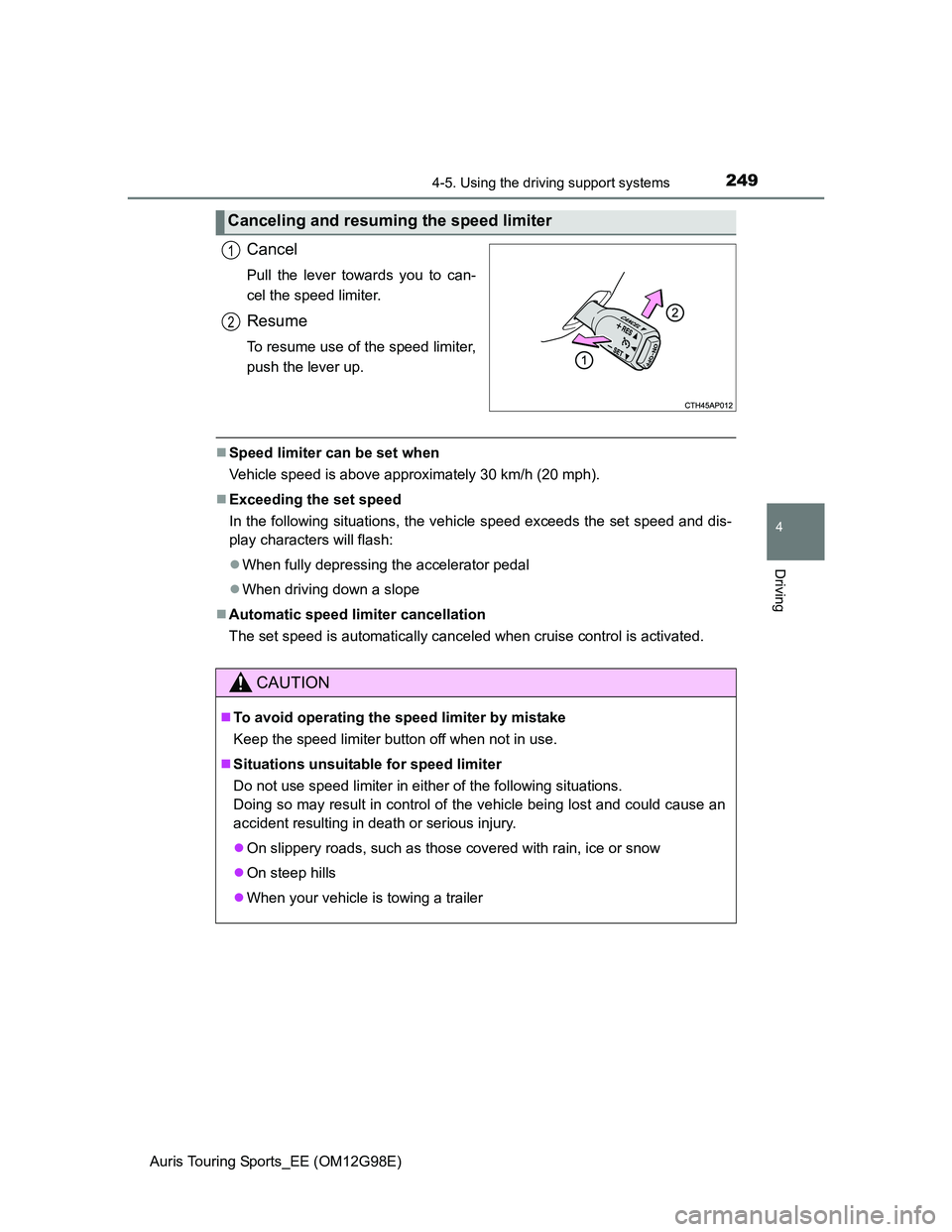
Cancel
Pull the lever towards you to can-
cel the speed limiter.
Resume
To resume use of the speed limiter,
push the lever up.
Speed limiter can be set when
Vehicle speed is above approximately 30 km/h (20 mph).
Exceeding the set speed
In the following situations, the vehicle speed exceeds the set speed and dis-
play characters will flash:
When fully depressing the accelerator pedal
When driving down a slope
Automatic speed limiter cancellation
The set speed is automatically canceled when cruise control is activated.
Canceling and resuming the speed limiter
1
2
CAUTION
To avoid operating the speed limiter by mistake
Keep the speed limiter button off when not in use.
Situations unsuitable for speed limiter
Do not use speed limiter in either of the following situations.
Doing so may result in control of the vehicle being lost and could cause an
accident resulting in death or serious injury.
On slippery roads, such as those covered with rain, ice or snow
On steep hills
When your vehicle is towing a trailer