button TOYOTA AURIS HYBRID 2016 User Guide
[x] Cancel search | Manufacturer: TOYOTA, Model Year: 2016, Model line: AURIS HYBRID, Model: TOYOTA AURIS HYBRID 2016Pages: 592, PDF Size: 16.67 MB
Page 120 of 592
120
UK AURIS_HV_HB_EE (OM12K47E)
3-1. Key information
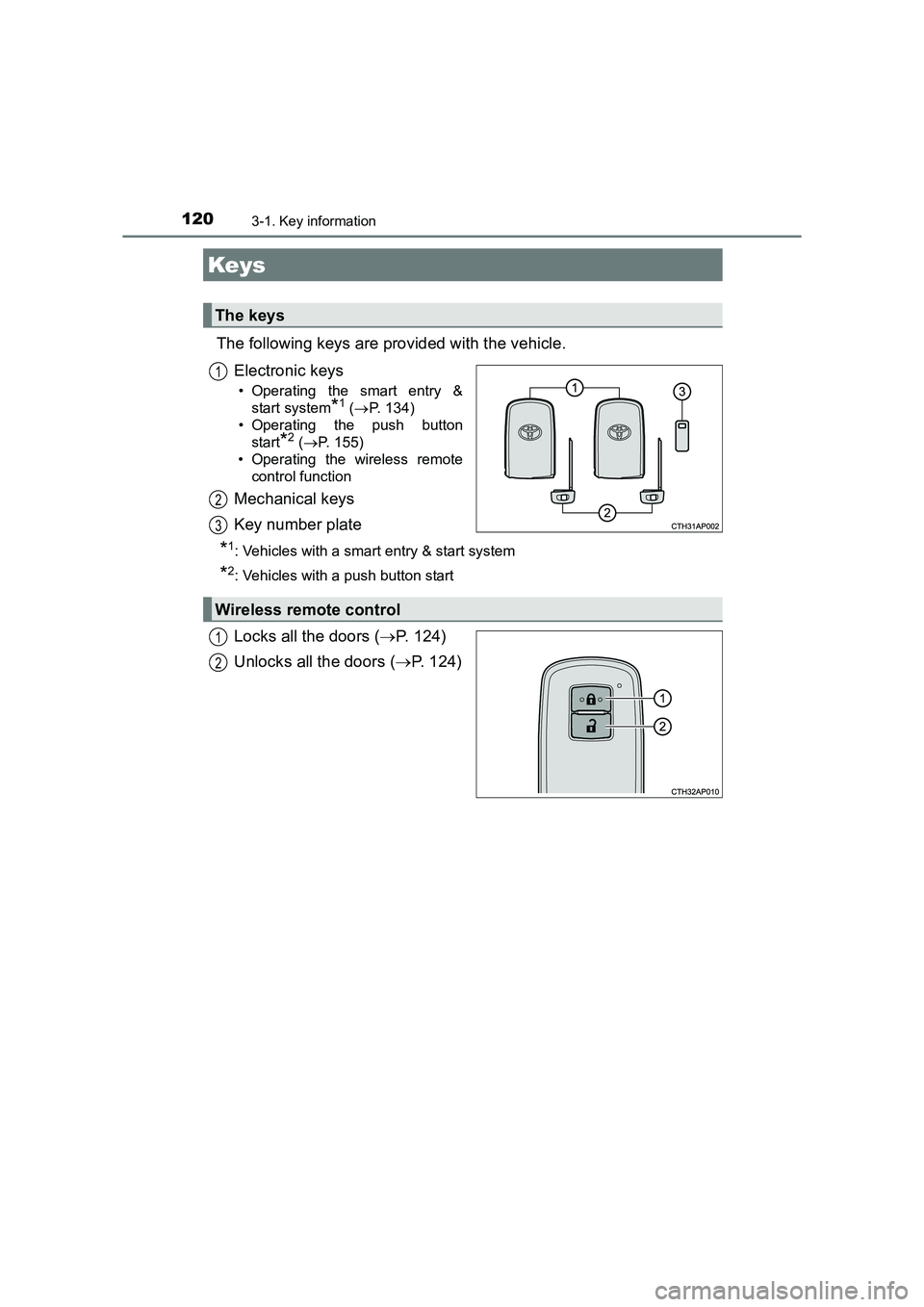
The following keys are provided with the vehicle.Electronic keys
• Operating the smart entry &start system
*1 (→ P. 134)
• Operating the push button start
*2 (→ P. 155)
• Operating the wireless remote
control function
Mechanical keys
Key number plate
*1: Vehicles with a smart entry & start system
*2: Vehicles with a push button start
Locks all the doors ( →P. 124)
Unlocks all the doors ( →P. 124)
Keys
The keys
1
2
3
Wireless remote control
1
2
Page 121 of 592
1213-1. Key information
UK AURIS_HV_HB_EE (OM12K47E)
3
Operation of each component
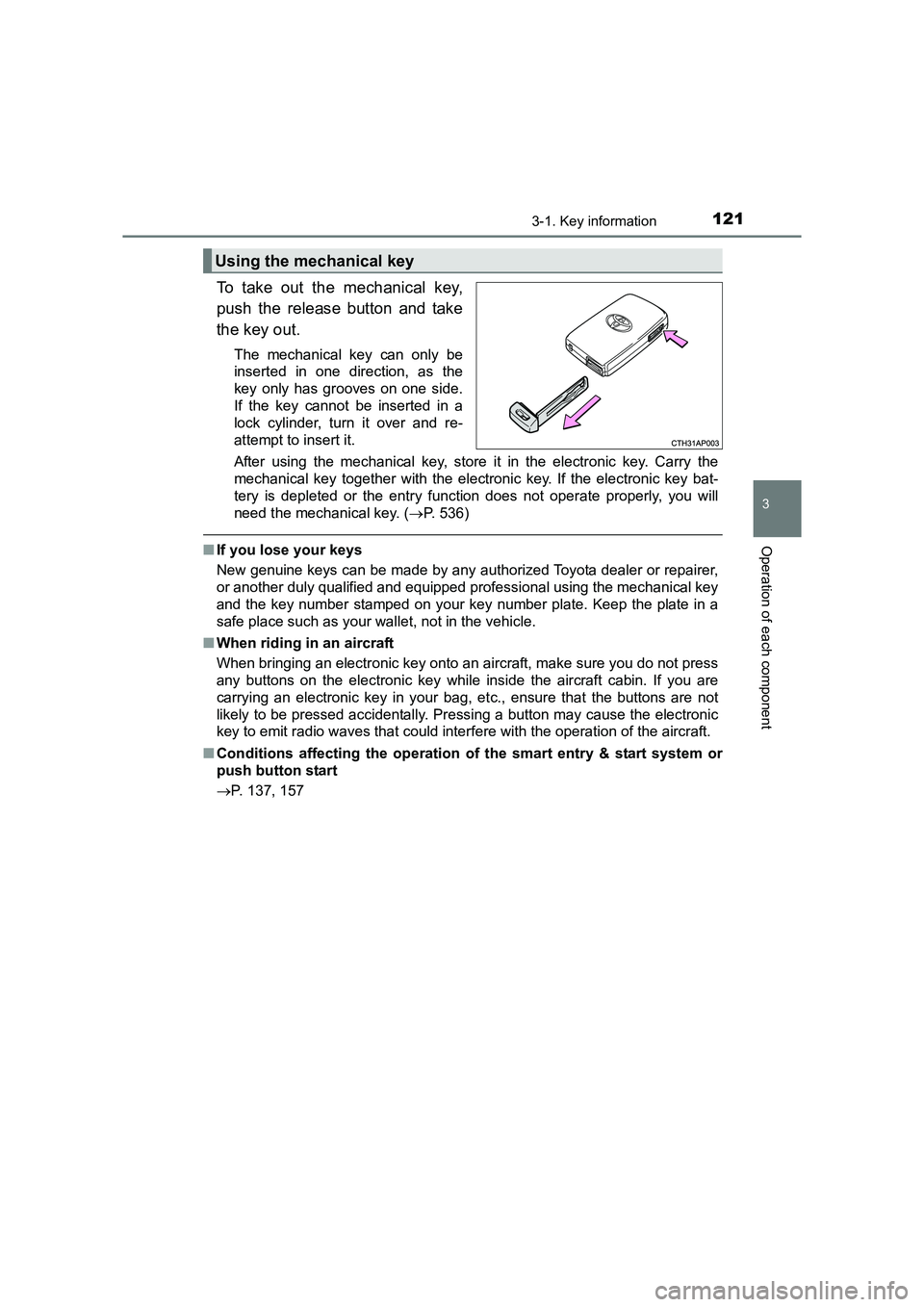
To take out the mechanical key,
push the release button and take
the key out.
The mechanical key can only be
inserted in one direction, as the
key only has grooves on one side.
If the key cannot be inserted in a
lock cylinder, turn it over and re-
attempt to insert it.
After using the mechanical key, store it in the electronic key. Carry the
mechanical key together with the electronic key. If the electronic key bat-
tery is depleted or the entry function does not operate properly, you will
need the mechanical key. ( →P. 536)
■If you lose your keys
New genuine keys can be made by any authorized Toyota dealer or repairer,
or another duly qualified and equipped professional using the mechanical key
and the key number stamped on your key number plate. Keep the plate in a
safe place such as your wallet, not in the vehicle.
■ When riding in an aircraft
When bringing an electronic key onto an aircraft, make sure you do not press
any buttons on the electronic key while inside the aircraft cabin. If you are
carrying an electronic key in your bag, etc., ensure that the buttons are not
likely to be pressed accidentally. Pressing a button may cause the electronic
key to emit radio waves that could interfere with the operation of the aircraft.
■ Conditions affecting the operation of the smart entry & start system or
push button start
→ P. 137, 157
Using the mechanical key
Page 122 of 592
1223-1. Key information
UK AURIS_HV_HB_EE (OM12K47E)■
Electronic key battery depletion
●The standard battery life is 1 to 2 years.
● If the battery becomes low, an alarm will sound in the cabin when the hybrid
system stops.
● As the electronic key always receives radio waves, the battery will become
depleted even if the electronic key is not used. The following symptoms indi-
cate that the electronic key battery may be depleted. Replace the battery
when necessary. ( →P. 459)
• The smart entry & start system, push button start or the wireless remote control does not operate.
• The detection area becomes smaller.
• The LED indicator on the key surface does not turn on.
● To avoid serious deterioration, do not leave the electronic key within 1 m (3
ft.) of the following electrical appliances that produce a magnetic field.
•TVs
• Personal computers
• Cellular phones, cordless phones and battery chargers
• Recharging cellular phones or cordless phones
• Table lamps
• Induction cookers
■ When the electronic key battery is fully depleted
→ P. 459
■ Confirmation of the registered key number
The number of keys already registered to the vehicle can be confirmed. Ask
any authorized Toyota dealer or re pairer, or another duly qualified and
equipped professional for details.
■ If a wrong key is used
The key cylinder rotates freely, isolated from the internal mechanism.
■ Customization
Settings (e.g. wireless remote control system) can be changed.
(Customizable features: →P. 566)
■ Certification for the wireless remote control
→ P. 140, 158
Page 126 of 592
1263-2. Opening, closing and locking the doors
UK AURIS_HV_HB_EE (OM12K47E)
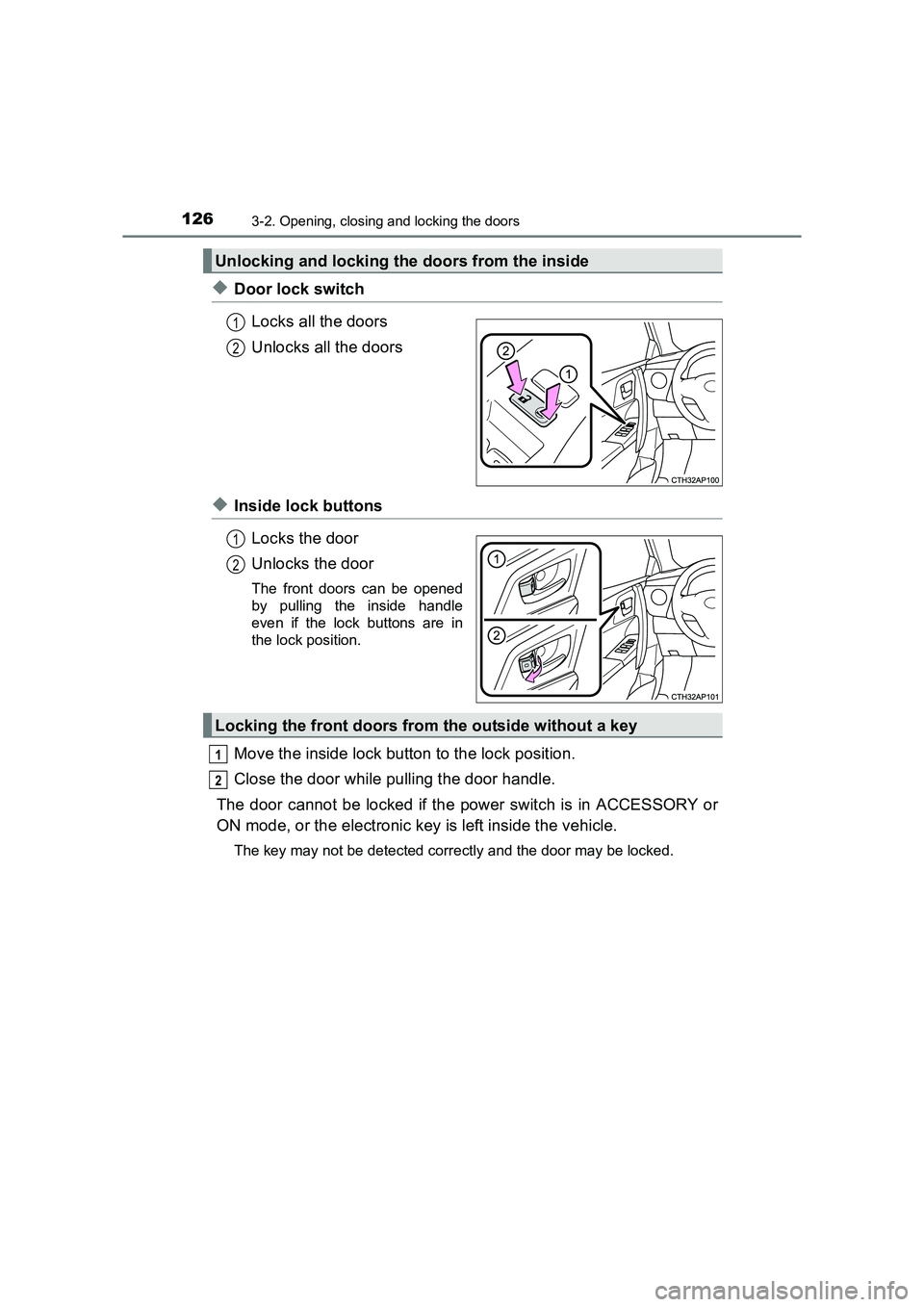
◆Door lock switchLocks all the doors
Unlocks all the doors
◆Inside lock buttonsLocks the door
Unlocks the door
The front doors can be opened
by pulling the inside handle
even if the lock buttons are in
the lock position.
Move the inside lock button to the lock position.
Close the door while pulling the door handle.
The door cannot be locked if the power switch is in ACCESSORY or
ON mode, or the electronic key is left inside the vehicle.
The key may not be detected correctly and the door may be locked.
Unlocking and locking the doors from the inside
1
2
1
2
Locking the front doors from the outside without a key
1
2
Page 128 of 592
1283-2. Opening, closing and locking the doors
UK AURIS_HV_HB_EE (OM12K47E)
WARNING
■ To prevent an accident
Observe the following precautions while driving the vehicle.
Failure to do so may result in a door opening and an occupant throwing out
of the vehicle, resulting in death or serious injury.
●Ensure that all doors are properly closed and locked.
● Do not pull the inside handle of the doors while driving.
Be especially careful for the driver’s door and passenger’s door, as the
door may be opened even if the inside lock button is in the locked position.
● Set the rear door child-protector loc ks when children are seated in the rear
seats.
Page 129 of 592
1293-2. Opening, closing and locking the doors
UK AURIS_HV_HB_EE (OM12K47E)
3
Operation of each component
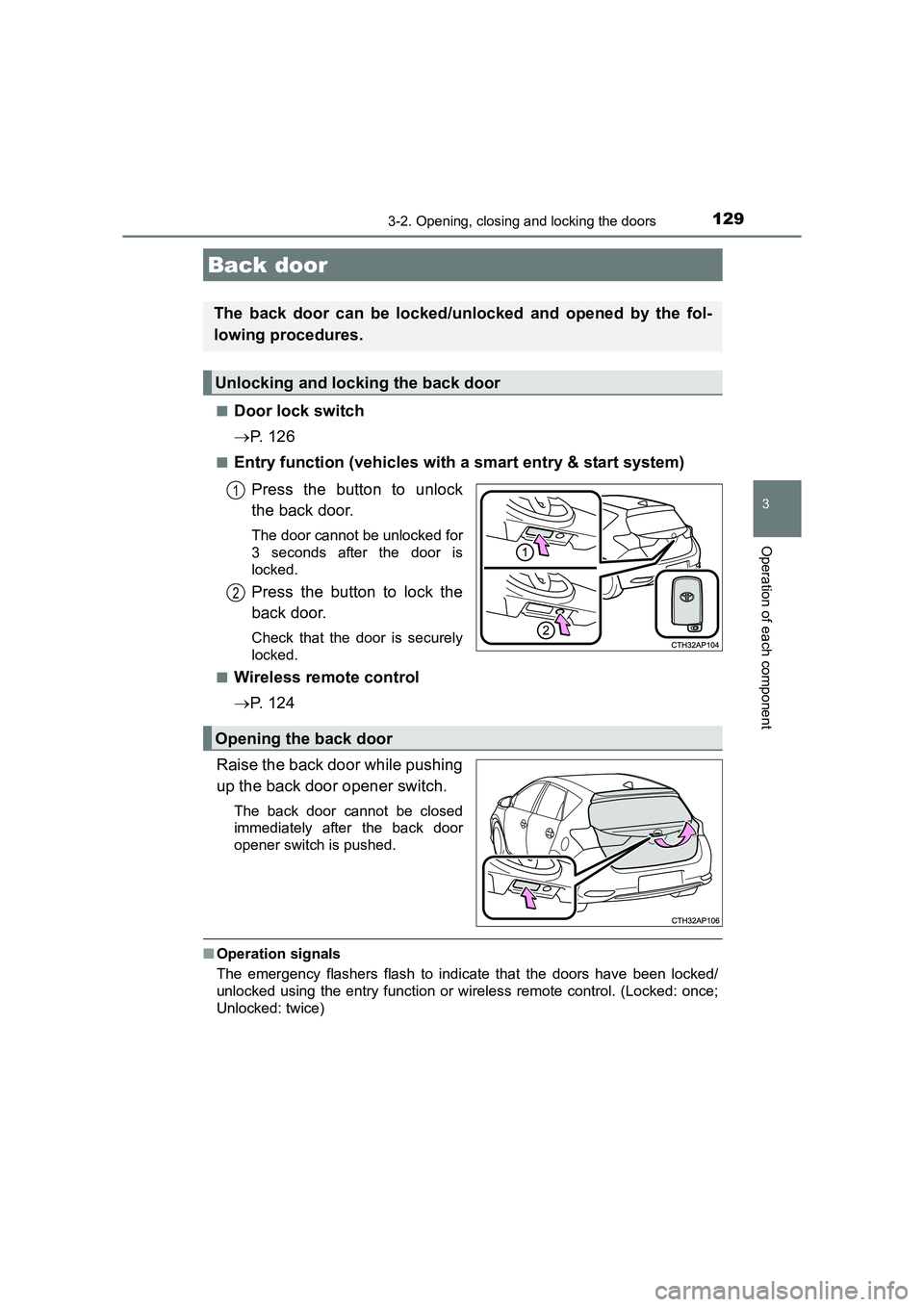
■Door lock switch
→P. 1 2 6
■Entry function (vehicles with a smart entry & start system)
Press the button to unlock
the back door.
The door cannot be unlocked for
3 seconds after the door is
locked.
Press the button to lock the
back door.
Check that the door is securely
locked.
■
Wireless remote control
→ P. 1 2 4
Raise the back door while pushing
up the back door opener switch.
The back door cannot be closed
immediately after the back door
opener switch is pushed.
■ Operation signals
The emergency flashers flash to indicate that the doors have been locked/
unlocked using the entry function or wireless remote control. (Locked: once;
Unlocked: twice)
Back door
The back door can be locked/unlocked and opened by the fol-
lowing procedures.
Unlocking and locking the back door
1
2
Opening the back door
Page 136 of 592
1363-2. Opening, closing and locking the doors
UK AURIS_HV_HB_EE (OM12K47E)■
When “Check entry & start system.” is displayed on the multi-informa-
tion display
The system may be malfunctioning. Have the vehicle inspected by any autho-
rized Toyota dealer or repairer, or another duly qualified and equipped profes-
sional immediately.
■ Battery-saving function
The battery-saving function will be activated in order to prevent the electronic
key battery and the vehicle battery from being discharged while the vehicle is
not operated for a long time.
●In the following situations, the smart entry & start system may take some
time to unlock the doors.
• The electronic key has been left within approximately 2 m (6 ft.) of the
outside of the vehicle for 10 minutes or longer.
• The smart entry & start system has not been used for 5 days or longer.
● If the smart entry & start system has not been used for 14 days or longer,
the doors cannot be unlocked from any door except the driver’s door. In this
case, hold the driver’s door handle, or use the wireless remote control or
mechanical key to unlock the doors.
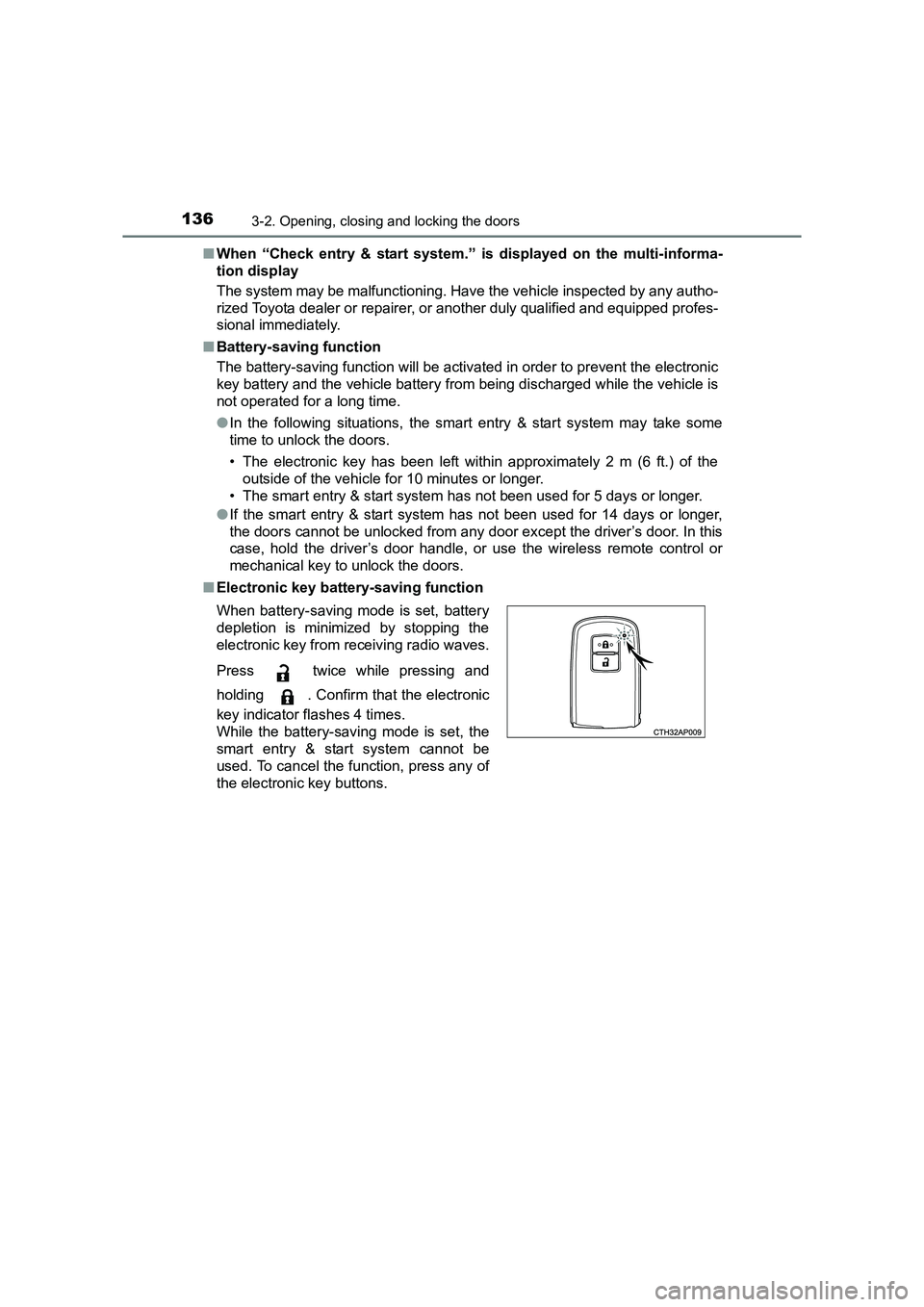
■ Electronic key battery-saving function
When battery-saving mode is set, battery
depletion is minimized by stopping the
electronic key from receiving radio waves.
Press twice while pressing and
holding . Confirm that the electronic
key indicator flashes 4 times.
While the battery-saving mode is set, the
smart entry & start system cannot be
used. To cancel the function, press any of
the electronic key buttons.
Page 155 of 592
1553-2. Opening, closing and locking the doors
UK AURIS_HV_HB_EE (OM12K47E)
3
Operation of each component
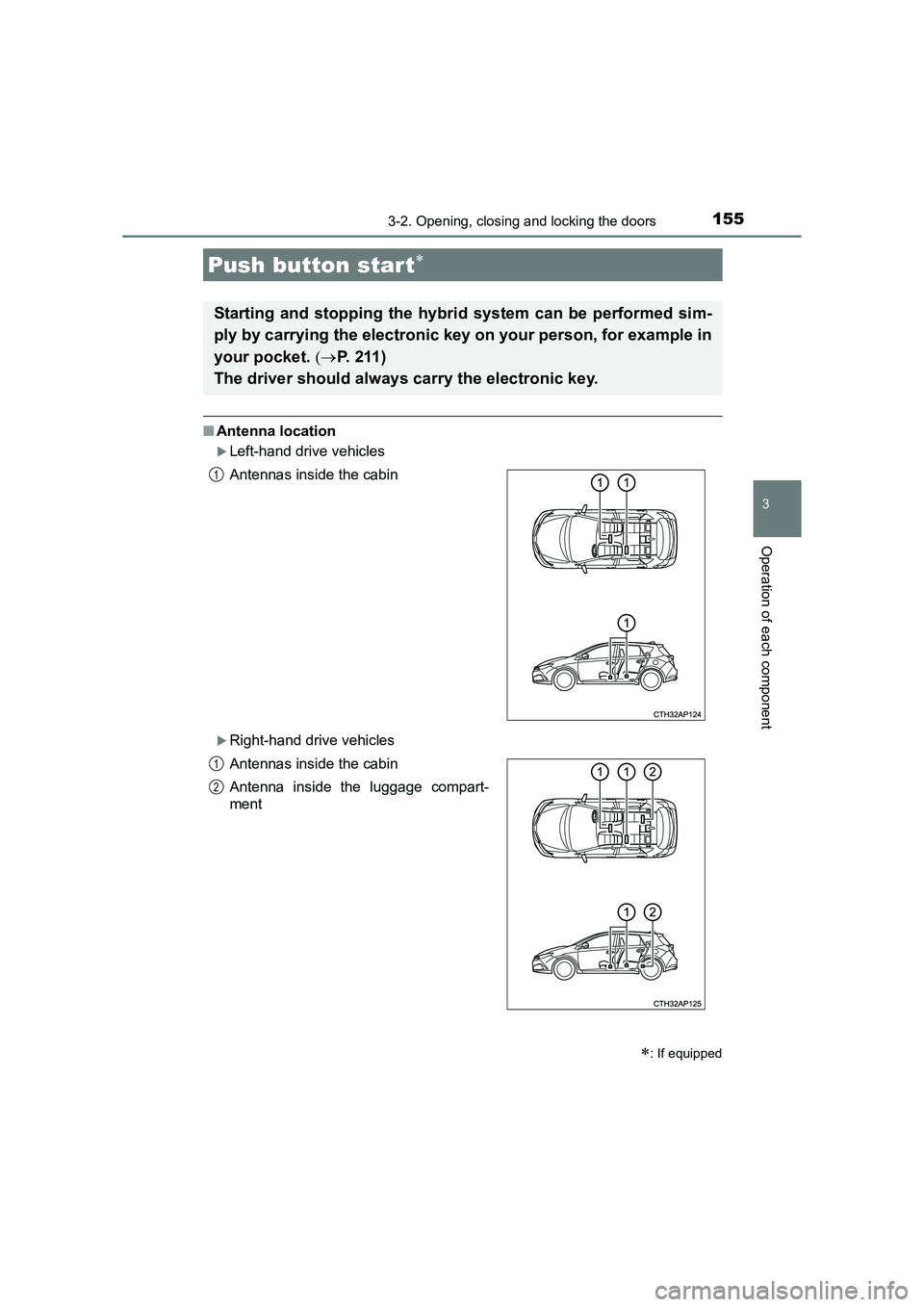
■Antenna location
XLeft-hand drive vehicles
XRight-hand drive vehicles
Push button start∗
∗: If equipped
Starting and stopping the hybrid system can be performed sim-
ply by carrying the electronic key on your person, for example in
your pocket. (→P. 2 1 1 )
The driver should always carry the electronic key.
Antennas inside the cabin
Antennas inside the cabin
Antenna inside the luggage compart-
ment1
1
2
Page 156 of 592
1563-2. Opening, closing and locking the doors
UK AURIS_HV_HB_EE (OM12K47E)■
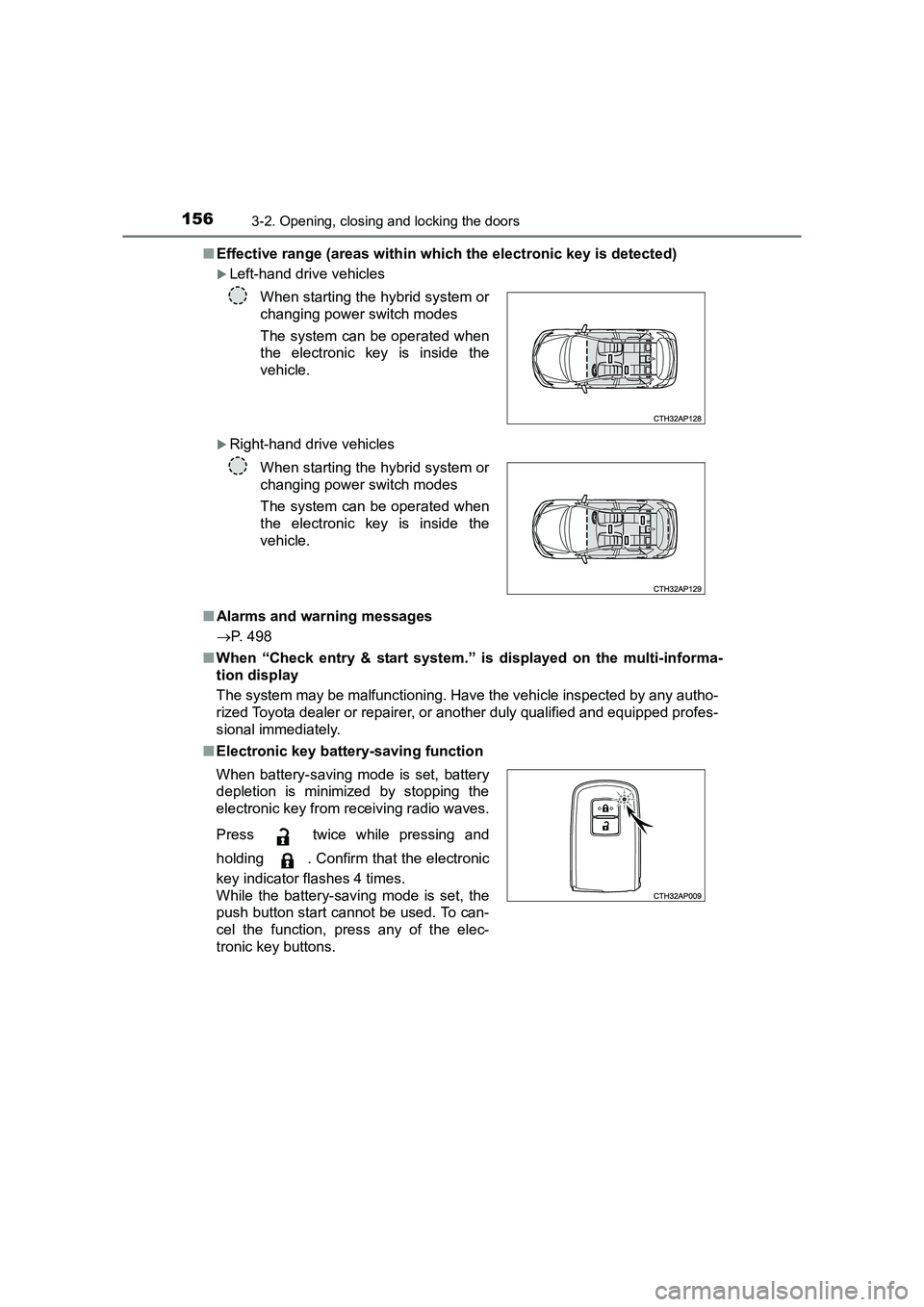
Effective range (areas within which the electronic key is detected)
XLeft-hand drive vehicles
XRight-hand drive vehicles
■ Alarms and warning messages
→ P. 498
■ When “Check entry & start system.” is displayed on the multi-informa-
tion display
The system may be malfunctioning. Have the vehicle inspected by any autho-
rized Toyota dealer or repairer, or another duly qualified and equipped profes-
sional immediately.
■ Electronic key battery-saving function When starting the hybrid system or
changing power switch modes
The system can be operated when
the electronic key is inside the
vehicle.
When starting the hybrid system or
changing power switch modes
The system can be operated when
the electronic key is inside the
vehicle.
When battery-saving mode is set, battery
depletion is minimized by stopping the
electronic key from receiving radio waves.
Press twice while pressing and
holding . Confirm that the electronic
key indicator flashes 4 times.
While the battery-saving mode is set, the
push button start cannot be used. To can-
cel the function, press any of the elec-
tronic key buttons.
Page 157 of 592
1573-2. Opening, closing and locking the doors
UK AURIS_HV_HB_EE (OM12K47E)
3
Operation of each component
■Conditions affecting operation
The push button start uses weak radio waves. In the following situations, the
communication between the electronic key and the vehicle may be affected,
preventing the push button start, wireless remote control and immobilizer sys-
tem from operating properly: (Ways of coping: →P. 536)
● When the electronic key battery is depleted
● Near a TV tower, electric power plant, gas station, radio station, large dis-
play, airport or other facility that generates strong radio waves or electrical
noise
● When carrying a portable radio, cellular phone, cordless phone or other
wireless communication device
● When the electronic key is in contact with, or is covered by the following
metallic objects
• Cards to which aluminum foil is attached
• Cigarette boxes that have aluminum foil inside
• Metallic wallets or bags
• Coins
• Hand warmers made of metal
• Media such as CDs and DVDs
● When other wireless keys (that emit radio waves) are being used nearby
● When carrying the electronic key together with the following devices that
emit radio waves
• Another vehicle’s electronic key or a wireless key that emits radio waves
• Personal computers or personal digital assistants (PDAs)
• Digital audio players
• Portable game systems
● If window tint with a metallic content or metallic objects are attached to the
rear window
● When the electronic key is placed near a battery charger or electronic
devices
■ To operate the system properly
Make sure to carry the electronic key when operating the system.
Depending on the position and holding condition of the electronic key, the key
may not be detected correctly and the system may not operate properly.
■ If the push button start does not operate properly
Starting the hybrid system: →P. 2 11
■ Customization
It is possible to deactivate the push button start.
(Customizable features →P. 566)
■ If the push button start has been deactivated in a customized setting
● Starting the hybrid system and changing power switch modes: →P. 537
● Stopping the hybrid system: →P. 212