button TOYOTA AURIS HYBRID 2016 Service Manual
[x] Cancel search | Manufacturer: TOYOTA, Model Year: 2016, Model line: AURIS HYBRID, Model: TOYOTA AURIS HYBRID 2016Pages: 592, PDF Size: 16.67 MB
Page 336 of 592
3365-5. Using an external device
UK AURIS_HV_HB_EE (OM12K47E)■
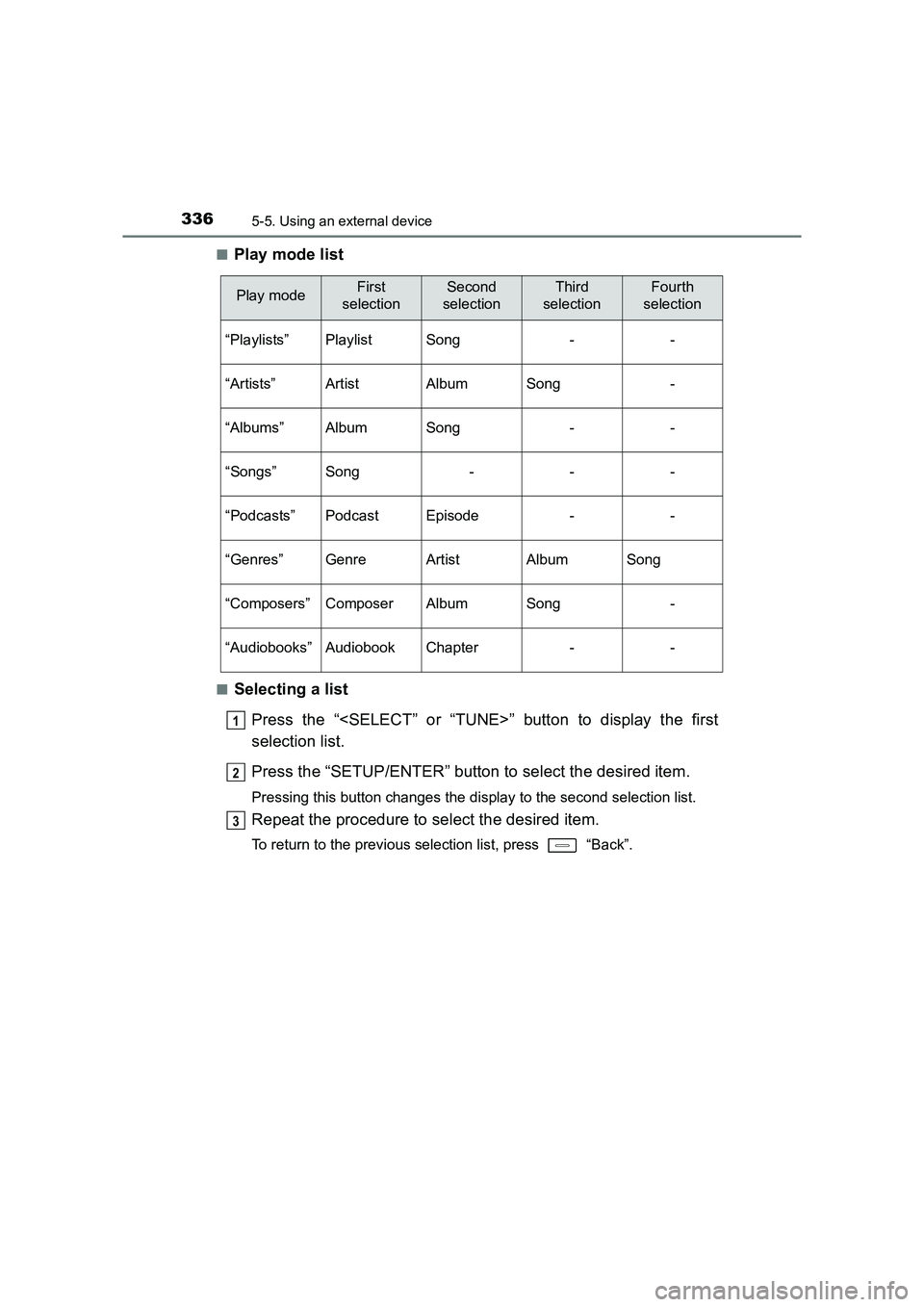
Play mode list
■Selecting a list
Press the “
selection list.
Press the “SETUP/ENTER” button to select the desired item.
Pressing this button changes the display to the second selection list.
Repeat the procedure to select the desired item.
To return to the previous selection list, press “Back”.
Play modeFirst
selectionSecond
selectionThird
selectionFourth
selection
“Playlists”PlaylistSong--
“Artists”ArtistAlbumSong-
“Albums”AlbumSong--
“Songs”Song---
“Podcasts”PodcastEpisode--
“Genres”GenreArtistAlbumSong
“Composers”ComposerAlbumSong-
“Audiobooks”AudiobookChapter--
1
2
3
Page 337 of 592
3375-5. Using an external device
UK AURIS_HV_HB_EE (OM12K47E)
5
Audio system
Press the “
select the desired song.Press “List”.
The song list will be displayed.
Press the “
Press the “SETUP/ENTER” button to play the song.
To return to the previous display, press “Back”.
To fast-forward or reverse, press and hold the “SEEK>” or “
Press
“RPT”.
To cancel, press “RPT” again.
Pressing “RDM” changes the shuffle playback mode in the fol-
lowing order:
Track shuffle → Album shuffle → Off.
Press “Text”.
Track title, Artist name and Albu m title are shown on the display.
To return to the previous display, press “Text” or “Back”.
Selecting a song
Selecting a song from the song list
Fast-forwarding and reversing a song
Repeat play
Shuffle playback
Switching the display
1
2
3
Page 338 of 592
3385-5. Using an external device
UK AURIS_HV_HB_EE (OM12K47E)
Press the “SETUP/ENTER” button to enter Set up menu mode.
Press the “
(→ P. 321)
■About iPod
●“Made for iPod” and “Made for iPhone” mean that an electronic accessory
has been designed to connect specifically to iPod, or iPhone, respectively,
and has been certified by the developer to meet Apple performance stan-
dards.
● Apple is not responsible for the operation of this device or its compliance
with safety and regulatory standards. Please note that the use of this acces-
sory with iPod or iPhone may affect wireless performance.
● iPhone, iPod, iPod classic, iPod nano and iPod touch are trademarks of
Apple Inc., registered in the U.S. and other countries.
■ iPod functions
●When an iPod is connected and the audio source is changed to iPod mode,
the iPod will resume play from the same point in which it was last used.
● Depending on the iPod that is connected to the system, certain functions
may not be available. If a function is unavailable due to a malfunction (as
opposed to a system specification), disconnecting the device and recon-
necting it once again may resolve the problem.
● While connected to the system, the iPod cannot be operated with its own
controls. It is necessary to use the controls of the vehicle’s audio system
instead.
● When the battery level of an iPod is very low, the iPod may not operate. If
so, charge the iPod before use.
● Supported models ( →P. 340)
Adjusting sound quality and volume balance
1
2
Page 342 of 592
3425-5. Using an external device
UK AURIS_HV_HB_EE (OM12K47E)
→P. 3 2 0
Listening to a USB memor y device
Connecting a USB memory device enables you to enjoy music
from the vehicle speakers. Press the “MODE” button until “USB”
is displayed.
Connecting a USB memory
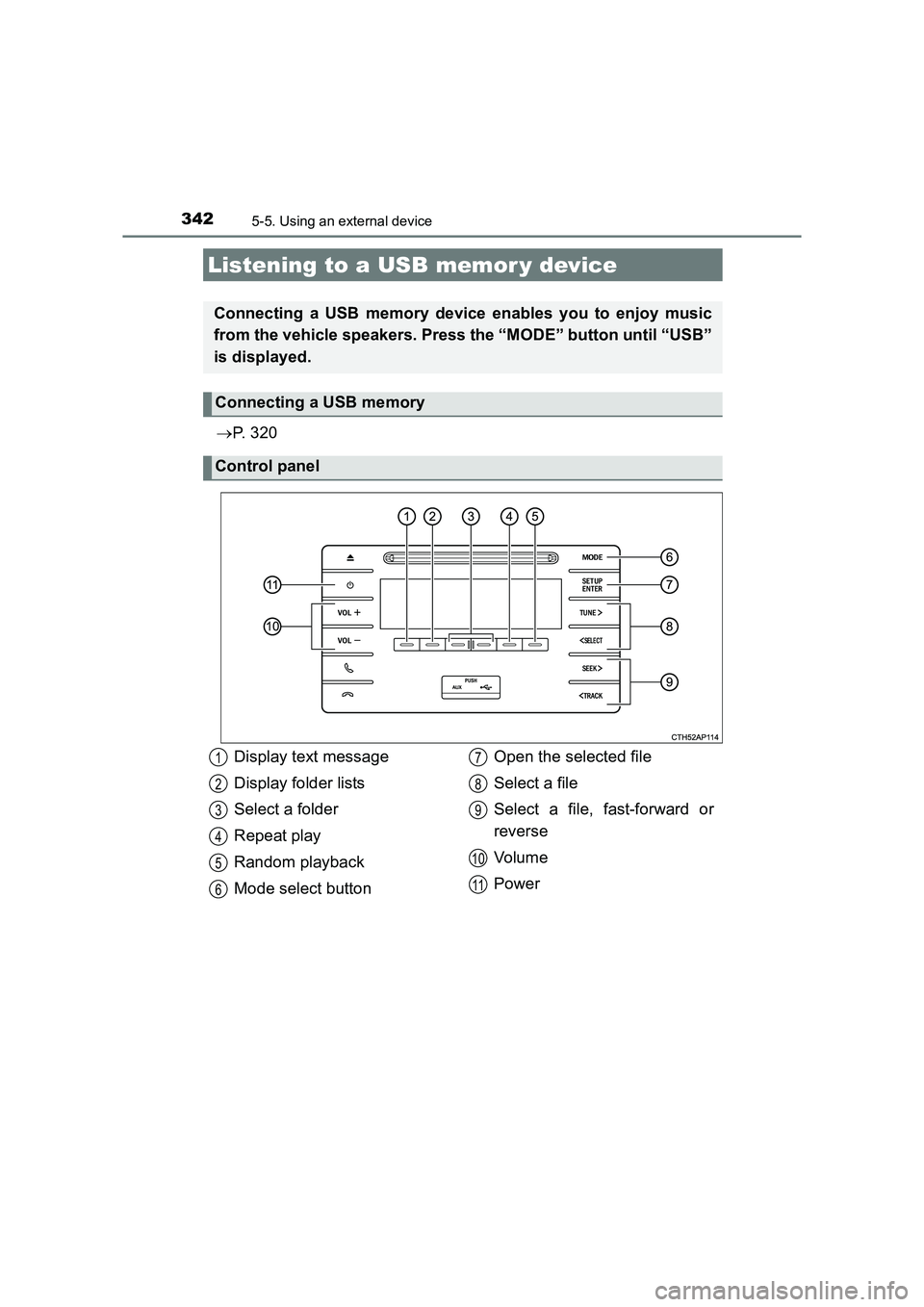
Control panel
Display text message
Display folder lists
Select a folder
Repeat play
Random playback
Mode select button Open the selected file
Select a file
Select a file, fast-forward or
reverse
Vol um e
Power1
2
3
4
5
6
7
8
9
10
11
Page 343 of 592
3435-5. Using an external device
UK AURIS_HV_HB_EE (OM12K47E)
5
Audio system
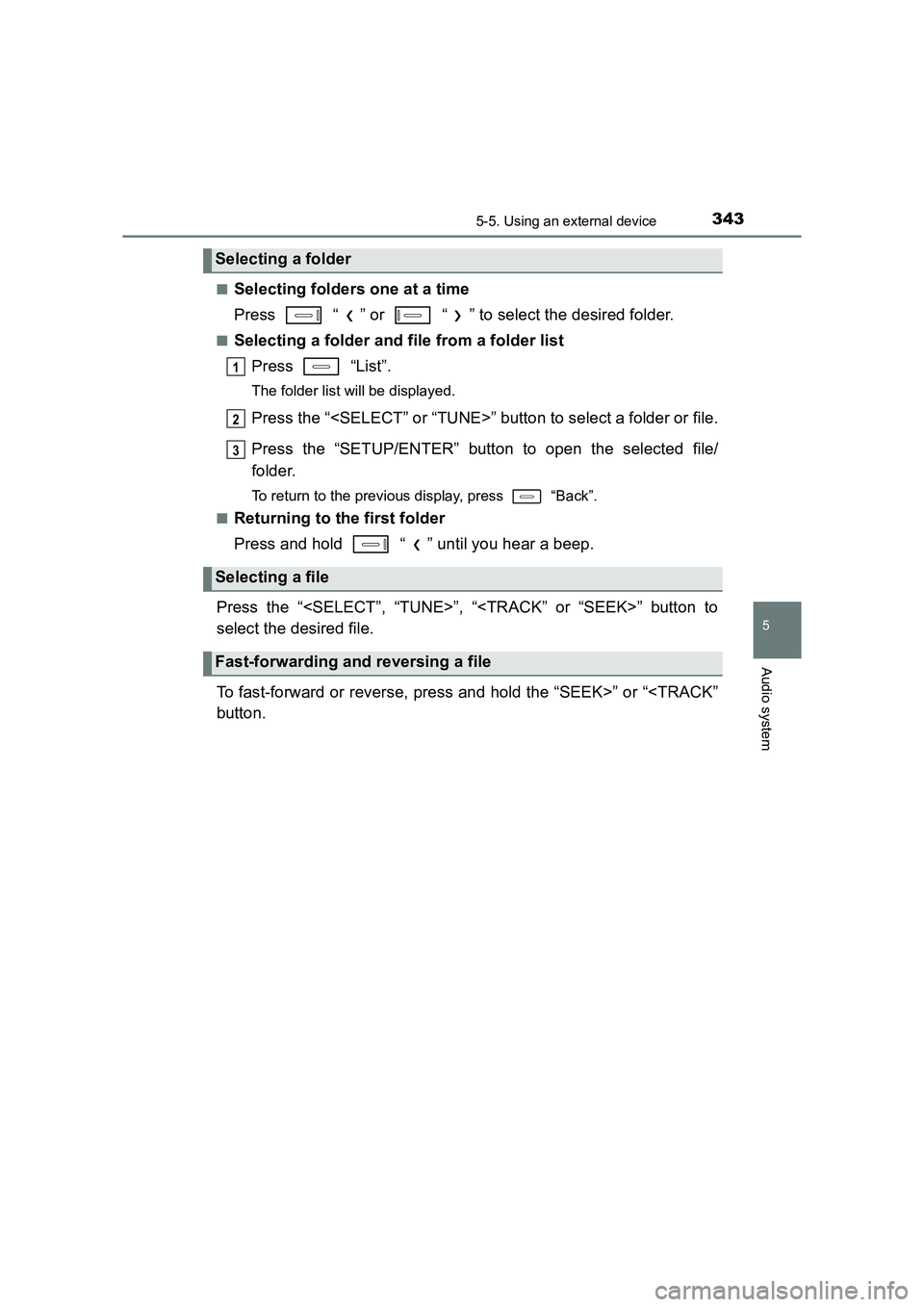
■Selecting folders one at a time
Press “ ” or “ ” to select the desired folder.
■Selecting a folder and file from a folder listPress “List”.
The folder list will be displayed.
Press the “
Press the “SETUP/ENTER” button to open the selected file/
folder.
To return to the previous display, press “Back”.
■
Returning to the first folder
Press and hold “ ” until you hear a beep.
Press the “
select the desired file.
To fast-forward or reverse, press and hold the “SEEK>” or “
Selecting a folder
Selecting a file
Fast-forwarding and reversing a file
1
2
3
Page 353 of 592
3535-6. Using Bluetooth® devices
UK AURIS_HV_HB_EE (OM12K47E)
5
Audio system
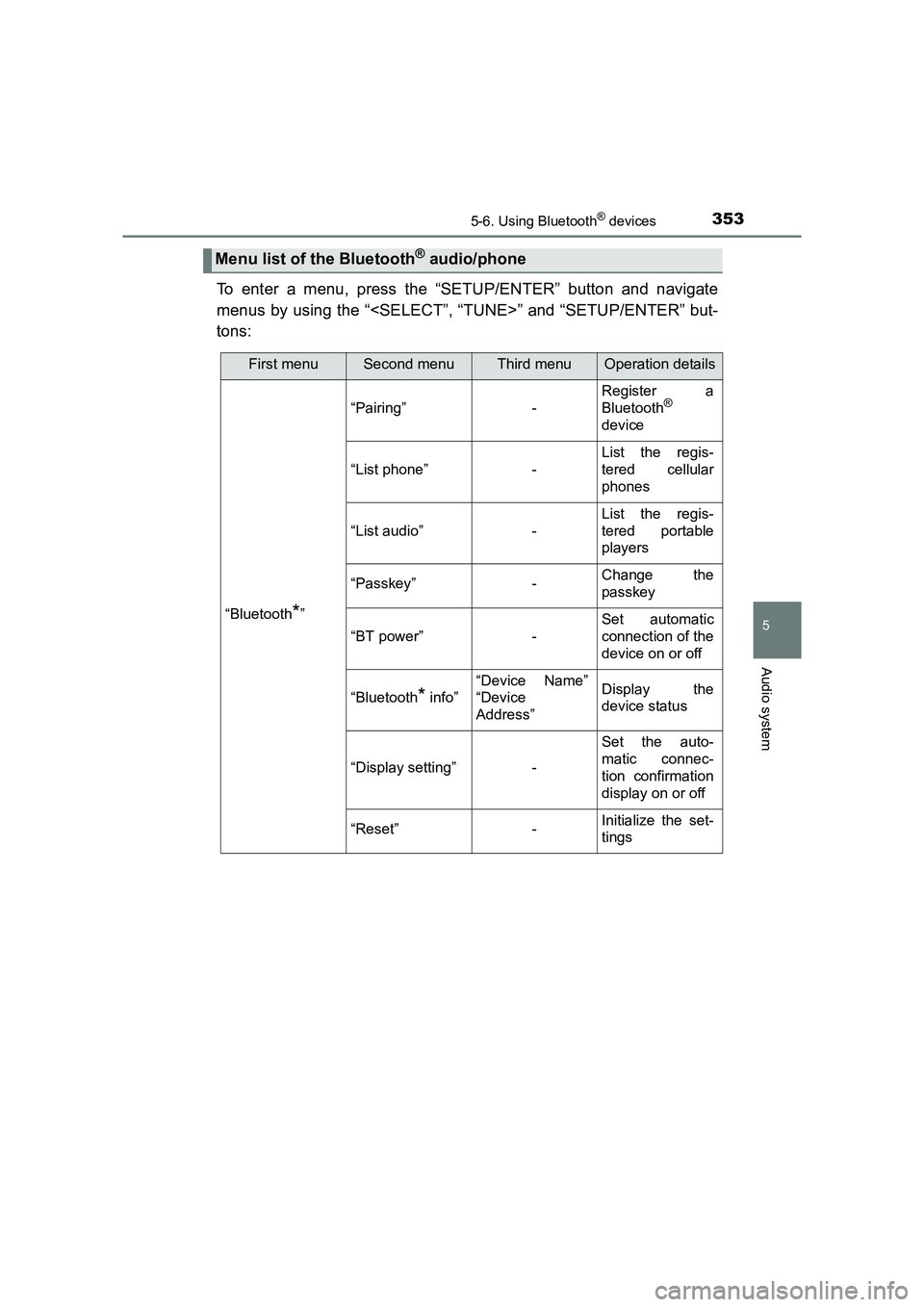
To enter a menu, press the “SETUP/ENTER” button and navigate
menus by using the “
tons:
Menu list of the Bluetooth® audio/phone
First menuSecond menuThird menuOperation details
“Bluetooth*”
“Pairing”-
Register a
Bluetooth®
device
“List phone”-
List the regis-
tered cellular
phones
“List audio”-
List the regis-
tered portable
players
“Passkey”-Change the
passkey
“BT power”-
Set automatic
connection of the
device on or off
“Bluetooth* info”
“Device Name”
“Device
Address”Display the
device status
“Display setting”-
Set the auto-
matic connec-
tion confirmation
display on or off
“Reset”-Initialize the set-
tings
Page 355 of 592
3555-6. Using Bluetooth® devices
UK AURIS_HV_HB_EE (OM12K47E)
5
Audio system
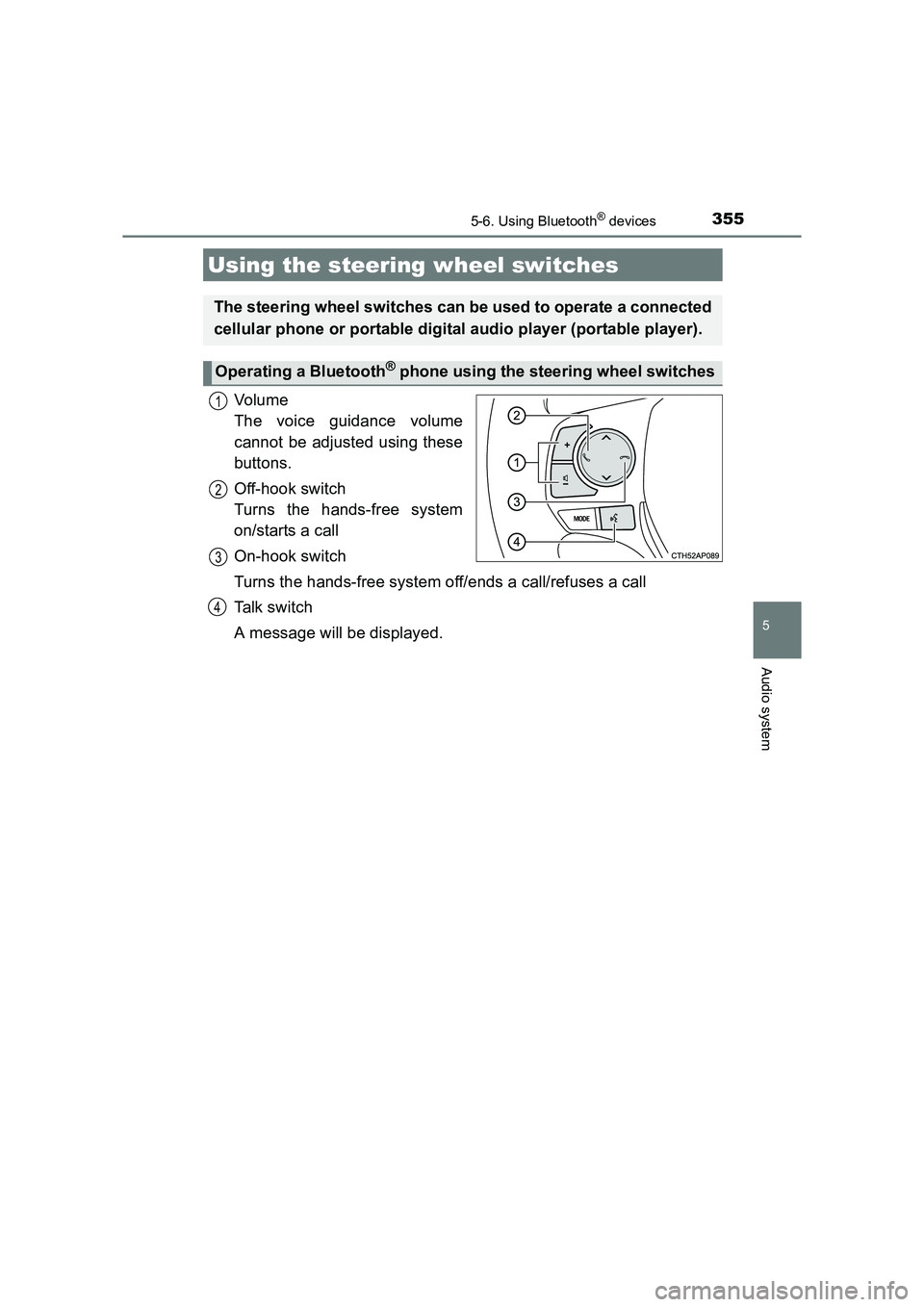
Vo lu m e
The voice guidance volume
cannot be adjusted using these
buttons.
Off-hook switch
Turns the hands-free system
on/starts a call
On-hook switch
Turns the hands-free system off/ends a call/refuses a call
Talk switch
A message will be displayed.
Using the steering wheel switches
The steering wheel switches can be used to operate a connected
cellular phone or portable digital audio player (portable player).
Operating a Bluetooth® phone using the steering wheel switches
1
2
3
4
Page 356 of 592
3565-6. Using Bluetooth® devices
UK AURIS_HV_HB_EE (OM12K47E)
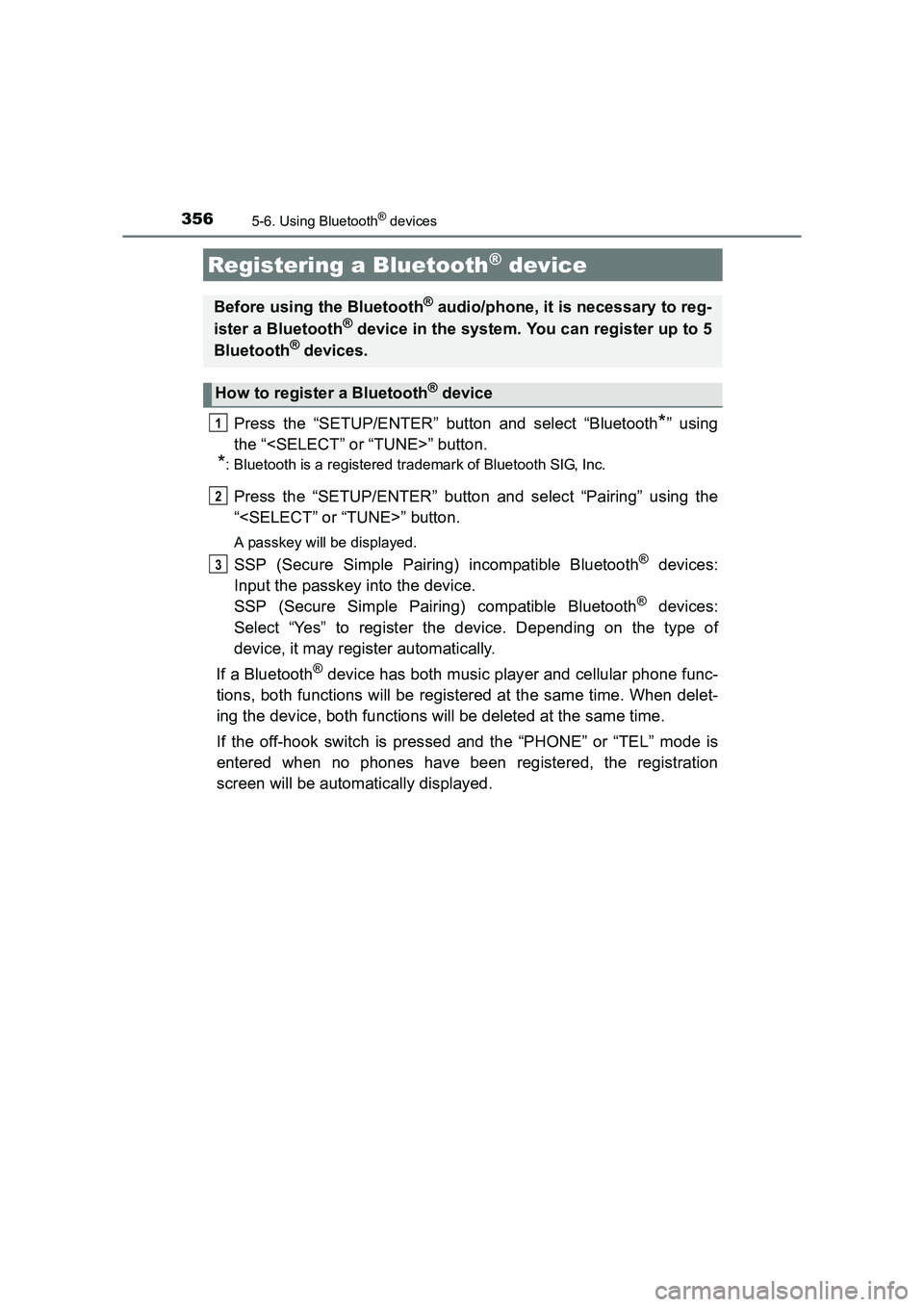
Press the “SETUP/ENTER” button and select “Bluetooth*” using
the “
*: Bluetooth is a registered trademark of Bluetooth SIG, Inc.
Press the “SETUP/ENTER” button and select “Pairing” using the
“
A passkey will be displayed.
SSP (Secure Simple Pairing) incompatible Bluetooth® devices:
Input the passkey into the device.
SSP (Secure Simple Pairing) compatible Bluetooth
® devices:
Select “Yes” to register the device. Depending on the type of
device, it may register automatically.
If a Bluetooth
® device has both music player and cellular phone func-
tions, both functions will be registered at the same time. When delet-
ing the device, both functions will be deleted at the same time.
If the off-hook switch is pressed and the “PHONE” or “TEL” mode is
entered when no phones have been registered, the registration
screen will be automatically displayed.
Registering a Bluetooth® device
Before using the Bluetooth® audio/phone, it is necessary to reg-
ister a Bluetooth® device in the system. You can register up to 5
Bluetooth® devices.
How to register a Bluetooth® device
1
2
3
Page 357 of 592
357
UK AURIS_HV_HB_EE (OM12K47E)
5
Audio system
5-7. “SET UP” menu
*: Bluetooth is a registered trademark of Bluetooth SIG, Inc.
Select “Pairing” using the “
ENTER” buttons (→P. 353), and perform the procedure for registering
a portable player. ( →P. 356)
Select “List phone” using the “
ENTER” buttons. ( →P. 353) The list of registered cellular phones will
be displayed.
● Connecting the registered cellular phone to the audio system
Select the name of the cellular phone to be connected using the
“
Select “Select” using the “
ENTER” buttons.
● Deleting a registered cellular phone
Select the name of the cellular phone to be deleted using the
“
Select “Delete” using the “
ENTER” buttons.
Press “Yes”.
Using the “SET UP” menu (“Bluetooth*”
menu)
Registering a Bluetooth® device in the system allows the system
to function. The following functions can be used for registered
devices:
Registering a portable player
Listing the registered cellular phones
1
2
1
2
3
Page 358 of 592
3585-7. “SET UP” menu
UK AURIS_HV_HB_EE (OM12K47E)
●Disconnecting the registered cellular phone from the audio system
Select the name of the cellular to be disconnected using the
“
Select “Disconnect” using the “
“SETUP/ENTER” buttons.
Press “Yes”.
Select “List audio” using the “
ENTER” buttons. ( →P. 353) The list of registered portable players will
be displayed.
● Connecting the registered portable player to the audio system
Select the name of the portable player to be connected using the
“
Select “Select” using the “
ENTER” buttons.
● Deleting the registered portable player
Select the name of the portable player to be deleted using the
“
Select “Delete” using the “
ENTER” buttons.
Press “Yes”.
Listing the registered portable players
1
2
3
1
2
1
2
3