display TOYOTA AURIS HYBRID 2017 Owners Manual
[x] Cancel search | Manufacturer: TOYOTA, Model Year: 2017, Model line: AURIS HYBRID, Model: TOYOTA AURIS HYBRID 2017Pages: 664, PDF Size: 27.42 MB
Page 360 of 664
3605-5. Using an external device
AURIS Touring Sports_EE (12L13E)■
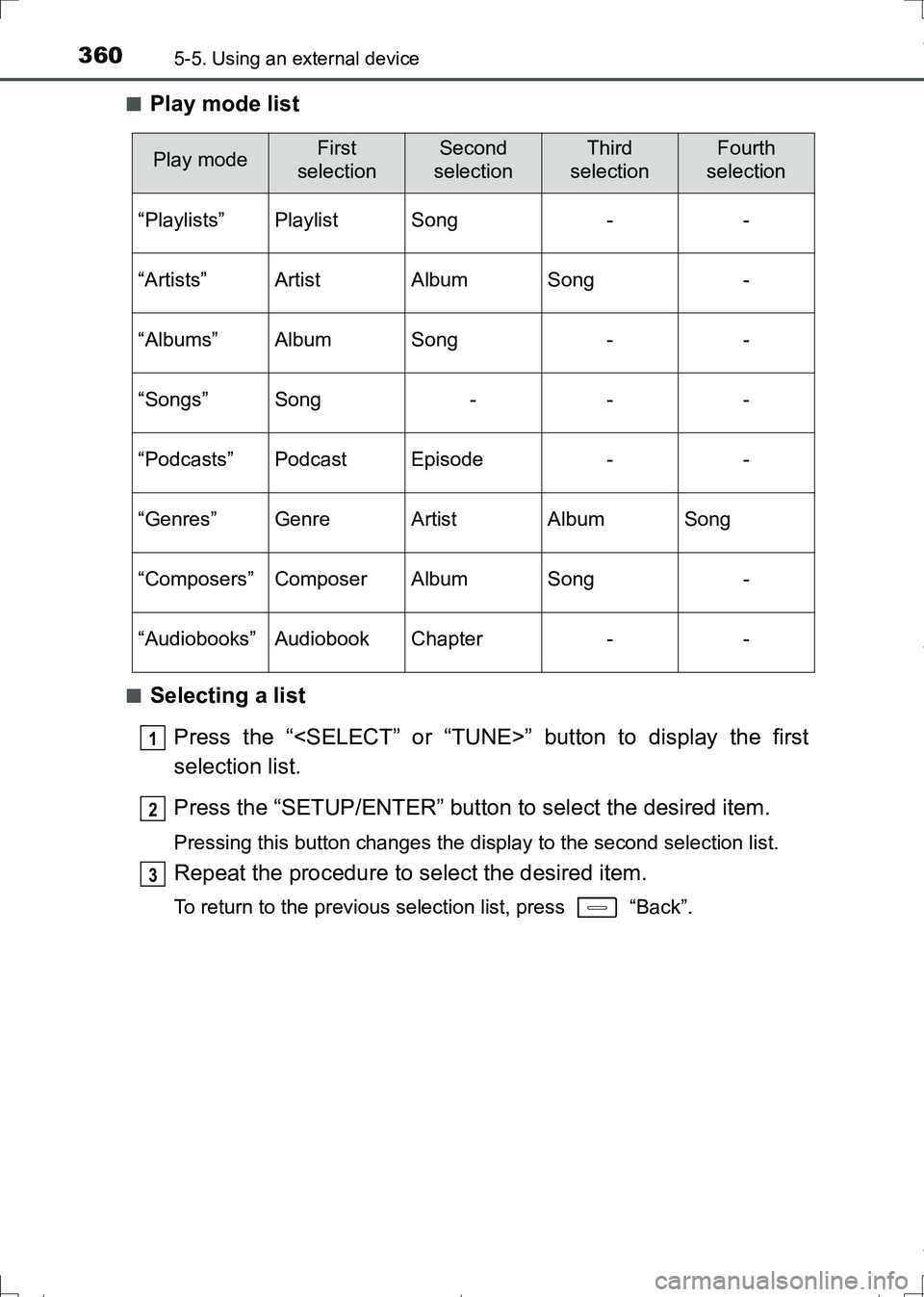
Play mode list
■Selecting a list
Press the “
selection list.
Press the “SETUP/ENTER” button to select the desired item.
Pressing this button changes the display to the second selection list.
Repeat the procedure to select the desired item.
To return to the previous selection list, press “Back”.
Play modeFirst
selectionSecond
selectionThird
selectionFourth
selection
“Playlists”PlaylistSong--
“Artists”ArtistAlbumSong-
“Albums”AlbumSong--
“Songs”Song---
“Podcasts”PodcastEpisode--
“Genres”GenreArtistAlbumSong
“Composers”ComposerAlbumSong-
“Audiobooks”AudiobookChapter--
1
2
3
AURIS Touring Sports_OM_Europe_OM12L13E.book 360 ページ 2016年6月27日 月曜日 午後5時21分
Page 361 of 664
3615-5. Using an external device
AURIS Touring Sports_EE (12L13E)
5
Audio system
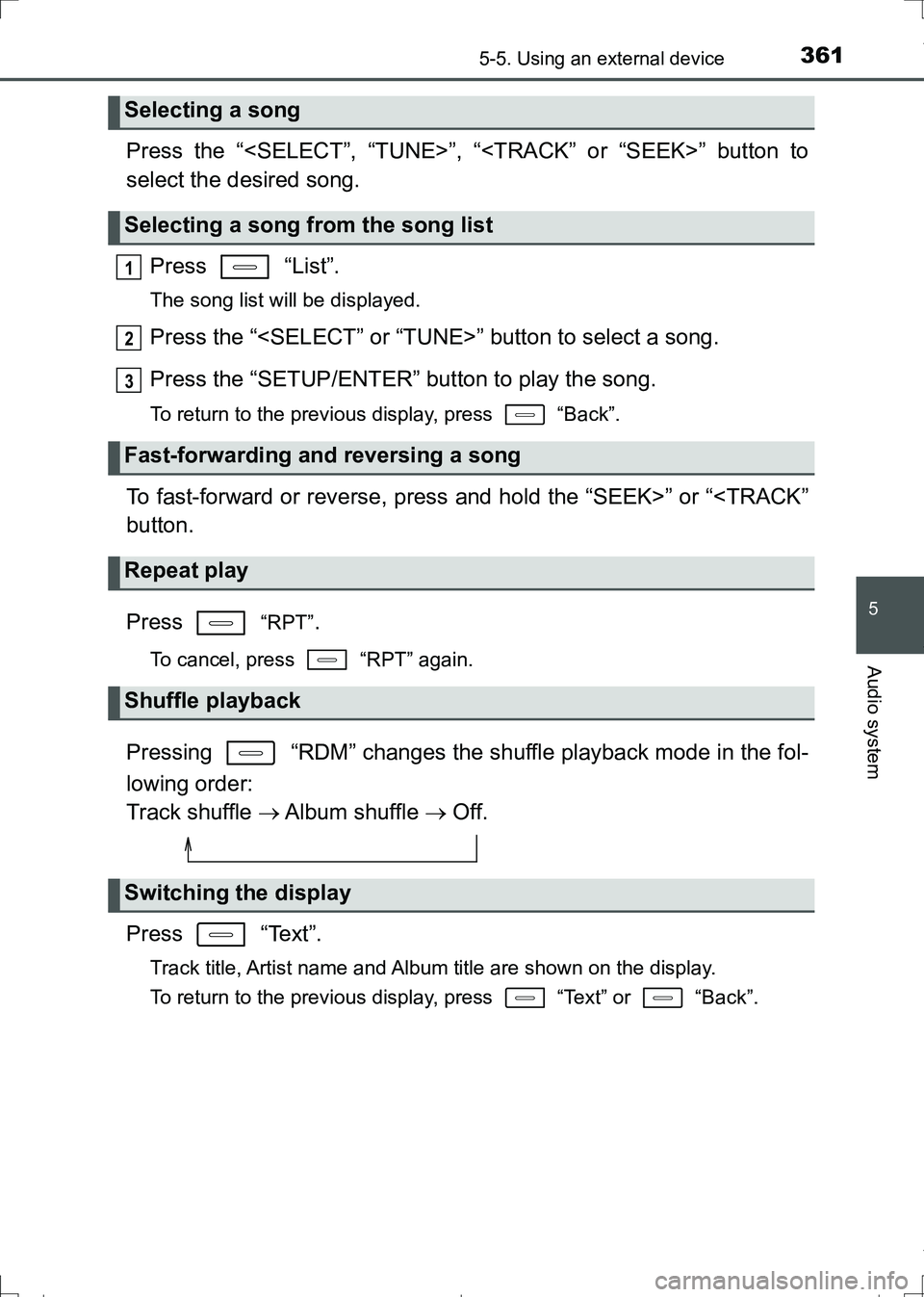
Press the “
select the desired song.
Press “List”.
The song list will be displayed.
Press the “
Press the “SETUP/ENTER” button to play the song.
To return to the previous display, press “Back”.
To fast-forward or reverse, press and hold the “SEEK>” or “
Press
“RPT”.
To cancel, press “RPT” again.
Pressing “RDM” changes the shuffle playback mode in the fol-
lowing order:
Track shuffle Album shuffle Off.
Press “Text”.
Track title, Artist name and Album title are shown on the display.
To return to the previous display, press “Text” or “Back”.
Selecting a song
Selecting a song from the song list
Fast-forwarding and reversing a song
Repeat play
Shuffle playback
Switching the display
1
2
3
AURIS Touring Sports_OM_Europe_OM12L13E.book 361 ページ 2016年6月27日 月曜日 午後5時21分
Page 363 of 664
3635-5. Using an external device
AURIS Touring Sports_EE (12L13E)
5
Audio system
■iPod problems
To resolve most problems encountered when using your iPod, disconnect
your iPod from the vehicle iPod connection and reset it.
For instructions on how to reset your iPod, refer to your iPod Owner’s Man-
ual.
■Display
P. 353
■Error messages
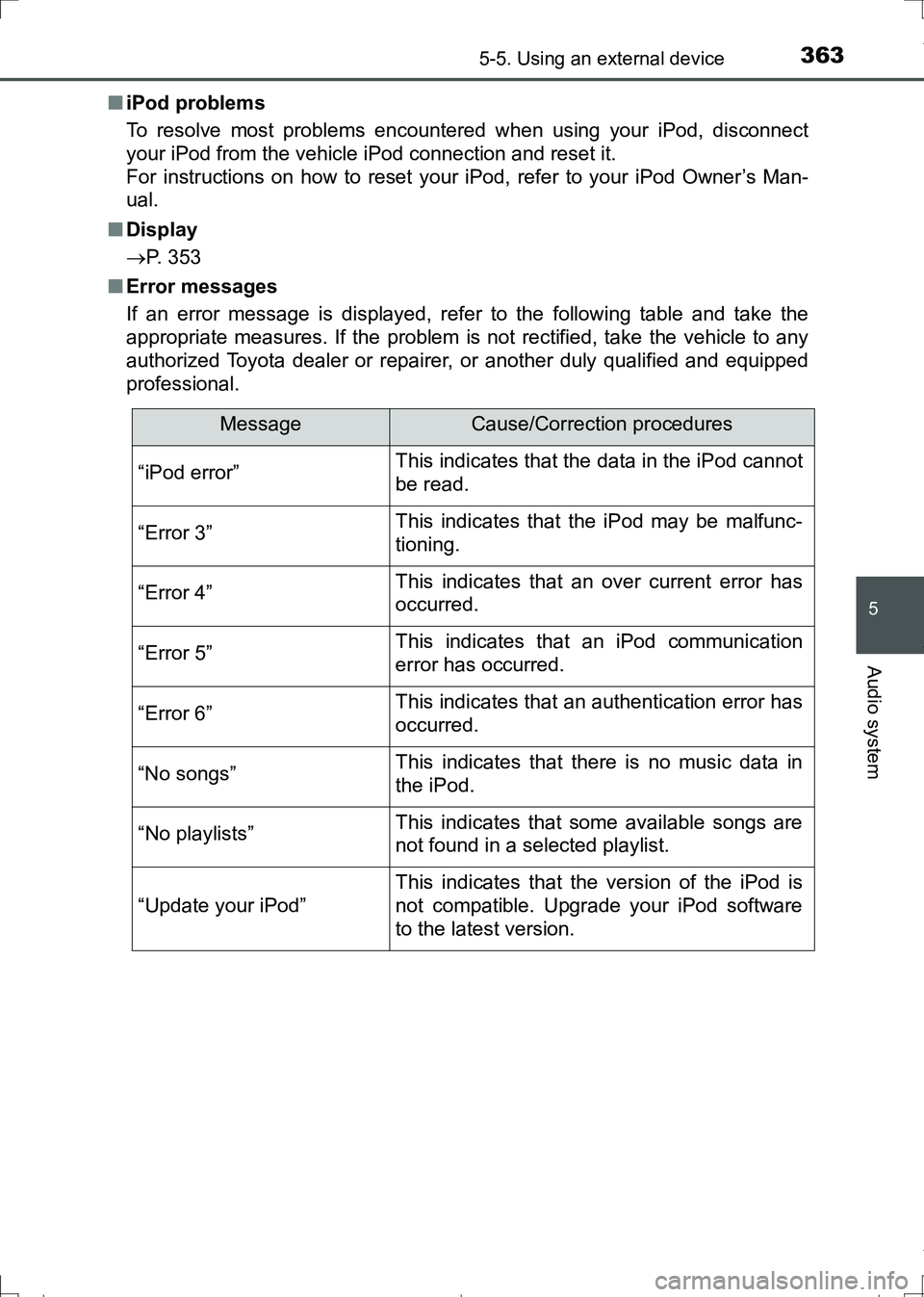
If an error message is displayed, refer to the following table and take the
appropriate measures. If the problem is not rectified, take the vehicle to any
authorized Toyota dealer or repairer, or another duly qualified and equipped
professional.
MessageCause/Correction procedures
“iPod error”This indicates that the data in the iPod cannot
be read.
“Error 3”This indicates that the iPod may be malfunc-
tioning.
“Error 4”This indicates that an over current error has
occurred.
“Error 5”This indicates that an iPod communication
error has occurred.
“Error 6”This indicates that an authentication error has
occurred.
“No songs”This indicates that there is no music data in
the iPod.
“No playlists”This indicates that some available songs are
not found in a selected playlist.
“Update your iPod”
This indicates that the version of the iPod is
not compatible. Upgrade your iPod software
to the latest version.
AURIS Touring Sports_OM_Europe_OM12L13E.book 363 ページ 2016年6月27日 月曜日 午後5時21分
Page 366 of 664
3665-5. Using an external device
AURIS Touring Sports_EE (12L13E)
P. 3 4 4
Listening to a USB memory device
Connecting a USB memory device enables you to enjoy music
from the vehicle speakers. Press the “MODE” button until “USB”
is displayed.
Connecting a USB memory
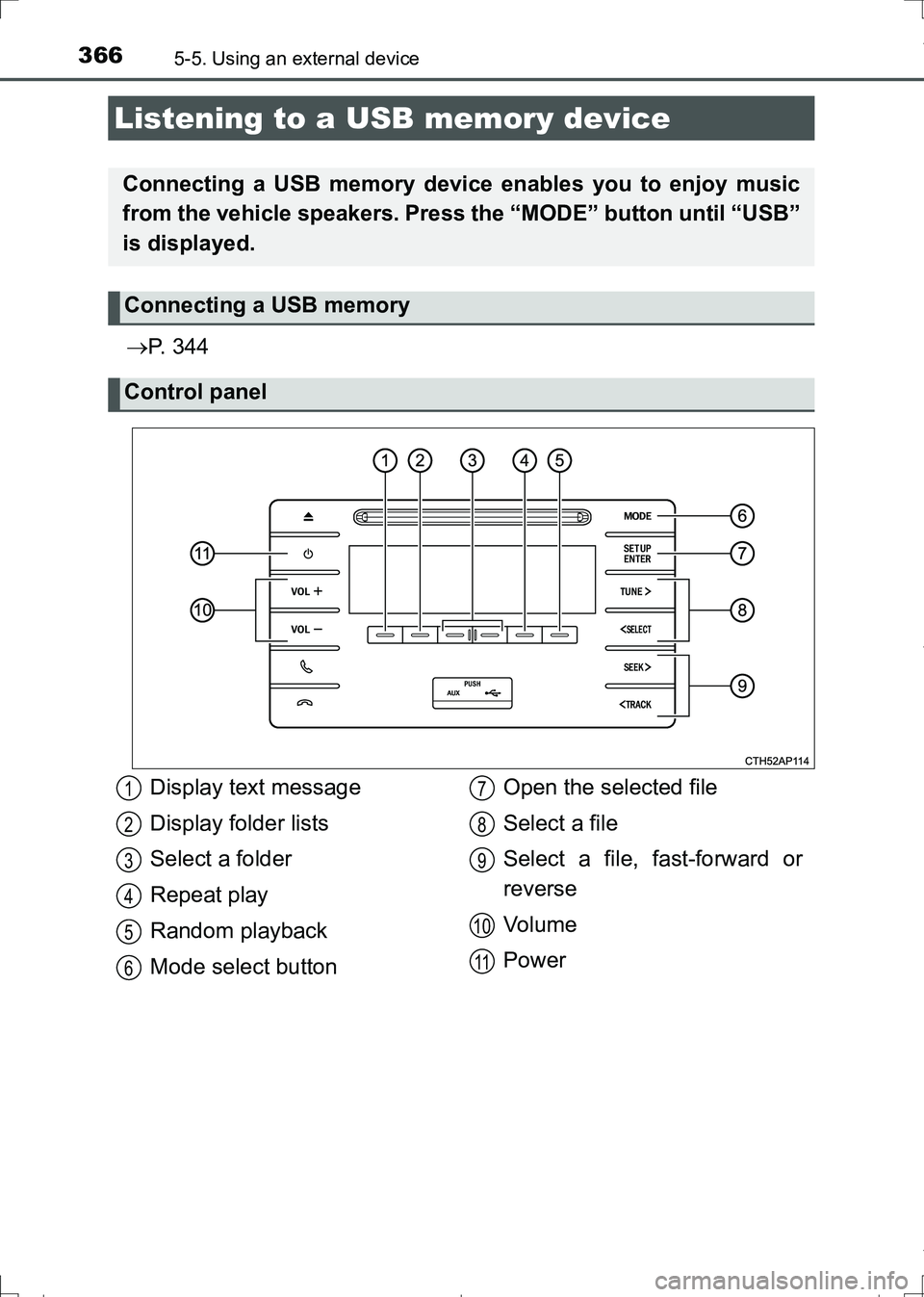
Control panel
Display text message
Display folder lists
Select a folder
Repeat play
Random playback
Mode select buttonOpen the selected file
Select a file
Select a file, fast-forward or
reverse
Vo l u m e
Power1
2
3
4
5
6
7
8
9
10
11
AURIS Touring Sports_OM_Europe_OM12L13E.book 366 ページ 2016年6月27日 月曜日 午後5時21分
Page 367 of 664
3675-5. Using an external device
AURIS Touring Sports_EE (12L13E)
5
Audio system
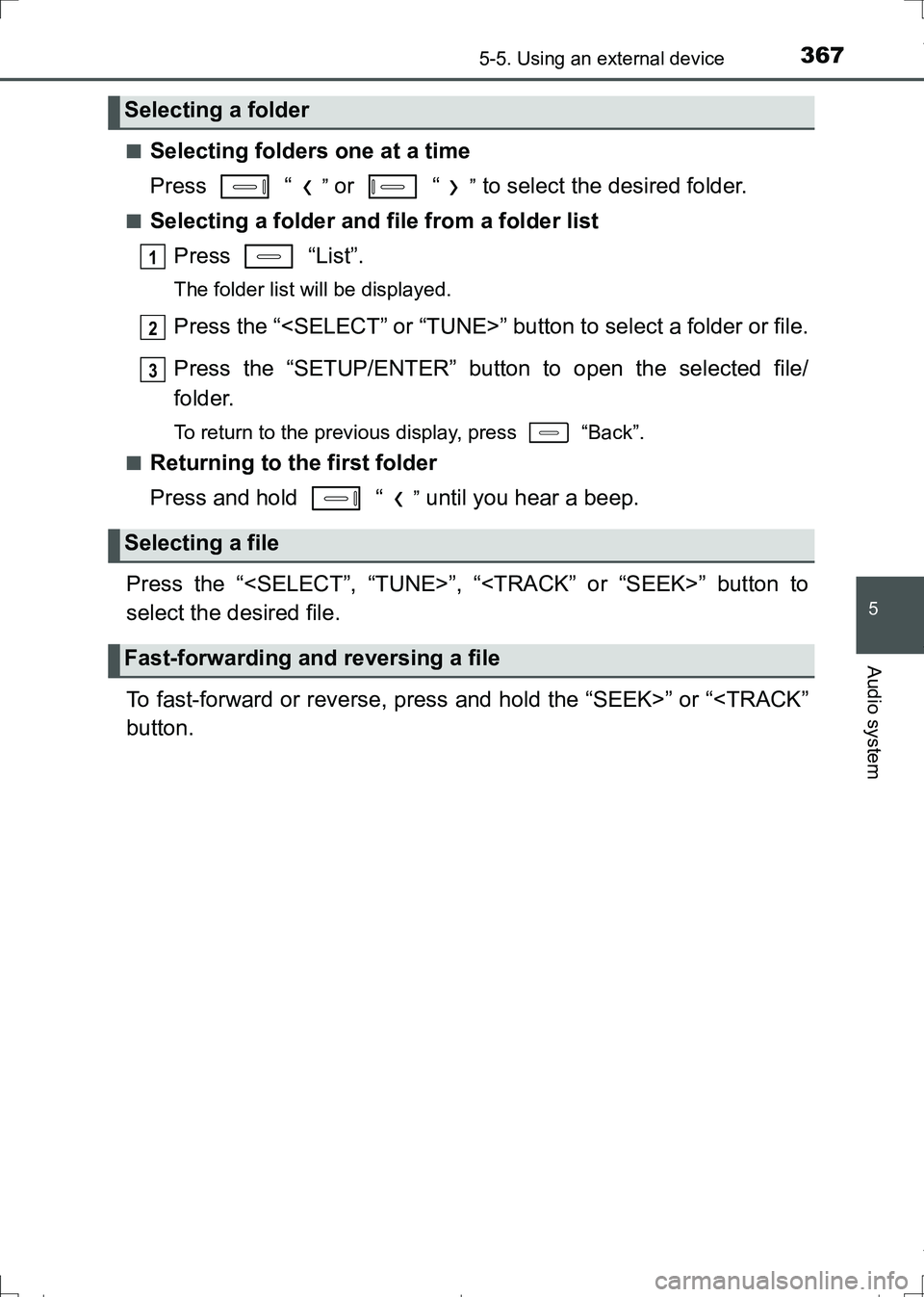
■Selecting folders one at a time
Press “
” or “” to select the desired folder.
■Selecting a folder and file from a folder list
Press “List”.
The folder list will be displayed.
Press the “
Press the “SETUP/ENTER” button to open the selected file/
folder.
To return to the previous display, press “Back”.
■
Returning to the first folder
Press and hold “
” until you hear a beep.
Press the “
select the desired file.
To fast-forward or reverse, press and hold the “SEEK>” or “
Selecting a folder
Selecting a file
Fast-forwarding and reversing a file
1
2
3
AURIS Touring Sports_OM_Europe_OM12L13E.book 367 ページ 2016年6月27日 月曜日 午後5時21分
Page 368 of 664
3685-5. Using an external device
AURIS Touring Sports_EE (12L13E)
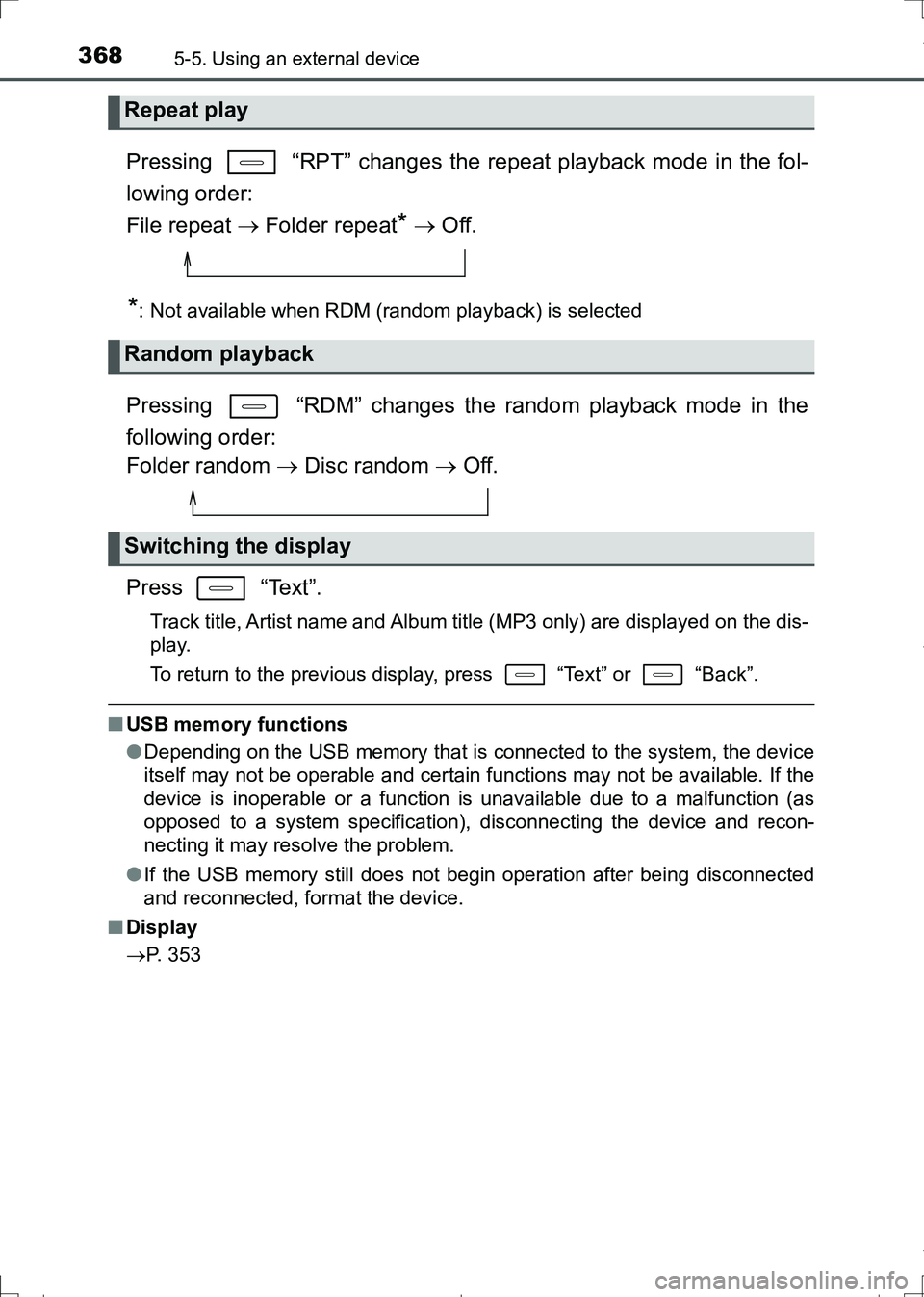
Pressing “RPT” changes the repeat playback mode in the fol-
lowing order:
File repeat Folder repeat
* Off.
*: Not available when RDM (random playback) is selected
Pressing “RDM” changes the random playback mode in the
following order:
Folder random Disc random Off.
Press “Text”.
Track title, Artist name and Album title (MP3 only) are displayed on the dis-
play.
To return to the previous display, press “Text” or “Back”.
■USB memory functions
●Depending on the USB memory that is connected to the system, the device
itself may not be operable and certain functions may not be available. If the
device is inoperable or a function is unavailable due to a malfunction (as
opposed to a system specification), disconnecting the device and recon-
necting it may resolve the problem.
●If the USB memory still does not begin operation after being disconnected
and reconnected, format the device.
■Display
P. 353
Repeat play
Random playback
Switching the display
AURIS Touring Sports_OM_Europe_OM12L13E.book 368 ページ 2016年6月27日 月曜日 午後5時21分
Page 369 of 664
3695-5. Using an external device
AURIS Touring Sports_EE (12L13E)
5
Audio system
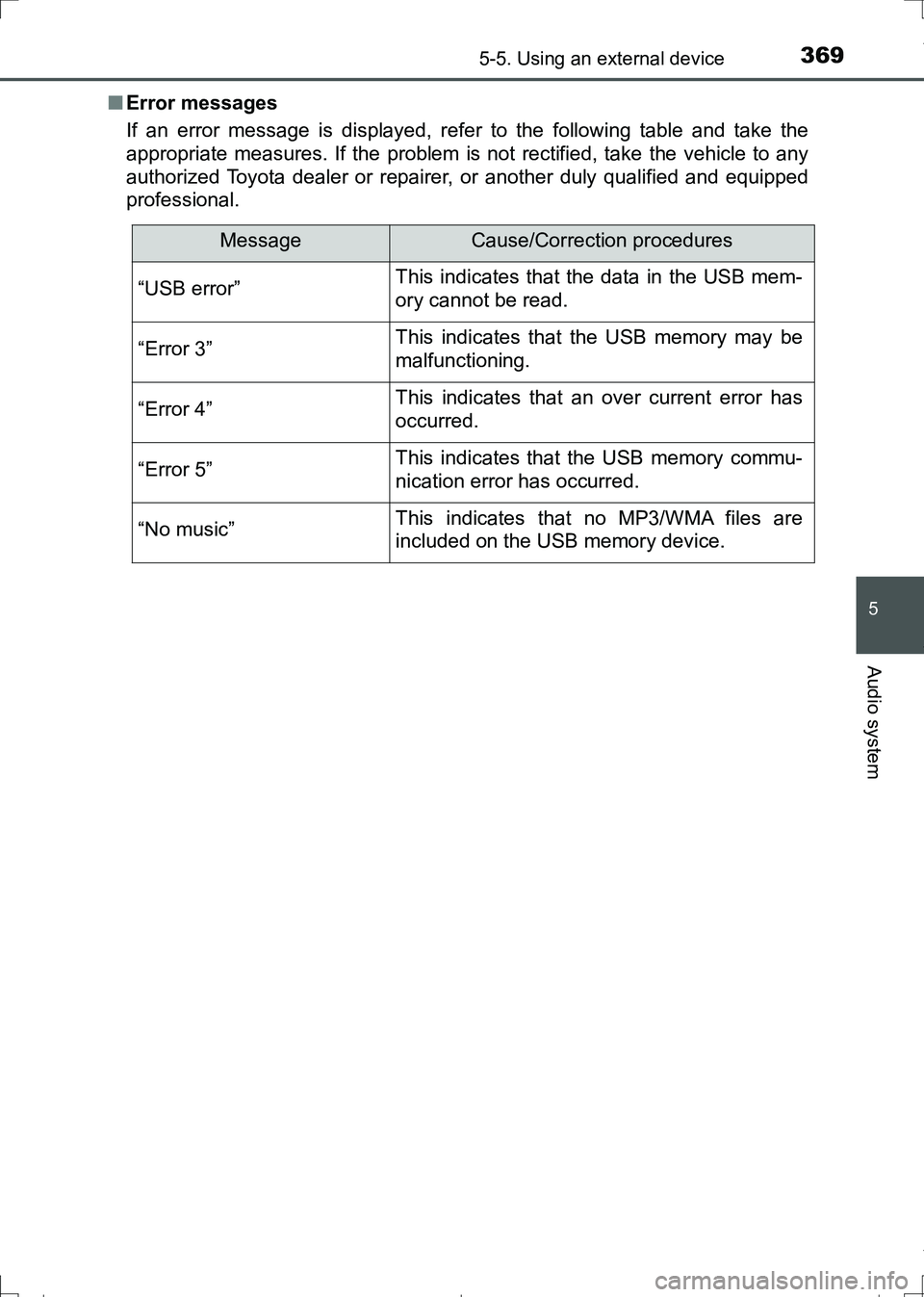
■Error messages
If an error message is displayed, refer to the following table and take the
appropriate measures. If the problem is not rectified, take the vehicle to any
authorized Toyota dealer or repairer, or another duly qualified and equipped
professional.
MessageCause/Correction procedures
“USB error”This indicates that the data in the USB mem-
ory cannot be read.
“Error 3”This indicates that the USB memory may be
malfunctioning.
“Error 4”This indicates that an over current error has
occurred.
“Error 5”This indicates that the USB memory commu-
nication error has occurred.
“No music”This indicates that no MP3/WMA files are
included on the USB memory device.
AURIS Touring Sports_OM_Europe_OM12L13E.book 369 ページ 2016年6月27日 月曜日 午後5時21分
Page 373 of 664
3735-5. Using an external device
AURIS Touring Sports_EE (12L13E)
5
Audio system
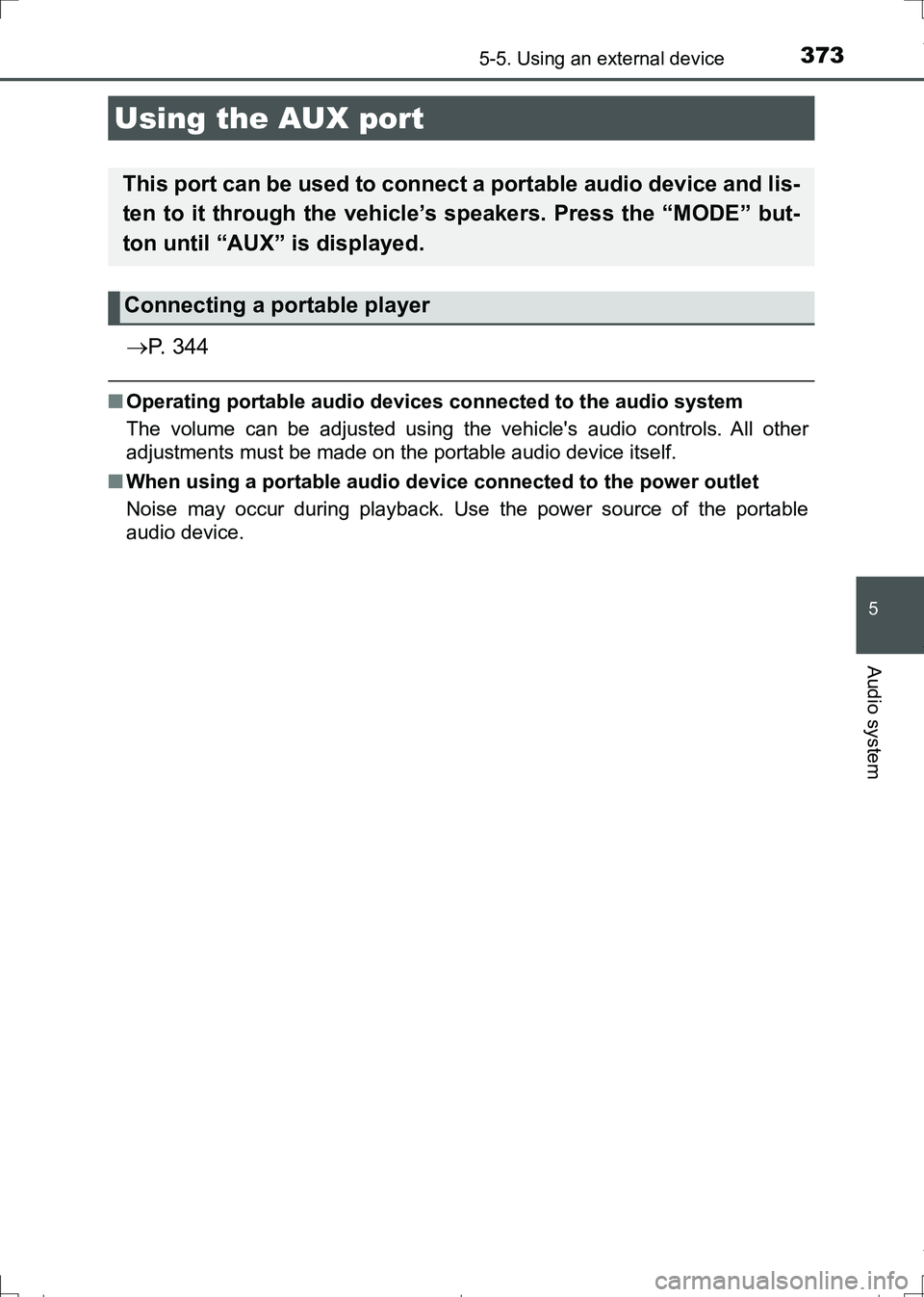
P. 3 4 4
■Operating portable audio devices connected to the audio system
The volume can be adjusted using the vehicle's audio controls. All other
adjustments must be made on the portable audio device itself.
■When using a portable audio device connected to the power outlet
Noise may occur during playback. Use the power source of the portable
audio device.
Using the AUX port
This port can be used to connect a portable audio device and lis-
ten to it through the vehicle’s speakers. Press the “MODE” but-
ton until “AUX” is displayed.
Connecting a portable player
AURIS Touring Sports_OM_Europe_OM12L13E.book 373 ページ 2016年6月27日 月曜日 午後5時21分
Page 376 of 664
3765-6. Using Bluetooth® devices
AURIS Touring Sports_EE (12L13E)
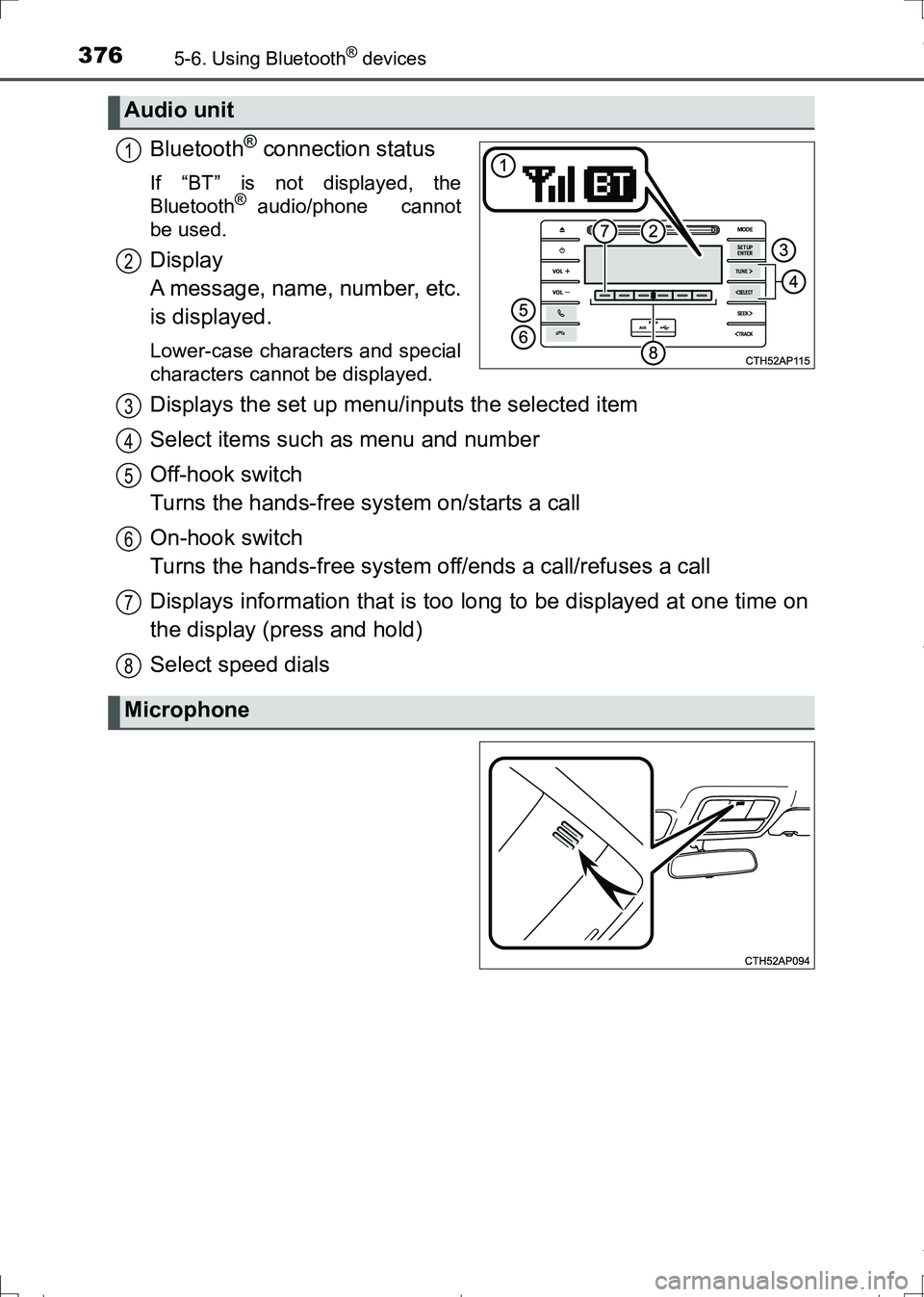
Bluetooth® connection status
If “BT” is not displayed, the
Bluetooth® audio/phone cannot
be used.
Display
A message, name, number, etc.
is displayed.
Lower-case characters and special
characters cannot be displayed.
Displays the set up menu/inputs the selected item
Select items such as menu and number
Off-hook switch
Turns the hands-free system on/starts a call
On-hook switch
Turns the hands-free system off/ends a call/refuses a call
Displays information that is too long to be displayed at one time on
the display (press and hold)
Select speed dials
Audio unit
1
2
Microphone
3
4
5
6
7
8
AURIS Touring Sports_OM_Europe_OM12L13E.book 376 ページ 2016年6月27日 月曜日 午後5時21分
Page 377 of 664
3775-6. Using Bluetooth® devices
AURIS Touring Sports_EE (12L13E)
5
Audio system
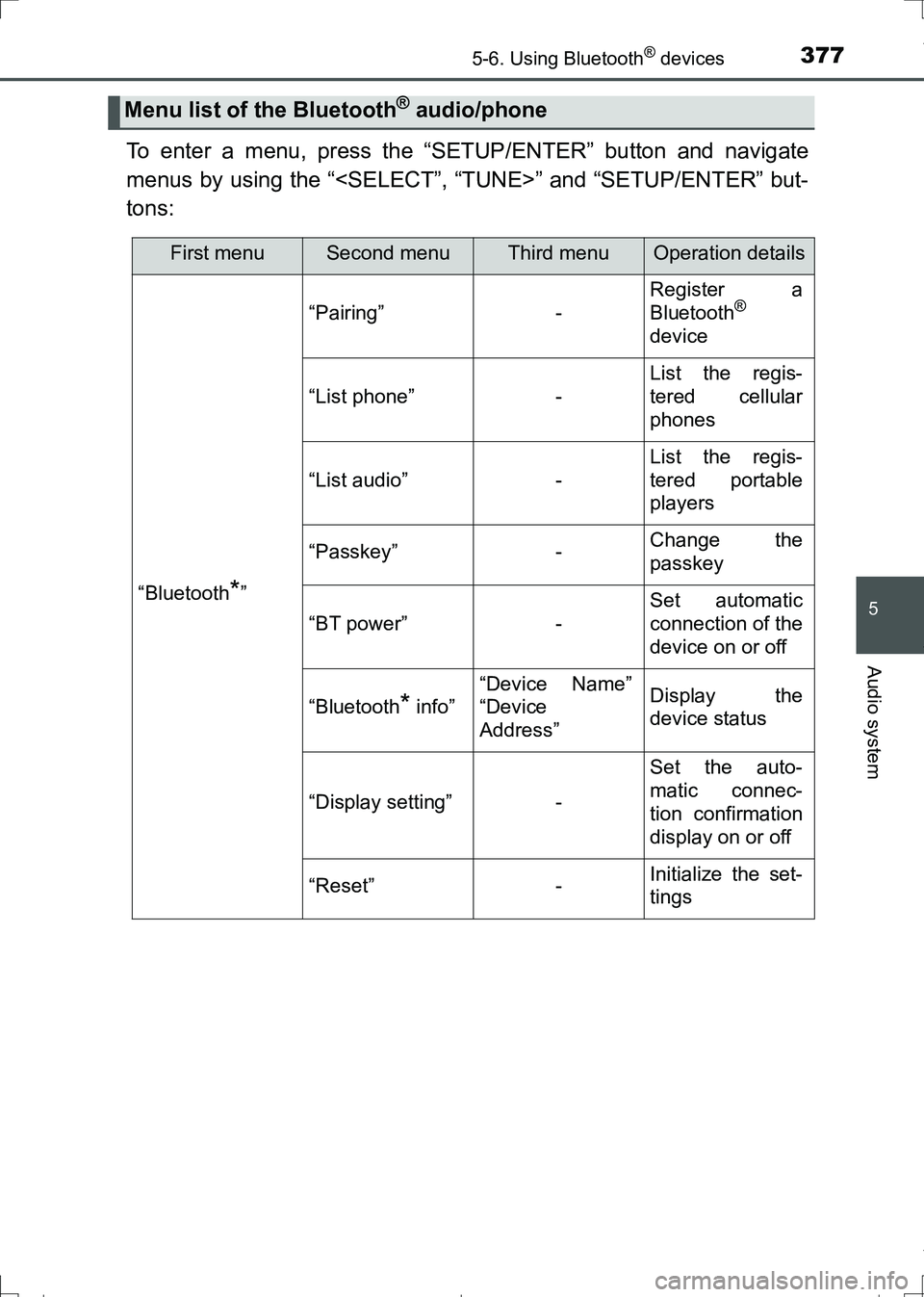
To enter a menu, press the “SETUP/ENTER” button and navigate
menus by using the “
tons:
Menu list of the Bluetooth® audio/phone
First menuSecond menuThird menuOperation details
“Bluetooth*”
“Pairing”-
Register a
Bluetooth®
device
“List phone”-
List the regis-
tered cellular
phones
“List audio”-
List the regis-
tered portable
players
“Passkey”-Change the
passkey
“BT power”-
Set automatic
connection of the
device on or off
“Bluetooth* info”
“Device Name”
“Device
Address”Display the
device status
“Display setting”-
Set the auto-
matic connec-
tion confirmation
display on or off
“Reset”-Initialize the set-
tings
AURIS Touring Sports_OM_Europe_OM12L13E.book 377 ページ 2016年6月27日 月曜日 午後5時21分