display TOYOTA AURIS HYBRID 2017 Repair Manual
[x] Cancel search | Manufacturer: TOYOTA, Model Year: 2017, Model line: AURIS HYBRID, Model: TOYOTA AURIS HYBRID 2017Pages: 664, PDF Size: 27.42 MB
Page 294 of 664
2944-6. Using the driving support systems
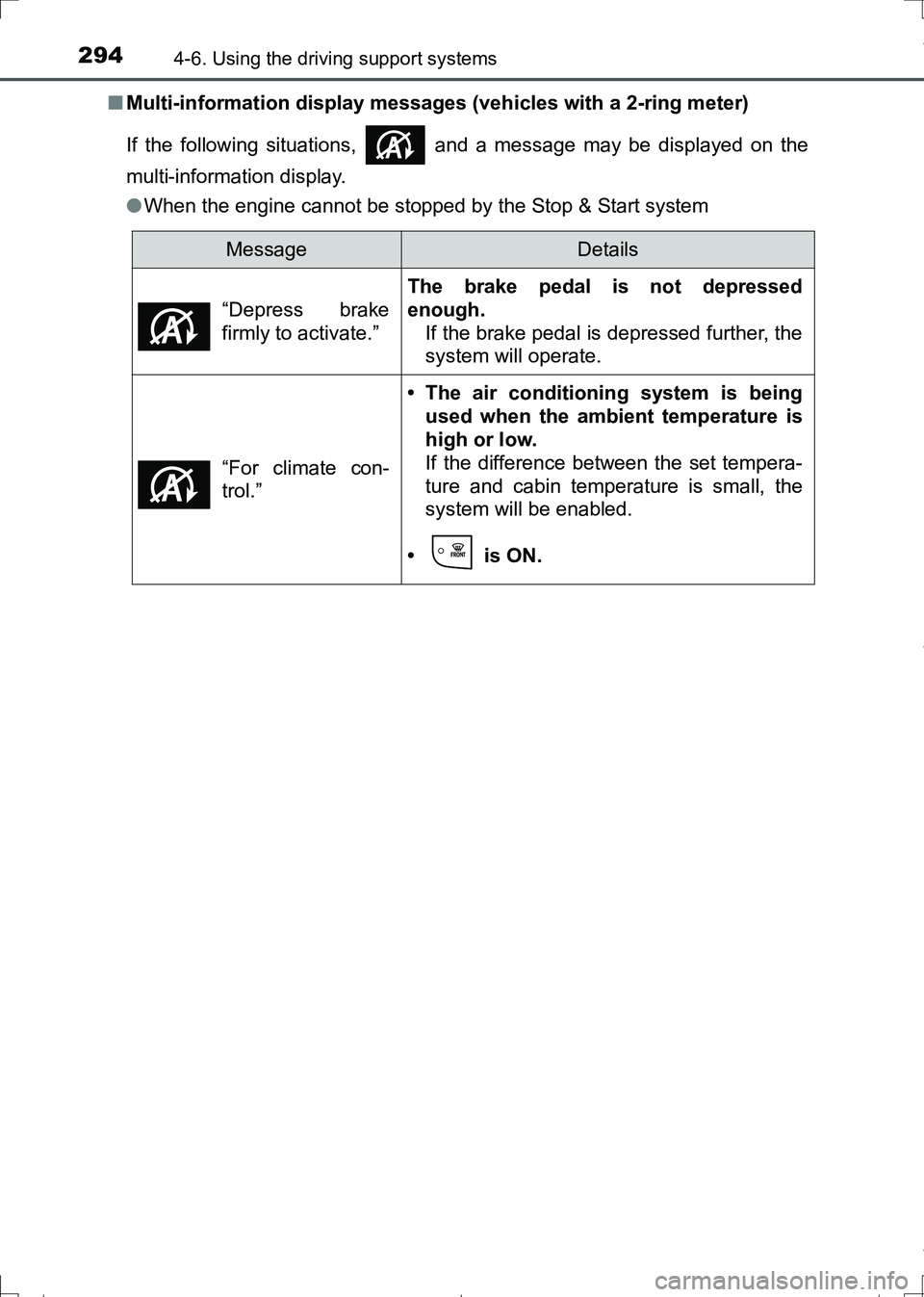
AURIS Touring Sports_EE (12L13E)■Multi-information display messages (vehicles with a 2-ring meter)
If the following situations, and a message may be displayed on the
multi-information display.
●When the engine cannot be stopped by the Stop & Start system
MessageDetails
“Depress brake
firmly to activate.”
The brake pedal is not depressed
enough.
If the brake pedal is depressed further, the
system will operate.
“For climate con-
trol.”
• The air conditioning system is being
used when the ambient temperature is
high or low.
If the difference between the set tempera-
ture and cabin temperature is small, the
system will be enabled.
• is ON.
AURIS Touring Sports_OM_Europe_OM12L13E.book 294 ページ 2016年6月27日 月曜日 午後5時21分
Page 297 of 664
2974-6. Using the driving support systems
AURIS Touring Sports_EE (12L13E)
4
Driving
■If “Stop & Start system malfunction. Inspect at dealer.” is displayed on
the multi-information display (vehicles with a 2-ring meter)
The system may be malfunctioning. Have the vehicle inspected by any autho-
rized Toyota dealer or repairer, or another duly qualified and equipped profes-
sional.
■If the Stop & Start cancel indicator continues to flash
The system may be malfunctioning. Have the vehicle inspected by any autho-
rized Toyota dealer or repairer, or another duly qualified and equipped profes-
sional.
WARNING
■When the Stop & Start system is operating
●Vehicles with a Multidrive: Depress the brake pedal and apply the parking
brake when necessary while the engine is stopped by the Stop & Start sys-
tem (while the Stop & Start indicator is on).
●Vehicles with a manual transmission: Keep the shift lever in N and depress
the brake pedal or apply the parking brake while the engine is stopped by
the Stop & Start system (while the Stop & Start indicator is on).
●Do not allow anyone to leave the vehicle while the engine is stopped by
the Stop & Start system (while the Stop & Start indicator is on).
An accident may occur due to the automatic engine start function.
●Ensure that the engine is not stopped by the Stop & Start system while the
vehicle is in a poorly ventilated area. The engine may restart due to the
automatic engine start function, causing exhaust gases to collect and
enter the vehicle, possibly resulting in death or a serious health hazard.
AURIS Touring Sports_OM_Europe_OM12L13E.book 297 ページ 2016年6月27日 月曜日 午後5時21分
Page 298 of 664
2984-6. Using the driving support systems
AURIS Touring Sports_EE (12L13E)
NOTICE
■To ensure the system operates correctly
If any of the following situations occur, the Stop & Start system may not
operate correctly. Have your vehicle checked by any authorized Toyota
dealer or repairer, or another duly qualified and equipped professional.
●While the driver’s seat belt is fastened, the driver’s and front passenger’s
seat belt reminder light flashes.
●Even though the driver’s seat belt is not fastened, the driver’s and front
passenger’s seat belt reminder light does not illuminate.
●Vehicles with a 3-ring meter: Even though the driver’s door is closed, the
open door warning light is illuminated or the interior light is illuminated
when the interior light switch is in the door position.
●Vehicles with a 2-ring meter: Even though the driver’s door is closed, the
open door warning is displayed on the multi-information display or the inte-
rior light is illuminated when the interior light switch is in the door position.
●Vehicles with a 3-ring meter: Even though the driver’s door is open, the
open door warning light does not illuminate or the interior light does not
illuminate when the interior light switch is in the door position.
●Vehicles with a 2-ring meter: Even though the driver’s door is open, the
open door warning is not displayed on the multi-information display or the
interior light does not illuminate when the interior light switch is in the door
position.
AURIS Touring Sports_OM_Europe_OM12L13E.book 298 ページ 2016年6月27日 月曜日 午後5時21分
Page 302 of 664
3024-6. Using the driving support systems
AURIS Touring Sports_EE (12L13E)
■Cruise control can be set when
Vehicles with a Multidrive
●The shift lever is in the D or range 4 or higher of M has been selected.
●Range 4 or higher has been selected by using the paddle shift.
(vehicles with paddle shift switch)
●Vehicle speed is above approximately 40 km/h (25 mph).
Vehicles with a manual transmission
Vehicle speed is above approximately 40 km/h (25 mph).
■Accelerating after setting the vehicle speed
●The vehicle can be accelerated by operating accelerator pedal. After accel-
erating, the set speed resumes.
●Even without canceling the cruise control, the set speed can be increased
by first accelerating the vehicle to the desired speed and then pushing the
lever down to set the new speed.
■Automatic cruise control cancelation
Cruise control is automatically canceled in any of the following situations.
●Actual vehicle speed falls more than approximately 16 km/h (10 mph) below
the set speed.
At this time, the memorized set speed is not retained.
●Actual vehicle speed is below approximately 40 km/h (25 mph).
●VSC is activated.
●Speed limiter is activated. (if equipped)
■If the cruise control indicator light comes on in yellow (vehicles with a 3-
ring meter) or “Check cruise control system.” is displayed on the multi-
information display (vehicles with a 2-ring meter)
Press the “ON-OFF” button once to deactivate the system, and then press
the button again to reactivate the system.
If the cruise control speed cannot be set or if the cruise control cancels imme-
diately after being activated, there may be a malfunction in the cruise control
system. Have the vehicle inspected by any authorized Toyota dealer or
repairer, or another duly qualified and equipped professional.
AURIS Touring Sports_OM_Europe_OM12L13E.book 302 ページ 2016年6月27日 月曜日 午後5時21分
Page 306 of 664
3064-6. Using the driving support systems
AURIS Touring Sports_EE (12L13E)
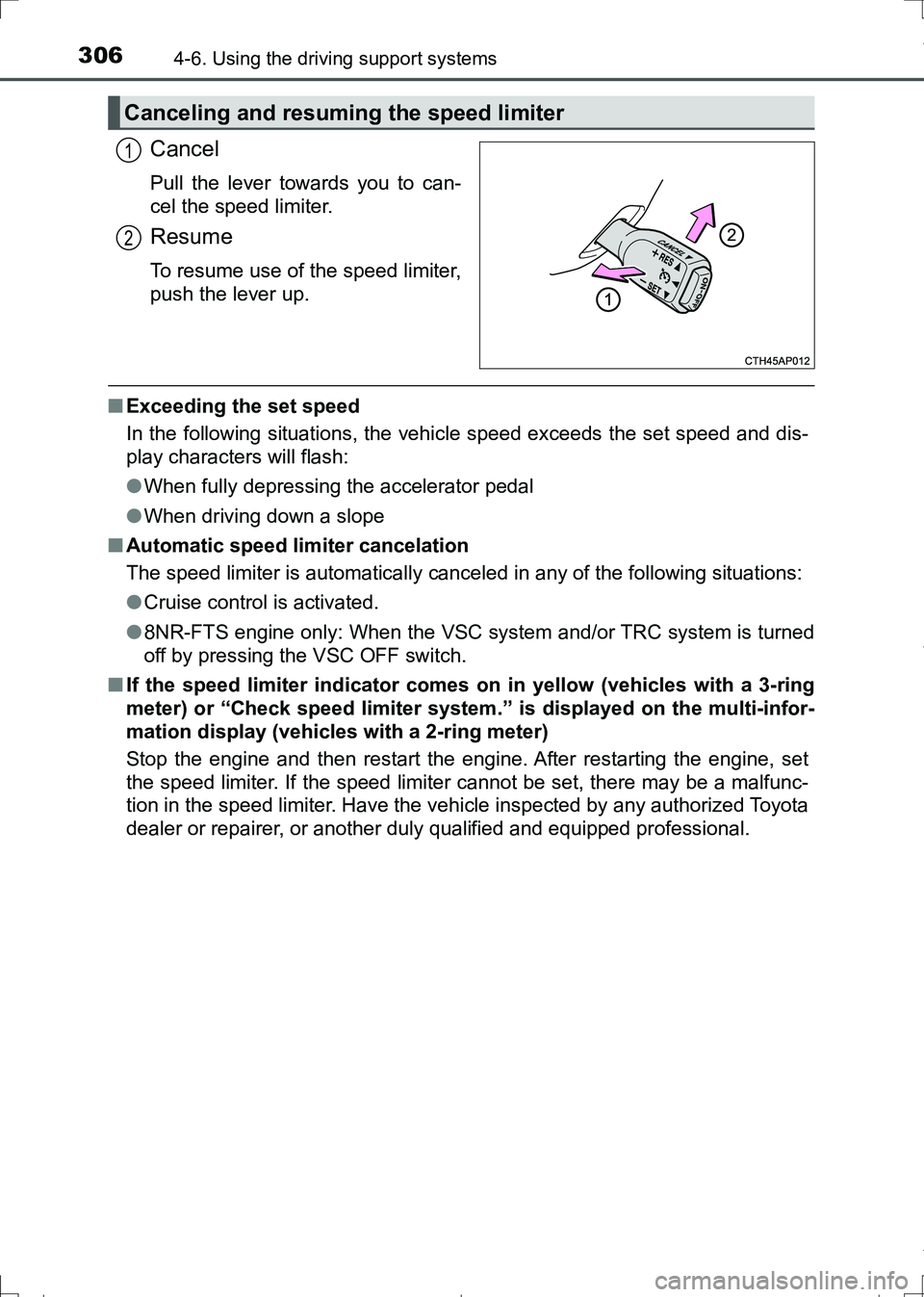
Cancel
Pull the lever towards you to can-
cel the speed limiter.
Resume
To resume use of the speed limiter,
push the lever up.
■Exceeding the set speed
In the following situations, the vehicle speed exceeds the set speed and dis-
play characters will flash:
●When fully depressing the accelerator pedal
●When driving down a slope
■Automatic speed limiter cancelation
The speed limiter is automatically canceled in any of the following situations:
●Cruise control is activated.
●8NR-FTS engine only: When the VSC system and/or TRC system is turned
off by pressing the VSC OFF switch.
■If the speed limiter indicator comes on in yellow (vehicles with a 3-ring
meter) or “Check speed limiter system.” is displayed on the multi-infor-
mation display (vehicles with a 2-ring meter)
Stop the engine and then restart the engine. After restarting the engine, set
the speed limiter. If the speed limiter cannot be set, there may be a malfunc-
tion in the speed limiter. Have the vehicle inspected by any authorized Toyota
dealer or repairer, or another duly qualified and equipped professional.
Canceling and resuming the speed limiter
1
2
AURIS Touring Sports_OM_Europe_OM12L13E.book 306 ページ 2016年6月27日 月曜日 午後5時21分
Page 308 of 664
3084-6. Using the driving support systems
AURIS Touring Sports_EE (12L13E)■
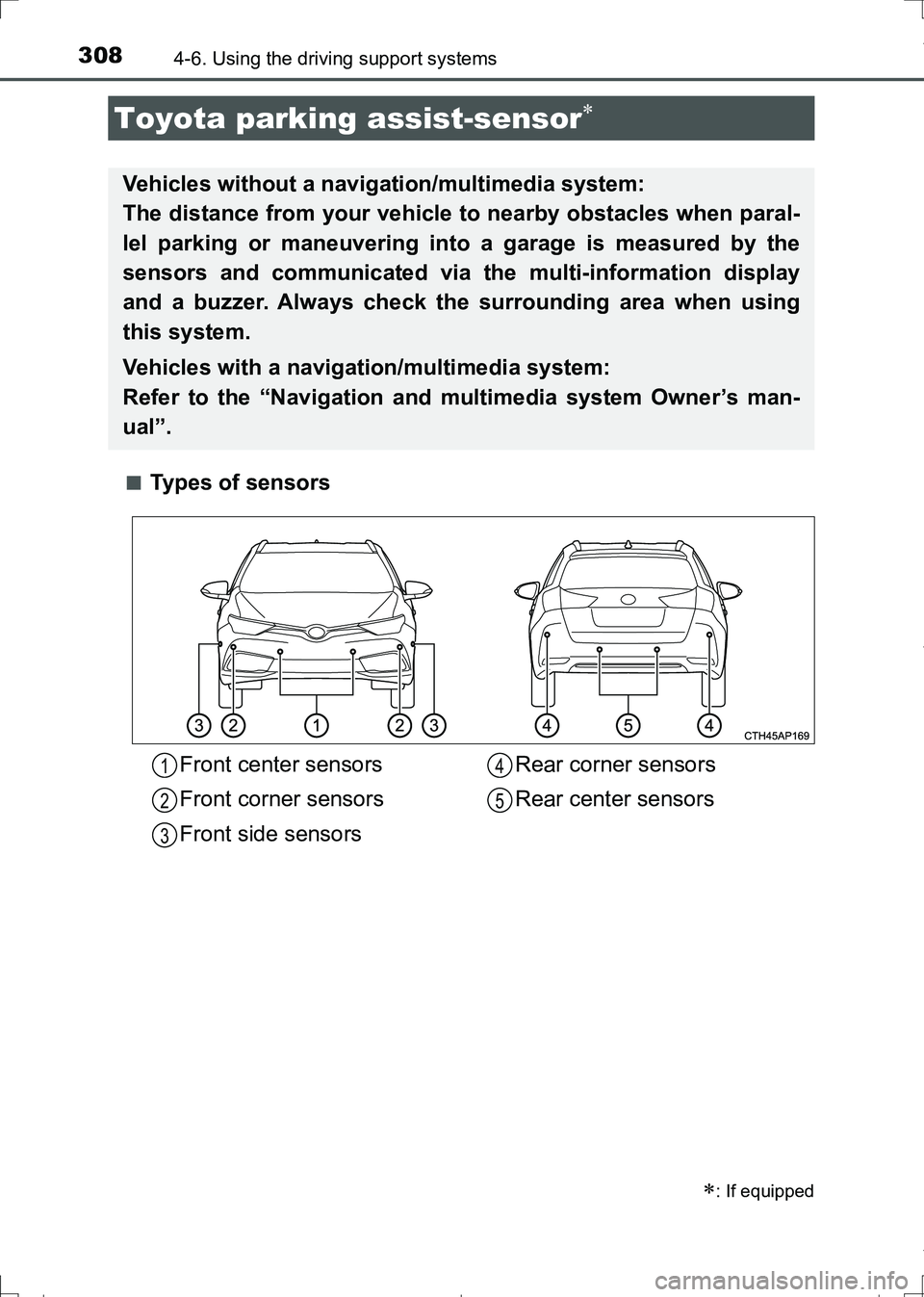
Types of sensors
Toyota parking assist-sensor
: If equipped
Vehicles without a navigation/multimedia system:
The distance from your vehicle to nearby obstacles when paral-
lel parking or maneuvering into a garage is measured by the
sensors and communicated via the multi-information display
and a buzzer. Always check the surrounding area when using
this system.
Vehicles with a navigation/multimedia system:
Refer to the “Navigation and multimedia system Owner’s man-
ual”.
Front center sensors
Front corner sensors
Front side sensorsRear corner sensors
Rear center sensors1
2
3
4
5
AURIS Touring Sports_OM_Europe_OM12L13E.book 308 ページ 2016年6月27日 月曜日 午後5時21分
Page 309 of 664
3094-6. Using the driving support systems
AURIS Touring Sports_EE (12L13E)
4
Driving
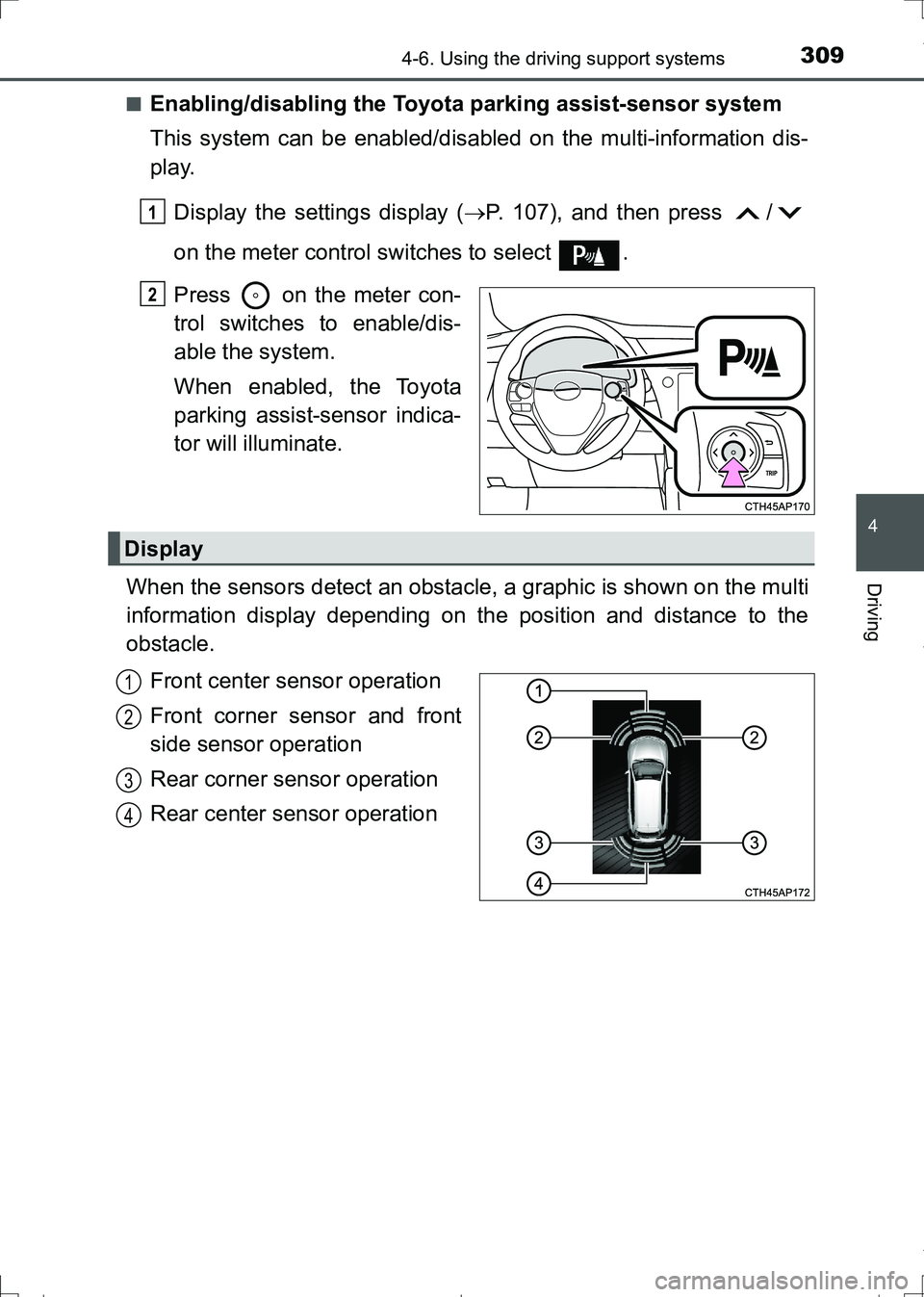
■Enabling/disabling the Toyota parking assist-sensor system
This system can be enabled/disabled on the multi-information dis-
play.
Display the settings display (P. 107), and then press /
on the meter control switches to select .
Press on the meter con-
trol switches to enable/dis-
able the system.
When enabled, the Toyota
parking assist-sensor indica-
tor will illuminate.
When the sensors detect an obstacle, a graphic is shown on the multi
information display depending on the position and distance to the
obstacle.
Front center sensor operation
Front corner sensor and front
side sensor operation
Rear corner sensor operation
Rear center sensor operation
1
2
Display
1
2
3
4
AURIS Touring Sports_OM_Europe_OM12L13E.book 309 ページ 2016年6月27日 月曜日 午後5時21分
Page 310 of 664
3104-6. Using the driving support systems
AURIS Touring Sports_EE (12L13E)
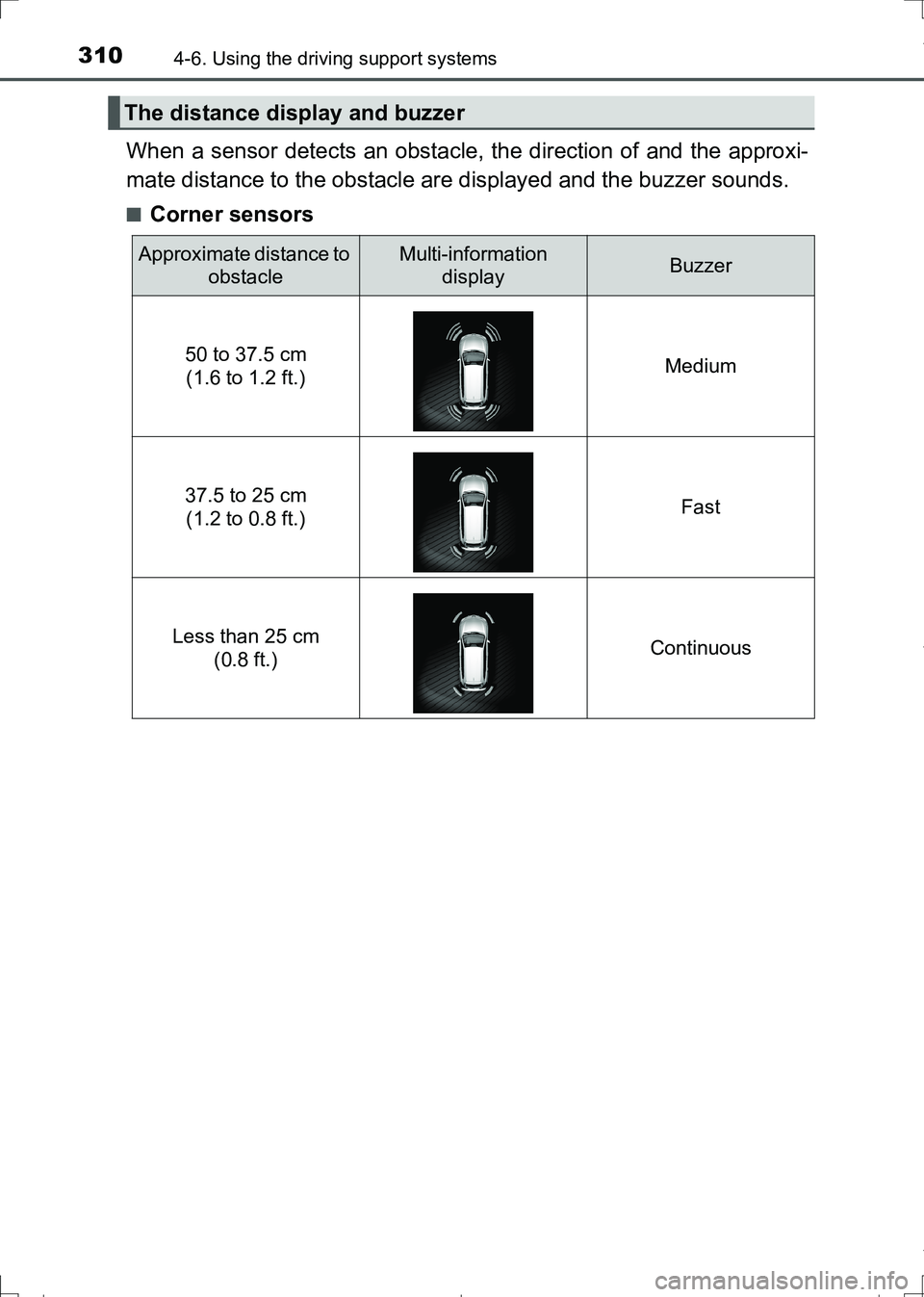
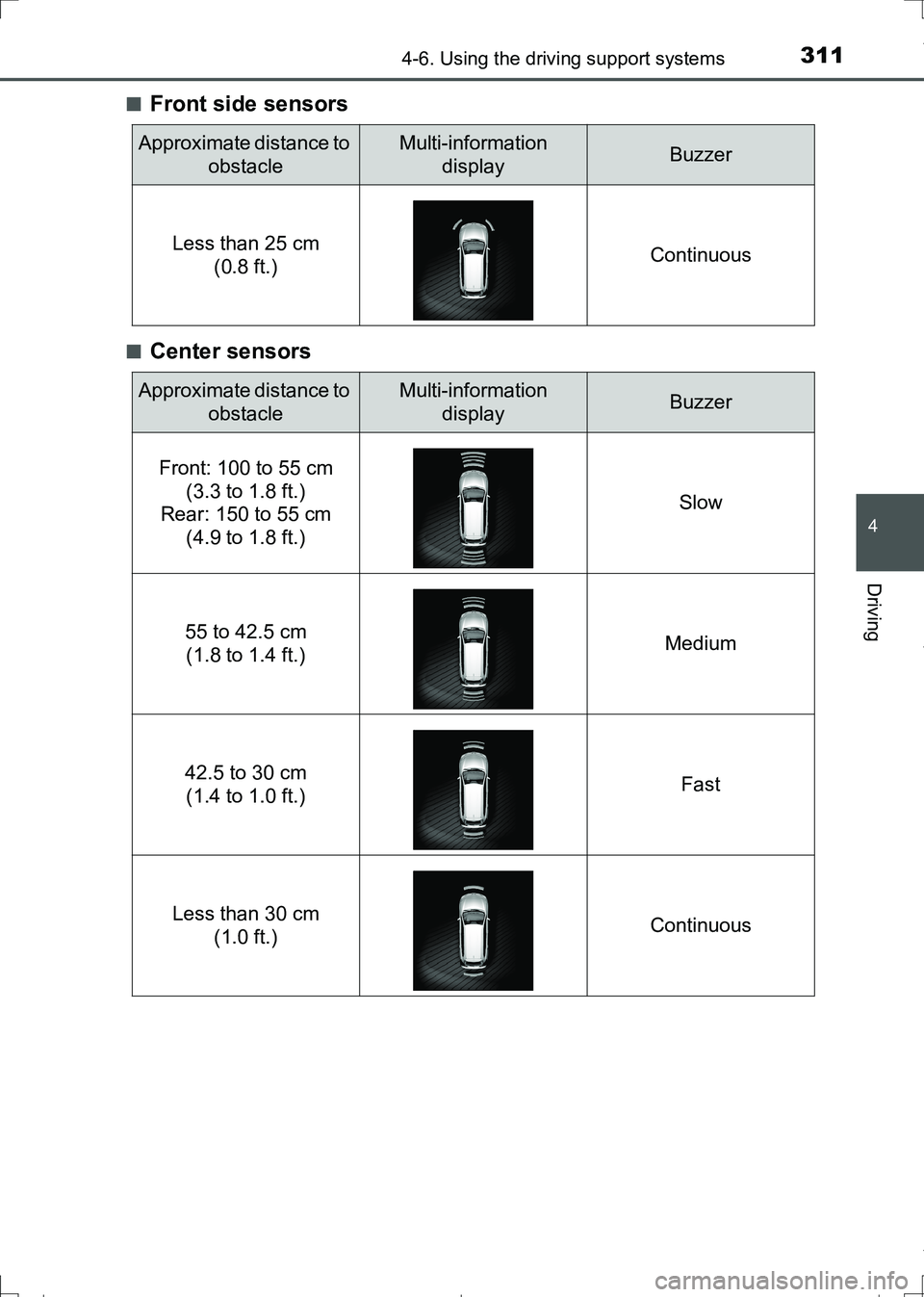
When a sensor detects an obstacle, the direction of and the approxi-
mate distance to the obstacle are displayed and the buzzer sounds.
■Corner sensors
The distance display and buzzer
Approximate distance to
obstacleMulti-information
displayBuzzer
50 to 37.5 cm
(1.6 to 1.2 ft.)Medium
37.5 to 25 cm
(1.2 to 0.8 ft.)Fast
Less than 25 cm
(0.8 ft.)Continuous
AURIS Touring Sports_OM_Europe_OM12L13E.book 310 ページ 2016年6月27日 月曜日 午後5時21分
Page 311 of 664
3114-6. Using the driving support systems
AURIS Touring Sports_EE (12L13E)
4
Driving
■Front side sensors
■Center sensors
Approximate distance to
obstacleMulti-information
displayBuzzer
Less than 25 cm
(0.8 ft.)Continuous
Approximate distance to
obstacleMulti-information
displayBuzzer
Front: 100 to 55 cm
(3.3 to 1.8 ft.)
Rear: 150 to 55 cm
(4.9 to 1.8 ft.)Slow
55 to 42.5 cm
(1.8 to 1.4 ft.)Medium
42.5 to 30 cm
(1.4 to 1.0 ft.)Fast
Less than 30 cm
(1.0 ft.)Continuous
AURIS Touring Sports_OM_Europe_OM12L13E.book 311 ページ 2016年6月27日 月曜日 午後5時21分
Page 314 of 664
3144-6. Using the driving support systems
AURIS Touring Sports_EE (12L13E)●The shape of the obstacle may prevent the sensor from detecting it. Pay
particular attention to the following obstacles:
• Wires, fences, ropes, etc.
• Cotton, snow and other materials that absorb sound waves
• Sharply-angled objects
• Low obstacles
• Tall obstacles with upper sections projecting outwards in the direction of
your vehicle
■If “Clean sonar.” is displayed on the multi-information display
A sensor may be dirty or covered with snow or ice. In this case, clean the
sensor and the system should return to normal.
If a sensor is frozen due to low temperatures, a warning message may be dis-
played or an obstacle may not be detected. When the sensor thaws out, the
system should return to normal.
■If “Check sonar system.” is displayed on the multi-information display
The system may not operate due to the malfunction of a sensor.
Have the vehicle inspected by any authorized Toyota dealer or repairer, or
another duly qualified and equipped professional.
WARNING
■Caution when using the Toyota parking assist-sensor
Observe the following precautions.
Failing to do so may result in the vehicle being unable to be driven safely
and possibly cause an accident.
●Do not use the sensor at speeds in excess of 10 km/h (6 mph).
●Do not attach any accessories within the sensor range.
NOTICE
■Notes on the Toyota parking assist-sensor
●Do not apply intensive bursts of water or steam to the sensor area.
Doing so may result in the sensor malfunctioning.
●If your vehicle is involved in an accident, it will affect the sensors and may
result in a system failure.
Contact any authorized Toyota dealer or repairer, or another duly qualified
and equipped professional.
AURIS Touring Sports_OM_Europe_OM12L13E.book 314 ページ 2016年6月27日 月曜日 午後5時21分