display TOYOTA AURIS HYBRID 2017 Manual Online
[x] Cancel search | Manufacturer: TOYOTA, Model Year: 2017, Model line: AURIS HYBRID, Model: TOYOTA AURIS HYBRID 2017Pages: 664, PDF Size: 27.42 MB
Page 345 of 664
345
AURIS Touring Sports_EE (12L13E)
5
Audio system
5-2. Using the audio system
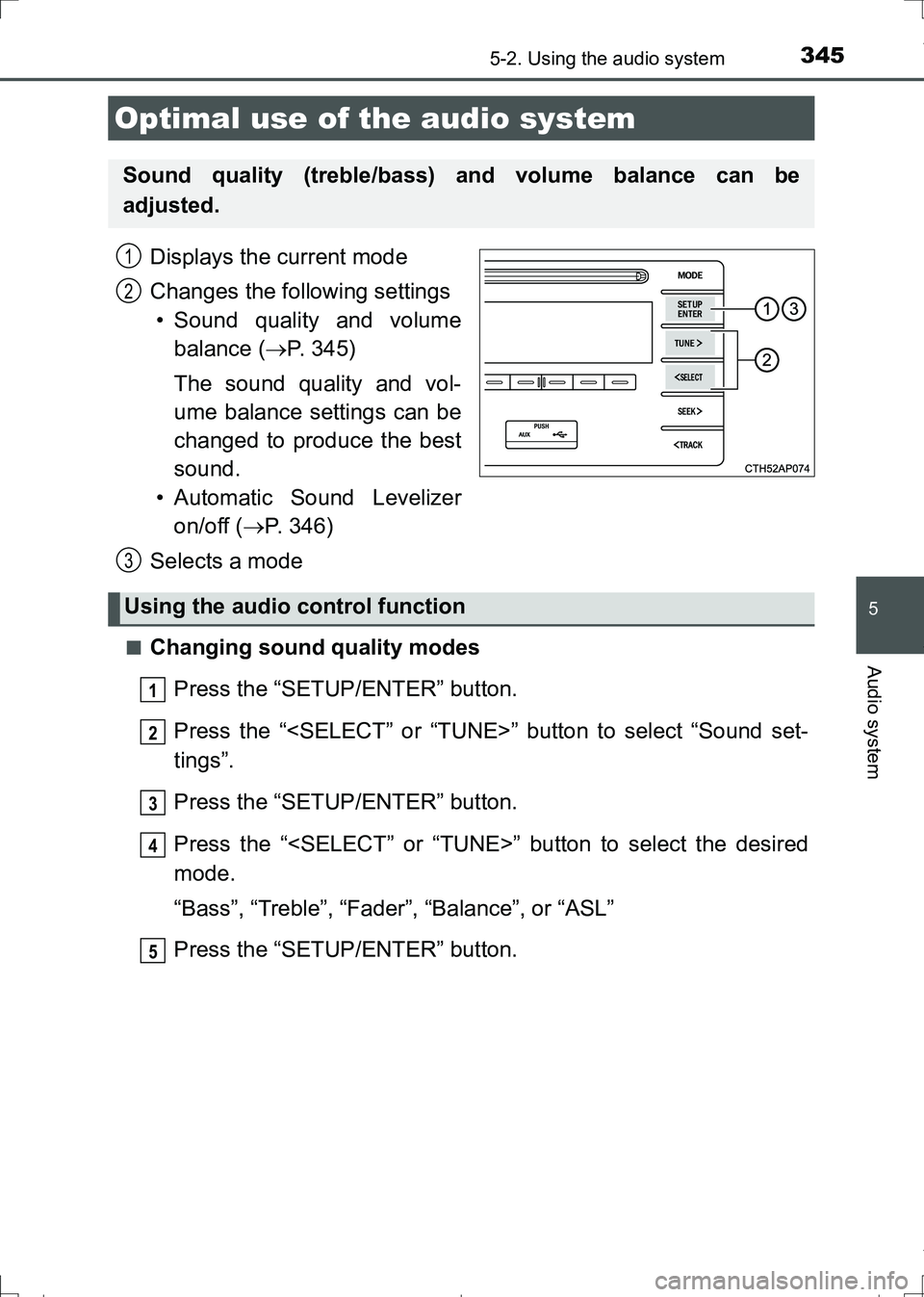
Displays the current mode
Changes the following settings
• Sound quality and volume
balance (P. 345)
The sound quality and vol-
ume balance settings can be
changed to produce the best
sound.
• Automatic Sound Levelizer
on/off (P. 346)
Selects a mode
■Changing sound quality modes
Press the “SETUP/ENTER” button.
Press the “
tings”.
Press the “SETUP/ENTER” button.
Press the “
mode.
“Bass”, “Treble”, “Fader”, “Balance”, or “ASL”
Press the “SETUP/ENTER” button.
Optimal use of the audio system
Sound quality (treble/bass) and volume balance can be
adjusted.
1
2
3
Using the audio control function
1
2
3
4
5
AURIS Touring Sports_OM_Europe_OM12L13E.book 345 ページ 2016年6月27日 月曜日 午後5時21分
Page 346 of 664
3465-2. Using the audio system
AURIS Touring Sports_EE (12L13E)■
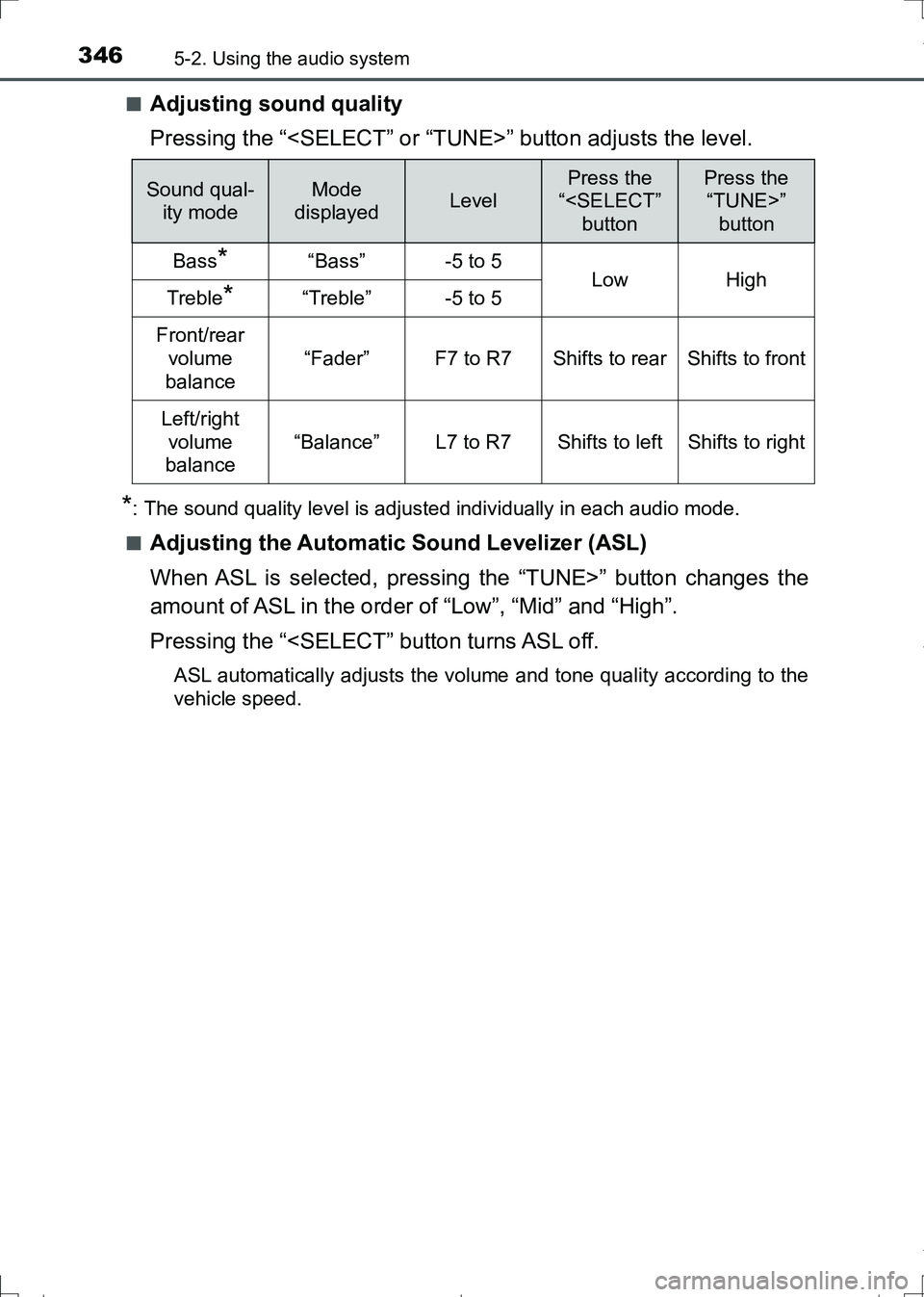
Adjusting sound quality
Pressing the “
*: The sound quality level is adjusted individually in each audio mode.
■
Adjusting the Automatic Sound Levelizer (ASL)
When ASL is selected, pressing the “TUNE>” button changes the
amount of ASL in the order of “Low”, “Mid” and “High”.
Pressing the “
vehicle speed.
Sound qual-
ity modeMode
displayedLevel
Press the
“
“TUNE>”
button
Bass*“Bass”-5 to 5LowHighTreble*“Treble”-5 to 5
Front/rear
volume
balance
“Fader”F7 to R7Shifts to rearShifts to front
Left/right
volume
balance
“Balance”L7 to R7Shifts to leftShifts to right
AURIS Touring Sports_OM_Europe_OM12L13E.book 346 ページ 2016年6月27日 月曜日 午後5時21分
Page 347 of 664
347
AURIS Touring Sports_EE (12L13E)
5
Audio system
5-3. Using the radio
Search for a desired station by pressing the “
Press and hold a desired station selector button until you hear a
beep.
Radio operation
Select “AM” or “FM” to begin listening to the radio.
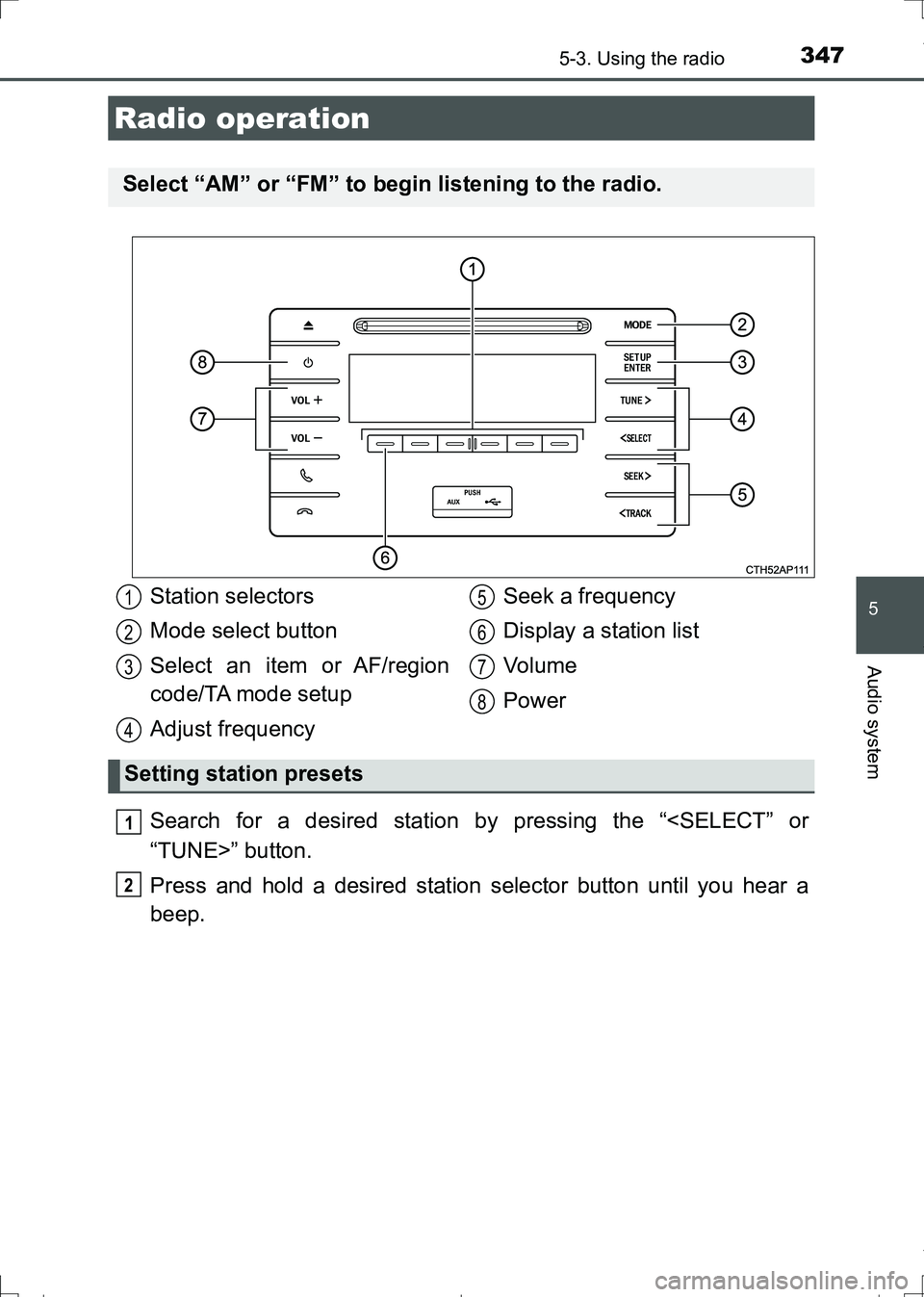
Station selectors
Mode select button
Select an item or AF/region
code/TA mode setup
Adjust frequencySeek a frequency
Display a station list
Vo l u m e
Power
Setting station presets
1
2
3
4
5
6
7
8
1
2
AURIS Touring Sports_OM_Europe_OM12L13E.book 347 ページ 2016年6月27日 月曜日 午後5時21分
Page 348 of 664
3485-3. Using the radio
AURIS Touring Sports_EE (12L13E)■
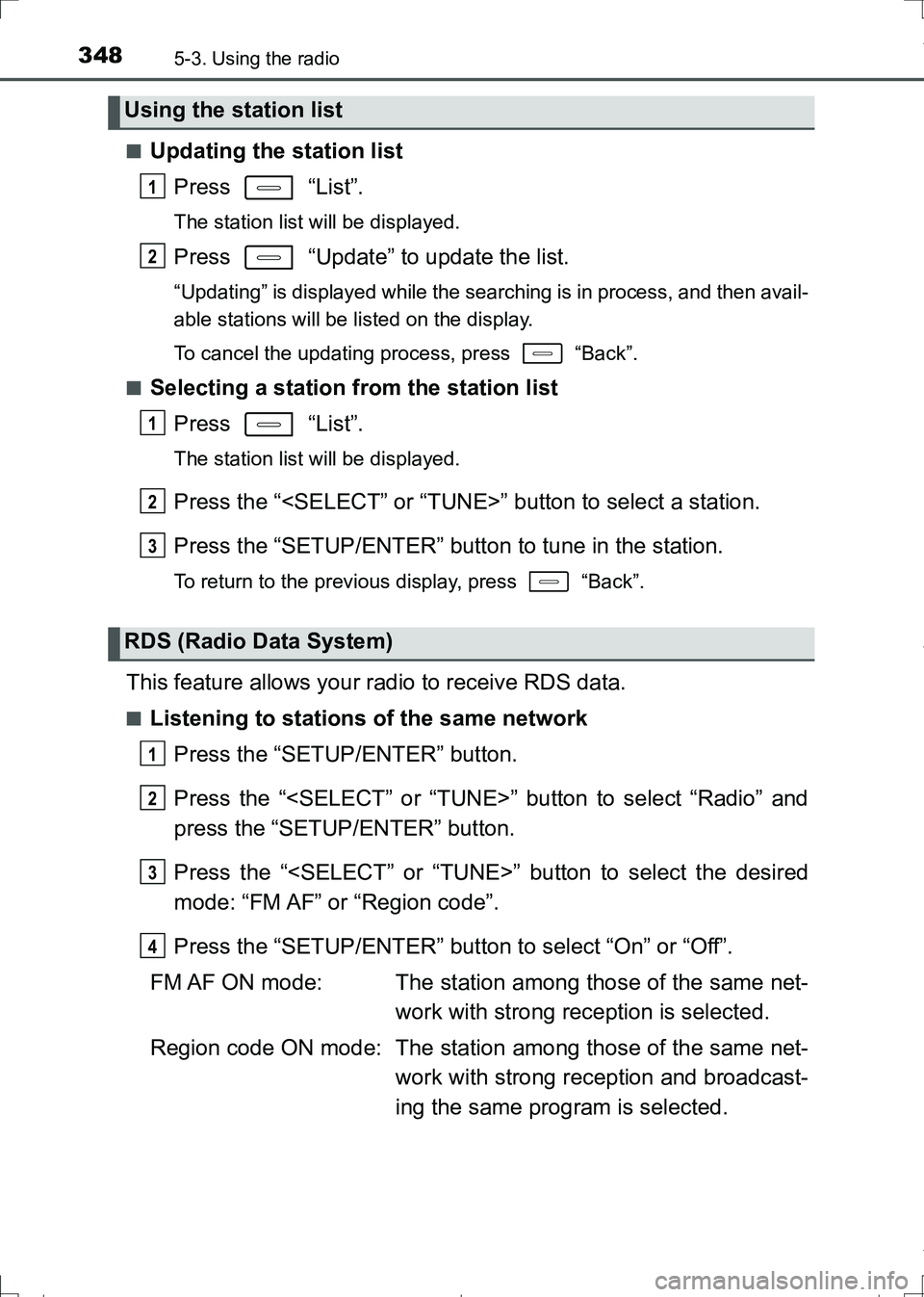
Updating the station list
Press “List”.
The station list will be displayed.
Press “Update” to update the list.
“Updating” is displayed while the searching is in process, and then avail-
able stations will be listed on the display.
To cancel the updating process, press “Back”.
■
Selecting a station from the station list
Press “List”.
The station list will be displayed.
Press the “
Press the “SETUP/ENTER” button to tune in the station.
To return to the previous display, press “Back”.
This feature allows your radio to receive RDS data.
■Listening to stations of the same network
Press the “SETUP/ENTER” button.
Press the “
press the “SETUP/ENTER” button.
Press the “
mode: “FM AF” or “Region code”.
Press the “SETUP/ENTER” button to select “On” or “Off”.
FM AF ON mode: The station among those of the same net-
work with strong reception is selected.
Region code ON mode: The station among those of the same net-
work with strong reception and broadcast-
ing the same program is selected.
Using the station list
RDS (Radio Data System)
1
2
1
2
3
1
2
3
4
AURIS Touring Sports_OM_Europe_OM12L13E.book 348 ページ 2016年6月27日 月曜日 午後5時21分
Page 350 of 664
350
AURIS Touring Sports_EE (12L13E)
5-4. Playing audio CDs and MP3/WMA discs
Insert a disc.
Press and remove the disc.
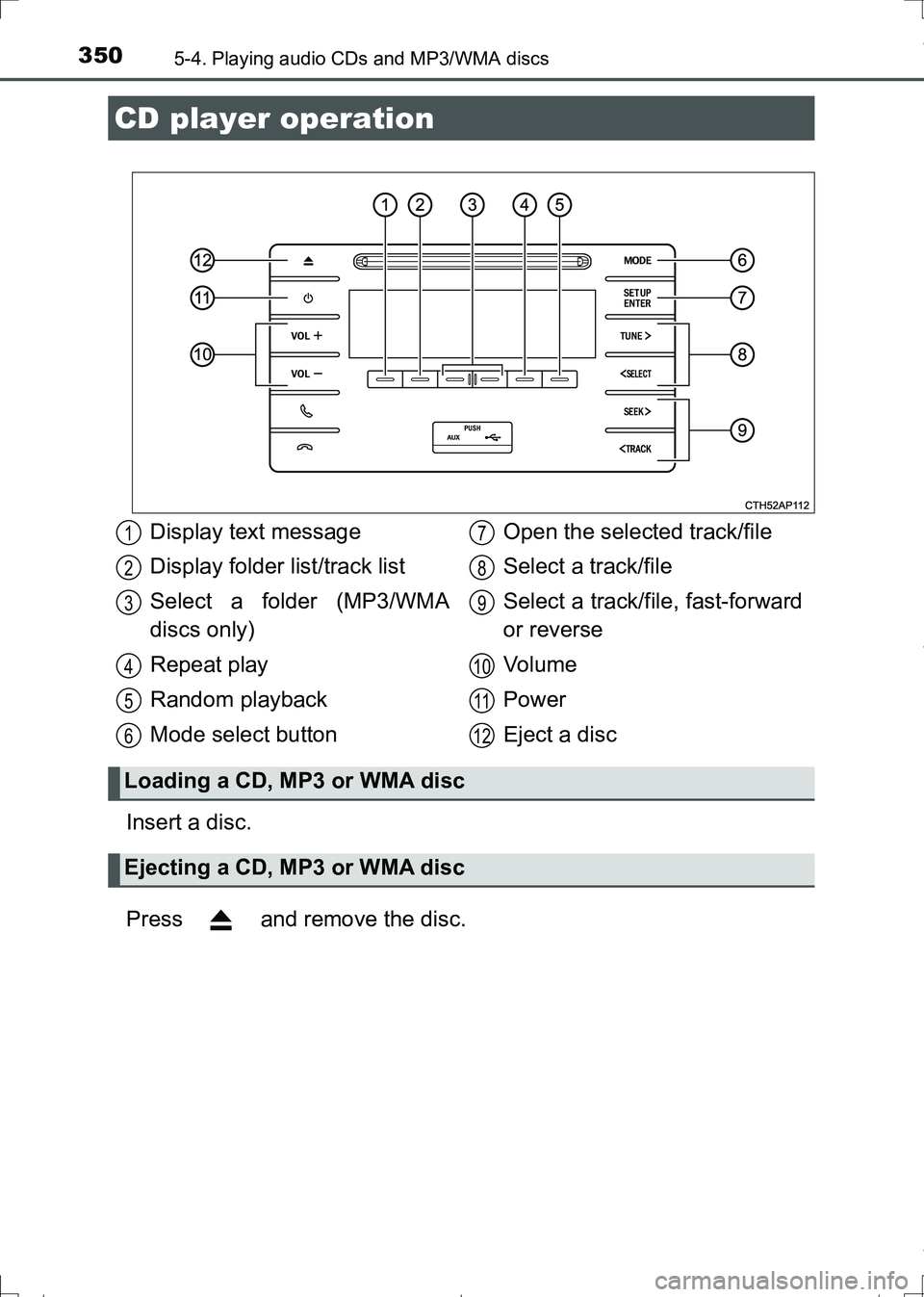
CD player operation
Display text message
Display folder list/track list
Select a folder (MP3/WMA
discs only)
Repeat play
Random playback
Mode select buttonOpen the selected track/file
Select a track/file
Select a track/file, fast-forward
or reverse
Vo l u m e
Power
Eject a disc
Loading a CD, MP3 or WMA disc
Ejecting a CD, MP3 or WMA disc
1
2
3
4
5
6
7
8
9
10
11
12
AURIS Touring Sports_OM_Europe_OM12L13E.book 350 ページ 2016年6月27日 月曜日 午後5時21分
Page 351 of 664
3515-4. Playing audio CDs and MP3/WMA discs
AURIS Touring Sports_EE (12L13E)
5
Audio system
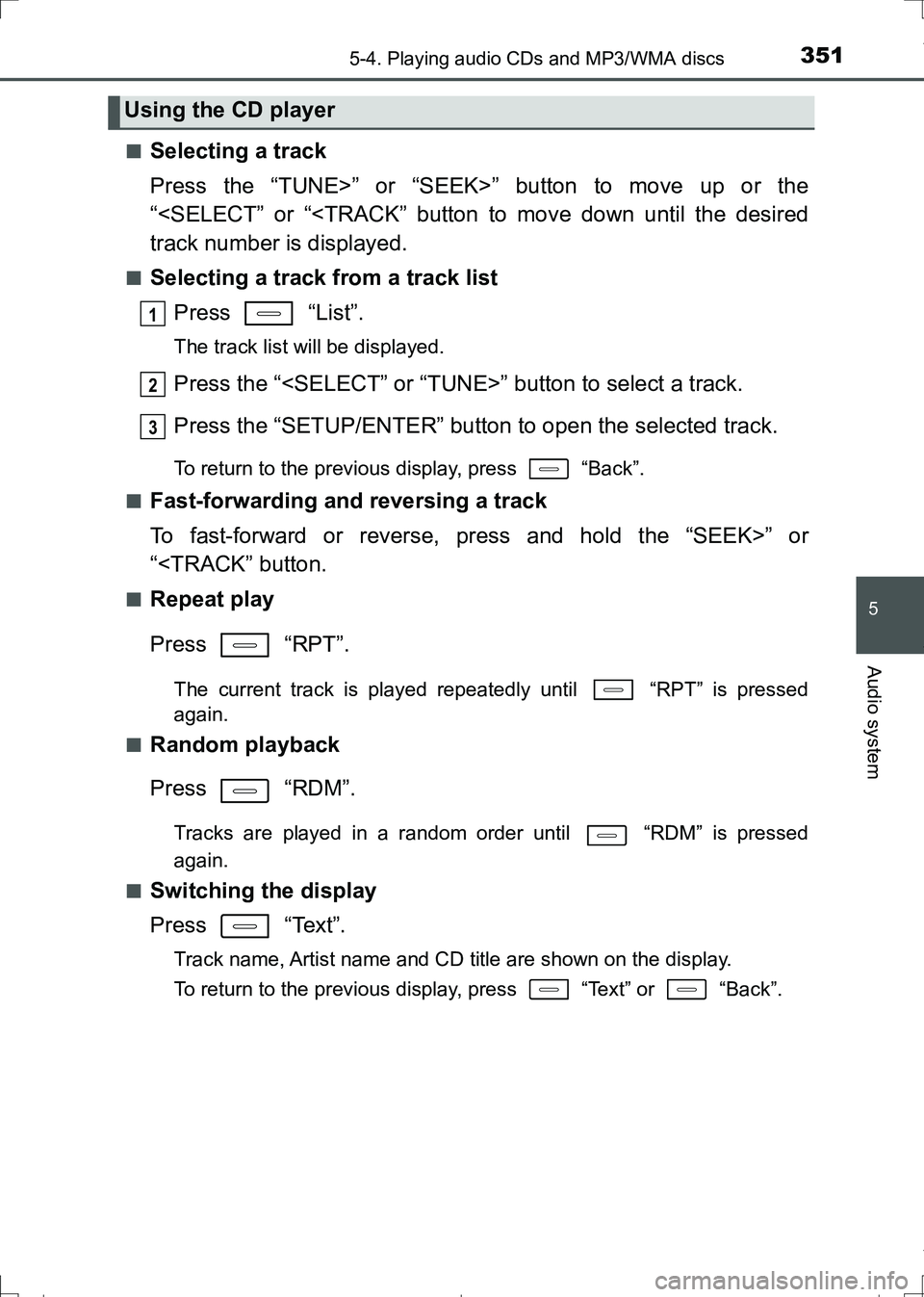
■Selecting a track
Press the “TUNE>” or “SEEK>” button to move up or the
“
■Selecting a track from a track list
Press “List”.
The track list will be displayed.
Press the “
Press the “SETUP/ENTER” button to open the selected track.
To return to the previous display, press “Back”.
■
Fast-forwarding and reversing a track
To fast-forward or reverse, press and hold the “SEEK>” or
“
Press “RPT”.
The current track is played repeatedly until “RPT” is pressed
again.
■
Random playback
Press “RDM”.
Tracks are played in a random order until “RDM” is pressed
again.
■
Switching the display
Press “Text”.
Track name, Artist name and CD title are shown on the display.
To return to the previous display, press “Text” or “Back”.
Using the CD player
1
2
3
AURIS Touring Sports_OM_Europe_OM12L13E.book 351 ページ 2016年6月27日 月曜日 午後5時21分
Page 352 of 664
3525-4. Playing audio CDs and MP3/WMA discs
AURIS Touring Sports_EE (12L13E)■
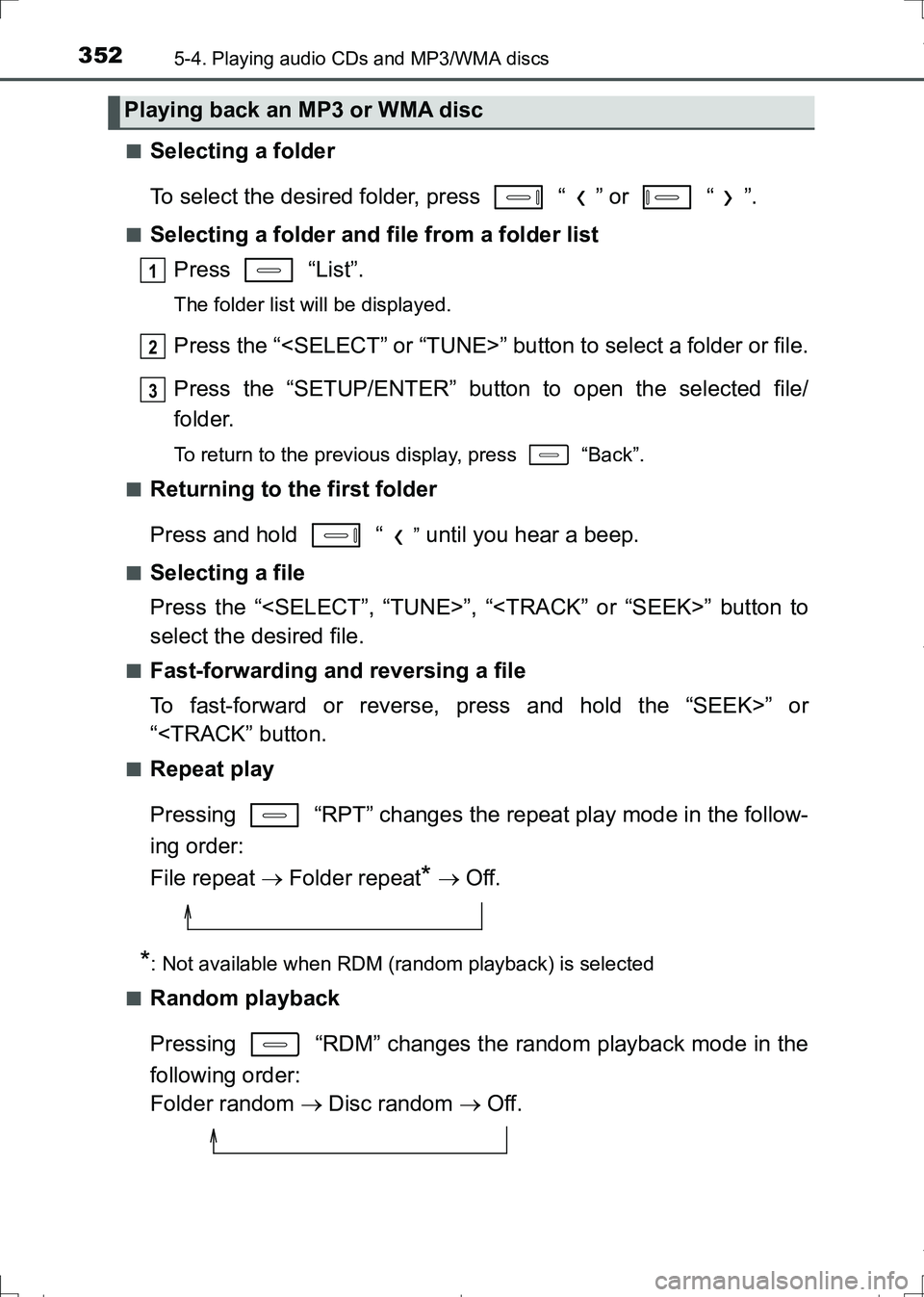
Selecting a folder
To select the desired folder, press “ ” or “ ”.
■Selecting a folder and file from a folder list
Press “List”.
The folder list will be displayed.
Press the “
Press the “SETUP/ENTER” button to open the selected file/
folder.
To return to the previous display, press “Back”.
■
Returning to the first folder
Press and hold “
” until you hear a beep.
■Selecting a file
Press the “
select the desired file.
■Fast-forwarding and reversing a file
To fast-forward or reverse, press and hold the “SEEK>” or
“
Pressing “RPT” changes the repeat play mode in the follow-
ing order:
File repeat Folder repeat
* Off.
*: Not available when RDM (random playback) is selected
■
Random playback
Pressing “RDM” changes the random playback mode in the
following order:
Folder random Disc random Off.
Playing back an MP3 or WMA disc
1
2
3
AURIS Touring Sports_OM_Europe_OM12L13E.book 352 ページ 2016年6月27日 月曜日 午後5時21分
Page 353 of 664
3535-4. Playing audio CDs and MP3/WMA discs
AURIS Touring Sports_EE (12L13E)
5
Audio system
■Switching the display
Press “Text”.
Track title, Artist name and Album title (MP3 only) are shown on the dis-
play.
To return to the previous display, press “Text” or “Back”.
■Display
Depending on the contents recorded, the characters may not be displayed
properly or may not be displayed at all.
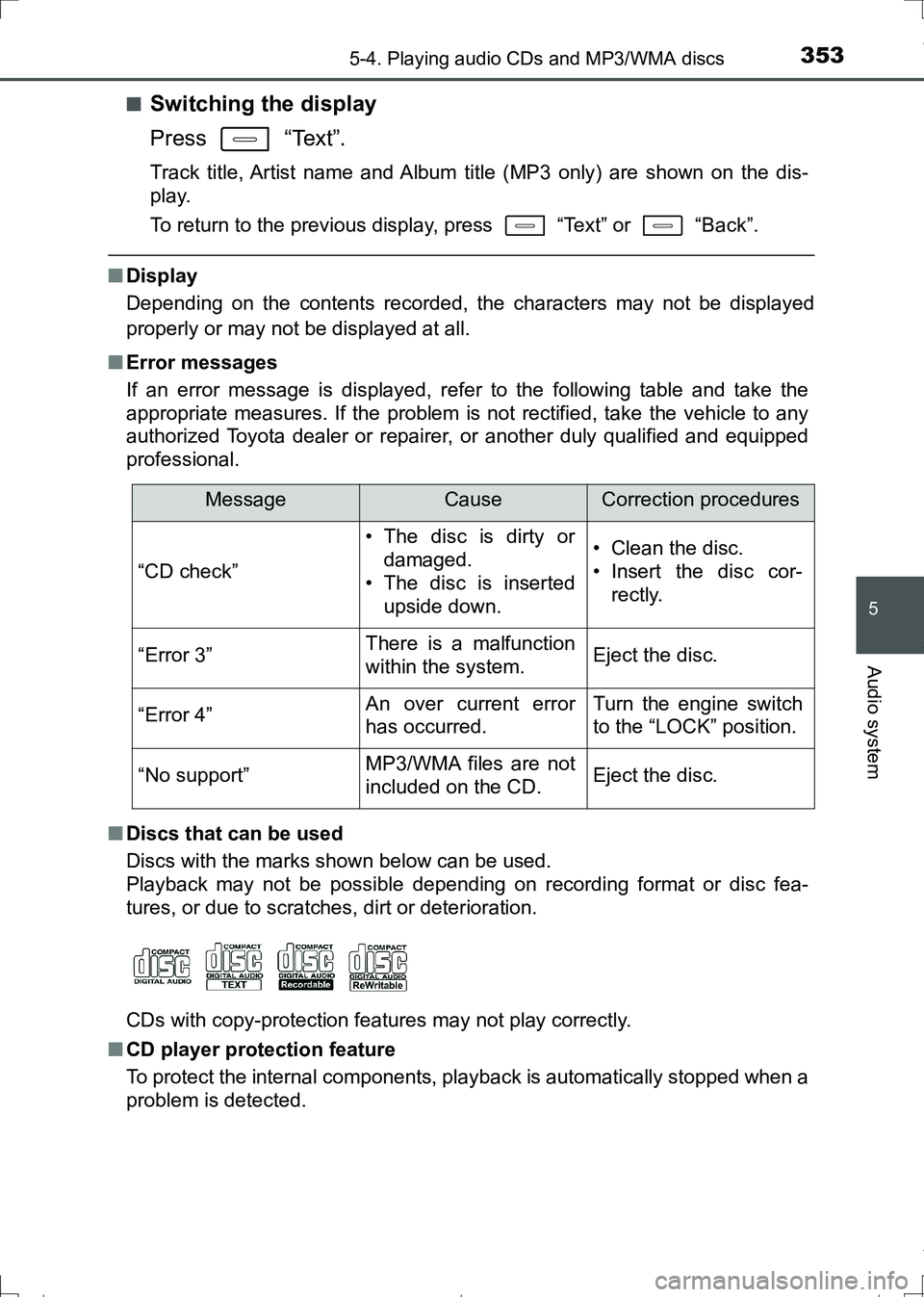
■Error messages
If an error message is displayed, refer to the following table and take the
appropriate measures. If the problem is not rectified, take the vehicle to any
authorized Toyota dealer or repairer, or another duly qualified and equipped
professional.
■Discs that can be used
Discs with the marks shown below can be used.
Playback may not be possible depending on recording format or disc fea-
tures, or due to scratches, dirt or deterioration.
CDs with copy-protection features may not play correctly.
■CD player protection feature
To protect the internal components, playback is automatically stopped when a
problem is detected.
MessageCauseCorrection procedures
“CD check”
• The disc is dirty or
damaged.
• The disc is inserted
upside down.• Clean the disc.
• Insert the disc cor-
rectly.
“Error 3”There is a malfunction
within the system.Eject the disc.
“Error 4”An over current error
has occurred.Turn the engine switch
to the “LOCK” position.
“No support”MP3/WMA files are not
included on the CD.Eject the disc.
AURIS Touring Sports_OM_Europe_OM12L13E.book 353 ページ 2016年6月27日 月曜日 午後5時21分
Page 355 of 664
3555-4. Playing audio CDs and MP3/WMA discs
AURIS Touring Sports_EE (12L13E)
5
Audio system
●WMA file compatibility
• Compatible standards
WMA Ver. 7, 8, 9
• Compatible sampling frequencies
32, 44.1, 48 (kHz)
• Compatible bit rates (only compatible with 2-channel playback)
Ver. 7, 8: CBR 48, 64, 80, 96, 128, 160, 192 (kbps)
Ver. 9: CBR 48, 64, 80, 96, 128, 160, 192, 256, 320 (kbps)
●Compatible media
Media that can be used for MP3 and WMA playback are CD-Rs and CD-
RWs.
Playback in some instances may not be possible if the CD-R or CD-RW is
not finalized. Playback may not be possible or the audio may jump if the
disc is scratched or marked with fingerprints.
●Compatible disc formats
The following disc formats can be used.
• Disc formats: CD-ROM Mode 1 and Mode 2
CD-ROM XA Mode 2, Form 1 and Form 2
• File formats: ISO9660 Level 1, Level 2, (Romeo, Joliet)
MP3 and WMA files written in any format other than those listed above
may not play correctly, and their file names and folder names may not be
displayed correctly.
Items related to standards and limitations are as follows.
• Maximum directory hierarchy: 8 levels
• Maximum length of folder names/file names: 32 characters
• Maximum number of folders: 192 (including the root)
• Maximum number of files per disc: 255
●File names
The only files that can be recognized as MP3/WMA and played are those
with the extension .mp3 or .wma.
●Multi-session discs
As the audio system is compatible with multi-session discs, it is possible to
play discs that contain MP3 and WMA files. However, only the first session
can be played.
●ID3 and WMA tags
ID3 tags can be added to MP3 files, making it possible to record the track
title, artist name, etc.
The system is compatible with ID3 Ver. 1.0, 1.1, and Ver. 2.2, 2.3 ID3 tags.
(The number of characters is based on ID3 Ver. 1.0 and 1.1.)
WMA tags can be added to WMA files, making it possible to record the
track title and artist name in the same way as with ID3 tags.
AURIS Touring Sports_OM_Europe_OM12L13E.book 355 ページ 2016年6月27日 月曜日 午後5時21分
Page 358 of 664
358
AURIS Touring Sports_EE (12L13E)
5-5. Using an external device
P. 3 4 4
Listening to an iPod
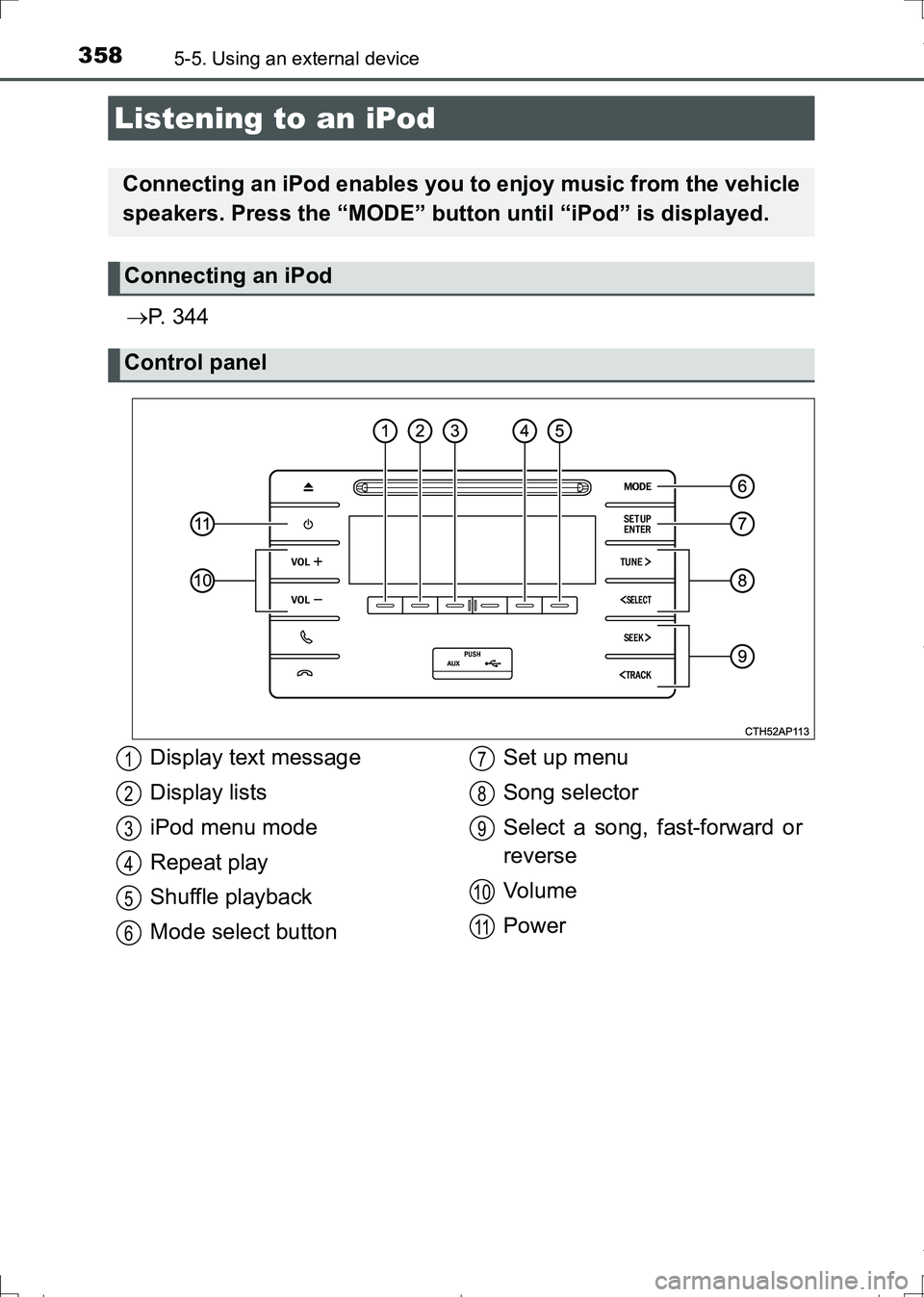
Connecting an iPod enables you to enjoy music from the vehicle
speakers. Press the “MODE” button until “iPod” is displayed.
Connecting an iPod
Control panel
Display text message
Display lists
iPod menu mode
Repeat play
Shuffle playback
Mode select buttonSet up menu
Song selector
Select a song, fast-forward or
reverse
Vo l u m e
Power1
2
3
4
5
6
7
8
9
10
11
AURIS Touring Sports_OM_Europe_OM12L13E.book 358 ページ 2016年6月27日 月曜日 午後5時21分