display TOYOTA AVALON 2012 XX40 / 4.G Owner's Guide
[x] Cancel search | Manufacturer: TOYOTA, Model Year: 2012, Model line: AVALON, Model: TOYOTA AVALON 2012 XX40 / 4.GPages: 580, PDF Size: 9.33 MB
Page 270 of 580
270 3-2. Using the audio system
Shuffle playback■ Playing songs from one playlis t or album in random order
Press that corresponds to “RDM”.
To cancel, press the button twice.
■ Playing songs from a ll the playlists or albums in random order
Press that corresponds to “RDM” twice.
To cancel, press the button again.
Repeat play
Press that corresponds to “RPT”.
To cancel, press the button again.
Even when the repeat play option has not been selected, playback will
automatically continue from the first song in the current play list once the
last song has ended.
Switching the displayPress .
Each time the button is pressed, the display changes in the following
order: Track title Track title/Artist name Track title/Album name
Track title/Elapsed time.
Page 274 of 580
274
3-2. Using the audio system
Operating a USB memor y
Connecting a USB memory enables you to enjoy music from the
vehicle speakers.
■Connecting a USB memory
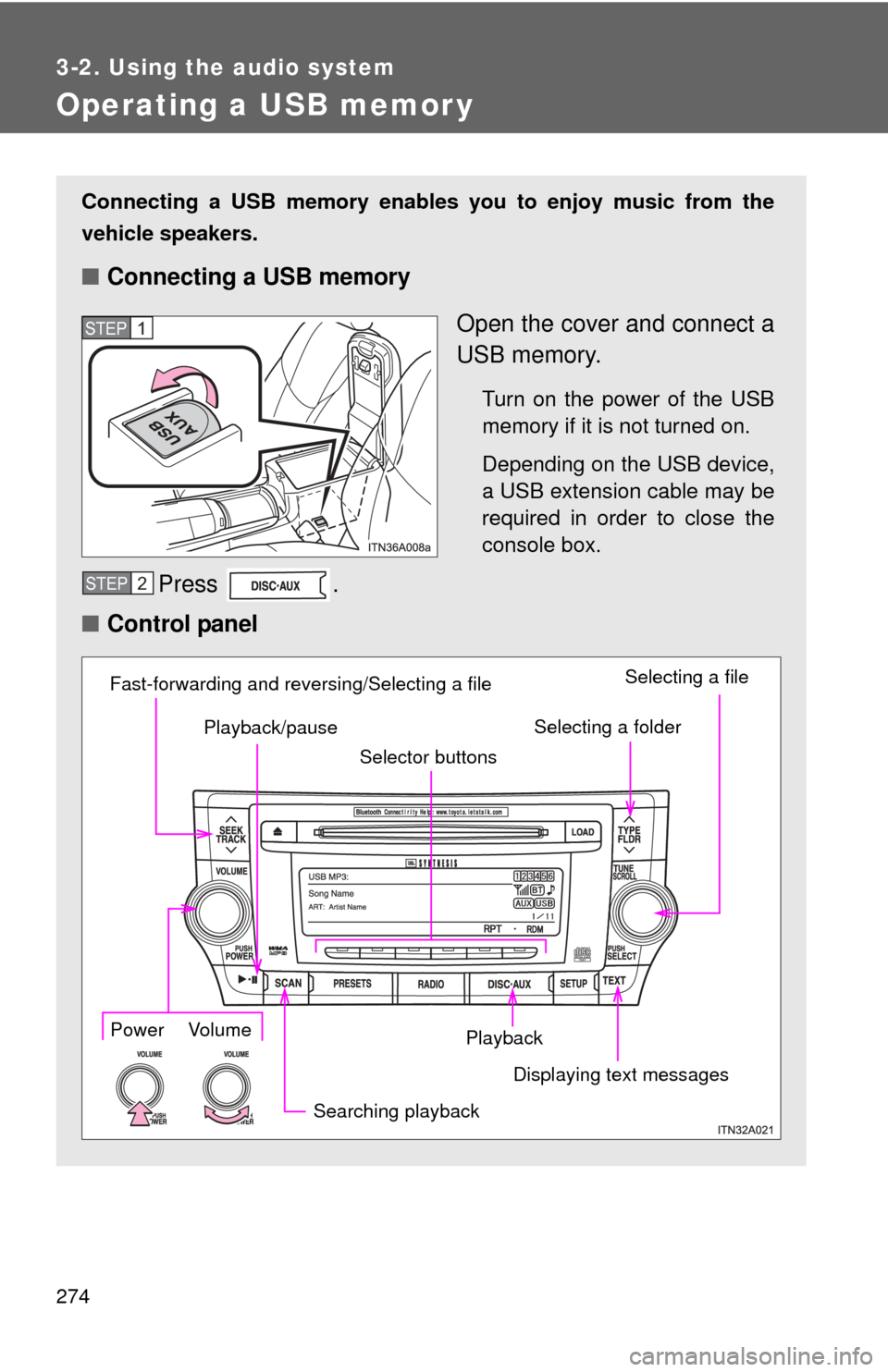
Open the cover and connect a
USB memory.
Turn on the power of the USB
memory if it is not turned on.
Depending on the USB device,
a USB extension cable may be
required in order to close the
console box.
Press .
■ Control panel
STEP1
STEP2
Playback
Playback/pause
Searching playback Displaying text messagesSelecting a folder
Selecting a file
Selector buttons
Fast-forwarding and reversing/Selecting a filePower Volume
Page 277 of 580
277
3-2. Using the audio system
3
Interior features
Switching the display
Press .
Each time the button is pressed, the display changes in the following
order: Track title Track title/Artist name Track title/Album name
Track title/Elapsed time.
■ When using the USB port
You may be unable to use the instrument panel power outlet if a device is
connected to the USB port at the same time.
■ USB memory functions
Depending on the USB memory that is connected to the system, certain
functions may not be available. Disconnecting the device and reconnecting it
once again may resolve some malfunctions.
■ Error messages
“USB ERROR”: This indicates a problem either in the USB memory or
inside the USB box or connection between them.
“NO MUSIC”: This indicates that no MP3/WMA files are included in the USB memory.
Page 278 of 580
278 3-2. Using the audio system
■USB memory
●Compatible devices
USB memory that can be used for MP3 and WMA playback.
Depending on the type of USB device, playback may not be possible.
● Compatible device formats
The following device formats can be used:
• USB communication formats: USB2.0 FS (12mbps)
• File formats: FAT16/32 (Windows)
• Correspondence class: Mass storage class
MP3 and WMA files written in any format other than those listed above
may not play correctly, and their file names and folder names may not be
displayed correctly.
Items related to standards and limitations are as follows:
• Maximum directory hierarchy: 8 levels
• Maximum number of folders in a device: 999 (including the root)
• Maximum number of files in a device: 65025
• Maximum number of files per folder: 255
● MP3 and WMA files
MP3 (MPEG Audio LAYER 3) is a standard audio compression format.
Files can be compressed to approximately 1/10 of their original size using
MP3 compression.
WMA (Windows Media Audio) is a Microsoft audio compression format.
This format compresses audio data to a size smaller than that of the MP3
format.
There is a limit to the MP3 and WMA file standards that can be used and to
the media/formats on which the files are recorded.
Page 283 of 580
283
3-2. Using the audio system
3
Interior features
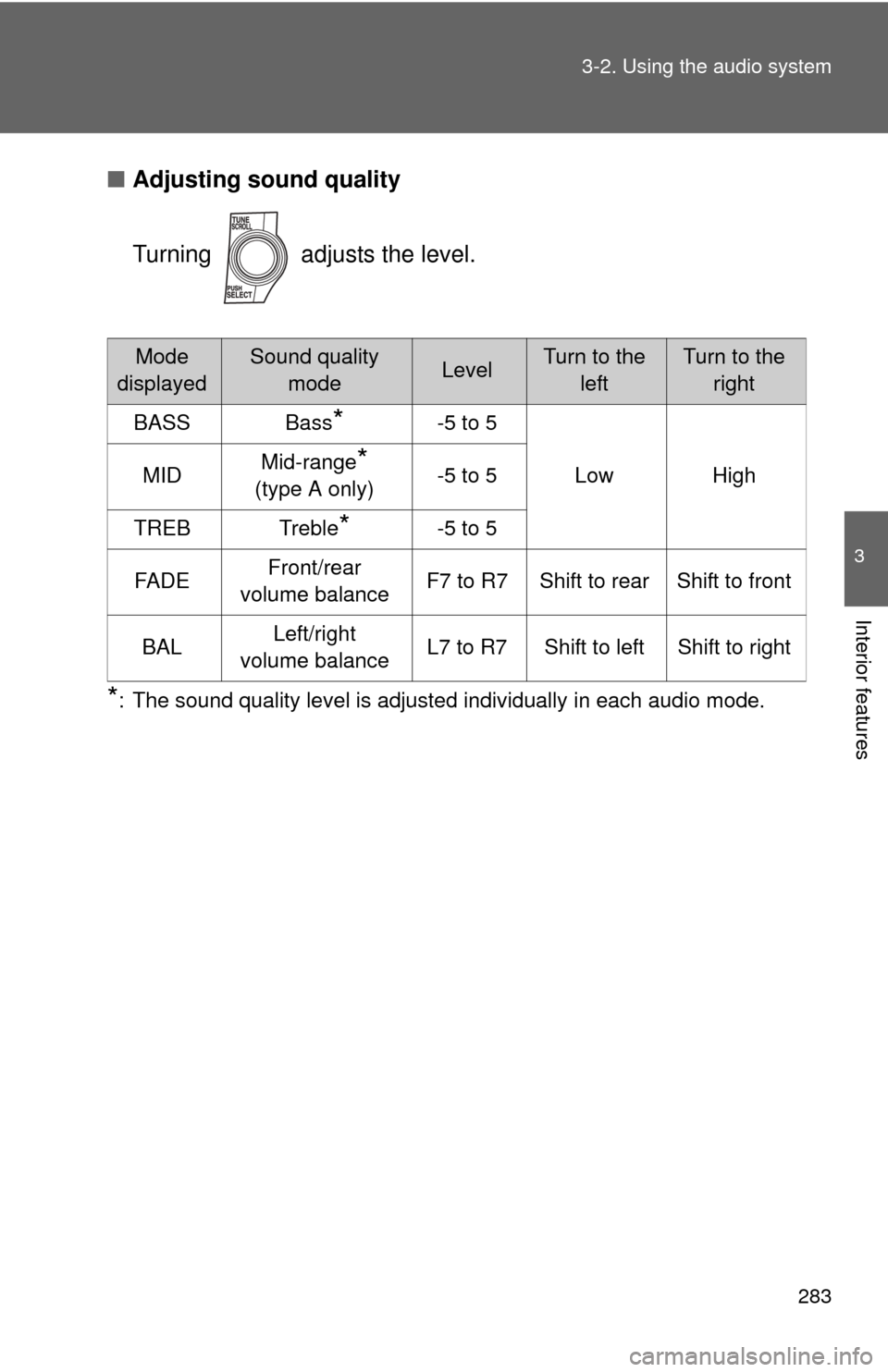
■
Adjusting sound quality
Turning adjusts the level.
*: The sound quality level is adjusted individually in each audio mode.
Mode
displayedSound quality modeLevelTurn to the leftTurn to the right
BASS Bass
*-5 to 5
Low High
MID Mid-range
*
(type A only) -5 to 5
TREB Treble
*-5 to 5
FA D E Front/rear
volume balance F7 to R7 Shift to rear Shift to front
BAL Left/right
volume balance L7 to R7 Shift to left Shift to right
Page 292 of 580
292
3-3. Using the Bluetooth® audio system
Using the Bluetooth® audio system
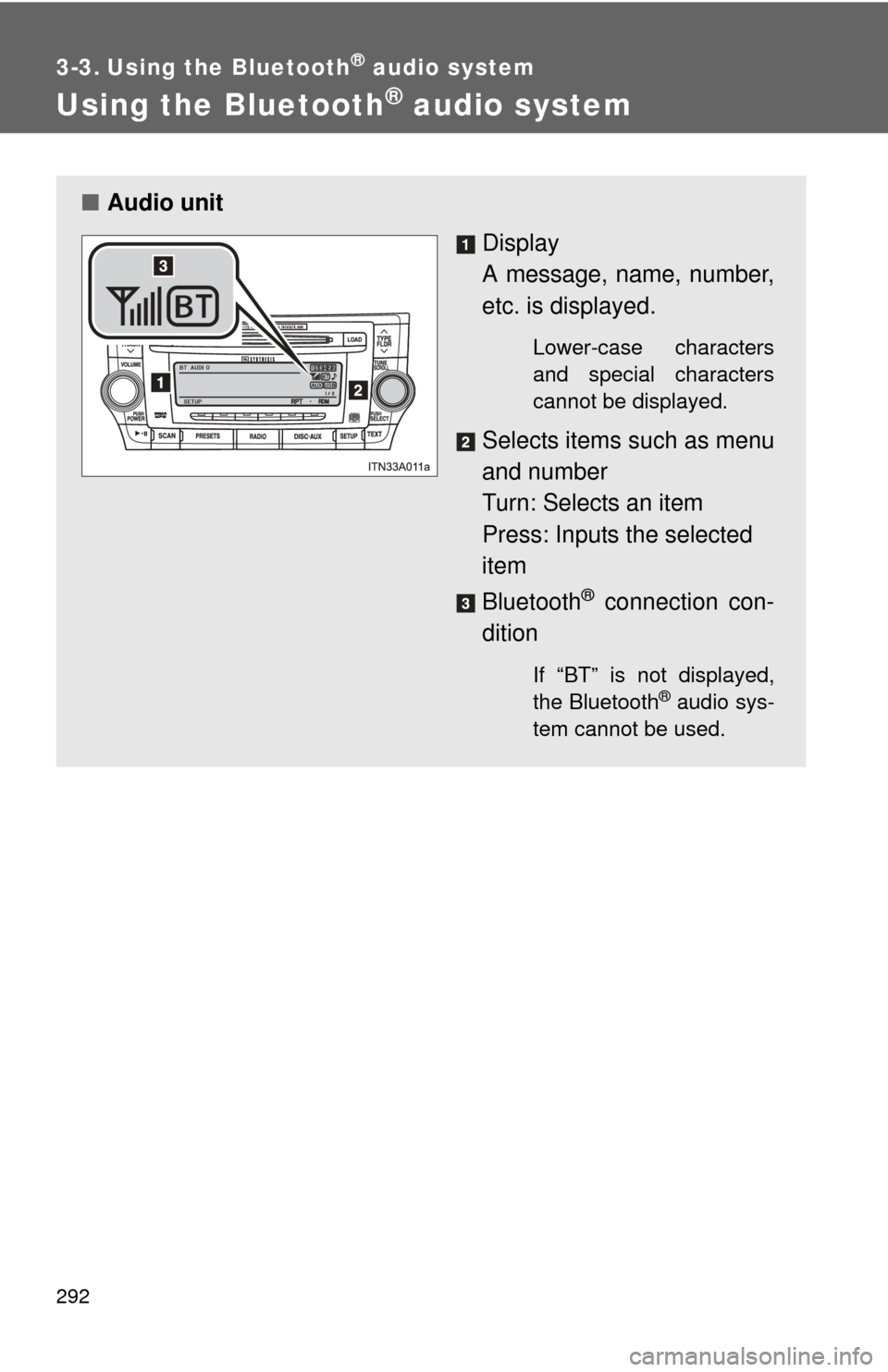
■Audio unit
Display
A message, name, number,
etc. is displayed.
Lower-case characters
and special characters
cannot be displayed.
Selects items such as menu
and number
Turn: Selects an item
Press: Inputs the selected
item
Bluetooth
® connection con-
dition
If “BT” is not displayed,
the Bluetooth® audio sys-
tem cannot be used.
Page 294 of 580
294 3-3. Using the Bluetooth
® audio system
Operating the system using voice commandsBy following voice gui dance instructions output from the speaker,
voice commands enable to th e operation of the Bluetooth
® audio sys-
tem without the need to check the display or operate .
■ Operation procedure when using voice commands
Press the talk switch and follo w voice guidance instructions.
■ Auxiliary commands when using voice commands
The following auxiliary commands can be used when operating the
system using a voice command:
“Cancel”: Exits the Bluetooth
® audio system
“Repeat”: Repeats the previous voice guidance instruction
“Go back”: Returns to the previous procedure
“Help”: Reads aloud the function summary if a help comment is
registered for the selected function
Page 295 of 580
295
3-3. Using the Bluetooth
® audio system
3
Interior features
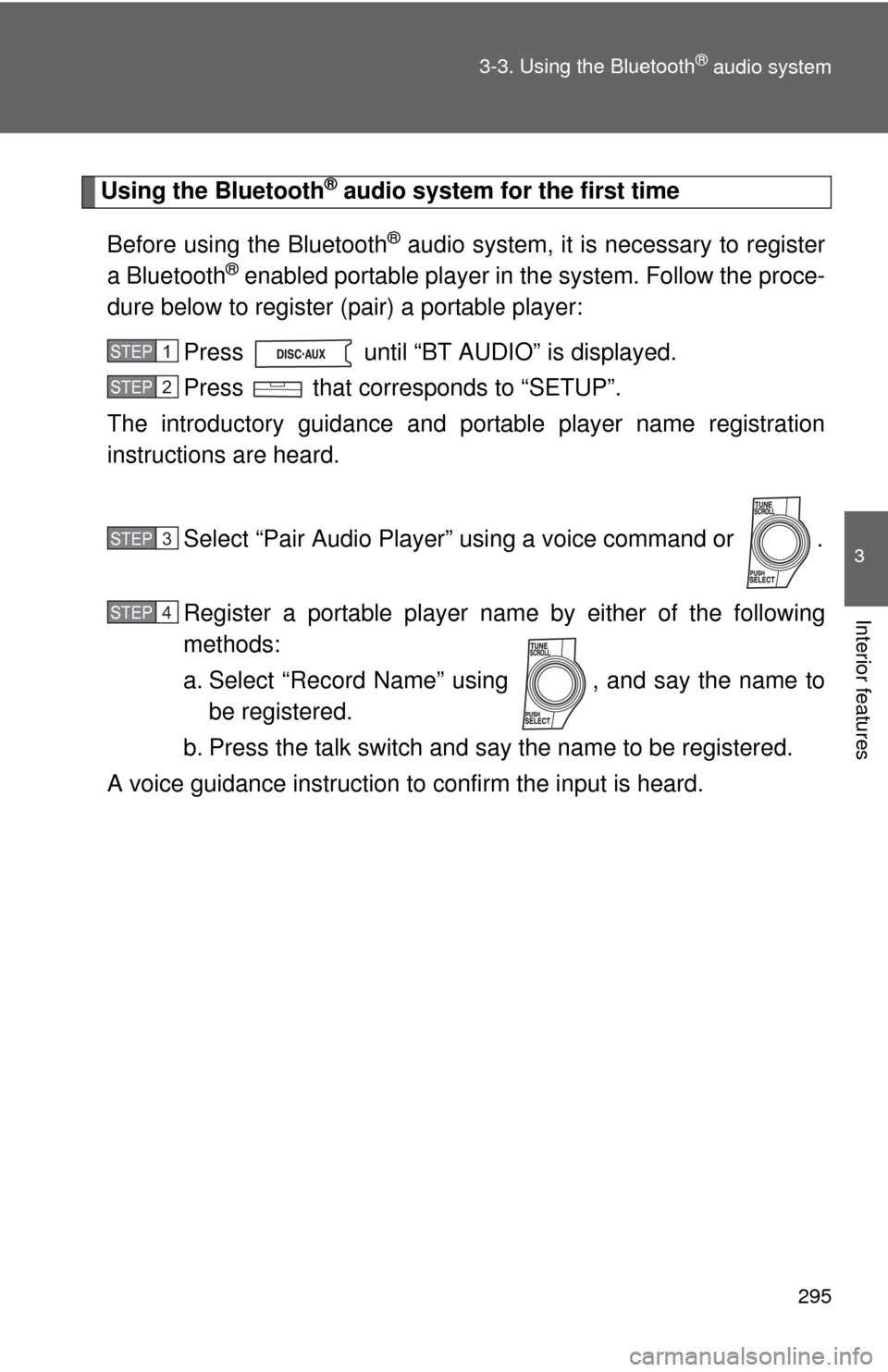
Using the Bluetooth® audio system for the first time
Before using the Bluetooth
® audio system, it is necessary to register
a Bluetooth
® enabled portable player in the system. Follow the proce-
dure below to register (pair) a portable player:
Press until “BT AUDIO” is displayed.
Press that corresponds to “SETUP”.
The introductory guidance and port able player name registration
instructions are heard.
Select “Pair Audio Player” using a voice command or .
Register a portable player nam e by either of the following
methods:
a. Select “Record Name” using , and say the name to be registered.
b. Press the talk switch and say the name to be registered.
A voice guidance instruction to confirm the input is heard.
STEP1
STEP2
STEP3
STEP4
Page 296 of 580
296 3-3. Using the Bluetooth
® audio system
Select “Confirm” using a voice command or .
A passkey is displayed and heard, and a voice guidance instruction
for inputting the passkey into the portable player is heard. Input the passkey into the portable player.
Refer to the manual that comes with the portable player for the oper-
ation of the portable player.
Guidance for registration completion is heard.
If the portable player has a Bluetooth
® phone, the phone can be reg-
istered at the same time. ( P. 314)
STEP5
STEP6
Page 297 of 580
297
3-3. Using the Bluetooth
® audio system
3
Interior features
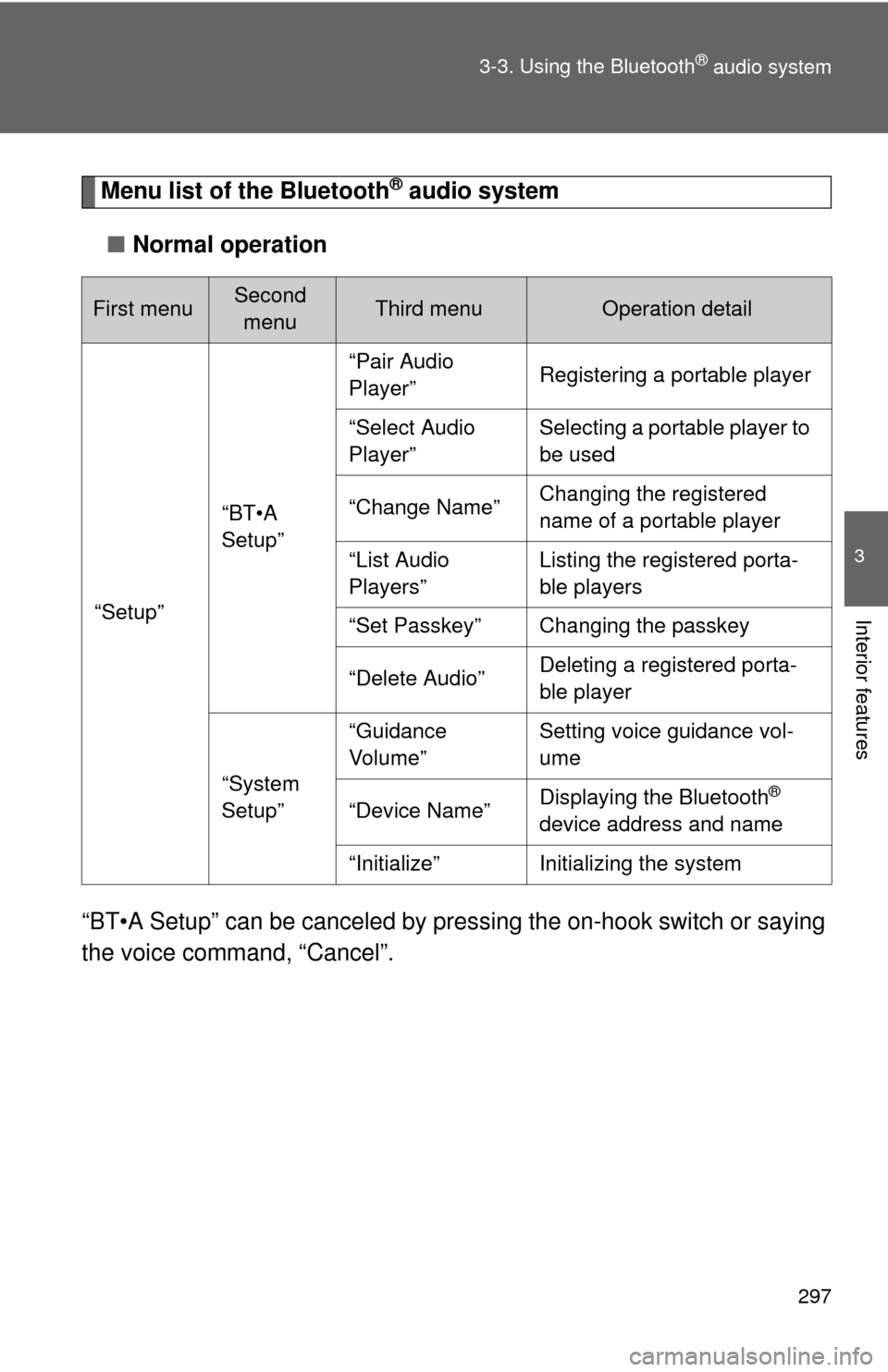
Menu list of the Bluetooth® audio system
■ Normal operation
“BT•A Setup” can be canceled by pres sing the on-hook switch or saying
the voice comm and, “Cancel”.
First menuSecond
menuThird menuOperation detail
“Setup”
“BT•A
Setup”
“Pair Audio
Player”Registering a portable player
“Select Audio
Player”Selecting a portable player to
be used
“Change Name”Changing the registered
name of a portable player
“List Audio
Players”Listing the registered porta-
ble players
“Set Passkey”Changing the passkey
“Delete Audio”Deleting a registered porta-
ble player
“System
Setup”
“Guidance
Vo l u m e ”Setting voice guidance vol-
ume
“Device Name”Displaying the Bluetooth®
device address and name
“Initialize”Initializing the system