display TOYOTA AVALON 2012 XX40 / 4.G Workshop Manual
[x] Cancel search | Manufacturer: TOYOTA, Model Year: 2012, Model line: AVALON, Model: TOYOTA AVALON 2012 XX40 / 4.GPages: 580, PDF Size: 9.33 MB
Page 339 of 580
339
3-4. Using the hands-free
system (for cellular phone)
3
Interior features
Transferring data from the cellular phone
STEP2-1 Select “By Phone” and then “Confirm” by using a
voice command or .
STEP2-2 Transfer the data from the cellular phone.
Refer to the manual that comes with the cellular phone
for the details of transferring data.
STEP2-3 Select the data to be registered by either of the fol- lowing methods:
a. Say “Previous” or “Next” until the desired data isdisplayed, and select “Confirm” by using a voice
command.
b. Select the desired data by using .
Inputting a phone number by using STEP2-1 Select “Manual Input” by using .
STEP2-2 Input a phone number by using , and press
again.
Input the phone number 1 digit at a time.
Page 340 of 580
340 3-4. Using the hands-free system (for cellular phone)
Selecting a phone number from outgoing or incoming call historySTEP2-1 Select “Call History” by using a voice command or
.
STEP2-2 Select “Outgoing” or “Incoming” by using a voice
command or .
STEP2-3 Select the data to be registered by either of the fol- lowing methods:
a. Say “Previous” or “Go back” until the desireddata is displayed, and select “Confirm” by using
a voice command.
b. Select the desired data by using .
Page 359 of 580
359
3-7. Other interior features
3
Interior features
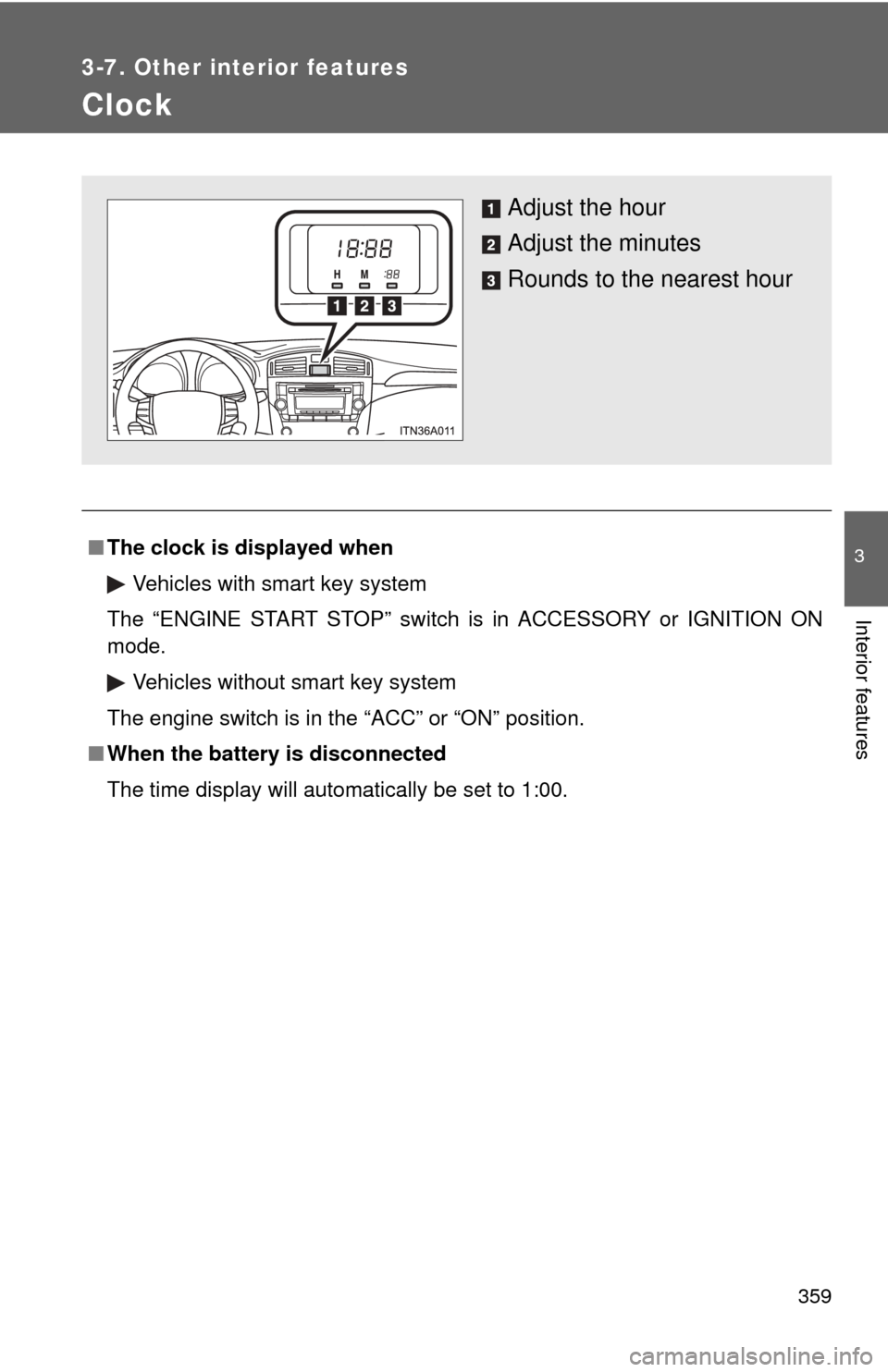
Clock
■The clock is displayed when
Vehicles with smart key system
The “ENGINE START STOP” switch is in ACCESSORY or IGNITION ON
mode. Vehicles without smart key system
The engine switch is in the “ACC” or “ON” position.
■ When the battery is disconnected
The time display will automatically be set to 1:00.
Adjust the hour
Adjust the minutes
Rounds to the nearest hour
Page 381 of 580
381
3-7. Other interior features
3
Interior features
Calibrating the compass
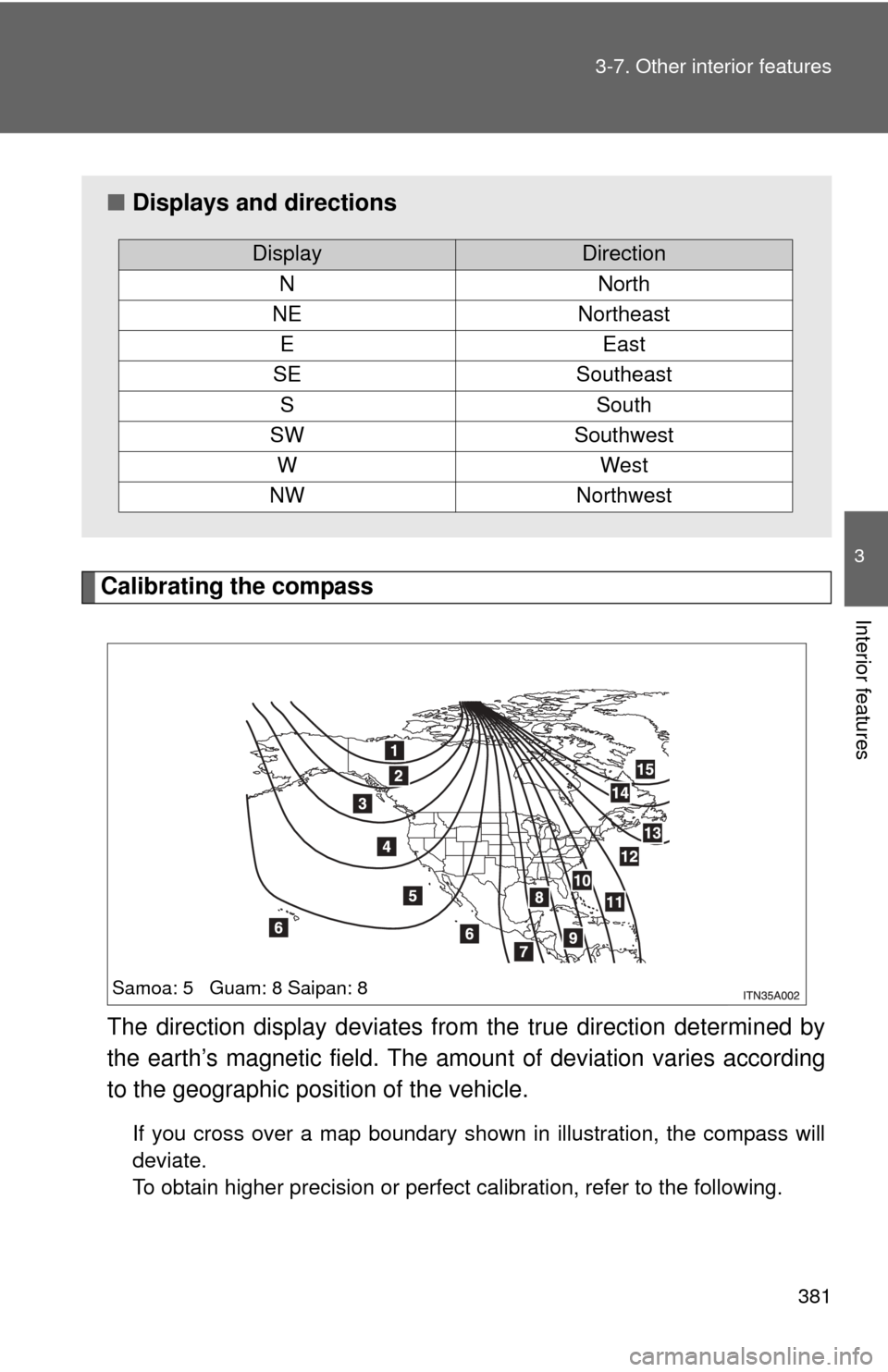
The direction display deviates fr om the true direction determined by
the earth’s magnetic field. The amoun t of deviation varies according
to the geographic position of the vehicle.
If you cross over a map boundary shown in illustration, the compass will
deviate.
To obtain higher precision or perfect calibration, refer to the following.
■ Displays and directions
DisplayDirection
NNorth
NENortheast
EEast
SESoutheast
SSouth
SWSouthwest
WWest
NWNorthwest
Samoa: 5 Guam: 8 Saipan: 8
Page 382 of 580
382 3-7. Other interior features
■Deviation calibration
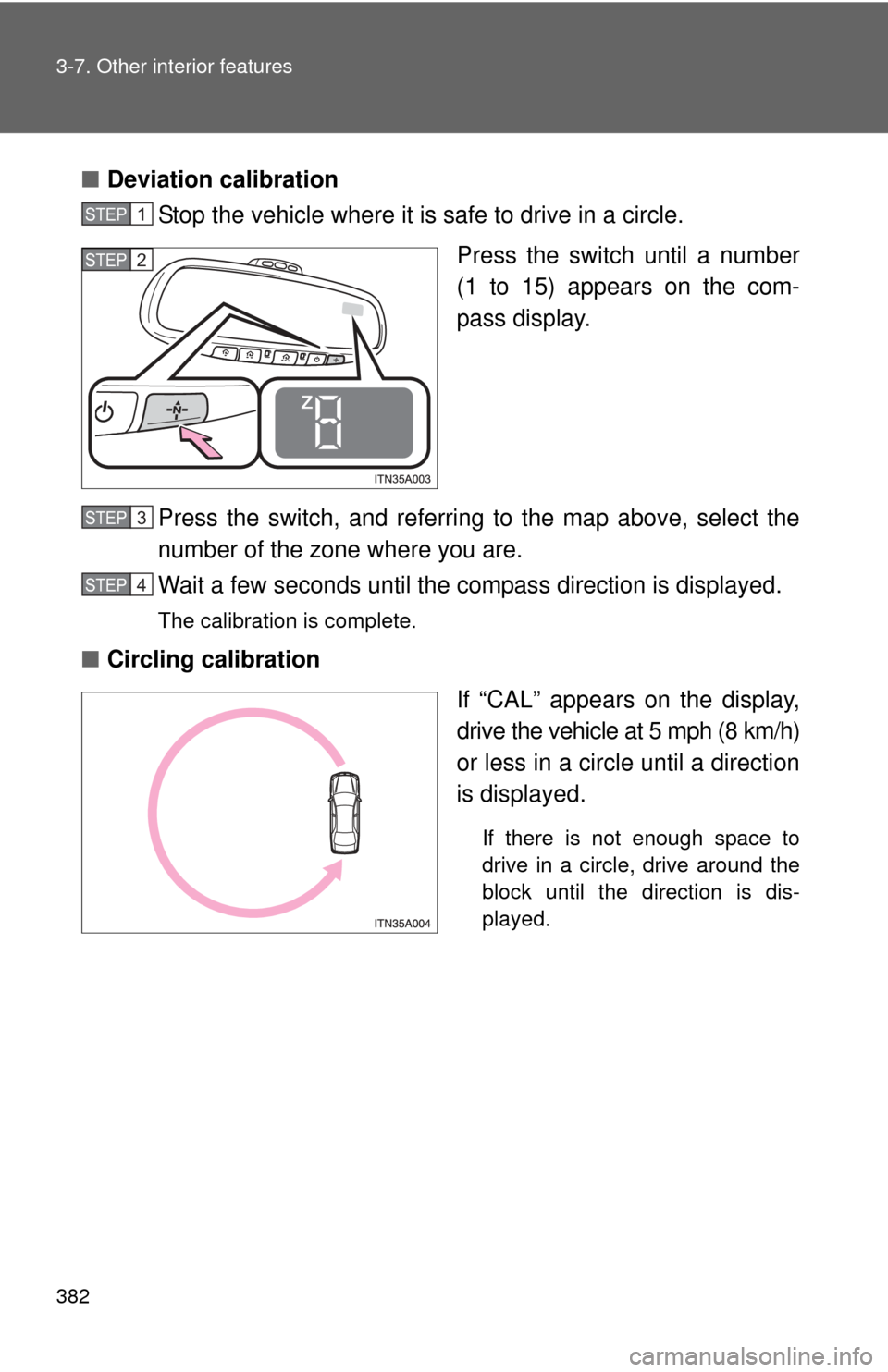
Stop the vehicle where it is safe to drive in a circle.
Press the switch until a number
(1 to 15) appears on the com-
pass display.
Press the switch, and referring to the map above, select the
number of the zone where you are.
Wait a few seconds until the compass direction is displayed.
The calibration is complete.
■ Circling calibration
If “CAL” appears on the display,
drive the vehicle at 5 mph (8 km/h)
or less in a circle until a direction
is displayed.
If there is not enough space to
drive in a circle, drive around the
block until the direction is dis-
played.
STEP1
STEP2
STEP3
STEP4
Page 383 of 580
383
3-7. Other interior features
3
Interior features
■
Conditions unfavorable to correct operation
The compass may not show the correct direction in the following conditions:
●The vehicle is stopped immediately after turning.
● The vehicle is on an inclined surface.
● The vehicle is in a place where the earth’s magnetic field is subject to
interference by artificial magnetic fields (underground car park/parking
lot, under a steel tower, between buildings, roof car park/parking lot, near
an intersection, near a large vehicle, etc.).
● The vehicle has become magnetized.
(There is a magnet or metal object near the inside rear view mirror.)
● The battery has been disconnected.
● A door is open.
CAUTION
■While driving
Do not adjust the display.
Be sure to adjust the display only when the vehicle is stopped.
■ When doing the circling calibration
Be sure to secure a wide space, and watch out for people and vehicles in the
neighborhood. Do not violate any local traffic rules while performing circling
calibration.
Page 393 of 580
393
4-2. Maintenance
4
Maintenance and care
■
Repair and replacement
It is recommended that genuine Toyota parts be used for repair to ensure
performance of each system. If non-Toyota parts are used in replacement or
if a repair shop other than a Toyota dealer performs repairs, confirm the war-
ranty coverage.
■ Reset the maintenance data (U.S.A. only)
After the required maintenance is performed according to the maintenance
schedule please reset the maintenance data.
To reset the data follow the procedures described below:
The oil change system should be reset. Perform the following procedures:
Switch the display to the odometer. ( P. 170)
Turn the “ENGINE START STOP” switch or the engine switch OFF.
Vehicles with smart key system: While pressing the trip meter reset
button, turn the “ENGINE START STOP” switch to IGNITION ON
mode. Continue to press and hold the button until the trip meter dis-
plays 000000.
Vehicles without smart key system: While pressing the trip meter
reset button, turn the engine switch to the “ON” position. Continue
to press and hold the button until the trip meter displays 000000.
■ Allow inspection and repairs to be performed by a Toyota dealer
● Toyota technicians are well-trained specialists and are kept up to date
with the latest service information. They are well informed about the
operations of all systems on your vehicle.
● Keep a copy of the repair order. It proves that the maintenance that has
been performed is under warranty coverage. If any problem should arise
while your vehicle is under warranty, your Toyota dealer will promptly
take care of it.
STEP1
STEP2
STEP3
Page 448 of 580
448 4-3. Do-it-yourself maintenance
FuseAmpereCircuit
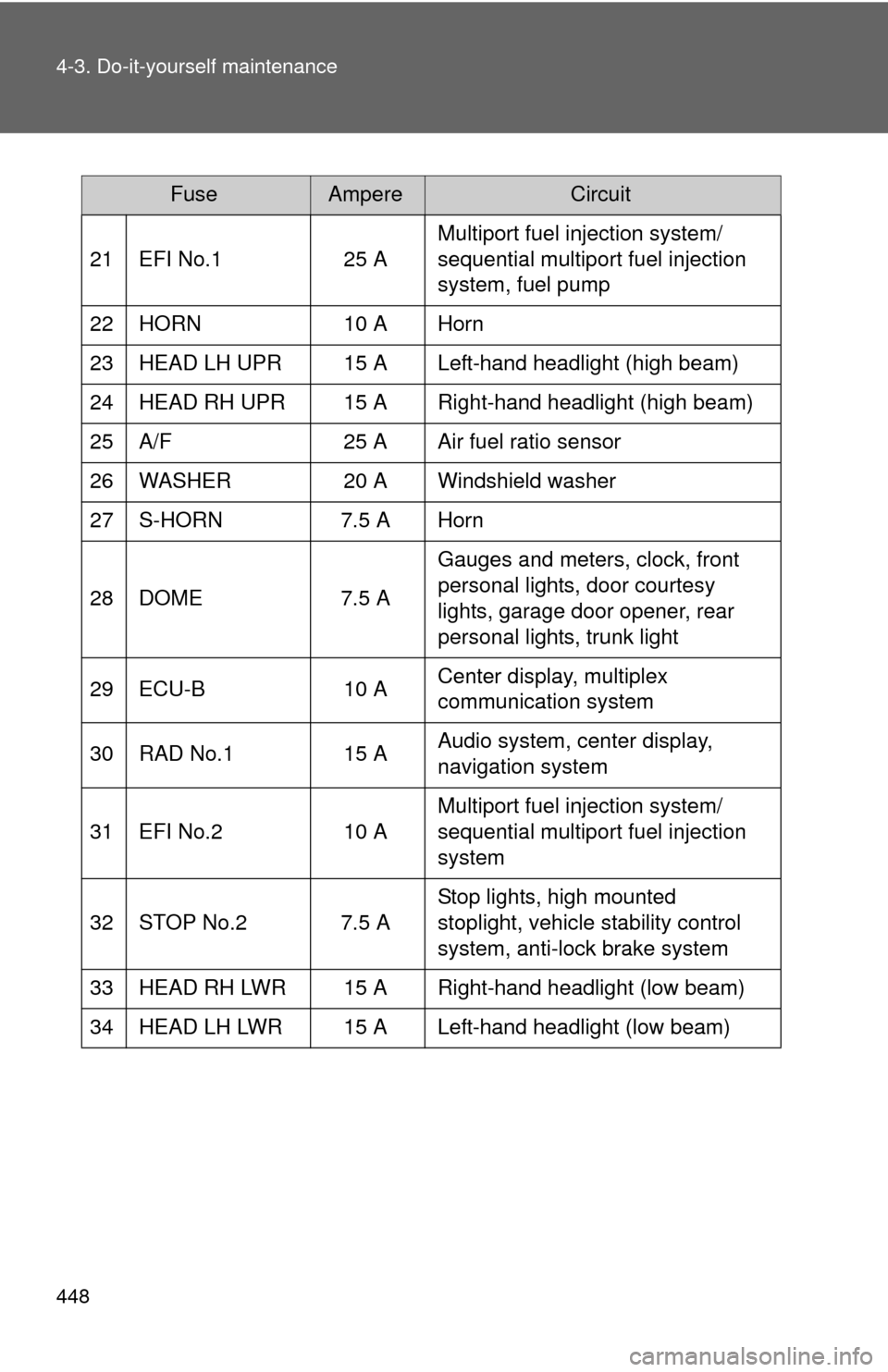
21 EFI No.1 25 A Multiport fuel injection system/
sequential multiport fuel injection
system, fuel pump
22 HORN 10 A Horn
23 HEAD LH UPR 15 A Left-hand headlight (high beam)
24 HEAD RH UPR 15 A Right-hand headlight (high beam)
25 A/F 25 A Air fuel ratio sensor
26 WASHER 20 A Windshield washer
27 S-HORN 7.5 A Horn
28 DOME 7.5 A Gauges and meters, clock, front
personal lights, door courtesy
lights, garage door opener, rear
personal lights, trunk light
29 ECU-B 10 A Center display, multiplex
communication system
30 RAD No.1 15 A Audio system, center display,
navigation system
31 EFI No.2 10 A Multiport fuel injection system/
sequential multiport fuel injection
system
32 STOP No.2 7.5 A Stop lights, high mounted
stoplight, vehicle stability control
system, anti-lock brake system
33 HEAD RH LWR 15 A Right-hand headlight (low beam)
34 HEAD LH LWR 15 A Left-hand headlight (low beam)
Page 450 of 580
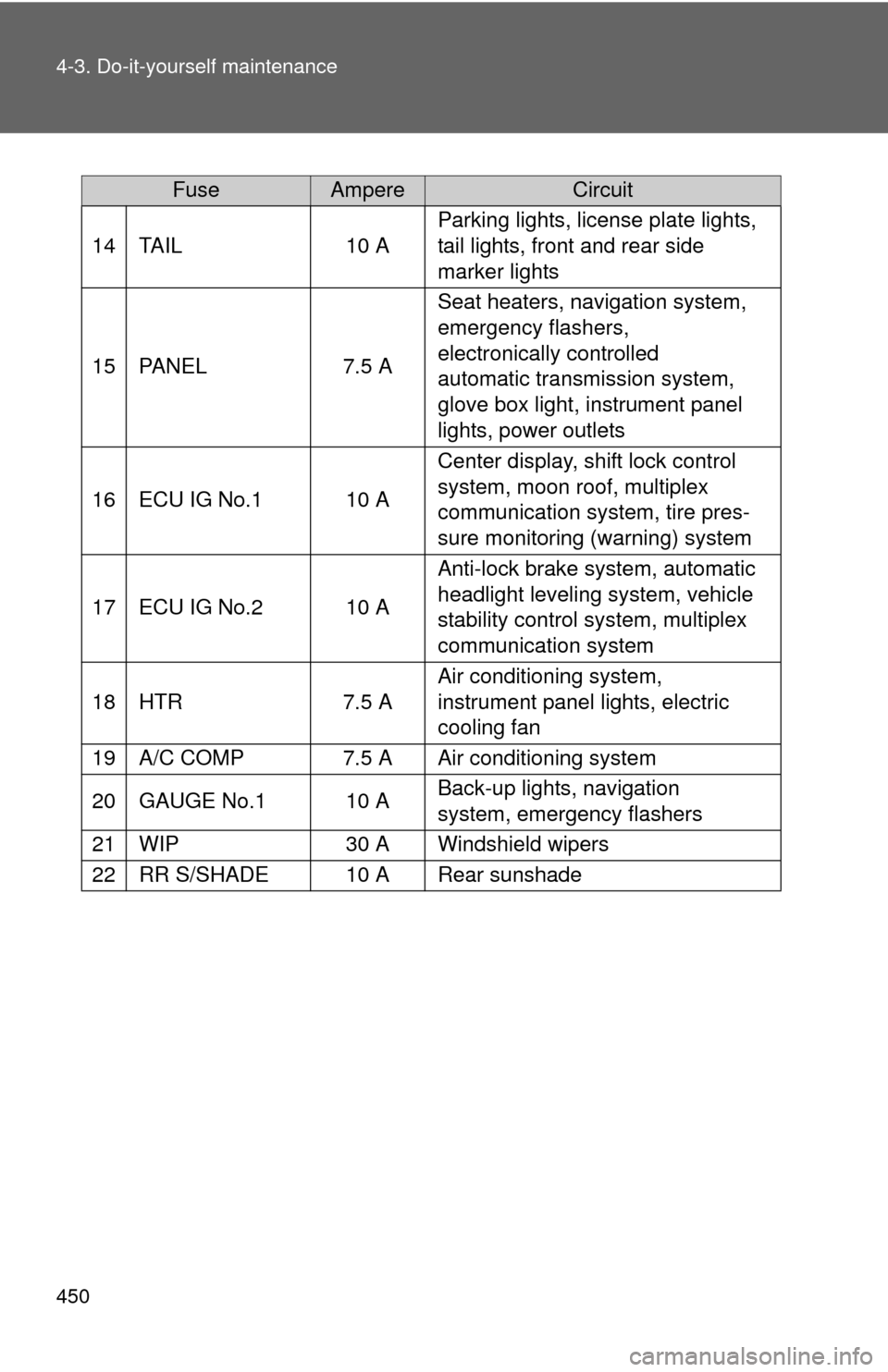
450 4-3. Do-it-yourself maintenance
FuseAmpereCircuit
14TA I L10 A
Parking lights, license plate lights,
tail lights, front and rear side
marker lights
15PA N E L7.5 A
Seat heaters, navigation system,
emergency flashers,
electronically controlled
automatic transmission system,
glove box light, instrument panel
lights, power outlets
16ECU IG No.110 A
Center display, shift lock control
system, moon roof, multiplex
communication system, tire pres-
sure monitoring (warning) system
17ECU IG No.210 A
Anti-lock brake system, automatic
headlight leveling system, vehicle
stability control system, multiplex
communication system
18HTR7.5 A
Air conditioning system,
instrument panel lights, electric
cooling fan
19A/C COMP7.5 AAir conditioning system
20GAUGE No.110 ABack-up lights, navigation
system, emergency flashers
21WIP30 AWindshield wipers
22RR S/SHADE10 ARear sunshade
Page 451 of 580
4
Maintenance and care
451
4-3. Do-it-yourself maintenance
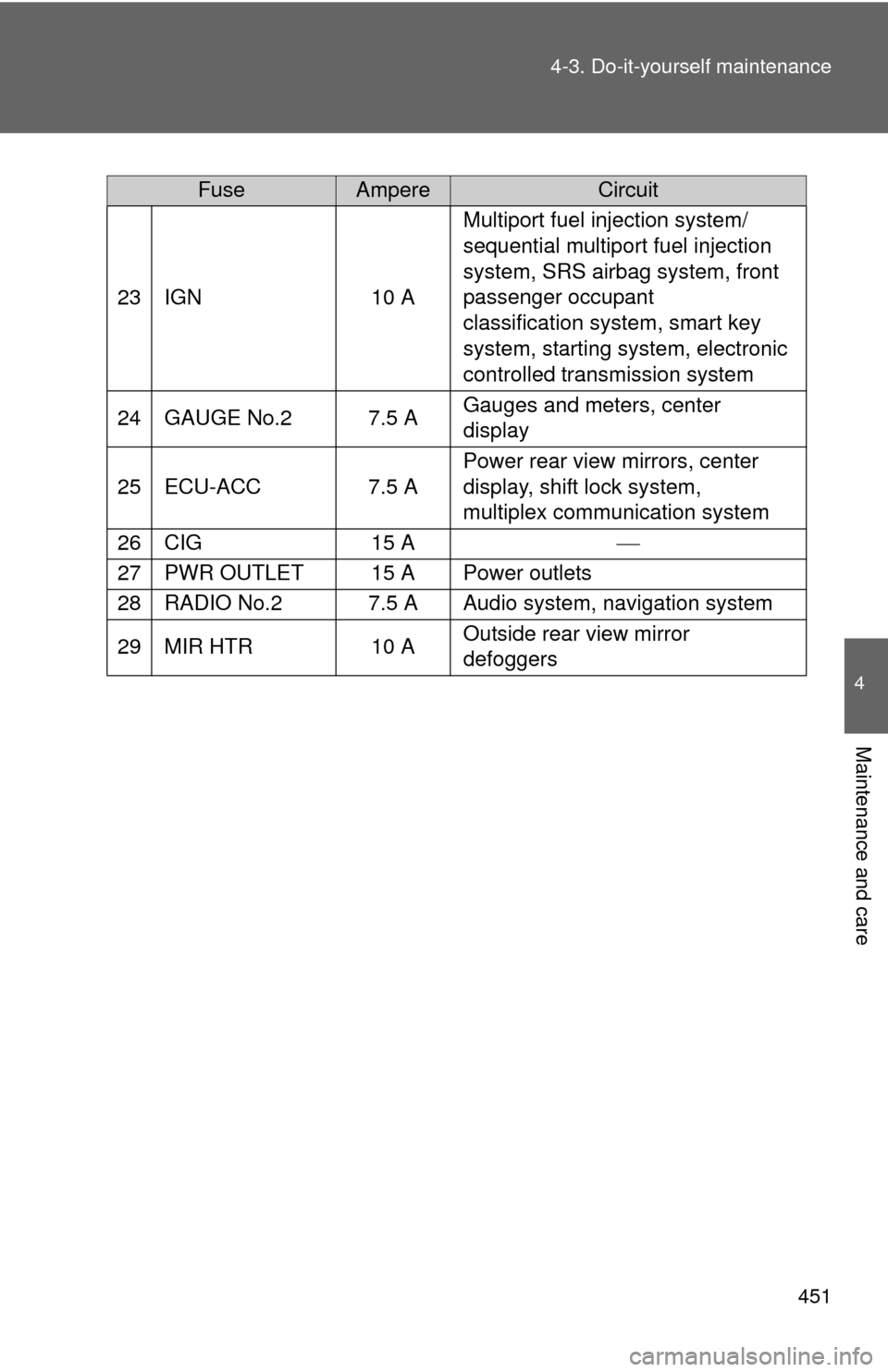
FuseAmpereCircuit
23IGN10 A
Multiport fuel injection system/
sequential multiport fuel injection
system, SRS airbag system, front
passenger occupant
classification system, smart key
system, starting system, electronic
controlled transmission system
24GAUGE No.27.5 AGauges and meters, center
display
25ECU-ACC7.5 A
Power rear view mirrors, center
display, shift lock system,
multiplex communication system
26CIG15 A
27PWR OUTLET15 APower outlets
28RADIO No.27.5 AAudio system, navigation system
29MIR HTR10 AOutside rear view mirror
defoggers