reset TOYOTA AVALON 2019 Owners Manual (in English)
[x] Cancel search | Manufacturer: TOYOTA, Model Year: 2019, Model line: AVALON, Model: TOYOTA AVALON 2019Pages: 52, PDF Size: 3.61 MB
Page 28 of 52
 26
Clock
Cup holders
FEATURES & OPERATIONS
FrontRear
TSS-P combines an in-vehicle camera mounted in front of the inside rear \
view mirror
and a millimeter-wave radar mounted in the front grill. Thes")
26
Clock
Cup holders
FEATURES & OPERATIONS
FrontRear
TSS-P combines an in-vehicle camera mounted in front of the inside rear \
view mirror
and a millimeter-wave radar mounted in the front grill. These sensors su\
pport the
driver assist systems.
LockUnlock
Door locks
Toyota Safety Sense™ P (TSS-P) is a set of active safety technologies designed
to help mitigate or prevent collisions across a wide range of traffic si\
tuations, in
certain conditions. TSS-P is designed to help support the driver’s aw\
areness,
decision making and vehicle operation contributing to a safe driving exp\
erience.
Refer to the Owner’s Manual for operation, setting adjustments, limitations and
more details to understand these functions and complete safety precautions. For
more information, please go to http://www.toyota.com/safety-sense
1) Push “MENU” button next to the screen.
2) Select “Setup” or “General” in the touch screen to access the general settings
screen.
3) Select “Clock.”
4) Then select desired items to be reset.
Refer to the “Navigation System Owner’s Manual” for more detail\
s.
* Entune™ Premium Audio only
Select to change time zone
Select to daylight savings
time ON/OFF/AUTO.*
Select to set to automatic
GPS adjustment of clock.2
Select to set hour display
to 12 or 24 hour time.
2019_Avalon_QRG_V3_3_ML_0406.indd 264/12/18 3:14 PM
Page 29 of 52
 27
Quick overview-Toyota Safety Sense™ P (TSS-P)
Sensors
TSS-P combines an in-vehicle camera mounted in front of the inside rear \
view mirror
and a millimeter-wave radar mounted in the front grill")
27
Quick overview-Toyota Safety Sense™ P (TSS-P)
Sensors
TSS-P combines an in-vehicle camera mounted in front of the inside rear \
view mirror
and a millimeter-wave radar mounted in the front grill. These sensors su\
pport the
driver assist systems.
Camera sensor
Radar sensor
TOYOTA SAFETY SENSE™
Toyota Safety Sense™ P (TSS-P) is a set of active safety technologies designed
to help mitigate or prevent collisions across a wide range of traffic si\
tuations, in
certain conditions. TSS-P is designed to help support the driver’s aw\
areness,
decision making and vehicle operation contributing to a safe driving exp\
erience.
Refer to the Owner’s Manual for operation, setting adjustments, limitations and
more details to understand these functions and complete safety precautions. For
more information, please go to http://www.toyota.com/safety-sense
Lane Departure Alert with Steering Assist function (LDA w/SA)
LDA w/SA is designed to provide notification when the system
detects an unintended lane departure.
The Steering Assist function is designed to provide small
corrective steering inputs to the steering wheel for a short
period of time to help keep the vehicle in its lane.
Automatic High Beams (AHB)
AHB is designed to detect the headlights of oncoming vehicles
and the tail lights of preceding vehicles and switch between
high beams and low beams as appropriate.
Pre-Collision System with Pedestrian Detection function (PCS w/PD)
PCS w/PD is designed to provide alert, mitigation, and/or
avoidance support in certain conditions, when the system
detects a potential collision with a preceding vehicle is likely to
occur.
Advanced millimeter-wave radar sensor system is designed
to work with the camera sensor to help recognize a preceding
pedestrian, and provide an alert, mitigation and/or avoidance
support in certain conditions.
Full-Speed Range Dynamic Radar Cruise Control (DRCC)
DRCC is designed to help maintain a pre-set distance to a
preceding vehicle when the preceding vehicle is traveling at a
lower speed.
1) Push “MENU” button next to the screen.
2) Select “Setup” or “General” in the touch screen to access the general settings
screen.
3) Select “Clock.”
4) Then select desired items to be reset.
Refer to the “Navigation System Owner’s Manual” for more detail\
s.
* Entune™ Premium Audio only
OVERVIEW
FEATURES & OPERATIONS
TOYOTA SAFETY SENSE
SAFETY & EMERGENCY FEATURES
2019_Avalon_QRG_V3_3_ML_0406.indd 274/12/18 3:14 PM
Page 32 of 52
 30
DISABLING THE PRE-COLLISION SYSTEM (PCS)
LDA in TSS-P uses an in-vehicle camera designed to detect visible white \
and yellow
lane markers in front of the vehicle and the vehicle’s position on t")
30
DISABLING THE PRE-COLLISION SYSTEM (PCS)
LDA in TSS-P uses an in-vehicle camera designed to detect visible white \
and yellow
lane markers in front of the vehicle and the vehicle’s position on th\
e road. If the
system determines that the vehicle is starting to unintentionally deviat\
e from its lane,
the system alerts the driver with an audio and visual alert. When the al\
erts occur, the
driver must check the surrounding road situation and carefully operate t\
he steering
wheel to move the vehicle back to the center part of their lane.
LDA is designed to function at speeds of approximately 32 mph (50 km/h) or higher
on relatively straight roadways.
In addition to the alert function, LDA w/SA also features a steering ass\
ist
function. When enabled, if the system determines that the vehicle is on \
a path to
unintentionally depart from its lane, the system may provide small corrective steering
inputs to the steering wheel for a short period of time to help keep the\
vehicle in its
lane.
Lane Departure Alert with
Steering Assist function (LDA w/SA)
TOYOTA SAFETY SENSE™
TURNING THE LDA SYSTEM ON/OFF
Press the LDA switch to turn the LDA system on. Depress again to turn it\
off.
Note: Operation of the LDA system and setting adjustments continues in the
same condition regardless of Ignition cycle until changed by the driver or the
system is reset.
Refer to a Toyota Owner’s Manual for additional information on LDA op\
eration,
settings adjustments, limitations, and precautions before attempting to \
use it.
LDA FUNCTIONS
LDA function display(1)
Lane Departure Alert (LDA) indicator flashes orange when operating.
(1) Press “” switches and select from the Multi-Information Display (MID).
(2) Press “
” or “” and “” switches to change the setting.
(3) Press “
” to go back to the menu.
Note: The system is enabled each time the power switch is turned to ON
mode.
Refer to a Toyota Owner’s Manual for additional information on PCS op\
eration,
settings adjustments, limitations, and precautions before attempting to \
use it.
2019_Avalon_QRG_V3_3_ML_0406.indd 304/12/18 3:14 PM
Page 33 of 52
 31
LDA in TSS-P uses an in-vehicle camera designed to detect visible white \
and yellow
lane markers in front of the vehicle and the vehicle’s position on th\
e road. If the
system determines that")
31
LDA in TSS-P uses an in-vehicle camera designed to detect visible white \
and yellow
lane markers in front of the vehicle and the vehicle’s position on th\
e road. If the
system determines that the vehicle is starting to unintentionally deviat\
e from its lane,
the system alerts the driver with an audio and visual alert. When the al\
erts occur, the
driver must check the surrounding road situation and carefully operate t\
he steering
wheel to move the vehicle back to the center part of their lane.
LDA is designed to function at speeds of approximately 32 mph (50 km/h) or higher
on relatively straight roadways.
In addition to the alert function, LDA w/SA also features a steering ass\
ist
function. When enabled, if the system determines that the vehicle is on \
a path to
unintentionally depart from its lane, the system may provide small corrective steering
inputs to the steering wheel for a short period of time to help keep the\
vehicle in its
lane.
Lane Departure Alert with
Steering Assist function (LDA w/SA)
TURNING THE LDA SYSTEM ON/OFF
Press the LDA switch to turn the LDA system on. Depress again to turn it\
off.
Note: Operation of the LDA system and setting adjustments continues in the
same condition regardless of Ignition cycle until changed by the driver or the
system is reset.
Refer to a Toyota Owner’s Manual for additional information on LDA op\
eration,
settings adjustments, limitations, and precautions before attempting to \
use it.
LDA FUNCTIONS
LDA function display
Steering assist indicatorLDA indicator
Lane marker
(2)
(1)
Lane Departure Alert (LDA) indicator flashes orange when operating.
(1) Press “
” switches and select from the Multi-Information Display (MID).
(2) Press “ ” or “ ” and “
” switches to change the setting.
(3) Press “
” to go back to the menu.
Note: The system is enabled each time the power switch is turned to ON
mode.
Refer to a Toyota Owner’s Manual for additional information on PCS op\
eration,
settings adjustments, limitations, and precautions before attempting to \
use it.
OVERVIEW
FEATURES & OPERATIONS
TOYOTA SAFETY SENSE
SAFETY & EMERGENCY FEATURES
2019_Avalon_QRG_V3_3_ML_0406.indd 314/12/18 3:14 PM
Page 34 of 52
32
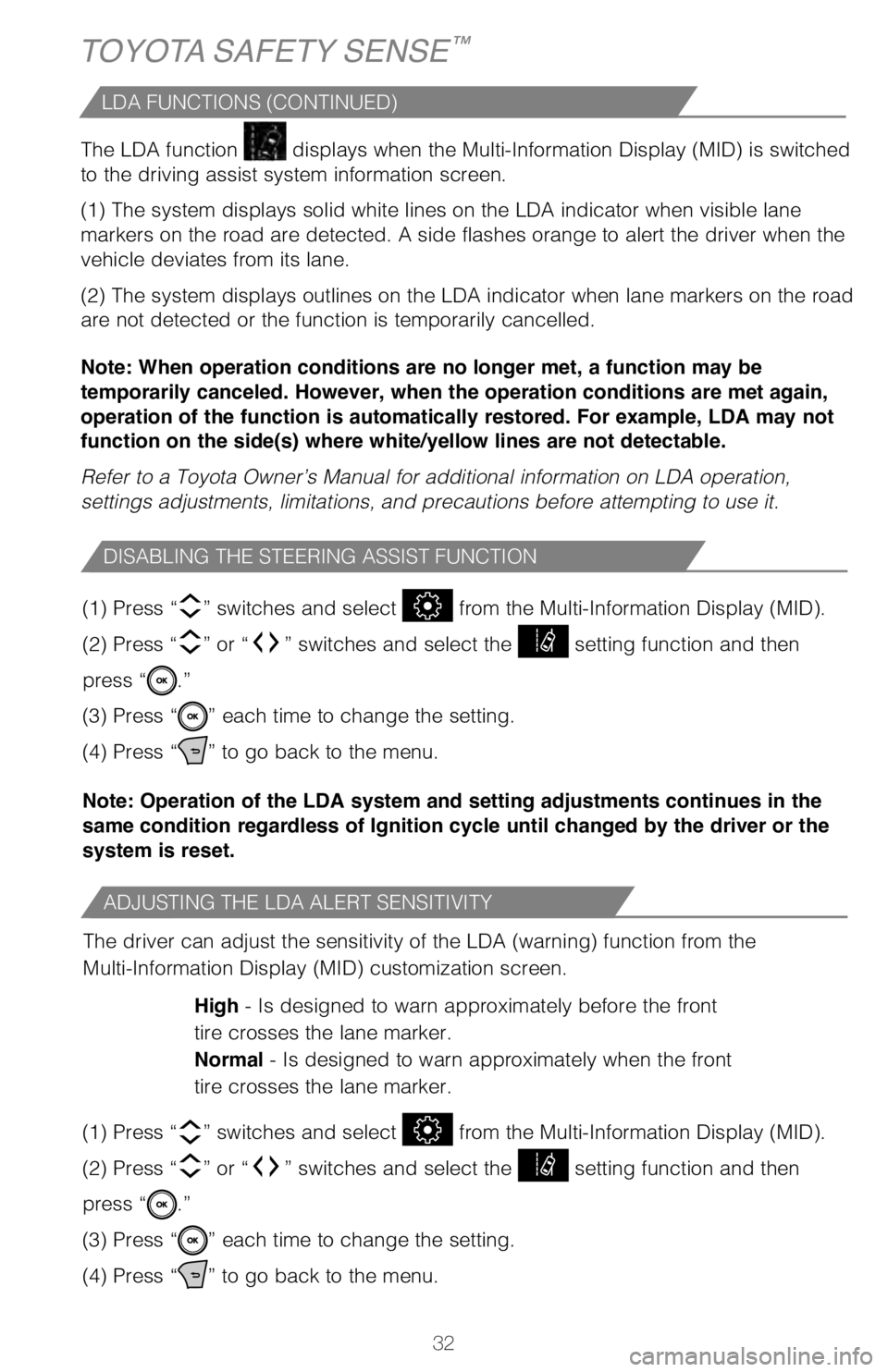
The LDA function
displays when the Multi-Information Display (MID) is switched
to the driving assist system information screen.
(1) The system displays solid white lines on the LDA indicator when visible lane
markers on the road are detected. A side flashes orange to alert the dri\
ver when the
vehicle deviates from its lane.
(2) The system displays outlines on the LDA indicator when lane markers on the road
are not detected or the function is temporarily cancelled.
Note: When operation conditions are no longer met, a function may be
temporarily canceled. However, when the operation conditions are met again,
operation of the function is automatically restored. For example, LDA may not
function on the side(s) where white/yellow lines are not detectable.
Refer to a Toyota Owner’s Manual for additional information on LDA op\
eration,
settings adjustments, limitations, and precautions before attempting to \
use it.
ADJUSTING THE LDA ALERT SENSITIVITY
DISABLING THE STEERING ASSIST FUNCTION
The driver can adjust the sensitivity of the LDA (warning) function from the
Multi-Information Display (MID) customization screen.
High - Is designed to warn approximately before the front
tire crosses the lane marker.
Normal - Is designed to warn approximately when the front
tire crosses the lane marker.
(1) Press “
” switches and select from the Multi-Information Display (MID).
(2) Press “
” or “” switches and select the setting function and then
press “
.”
(3) Press “
” each time to change the setting.
(4) Press “
” to go back to the menu.
(1) Press “
” switches and select from the Multi-Information Display (MID).
(2) Press “
” or “” switches and select the setting function and then
press “
.”
(3) Press “
” each time to change the setting.
(4) Press “
” to go back to the menu.
Note: Operation of the LDA system and setting adjustments continues in the
same condition regardless of Ignition cycle until changed by the driver or the
system is reset.
TOYOTA SAFETY SENSE™
VEHICLE SWAY WARNING SYSTEM (SWS) FUNCTION
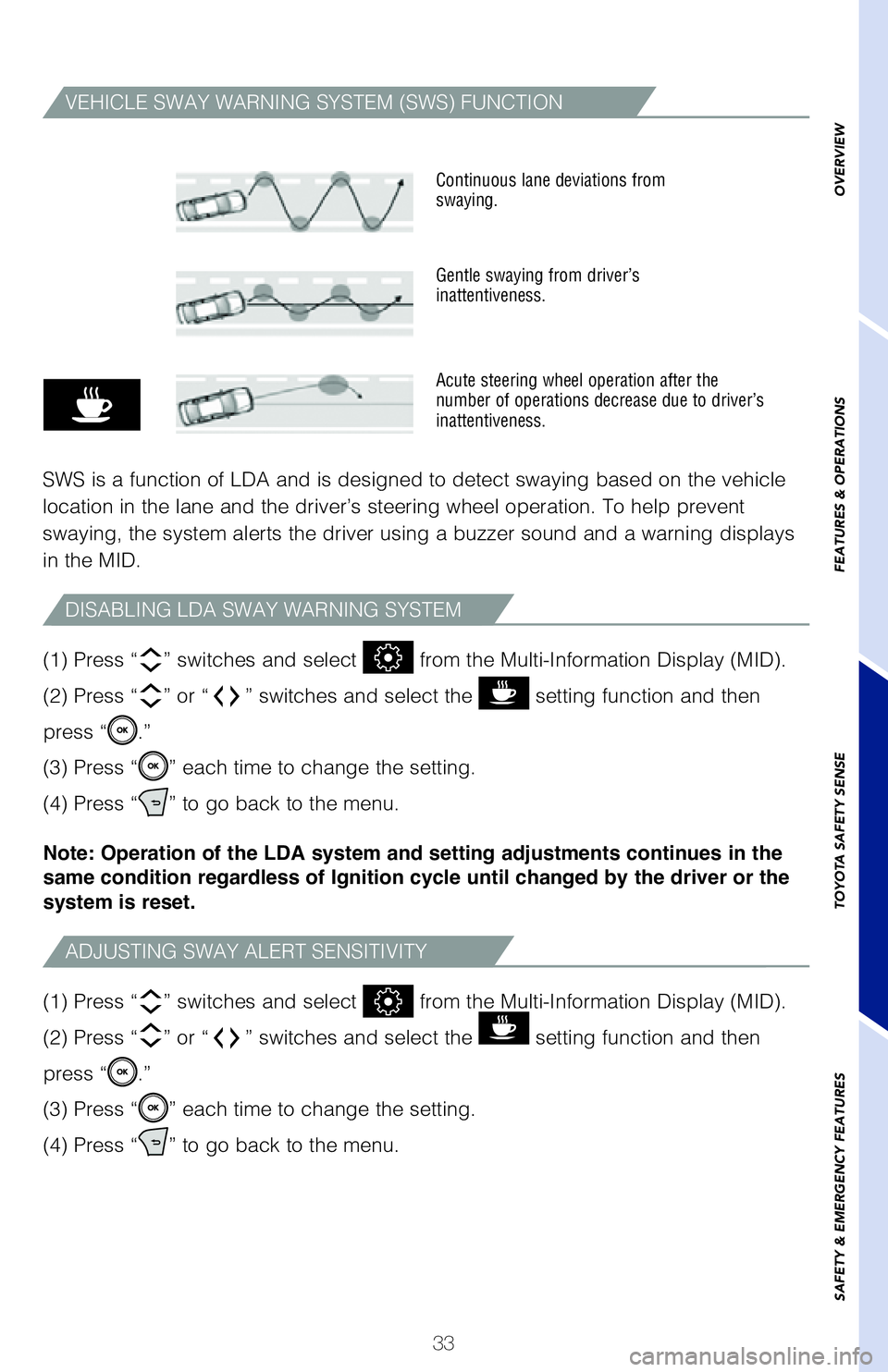
SWS is a function of LDA and is designed to detect swaying based on the \
vehicle
location in the lane and the driver’s steering wheel operation. To he\
lp prevent
swaying, the system alerts the driver using a buzzer sound and a warning\
displays
in the MID.
(1) Press “ ” switches and select from the Multi-Information Display (MID).
(2) Press “ ” or “ ” switches and select the
setting function and then
press “
.”
(3) Press “
” each time to change the setting.
(4) Press “
” to go back to the menu.
(1) Press “
” switches and select
from the Multi-Information Display (MID).
(2) Press “ ” or “ ” switches and select the
setting function and then
press “
.”
(3) Press “
” each time to change the setting.
(4) Press “
” to go back to the menu.
Note: Operation of the LDA system and setting adjustments continues in the
same condition regardless of Ignition cycle until changed by the driver or the
system is reset.
ADJUSTING SWAY ALERT SENSITIVITY
DISABLING LDA SWAY WARNING SYSTEM
LDA FUNCTIONS (CONTINUED)
2019_Avalon_QRG_V3_3_ML_0406.indd 324/12/18 3:14 PM
Page 35 of 52
33
The LDA function displays when the Multi-Information Display (MID) is switched
to the driving assist system information screen.
(1) The system displays solid white lines on the LDA indicator when visible lane
markers on the road are detected. A side flashes orange to alert the dri\
ver when the
vehicle deviates from its lane.
(2) The system displays outlines on the LDA indicator when lane markers on the road
are not detected or the function is temporarily cancelled.
Note: When operation conditions are no longer met, a function may be
temporarily canceled. However, when the operation conditions are met again,
operation of the function is automatically restored. For example, LDA may not
function on the side(s) where white/yellow lines are not detectable.
Refer to a Toyota Owner’s Manual for additional information on LDA op\
eration,
settings adjustments, limitations, and precautions before attempting to \
use it.
The driver can adjust the sensitivity of the LDA (warning) function from the
Multi-Information Display (MID) customization screen.
High - Is designed to warn approximately before the front
tire crosses the lane marker.
Normal - Is designed to warn approximately when the front
tire crosses the lane marker.
(1) Press “ ” switches and select
from the Multi-Information Display (MID).
(2) Press “ ” or “ ” switches and select the
setting function and then
press “
.”
(3) Press “
” each time to change the setting.
(4) Press “
” to go back to the menu.
(1) Press “
” switches and select
from the Multi-Information Display (MID).
(2) Press “ ” or “ ” switches and select the
setting function and then
press “
.”
(3) Press “
” each time to change the setting.
(4) Press “
” to go back to the menu.
Note: Operation of the LDA system and setting adjustments continues in the
same condition regardless of Ignition cycle until changed by the driver or the
system is reset.
VEHICLE SWAY WARNING SYSTEM (SWS) FUNCTION
SWS is a function of LDA and is designed to detect swaying based on the \
vehicle
location in the lane and the driver’s steering wheel operation. To he\
lp prevent
swaying, the system alerts the driver using a buzzer sound and a warning\
displays
in the MID.
Continuous lane deviations from
swaying.
Gentle swaying from driver’s
inattentiveness.
Acute steering wheel operation after the
number of operations decrease due to driver’s
inattentiveness.
(1) Press “” switches and select from the Multi-Information Display (MID).
(2) Press “
” or “” switches and select the setting function and then
press “
.”
(3) Press “
” each time to change the setting.
(4) Press “
” to go back to the menu.
(1) Press “
” switches and select from the Multi-Information Display (MID).
(2) Press “
” or “” switches and select the setting function and then
press “
.”
(3) Press “
” each time to change the setting.
(4) Press “
” to go back to the menu.
Note: Operation of the LDA system and setting adjustments continues in the
same condition regardless of Ignition cycle until changed by the driver or the
system is reset.
ADJUSTING SWAY ALERT SENSITIVITY
DISABLING LDA SWAY WARNING SYSTEM
OVERVIEW
FEATURES & OPERATIONS
TOYOTA SAFETY SENSE
SAFETY & EMERGENCY FEATURES
2019_Avalon_QRG_V3_3_ML_0406.indd 334/12/18 3:14 PM
Page 36 of 52
34
TURNING SYSTEM ON/OFF
ADJUSTING SET SPEED
(3)
(1)
Push once: On
Push twice: Off
(2)
TOYOTA SAFETY SENSE™
ADJUSTING DISTANCE
This mode employs a radar sensor to detect the presence of a preceding v\
ehicle
up to approximately 328 ft (100m) ahead, determines the current vehicle-to-vehicle
following distance and operates to maintain a preset following distance \
from the
vehicle ahead. These distances vary based on vehicle speed.
(1) Constant speed cruising when there are no vehicles ahead
The vehicle travels at the speed set by the driver. The desired vehicle-\
to-
vehicle distance can also be set by operating the vehicle-to-vehicle dis\
tance
control.
(2) Deceleration cruising and follow-up cruising when a preceding vehicle
driving slower than the set speed appears When a vehicle is detected running ahead of you, the system automaticall\
y
decelerates your vehicle. When a greater reduction in vehicle speed is
necessary, the system applies the brakes (the brake lights will come on at this
time). The system will respond to changes in the speed of the vehicle ahead
in order to maintain the vehicle-to-vehicle distance set by the driver. \
A warning
tone warns you when the system cannot decelerate sufficiently to prevent\
your
vehicle from closing in on the vehicle ahead.
Note: Vehicle-to-vehicle distance will close in when traveling on long downhill
slopes.
1 The set speed may be resumed once vehicle speed exceeds 25 mph.2 The set speed may also be cancelled by depressing the brake pedal.
Full-Speed Range
Dynamic Radar Cruise Control (DRCC)
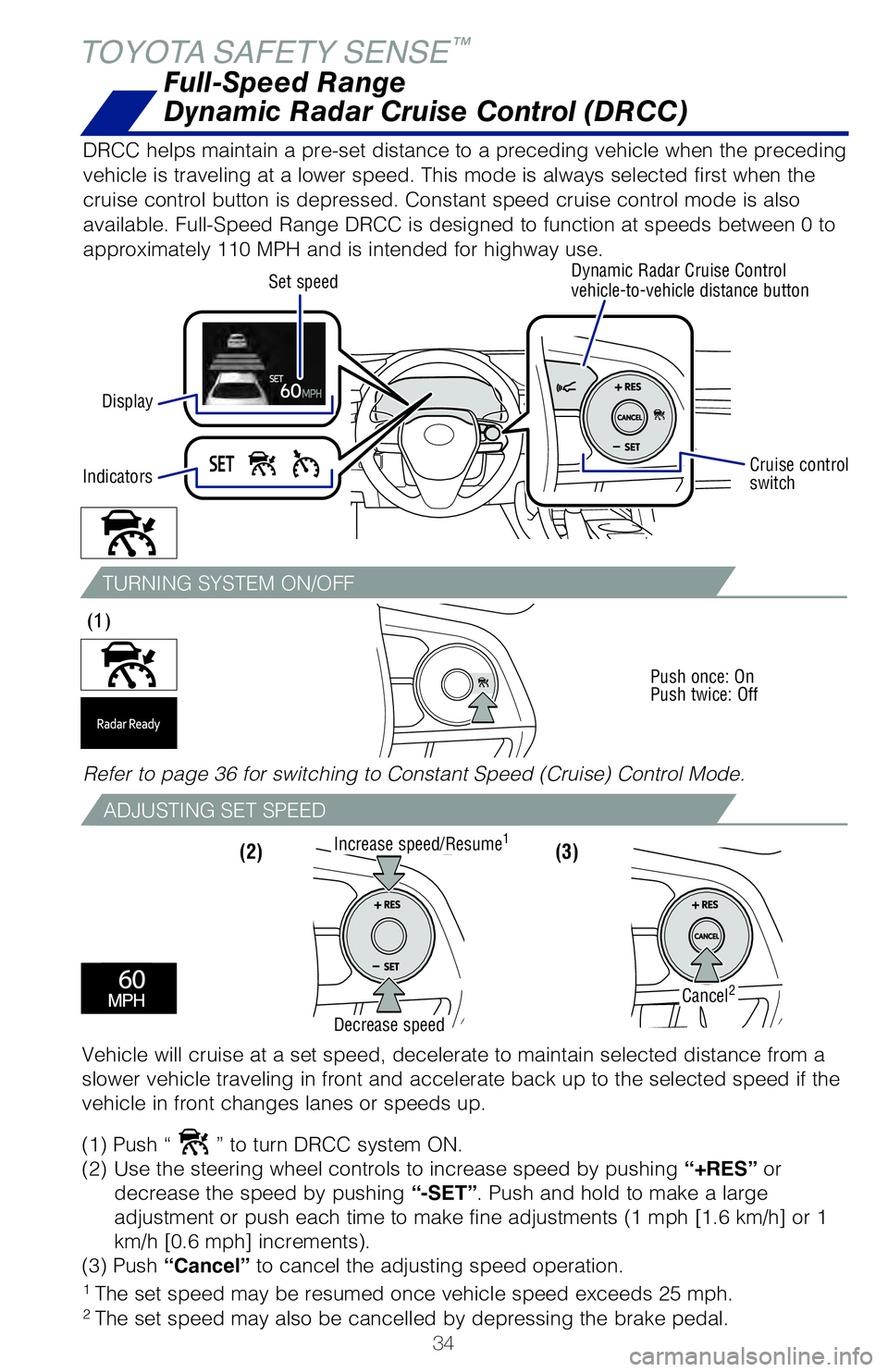
DRCC helps maintain a pre-set distance to a preceding vehicle when the p\
receding
vehicle is traveling at a lower speed. This mode is always selected firs\
t when the
cruise control button is depressed. Constant speed cruise control mode i\
s also
available. Full-Speed Range DRCC is designed to function at speeds betwe\
en 0 to
approximately 110 MPH and is intended for highway use.
Display Set speed
Dynamic Radar Cruise Control
vehicle-to-vehicle distance button
Cruise control
switch
Indicators
Refer to page 36 for switching to Constant Speed (Cruise) Control Mode\
.
Vehicle will cruise at a set speed, decelerate to maintain selected dist\
ance from a
slower vehicle traveling in front and accelerate back up to the selected\
speed if the
vehicle in front changes lanes or speeds up.
(1) Push “
” to turn DRCC system ON.
(2) Use the steering wheel controls to increase speed by pushing “+RES” or
decrease the speed by pushing “-SET”. Push and hold to make a large
adjustment or push each time to make fine adjustments (1 mph [1.6 km/h] or 1
km/h [0.6 mph] increments).
(3) Push “Cancel” to cancel the adjusting speed operation.
Increase speed/Resume1
Cancel2
Decrease speed
2019_Avalon_QRG_V3_3_ML_0406.indd 344/12/18 3:14 PM
Page 37 of 52
35
ADJUSTING DISTANCE
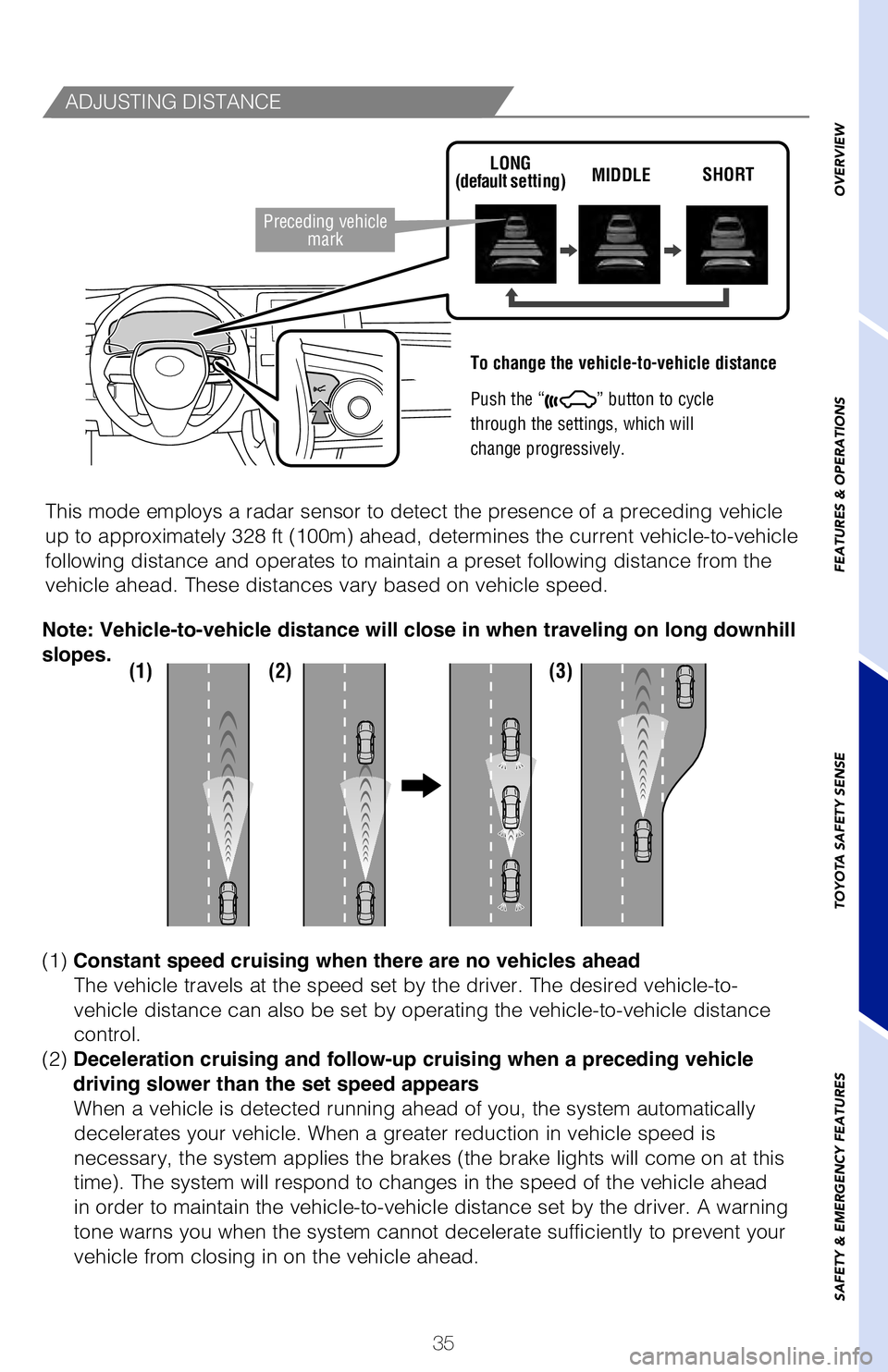
To change the vehicle-to-vehicle distance
Push the “
” button to cycle
through the settings, which will
change progressively.
This mode employs a radar sensor to detect the presence of a preceding v\
ehicle
up to approximately 328 ft (100m) ahead, determines the current vehicle-to-vehicle
following distance and operates to maintain a preset following distance \
from the
vehicle ahead. These distances vary based on vehicle speed.
LONG
(default setting) MIDDLE
SHORT
(1) (2) (3)
(1) Constant speed cruising when there are no vehicles ahead
The vehicle travels at the speed set by the driver. The desired vehicle-\
to-
vehicle distance can also be set by operating the vehicle-to-vehicle dis\
tance
control.
(2) Deceleration cruising and follow-up cruising when a preceding vehicle
driving slower than the set speed appears When a vehicle is detected running ahead of you, the system automaticall\
y
decelerates your vehicle. When a greater reduction in vehicle speed is
necessary, the system applies the brakes (the brake lights will come on at this
time). The system will respond to changes in the speed of the vehicle ahead
in order to maintain the vehicle-to-vehicle distance set by the driver. \
A warning
tone warns you when the system cannot decelerate sufficiently to prevent\
your
vehicle from closing in on the vehicle ahead.
Note: Vehicle-to-vehicle distance will close in when traveling on long downhill
slopes.
1 The set speed may be resumed once vehicle speed exceeds 25 mph.2 The set speed may also be cancelled by depressing the brake pedal.
Preceding vehicle
mark
Full-Speed Range
Dynamic Radar Cruise Control (DRCC)
DRCC helps maintain a pre-set distance to a preceding vehicle when the p\
receding
vehicle is traveling at a lower speed. This mode is always selected firs\
t when the
cruise control button is depressed. Constant speed cruise control mode i\
s also
available. Full-Speed Range DRCC is designed to function at speeds betwe\
en 0 to
approximately 110 MPH and is intended for highway use.
Dynamic Radar Cruise Control
vehicle-to-vehicle distance button
Cruise control
switch
Refer to page 36 for switching to Constant Speed (Cruise) Control Mode\
.
Vehicle will cruise at a set speed, decelerate to maintain selected dist\
ance from a
slower vehicle traveling in front and accelerate back up to the selected\
speed if the
vehicle in front changes lanes or speeds up.
(1) Push “
” to turn DRCC system ON.
(2) Use the steering wheel controls to increase speed by pushing “+RES” or
decrease the speed by pushing “-SET”. Push and hold to make a large
adjustment or push each time to make fine adjustments (1 mph [1.6 km/h] or 1
km/h [0.6 mph] increments).
(3) Push “Cancel” to cancel the adjusting speed operation.
OVERVIEW
FEATURES & OPERATIONS
TOYOTA SAFETY SENSE
SAFETY & EMERGENCY FEATURES
2019_Avalon_QRG_V3_3_ML_0406.indd 354/12/18 3:14 PM