ESP TOYOTA AVALON 2019 (in English) User Guide
[x] Cancel search | Manufacturer: TOYOTA, Model Year: 2019, Model line: AVALON, Model: TOYOTA AVALON 2019Pages: 536, PDF Size: 9.43 MB
Page 105 of 536

1052. Instrument cluster
2
Instrument cluster
■Head-up display
The head-up display may seem dark or hard to see when viewed th rough
sunglasses, especially polarized sunglasses.
Adjust the brightness of the head-up display or remove your sun glasses.
■ Display brightness
The brightness of the head-up display can be adjusted on of th e multi-
information display. Also, it is automatically adjusted accordi ng to the ambient
brightness.
■ Enabling/disabling of the head-up display
If the head-up display is disabled, it will remain disabled whe n the engine
switch is turned off then back to IGNITION ON mode.
■ Street name display
Only street names which are included in the map data will be displayed.
WARNING
■Before using the head-up display
● Check that the position and brightness of the head-up display i mage does
not interfere with safe driving. Incorrect adjustment of the image’s position
or brightness may obstruct the driver’s view and lead to an acc ident,
resulting in death or serious injury.
● Do not continuously look at the head-up display while driving a s you may
fail to see pedestrians, objects on the road, etc. ahead of the vehicle.
■ Caution for changing setti ngs of the head-up display
As the engine needs to be running while changing the settings of the head-
up display, ensure that the vehicle is parked in a place with adequate venti-
lation. In a closed area such as a garage, exhaust gases includ ing harmful
carbon monoxide (CO) may collect and enter the vehicle. This may lead to
death or a serious health hazard.
Page 120 of 536

1203-2. Opening, closing and locking the doors
■Using the mechanical key
The doors can also be locked and unlocked with the mechanical key.
(P. 452)
■ Conditions affecting the operation of the smart key system or w ireless
remote control
P. 127
■ Customization
Some functions can be customized. ( P. 491)
WARNING
■To prevent an accident
Observe the following precautions while driving the vehicle.
Failure to do so may result in a door opening and an occupant falling out,
resulting in death or serious injury.
● Ensure that all doors are properly closed.
● Do not pull the inside handle of the doors while driving.
Be especially careful for the front doors, as the doors may be opened
even if the inside lock buttons are in locked position.
● Set the rear door child-protector locks when children are seate d in the rear
seats.
■ When opening or closing a door
Check the surroundings of the vehicle such as whether the vehic le is on an
incline, whether there is enough space for a door to open and w hether a
strong wind is blowing.
When opening or closing the door, hold the door handle tightly to prepare
for any unpredictable movement.
Page 126 of 536
1263-2. Opening, closing and locking the doors
■Alarms and warning indicators
A combination of exterior and interior alarms as well as warnin g messages
shown on the multi-information display are used to prevent theft of the vehicle
and accidents resulting from erroneous operation. Take appropriate mea-
sures in response to any warning message on the multi-information display.
( P. 433)
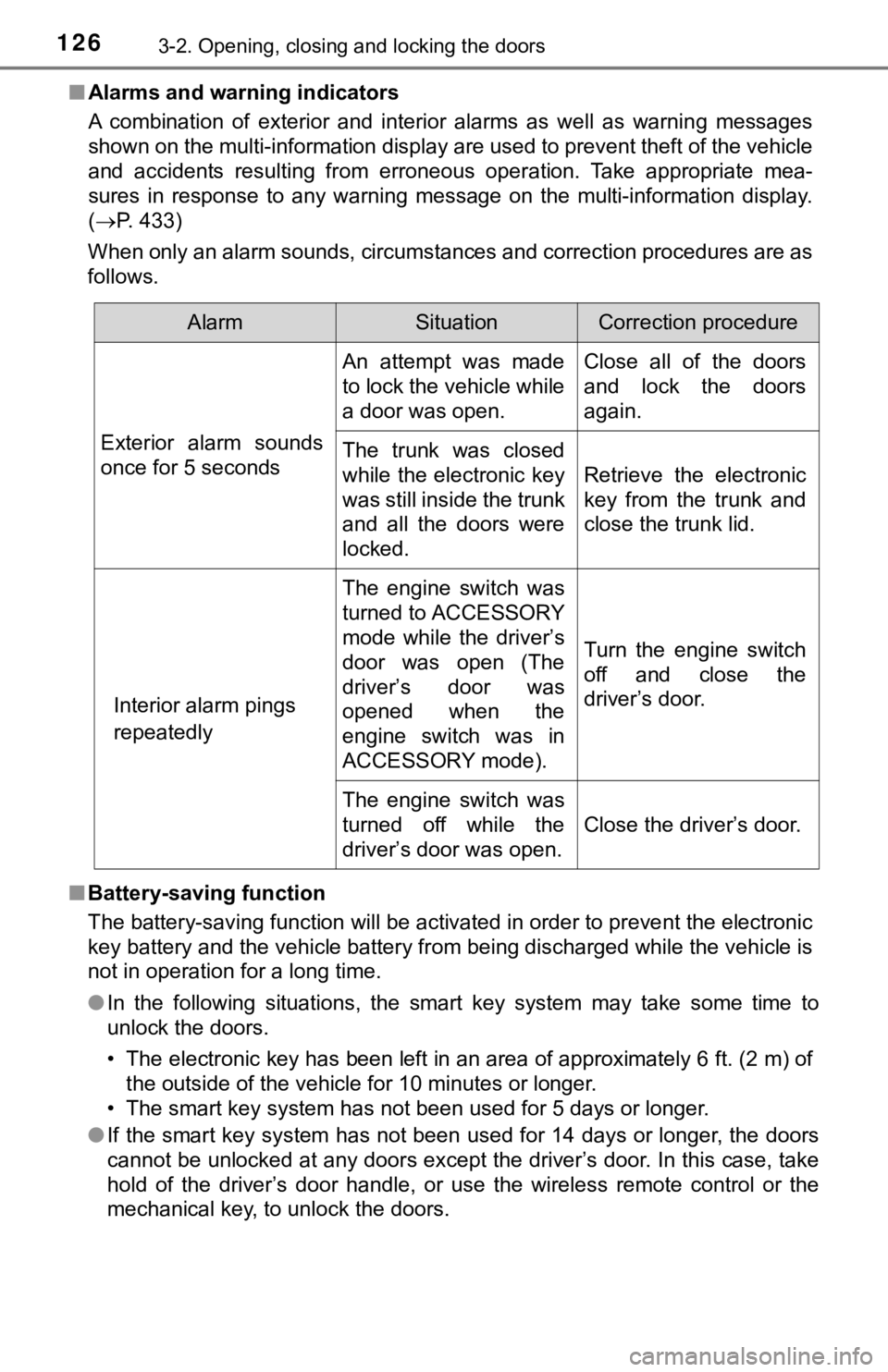
When only an alarm sounds, circumstances and correction procedu res are as
follows.
■ Battery-saving function
The battery-saving function will be activated in order to preve nt the electronic
key battery and the vehicle battery from being discharged while the vehicle is
not in operation for a long time.
● In the following situations, the smart key system may take some time to
unlock the doors.
• The electronic key has been left in an area of approximately 6 ft. (2 m) of
the outside of the vehicle for 10 minutes or longer.
• The smart key system has not been used for 5 days or longer.
● If the smart key system has not been used for 14 days or longer , the doors
cannot be unlocked at any doors except the driver’s door. In th is case, take
hold of the driver’s door handle, or use the wireless remote co ntrol or the
mechanical key, to unlock the doors.
AlarmSituationCorrection procedure
Exterior alarm sounds
once for 5 seconds An attempt was made
to lock the vehicle while
a door was open.
Close all of the doors
and lock the doors
again.
The trunk was closed
while the electronic key
was still inside the trunk
and all the doors were
locked. Retrieve the electronic
key from the trunk and
close the trunk lid.
Interior alarm pings
repeatedly The engine switch was
turned to ACCESSORY
mode while the driver’s
door was open (The
driver’s door was
opened when the
engine switch was in
ACCESSORY mode).
Turn the engine switch
off and close the
driver’s door.
The engine switch was
turned off while the
driver’s door was open. Close the driver’s door.
Page 142 of 536
1423-3. Adjusting the seats
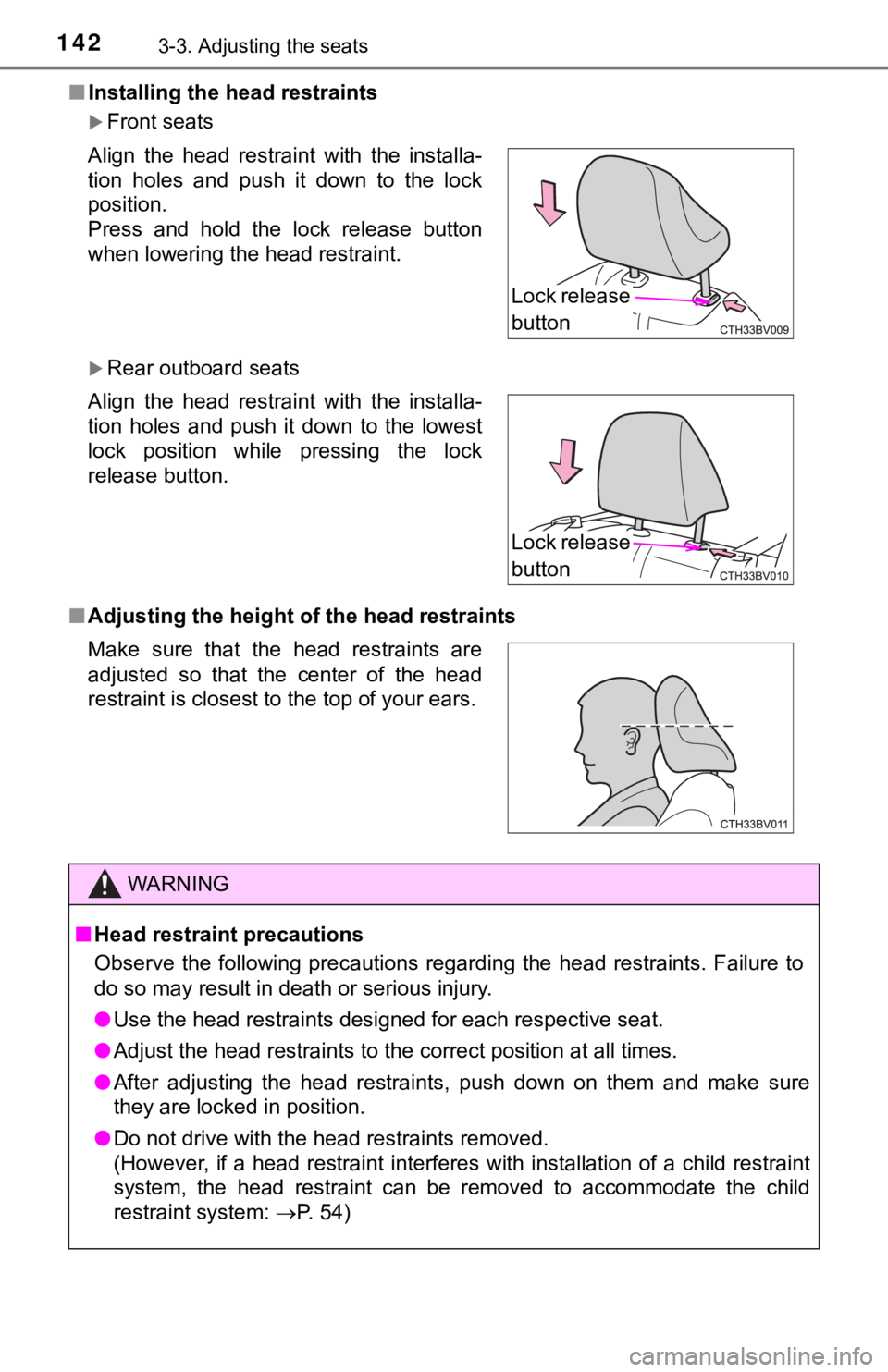
■Installing the head restraints
Front seats
Rear outboard seats
■ Adjusting the height o f the head restraints
Align the head restraint with the installa-
tion holes and push it down to the lock
position.
Press and hold the lock release button
when lowering the head restraint.
Align the head restraint with the installa-
tion holes and push it down to the lowest
lock position while pressing the lock
release button.
Make sure that the head restraints are
adjusted so that the center of the head
restraint is closest to the top of your ears.
WARNING
■
Head restraint precautions
Observe the following precautions regarding the head restraints. Failure to
do so may result in death or serious injury.
● Use the head restraints designed for each respective seat.
● Adjust the head restraints to the correct position at all times.
● After adjusting the head restraints, push down on them and make sure
they are locked in position.
● Do not drive with the head rest raints removed.
(However, if a head restraint interferes with installation of a child restraint
system, the head restraint can be removed to accommodate the ch ild
restraint system: P. 54)
Lock release
button
Lock release
button
Page 145 of 536
1453-4. Adjusting the steering wheel and mirrors
3
Operation of each component
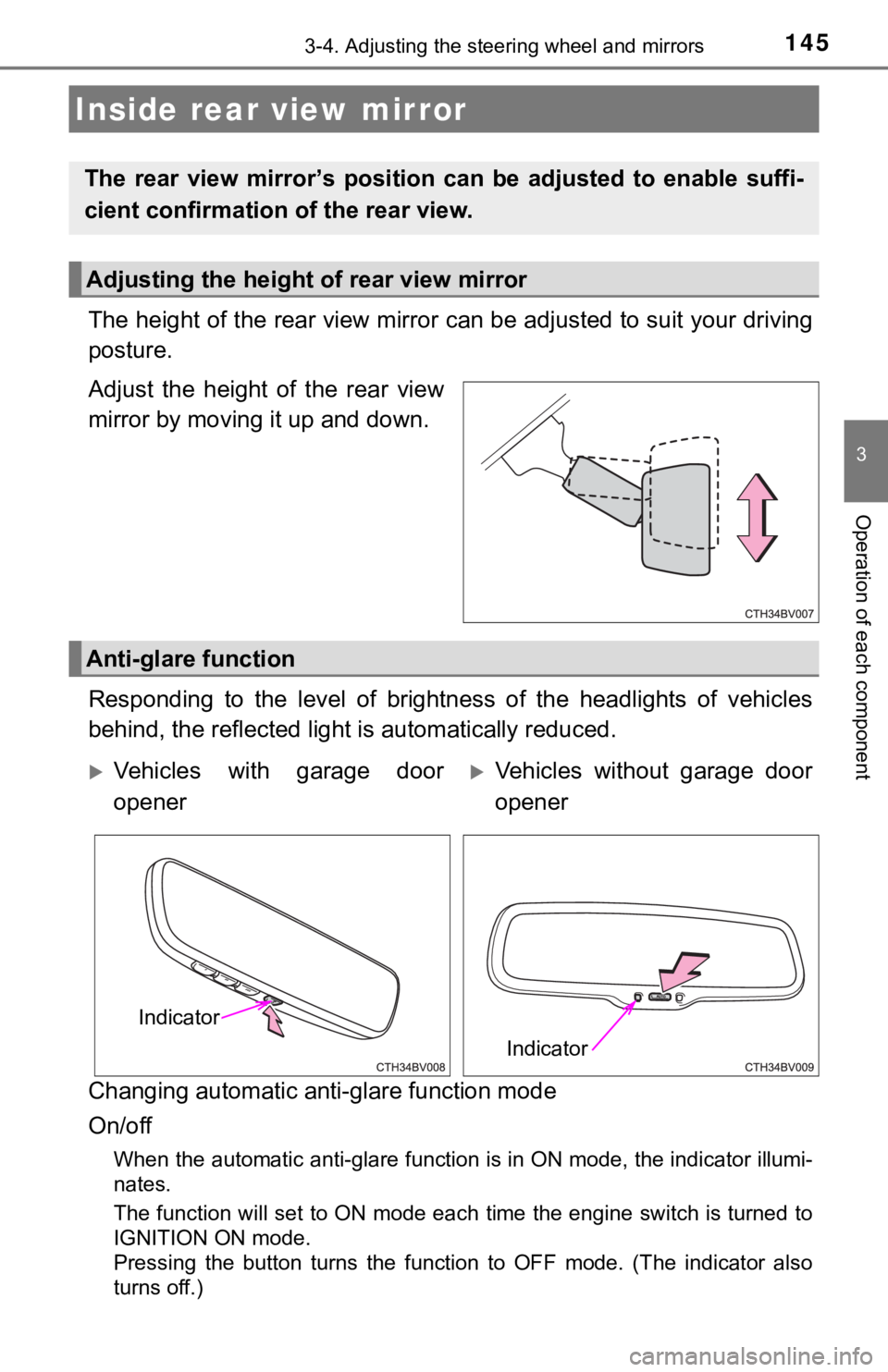
The height of the rear view mirror can be adjusted to suit your driving
posture.
Adjust the height of the rear view
mirror by moving it up and down.
Responding to the level of brightness of the headlights of vehi cles
behind, the reflected light is automatically reduced.
Changing automatic anti- glare function mode
On/off
When the automatic anti-glare function is in ON mode, the indic ator illumi-
nates.
The function will set to ON mode each time the engine switch is turned to
IGNITION ON mode.
Pressing the button turns the function to OFF mode. (The indica tor also
turns off.)
Inside rear view mirror
The rear view mirror’s position ca n be adjusted to enable suffi-
cient confirmation of the rear view.
Adjusting the height of rear view mirror
Anti-glare function
Vehicles with garage door
openerVehicles without garage door
opener
Indicator
Indicator
Page 153 of 536
1533-5. Opening and closing the windows
3
Operation of each component
WARNING
Observe the following precautions.
Failing to do so may result in death or serious injury.
■Opening and closing the windows
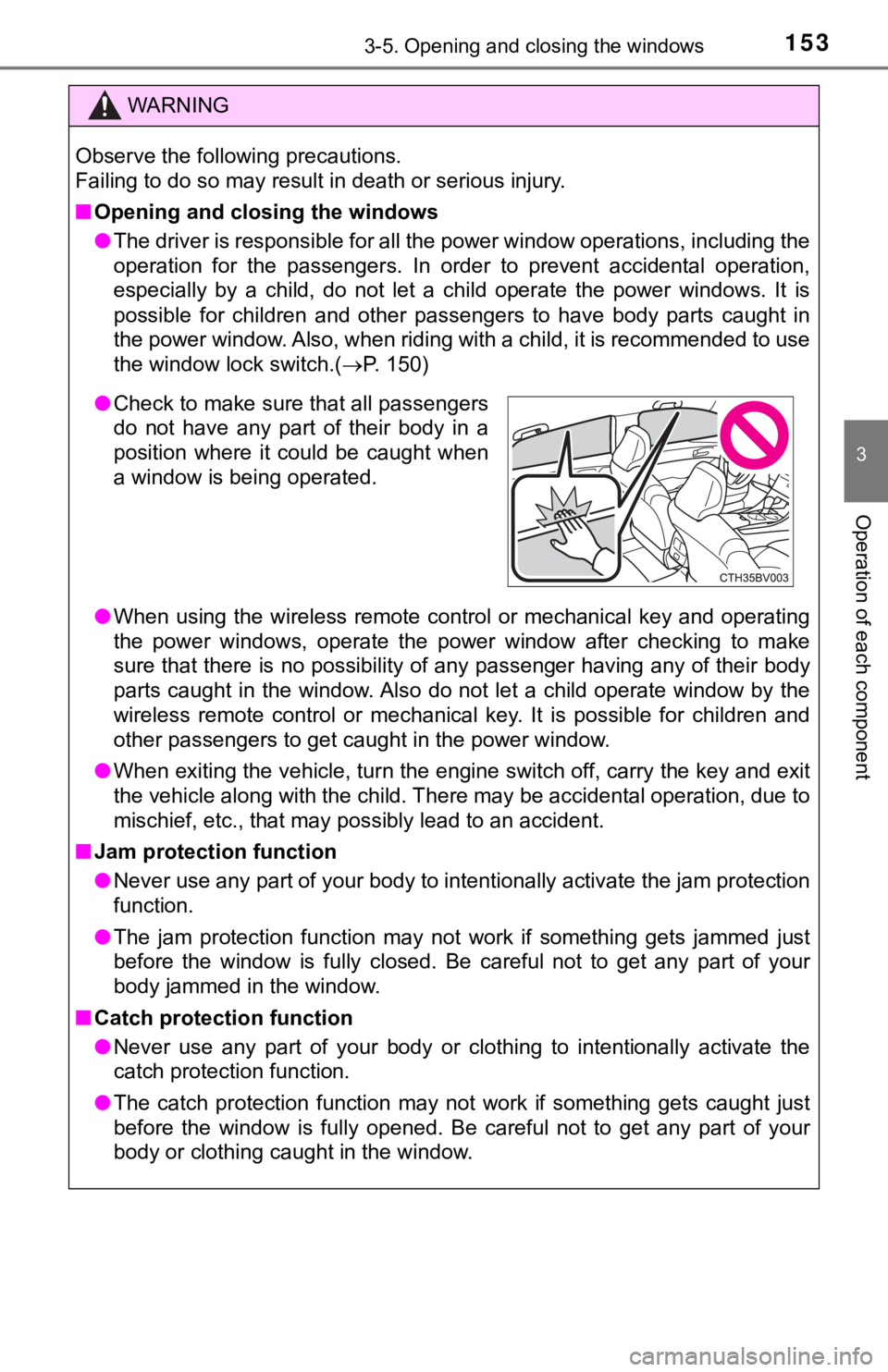
● The driver is responsible for all the power window operations, including the
operation for the passengers. In order to prevent accidental op eration,
especially by a child, do not let a child operate the power win dows. It is
possible for children and other passengers to have body parts c aught in
the power window. Also, when riding with a child, it is recomme nded to use
the window lock switch.( P. 150)
● When using the wireless remote control or mechanical key and op erating
the power windows, operate the power window after checking to m ake
sure that there is no possibility of any passenger having any o f their body
parts caught in the window. Also do not let a child operate window by the
wireless remote control or mechanical key. It is possible for c hildren and
other passengers to get caught in the power window.
● When exiting the vehicle, turn the engine switch off, carry the key and exit
the vehicle along with the child. There may be accidental operation, due to
mischief, etc., that may possibly lead to an accident.
■ Jam protection function
● Never use any part of your body to intentionally activate the j am protection
function.
● The jam protection function may not work if something gets jamm ed just
before the window is fully closed. Be careful not to get any pa rt of your
body jammed in the window.
■ Catch protection function
● Never use any part of your body or clothing to intentionally ac tivate the
catch protection function.
● The catch protection function may not work if something gets caught just
before the window is fully opened. Be careful not to get any pa rt of your
body or clothing caught in the window.
● Check to make sure that all passengers
do not have any part of their body in a
position where it could be caught when
a window is being operated.
Page 157 of 536
1573-5. Opening and closing the windows
3
Operation of each component
WARNING
Observe the following precautions.
Failing to do so may cause death or serious injury.
■Opening the moon roof
● Do not allow any passengers to put their hands or heads outside the vehi-
cle while it is moving.
● Do not sit on top of the moon roof.
■ Opening and closing the moon roof
● The driver is responsible for moon roof opening and closing ope rations.
In order to prevent accidental operation, especially by a child , do not let a
child operate the moon roof. It is possible for children and ot her passen-
gers to have body parts caught in the moon roof.
● When exiting the vehicle, turn the engine switch off, carry the key and exit
the vehicle along with the child. There may be accidental operation, due to
mischief, etc., that may possibly lead to an accident.
■ Jam protection function
● Never use any part of your body to intentionally activate the j am protection
function.
● The jam protection function may not work if something gets caught just
before the moon roof is fully closed. Also, the jam protection function is not
designed to operate while the switch is being pressed. Take care so that
your fingers, etc. do not get caught.
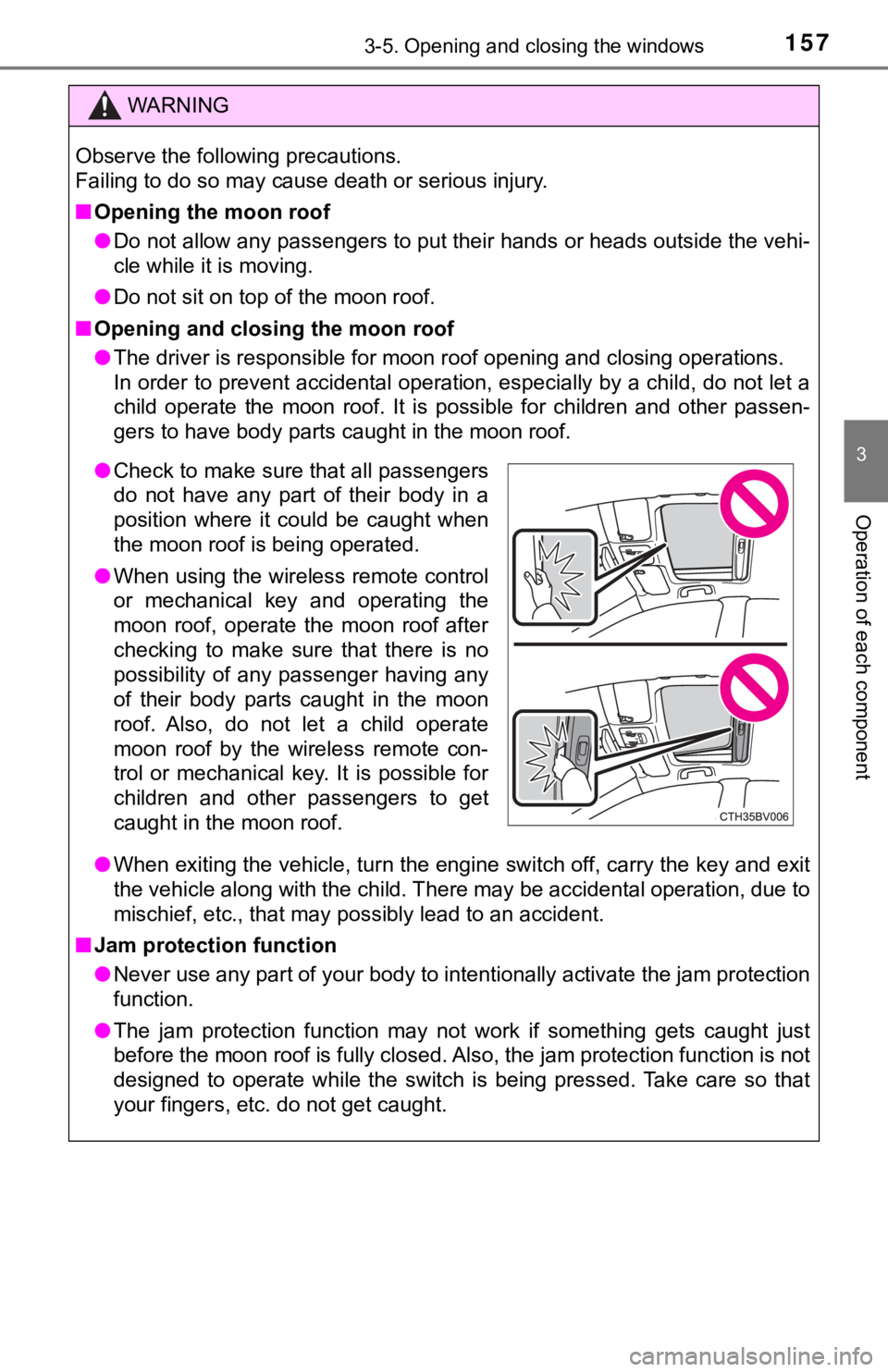
●Check to make sure that all passengers
do not have any part of their body in a
position where it could be caught when
the moon roof is being operated.
● When using the wireless remote control
or mechanical key and operating the
moon roof, operate the moon roof after
checking to make sure that there is no
possibility of any passenger having any
of their body parts caught in the moon
roof. Also, do not let a child operate
moon roof by the wireless remote con-
trol or mechanical key. It is possible for
children and other passengers to get
caught in the moon roof.
Page 161 of 536

1614-1. Before driving
4
Driving
■When starting off on a uphill
The hill-start assist control will activate. ( P. 299)
■ Driving in the rain
●Drive carefully when it is raining, because visibility will be reduced, the win-
dows may become fogged-up, and the road will be slippery.
● Drive carefully when it starts to rain, because the road surface will be espe-
cially slippery.
● Refrain from high speeds when driving on an expressway in the r ain,
because there may be a layer of water between the tires and the road sur-
face, preventing the steering and brakes from operating properl y.
■ Engine speed while driving
In the following conditions, the engine speed may become high w hile driving.
This is due to automatic up-shifting control or down-shifting implementation to
meet driving conditions. It does not indicate sudden acceleration.
● The vehicle is judged to be driving uphill or downhill
● When the accelerator pedal is released
■ Restraining the engine out put (Brake Override System)
● When the accelerator and brake pedals are depressed at the same time, the
engine output may be restrained.
● A warning message is displayed on the multi-information display while the
system is operating.
■ Restraining sudden start (Drive-Start Control)
● When the following unusual operation is performed, the engine o utput may
be restrained.
• When the shift lever is shifted from R to D, D to R, N to R, P to D, or P to
R (D includes S) with the accelerator pedal depressed, a warnin g mes-
sage appears on the multi-information display.
• When the accelerator pedal is depressed too much while the veh icle is in
reverse.
● While Drive-Start Control is being activated, your vehicle may have trouble
escaping from the mud or fresh snow. In such case, deactivate T RAC (P.
300) to cancel Drive-Start Control so that the vehicle may beco me able to
escape from the mud or fresh snow.
■ Breaking in your new Toyota
To extend the life of the vehicle, observing the following prec autions is recom-
mended:
● For the first 186 miles (300 km):
Avoid sudden stops.
● For the first 621 miles (1000 km):
• Do not drive at extremely high speeds.
• Avoid sudden acceleration.
• Do not drive continuously in low gears.
• Do not drive at a constant speed for extended periods.
Page 163 of 536

1634-1. Before driving
4
Driving
WARNING
Observe the following precautions.
Failure to do so may result in death or serious injury.
■When starting the vehicle
Always keep your foot on the brake pedal while stopped with the engine
running. This prevents the vehicle from creeping.
■ When driving the vehicle
● Do not drive if you are unfamiliar with the location of the brake and accel-
erator pedals to avoid depressing the wrong pedal.
• Accidentally depressing the accelerator pedal instead of the b rake
pedal will result in sudden acceleration that may lead to an accident.
• When backing up, you may twist your body around, leading to a diffi-
culty in operating the pedals. Make sure to operate the pedals properly.
• Make sure to keep a correct driving posture even when moving t he
vehicle only slightly. This allows you to depress the brake and accelera-
tor pedals properly.
• Depress the brake pedal using your right foot. Depressing the brake
pedal using your left foot may delay response in an emergency, result-
ing in an accident.
● Do not drive the vehicle over or stop the vehicle near flammable materials.
The exhaust system and exhaust gases can be extremely hot. Thes e hot
parts may cause a fire if there is any flammable material nearby.
● During normal driving, do not turn off the engine. Turning the engine off
while driving will not cause loss of steering or braking contro l, but the
power assist to these systems will be lost. This will make it m ore difficult to
steer and brake, so you should pull over and stop the vehicle a s soon as it
is safe to do so.
However, in the event of an emergency, such as if it becomes im possible
to stop the vehicle in the normal way: P. 417
● Use engine braking (downshift) to maintain a safe speed when driving
down a steep hill.
Using the brakes continuously may cause the brakes to overheat and lose
effectiveness. ( P. 180)
● Do not adjust the display, the positions of the steering wheel, the seat, or
the inside or outside rear view mirrors while driving.
Doing so may result in a loss of vehicle control.
● Always check that all passengers’ arms, heads or other parts of their body
are not outside the vehicle.
● Do not drive in excess of the speed limit. Even if the legal sp eed limit per-
mits it, do not drive over 85 mph (140 km/h) unless your vehicl e has high-
speed capability tires. Driving over 85 mph (140 km/h) may resu lt in tire
failure, loss of control and possible injury. Be sure to consult a tire dealer
to determine whether the tires on your vehicle are high-speed c apability
tires or not before driving at such speeds.
Page 208 of 536
2084-5. Using the driving support systems
◆PCS (Pre-Collision System)
P. 2 1 6
◆LDA (Lane Departure Aler t with steering control)
P. 2 2 8
◆Automatic High Beam
P. 1 9 6
◆Dynamic radar cruise cont rol with full-speed range
P. 2 3 8
Toyota Safety Sense P
The Toyota Safety Sense P consists of the following drive assis t
systems and contributes to a safe and comfortable driving expe-
rience:
WARNING
■ Toyota Safety Sense P
The Toyota Safety Sense P is designed to operate under the assu mption
that the driver will drive safely, and is designed to help redu ce the impact to
the occupants and the vehicle in the case of a collision or ass ist the driver in
normal driving conditions.
As there is a limit to the degree of recognition accuracy and control perfor- mance that this system can provide, do not overly rely on this system. The
driver is always responsible for paying attention to the vehicl e's surround-
ings and driving safely.