door lock TOYOTA AVALON 2019 (in English) Service Manual
[x] Cancel search | Manufacturer: TOYOTA, Model Year: 2019, Model line: AVALON, Model: TOYOTA AVALON 2019Pages: 536, PDF Size: 9.43 MB
Page 361 of 536
3616-1. Maintenance and care
6
Maintenance and care
■When using a car wash
If the door handle becomes wet while the electronic key is within the effective
range, the door may lock and unlock repeatedly. In that case, f ollow the fol-
lowing correction procedures to wash the vehicle:
● Place the key in a position 6 ft. (2 m) or more separate from t he vehicle
while the vehicle is being washed. (Take care to ensure that th e key is not
stolen.)
● Set the electronic key to battery-saving mode to disable the sm art key sys-
tem. ( P. 127)
■ Aluminum wheels
●Remove any dirt immediately by using a neutral detergent.
● Wash detergent off with water immediately after use.
● To protect the paint from damage, make sure to observe the following pre-
cautions.
• Do not use acidic, alkaline or abrasive detergent
• Do not use hard brushes
• Do not use detergent on the wheels when they are hot, such as after driv-
ing or parking in hot weather
■ Bumpers
Do not scrub with abrasive cleaners.
WARNING
■When washing the vehicle
Do not apply water to the inside of the engine compartment. Doing so may
cause the electrical components, etc. to catch fire.
■ Precautions regarding the exhaust pipes
Exhaust gasses cause the exhaust pipes to become quite hot.
When washing the vehicle, be careful not to touch the pipes unt il it has
cooled sufficiently, as touching a hot exhaust pipes can cause burns.
■ Precaution regarding the rear b umper with Blind Spot Monitor
If the paint of the rear bumper is chipped or scratched, the sy stem may mal-
function. If this occurs, avoid using the system and consult yo ur Toyota
dealer.
Page 370 of 536
3706-2. Maintenance
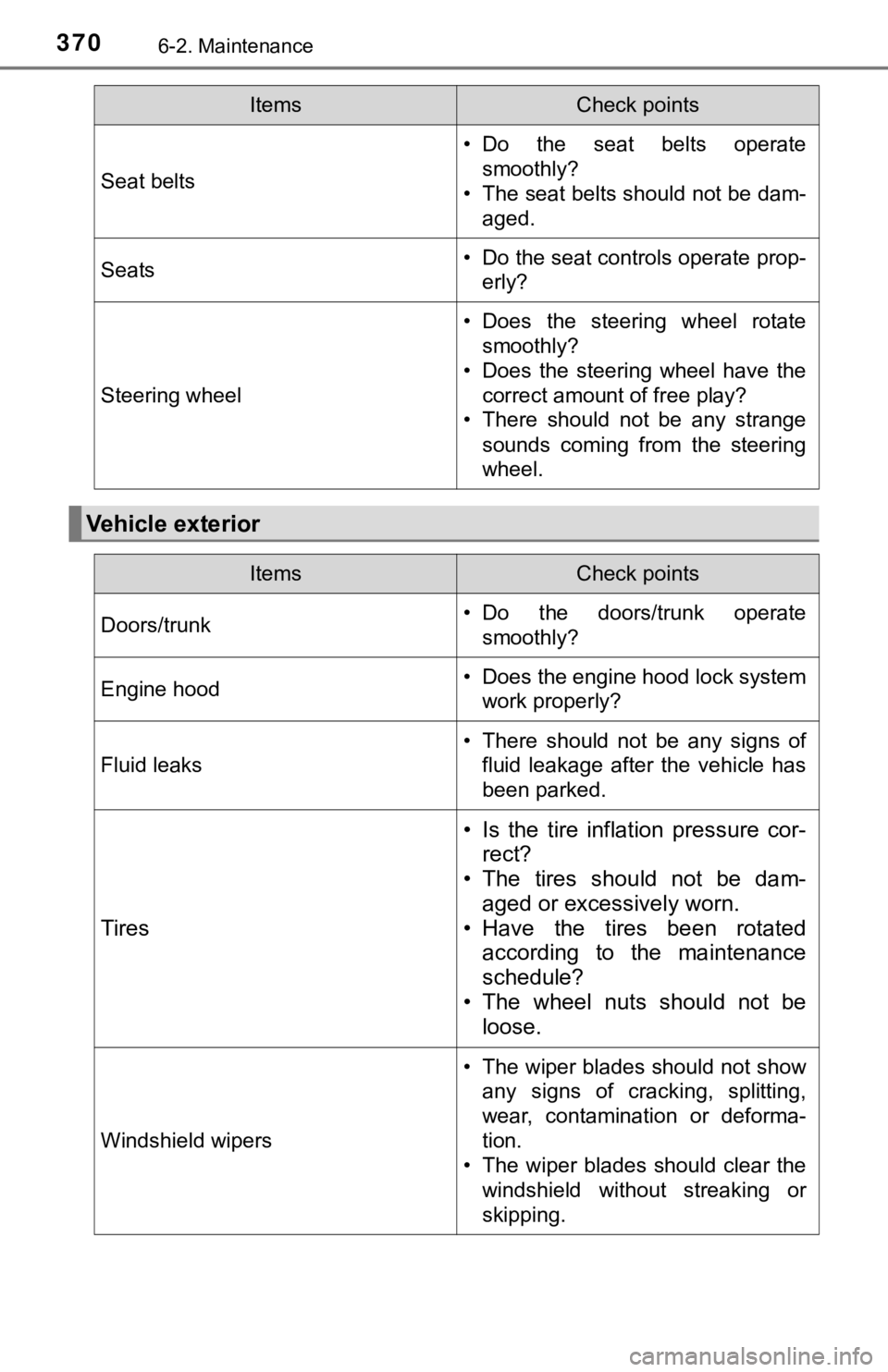
Seat belts
• Do the seat belts operatesmoothly?
• The seat belts should not be dam- aged.
Seats• Do the seat controls operate prop-erly?
Steering wheel
• Does the steering wheel rotatesmoothly?
• Does the steering wheel have the correct amount of free play?
• There should not be any strange
sounds coming from the steering
wheel.
Vehicle exterior
ItemsCheck points
ItemsCheck points
Doors/trunk• Do the doors/trunk operatesmoothly?
Engine hood• Does the engine hood lock systemwork properly?
Fluid leaks
• There should not be any signs offluid leakage after the vehicle has
been parked.
Tires
• Is the tire inflation pressure cor-rect?
• The tires should not be dam-
aged or excessively worn.
• Have the tires been rotated according to the maintenance
schedule?
• The wheel nuts should not be loose.
Windshield wipers
• The wiper blades should not show
any signs of cracking, splitting,
wear, contamination or deforma-
tion.
• The wiper blades should clear the windshield without streaking or
skipping.
Page 384 of 536
3846-3. Do-it-yourself maintenance
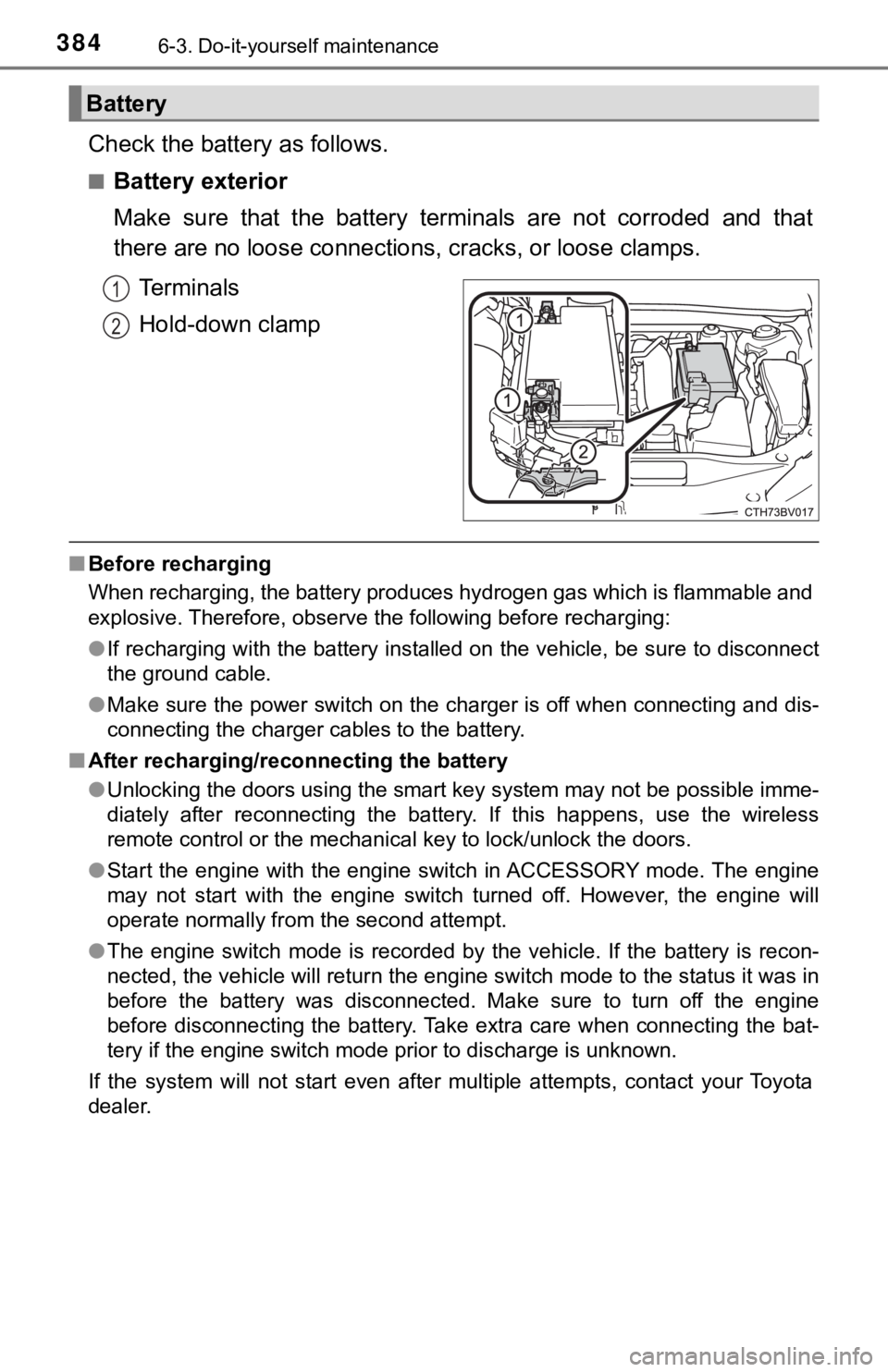
Check the battery as follows.
■Battery exterior
Make sure that the battery terminals are not corroded and that
there are no loose connections, cracks, or loose clamps.
Terminals
Hold-down clamp
■ Before recharging
When recharging, the battery produces hydrogen gas which is flammable and
explosive. Therefore, observe the following before recharging:
●If recharging with the battery installed on the vehicle, be sur e to disconnect
the ground cable.
● Make sure the power switch on the charger is off when connectin g and dis-
connecting the charger cables to the battery.
■ After recharging/reconnecting the battery
●Unlocking the doors using the smart key system may not be possi ble imme-
diately after reconnecting the battery. If this happens, use the wireless
remote control or the mechanical key to lock/unlock the doors.
● Start the engine with the engine switch in ACCESSORY mode. The engine
may not start with the engine switch turned off. However, the e ngine will
operate normally from the second attempt.
● The engine switch mode is recorded by the vehicle. If the batte ry is recon-
nected, the vehicle will return the engine switch mode to the s tatus it was in
before the battery was disconnected. Make sure to turn off the engine
before disconnecting the battery. Take extra care when connecti ng the bat-
tery if the engine switch mode prior to discharge is unknown.
If the system will not start even after multiple attempts, contact your Toyota
dealer.
Battery
1
2
Page 409 of 536
4096-3. Do-it-yourself maintenance
6
Maintenance and care
Operate the or switch and check that the doors can
be locked/unlocked.
■When replacing the key battery
Be careful not to lose the battery or any other small parts.
■ Use a CR2032 lithium battery
●Batteries can be purchased at your Toyota dealer, local electri cal appliance
shops or camera stores.
● Replace only with the same or equivalent type recommended by the manu-
facturer.
● Dispose of used batteries according to local laws.
■ If the key battery is depleted
The following symptoms may occur:
●The smart key system and wireless remote control will not funct ion properly.
● The operational range will be reduced.
WARNING
■Removed battery a nd other parts
These parts are small and if swallowed by a child, they can cause choking.
Keep away from children. Failure to do so could result in death or serious
injury.
NOTICE
■ For normal operation after replacing the battery
Observe the following precautions to prevent accidents:
● Always work with dry hands.
Moisture may cause the battery to rust.
● Do not touch or move any other component inside the remote cont rol.
● Do not bend either of the battery terminals.
5
Page 436 of 536

4367-2. Steps to take in an emergency
■If “A New Key has been Registered Contact Your Dealer for Detai ls” is
displayed
This message will be displayed each time the driver’s door is opened when
the doors are unlocked from the outside for approximately one week after a
new electronic key has been registered.
If this message is displayed but you have not had a new electro nic key regis-
tered, ask your Toyota dealer to check if an unknown electronic key (other
than those in your possession) has been registered.
■ When “Headlight System Malfunction Visit Your Dealer” is displa yed
The following systems may be malfunctioning. Have the vehicle i nspected by
your Toyota dealer immediately.
● The LED headlight system
● Automatic High Beam
■ “Front Camera Unavailable” or “Front Camera Unavailable Remove
Debris On Windshield” is displayed
The following systems may be suspended until the problem shown in the
message is resolved.
● PCS (Pre-Collision System)
● LDA (Lane Departure Alert with steering control)
● Dynamic radar cruise control with full-speed range
● Automatic High Beam
■ If “Maintenance Required Soon” is displayed
Indicates that all maintenance according to the driven distance on the mainte-
nance schedule
* should be performed soon.
Comes on approximately 4500 miles (7200 km) after the message has been
reset.
If necessary, perform maintenance. Please reset the message aft er the main-
tenance is performed. ( P. 367)
*: Refer to the separate “Scheduled Maintenance Guide” or “Owner’ s Manual
Supplement” for the maintenance interval applicable to your veh icle.
■ If “Maintenance Required Visit Your Dealer” is displayed
Indicates that all maintenance is required to correspond to the driven distance
on the maintenance schedule
*.
Comes on approximately 5000 miles (8000 km) after the message has been
reset.
(The indicator will not work properly unless the message has been reset.)
Perform the necessary maintenance. Please reset the message aft er the
maintenance is performed. ( P. 367)
*: Refer to the separate “Scheduled Maintenance Guide” or “Owner’ s Manual
Supplement” for the maintenance interval applicable to your veh icle.
Page 452 of 536
4527-2. Steps to take in an emergency
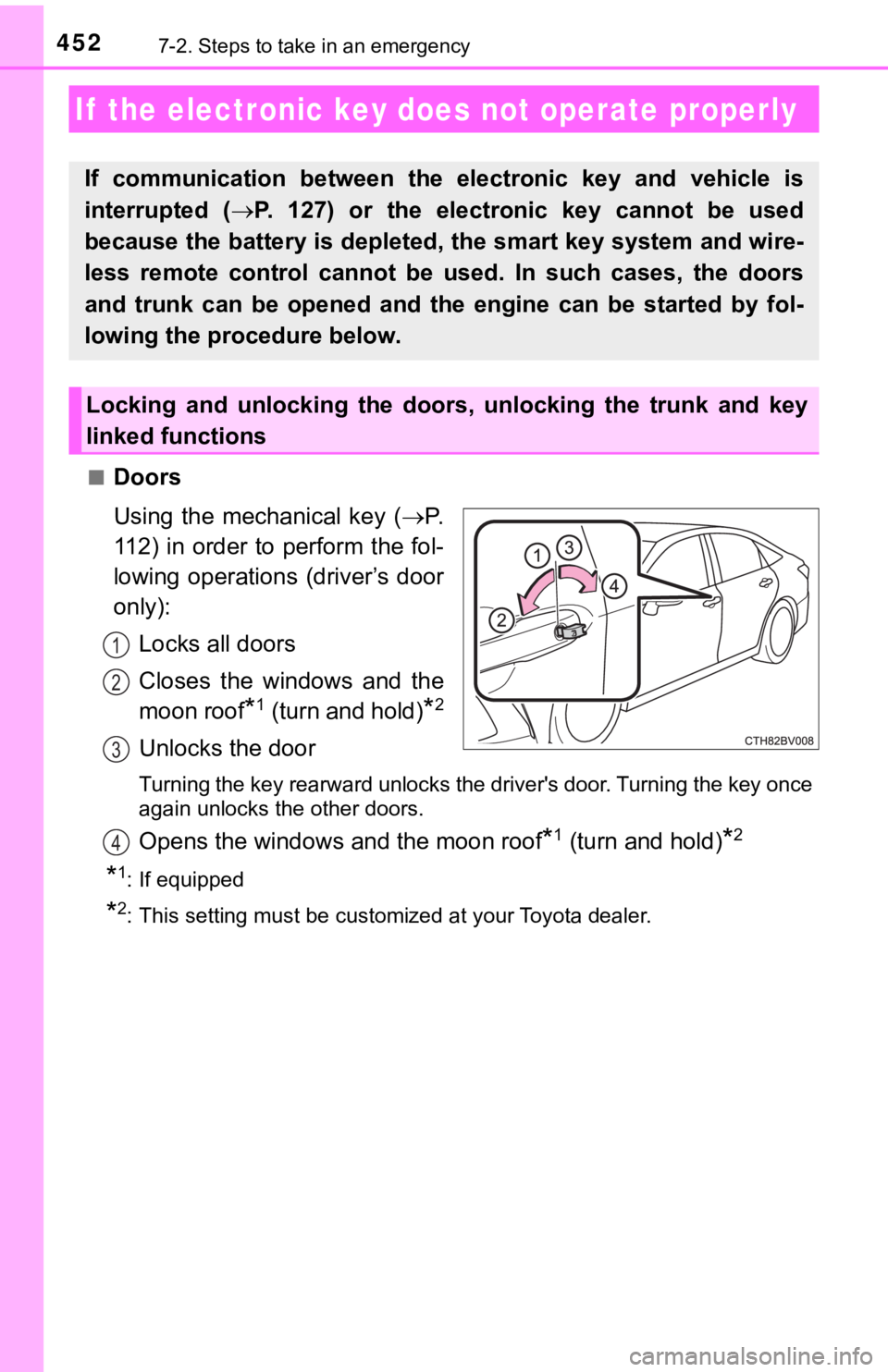
■Doors
Using the mechanical key (P.
112) in order to perform the fol-
lowing operations (driver’s door
only):
Locks all doors
Closes the windows and the
moon roof
*1 (turn and hold)*2
Unlocks the door
Turning the key rearward unlocks the driver's door. Turning the key once
again unlocks the other doors.
Opens the windows and the moon roof*1 (turn and hold)*2
*1: If equipped
*2: This setting must be customized at your Toyota dealer.
If the electronic key does not operate properly
If communication between the electronic key and vehicle is
interrupted (P. 127) or the electronic key cannot be used
because the battery is depleted, the smart key system and wire-
less remote control cannot be used. In such cases, the doors
and trunk can be opened and the engine can be started by fol-
lowing the procedure below.
Locking and unlocking the doors, unlocking the trunk and key
linked functions
1
2
3
4
Page 455 of 536
4557-2. Steps to take in an emergency
7
When trouble arises
If you have a set of jumper (or booster) cables and a second vehicle
with a 12-volt battery, you can jump start your vehicle by foll owing the
steps below.
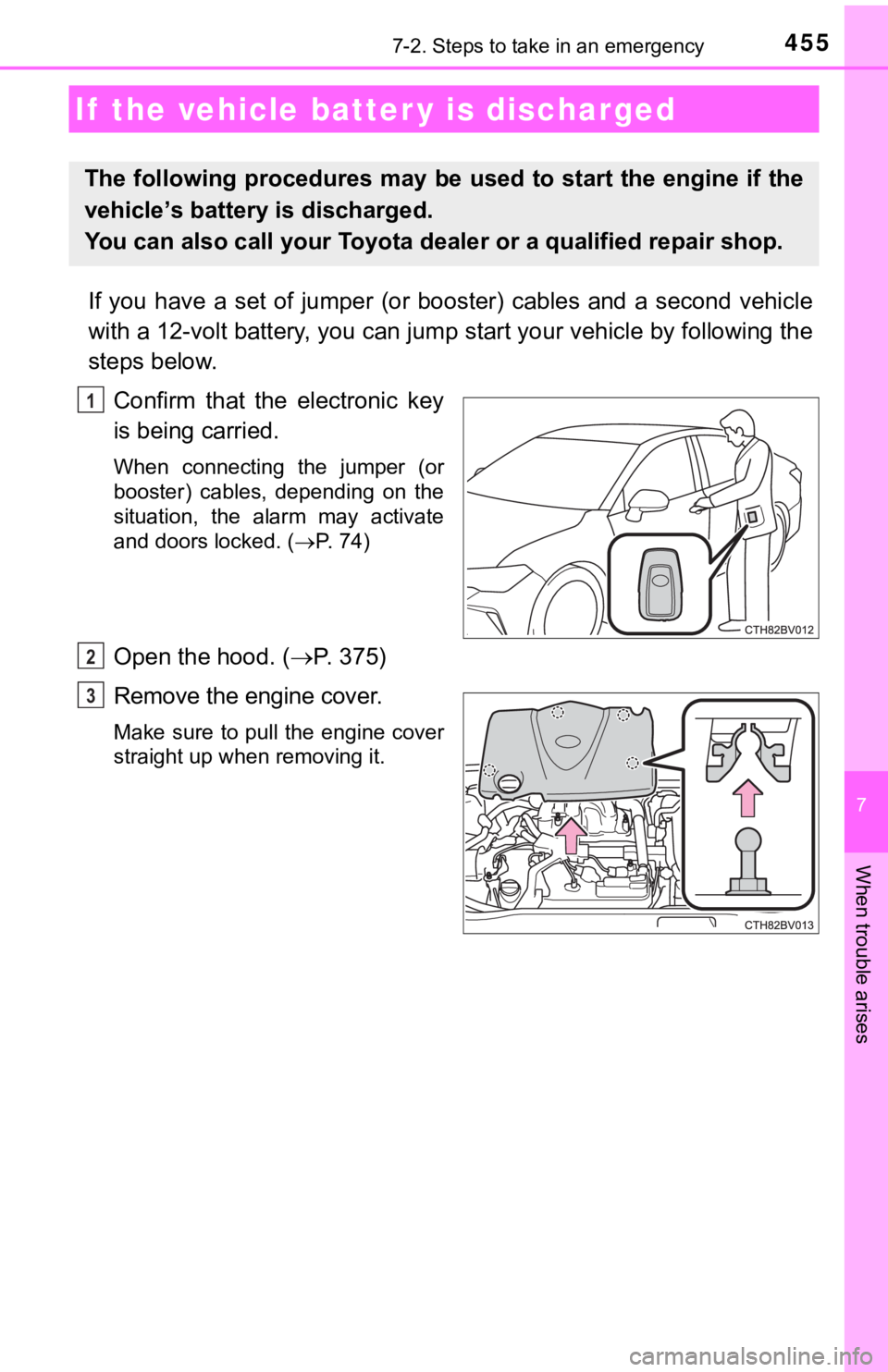
Confirm that the electronic key
is being carried.
When connecting the jumper (or
booster) cables, depending on the
situation, the alarm may activate
and doors locked. ( P. 74)
Open the hood. ( P. 375)
Remove the engine cover.
Make sure to pull the engine cover
straight up when removing it.
If the vehicle batt er y is discharged
The following procedures may be used to start the engine if the
vehicle’s battery is discharged.
You can also call your Toyota de aler or a qualified repair shop.
1
2
3
Page 457 of 536
4577-2. Steps to take in an emergency
7
When trouble arises
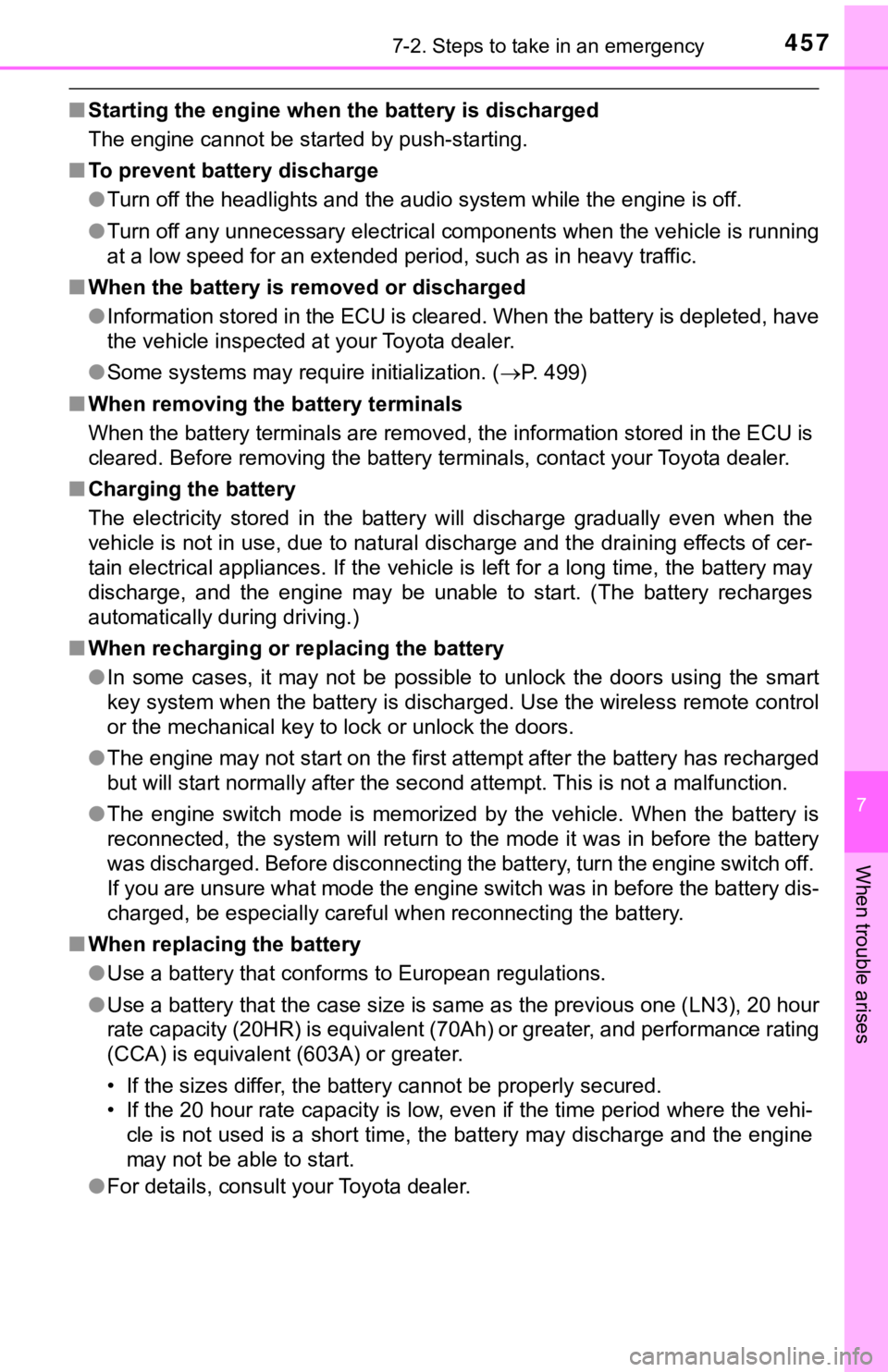
■Starting the engine when t he battery is discharged
The engine cannot be started by push-starting.
■ To prevent battery discharge
●Turn off the headlights and the audio system while the engine is off.
● Turn off any unnecessary electrical components when the vehicle is running
at a low speed for an extended period, such as in heavy traffic .
■ When the battery is r emoved or discharged
● Information stored in the ECU is cleared. When the battery is d epleted, have
the vehicle inspected at your Toyota dealer.
● Some systems may require initialization. ( P. 499)
■ When removing the battery terminals
When the battery terminals are removed, the information stored in the ECU is
cleared. Before removing the battery terminals, contact your Toyota dealer.
■ Charging the battery
The electricity stored in the battery will discharge gradually even when the
vehicle is not in use, due to natural discharge and the draining effects of cer-
tain electrical appliances. If the vehicle is left for a long t ime, the battery may
discharge, and the engine may be unable to start. (The battery recharges
automatically during driving.)
■ When recharging or replacing the battery
●In some cases, it may not be possible to unlock the doors using the smart
key system when the battery is discharged. Use the wireless rem ote control
or the mechanical key to lock or unlock the doors.
● The engine may not start on the first attempt after the battery has recharged
but will start normally after the second attempt. This is not a malfunction.
● The engine switch mode is memorized by the vehicle. When the ba ttery is
reconnected, the system will return to the mode it was in befor e the battery
was discharged. Before disconnecting the battery, turn the engine switch off.
If you are unsure what mode the engine switch was in before the battery dis-
charged, be especially careful when reconnecting the battery.
■ When replacing the battery
●Use a battery that conforms to European regulations.
● Use a battery that the case size is same as the previous one (L N3), 20 hour
rate capacity (20HR) is equivalent (70Ah) or greater, and perfo rmance rating
(CCA) is equivalent (603A) or greater.
• If the sizes differ, the battery cannot be properly secured.
• If the 20 hour rate capacity is low, even if the time period w here the vehi-
cle is not used is a short time, the battery may discharge and the engine
may not be able to start.
● For details, consult your Toyota dealer.
Page 493 of 536
4938-2. Customization
8
Vehicle specifications
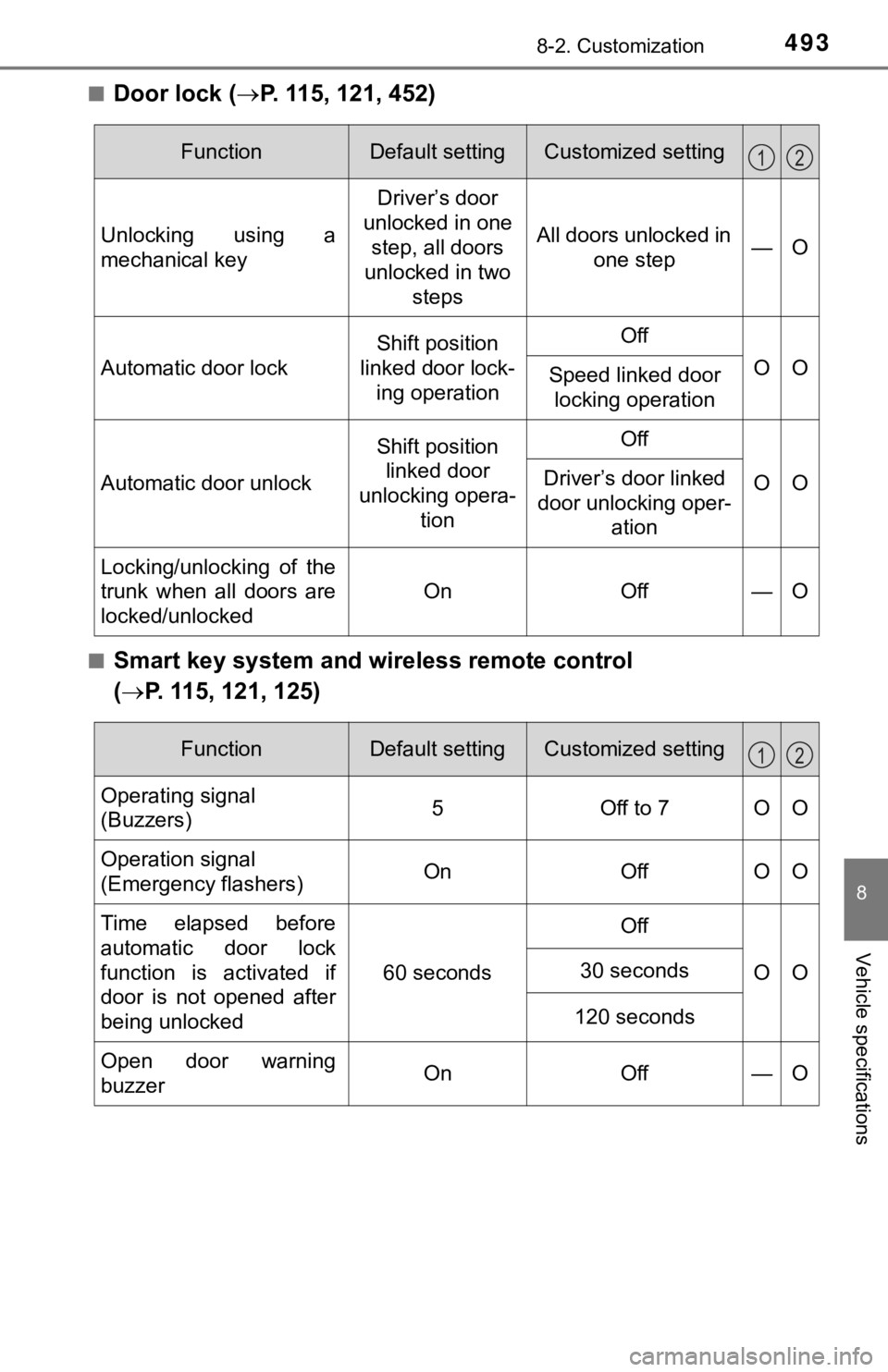
■Door lock (P. 115, 121, 452)
■Smart key system and wireless remote control
( P. 115, 121, 125)
FunctionDefault settingCustomized setting
Unlocking using a
mechanical key Driver’s door
unlocked in one step, all doors
unlocked in two
steps All doors unlocked in
one step —O
Automatic door lock
Shift position
linked door lock- ing operationOff
OOSpeed linked door locking operation
Automatic door unlock
Shift position linked door
unlocking opera- tionOff
OODriver’s door linked
door unlocking oper- ation
Locking/unlocking of the
trunk when all doors are
locked/unlocked
OnOff—O
12
FunctionDefault settingCustomized setting
Operating signal
(Buzzers)5Off to 7OO
Operation signal
(Emergency flashers) On Off O O
Time elapsed before
automatic door lock
function is activated if
door is not opened after
being unlocked 60 seconds
Off
OO
30 seconds
120 seconds
Open door warning
buzzerOnOff —O
12
Page 494 of 536
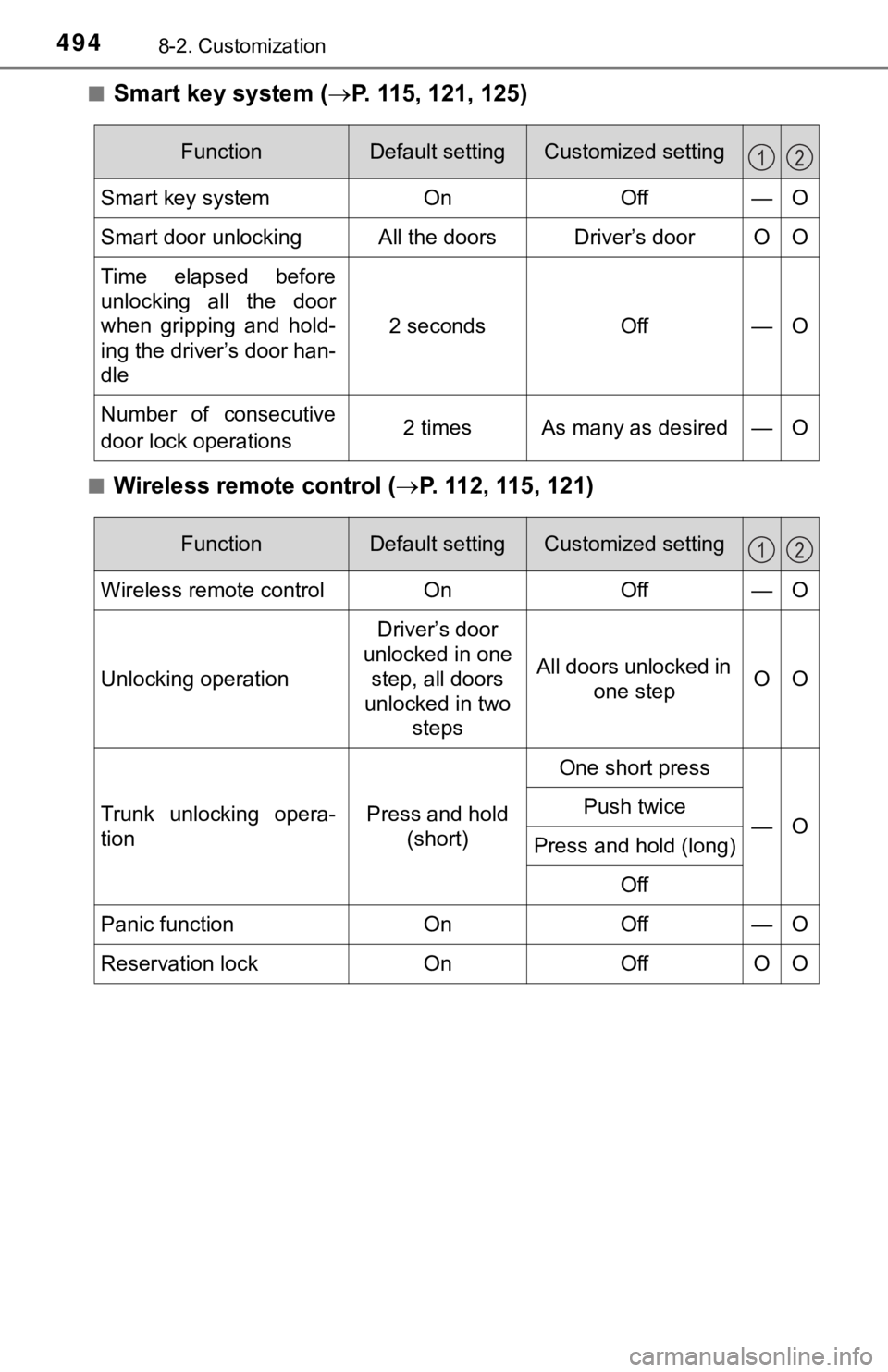
4948-2. Customization
■Smart key system (P. 115, 121, 125)
■Wireless remote control ( P. 112, 115, 121)
FunctionDefault settingCustomized setting
Smart key systemOnOff—O
Smart door unlockingAll the doorsDriver’s door O O
Time elapsed before
unlocking all the door
when gripping and hold-
ing the driver’s door han-
dle
2 secondsOff—O
Number of consecutive
door lock operations 2 times As many as desired — O
12
FunctionDefault settingCustomized setting
Wireless remote controlOnOff—O
Unlocking operation
Driver’s door
unlocked in one step, all doors
unlocked in two steps
All doors unlocked in one stepOO
Trunk unlocking opera-
tionPress and hold (short)
One short press
—OPush twice
Press and hold (long)
Off
Panic functionOnOff—O
Reservation lockOnOffOO
12