warning light TOYOTA AVALON 2019 (in English) Service Manual
[x] Cancel search | Manufacturer: TOYOTA, Model Year: 2019, Model line: AVALON, Model: TOYOTA AVALON 2019Pages: 536, PDF Size: 9.43 MB
Page 226 of 536

2264-5. Using the driving support systems
●Some pedestrians such as the following may not be detected by t he radar
sensor and camera sensor, preventing the system from operating properly:
• Pedestrians shorter than approximately 3.2 ft. (1 m) or taller than approx-
imately 6.5 ft. (2 m)
• Pedestrians wearing oversized clothing (a rain coat, long skir t, etc.), mak-
ing their silhouette obscure
• Pedestrians who are carrying large baggage, holding an umbrell a, etc.,
hiding part of their body
• Pedestrians who are bending forward or squatting
• Pedestrians who are pushing a stroller, wheelchair, bicycle or other vehi-
cle
• Groups of pedestrians which are close together
• Pedestrians who are wearing white and look extremely bright
• Pedestrians in the dark, such as at night or while in a tunnel
• Pedestrians whose clothing appears to be nearly the same color or
brightness as their surroundings
• Pedestrians near walls, fences, guardrails, or large objects
• Pedestrians who are on a metal object (manhole cover, steel plate, etc.) on the road
• Pedestrians who are walking fast
• Pedestrians who are changing speed abruptly
• Pedestrians running out from beh ind a vehicle or a large object
• Pedestrians who are extremely close to the side of the vehicle (outside
rear view mirror, etc.)
■ If the PCS warning light flashes or illuminates and a warning m essage is
displayed on the multi-information display
The pre-collision system may be temporarily unavailable or there may be a
malfunction in the system.
● In the following situations, the warning light will turn off, t he message will
disappear and the system will become operational when normal op erating
conditions return:
• When the radar sensor or camera sensor or the area around eith er sen-
sor is hot, such as in the sun
• When the radar sensor or camera sensor or the area around eith er sen-
sor is cold, such as in an extremely cold environment
• When a front sensor is dirty or covered with snow, etc.
• When the part of the windshield in front of the camera sensor is fogged
up or covered with condensation or ice
(Defogging the windshield:
P. 312)
• If the camera sensor is obstructed, such as when the hood is open or a sticker is attached to the windshield near the camera sensor
● If the PCS warning light continues to flash or remains illuminated or the
warning message does not disappear even though the vehicle has returned
to normal, the system may be malfunctioning. Have the vehicle inspected by
your Toyota dealer immediately.
Page 227 of 536

2274-5. Using the driving support systems
4
Driving
■If VSC is disabled
●If VSC is disabled ( P. 300), the pre-collision brake assist and pre-collision
braking functions are also disabled.
● The PCS warning light will turn on and “VSC Turned Off Pre-Coll ision Brake
System Unavailable” will be displayed on the multi-information display.
Page 231 of 536
2314-5. Using the driving support systems
4
Driving
WARNING
■Situations unsuitable for LDA system
Do not use the LDA system in the following situations.
The system may not operate properly and lead to an accident, re sulting in
death or serious injury.
● A spare tire, tire chains, etc. are equipped.
● When the tires have been excessively worn, or when the tire inf lation pres-
sure is low.
● Tires which differ by structure, manufacturer, brand or tread p attern are
used.
● Objects or patterns that could be mistaken for white (yellow) l ines are
present on the side of the road (guardrails, curbs, reflective poles, etc.).
● Vehicle is driven on a snow-covered road.
● White (yellow) lines are diffi cult to see due to rain, snow, fo g, dust, etc.
● Asphalt repair marks, white (yellow) line marks, etc. are prese nt due to
road repair.
● Vehicle is driven in a temporary lane or restricted lane due to construction
work.
● Vehicle is driven on a road surface which is slippery due to rainy weather,
fallen snow, freezing, etc.
● Vehicle is driven in traffic lanes other than on highways and freeways.
● Vehicle is driven in a construction zone.
■ Preventing LDA system malfunctio ns and operations performed by
mistake
● Do not modify the headlights or place stickers, etc. on the sur face of the
lights.
● Do not modify the suspension etc. If the suspension etc. needs to be
replaced, contact your Toyota dealer.
● Do not install or place anything on the hood or grille. Also, d o not install a
grille guard (bull bars, kangaroo bar, etc.).
● If your windshield needs repairs, contact your Toyota dealer.
Page 241 of 536
2414-5. Using the driving support systems
4
Driving
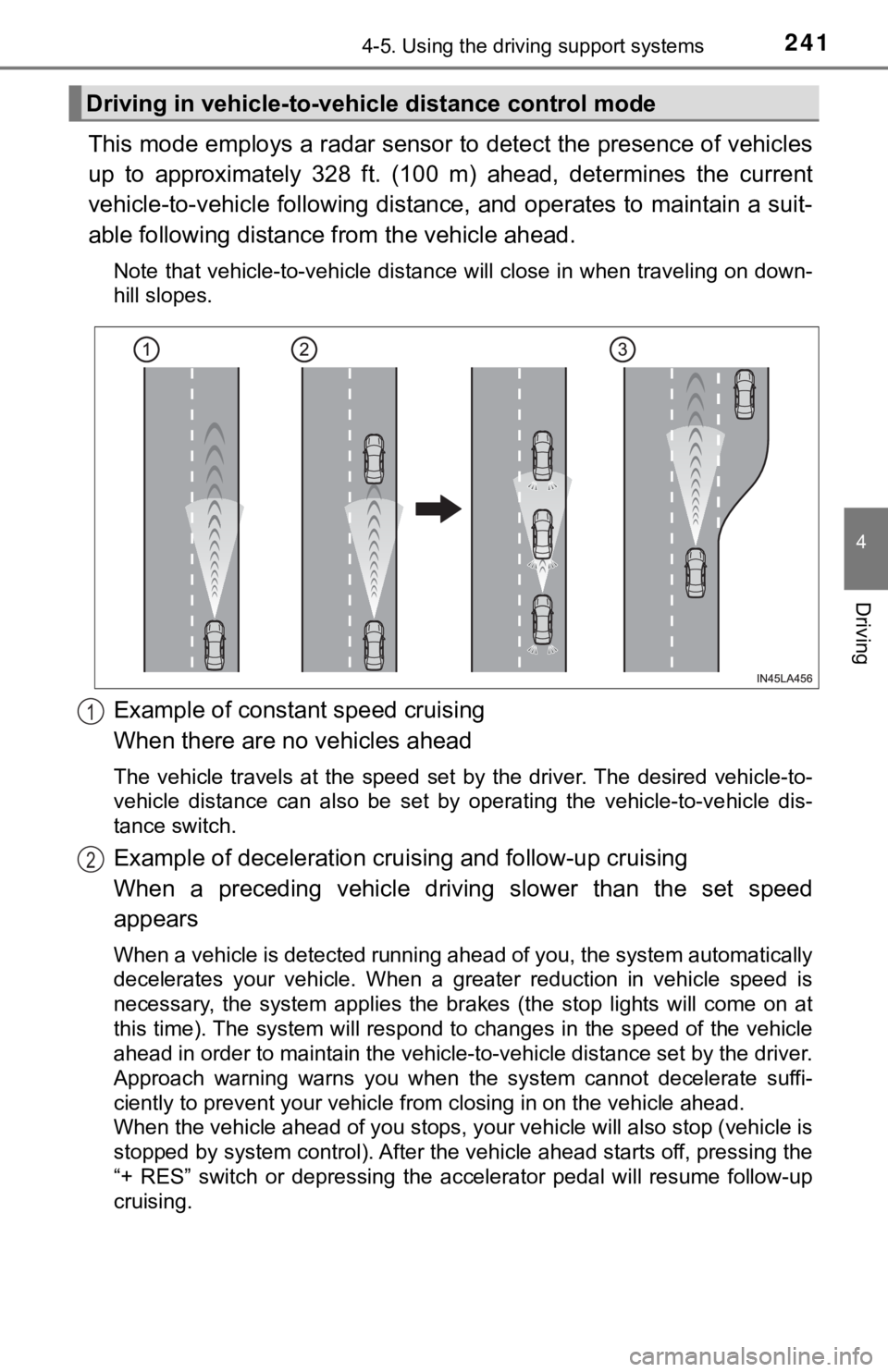
This mode employs a radar sensor to detect the presence of vehicles
up to approximately 328 ft. (100 m) ahead, determines the curre nt
vehicle-to-vehicle following distance, and operates to maintain a suit-
able following distance from the vehicle ahead.
Note that vehicle-to-vehicle distance will close in when travel ing on down-
hill slopes.
Example of constant speed cruising
When there are no vehicles ahead
The vehicle travels at the speed set by the driver. The desired vehicle-to-
vehicle distance can also be set by operating the vehicle-to-ve hicle dis-
tance switch.
Example of deceleration crui sing and follow-up cruising
When a preceding vehicle driving slower than the set speed
appears
When a vehicle is detected running ahead of you, the system automatically
decelerates your vehicle. When a greater reduction in vehicle s peed is
necessary, the system applies the brakes (the stop lights will come on at
this time). The system will respond to changes in the speed of the vehicle
ahead in order to maintain the vehicle-to-vehicle distance set by the driver.
Approach warning warns you when the system cannot decelerate su ffi-
ciently to prevent your vehicle from closing in on the vehicle ahead.
When the vehicle ahead of you stops, your vehicle will also stop (vehicle is
stopped by system control). After the vehicle ahead starts off, pressing the
“+ RES” switch or depressing the accelerator pedal will resume follow-up
cruising.
Driving in vehicle-to-vehi cle distance control mode
1
2
Page 252 of 536
2524-5. Using the driving support systems
Audio system screen (RCTA function only)
If a vehicle approaching from the right or left at the rear of the vehicle is
detected, the RCTA icon ( P. 258) for the detected side will be displayed.
RCTA
buzzer (RCTA function only)
When a vehicle approaching from the right or left rear of the v ehicle is
detected, a buzzer sounds from behind the rear seat.
Press / of the meter control switches, select .
Press
/ of the meter control sw itched, select or .
Press of the meter control switch.
Each time is pressed, t he function changes on/off.
■The outside rear view mirror indicators visibility
When under strong sunlight, the outside rear view mirror indica tor may be dif-
ficult to see.
■ RCTA buzzer hearing
RCTA function may be difficult to hear over loud noises such as high audio
volume.
■ When “Blind Spot Monitor Unava ilable” or “Rear Cross Traffic Alert
Unavailable” are shown on the multi-information display
Ice, snow, mud, etc., may be attached to the rear bumper around the sensors.
( P. 254)
The system should return to normal operation after removing the ice, snow,
mud, etc., from the rear bumper. Additionally, the sensors may not operate
normally when driving in extremely hot or cold environments.
■ When there is a malfunction in the Blind Spot Monitor
If a system malfunction is detected due to any of the following reasons, a
warning message will be displayed:
● There is a malfunction with the sensors
● The sensors have become dirty
● The outside temperature is extremely high or low
● The sensor voltage has become abnormal
Turning the BSM function/RCTA function on/off
4
5
1
2
3
Page 254 of 536
2544-5. Using the driving support systems
WARNING
■Handling the radar sensor
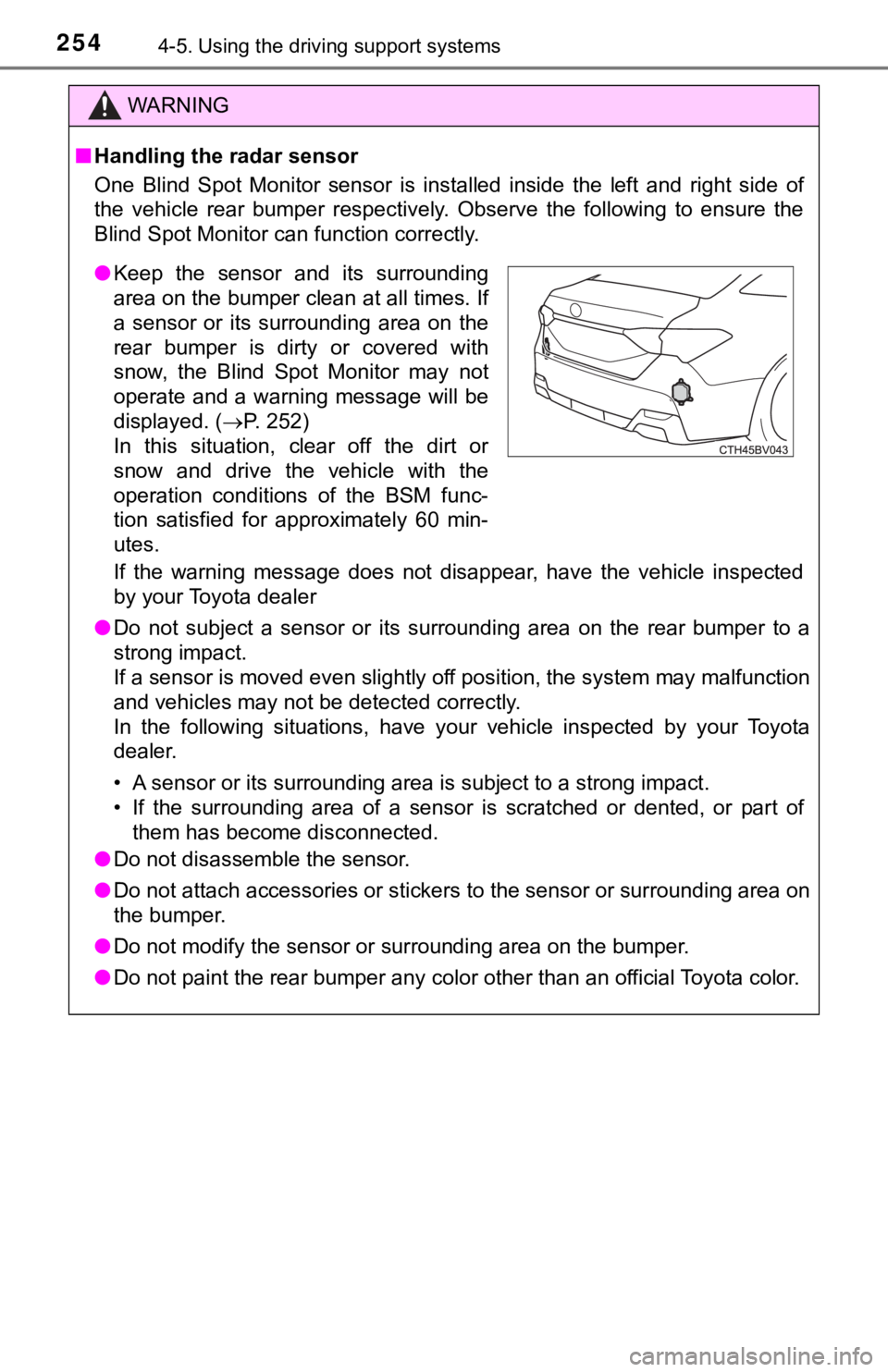
One Blind Spot Monitor sensor is installed inside the left and right side of
the vehicle rear bumper respectively. Observe the following to ensure the
Blind Spot Monitor can function correctly.
If the warning message does not disappear, have the vehicle inspected
by your Toyota dealer
● Do not subject a sensor or its surrounding area on the rear bum per to a
strong impact.
If a sensor is moved even slightly off position, the system may malfunction
and vehicles may not be detected correctly.
In the following situations, have your vehicle inspected by your Toyota
dealer.
• A sensor or its surrounding area is subject to a strong impact .
• If the surrounding area of a sensor is scratched or dented, or part of
them has become disconnected.
● Do not disassemble the sensor.
● Do not attach accessories or stickers to the sensor or surround ing area on
the bumper.
● Do not modify the sensor or surrounding area on the bumper.
● Do not paint the rear bumper any color other than an official Toyota color.
●Keep the sensor and its surrounding
area on the bumper clean at all times. If
a sensor or its surrounding area on the
rear bumper is dirty or covered with
snow, the Blind Spot Monitor may not
operate and a warning message will be
displayed. ( P. 252)
In this situation, clear off the dirt or
snow and drive the vehicle with the
operation conditions of the BSM func-
tion satisfied for approximately 60 min-
utes.
Page 272 of 536
2724-5. Using the driving support systems
WARNING
■Sensors
Certain vehicle conditions and the surrounding environment may affect the
ability of a sensor to correctl y detect an obstacle. Particular instances where
this may occur are listed below.
● There is dirt, snow or ice on the sensor. (Wiping the sensors w ill resolve
this problem.)
● The sensor is frozen. (Thawing the area will resolve this probl em.)
In especially cold weather, if a sensor is frozen the screen ma y show an
abnormal display, or obstacles may not be detected.
● The sensor is covered in any way.
● The vehicle is leaning considerably to one side.
● On an extremely bumpy road, on an incline, on gravel, or on grass.
● The vicinity of the vehicle is noisy due to vehicle horns, moto rcycle
engines, air brakes of large vehicles, or other loud noises pro ducing ultra-
sonic waves.
● There is another vehicle equipped with parking assist sensors i n the vicin-
ity.
● The sensor is coated with a sheet of spray or heavy rain.
● The sensor is drenched with water on a flooded road.
● The vehicle is equipped with a fender pole or wireless antenna.
● Towing eyelets are installed.
● The bumper or sensor receives a strong impact.
● The vehicle is approaching a tall or curved curb.
● The detection range is reduced due to an object such as a sign.
● In harsh sunlight or intense cold weather.
● The area directly under the bumpers is not detected.
● If obstacles draw too close to the sensor.
● A non-genuine Toyota suspension (lowered suspension, etc.) is i nstalled.
● A backlit license plate is installed.
In addition to the examples above, there are instances in which , because of
their shape, signs and other objects may be judged by a sensor to be closer
than they are.
Page 301 of 536
3014-5. Using the driving support systems
4
Driving
■Turning off both TRAC and VSC systems
To turn the TRAC and VSC systems off, press and hold for more than 3
seconds while the vehicle is stopped.
The VSC OFF indicator light will come on and the “Traction Cont rol Turned
Off” will be shown on the multi-information display
*.
Press again to turn the systems back on.
*: Pre-collision brake assist and pre-collision braking will also be disabled. The pre-collision system warning light will come on and the message will
be shown on the multi-information display. ( P. 227)
■ When the message is displayed on the multi-information display show-
ing that TRAC has been disabled even if has not been pressed
TRAC cannot be operated. Contact your Toyota dealer.
■ Operating conditions of hill-start assist control
When the following four conditions are met, the hill-start assi st control will
operate:
● The shift lever is in a position other than P or N (when starting off forward/
backward on an upward incline)
● The vehicle is stopped
● The accelerator pedal is not depressed
● The parking brake is not engaged
■ Automatic system cancelation of hill-start assist control
The hill-start assist control will turn off in any of the follo wing situations:
● The shift lever is shifted to P or N
● The accelerator pedal is depressed
● The parking brake is engaged
● 2 seconds at maximum elapsed after the brake pedal is released
Page 303 of 536
3034-5. Using the driving support systems
4
Driving
WARNING
■The ABS does not operate effectively when
● The limits of tire gripping performance have been exceeded (suc h as
excessively worn tires on a snow covered road).
● The vehicle hydroplanes while driving at high speed on wet or s lick roads.
■ Stopping distance when the ABS is operating may exceed that of nor-
mal conditions
The ABS is not designed to shorten the vehicle’s stopping distance. Always
maintain a safe distance from the vehicle in front of you, espe cially in the
following situations:
● When driving on dirt, gravel or snow-covered roads
● When driving with tire chains
● When driving over bumps in the road
● When driving over roads with potholes or uneven surfaces
■ TRAC/VSC may not operate effectively when
Directional control and power may not be achievable while driving on slip-
pery road surfaces, even if the TRAC/VSC system is operating.
Drive the vehicle carefully in conditions where stability and p ower may be
lost.
■ Hill- start assist control does not operate effectively when
● Do not overly rely on hill-start assist control. Hill-start ass ist control may
not operate effectively on steep inclines and roads covered wit h ice.
● Unlike the parking brake, hill-st art assist control is not intended to hold the
vehicle stationary for an extended period of time. Do not attempt to use
hill-start assist control to hold the vehicle on an incline, as doing so may
lead to an accident.
■ When the TRAC/VSC is activated
The slip indicator light flashes. Always drive carefully. Reckless driving may
cause an accident. Exercise particular care when the indicator light flashes.
■ When the TRAC/VSC systems are turned off
Be especially careful and drive at a speed appropriate to the r oad condi-
tions. As these are the systems to help ensure vehicle stabilit y and driving
force, do not turn the TRAC/VSC systems off unless necessary.
■ Secondary Collision Brake
Do not overly rely on the Secondary Collision Brake. This syste m is
designed to help reduce the possibility of further damage due t o a second-
ary collision, however, that effect changes according to variou s conditions.
Overly relying on the system may result in death or serious inj ury.
Page 323 of 536
323
5
Interior features
5-3. Using the storage features
List of storage features
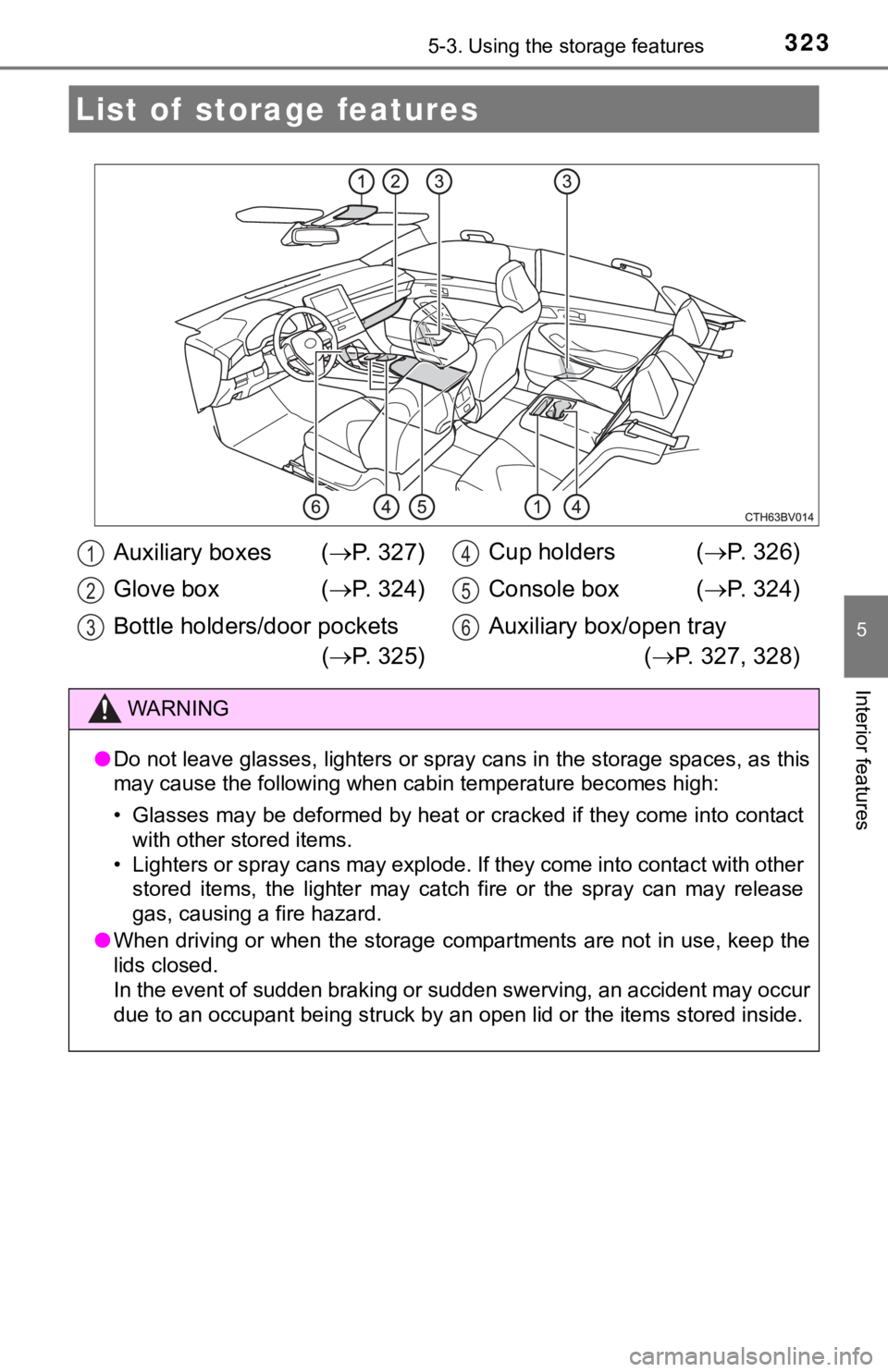
Auxiliary boxes (P. 3 2 7 )
Glove box ( P. 3 2 4 )
Bottle holders/door pockets ( P. 3 2 5 ) Cup holders (
P. 326)
Console box ( P. 324)
Auxiliary box/open tray ( P. 327, 328)
WARNING
●Do not leave glasses, lighters or spray cans in the storage spa ces, as this
may cause the following when cabin temperature becomes high:
• Glasses may be deformed by heat or cracked if they come into c ontact
with other stored items.
• Lighters or spray cans may explode. If they come into contact with other
stored items, the lighter may catch fire or the spray can may r elease
gas, causing a fire hazard.
● When driving or when the storage compartments are not in use, k eep the
lids closed.
In the event of sudden braking or sudden swerving, an accident may occur
due to an occupant being struck by an open lid or the items sto red inside.
1
2
3
4
5
6