maintenance TOYOTA AVALON 2019 Owners Manual (in English)
[x] Cancel search | Manufacturer: TOYOTA, Model Year: 2019, Model line: AVALON, Model: TOYOTA AVALON 2019Pages: 536, PDF Size: 9.43 MB
Page 1 of 536

Pictorial indexSearch by illustration
1For safety
and securityMake sure to read through them
2Instrument
clusterHow to read the gauges and meters, the variety of
warning lights and indicators, etc.
3
Operation of
each
componentOpening and closing the doors and windows,
adjustment before driving, etc.
4DrivingOperations and advice which are necessary for
driving
5Interior featuresUsage of the interior features, etc.
6Maintenance
and careCaring for your vehicle and maintenance
procedures
7When trouble
arisesWhat to do in case of malfunction or emergency
8Vehicle
specificationsVehicle specifications, customizable features, etc.
9For ownersReporting safety defects for U.S. owners, and seat
belt and SRS airbag instructions for Canadian
owners
IndexSearch by symptom
Search alphabetically
Page 5 of 536

5
1
8 7 5 4
3
2
9
6
5-4. Other interior featuresOther interior features ....... 330
• Sun visors ..................... 330
• Vanity mirrors................ 330
• Power outlet .................. 331
• USB charging ports....... 332
• Wireless charger ........... 334
• Armrest ......................... 343
• Assist grips ................... 343
• Coat hooks.................... 344
Garage door opener .......... 345
Safety Connect.................. 352 6-1. Maintenance and care
Cleaning and protecting the vehicle exterior .......... 360
Cleaning and protecting the vehicle interior ........... 363
6-2. Maintenance Maintenance requirements ................... 366
General maintenance ........ 368
Emission inspection and maintenance (I/M)
programs ......................... 372
6-3. Do-it-yourself maintenance
Do-it-yourself service precautions ...................... 373
Hood .................................. 375
Positioning a floor jack....... 376
Engine compartment ......... 377
Tires................................... 387
Tire inflation pressure ........ 401
Wheels............................... 404
Air conditioning filter .......... 406
Electronic key battery ........ 408
Checking and replacing fuses ................................ 410
Light bulbs ......................... 4136Maintenance and care
Page 6 of 536

TABLE OF CONTENTS6
7-1. Essential informationEmergency flashers .......... 416
If your vehicle has to be stopped in an
emergency ...................... 417
7-2. Steps to take in an emergency
If your vehicle needs to be towed ..................... 418
If you think something is wrong........................... 421
Fuel pump shut off system........................ 422
If a warning light turns on or a warning buzzer
sounds ............................ 423
If a warning message is displayed ..................... 433
If you have a flat tire .......... 438
If the engine will not start ..................... 450
If the electronic key does not operate
properly ........................... 452
If the vehicle battery is discharged ................... 455
If your vehicle overheats ........................ 459
If the vehicle becomes stuck................................ 462 8-1. Specifications
Maintenance data (fuel, oil level, etc.) .......... 466
Fuel information ................. 475
Tire information.................. 478
8-2. Customization Customizable features ....... 491
8-3. Items to initialize Items to initialize ................ 499
Reporting safety defects for U.S. owners ........................ 502
Seat belt instructions for Canadian owners
(in French)................................ 503
SRS airbag instructions for Canadian owners
(in French)................................ 505
7When trouble arises8Vehicle specifications
9For owners
Page 69 of 536
69
1
For safety and security
1-2. Theft deterrent system
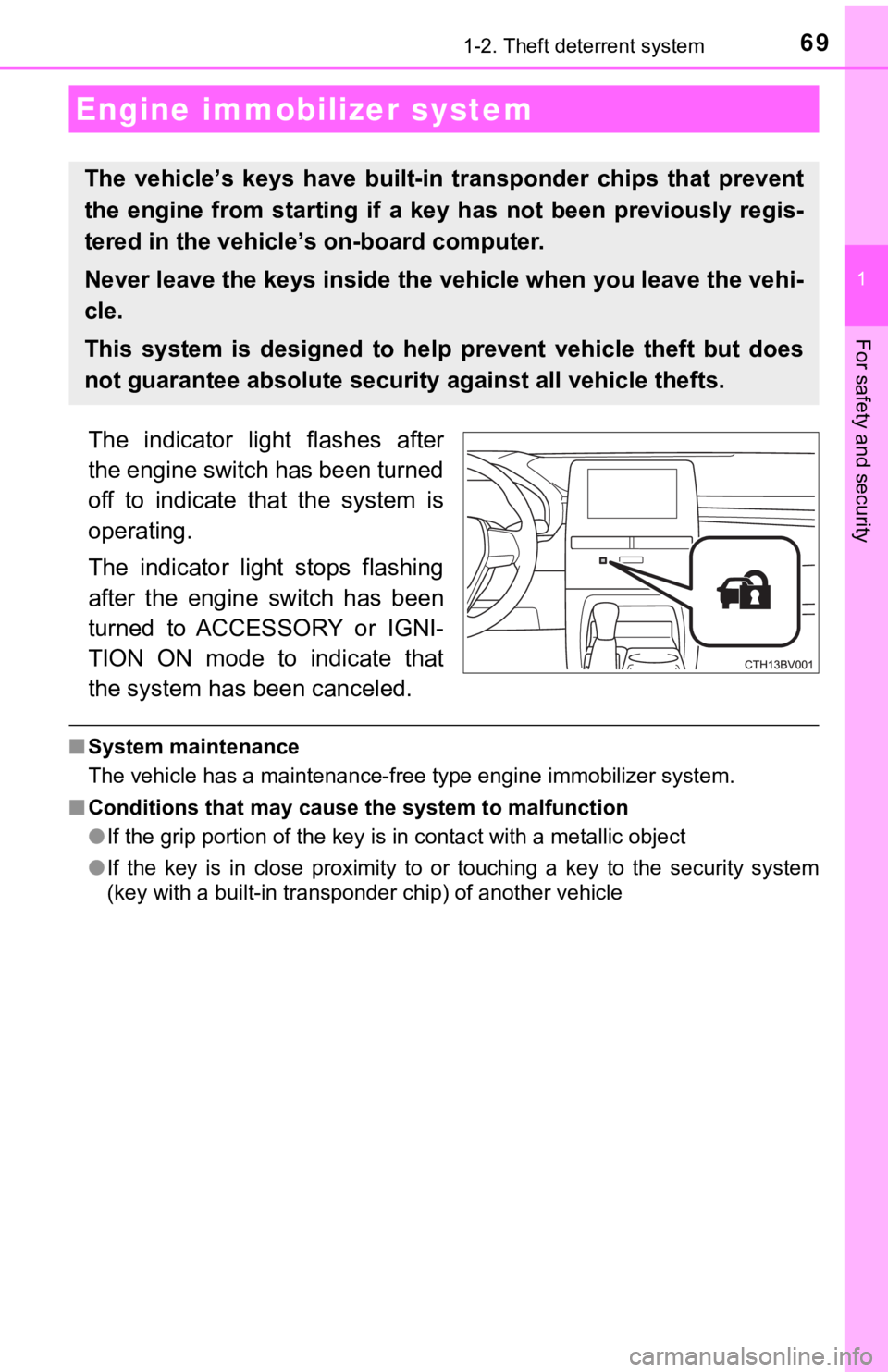
The indicator light flashes after
the engine switch has been turned
off to indicate that the system is
operating.
The indicator light stops flashing
after the engine switch has been
turned to ACCESSORY or IGNI-
TION ON mode to indicate that
the system has been canceled.
■System maintenance
The vehicle has a maintenance-free type engine immobilizer syst em.
■ Conditions that may cause the system to malfunction
●If the grip portion of the key is in contact with a metallic ob ject
● If the key is in close proximity to or touching a key to the security system
(key with a built-in transponder chip) of another vehicle
Engine immobilizer system
The vehicle’s keys ha ve built-in transponder chips that prevent
the engine from starting if a key has not been previously regis -
tered in the vehicle’s on-board computer.
Never leave the keys inside the vehicle when you leave the vehi-
cle.
This system is designed to help prevent vehicle theft but does
not guarantee absolute security against all vehicle thefts.
Page 73 of 536
731-2. Theft deterrent system
1
For safety and security
■System maintenance
The vehicle has a maintenance-free type alarm system.
■ Items to check before locking the vehicle
To prevent unexpected triggering of the alarm and vehicle theft , make sure of
the following:
● Nobody is in the vehicle.
● The windows and moon roof (if equipped) are closed before the a larm is set.
● No valuables or other personal items are left in the vehicle.
■ Triggering of the alarm
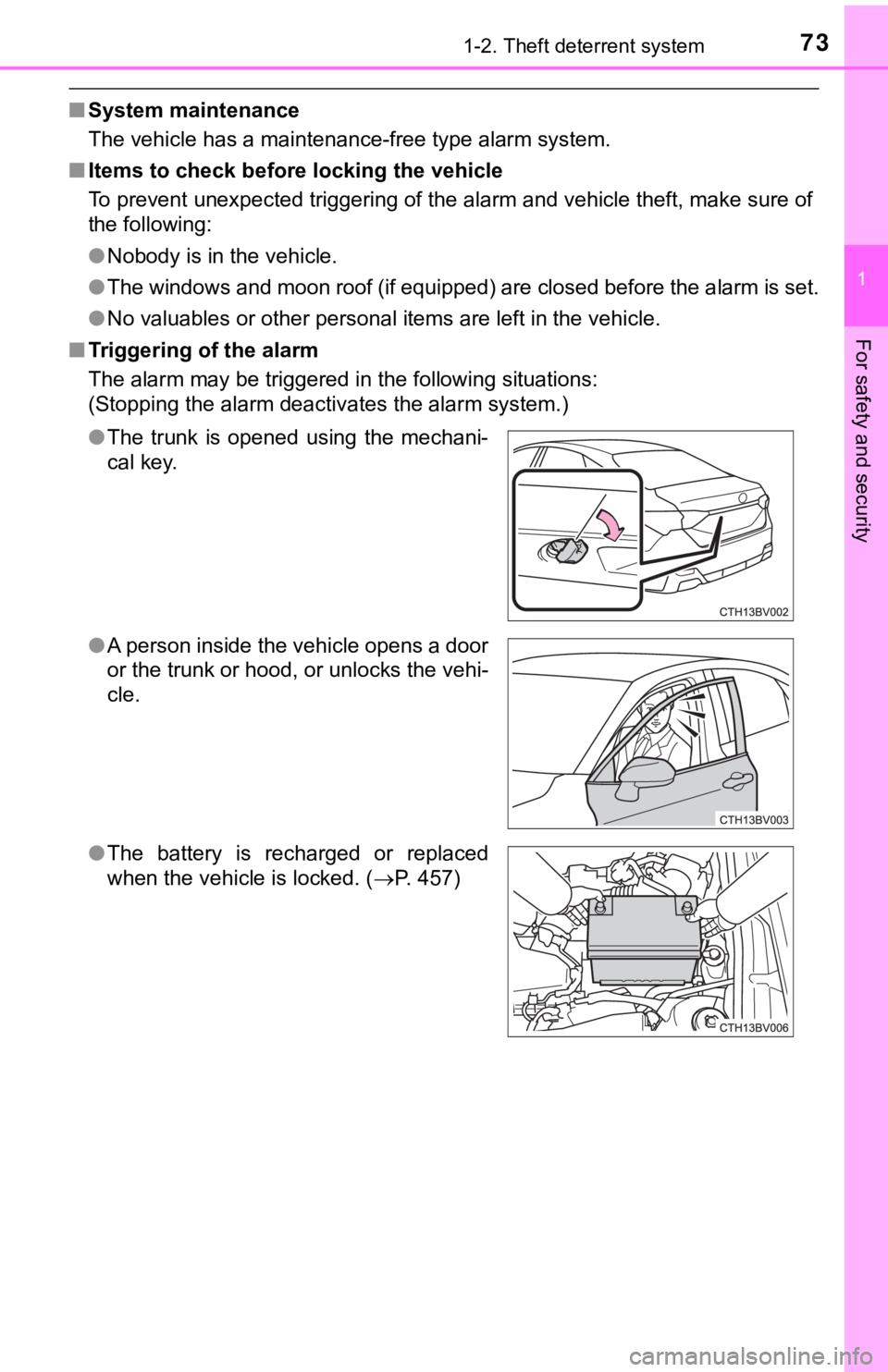
The alarm may be triggered in the following situations:
(Stopping the alarm deactivates the alarm system.)
●The trunk is opened using the mechani-
cal key.
● A person inside the vehicle opens a door
or the trunk or hood, or unlocks the vehi-
cle.
● The battery is recharged or replaced
when the vehicle is locked. ( P. 457)
Page 95 of 536
952. Instrument cluster
2
Instrument cluster
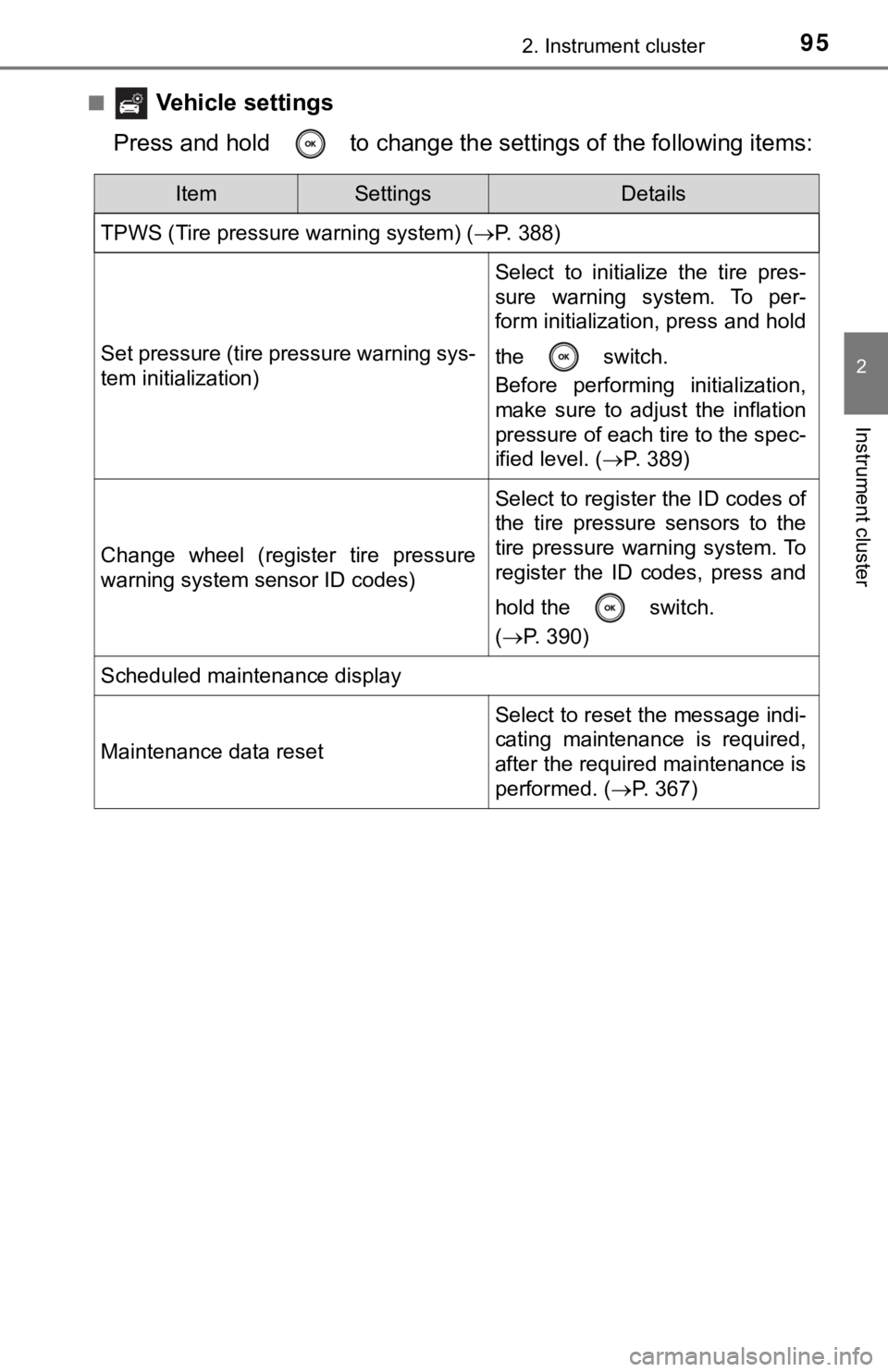
■ Vehicle settings
Press and hold to change the se ttings of the following items:
ItemSettingsDetails
TPWS (Tire pressure warning system) ( P. 388)
Set pressure (tire pressure warning sys-
tem initialization)
Select to initialize the tire pres-
sure warning system. To per-
form initialization, press and hold
the switch.
Before performing initialization,
make sure to adjust the inflation
pressure of each tire to the spec-
ified level. (P. 389)
Change wheel (register tire pressure
warning system sensor ID codes)
Select to register the ID codes of
the tire pressure sensors to the
tire pressure warning system. To
register the ID codes, press and
hold the switch.
(P. 390)
Scheduled maintenance display
Maintenance data reset
Select to reset the message indi-
cating maintenance is required,
after the required maintenance is
performed. ( P. 367)
Page 359 of 536

359
6Maintenance and care
6-1. Maintenance and careCleaning and protecting the vehicle exterior .......... 360
Cleaning and protecting the vehicle interior ........... 363
6-2. Maintenance Maintenance requirements ................... 366
General maintenance........ 368
Emission inspection and maintenance (I/M)
programs......................... 372
6-3. Do-it-yourself maintenance
Do-it-yourself service precautions ..................... 373
Hood ................................. 375
Positioning a floor jack ...... 376
Engine compartment ......... 377
Tires .................................. 387
Tire inflation pressure ....... 401
Wheels .............................. 404
Air conditioning filter.......... 406
Electronic key battery........ 408
Checking and replacing fuses ................ 410
Light bulbs......................... 413
Page 360 of 536
3606-1. Maintenance and care
●Working from top to bottom, liberally apply water to the vehicl e
body, wheel wells and underside of the vehicle to remove any di rt
and dust.
● Wash the vehicle body using a sponge or soft cloth, such as a
chamois.
● For hard-to-remove marks, use car wash soap and rinse thoroughl y
with water.
● Wipe away any water.
● Wax the vehicle when the wate rproof coating deteriorates.
If water does not bead on a clean surface, apply wax when the vehicle
body is cool.
■Automatic car washes
●Fold the mirrors before washing the vehicle. Start washing from the front of
the vehicle. Make sure to extend the mirrors before driving.
● Brushes used in automatic car washes may scratch the vehicle su rface and
harm your vehicle's paint.
● Vehicles with a rear spoiler: In certain automatic car washes, the rear spoiler
may interfere with machine operation. This may prevent the vehicle from
being cleaned properly or result in damage to the rear spoiler.
■ High pressure car washes
●Do not allow the nozzles of the car wash to come within close p roximity of
the windows.
● Before using the car wash, check that the fuel filler door on y our vehicle is
closed properly.
Cleaning and prot ecting the vehicle
exterior
Perform the following to protect the vehicle and maintain it in
prime condition:
Page 361 of 536

3616-1. Maintenance and care
6
Maintenance and care
■When using a car wash
If the door handle becomes wet while the electronic key is within the effective
range, the door may lock and unlock repeatedly. In that case, f ollow the fol-
lowing correction procedures to wash the vehicle:
● Place the key in a position 6 ft. (2 m) or more separate from t he vehicle
while the vehicle is being washed. (Take care to ensure that th e key is not
stolen.)
● Set the electronic key to battery-saving mode to disable the sm art key sys-
tem. ( P. 127)
■ Aluminum wheels
●Remove any dirt immediately by using a neutral detergent.
● Wash detergent off with water immediately after use.
● To protect the paint from damage, make sure to observe the following pre-
cautions.
• Do not use acidic, alkaline or abrasive detergent
• Do not use hard brushes
• Do not use detergent on the wheels when they are hot, such as after driv-
ing or parking in hot weather
■ Bumpers
Do not scrub with abrasive cleaners.
WARNING
■When washing the vehicle
Do not apply water to the inside of the engine compartment. Doing so may
cause the electrical components, etc. to catch fire.
■ Precautions regarding the exhaust pipes
Exhaust gasses cause the exhaust pipes to become quite hot.
When washing the vehicle, be careful not to touch the pipes unt il it has
cooled sufficiently, as touching a hot exhaust pipes can cause burns.
■ Precaution regarding the rear b umper with Blind Spot Monitor
If the paint of the rear bumper is chipped or scratched, the sy stem may mal-
function. If this occurs, avoid using the system and consult yo ur Toyota
dealer.
Page 362 of 536

3626-1. Maintenance and care
NOTICE
■To prevent paint deterioration an d corrosion on the body and compo-
nents (aluminum wheels, etc.)
● Wash the vehicle immediately in the following cases:
• After driving near the sea coast
• After driving on salted roads
• If coal tar or tree sap is present on the paint surface
• If dead insects, insect droppings or bird droppings are presen t on the
paint surface
• After driving in an area contaminated with soot, oily smoke, mine dust,
iron powder or chemical substances
• If the vehicle becomes heavily soiled with dust or mud
• If liquids such as benzene and gasoline are spilled on the paint surface
● If the paint is chipped or scratched, have it repaired immediat ely.
● To prevent the wheels from corroding, remove any dirt and store in a place
with low humidity when storing the wheels.
■ Cleaning the exterior lights
● Wash carefully. Do not use organic substances or scrub with a h ard brush.
This may damage the surfaces of the lights.
● Do not apply wax to the surfaces of the lights.
Wax may cause damage to the lenses.
■ When using a high pressure car wash
Do not bring the nozzle tip close to boots (rubber or resin man ufactured
cover), connectors or the following parts. The parts may be damaged if they
come into contact with high-pressure water.
• Traction related parts
• Steering parts
• Suspension parts
• Brake parts