power steering TOYOTA AVALON 2019 Owners Manual (in English)
[x] Cancel search | Manufacturer: TOYOTA, Model Year: 2019, Model line: AVALON, Model: TOYOTA AVALON 2019Pages: 536, PDF Size: 9.43 MB
Page 3 of 536

3
1
8 7 5 4
3
2
9
6
3-1. Key informationKeys .................................. 112
3-2. Opening, closing and locking the doors
Doors................................. 115
Trunk ................................. 121
Smart key system.............. 125
3-3. Adjusting the seats Front seats ........................ 132
Rear seats ......................... 134
Driving position memory ........................... 136
Head restraints .................. 141
3-4. Adjusting the steering wheel and mirrors
Steering wheel .................. 143
Inside rear view mirror....... 145
Outside rear view mirrors..................... 147
3-5. Opening and closing the windows
Power windows ................. 150
Moon roof .......................... 154 4-1. Before driving
Driving the vehicle ............. 160
Cargo and luggage ............ 168
Vehicle load limits .............. 171
Trailer towing ..................... 172
Dinghy towing .................... 173
4-2. Driving procedures Engine (ignition) switch .............................. 174
Automatic transmission .................... 179
Turn signal lever ................ 185
Parking brake .................... 186
Brake Hold ......................... 190
4-3. Operating the lights and wipers
Headlight switch ................ 192
Automatic High Beam ........ 196
Windshield wipers and washer ...................... 200
4-4. Refueling Opening the fuel tank cap ........................... 204
3Operation of each
component4Driving
Page 77 of 536
772. Instrument cluster
2
Instrument cluster
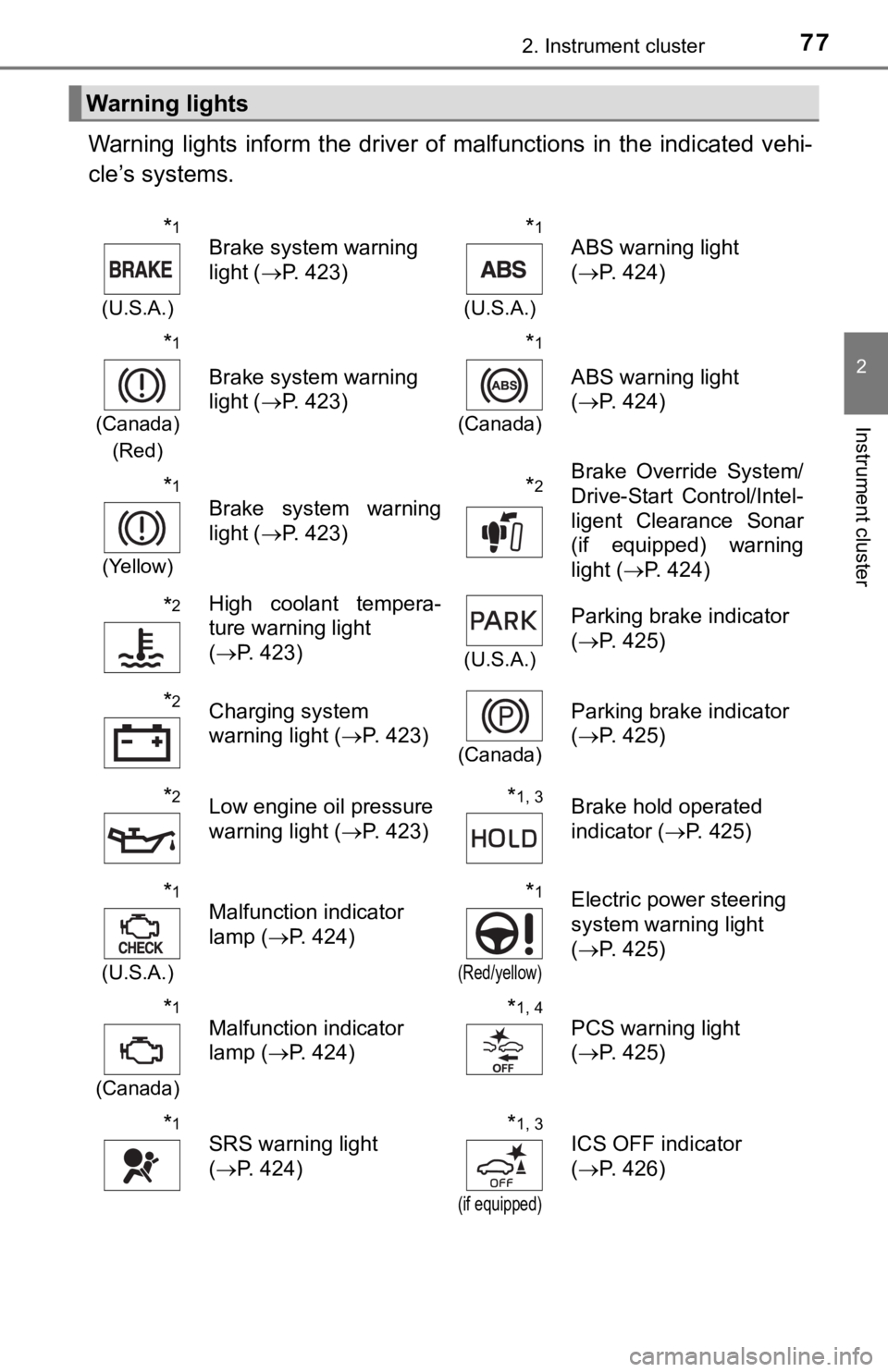
Warning lights inform the driver of malfunctions in the indicated vehi-
cle’s systems.
Warning lights
*1
(U.S.A.)
Brake system warning
light ( P. 423)*1
(U.S.A.)
ABS warning light
(P. 424)
*1
(Canada)
(Red)
Brake system warning
light ( P. 423)
*1
(Canada)
ABS warning light
(P. 424)
*1
(Yellow)
Brake system warning
light ( P. 423)*2Brake Override System/
Drive-Start Control/Intel-
ligent Clearance Sonar
(if equipped) warning
light (P. 424)
*2High coolant tempera-
ture warning light
(P. 423)
(U.S.A.)
Parking brake indicator
(P. 425)
*2Charging system
warning light ( P. 423)
(Canada)
Parking brake indicator
(P. 425)
*2Low engine oil pressure
warning light ( P. 423)*1, 3Brake hold operated
indicator ( P. 425)
*1
(U.S.A.)
Malfunction indicator
lamp ( P. 424)*1
(Red/yellow)
Electric power steering
system warning light
(P. 425)
*1
(Canada)
Malfunction indicator
lamp ( P. 424)*1, 4PCS warning light
(P. 425)
*1SRS warning light
(P. 424)*1, 3
(if equipped)
ICS OFF indicator
(P. 426)
Page 111 of 536

111
3
Operation of
each component
3-1. Key information
Keys .................................. 112
3-2. Opening, closing and locking the doors
Doors ................................ 115
Trunk ................................. 121
Smart key system ............. 125
3-3. Adjusting the seats Front seats ........................ 132
Rear seats......................... 134
Driving position memory ........................... 136
Head restraints.................. 141
3-4. Adjusting the steering wheel and mirrors
Steering wheel .................. 143
Inside rear view mirror ...... 145
Outside rear view mirrors .................... 147
3-5. Opening and closing the windows
Power windows ................. 150
Moon roof .......................... 154
Page 132 of 536
1323-3. Adjusting the seats
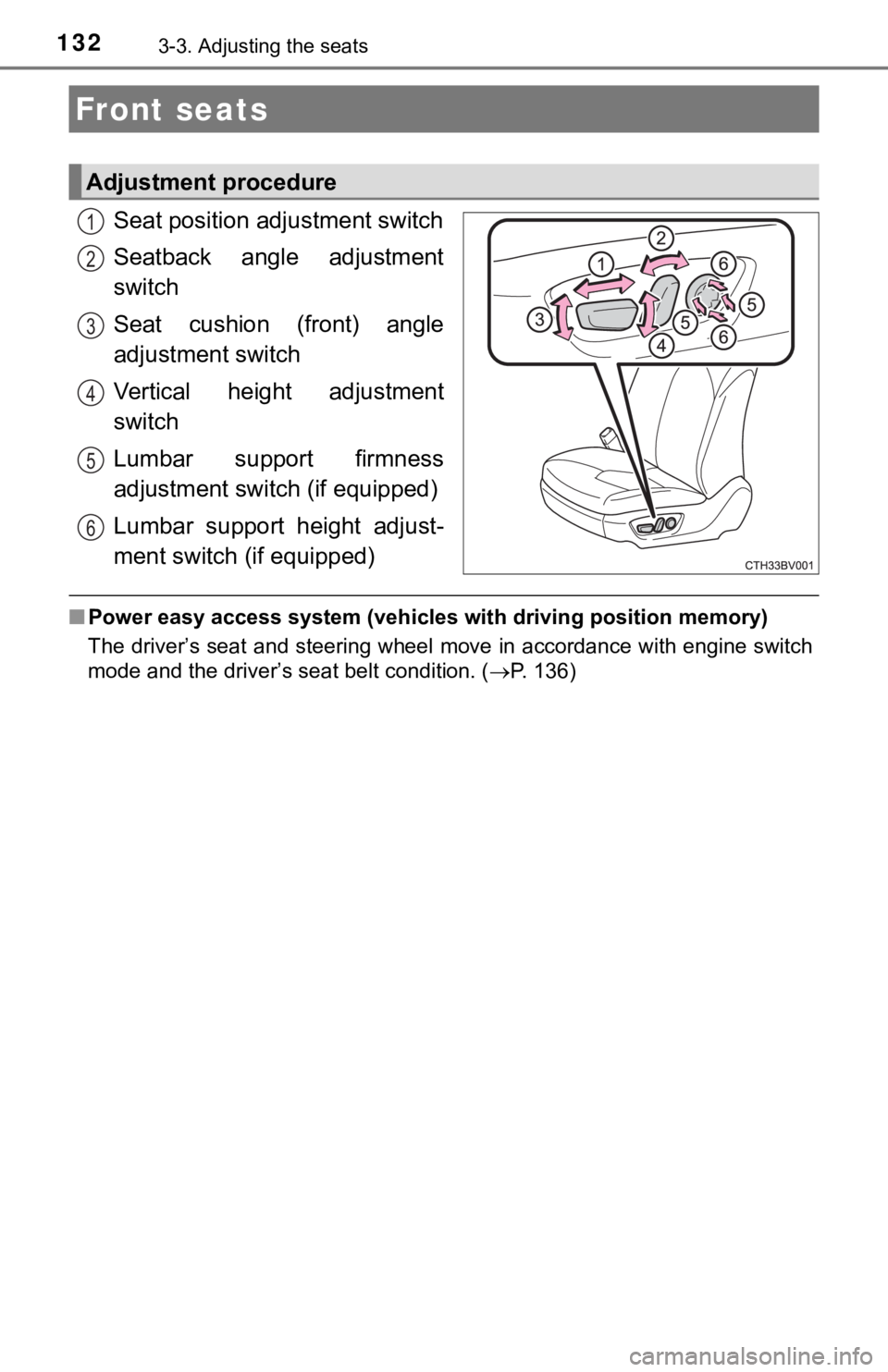
Seat position adjustment switch
Seatback angle adjustment
switch
Seat cushion (front) angle
adjustment switch
Vertical height adjustment
switch
Lumbar support firmness
adjustment switch (if equipped)
Lumbar support height adjust-
ment switch (if equipped)
■ Power easy access system (vehicles with driving position memory )
The driver’s seat and steering wheel move in accordance with en gine switch
mode and the driver’s seat belt condition. ( P. 136)
Front seats
Adjustment procedure
1
2
3
4
5
6
Page 136 of 536
1363-3. Adjusting the seats
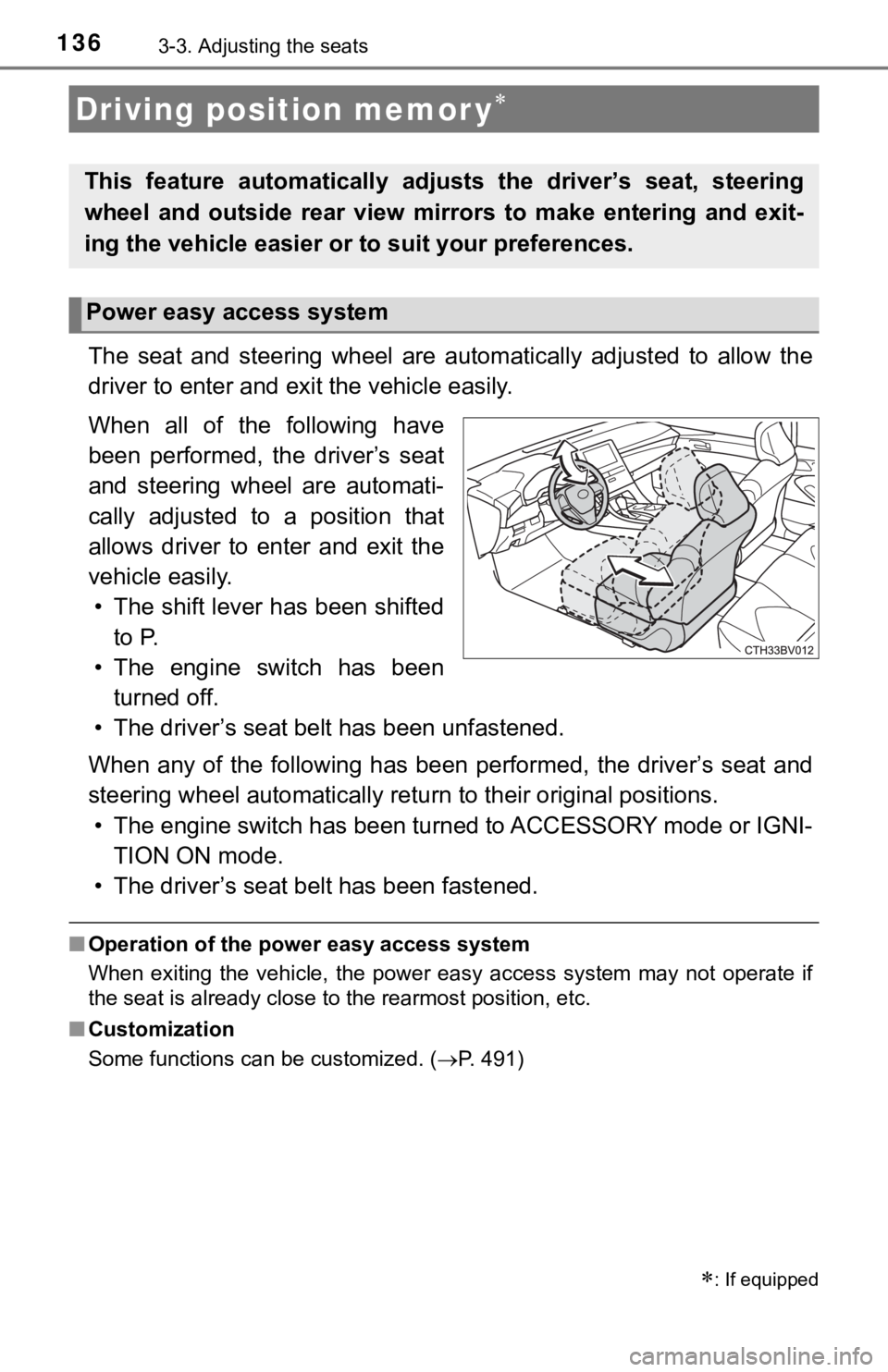
The seat and steering wheel are automatically adjusted to allow the
driver to enter and exi t the vehicle easily.
When all of the following have
been performed, the driver’s seat
and steering wheel are automati-
cally adjusted to a position that
allows driver to enter and exit the
vehicle easily. • The shift lever has been shifted to P.
• The engine switch has been turned off.
• The driver’s seat belt has been unfastened.
When any of the following has be en performed, the driver’s seat and
steering wheel automatically ret urn to their original positions.
• The engine switch has been turned to ACCESSORY mode or IGNI- TION ON mode.
• The driver’s seat belt has been fastened.
■ Operation of the power easy access system
When exiting the vehicle, the power easy access system may not operate if
the seat is already close to the rearmost position, etc.
■ Customization
Some functions can be customized. ( P. 491)
Driving position memor y
This feature automatically adjusts the driver’s seat, steering
wheel and outside rear view mirrors to make entering and exit-
ing the vehicle easier or to suit your preferences.
: If equipped
Power easy access system
Page 143 of 536
143
3
Operation of each component
3-4. Adjusting the st eering wheel and mirrors
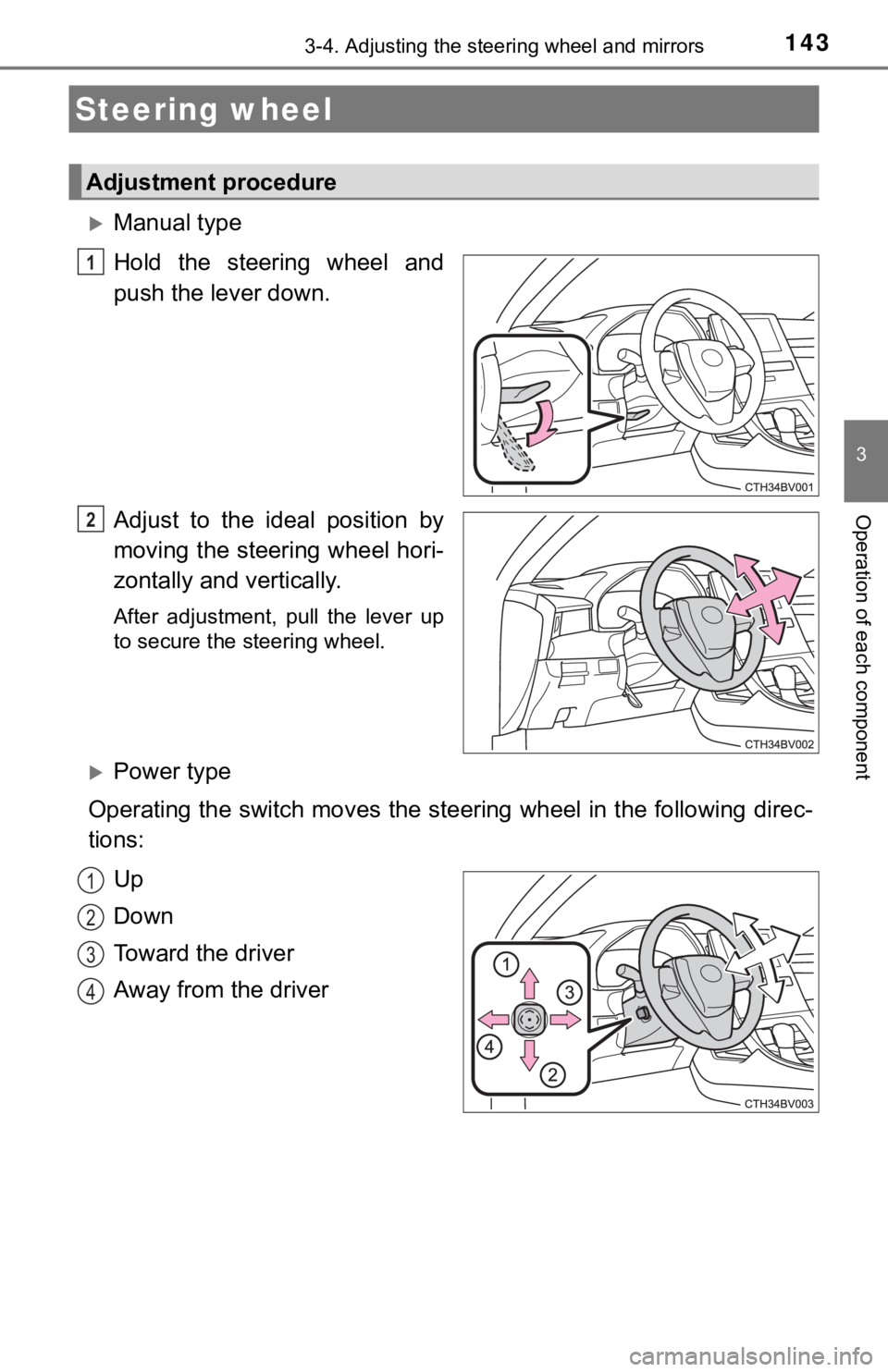
Manual type
Hold the steering wheel and
push the lever down.
Adjust to the ideal position by
moving the steering wheel hori-
zontally and vertically.
After adjustment, pull the lever up
to secure the steering wheel.
Power type
Operating the switch moves the steering wheel in the following direc-
tions:
Up
Down
Toward the driver
Away from the driver
Steering wheel
Adjustment procedure
1
2
1
2
3
4
Page 144 of 536
1443-4. Adjusting the steering wheel and mirrors
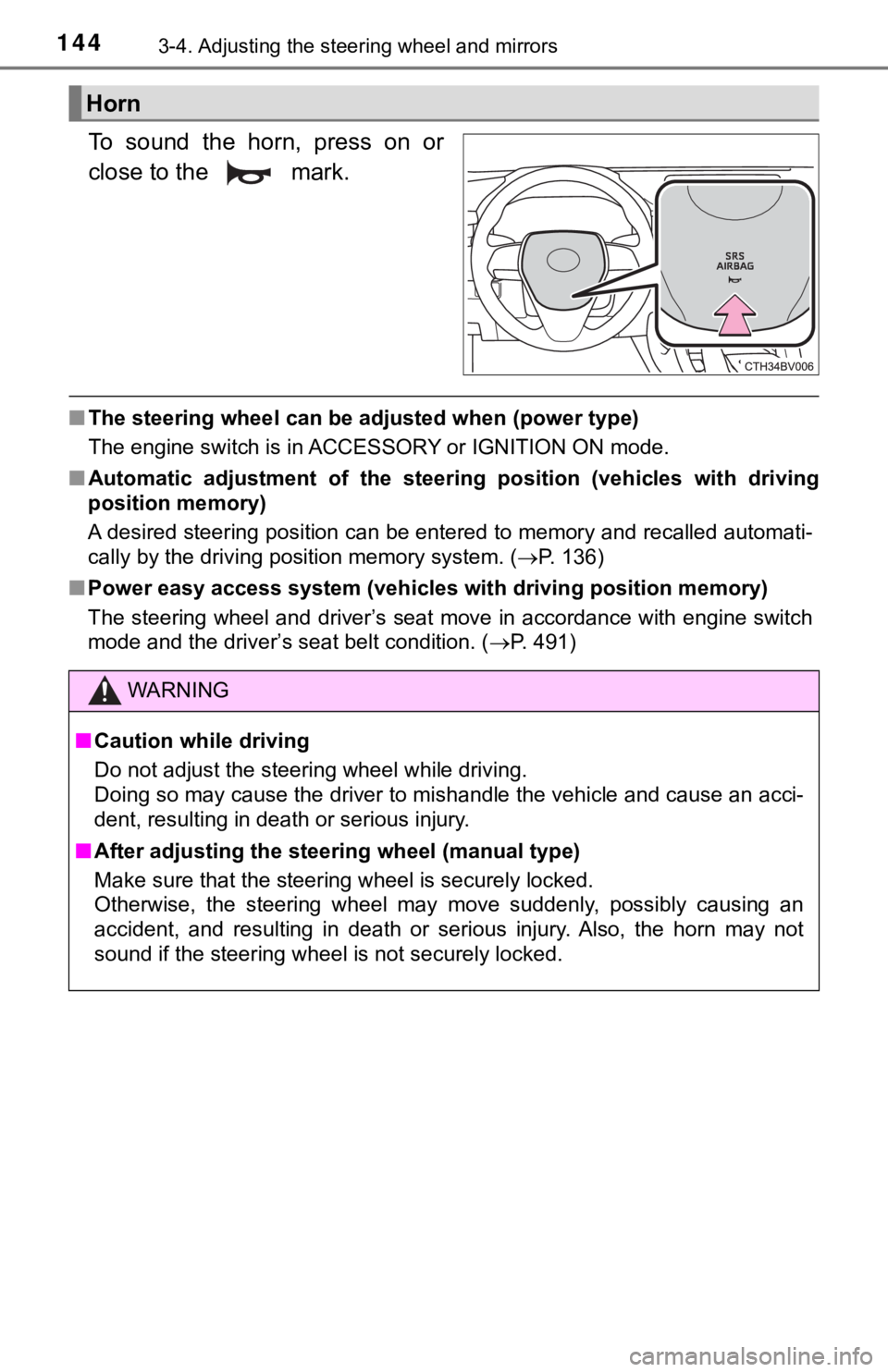
To sound the horn, press on or
close to the mark.
■The steering wheel can be adjusted when (power type)
The engine switch is in ACCESSORY or IGNITION ON mode.
■ Automatic adjustment of the steer ing position (vehicles with driving
position memory)
A desired steering position can be entered to memory and recall ed automati-
cally by the driving position memory system. ( P. 136)
■ Power easy access system (vehicles with driving position memory )
The steering wheel and driver’s seat move in accordance with en gine switch
mode and the driver’s seat belt condition. ( P. 491)
Horn
WARNING
■Caution while driving
Do not adjust the steering wheel while driving.
Doing so may cause the driver to mishandle the vehicle and caus e an acci-
dent, resulting in death or serious injury.
■ After adjusting the steer ing wheel (manual type)
Make sure that the steering wheel is securely locked.
Otherwise, the steering wheel may move suddenly, possibly causi ng an
accident, and resulting in death or serious injury. Also, the h orn may not
sound if the steering wheel is not securely locked.
Page 163 of 536

1634-1. Before driving
4
Driving
WARNING
Observe the following precautions.
Failure to do so may result in death or serious injury.
■When starting the vehicle
Always keep your foot on the brake pedal while stopped with the engine
running. This prevents the vehicle from creeping.
■ When driving the vehicle
● Do not drive if you are unfamiliar with the location of the brake and accel-
erator pedals to avoid depressing the wrong pedal.
• Accidentally depressing the accelerator pedal instead of the b rake
pedal will result in sudden acceleration that may lead to an accident.
• When backing up, you may twist your body around, leading to a diffi-
culty in operating the pedals. Make sure to operate the pedals properly.
• Make sure to keep a correct driving posture even when moving t he
vehicle only slightly. This allows you to depress the brake and accelera-
tor pedals properly.
• Depress the brake pedal using your right foot. Depressing the brake
pedal using your left foot may delay response in an emergency, result-
ing in an accident.
● Do not drive the vehicle over or stop the vehicle near flammable materials.
The exhaust system and exhaust gases can be extremely hot. Thes e hot
parts may cause a fire if there is any flammable material nearby.
● During normal driving, do not turn off the engine. Turning the engine off
while driving will not cause loss of steering or braking contro l, but the
power assist to these systems will be lost. This will make it m ore difficult to
steer and brake, so you should pull over and stop the vehicle a s soon as it
is safe to do so.
However, in the event of an emergency, such as if it becomes im possible
to stop the vehicle in the normal way: P. 417
● Use engine braking (downshift) to maintain a safe speed when driving
down a steep hill.
Using the brakes continuously may cause the brakes to overheat and lose
effectiveness. ( P. 180)
● Do not adjust the display, the positions of the steering wheel, the seat, or
the inside or outside rear view mirrors while driving.
Doing so may result in a loss of vehicle control.
● Always check that all passengers’ arms, heads or other parts of their body
are not outside the vehicle.
● Do not drive in excess of the speed limit. Even if the legal sp eed limit per-
mits it, do not drive over 85 mph (140 km/h) unless your vehicl e has high-
speed capability tires. Driving over 85 mph (140 km/h) may resu lt in tire
failure, loss of control and possible injury. Be sure to consult a tire dealer
to determine whether the tires on your vehicle are high-speed c apability
tires or not before driving at such speeds.
Page 167 of 536

1674-1. Before driving
4
Driving
NOTICE
■When driving the vehicle
● Do not depress the accelerator and brake pedals at the same tim e during
driving, as this may restrain the engine output.
● Do not use the accelerator pedal or depress the accelerator and brake
pedals at the same time to hold the vehicle on a hill.
■ When parking the vehicle
Always set the parking brake and shift the shift lever to P. Failure to do so
may cause the vehicle to move or the vehicle may accelerate sud denly if
the accelerator pedal is accidentally depressed.
■ Avoiding damage to vehicle parts
● Do not turn the steering wheel fully in either direction and ho ld it there for
an extended period of time.
Doing so may damage the power steering motor.
● When driving over bumps in the road, drive as slowly as possibl e to avoid
damaging the wheels, underside of the vehicle, etc.
■ If you get a flat tire while driving
A flat or damaged tire may cause the following situations. Hold the steering
wheel firmly and gradually depress the brake pedal to slow down the vehi-
cle.
● It may be difficult to control your vehicle.
● The vehicle will make abnormal sounds or vibrations.
● The vehicle will lean abnormally.
Information on what to do in case of a flat tire ( P. 438)
■ When encountering flooded roads
Do not drive on a road that has flooded after heavy rain etc. D oing so may
cause the following serious damage to the vehicle:
● Engine stalling
● Short in electrical components
● Engine damage caused by water immersion
In the event that you drive on a flooded road and the vehicle i s flooded, be
sure to have your Toyota dealer check the following:
● Brake function
● Changes in quantity and quality of oil and fluid used for the e ngine, tran-
saxle, etc.
● Lubricant condition for the bearings and suspension joints (whe re possi-
ble), and the function of all joints, bearings, etc.
Page 176 of 536
1764-2. Driving procedures
■Auto power off function
If the vehicle is left in ACCESSORY mode for more than 20 minut es or IGNI-
TION ON mode (with the engine is not running) for more than an hour with
the shift lever in P, the engine switch will automatically turn off. However, this
function cannot entirely prevent battery discharge. Do not leav e the vehicle
with the engine switch in ACCESSORY or IGNITION ON mode for lon g peri-
ods of time when the engine is not running.
■ Electronic key battery depletion
P. 113
■ Conditions affecting operation
P. 127
■ Notes for the entry function
P. 128
■ If the engine does not start
●The engine immobilizer system may not have been deactivated. ( P. 69)
Contact your Toyota dealer.
● Check that the shift lever is securely set in P. The engine may not start if the
shift lever is displaced out of P.
■ Steering lock
After turning the engine switch off and opening and closing the doors, the
steering wheel will be locked due to the steering lock function . Operating the
engine switch again automatically cancels the steering lock.
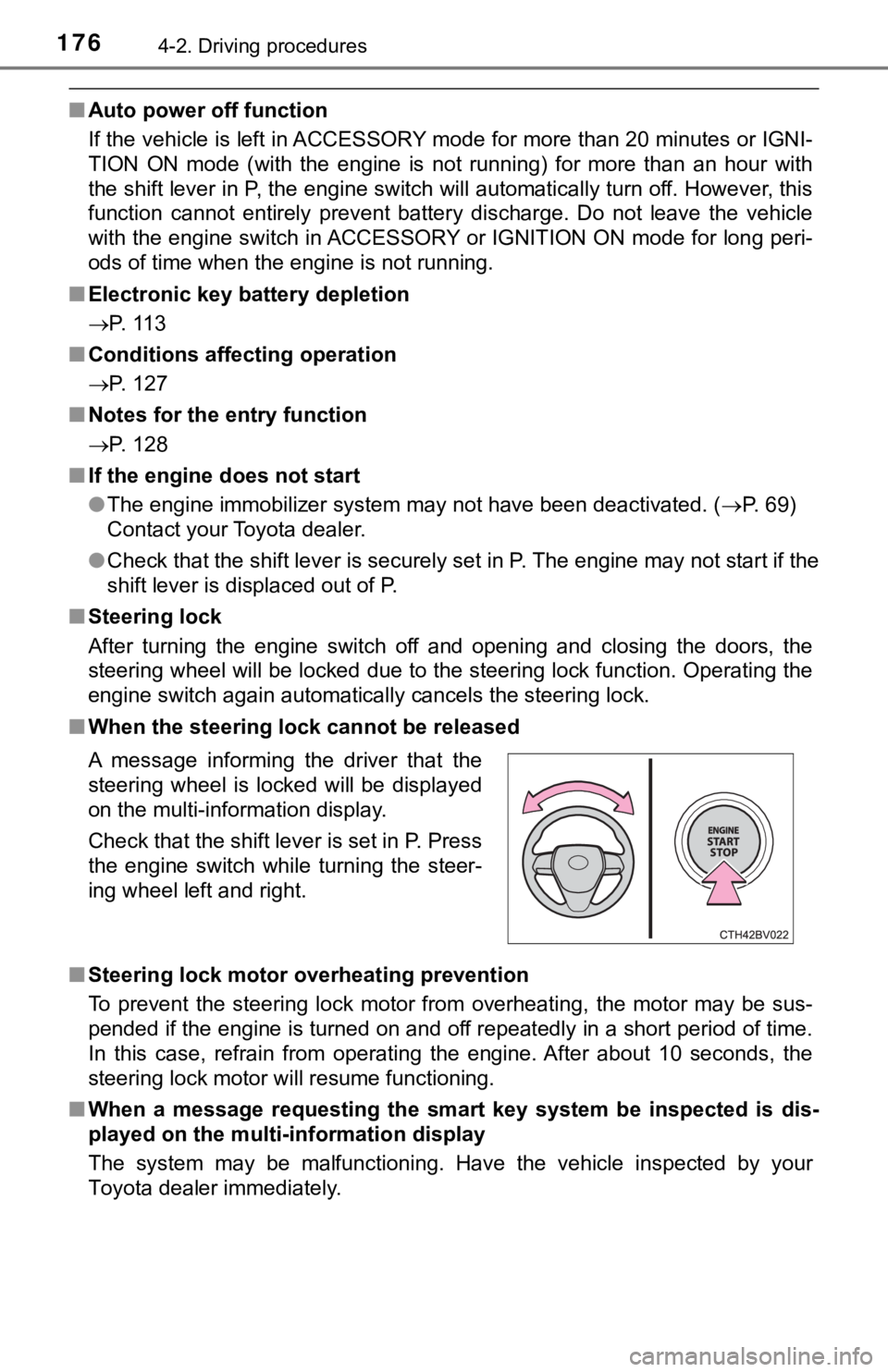
■ When the steering lock cannot be released
■ Steering lock motor overheating prevention
To prevent the steering lock motor from overheating, the motor may be sus-
pended if the engine is turned on and off repeatedly in a short period of time.
In this case, refrain from operating the engine. After about 10 seconds, the
steering lock motor will resume functioning.
■ When a message requesting the smart key system be inspected is dis-
played on the multi-information display
The system may be malfunctioning. Have the vehicle inspected by your
Toyota dealer immediately. A message informing the driver that the
steering wheel is locked will be displayed
on the multi-information display.
Check that the shift lever is set in P. Press
the engine switch while turning the steer-
ing wheel left and right.