parking brake TOYOTA AVALON 2020 (in English) Owner's Manual
[x] Cancel search | Manufacturer: TOYOTA, Model Year: 2020, Model line: AVALON, Model: TOYOTA AVALON 2020Pages: 540, PDF Size: 10.4 MB
Page 258 of 540

2584-5. Using the driving support systems
■Dynamic radar cruise control wi th full-speed range can be set when
● The shift lever is in D or range 4 or higher of S has been sele cted.
● Range 4 or higher of D has been selected by using the paddle sh ift switch.
(vehicles with paddle shift switches)
● Vehicle speed is at or above approximately 30 mph (50 km/h). Ho wever,
when a preceding vehicle is detected, the dynamic radar cruise control with
full-speed range can be set even if the vehicle speed is below approximately
30 mph (50 km/h).
■ Accelerating after setting the vehicle speed
The vehicle can accelerate by operating the accelerator pedal. After acceler-
ating, the set speed resumes. However, during vehicle-to-vehicl e distance
control mode, the vehicle speed may decrease below the set spee d in order
to maintain the distance to the preceding vehicle.
■ When the vehicle stops while follow-up cruising
●Pressing the “+ RES” switch while the vehicle ahead stops will resume fol-
low-up cruising if the vehicle ahead starts off within approxim ately 3 sec-
onds after the switch is pressed.
● If the vehicle ahead starts off within 3 seconds after your vehicle stops, fol-
low-up cruising will be resumed.
■ Automatic cancelation of vehicle-to-vehicle distance control mo de
Vehicle-to-vehicle distance control mode is automatically cance led in the fol-
lowing situations.
● Actual vehicle speed falls at or below approximately 25 mph (40 km/h) when
there are no vehicles ahead.
● The preceding vehicle leaves the lane when your vehicle is following at a
vehicle speed at or below approximately 25 mph (40 km/h). Other wise, the
sensor can not properly detect the vehicle. (“Radar Cruise Control Unavail-
able” is displayed on the multi-information display)
● VSC is activated.
● TRAC is activated for a period of time.
● When the VSC or TRAC system is turned off.
● The sensor cannot detect correctly because it is covered in some way.
● Pre-collision braking is activated.
● The parking brake is operated.
● The vehicle is stopped by system control on a steep incline.
● The following are detected when the vehicle has been stopped by system
control:
• The driver is not wearing a seat belt.
• The driver’s door is opened.
• The vehicle has been stopped for about 3 minutes
If vehicle-to-vehicle distance control mode is automatically ca nceled for any
other reason, there may be a malfunction in the system. Contact your Toyota
dealer.
Page 281 of 540

2814-5. Using the driving support systems
4
Driving
■If “Parking Assist Unavailable” is displayed on the multi-infor mation dis-
play
● Water may be continuously flowing over the sensor surface, such as in a
heavy rain. When the system determines that it is normal, the system will
return to normal.
● Initialization may not have been performed after a battery term inal was dis-
connected and reconnected. Initialize the system. If this messa ge continues
to be displayed even after initialization, have the vehicle ins pected by your
Toyota dealer.
■ Certification
For vehicles sold in Canada
This ISM device complies with Canadian ICES-001.
Cet appareil ISM est conforme a la norme NMB-001 du Canada.
■ Customization
Some functions can be customized. ( P. 100, 498)
WARNING
■When using the intuitive parking assist
Observe the following precautions.
Failing to do so may result in the vehicle being unable to be d riven safely
and possibly cause an accident.
● Do not use the sensor at speeds in excess of 6 mph (10 km/h).
● The sensors’ detection areas and reaction times are limited. When moving
forward or reversing, check the areas surrounding the vehicle ( especially
the sides of the vehicle) for safety, and drive slowly, using t he brake to
control the vehicle’s speed.
● Do not install accessories within the sensors’ detection areas.
Page 282 of 540

2824-5. Using the driving support systems
WARNING
■Sensors
Certain vehicle conditions and the surrounding environment may affect the
ability of a sensor to correctly detect an object. Particular instances where
this may occur are listed below.
● There is dirt, snow or ice on the sensor. (Wiping the sensors w ill resolve
this problem.)
● The sensor is frozen. (Thawing the area will resolve this probl em.)
In especially cold weather, if a sensor is frozen the screen ma y show an
abnormal display, or objects may not be detected.
● The sensor is covered in any way.
● The vehicle is leaning considerably to one side.
● On an extremely bumpy road, on an incline, on gravel, or on grass.
● The vicinity of the vehicle is noisy due to vehicle horns, moto rcycle
engines, air brakes of large vehicles, or other loud noises pro ducing ultra-
sonic waves.
● There is another vehicle equipped with parking assist sensors i n the vicin-
ity.
● The sensor is coated with a sheet of spray or heavy rain.
● The sensor is drenched with water on a flooded road.
● The vehicle is equipped with a fender pole or wireless antenna.
● Towing eyelets are installed.
● The bumper or sensor receives a strong impact.
● The vehicle is approaching a tall or curved curb.
● The detection range is reduced due to an object such as a sign.
● In harsh sunlight or intense cold weather.
● The area directly under the bumpers is not detected.
● If objects draw too close to the sensor.
● A non-genuine Toyota suspension (lowered suspension, etc.) is i nstalled.
● A backlit license plate is installed.
In addition to the examples above, there are instances in which , because of
their shape, signs and other objects may be judged by a sensor to be closer
than they are.
Page 284 of 540
2844-5. Using the driving support systems
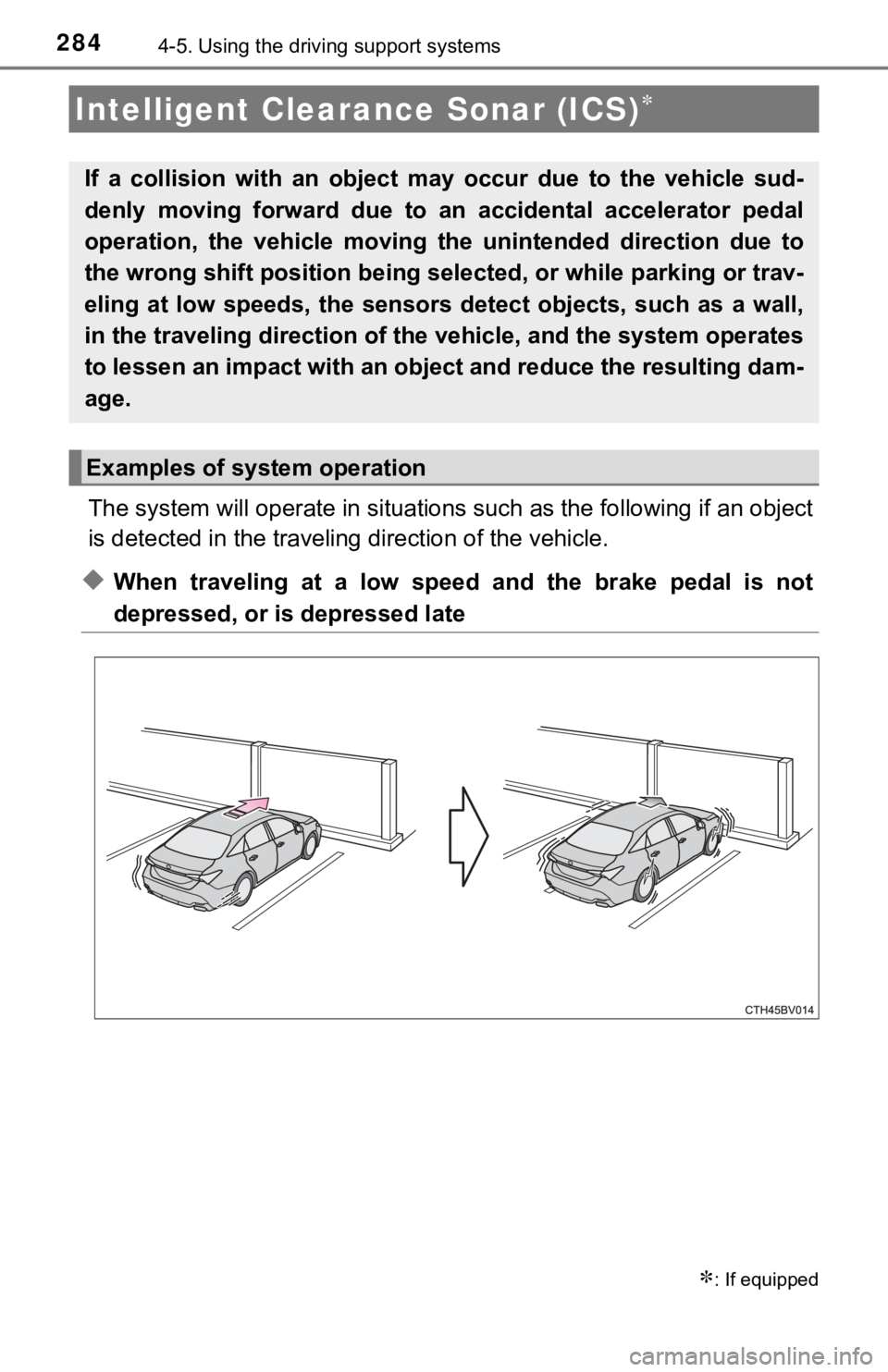
The system will operate in situat ions such as the following if an object
is detected in the traveling direction of the vehicle.
◆When traveling at a low speed and the brake pedal is not
depressed, or is depressed late
Intelligent Clearance Sonar (ICS)
: If equipped
If a collision with an object ma y occur due to the vehicle sud-
denly moving forward due to an accidental accelerator pedal
operation, the vehicle moving th e unintended direction due to
the wrong shift position being se lected, or while parking or trav-
eling at low speeds, the sensors detect objects, such as a wall ,
in the traveling direction of t he vehicle, and the system opera tes
to lessen an impact with an object and reduce the resulting dam -
age.
Examples of system operation
Page 291 of 540

2914-5. Using the driving support systems
4
Driving
■The Intelligent Clearance Sonar function will operate when
The function will operate when the ICS OFF indicator is not illuminated or
flashing ( P. 287, 295) and all of the following conditions are met:
● Engine output restriction control
• The Intelligent Clearance Sonar system is enabled.
• The vehicle speed is 10 mph (15 km/h) or less.
• There is an object in the traveling direction of the vehicle a nd 6 to 13 ft. (2
to 4 m) away.
• The system determines that a stronger-than-normal brake operat ion is
necessary to avoid a collision.
● Brake control
• Engine output restriction control is operating.
• The system determines that an emergency brake operation is nec essary
to avoid a collision.
■ The Intelligent Clearance Sonar function will stop operating when
The function will stop operating if any of the following condit ions are met:
● Engine output restriction control
• The Intelligent Clearance Sonar system is disabled.
• The collision becomes avoidable with normal brake operation.
• The object is no longer 6 to 13 ft. (2 to 4 m) away in the traveling direction
of the vehicle.
● Brake control
• The Intelligent Clearance Sonar system is disabled.
• Approximately 2 seconds elapse after the vehicle is stopped by brake
control.
• The brake pedal is depressed after the vehicle is stopped by b rake con-
trol.
• The object is no longer 6 to 13 ft. (2 to 4 m) away in the traveling direction of the vehicle.
■ Detection range of the Intellig ent Clearance Sonar function
The detection range of the Intelligent Clearance Sonar function differs from
the detection range of the intuitive parking assist. ( P. 279)
Therefore, even if the intuitive parking assist detects an obje ct and provides a
warning, the Intelligent Clearance Sonar function may not start operating.
■ If the Intelligent Clearance Sonar function has operated
If the vehicle is stopped due to operation of the Intelligent C learance Sonar
function, the Intelligent Clearance Sonar system will be disabl ed and the ICS
OFF indicator will illuminate.
Page 292 of 540

2924-5. Using the driving support systems
■Re-enabling the Intellig ent Clearance Sonar system
To re-enable the Intelligent Clearance Sonar system when it is disabled due
to operation of the Intelligent Clearance Sonar function, either enable the sys-
tem again (P. 287), or turn the engine switch off and then back to IGNITIO N
ON mode.
Additionally, if the object becomes no longer in the traveling direction of the
vehicle or if the traveling direction of the vehicle changes (such as changing
from moving forward to backing up, or from backing up to moving forward),
the system will be re-enabled automatically.
■ Objects that the Intelligent Clearance Sonar function may not d etect
The sensors may not be able to detect certain objects, such as the following.
● Cotton cloth, snow, and other materials that are poor reflector s of ultrasonic
waves.
(People may also not be detected depending on the type of cloth ing they are
wearing.)
● Objects which are not perpendicular to the ground, are not perp endicular to
the traveling direction of the vehicle, are uneven or are wavin g.
● Low objects
● Thin objects such as wires, fences, ropes and signposts
● Objects that are extremely close to the bumper
■ Situations in which the Intelligent Clearance Sonar may not ope rate
properly
When the shift lever is in N
■ Intuitive parking assist buzzer
Regardless of whether the intuitive parking assist system is en abled or not
( P. 276), if the Intelligent Clearance Sonar system is enabled ( P. 287),
the front or rear sensors detect an object and brake control is performed, the
intuitive parking assist buzzer will sound to notify the driver of the approxi-
mate distance to the object.
Page 293 of 540
2934-5. Using the driving support systems
4
Driving
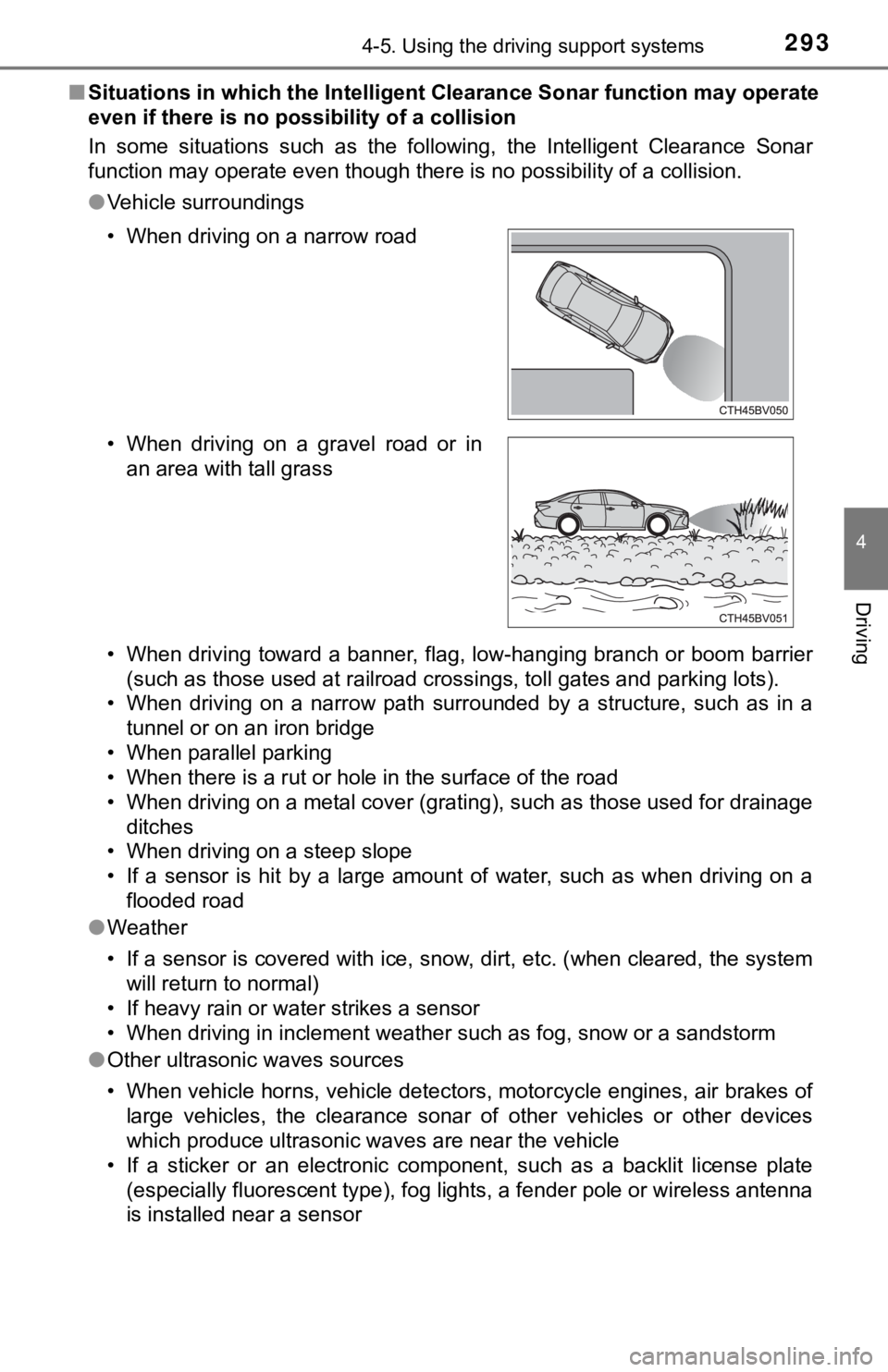
■Situations in which the Intellige nt Clearance Sonar function ma y operate
even if there is no possibility of a collision
In some situations such as the following, the Intelligent Clear ance Sonar
function may operate even though there is no possibility of a c ollision.
● Vehicle surroundings
• When driving toward a banner, flag, low-hanging branch or boom barrier
(such as those used at railroad crossings, toll gates and parki ng lots).
• When driving on a narrow path surrounded by a structure, such as in a
tunnel or on an iron bridge
• When parallel parking
• When there is a rut or hole in the surface of the road
• When driving on a metal cover (grating), such as those used fo r drainage
ditches
• When driving on a steep slope
• If a sensor is hit by a large amount of water, such as when driving on a flooded road
● Weather
• If a sensor is covered with ice, snow, dirt, etc. (when cleared, the system
will return to normal)
• If heavy rain or water strikes a sensor
• When driving in inclement weather such as fog, snow or a sands torm
● Other ultrasonic waves sources
• When vehicle horns, vehicle detectors, motorcycle engines, air brakes of
large vehicles, the clearance sonar of other vehicles or other devices
which produce ultrasonic waves are near the vehicle
• If a sticker or an electronic component, such as a backlit license plate (especially fluorescent type), fog lights, a fender pole or wir eless antenna
is installed near a sensor
• When driving on a narrow road
• When driving on a gravel road or in
an area with tall grass
Page 295 of 540

2954-5. Using the driving support systems
4
Driving
●Other ultrasonic waves sources
• When vehicle horns, vehicle detectors, motorcycle engines, air brakes of
large vehicles, the clearance sonar of other vehicles or other devices
which produce ultrasonic waves are near the vehicle
• If a sticker or an electronic component, such as a backlit license plate
(especially fluorescent type), fog lights, a fender pole or wir eless antenna
is installed near a sensor
● Changes in the vehicle posture
• If the vehicle is significantly tilted
• If the front of the vehicle is raised or lowered due to the ca rried load
• If the orientation of a sensor has been changed due to a collision or other impact
■ If a battery terminal has been disconnected and reconnected
The system needs to be initialized.
To initialize the system, drive the vehicle straight ahead for 5 seconds or more
at a speed of approximately 22 mph (35 km/h) or more.
■ If “ICS Unavailable” is displayed on the multi-information display and
the ICS OFF indicator is flashing
Initialization may not have been performed after a battery term inal was dis-
connected and reconnected. Initialize the system. ( P. 295)
If this message continues to be displayed even after initializa tion, have the
vehicle inspected by your Toyota dealer.
■ If “ICS Unavailable” and “Parking Assist Unavailable Clean Park ing
Assist Sensor” are displayed on th e multi-information display and the
ICS OFF indicator is flashing
● A sensor may be covered with ice, snow, dirt, etc. In this case , remove the
ice, snow, dirt, etc., from the sensor to return the system to normal. If this
message is shown even after removing dirt from the sensor, or s hown when
the sensor was not dirty to begin with, have the vehicle inspec ted at your
Toyota dealer.
● A sensor may be frozen. Once the ice melts, the system will ret urn to nor-
mal.
● Water may be continuously flowing over the sensor surface, such as in a
heavy rain. When the system determines that it is normal, the system will
return to normal.
Page 301 of 540
3014-5. Using the driving support systems
4
Driving
■Re-enabling the Rear Cross Traffic Auto Brake function
To re-enable the Rear Cross Traffic Auto Brake function when it is disabled
while it is operating, either enable the Intelligent Clearance Sonar system
again ( P. 287), or turn the engine switch off and then back to IGNITIO N ON
mode. When the function is disabled, the ICS OFF indicator will illuminate.
( P. 87)
If there is no longer a vehicle approaching from the right or l eft at the rear of
the vehicle when backing up, or if the traveling direction of the vehicle
changes (such as changing from backing up to moving forward), the system
will be re-enabled automatically. When the function is re-enabl ed, the ICS
OFF indicator will turn off.
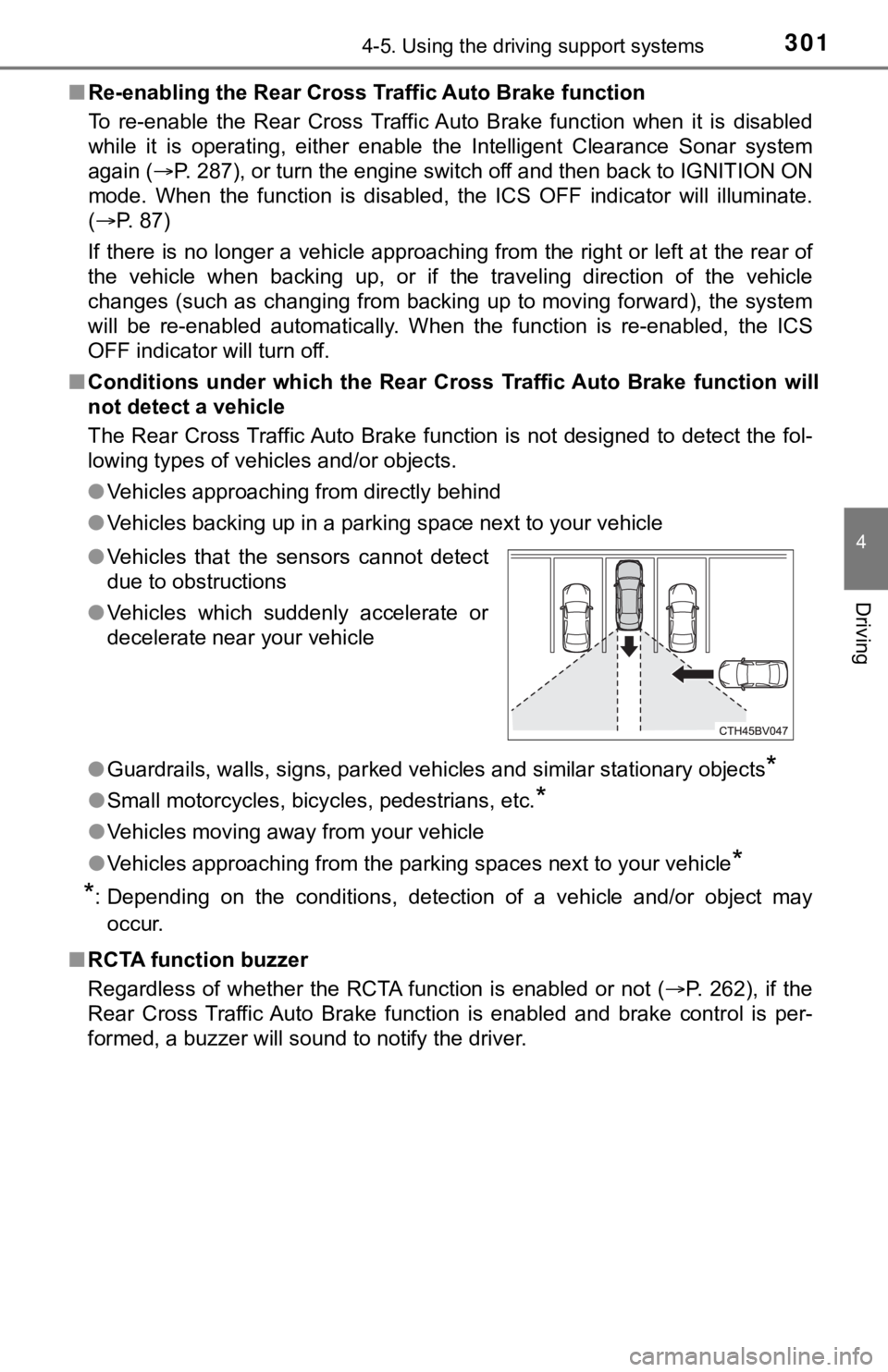
■ Conditions under which the Rear Cross Traffic Auto Brake function will
not detect a vehicle
The Rear Cross Traffic Auto Brake function is not designed to d etect the fol-
lowing types of vehicles and/or objects.
● Vehicles approaching from directly behind
● Vehicles backing up in a parking space next to your vehicle
● Guardrails, walls, signs, parked vehicles and similar stationar y objects
*
●Small motorcycles, bicycles, pedestrians, etc.*
●Vehicles moving away from your vehicle
● Vehicles approaching from the parking spaces next to your vehic le
*
*
: Depending on the conditions, detection of a vehicle and/or obj ect may
occur.
■ RCTA function buzzer
Regardless of whether the RCTA function is enabled or not ( P. 262), if the
Rear Cross Traffic Auto Brake function is enabled and brake con trol is per-
formed, a buzzer will sound to notify the driver. ● Vehicles that the sensors cannot detect
due to obstructions
● Vehicles which suddenly accelerate or
decelerate near your vehicle
Page 302 of 540
3024-5. Using the driving support systems
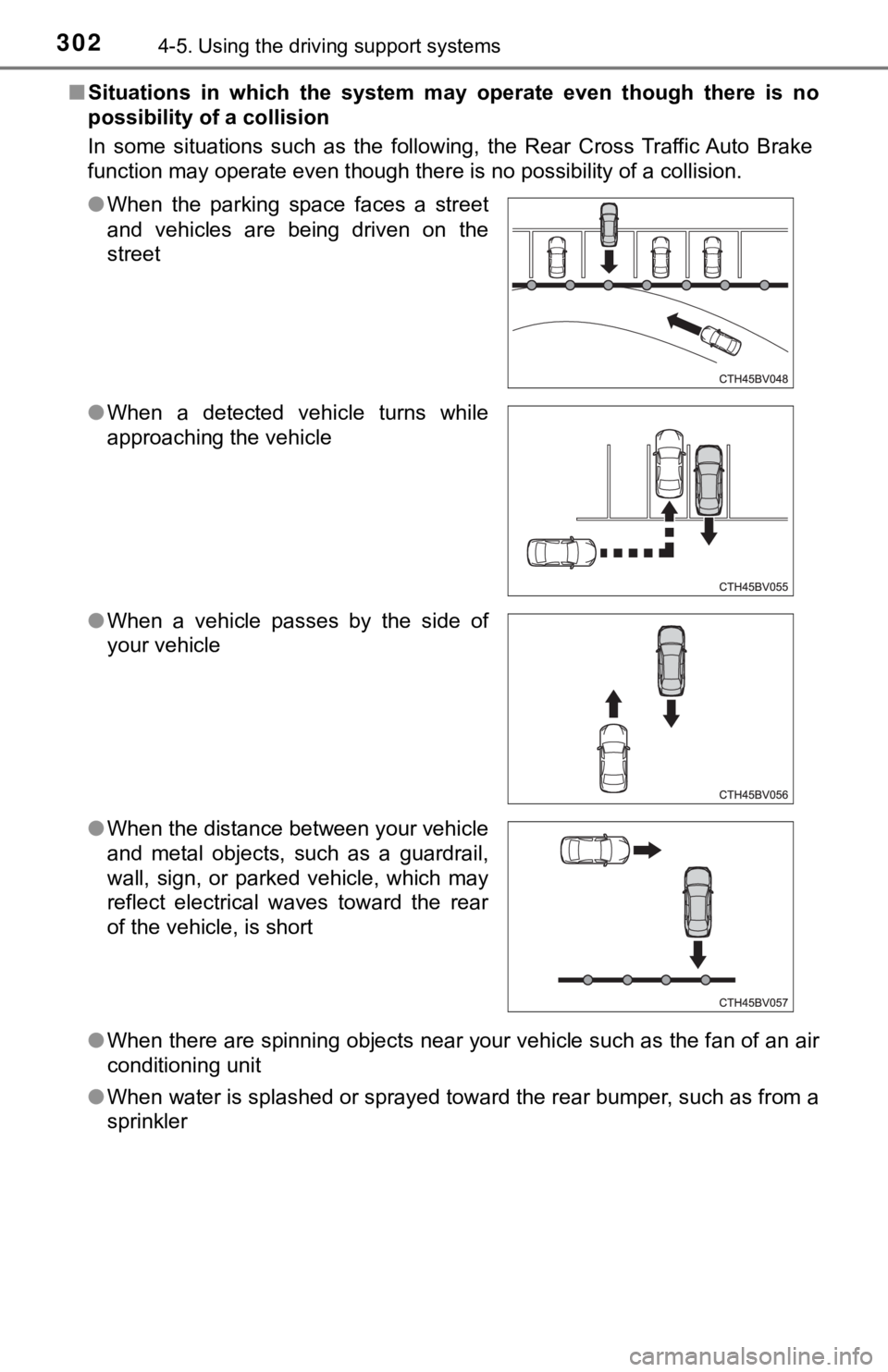
■Situations in which the system m ay operate even though there is no
possibility of a collision
In some situations such as the following, the Rear Cross Traffic Auto Brake
function may operate even though there is no possibility of a c ollision.
● When there are spinning objects near your vehicle such as the f an of an air
conditioning unit
● When water is splashed or sprayed toward the rear bumper, such as from a
sprinkler
●
When the parking space faces a street
and vehicles are being driven on the
street
● When a detected vehicle turns while
approaching the vehicle
● When a vehicle passes by the side of
your vehicle
● When the distance between your vehicle
and metal objects, such as a guardrail,
wall, sign, or parked vehicle, which may
reflect electrical waves toward the rear
of the vehicle, is short