park assist TOYOTA AVALON 2020 Owners Manual (in English)
[x] Cancel search | Manufacturer: TOYOTA, Model Year: 2020, Model line: AVALON, Model: TOYOTA AVALON 2020Pages: 540, PDF Size: 10.4 MB
Page 4 of 540

TABLE OF CONTENTS4
4-5. Using the driving support systems
Toyota Safety Sense P ..... 218
PCS (Pre-Collision System) .... 226
LDA (Lane Departure Alert
with steering control) ....... 238
Dynamic radar cruise control with full-speed
range ............................... 248
BSM (Blind Spot Monitor) ........ 261
• BSM function ................ 265
• RCTA function .............. 267
Rear Camera Detection function ........................... 272
Intuitive parking assist ....... 276
Intelligent Clearance Sonar (ICS) ..................... 284
Driving mode select switches .......................... 305
Driving assist systems....... 309
4-6. Driving tips Winter driving tips.............. 316 5-1. Using the
air conditioning
system and defogger
Automatic air conditioning system ............................. 322
Heated steering wheel/ seat heaters/
seat ventilators ................ 329
5-2. Using the interior lights Interior lights list................. 332
• Interior light ................... 333
• Personal lights............... 333
• Ambient lights................ 334
5-3. Using the storage features
List of storage features ...... 335
• Glove box ...................... 336
• Console box .................. 336
• Bottle holders ................ 337
• Cup holders ................... 338
• Auxiliary boxes .............. 339
• Open tray ...................... 340
Trunk features ................... 3415Interior features
Page 7 of 540
7
1
8 7 5 4
3
2
9
6
Reporting safety defects for U.S. owners ............................. 508
Seat belt instructions for Canadian owners
(in French) ............................... 509
SRS airbag instructions for Canadian owners
(in French) ............................... 511 What to do if...
(Troubleshooting) ..................... 522
Alphabetical index ...................... 525
9For ownersIndex
For information regarding the equipment listed below, refer to “NAV-
IGATION AND MULTIMEDIA SYSTEM OWNER’S MANUAL”.
• Navigation system
• Audio/visual system
• Toyota parking assist monitor• Panoramic view monitor
• Toyota Entune
Page 45 of 540

451-1. For safe use
1
For safety and security
■If the SRS airbags deploy (inflate)
●Slight abrasions, burns, bruising etc., may be sustained from S RS airbags,
due to the extremely high speed deployment (inflation) by hot g ases.
● A loud noise and white powder will be emitted.
● Parts of the airbag module (steering wheel hub, airbag cover an d inflator) as
well as the front seats, parts of the front and rear pillars, and roof side rails,
may be hot for several minutes. The airbag itself may also be hot.
● The windshield may crack.
● The interior lights will turn on automatically. ( P. 332)
● The emergency flashers will turn on automatically. ( P. 422)
● For Safety Connect subscribers, if any of the following situations occur, the
system is designed to send an emergency call to the response center, noti-
fying them of the vehicle’s location (without needing to push t he “SOS” but-
ton) and an agent will attempt to speak with the occupants to a scertain the
level of emergency and assistance required. If the occupants are unable to
communicate, the agent automatically treats the call as an emer gency and
helps to dispatch the necessary emergency services. ( P. 71)
• An SRS airbag is deployed.
• A seat belt pretensioner is activated.
• The vehicle is involved in a severe rear-end collision.
■ SRS airbag deployment condi tions (SRS front airbags)
● The SRS front airbags will deploy i n the event of an impact tha t exceeds the
set threshold level (the level of force corresponding to an app roximately 12 -
18 mph [20 - 30 km/h] frontal collision with a fixed wall that does not move or
deform).
However, this threshold velocity will be considerably higher in the following
situations:
• If the vehicle strikes an object, such as a parked vehicle or sign pole,
which can move or deform on impact
• If the vehicle is involved in an underride collision, such as a collision in
which the front of the vehicle “underrides”, or goes under, the bed of a
truck
● Depending on the type of collision, it is possible that only th e seat belt pre-
tensioners will activate.
● The SRS front airbags for the front passenger will not activate if there is no
passenger sitting in the front passenger seat. However, the SRS front air-
bags for the front passenger may deploy if luggage is put in the seat, even if
the seat is unoccupied.
Page 88 of 540
882. Instrument cluster
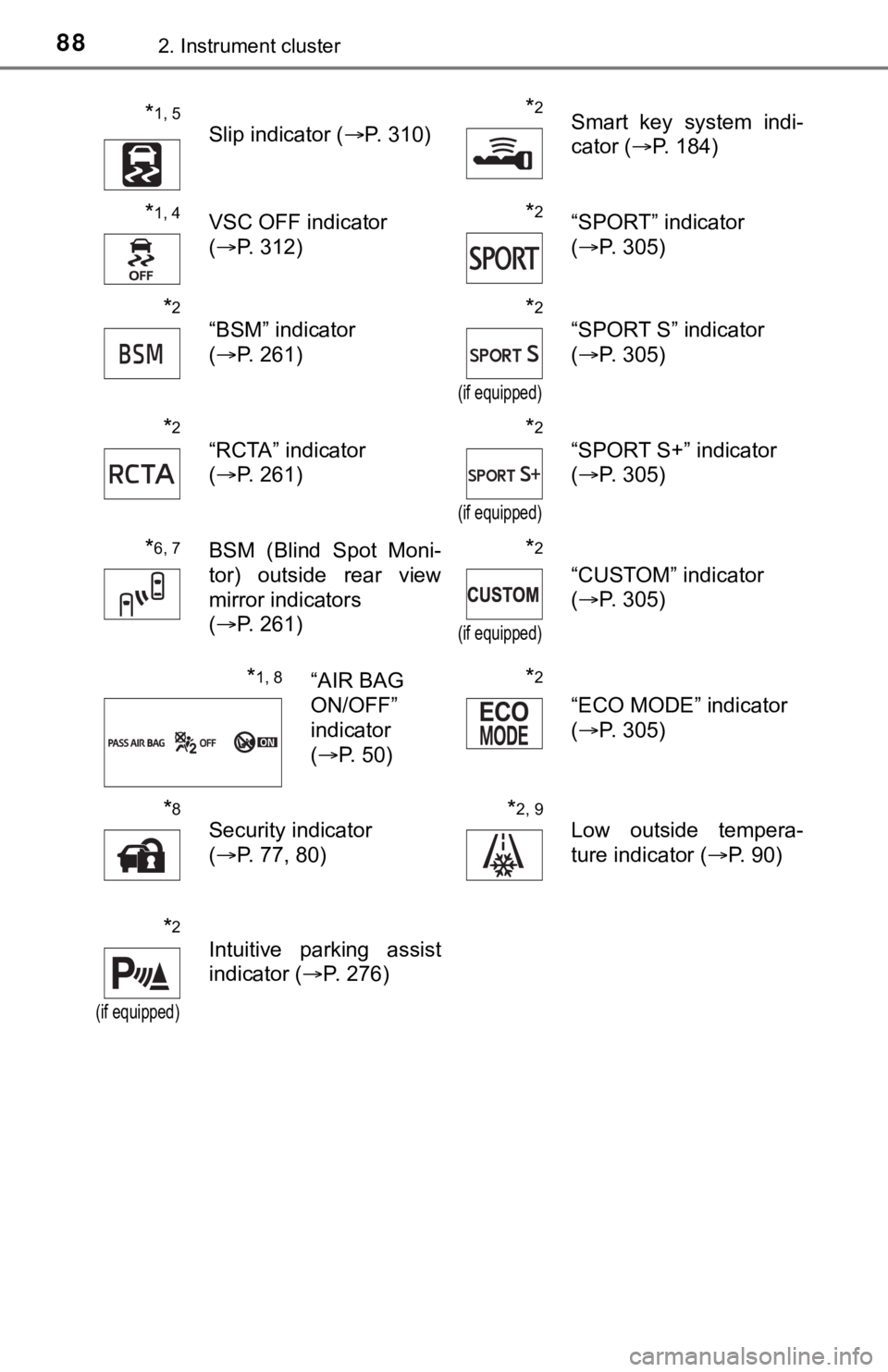
*1, 5
Slip indicator (P. 310)
*2Smart key system indi-
cator (P. 184)
*1, 4VSC OFF indicator
(P. 312)*2“SPORT” indicator
(P. 305)
*2
“BSM” indicator
(P. 261)*2
(if equipped)
“SPORT S” indicator
(P. 305)
*2
“RCTA” indicator
(P. 261)*2
(if equipped)
“SPORT S+” indicator
(P. 305)
*6, 7BSM (Blind Spot Moni-
tor) outside rear view
mirror indicators
(P. 261)*2
(if equipped)
“CUSTOM” indicator
(P. 305)
*1, 8“AIR BAG
ON/OFF”
indicator
(P. 50)*2
“ECO MODE” indicator
(P. 305)
*8
Security indicator
(P. 77, 80)*2, 9
Low outside tempera-
ture indicator ( P. 90)
*2
(if equipped)
Intuitive parking assist
indicator (P. 276)
Page 96 of 540
962. Instrument cluster
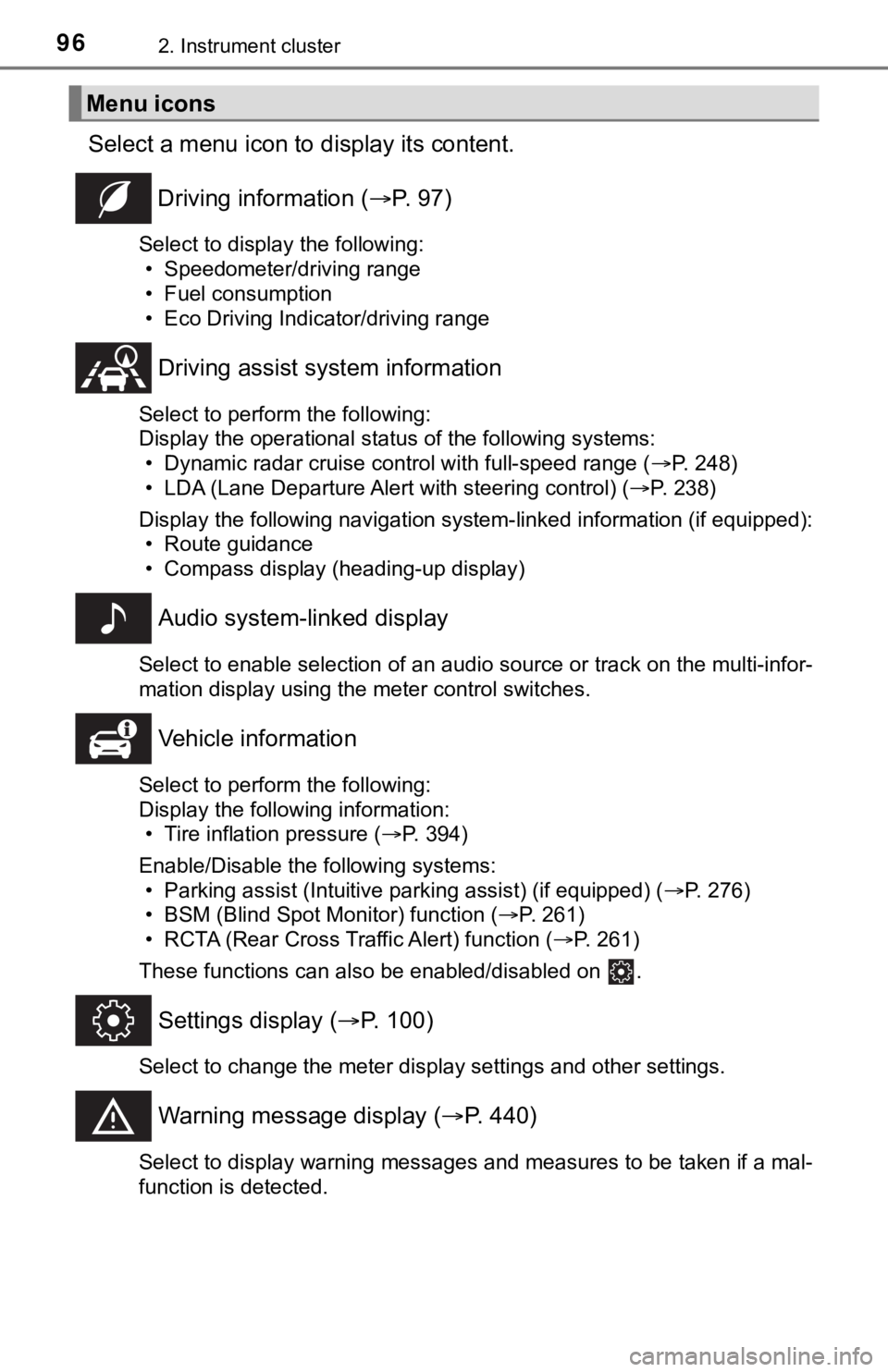
Select a menu icon to display its content.
Driving information ( P. 9 7 )
Select to display the following:
• Speedometer/driving range
• Fuel consumption
• Eco Driving Indicator/driving range
Driving assist sys tem information
Select to perform the following:
Display the operational status of the following systems:
• Dynamic radar cruise control with full-speed range ( P. 248)
• LDA (Lane Departure Alert with steering control) ( P. 238)
Display the following navigation system-linked information (if equipped):
• Route guidance
• Compass display (heading-up display)
Audio system-linked display
Select to enable selection of an audio source or track on the multi-infor-
mation display using the meter control switches.
Vehicle information
Select to perform the following:
Display the following information: • Tire inflation pressure ( P. 394)
Enable/Disable the following systems: • Parking assist (Intuitive parking assist) (if equipped) ( P. 276)
• BSM (Blind Spot Monitor) function ( P. 261)
• RCTA (Rear Cross Traffic Alert) function ( P. 261)
These functions can also be enabled/disabled on .
Settings display ( P. 100)
Select to change the meter display settings and other settings.
Warning message display ( P. 440)
Select to display warning messages and measures to be taken if a mal-
function is detected.
Menu icons
Page 102 of 540
1022. Instrument cluster
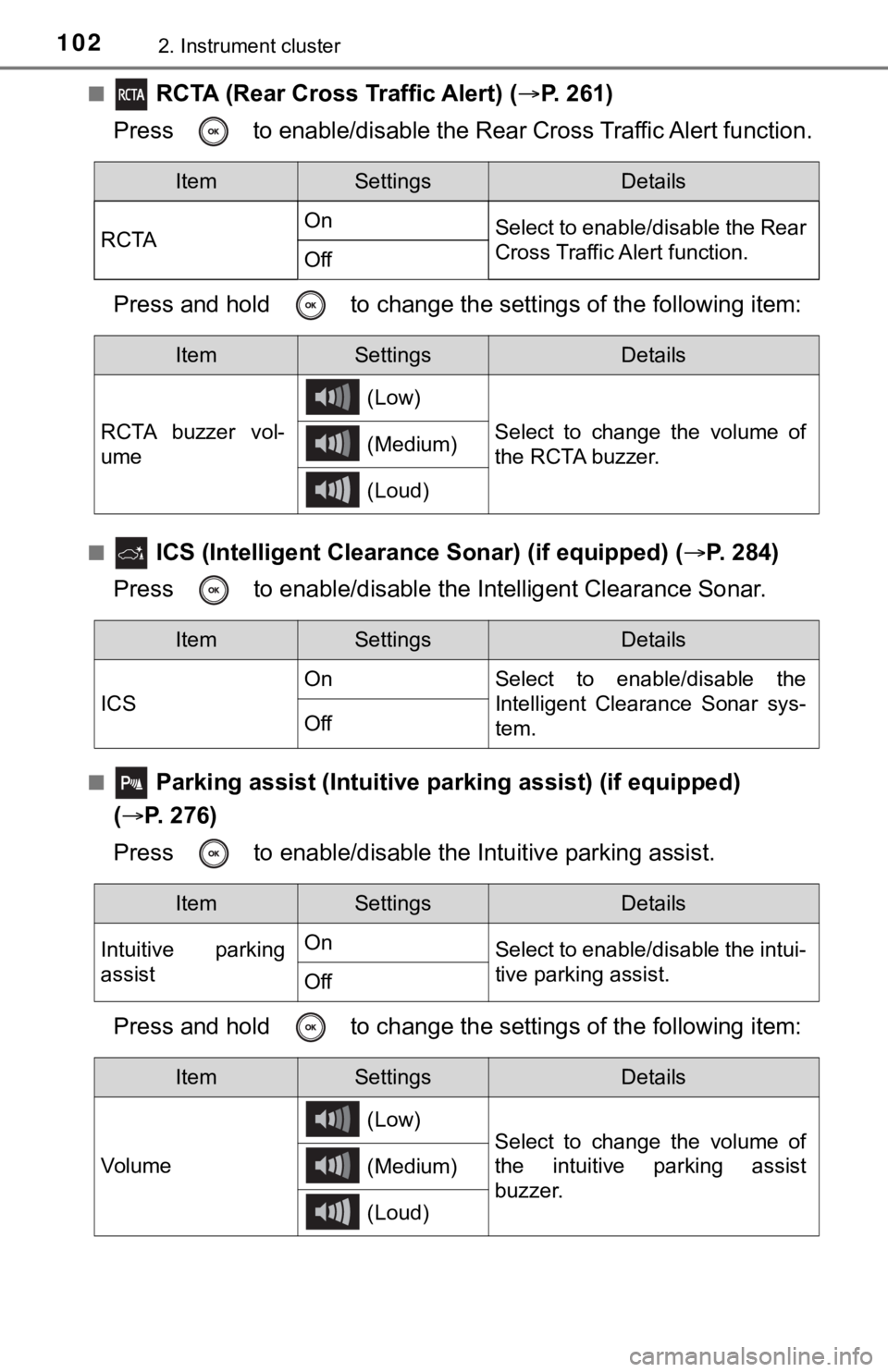
■ RCTA (Rear Cross Traffic Alert) (P. 261)
Press to enable/disable the Rear Cross Traffic Alert function.
Press and hold to c hange the settings of the following item:
■ ICS (Intelligent Clearance Sonar) (if equipped) ( P. 2 8 4 )
Press to enable/disable the Intelligent Clearance Sonar.
■ Parking assist (Intuitive parking assist) (if equipped)
( P. 276)
Press to enable/disable t he Intuitive parking assist.
Press and hold to c hange the settings of the following item:
ItemSettingsDetails
RCTA On
Select to enable/disable the Rear
Cross Traffic Alert function.
Off
ItemSettingsDetails
RCTA buzzer vol-
ume (Low)
Select to change the volume of
the RCTA buzzer.
(Medium)
(Loud)
ItemSettingsDetails
ICS On Select to enable/disable the
Intelligent Clearance Sonar sys-
tem.
Off
ItemSettingsDetails
Intuitive parking
assist On
Select to enable/disable the intui-
tive parking assist.
Off
ItemSettingsDetails
Vol u me (Low)
Select to change the volume of
the intuitive parking assist
buzzer.
(Medium)
(Loud)
Page 111 of 540
1112. Instrument cluster
2
Instrument cluster
◆Driving assist system status display
Displays the operational status of the following systems:
• Dynamic radar cruise control with full-speed range ( P. 248)
• LDA (Lane Departure Alert with steering control) ( P. 2 3 8 )
• Intuitive parking assist (if equipped) ( P. 276)
◆Navigation system-linked display area
Displays the following items, which are linked to the navigation sys-
tem:
■Street name
When the navigation system is performing route guidance, the
name of the next street will be displayed on the top of the dis play
area.
■Route guidance to destination
Displayed when the navigation s ystem is performing route guid-
ance. When approaching an intersection, an arrow will be displa yed
to indicate the suggeste d direction of travel.
■Compass
Displays the direction of travel.
Driving assist system status/navigation system-linked display
area
Page 137 of 540
1373-2. Opening, closing and locking the doors
3
Operation of each component
■Electronic Key Battery-Saving Function
When battery-saving mode is set, battery depletion is minimized by stopping
the electronic key from receiving radio waves.
■ Conditions affecting operation
The smart key system, wireless remote control and engine immobi lizer sys-
tem use weak radio waves. In the following situations, the communication
between the electronic key and the vehicle may be affected, pre venting the
smart key system, wireless remote control and engine immobilizer system
from operating properly. (Ways of coping: P. 459)
● When the electronic key battery is depleted
● Near a TV tower, electric power plant, gas station, radio stati on, large dis-
play, airport or other facility that generates strong radio wav es or electrical
noise
● When the electronic key is in contact with, or is covered by th e following
metallic objects
• Cards to which aluminum foil is attached
• Cigarette boxes that have aluminum foil inside
• Metallic wallets or bags
• Coins
• Hand warmers made of metal
• Media such as CDs and DVDs
● When other wireless keys (that emit radio waves) are being used nearby
● When carrying the electronic key together with the following devices that
emit radio waves
• Portable radio, cellular phone, cordless phone or other wirele ss commu-
nication devices
• Another vehicle’s electronic key, another electronic key of yo ur vehicle, or
a wireless key that emits radio waves
• Personal computers or personal digital assistants (PDAs)
• Digital audio players
• Portable game systems
● If window tint with a metallic content or metallic objects are attached to the
rear window
● When the electronic key is placed near a battery charger or ele ctronic
devices
● When the vehicle is parked in a pay parking spot where radio wa ves are
emitted.
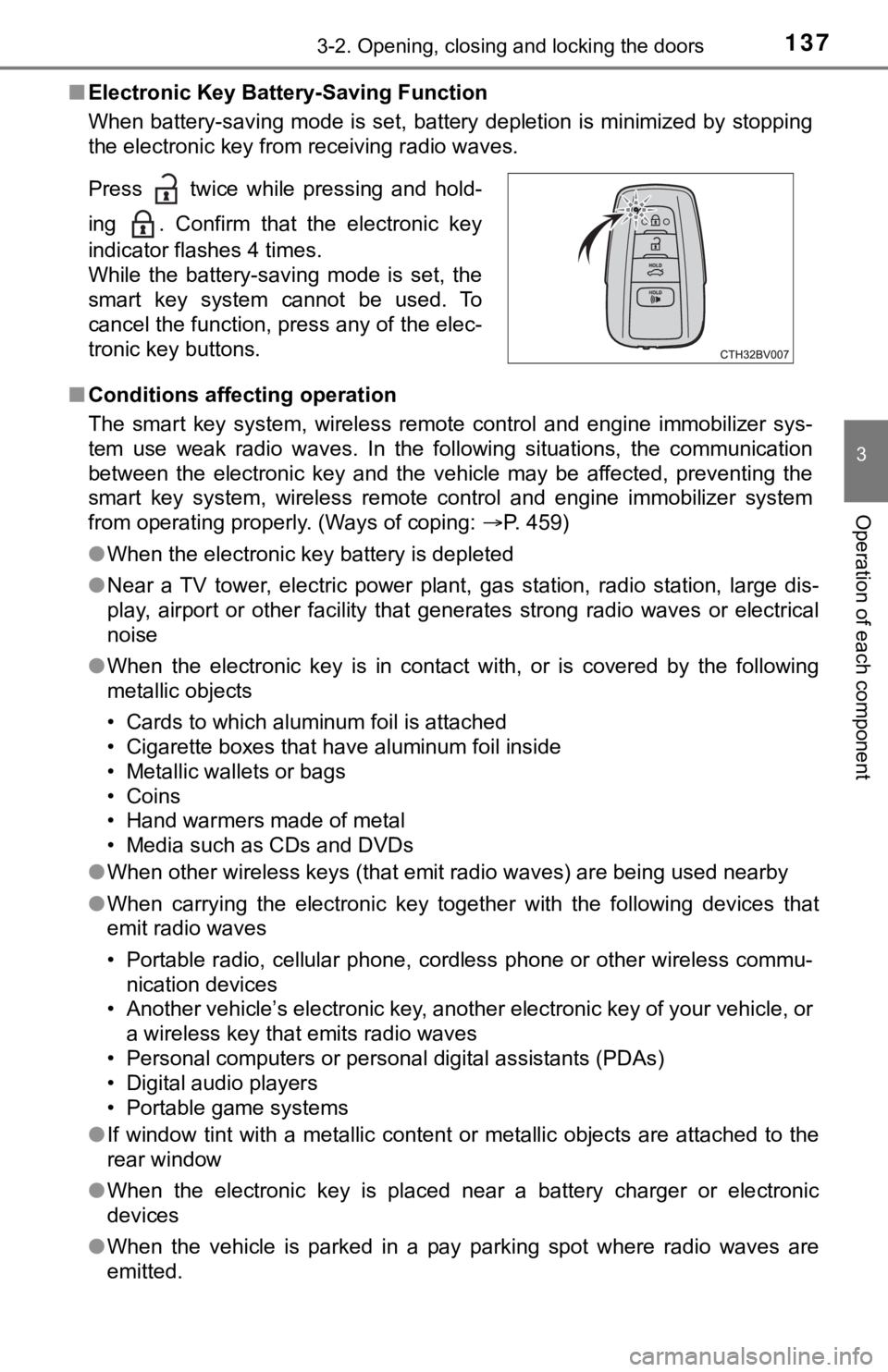
Press twice while pressing and hold-
ing . Confirm that the electronic key
indicator flashes 4 times.
While the battery-saving mode is set, the
smart key system cannot be used. To
cancel the function, press any of the elec-
tronic key buttons.
Page 169 of 540

169
4Driving
4-1. Before drivingDriving the vehicle ............. 170
Cargo and luggage ........... 178
Vehicle load limits ............. 181
Trailer towing..................... 182
Dinghy towing ................... 183
4-2. Driving procedures Engine (ignition) switch ..... 184
Automatic transmission ..... 189
Turn signal lever................ 195
Parking brake .................... 196
Brake Hold ........................ 200
4-3. Operating the lights and wipers
Headlight switch ................ 202
Automatic High Beam ....... 206
Windshield wipers and washer ............................ 210
4-4. Refueling Opening the fuel tank cap .................................. 214 4-5. Using the driving
support systems
Toyota Safety Sense P ..... 218
PCS (Pre-Collision System) .... 226
LDA (Lane Departure Alert
with steering control) ....... 238
Dynamic radar cruise control with full-speed
range............................... 248
BSM (Blind Spot Monitor) ........ 261
• BSM function ................ 265
• RCTA function .............. 267
Rear Camera Detection function ........................... 272
Intuitive parking assist....... 276
Intelligent Clearance Sonar (ICS) ..................... 284
Driving mode select switches .......................... 305
Driving assist systems ...... 309
4-6. Driving tips Winter driving tips ............. 316
Page 176 of 540

1764-1. Before driving
WARNING
Observe the following precautions.
Failure to do so may result in death or serious injury.
■When the vehicle is parked
● Always apply the parking brake, shift the shift lever to P, stop the engine
and lock the vehicle.
Do not leave the vehicle unattended while the engine is running .
If the vehicle is parked with the shift lever in P but the park ing brake is not
set, the vehicle may start to move, possibly leading to an acci dent.
● Do not touch the exhaust pipes while the engine is running or i mmediately
after turning the engine off.
Doing so may cause burns.
■ When taking a nap in the vehicle
Always turn the engine off. Otherwise, if you accidentally move the shift
lever or depress the accelerator pedal, this could cause an acc ident or fire
due to engine overheating. Additionally, if the vehicle is park ed in a poorly
ventilated area, exhaust gases may collect and enter the vehicl e, leading to
death or a serious health hazard.
■ When braking
● When the brakes are wet, drive more cautiously.
Braking distance increases when the brakes are wet, and this ma y cause
one side of the vehicle to brake differently than the other sid e. Also, the
parking brake may not securely hold the vehicle.
● If the brake booster device does not operate, do not follow oth er vehicles
closely and avoid hills or shar p turns that require braking.
In this case, braking is still possible, but the brake pedal sh ould be
depressed more firmly than usual. Also, the braking distance wi ll increase.
Have your brakes fixed immediately.
● Do not pump the brake pedal if the engine stalls.
Each push on the brake pedal uses up the reserve for the power-assisted
brakes.
● The brake system consists of 2 individual hydraulic systems; if one of the
systems fails, the other will still operate. In this case, the brake pedal
should be depressed more firmly than usual and the braking dist ance will
increase.
Have your brakes fixed immediately.