ignition TOYOTA AVALON 2021 (in English) Service Manual
[x] Cancel search | Manufacturer: TOYOTA, Model Year: 2021, Model line: AVALON, Model: TOYOTA AVALON 2021Pages: 548, PDF Size: 13.4 MB
Page 287 of 548
2874-5. Using the driving support systems
4
Driving
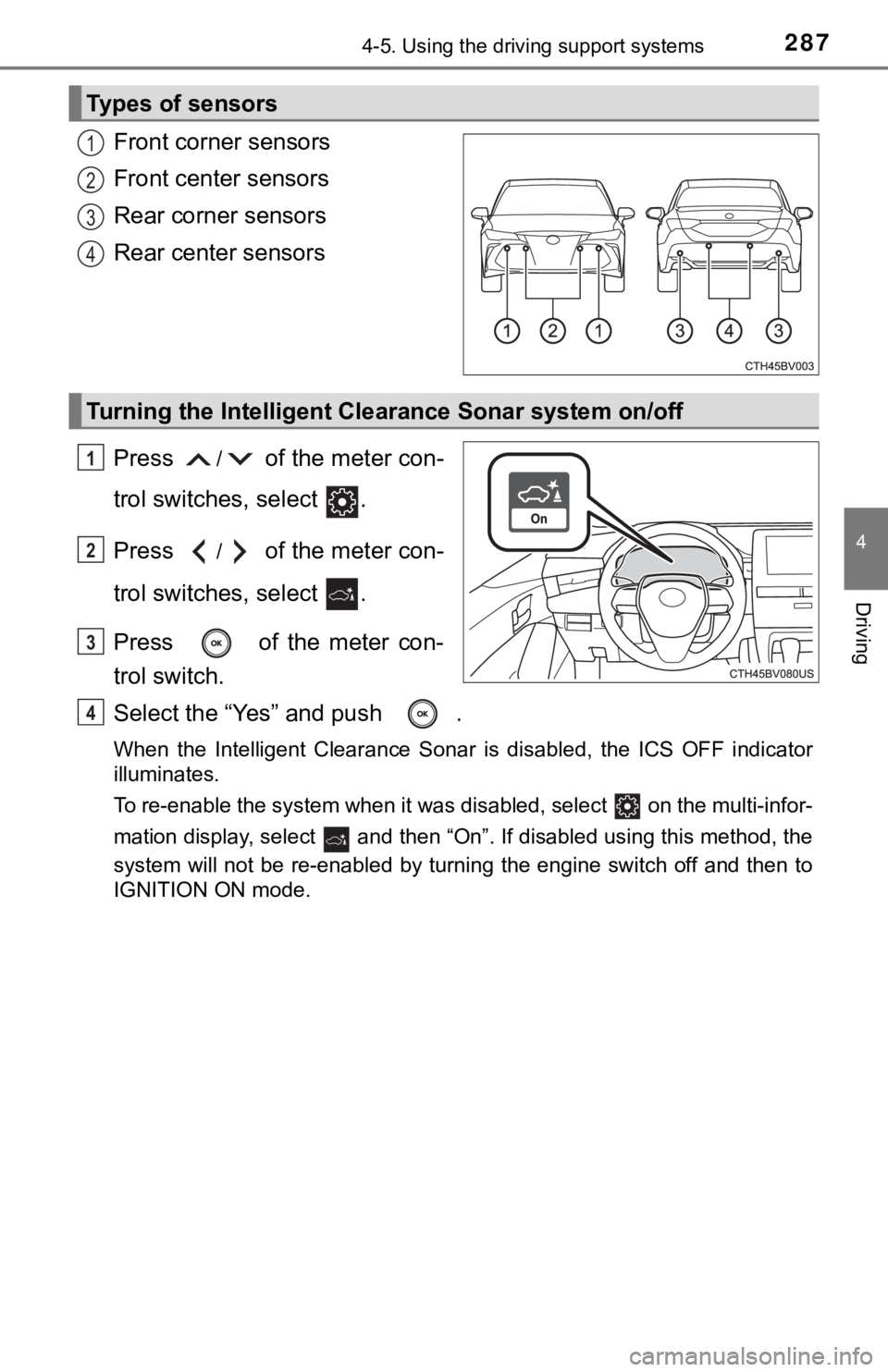
Front corner sensors
Front center sensors
Rear corner sensors
Rear center sensors
Press
/ of the meter con-
trol switches, select .
Press
/ of the meter con-
trol switches, select .
Press of the meter con-
trol switch.
Select the “Yes” and push .
When the Intelligent Clearance Sonar is disabled, the ICS OFF indicator
illuminates.
To re-enable the system when it was disabled, select on the multi-infor-
mation display, select and then “On”. If disabled using this method, the
system will not be re-enabled by turning the engine switch off and then to
IGNITION ON mode.
Types of sensors
1
2
3
4
Turning the Intelligent Clearance Sonar system on/off
1
2
3
4
Page 292 of 548

2924-5. Using the driving support systems
■Re-enabling the Intelligent Clearance Sonar system
To re-enable the Intelligent Clearance Sonar system when it is disabled due
to operation of the Intelligent Clearance Sonar function, either enable the sys-
tem again (P. 287), or turn the engine switch off and then back to IGNITION
ON mode.
Additionally, if the object becomes no longer in the traveling direction of the
vehicle or if the traveling direction of the vehicle changes (such as changing
from moving forward to backing up, or from backing up to moving forward),
the system will be re-enabled automatically.
■Objects that the Intelligent Clearance Sonar function may not detect
The sensors may not be able to detect certain objects, such as the following.
●Cotton cloth, snow, and other materials that are poor reflectors of ultrasonic
waves.
(People may also not be detected depending on the type of clothing they are
wearing.)
●Objects which are not perpendicular to the ground, are not perpendicular to
<0057004b0048000300570055004400590048004f004c0051004a00030047004c0055004800460057004c0052005100030052004900030057004b0048000300590048004b004c0046004f0048000f0003004400550048000300580051004800590048005100
030052005500030044005500480003005a00440059004c0051[g.
●Low objects
●Thin objects such as wires, fences, ropes and signposts
●Objects that are extremely close to the bumper
■Situations in which the Intelligent Clearance Sonar may not operate
properly
When the shift lever is in N
■Intuitive parking assist buzzer
Regardless of whether the intuitive parking assist system is enabled or not
(P. 276), if the Intelligent Clearance Sonar system is enabled (P. 287),
the front or rear sensors detect an object and brake control is performed, the
intuitive parking assist buzzer will sound to notify the driver of the approxi-
mate distance to the object.
Page 301 of 548
3014-5. Using the driving support systems
4
Driving
■Re-enabling the Rear Cross Traffic Auto Brake function
To re-enable the Rear Cross Traffic Auto Brake function when it is disabled
while it is operating, either enable the Intelligent Clearance Sonar system
again (P. 287), or turn the engine switch off and then back to IGNITION ON
mode. When the function is disabled, the ICS OFF indicator will illuminate.
(P. 87)
If there is no longer a vehicle approaching from the right or left at the rear of
the vehicle when backing up, or if the traveling direction of the vehicle
changes (such as changing from backing up to moving forward), the system
will be re-enabled automatically. When the function is re-enabled, the ICS
OFF indicator will turn off.
■Conditions under which the Rear Cross Traffic Auto Brake function will
not detect a vehicle
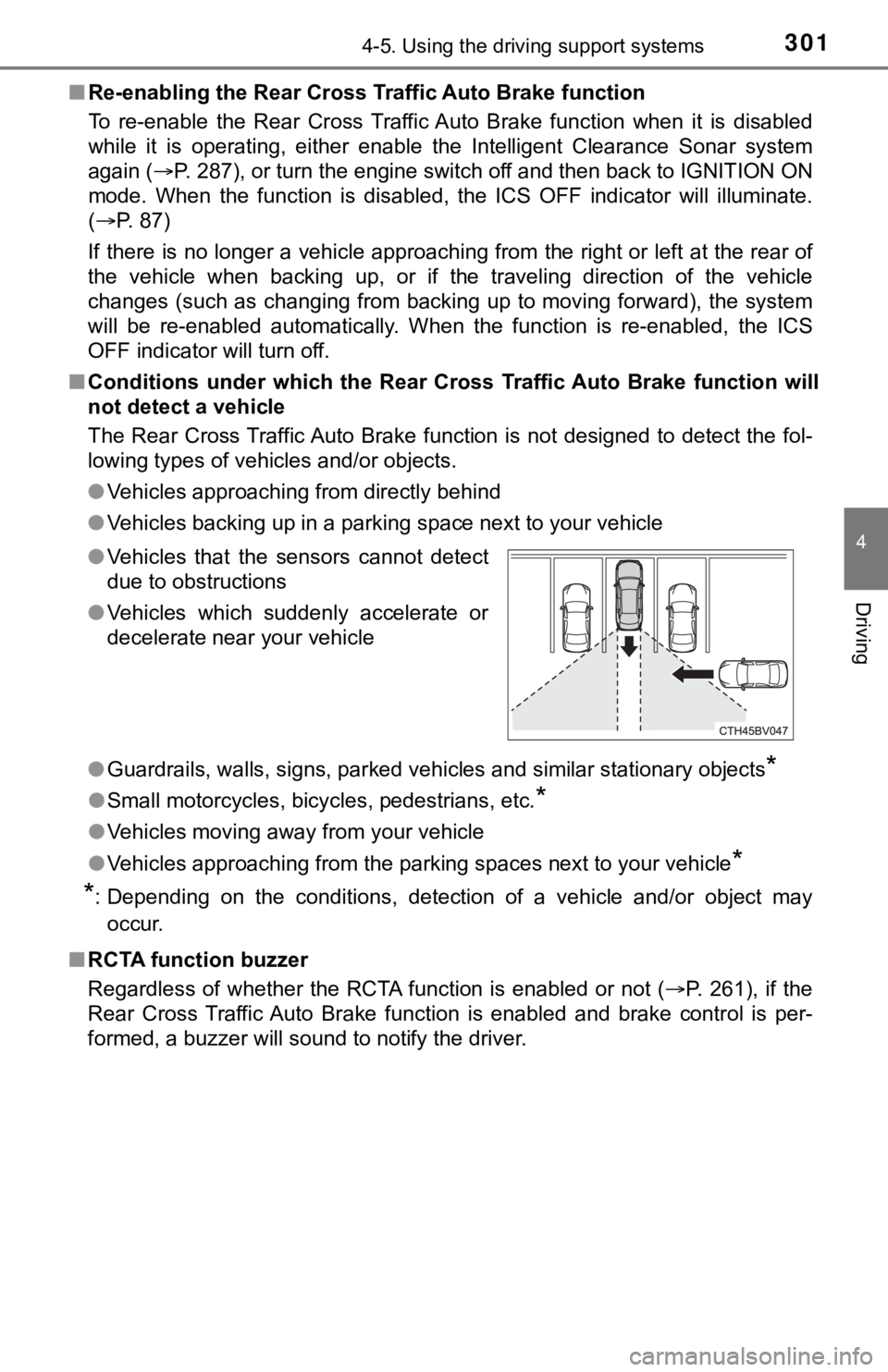
The Rear Cross Traffic Auto Brake function is not designed to detect the fol-
lowing types of vehicles and/or objects.
●Vehicles approaching from directly behind
●Vehicles backing up in a parking space next to your vehicle
●<002a005800440055004700550044004c004f0056000f0003005a0044004f004f0056000f00030056004c004a00510056000f0003005300440055004e00480047000300590048004b004c0046004f00480056000300440051004700030056004c0050004c00
4f0044005500030056005700440057004c0052005100440055[y objects
*
●Small motorcycles, bicycles, pedestrians, etc.*
●Vehicles moving away from your vehicle
●Vehicles approaching from the parking spaces next to your vehicle
*
*
: Depending on the conditions, detection of a vehicle and/or object may
occur.
■RCTA function buzzer
Regardless of whether the RCTA function is enabled or not (P. 261), if the
Rear Cross Traffic Auto Brake function is enabled and brake control is per-
formed, a buzzer will sound to notify the driver. ●Vehicles that the sensors cannot detect
due to obstructions
●Vehicles which suddenly accelerate or
decelerate near your vehicle
Page 326 of 548
3265-1. Using the air conditioning system and defogger
■When driving on dusty roads
Close all windows. If dust thrown up by the vehicle is still drawn into the vehi-
cle after closing the windows, it is recommended that the air intake mode be
set to outside air mode and the fan speed to any setting except off.
■Outside/recirculated air mode
●Setting to the recirculated air mode temporarily is recommended in prevent-
ing dirty air from entering the vehicle interior and helping to cool the vehicle
when the outside air temperature is high.
●Outside/recirculated air mode may automatically switch depending on the
temperature setting or the inside temperature.
■When the outside temperature exceeds 75°F (24°C) and the air condition-
ing system is on
●In order to reduce the air conditioning power consumption, the air condition-
ing system may switch to recirculated air mode automatically. This may also
reduce fuel consumption.
●Recirculated air mode is selected as a default mode when the engine switch
is turned to IGNITION ON mode.
●It is possible to switch to outside air mode at any time by pressing .
■When the outside temperature is low
The dehumidification function may not operate even when is pressed.
■Operation of the air conditioning system in Eco drive mode
●In the Eco drive mode, “ECO” is displayed on the air conditioning screen
and the air conditioning system is controlled as follows to prioritize fuel effi-
ciency:
• Engine speed and compressor operation controlled to restrict heating/
cooling capacity
• Fan speed restricted when automatic mode is selected
●To improve air conditioning performance, perform the following operations:
• Adjust the fan speed
• Turn off Eco drive mode
■Ventilation and air conditioning odors
●To let fresh air in, set the air conditioning system to the outside air mode.
●During use, various odors from inside and outside the vehicle may enter into
and accumulate in the air conditioning system. This may then cause odor to
be emitted from the vents.
●To reduce potential odors from occurring:
• It is recommended that the air conditioning system be set to outside air
mode prior to turning the vehicle off.
• The start timing of the blower may be delayed for a short period of time
immediately after the air conditioning system is started in automatic
mode.
Page 331 of 548
3315-1. Using the air conditioning system and defogger
5
Interior features
■Rear (if equipped)
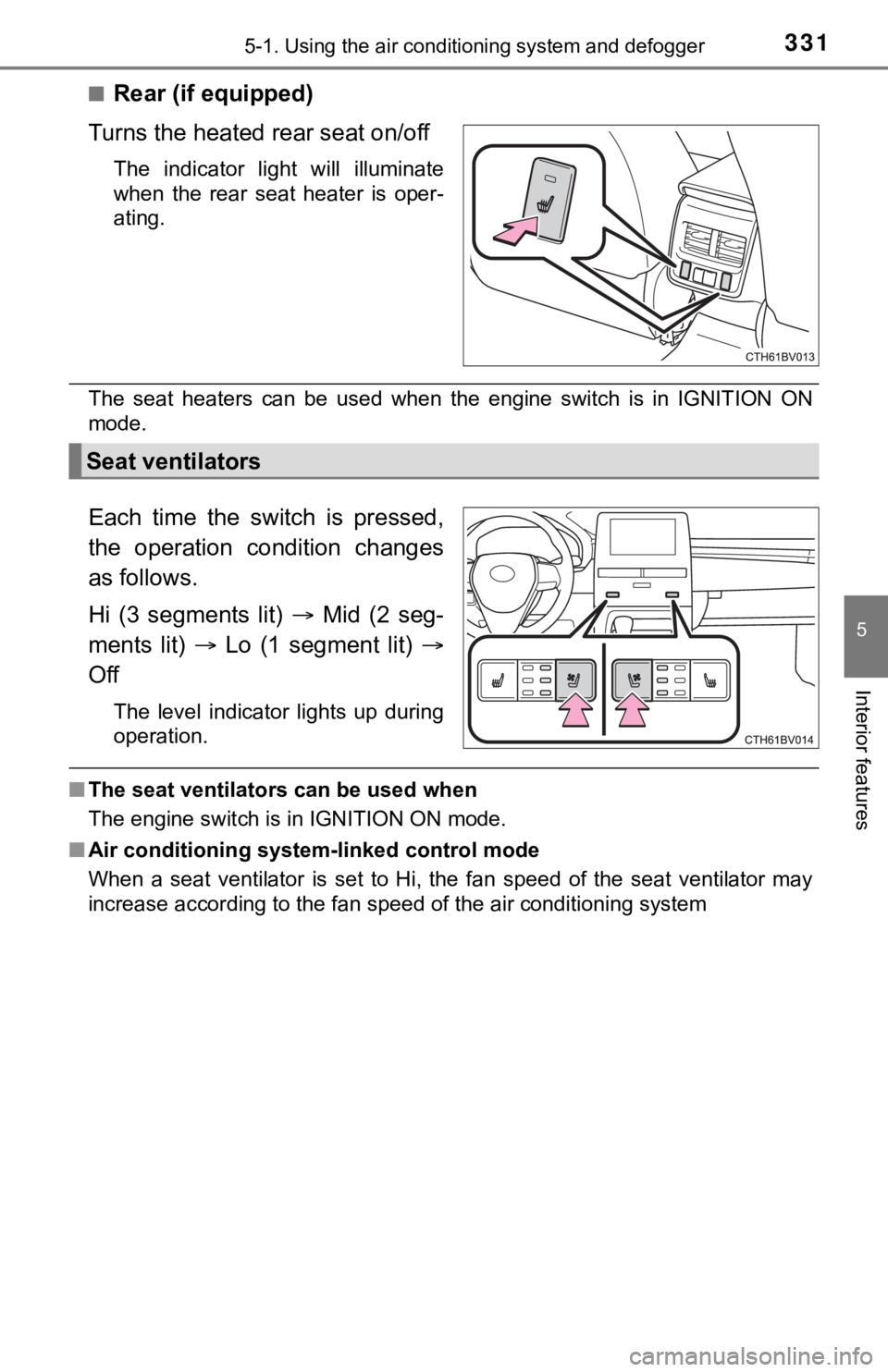
Turns the heated rear seat on/off
The indicator light will illuminate
when the rear seat heater is oper-
ating.
The seat heaters can be used when the engine switch is in IGNITION ON
mode.
Each time the switch is pressed,
the operation condition changes
as follows.
Hi (3 segments lit) Mid (2 seg-
ments lit) Lo (1 segment lit)
Off
The level indicator lights up during
operation.
■The seat ventilators can be used when
The engine switch is in IGNITION ON mode.
■Air conditioning system-linked control mode
When a seat ventilator is set to Hi, the fan speed of the seat ventilator may
increase according to the fan speed of the air conditioning system
Seat ventilators
Page 336 of 548
3365-3. Using the storage features
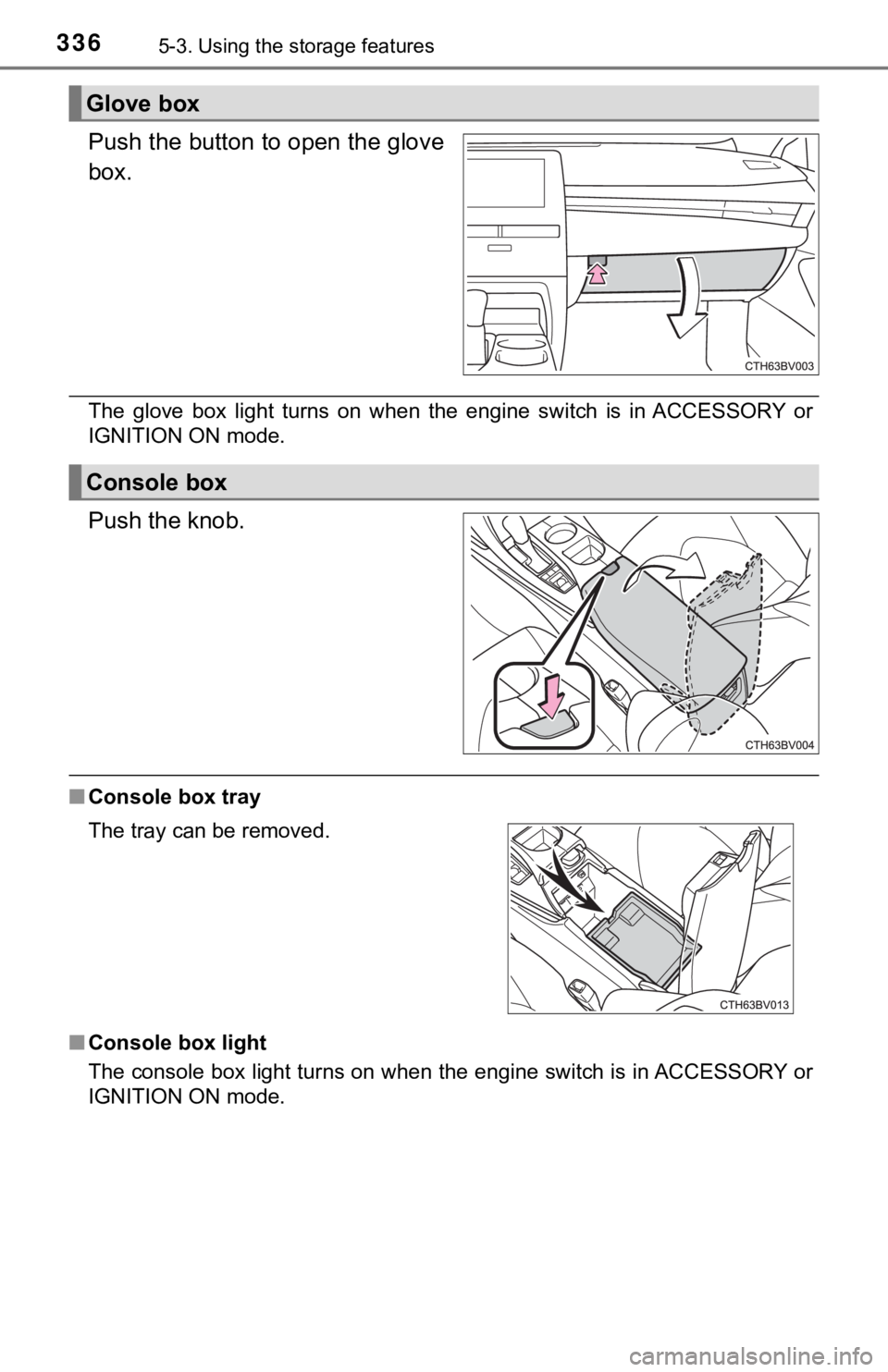
Push the button to open the glove
box.
The glove box light turns on when the engine switch is in ACCESSORY or
IGNITION ON mode.
Push the knob.
■Console box tray
■Console box light
The console box light turns on when the engine switch is in ACCESSORY or
IGNITION ON mode.
Glove box
Console box
The tray can be removed.
Page 343 of 548
3435-4. Other interior features
5
Interior features
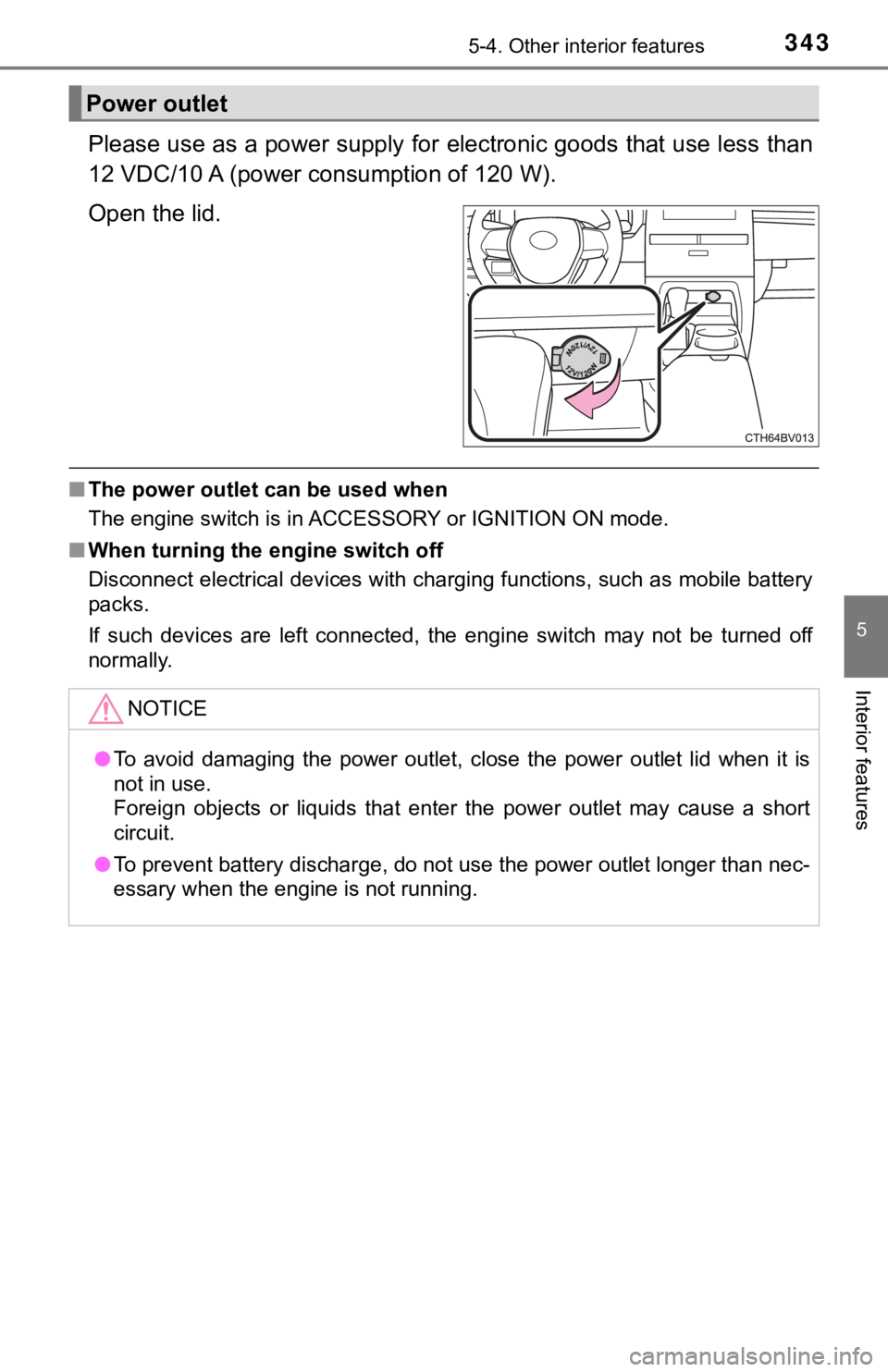
Please use as a power supply for electronic goods that use less than
12 VDC/10 A (power consumption of 120 W).
Open the lid.
■The power outlet can be used when
The engine switch is in ACCESSORY or IGNITION ON mode.
■When turning the engine switch off
Disconnect electrical devices with charging functions, such as mobile battery
packs.
If such devices are left connected, the engine switch may not be turned off
normally.
Power outlet
NOTICE
●To avoid damaging the power outlet, close the power outlet lid when it is
not in use.
Foreign objects or liquids that enter the power outlet may cause a short
circuit.
●To prevent battery discharge, do not use the power outlet longer than nec-
essary when the engine is not running.
Page 344 of 548
3445-4. Other interior features
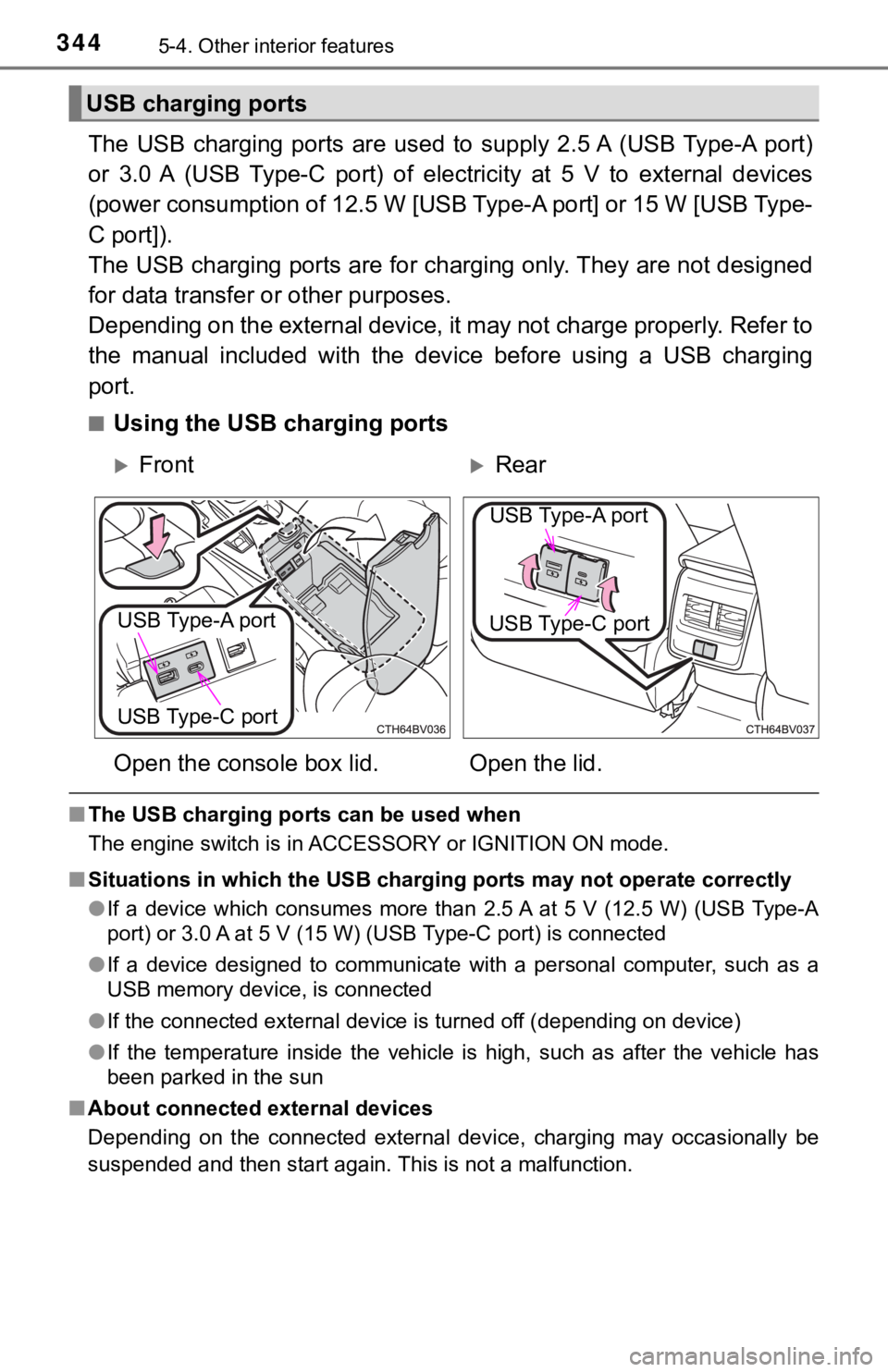
The USB charging ports are used to supply 2.5 A (USB Type-A port)
or 3.0 A (USB Type-C port) of electricity at 5 V to external devices
(power consumption of 12.5 W [USB Type-A port] or 15 W [USB Type-
C port]).
The USB charging ports are for charging only. They are not designed
for data transfer or other purposes.
Depending on the external device, it may not charge properly. Refer to
the manual included with the device before using a USB charging
port.
■Using the USB charging ports
■The USB charging ports can be used when
The engine switch is in ACCESSORY or IGNITION ON mode.
■Situations in which the USB charging ports may not operate correctly
●If a device which consumes more than 2.5 A at 5 V (12.5 W) (USB Type-A
port) or 3.0 A at 5 V (15 W) (USB Type-C port) is connected
●If a device designed to communicate with a personal computer, such as a
USB memory device, is connected
●If the connected external device is turned off (depending on device)
●If the temperature inside the vehicle is high, such as after the vehicle has
been parked in the sun
■About connected external devices
Depending on the connected external device, charging may occasionally be
suspended and then start again. This is not a malfunction.
USB charging ports
FrontRear
Open the console box lid. Open the lid.
USB Type-A port
USB Type-C port
USB Type-A port
USB Type-C port
Page 349 of 548

3495-4. Other interior features
5
Interior features
■The wireless charger can be operated when
The engine switch is in ACCESSORY or IGNITION ON mode.
■Portable devices that can be charged
●Portable devices compatible with the Qi wireless charging standard can be
charged by the wireless charger. However, compatibility with all devices
<005a004b004c0046004b0003005000480048005700030057004b004800030034004c0003005a004c00550048004f00480056005600030046004b00440055004a004c0051004a0003005600570044005100470044005500470003004c005600030051005200
570003004a0058004400550044005100570048004800470011[
●The wireless charger is designed to supply low power electricity (5 W or
less) to a cellular phone, smartphone, or other portable device.
■If a cover or accessory is attached to the portable device
Do not charge a portable device if a cover or accessory which is not Qi com-
patible is attached. Depending on the type of cover and/or accessory
attached, it may not be possible to charge the portable device. If the portable
device is placed on the charging area and does not charge, remove the cover
and/or accessories.
■If interference is heard in AM radio broadcasts while charging
Turn off the wireless charger and check if the noise is reduced. If noise is
reduced, press and hold the power supply switch of the wireless charger for 2
seconds. The frequency of the wireless charger is changed and noise may be
reduced. When the frequency is changed, the operation indicator light will
blink (orange) 2 times.
■Charging precautions
●If the electronic key cannot be detected in the cabin, charging cannot be
performed. When a door is opened and closed, charging may be temporarily
suspended.
●While charging, the wireless charger and the portable device will become
warm. This is not a malfunction.
If a portable device becomes warm while charging and charging stops due
to the protection function of the portable device, wait until the portable
device cools down and charge it again.
■Sound generated during operation
When the power supply switch is turned on or while a portable device is being
identified, operation sounds may be heard. This is not a malfunction.
■Cleaning the wireless charger
P. 370
Page 380 of 548

3806-3. Do-it-yourself maintenance
WARNING
The engine compartment contains many mechanisms and fluids that may
move suddenly, become hot, or become electrically energized. To avoid death
or serious injury, observe the following precautions.
■When working on the engine compartment
●Keep hands, clothing and tools away from the moving fan and engine
drive belt.
●Be careful not to touch the engine, radiator, exhaust manifold, etc. right
after driving as they may be hot. Oil and other fluids may also be hot.
●Do not leave anything that may burn easily, such as paper and rags, in the
engine compartment.
●Do not smoke, cause sparks or expose an open flame to fuel or the bat-
tery. Fuel and battery fumes are flammable.
●Be extremely cautious when working on the battery. It contains poisonous
and corrosive sulfuric acid.
■When working near the electric cooling fan or radiator grille
Be sure the engine switch is off. With the engine switch in IGNITION ON
mode, the electric cooling fan may automatically start to run if the air condi-
tioning is on and/or the coolant temperature is high. (P. 389)
■Safety glasses
Wear safety glasses to prevent flying or falling material, fluid spray, etc.
from getting in your eyes.
NOTICE
■If you remove the air cleaner filter
Driving with the air cleaner filter removed may cause excessive engine wear
due to dirt in the air.