BSM function TOYOTA AVALON 2021 Owners Manual (in English)
[x] Cancel search | Manufacturer: TOYOTA, Model Year: 2021, Model line: AVALON, Model: TOYOTA AVALON 2021Pages: 548, PDF Size: 13.4 MB
Page 4 of 548
TABLE OF CONTENTS4
4-5. Using the driving
support systems
Toyota Safety Sense P ..... 218
PCS
(Pre-Collision System) .... 226
LDA (Lane Departure Alert
with steering control) ....... 237
Dynamic radar cruise
controlwith full-speed
range ............................... 247
BSM
(Blind Spot Monitor) ........ 260
• BSM function ................ 264
• RCTA function .............. 267
Rear Camera Detection
function (vehicles with
panoramic view
monitor) ........................... 272
Intuitive parking assist ....... 276
Intelligent Clearance
Sonar (ICS) ..................... 284
Driving mode select
switches .......................... 305
Driving assist systems....... 309
4-6. Driving tips
Winter driving tips.............. 3175-1. Using the
air conditioning
system and defogger
Automatic air conditioning
system ............................. 322
Heated steering wheel/
seat heaters/seat
ventilators ........................ 329
5-2. Using the interior lights
Interior lights list................. 332
• Interior light ................... 333
• Personal lights............... 333
• Ambient lights................ 334
5-3. Using the storage
features
List of storage features ...... 335
• Glove box ...................... 336
• Console box .................. 336
• Bottle holders ................ 337
• Cup holders ................... 338
• Auxiliary boxes .............. 339
• Open tray ...................... 340
Trunk features ................... 341
5-4. Other interior features
Other interior features........ 342
• Sun visors ..................... 342
• Vanity mirrors ................ 342
• Power outlet .................. 343
• USB charging ports ....... 344
• Wireless charger ........... 346
• Armrest.......................... 355
• Assist grips .................... 355
• Coat hooks .................... 356
Garage door opener .......... 3575Interior features
Page 89 of 548
892. Instrument cluster
2
Instrument cluster
*1: These lights turn on when the engine switch is turned to IGNITION ON
mode to indicate that a system check is being performed. They will turn off
after the engine is started, or after a few seconds. There may be a mal-
function in a system if a light does not come on, or turn off. Have the vehi-
cle inspected by your Toyota dealer.
*2: This light illuminates on the multi-information display.
*3: This light does not turn on when the system is disabled.
*4: This light turns on when the system is off.
*5: This light flashes to indicate that the system is operating.
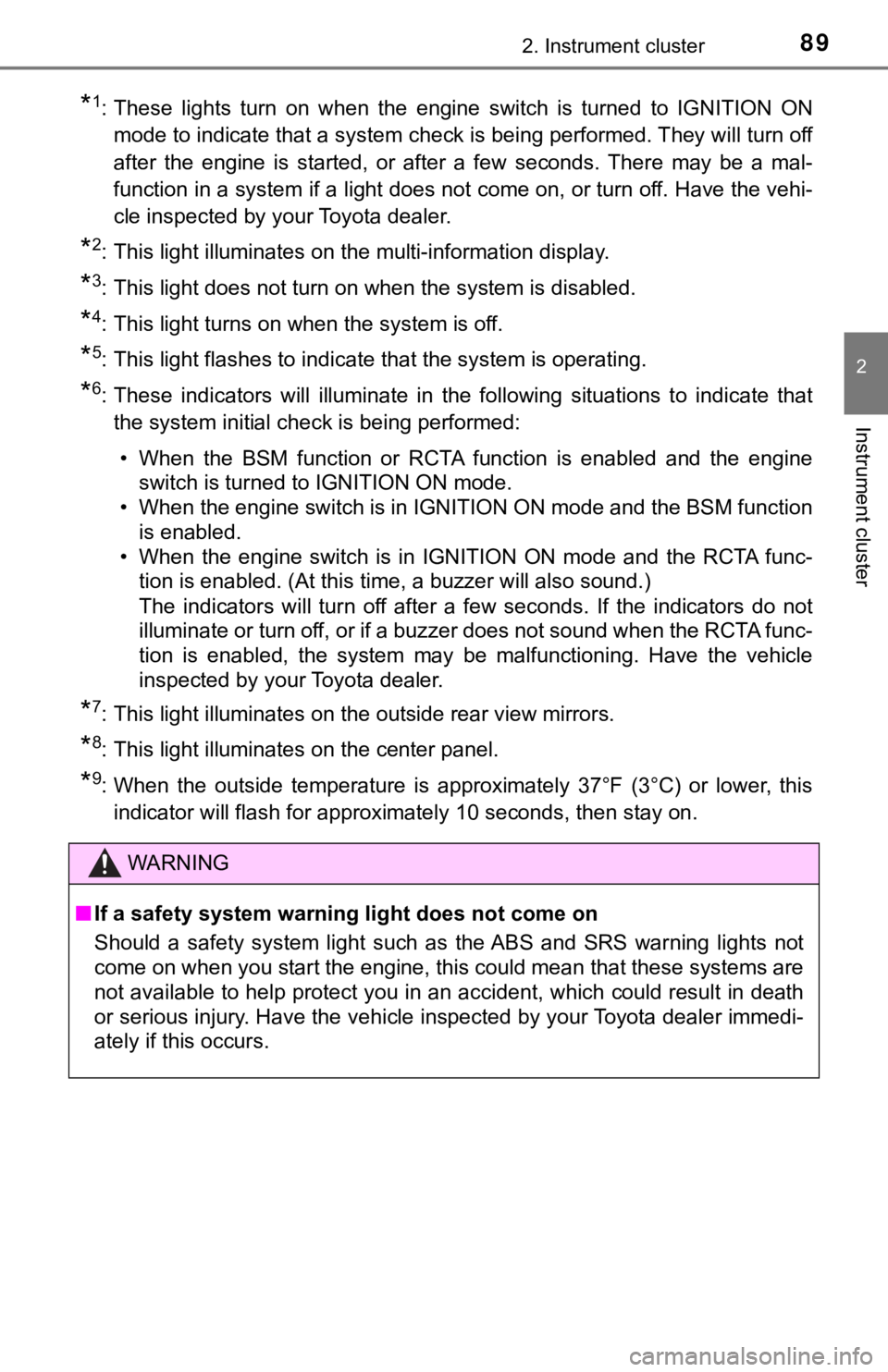
*6: These indicators will illuminate in the following situations to indicate that
the system initial check is being performed:
• When the BSM function or RCTA function is enabled and the engine
switch is turned to IGNITION ON mode.
• When the engine switch is in IGNITION ON mode and the BSM function
is enabled.
• When the engine switch is in IGNITION ON mode and the RCTA func-
tion is enabled. (At this time, a buzzer will also sound.)
The indicators will turn off after a few seconds. If the indicators do not
illuminate or turn off, or if a buzzer does not sound when the RCTA func-
tion is enabled, the system may be malfunctioning. Have the vehicle
inspected by your Toyota dealer.
*7: This light illuminates on the outside rear view mirrors.
*8: This light illuminates on the center panel.
*9: When the outside temperature is approximately 37°F (3°C) or lower, this
indicator will flash for approximately 10 seconds, then stay on.
WARNING
■If a safety system warning light does not come on
Should a safety system light such as the ABS and SRS warning lights not
come on when you start the engine, this could mean that these systems are
not available to help protect you in an accident, which could result in death
or serious injury. Have the vehicle inspected by your Toyota dealer immedi-
ately if this occurs.
Page 96 of 548
962. Instrument cluster
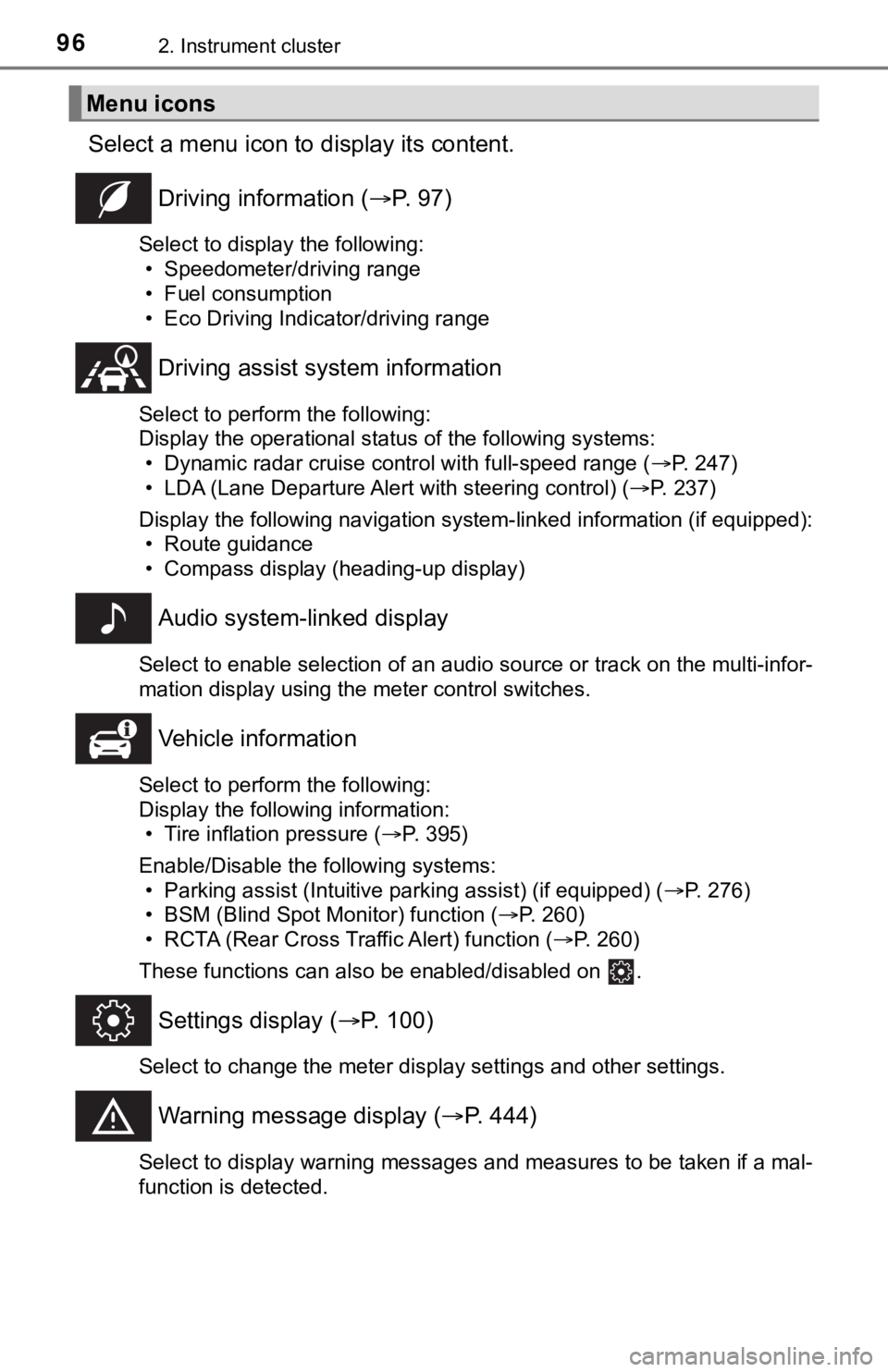
Select a menu icon to display its content.
Driving information (P. 9 7 )
Select to display the following:
• Speedometer/driving range
• Fuel consumption
• Eco Driving Indicator/driving range
Driving assist system information
Select to perform the following:
Display the operational status of the following systems:
• Dynamic radar cruise control with full-speed range (P. 247)
• LDA (Lane Departure Alert with steering control) (P. 237)
Display the following navigation system-linked information (if equipped):
• Route guidance
• Compass display (heading-up display)
Audio system-linked display
Select to enable selection of an audio source or track on the multi-infor-
mation display using the meter control switches.
Vehicle information
Select to perform the following:
Display the following information:
• Tire inflation pressure (P. 395)
Enable/Disable the following systems:
• Parking assist (Intuitive parking assist) (if equipped) (P. 276)
• BSM (Blind Spot Monitor) function (P. 260)
• RCTA (Rear Cross Traffic Alert) function (P. 260)
These functions can also be enabled/disabled on .
Settings display (P. 100)
Select to change the meter display settings and other settings.
Warning message display (P. 444)
Select to display warning messages and measures to be taken if a mal-
function is detected.
Menu icons
Page 101 of 548
1012. Instrument cluster
2
Instrument cluster
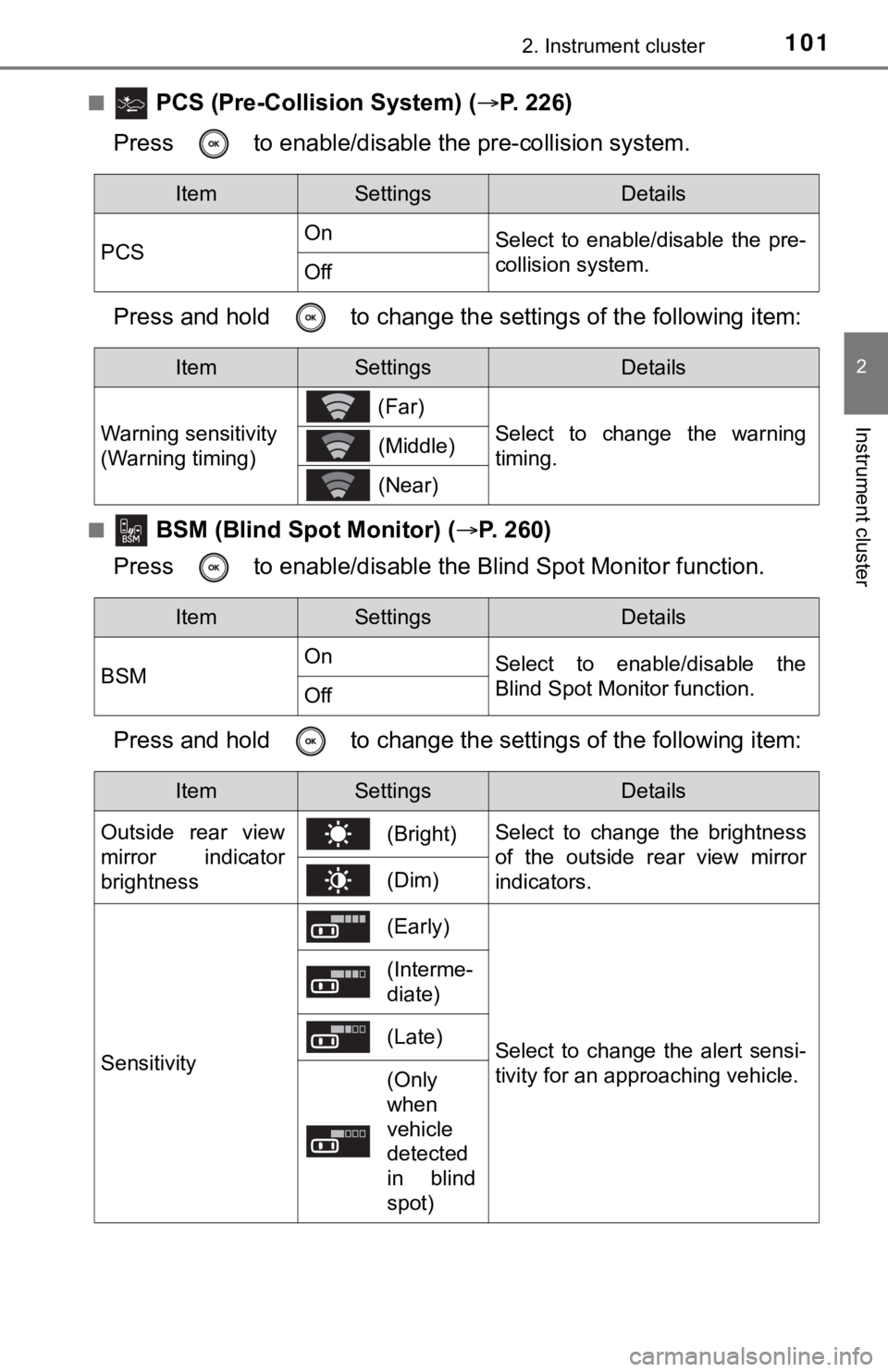
■ PCS (Pre-Collision System) (P. 226)
Press to enable/disable the pre-collision system.
Press and hold to change the settings of the following item:
■ BSM (Blind Spot Monitor) (P. 260)
Press to enable/disable the Blind Spot Monitor function.
Press and hold to change the settings of the following item:
ItemSettingsDetails
PCSOn
Select to enable/disable the pre-
collision system.
Off
ItemSettingsDetails
Warning sensitivity
(Warning timing) (Far)
Select to change the warning
timing. (Middle)
(Near)
ItemSettingsDetails
BSMOn
Select to enable/disable the
Blind Spot Monitor function.
Off
ItemSettingsDetails
Outside rear view
mirror indicator
brightness(Bright)Select to change the brightness
of the outside rear view mirror
indicators.
(Dim)
Sensitivity
(Early)
Select to change the alert sensi-
tivity for an approaching vehicle.
(Interme-
diate)
(Late)
(Only
when
vehicle
detected
in blind
spot)
Page 169 of 548
169
4Driving
4-1. Before driving
Driving the vehicle ............. 170
Cargo and luggage ........... 178
Vehicle load limits ............. 181
Trailer towing..................... 182
Dinghy towing ................... 183
4-2. Driving procedures
Engine (ignition) switch ..... 184
Automatic transmission ..... 189
Turn signal lever................ 195
Parking brake .................... 196
Brake Hold ........................ 200
4-3. Operating the lights
and wipers
Headlight switch ................ 202
Automatic High Beam ....... 206
Windshield wipers
and washer ..................... 210
4-4. Refueling
Opening the fuel
tank cap .......................... 2144-5. Using the driving
support systems
Toyota Safety Sense P ..... 218
PCS
(Pre-Collision System) .... 226
LDA
(Lane Departure Alert
with steering control) ....... 237
Dynamic radar cruise
controlwith full-speed
range............................... 247
BSM
(Blind Spot Monitor) ........ 260
• BSM function ................ 264
• RCTA function .............. 267
Rear Camera Detection
function (vehicles with
panoramic view
monitor)........................... 272
Intuitive parking assist....... 276
Intelligent Clearance
Sonar (ICS) ..................... 284
Driving mode select
switches .......................... 305
Driving assist systems ...... 309
4-6. Driving tips
Winter driving tips ............. 317
Page 260 of 548
2604-5. Using the driving support systems
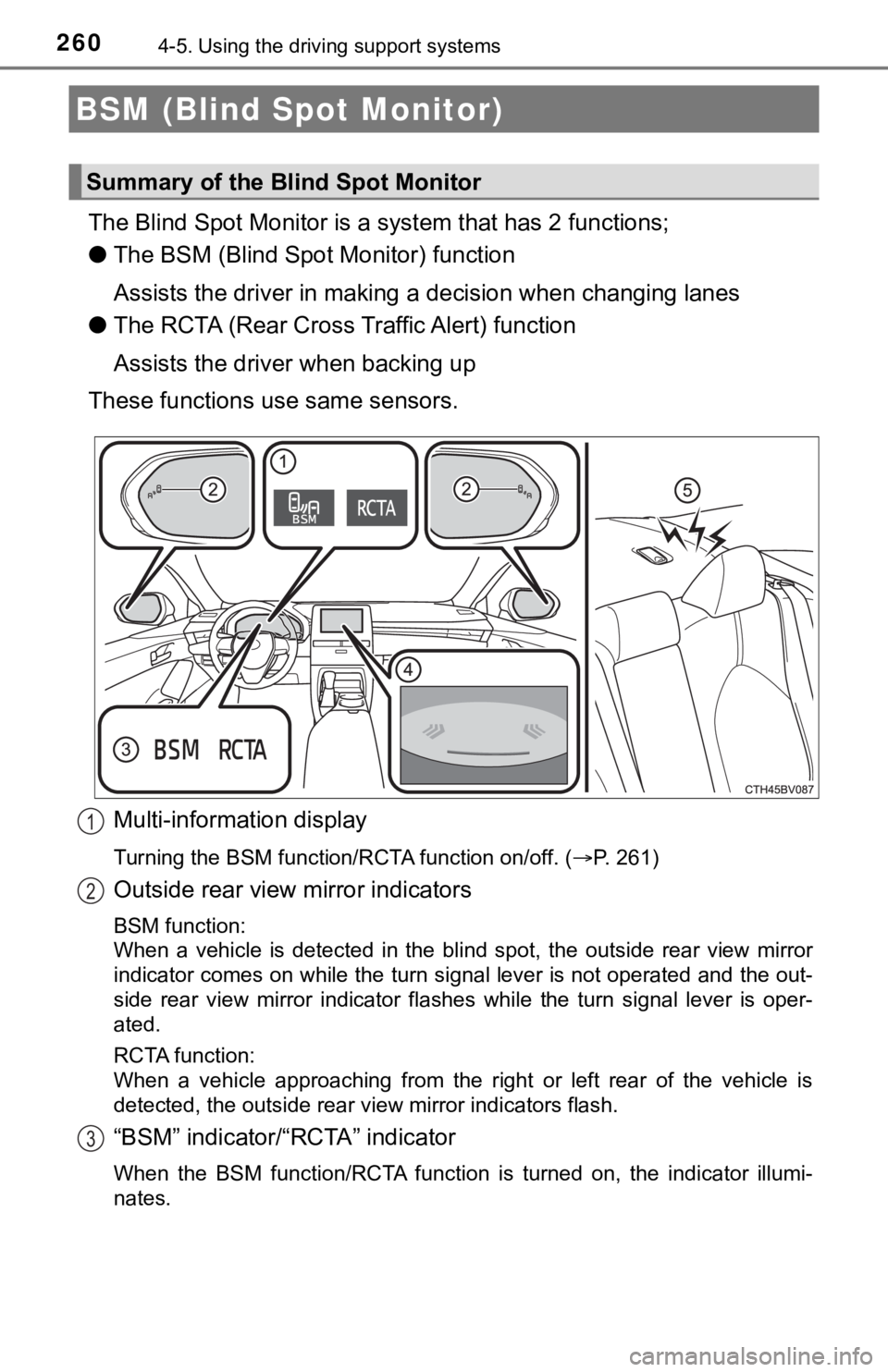
The Blind Spot Monitor is a system that has 2 functions;
●The BSM (Blind Spot Monitor) function
Assists the driver in making a decision when changing lanes
●The RCTA (Rear Cross Traffic Alert) function
Assists the driver when backing up
These functions use same sensors.
Multi-information display
Turning the BSM function/RCTA function on/off. (P. 261)
Outside rear view mirror indicators
BSM function:
When a vehicle is detected in the blind spot, the outside rear view mirror
indicator comes on while the turn signal lever is not operated and the out-
side rear view mirror indicator flashes while the turn signal lever is oper-
ated.
RCTA function:
When a vehicle approaching from the right or left rear of the vehicle is
<00470048005700480046005700480047000f00030057004b004800030052005800570056004c004700480003005500480044005500030059004c0048005a00030050004c00550055005200550003004c00510047004c004600440057005200550056000300
49004f00440056004b0011[
“BSM” indicator/“RCTA” indicator
When the BSM function/RCTA function is turned on, the indicator illumi-
nates.
BSM (Blind Spot Monitor)
Summary of the Blind Spot Monitor
1
2
3
Page 261 of 548
2614-5. Using the driving support systems
4
Driving
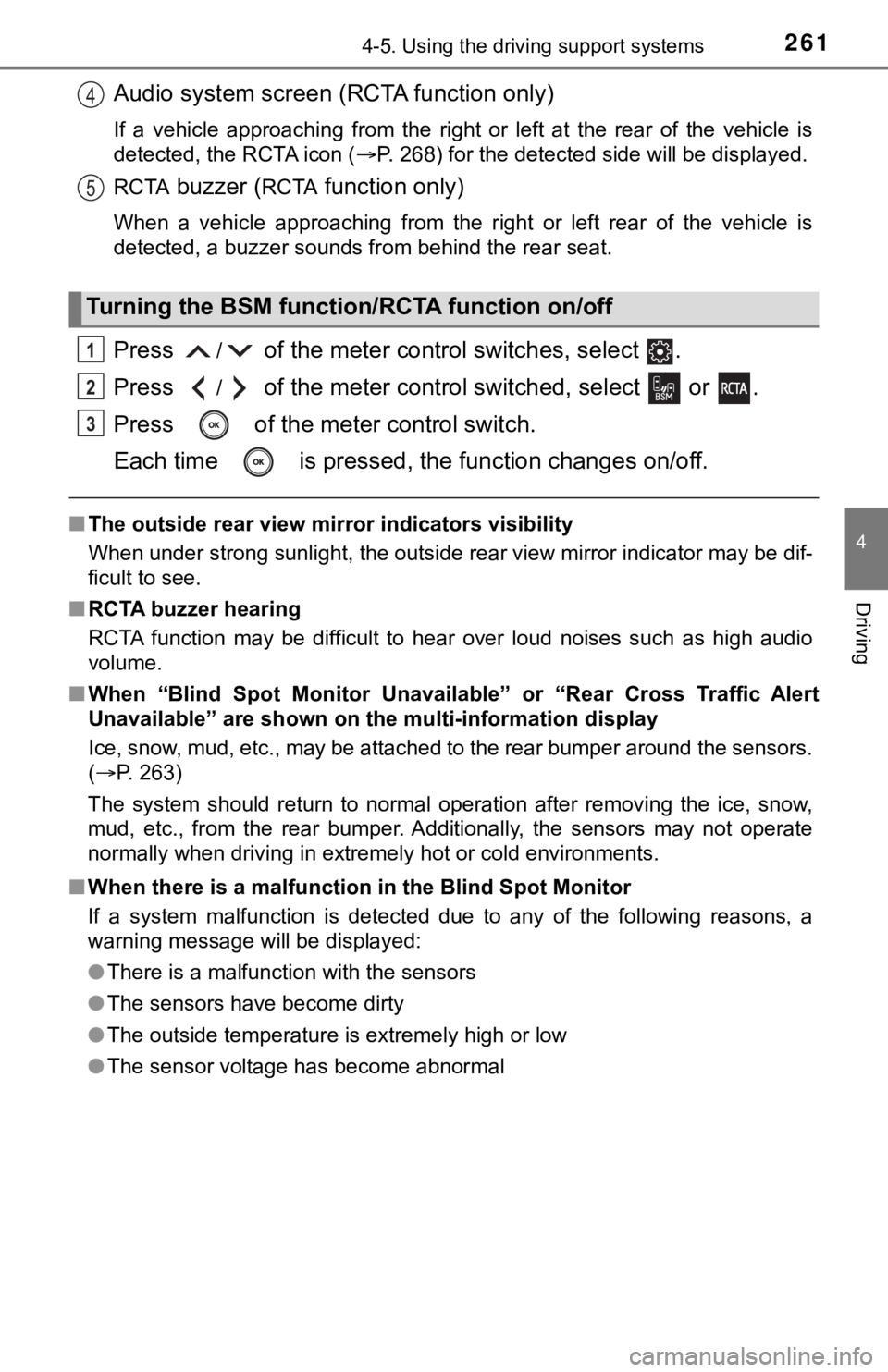
Audio system screen (RCTA function only)
If a vehicle approaching from the right or left at the rear of the vehicle is
detected, the RCTA icon (P. 268) for the detected side will be displayed.
RCTA
buzzer (RCTA function only)
When a vehicle approaching from the right or left rear of the vehicle is
detected, a buzzer sounds from behind the rear seat.
Press / of the meter control switches, select .
Press
/ of the meter control switched, select or .
Press of the meter control switch.
Each time is pressed, the function changes on/off.
■The outside rear view mirror indicators visibility
When under strong sunlight, the outside rear view mirror indicator may be dif-
ficult to see.
■RCTA buzzer hearing
RCTA function may be difficult to hear over loud noises such as high audio
volume.
■When “Blind Spot Monitor Unavailable” or “Rear Cross Traffic Alert
Unavailable” are shown on the multi-information display
Ice, snow, mud, etc., may be attached to the rear bumper around the sensors.
(P. 263)
The system should return to normal operation after removing the ice, snow,
mud, etc., from the rear bumper. Additionally, the sensors may not operate
<00510052005500500044004f004f005c0003005a004b00480051000300470055004c0059004c0051004a0003004c005100030048005b00570055004800500048004f005c0003004b00520057000300520055000300460052004f0047000300480051005900
4c005500520051005000480051005700560011[
■When there is a malfunction in the Blind Spot Monitor
If a system malfunction is detected due to any of the following reasons, a
warning message will be displayed:
●There is a malfunction with the sensors
●The sensors have become dirty
●The outside temperature is extremely high or low
●The sensor voltage has become abnormal
Turning the BSM function/RCTA function on/off
4
5
1
2
3
Page 263 of 548
2634-5. Using the driving support systems
4
Driving
WARNING
■Handling the radar sensor
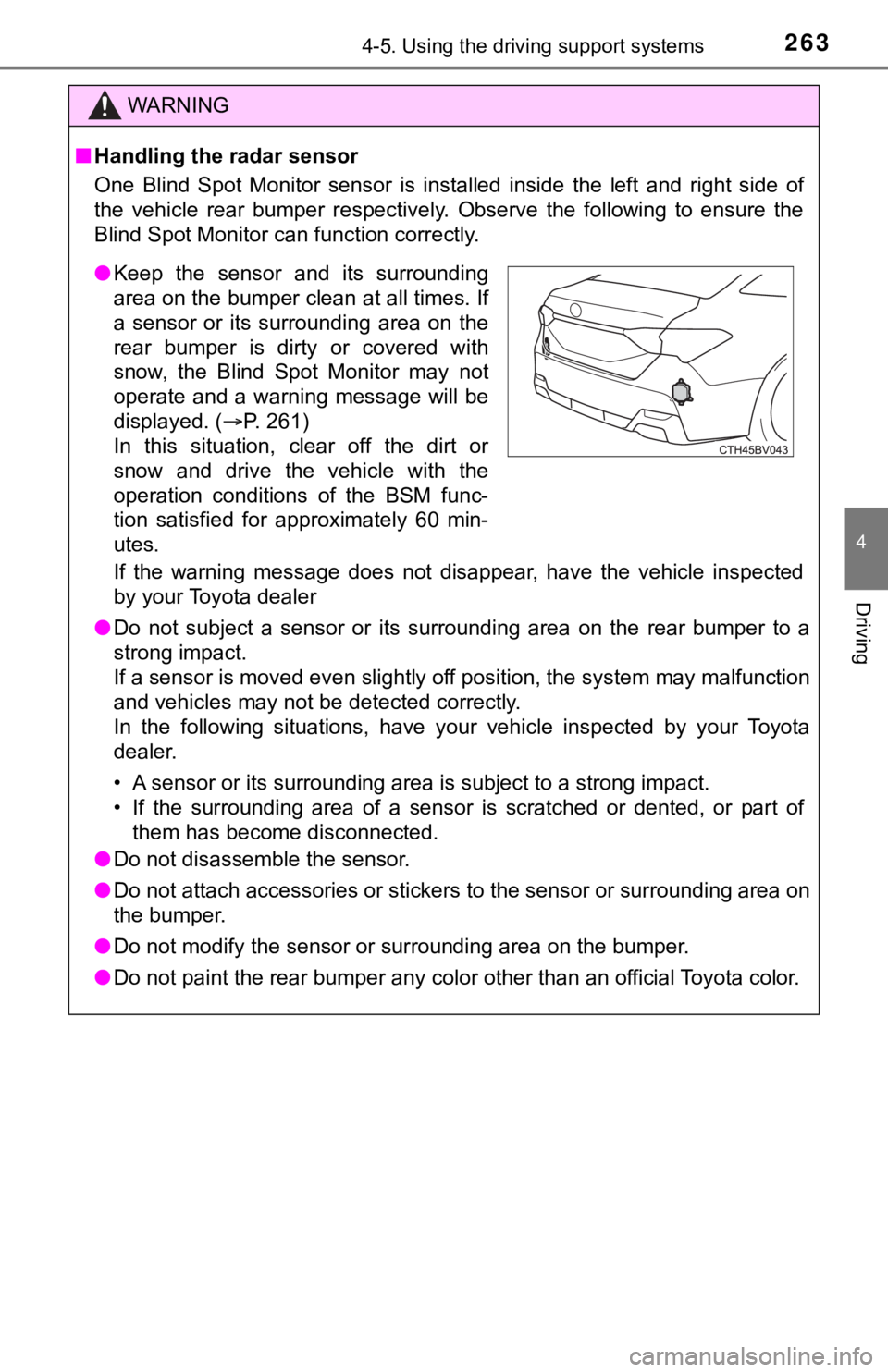
One Blind Spot Monitor sensor is installed inside the left and right side of
the vehicle rear bumper respectively. Observe the following to ensure the
Blind Spot Monitor can function correctly.
If the warning message does not disappear, have the vehicle inspected
by your Toyota dealer
●Do not subject a sensor or its surrounding area on the rear bumper to a
strong impact.
If a sensor is moved even slightly off position, the system may malfunction
and vehicles may not be detected correctly.
In the following situations, have your vehicle inspected by your Toyota
dealer.
• A sensor or its surrounding area is subject to a strong impact.
• If the surrounding area of a sensor is scratched or dented, or part of
them has become disconnected.
●Do not disassemble the sensor.
●Do not attach accessories or stickers to the sensor or surrounding area on
the bumper.
●Do not modify the sensor or surrounding area on the bumper.
●Do not paint the rear bumper any color other than an official Toyota color.
●Keep the sensor and its surrounding
area on the bumper clean at all times. If
a sensor or its surrounding area on the
rear bumper is dirty or covered with
snow, the Blind Spot Monitor may not
operate and a warning message will be
displayed. (P. 261)
In this situation, clear off the dirt or
snow and drive the vehicle with the
operation conditions of the BSM func-
tion satisfied for approximately 60 min-
utes.
Page 264 of 548
2644-5. Using the driving support systems
The BSM function uses radar sensors to detect vehicles that are trav-
eling in an adjacent lane in the area that is usually not reflected in the
outside rear view mirror (the blind spot), and advises the driver of the
vehicles existence via the outside rear view mirror indicator.
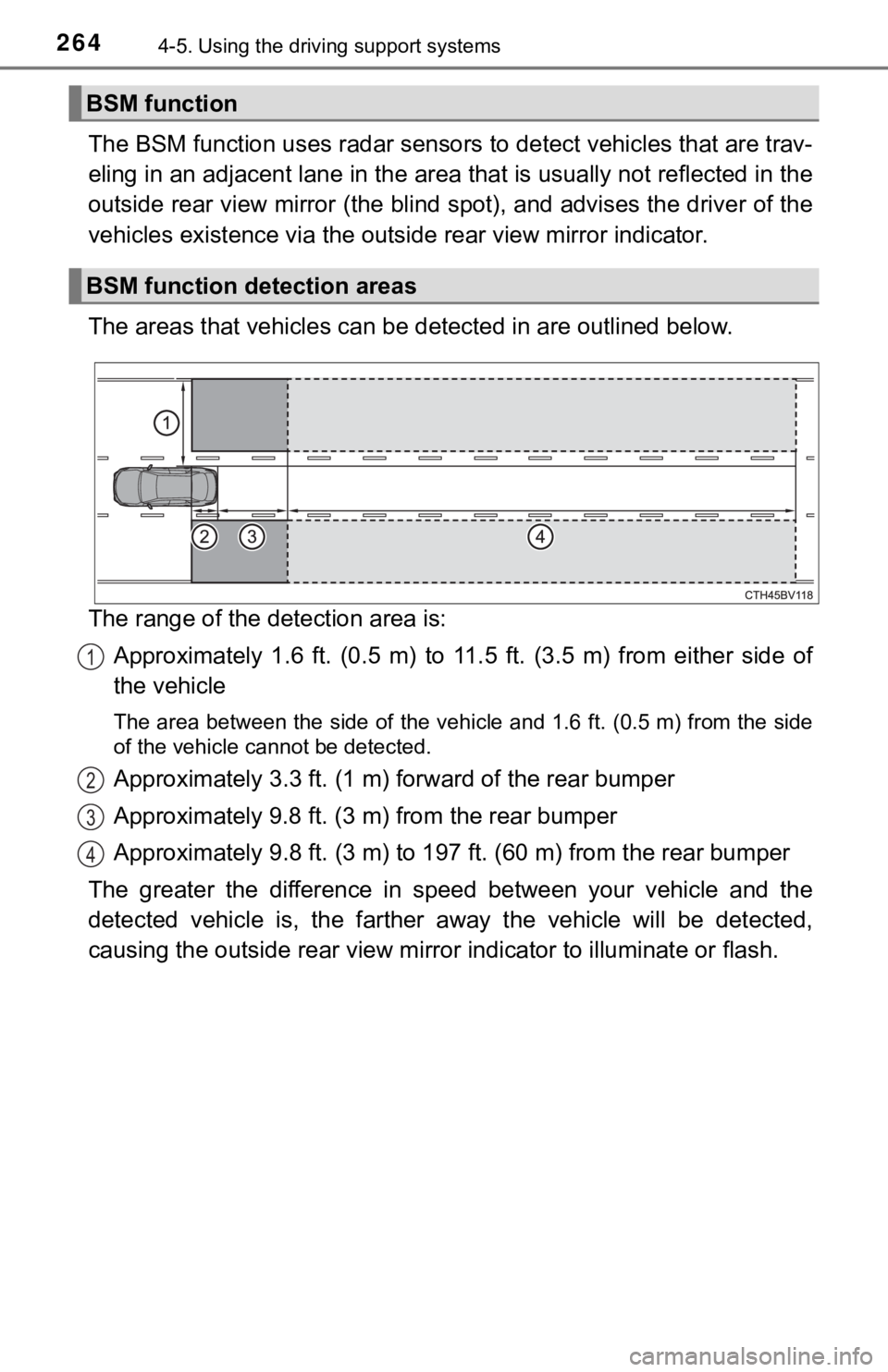
The areas that vehicles can be detected in are outlined below.
The range of the detection area is:
Approximately 1.6 ft. (0.5 m) to 11.5 ft. (3.5 m) from either side of
the vehicle
The area between the side of the vehicle and 1.6 ft. (0.5 m) from the side
of the vehicle cannot be detected.
Approximately 3.3 ft. (1 m) forward of the rear bumper
Approximately 9.8 ft. (3 m) from the rear bumper
Approximately 9.8 ft. (3 m) to 197 ft. (60 m) from the rear bumper
The greater the difference in speed between your vehicle and the
detected vehicle is, the farther away the vehicle will be detected,
causing the outside rear view mirror indicator to illuminate or flash.
BSM function
BSM function detection areas
1
2
3
4
Page 265 of 548
2654-5. Using the driving support systems
4
Driving
■The BSM function is operational when
●The BSM function is turned on
●Vehicle speed is greater than approximately 10 mph (16 km/h).
■The BSM function will detect a vehicle when
●A vehicle in an adjacent lane overtakes your vehicle.
●You overtake a vehicle in adjacent lane slowly.
●Another vehicle enters the detection area when it changes lanes.
WARNING
■Cautions regarding the use of the system
The driver is solely responsible for safe driving. Always drive safely, taking
care to observe your surroundings.
The BSM function is a supplementary function which alerts the driver that a
vehicle is present in the blind spot. Do not overly rely on the BSM function.
The function cannot judge if it is safe to change lanes, therefore over reli-
ance could cause an accident resulting in death or serious injury.
According to conditions, the system may not function correctly. Therefore
the driver’s own visual confirmation of safety is necessary.