approximately 11 TOYOTA AVALON 2021 Owners Manual (in English)
[x] Cancel search | Manufacturer: TOYOTA, Model Year: 2021, Model line: AVALON, Model: TOYOTA AVALON 2021Pages: 548, PDF Size: 13.4 MB
Page 8 of 548
8
Please note that this manual applies to all models and explains all equipment,
including options. Therefore, you may find some explanations for equipment
not installed on your vehicle.
All specifications provided in this manual are current at the time of printing.
However, because of the Toyota policy of continual product improvement, we
reserve the right to make changes at any time without notice.
Depending on specifications, the vehicle shown in the illustrations may differ
from your vehicle in terms of equipment.
Approximately five hours after the engine is turned off, you may hear sound
coming from under the vehicle for several minutes. This is the sound of a fuel
<00480059004400530052005500440057004c005200510003004f00480044004e0044004a004800030046004b00480046004e0003004400510047000f0003004c00570003004700520048005600030051005200570003004c00510047004c00460044005700
4800030044000300500044004f00490058005100460057004c[on.
A wide variety of non-genuine spare parts and accessories for Toyota vehi-
cles are currently available in the market. You should know that Toyota does
not warrant these products and is not responsible for their performance,
repair, or replacement, or for any damage they may cause to, or adverse
effect they may have on, your Toyota vehicle.
This vehicle should not be modified with non-genuine Toyota products. Modi-
fication with non-genuine Toyota products could affect its performance, safety
or durability, and may even violate governmental regulations. In addition,
damage or performance problems resulting from the modification may not be
covered under warranty.
The installation of a mobile two-way radio system in your vehicle could affect
electronic systems such as:
●Multiport fuel injection system/sequential multiport fuel injection system
●Toyota Safety Sense P
●Anti-lock brake system
●SRS airbag system
●Seat belt pretensioner system
Be sure to check with your Toyota dealer for precautionary measures or spe-
cial instructions regarding installation of a mobile two-way radio system.
For your infor mation
Main Owner’s Manual
Noise from under vehicle after turning off the engine
Accessories, spare parts and modification of your Toyota
Installation of a mobile two-way radio system
Page 45 of 548

451-1. For safe use
1
For safety and security
■If the SRS airbags deploy (inflate)
●Slight abrasions, burns, bruising etc., may be sustained from SRS airbags,
due to the extremely high speed deployment (inflation) by hot gases.
●A loud noise and white powder will be emitted.
●Parts of the airbag module (steering wheel hub, airbag cover and inflator) as
well as the front seats, parts of the front and rear pillars, and roof side rails,
may be hot for several minutes. The airbag itself may also be hot.
●The windshield may crack.
●The interior lights will turn on automatically. (P. 332)
●The emergency flashers will turn on automatically. (P. 424)
●For Safety Connect subscribers, if any of the following situations occur, the
system is designed to send an emergency call to the response center, noti-
fying them of the vehicle’s location (without needing to push the “SOS” but-
ton) and an agent will attempt to speak with the occupants to ascertain the
level of emergency and assistance required. If the occupants are unable to
communicate, the agent automatically treats the call as an emergency and
<004b0048004f0053005600030057005200030047004c00560053004400570046004b00030057004b0048000300510048004600480056005600440055005c00030048005000480055004a004800510046005c00030056004800550059004c00460048005600
110003000b[P. 71)
• An SRS airbag is deployed.
• A seat belt pretensioner is activated.
• The vehicle is involved in a severe rear-end collision.
■SRS airbag deployment conditions (SRS front airbags)
●The SRS front airbags will deploy in the event of an impact that exceeds the
set threshold level (the level of force corresponding to an approximately 12 -
18 mph [20 - 30 km/h] frontal collision with a fixed wall that does not move or
deform).
However, this threshold velocity will be considerably higher in the following
situations:
• If the vehicle strikes an object, such as a parked vehicle or sign pole,
which can move or deform on impact
• If the vehicle is involved in an underride collision, such as a collision in
which the front of the vehicle “underrides”, or goes under, the bed of a
truck
●Depending on the type of collision, it is possible that only the seat belt pre-
tensioners will activate.
●The SRS front airbags for the front passenger will not activate if there is no
passenger sitting in the front passenger seat. However, the SRS front air-
bags for the front passenger may deploy if luggage is put in the seat, even if
the seat is unoccupied.
Page 46 of 548
461-1. For safe use
■SRS airbag deployment conditions (SRS side and curtain shield airbags)
●The SRS side and curtain shield airbags will deploy in the event of an
impact that exceeds the set threshold level (the level of force corresponding
to the impact force produced by an approximately 3300 lb. [1500 kg] vehicle
colliding with the vehicle cabin from a direction perpendicular to the vehicle
orientation at an approximate speed of 12 - 18 mph [20 - 30 km/h]).
●Both SRS curtain shield airbags may deploy in the event of a severe side
collision.
●Both SRS curtain shield airbags will deploy in the event of vehicle rollover.
●Both SRS curtain shield airbags may also deploy in the event of a severe
frontal collision.
■Conditions under which the SRS airbags may deploy (inflate), other than
a collision
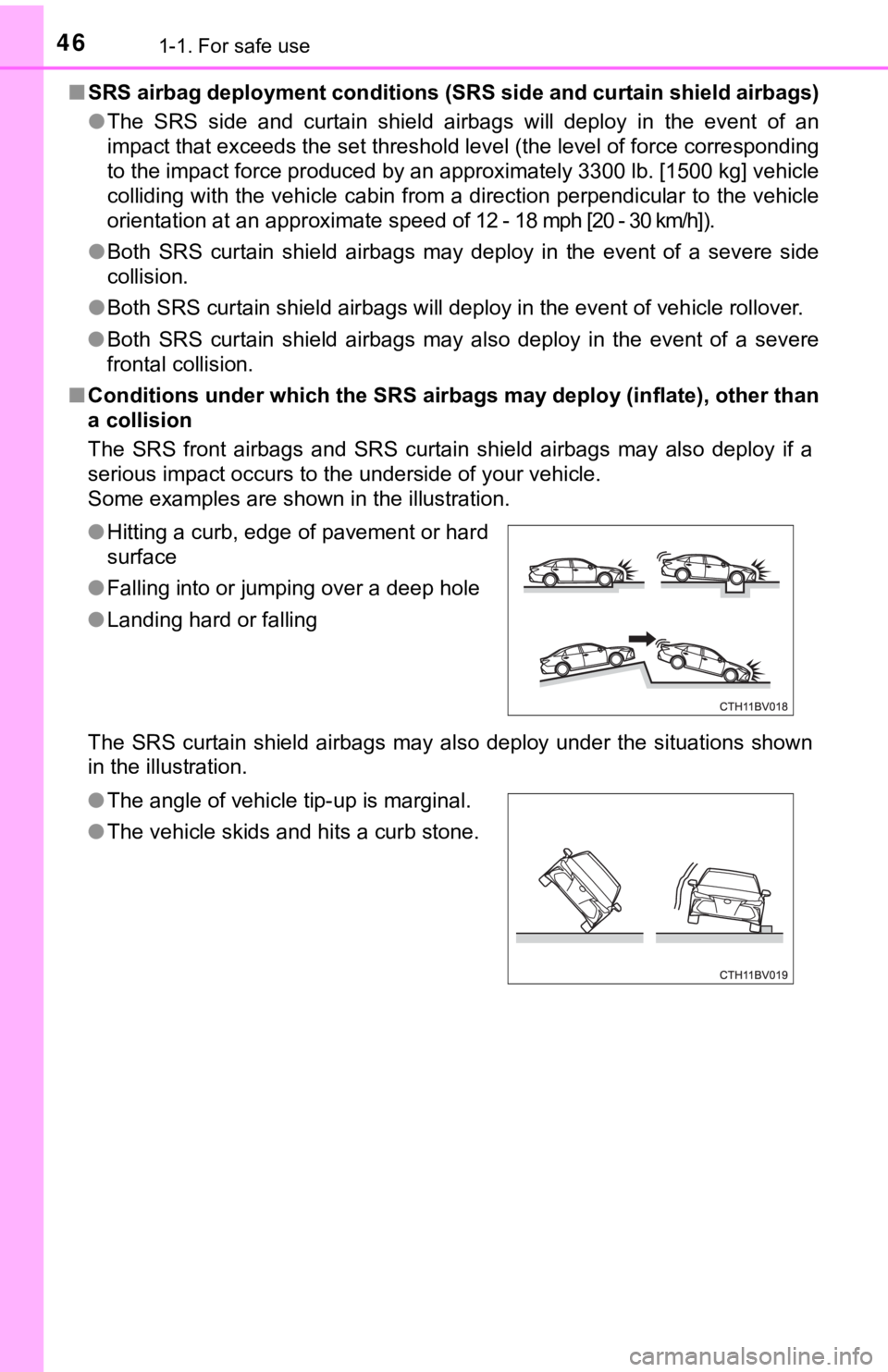
The SRS front airbags and SRS curtain shield airbags may also deploy if a
serious impact occurs to the underside of your vehicle.
Some examples are shown in the illustration.
The SRS curtain shield airbags may also deploy under the situations shown
in the illustration. ●Hitting a curb, edge of pavement or hard
surface
●Falling into or jumping over a deep hole
●Landing hard or falling
●The angle of vehicle tip-up is marginal.
●The vehicle skids and hits a curb stone.
Page 89 of 548

892. Instrument cluster
2
Instrument cluster
*1: These lights turn on when the engine switch is turned to IGNITION ON
mode to indicate that a system check is being performed. They will turn off
after the engine is started, or after a few seconds. There may be a mal-
function in a system if a light does not come on, or turn off. Have the vehi-
cle inspected by your Toyota dealer.
*2: This light illuminates on the multi-information display.
*3: This light does not turn on when the system is disabled.
*4: This light turns on when the system is off.
*5: This light flashes to indicate that the system is operating.
*6: These indicators will illuminate in the following situations to indicate that
the system initial check is being performed:
• When the BSM function or RCTA function is enabled and the engine
switch is turned to IGNITION ON mode.
• When the engine switch is in IGNITION ON mode and the BSM function
is enabled.
• When the engine switch is in IGNITION ON mode and the RCTA func-
tion is enabled. (At this time, a buzzer will also sound.)
The indicators will turn off after a few seconds. If the indicators do not
illuminate or turn off, or if a buzzer does not sound when the RCTA func-
tion is enabled, the system may be malfunctioning. Have the vehicle
inspected by your Toyota dealer.
*7: This light illuminates on the outside rear view mirrors.
*8: This light illuminates on the center panel.
*9: When the outside temperature is approximately 37°F (3°C) or lower, this
indicator will flash for approximately 10 seconds, then stay on.
WARNING
■If a safety system warning light does not come on
Should a safety system light such as the ABS and SRS warning lights not
come on when you start the engine, this could mean that these systems are
not available to help protect you in an accident, which could result in death
or serious injury. Have the vehicle inspected by your Toyota dealer immedi-
ately if this occurs.
Page 107 of 548
1072. Instrument cluster
2
Instrument cluster
■Eco Driving Indicator
Eco Driving Indicator will not operate under the following conditions:
●The shift lever is in any position other than D.
●A paddle shift switch (if equipped) is operated.
●Neither normal mode nor Eco drive mode is selected. (P. 305)
●The vehicle speed is approximately 80 mph (130 km/h) or higher.
■Suspension of the settings display
●Some settings cannot be changed while driving. When changing settings,
park the vehicle in a safe place.
●If a warning message is displayed, operation of the settings display will be
suspended.
■Tire pressure
●It may take a few minutes to display the tire inflation pressure after the
engine switch is turned to IGNITION ON mode. It may also take a few min-
utes to display the tire inflation pressure after inflation pressure has been
adjusted.
●“---” may be displayed if the tire position information cannot be determined
due to unfavorable radio wave conditions.
●Tire inflation pressure changes with temperature. The displayed values may
also be different from the values measured using a tire pressure gauge.
■Liquid crystal display
Small spots or light spots may appear on the display. This phenomenon is
characteristic of liquid crystal displays, and there is no problem continuing to
use the display.
■Customization
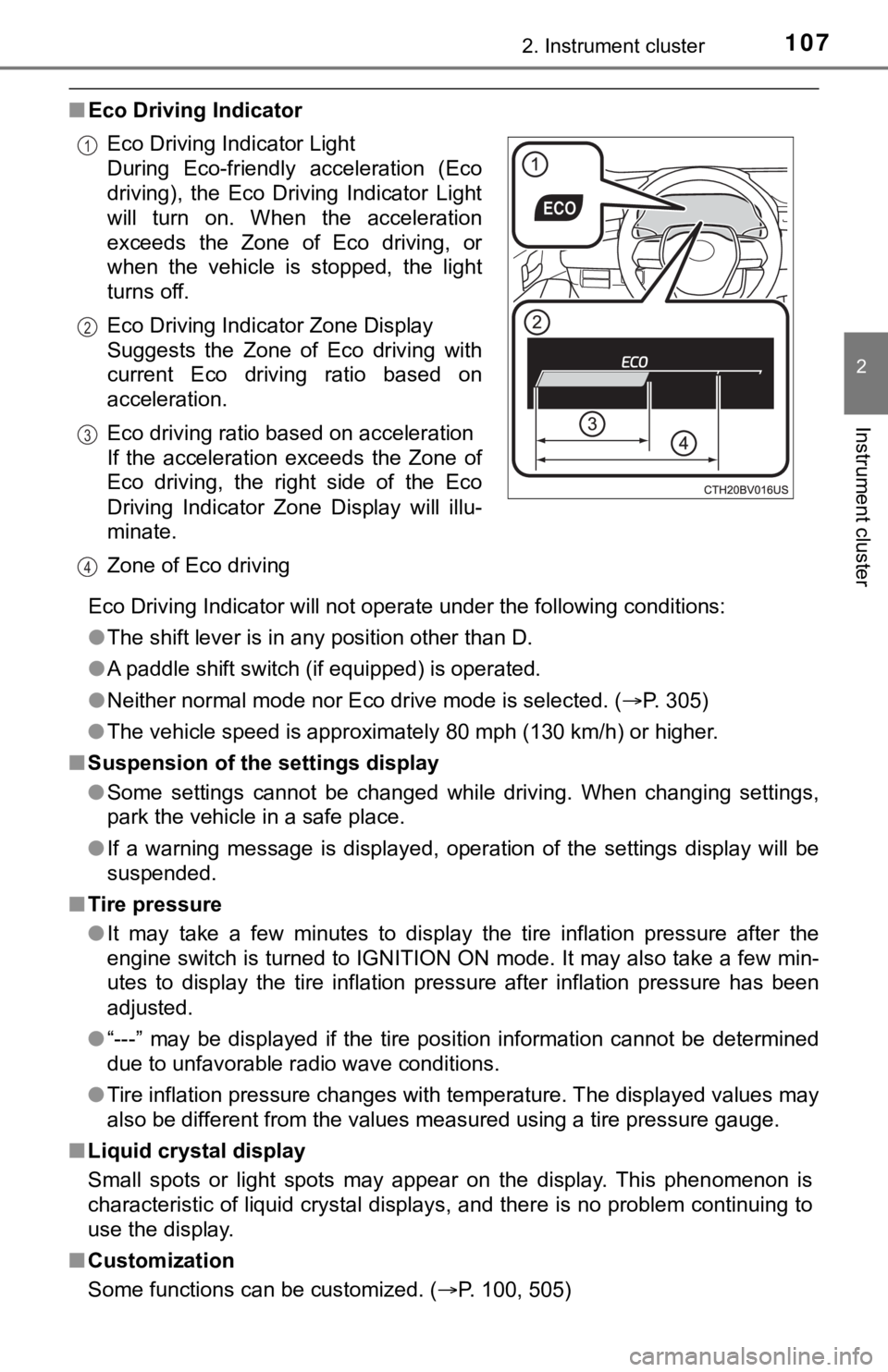
Some functions can be customized. (P. 100, 505) Eco Driving Indicator Light
During Eco-friendly acceleration (Eco
driving), the Eco Driving Indicator Light
will turn on. When the acceleration
exceeds the Zone of Eco driving, or
when the vehicle is stopped, the light
turns off.
Eco Driving Indicator Zone Display
Suggests the Zone of Eco driving with
current Eco driving ratio based on
acceleration.
Eco driving ratio based on acceleration
If the acceleration exceeds the Zone of
Eco driving, the right side of the Eco
Driving Indicator Zone Display will illu-
minate.
Zone of Eco driving
1
2
3
4
Page 125 of 548
125
3
Operation of each component
3-2. Opening, closing and locking the doors
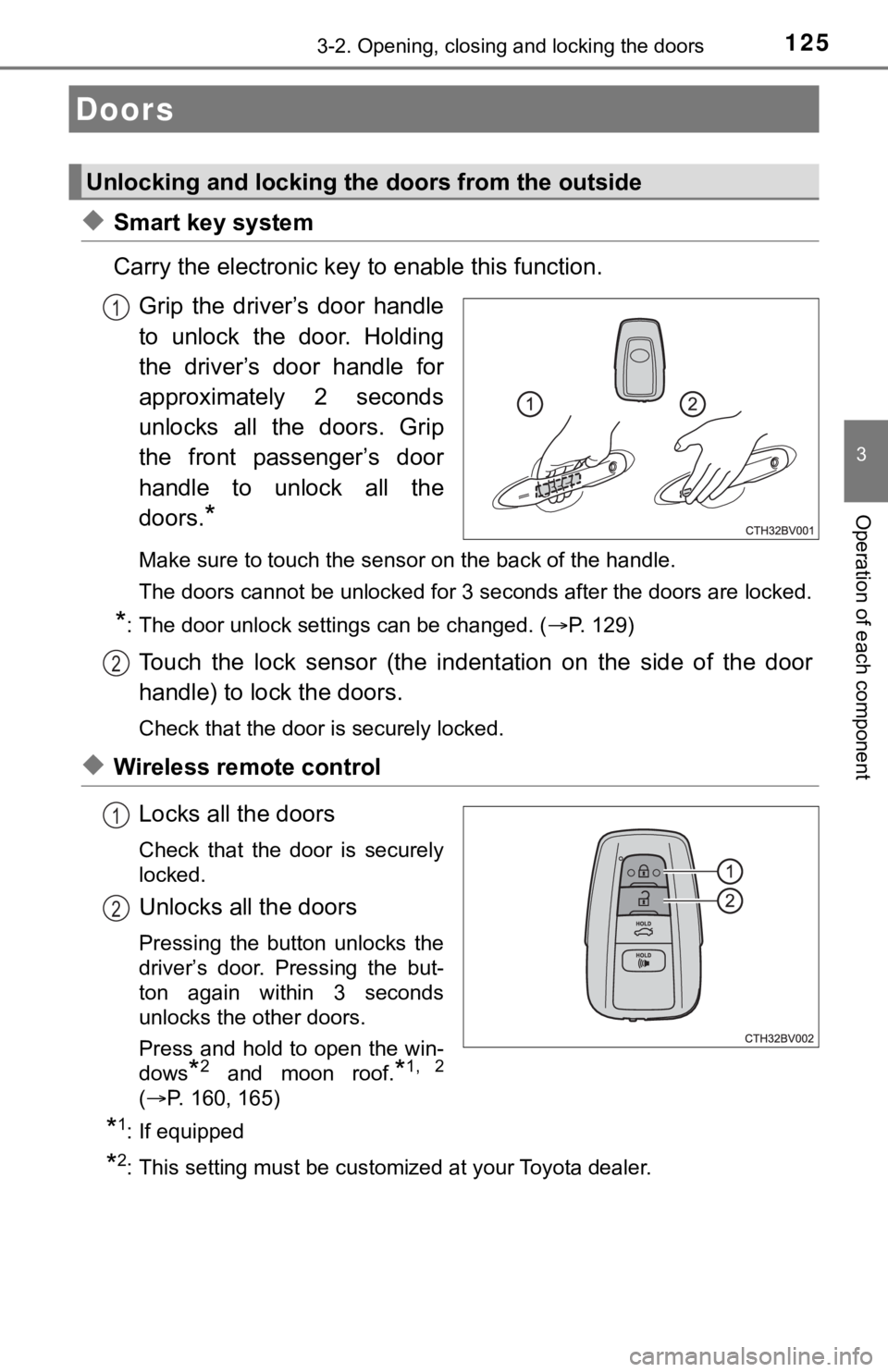
◆Smart key system
Carry the electronic key to enable this function.
Grip the driver’s door handle
to unlock the door. Holding
the driver’s door handle for
approximately 2 seconds
unlocks all the doors. Grip
the front passenger’s door
handle to unlock all the
doors.
*
Make sure to touch the sensor on the back of the handle.
<0037004b00480003004700520052005500560003004600440051005100520057000300450048000300580051004f00520046004e00480047000300490052005500030016000300560048004600520051004700560003004400490057004800550003005700
4b004800030047005200520055005600030044005500480003[locked.
*: The door unlock settings can be changed. (P. 129)
Touch the lock sensor (the indentation on the side of the door
handle) to lock the doors.
Check that the door is securely locked.
◆Wireless remote control
Locks all the doors
Check that the door is securely
locked.
Unlocks all the doors
Pressing the button unlocks the
driver’s door. Pressing the but-
ton again within 3 seconds
unlocks the other doors.
Press and hold to open the win-
dows
*2 and moon roof.*1, 2
(P. 160, 165)
*1: If equipped
*2: This setting must be customized at your Toyota dealer.
Doors
Unlocking and locking the doors from the outside
1
2
1
2
Page 126 of 548
1263-2. Opening, closing and locking the doors
■Operation signals
Doors:
A buzzer sounds and the emergency flashers flash to indicate that the doors
have been locked/unlocked. (Locked: Once; Unlocked: Twice)
Windows and moon roof:
A buzzer sounds to indicate that the windows and moon roof are operating.
■Security feature
If a door is not opened within approximately 60 seconds after the vehicle is
unlocked, the security feature automatically locks the vehicle again.
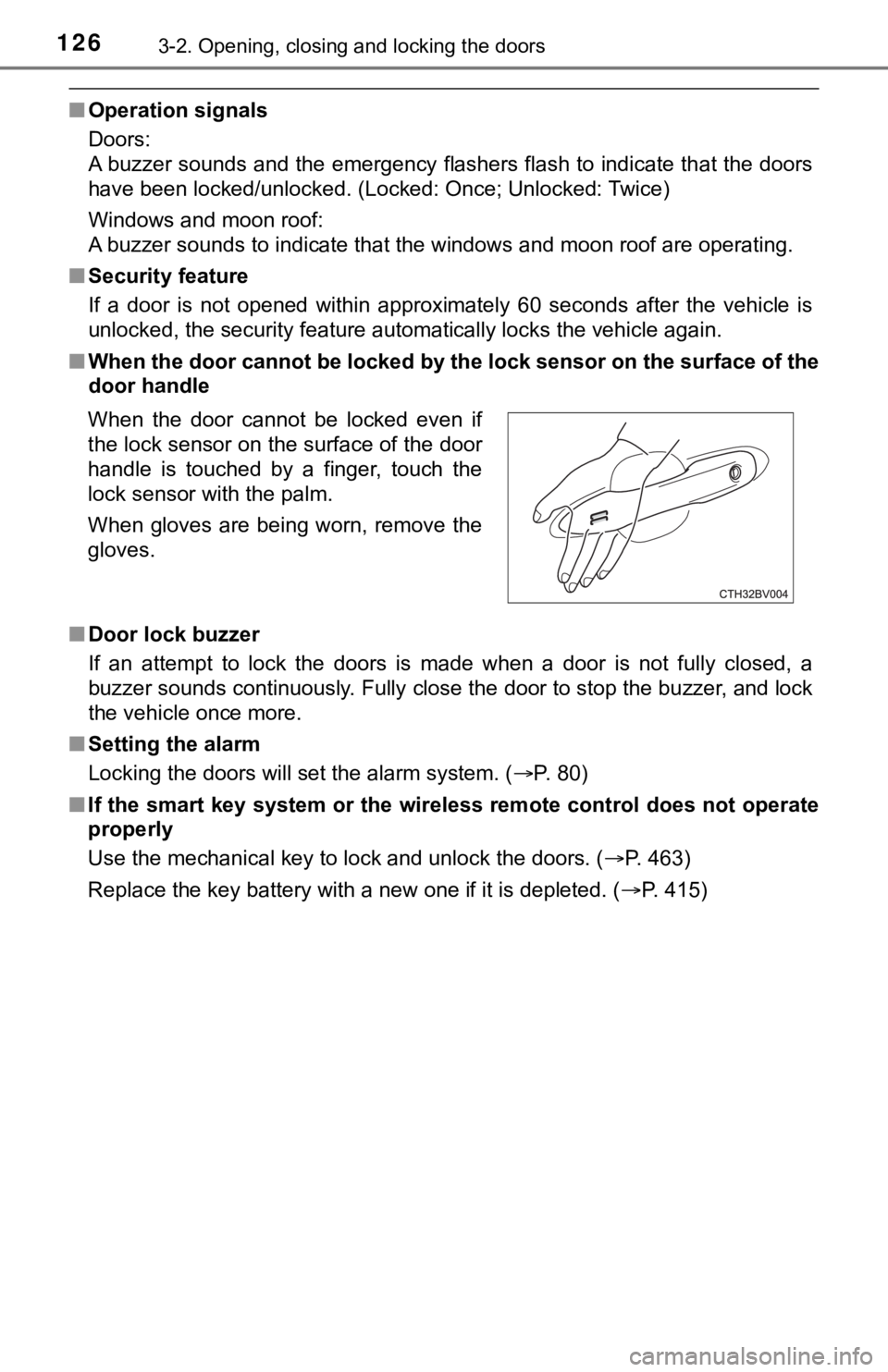
■When the door cannot be locked by the lock sensor on the surface of the
door handle
■Door lock buzzer
If an attempt to lock the doors is made when a door is not fully closed, a
buzzer sounds continuously. Fully close the door to stop the buzzer, and lock
the vehicle once more.
■Setting the alarm
Locking the doors will set the alarm system. (P. 80)
■If the smart key system or the wireless remote control does not operate
properly
Use the mechanical key to lock and unlock the doors. (P. 463)
<003500480053004f00440046004800030057004b00480003004e0048005c0003004500440057005700480055005c0003005a004c0057004b00030044000300510048005a00030052005100480003004c00490003004c00570003004c005600030047004800
53004f004800570048004700110003000b[P. 415) When the door cannot be locked even if
the lock sensor on the surface of the door
handle is touched by a finger, touch the
lock sensor with the palm.
When gloves are being worn, remove the
gloves.
Page 129 of 548
1293-2. Opening, closing and locking the doors
3
Operation of each component
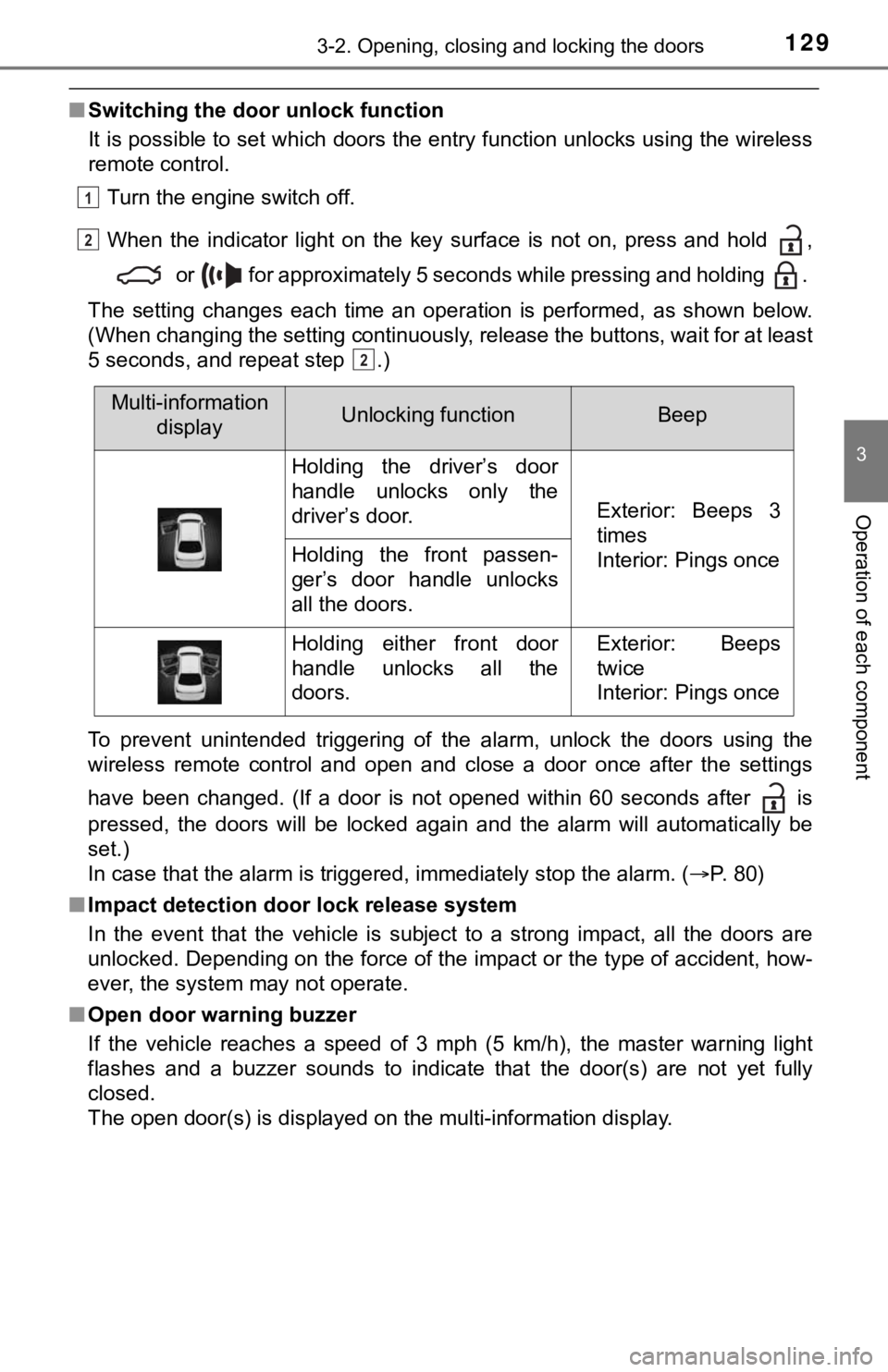
■Switching the door unlock function
It is possible to set which doors the entry function unlocks using the wireless
remote control.
Turn the engine switch off.
When the indicator light on the key surface is not on, press and hold ,
or for approximately 5 seconds while pressing and holding .
The setting changes each time an operation is performed, as shown below.
(When changing the setting continuously, release the buttons, wait for at least
5 seconds, and repeat step .)
To prevent unintended triggering of the alarm, unlock the doors using the
wireless remote control and open and close a door once after the settings
have been changed. (If a door is not opened within 60 seconds after is
pressed, the doors will be locked again and the alarm will automatically be
set.)
In case that the alarm is triggered, immediately stop the alarm. (P. 80)
■Impact detection door lock release system
In the event that the vehicle is subject to a strong impact, all the doors are
unlocked. Depending on the force of the impact or the type of accident, how-
ever, the system may not operate.
■Open door warning buzzer
If the vehicle reaches a speed of 3 mph (5 km/h), the master warning light
flashes and a buzzer sounds to indicate that the door(s) are not yet fully
closed.
The open door(s) is displayed on the multi-information display.
1
2
2
Multi-information
displayUnlocking functionBeep
Holding the driver’s door
handle unlocks only the
driver’s door.
Exterior: Beeps 3
times
Interior: Pings once
Holding the front passen-
ger’s door handle unlocks
all the doors.
Holding either front door
handle unlocks all the
doors.Exterior: Beeps
twice
Interior: Pings once
Page 136 of 548

1363-2. Opening, closing and locking the doors
■Alarms and warning indicators
A combination of exterior and interior alarms as well as warning messages
shown on the multi-information display are used to prevent theft of the vehicle
and accidents resulting from erroneous operation. Take appropriate mea-
sures in response to any warning message on the multi-information display.
(P. 444)
When only an alarm sounds, circumstances and correction procedures are as
follows.
■Battery-saving function
The battery-saving function will be activated in order to prevent the electronic
key battery and the vehicle battery from being discharged while the vehicle is
not in operation for a long time.
●In the following situations, the smart key system may take some time to
unlock the doors.
• The electronic key has been left in an area of approximately 6 ft. (2 m) of
the outside of the vehicle for 10 minutes or longer.
• The smart key system has not been used for 5 days or longer.
●If the smart key system has not been used for 14 days or longer, the doors
cannot be unlocked at any doors except the driver’s door. In this case, take
hold of the driver’s door handle, or use the wireless remote control or the
mechanical key, to unlock the doors.
AlarmSituationCorrection procedure
Exterior alarm sounds
once for 5 secondsAn attempt was made
to lock the vehicle while
a door was open.Close all of the doors
and lock the doors
again.
The trunk was closed
while the electronic key
was still inside the trunk
and all the doors were
locked.Retrieve the electronic
key from the trunk and
close the trunk lid.
Interior alarm pings
repeatedlyThe engine switch was
turned to ACCESSORY
mode while the driver’s
door was open (The
driver’s door was
opened when the
engine switch was in
ACCESSORY mode).Turn the engine switch
off and close the
driver’s door.
The engine switch was
turned off while the
driver’s door was open.Close the driver’s door.
Page 138 of 548

1383-2. Opening, closing and locking the doors
■Note for the entry function
●Even when the electronic key is within the effective range (detection areas),
the system may not operate properly in the following cases:
• The electronic key is too close to the window or outside door handle, near
the ground, or in a high place when the doors are locked or unlocked.
• The electronic key is near the ground or in a high place, or too close to
the rear bumper center when the trunk is opened.
• The electronic key is on the instrument panel, rear package tray or floor,
or in the door pockets or glove box when the engine is started or engine
switch modes are changed.
●Do not leave the electronic key on top of the instrument panel or near the
door pockets when exiting the vehicle. Depending on the radio wave recep-
tion conditions, it may be detected by the antenna outside the cabin and the
door will become lockable from the outside, possibly trapping the electronic
key inside the vehicle.
●As long as the electronic key is within the effective range, the doors may be
locked or unlocked by anyone. However, only the doors detecting the elec-
tronic key can be used to unlock the vehicle.
●Even if the electronic key is not inside the vehicle, it may be possible to start
the engine if the electronic key is near the window.
●The doors may unlock or lock if a large amount of water splashes on the
door handle, such as in the rain or in a car wash, when the electronic key is
within the effective range. (The doors will automatically be locked after
approximately 60 seconds if the doors are not opened and closed.)
●If the wireless remote control is used to lock the doors when the electronic
key is near the vehicle, there is a possibility that the door may not be
unlocked by the entry function. (Use the wireless remote control to unlock
the doors.)
●Touching the door lock sensor while wearing gloves may delay or prevent
lock operation. Remove the gloves and touch the lock sensor again.
●When the lock operation is performed using the lock sensor, recognition sig-
nals will be shown up to two consecutive times. After this, no recognition
signals will be given.
*
●If the door handle becomes wet while the electronic key is within the effec-
tive range, the door may lock and unlock repeatedly. In this case, follow the
<00490052004f004f0052005a004c0051004a00030046005200550055004800460057004c00520051000300530055005200460048004700580055004800560003005700520003005a00440056004b00030057004b0048000300590048004b004c0046004f00
48001d[
• Place the electronic key in a location 6 ft. (2 m) or more away from the
vehicle. (Take care to ensure that the key is not stolen.)
• Set the electronic key to battery-saving mode to disable the smart key
system. (P. 137)
●If the electronic key is inside the vehicle and a door handle becomes wet
during a car wash, a message may be shown on the multi-information dis-
play and a buzzer will sound outside the vehicle. To turn off the alarm, lock
all the doors.