horn TOYOTA AVALON 2021 Owners Manual (in English)
[x] Cancel search | Manufacturer: TOYOTA, Model Year: 2021, Model line: AVALON, Model: TOYOTA AVALON 2021Pages: 548, PDF Size: 13.4 MB
Page 154 of 548
1543-4. Adjusting the steering wheel and mirrors
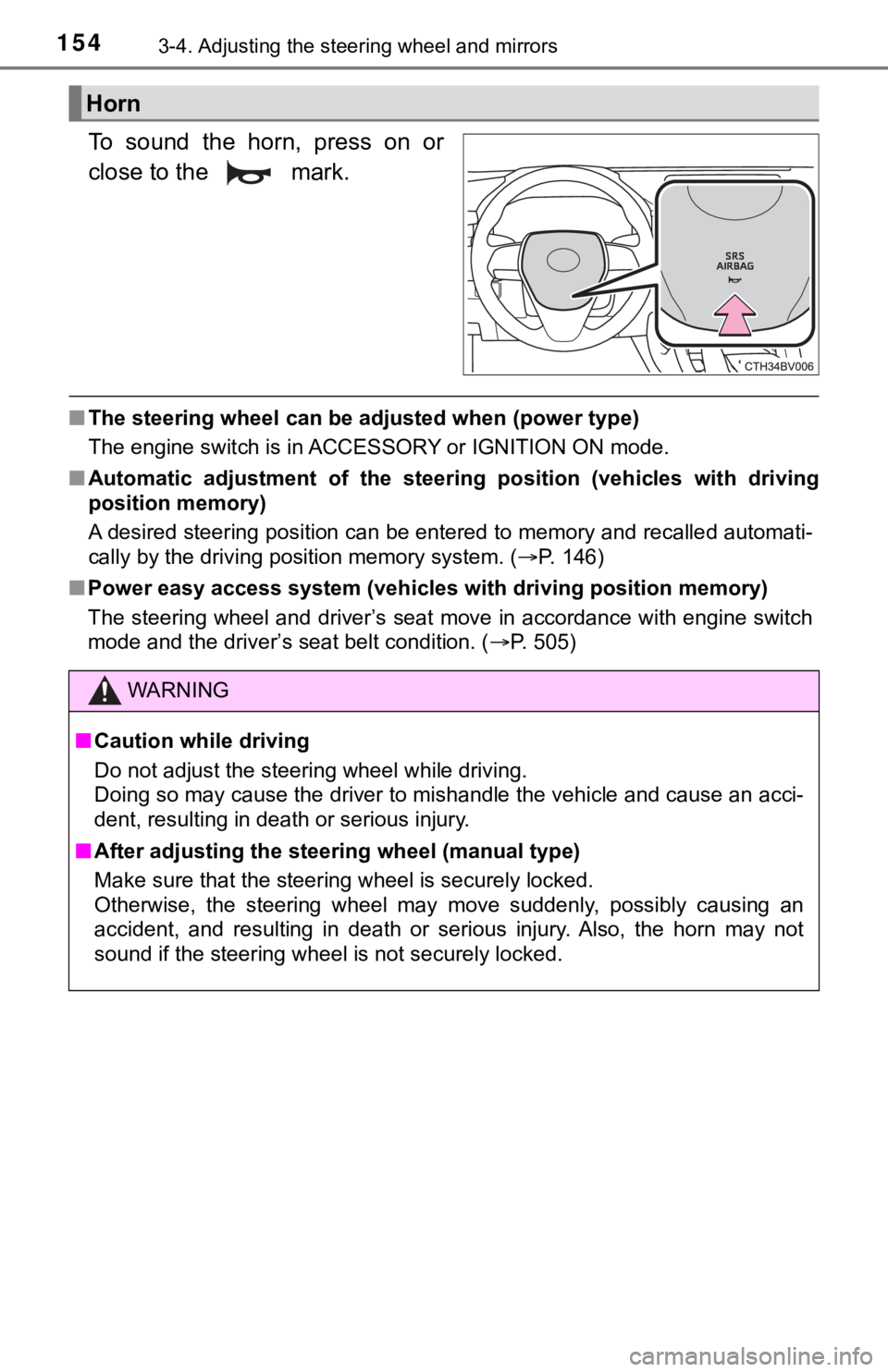
To sound the horn, press on or
close to the mark.
■The steering wheel can be adjusted when (power type)
The engine switch is in ACCESSORY or IGNITION ON mode.
■Automatic adjustment of the steering position (vehicles with driving
position memory)
A desired steering position can be entered to memory and recalled automati-
cally by the driving position memory system. (P. 146)
■Power easy access system (vehicles with driving position memory)
The steering wheel and driver’s seat move in accordance with engine switch
mode and the driver’s seat belt condition. (P. 505)
Horn
WARNING
■Caution while driving
Do not adjust the steering wheel while driving.
Doing so may cause the driver to mishandle the vehicle and cause an acci-
dent, resulting in death or serious injury.
■After adjusting the steering wheel (manual type)
Make sure that the steering wheel is securely locked.
Otherwise, the steering wheel may move suddenly, possibly causing an
accident, and resulting in death or serious injury. Also, the horn may not
sound if the steering wheel is not securely locked.
Page 282 of 548

2824-5. Using the driving support systems
WARNING
■Sensors
Certain vehicle conditions and the surrounding environment may affect the
ability of a sensor to correctly detect an object. Particular instances where
this may occur are listed below.
●There is dirt, snow or ice on the sensor. (Wiping the sensors will resolve
this problem.)
●The sensor is frozen. (Thawing the area will resolve this problem.)
In especially cold weather, if a sensor is frozen the screen may show an
abnormal display, or objects may not be detected.
●The sensor is covered in any way.
●The vehicle is leaning considerably to one side.
●<0032005100030044005100030048005b00570055004800500048004f005c00030045005800500053005c00030055005200440047000f0003005200510003004400510003004c00510046004f004c00510048000f0003005200510003004a00550044005900
48004f000f0003005200550003005200510003004a00550044[ss.
●The vicinity of the vehicle is noisy due to vehicle horns, motorcycle
engines, air brakes of large vehicles, or other loud noises producing ultra-
sonic waves.
●There is another vehicle equipped with parking assist sensors in the vicin-
ity.
●The sensor is coated with a sheet of spray or heavy rain.
●The sensor is drenched with water on a flooded road.
●The vehicle is equipped with a fender pole or wireless antenna.
●Towing eyelets are installed.
●The bumper or sensor receives a strong impact.
●The vehicle is approaching a tall or curved curb.
●The detection range is reduced due to an object such as a sign.
●In harsh sunlight or intense cold weather.
●The area directly under the bumpers is not detected.
●If objects draw too close to the sensor.
●A non-genuine Toyota suspension (lowered suspension, etc.) is installed.
●A backlit license plate is installed.
In addition to the examples above, there are instances in which, because of
their shape, signs and other objects may be judged by a sensor to be closer
than they are.
Page 293 of 548
2934-5. Using the driving support systems
4
Driving
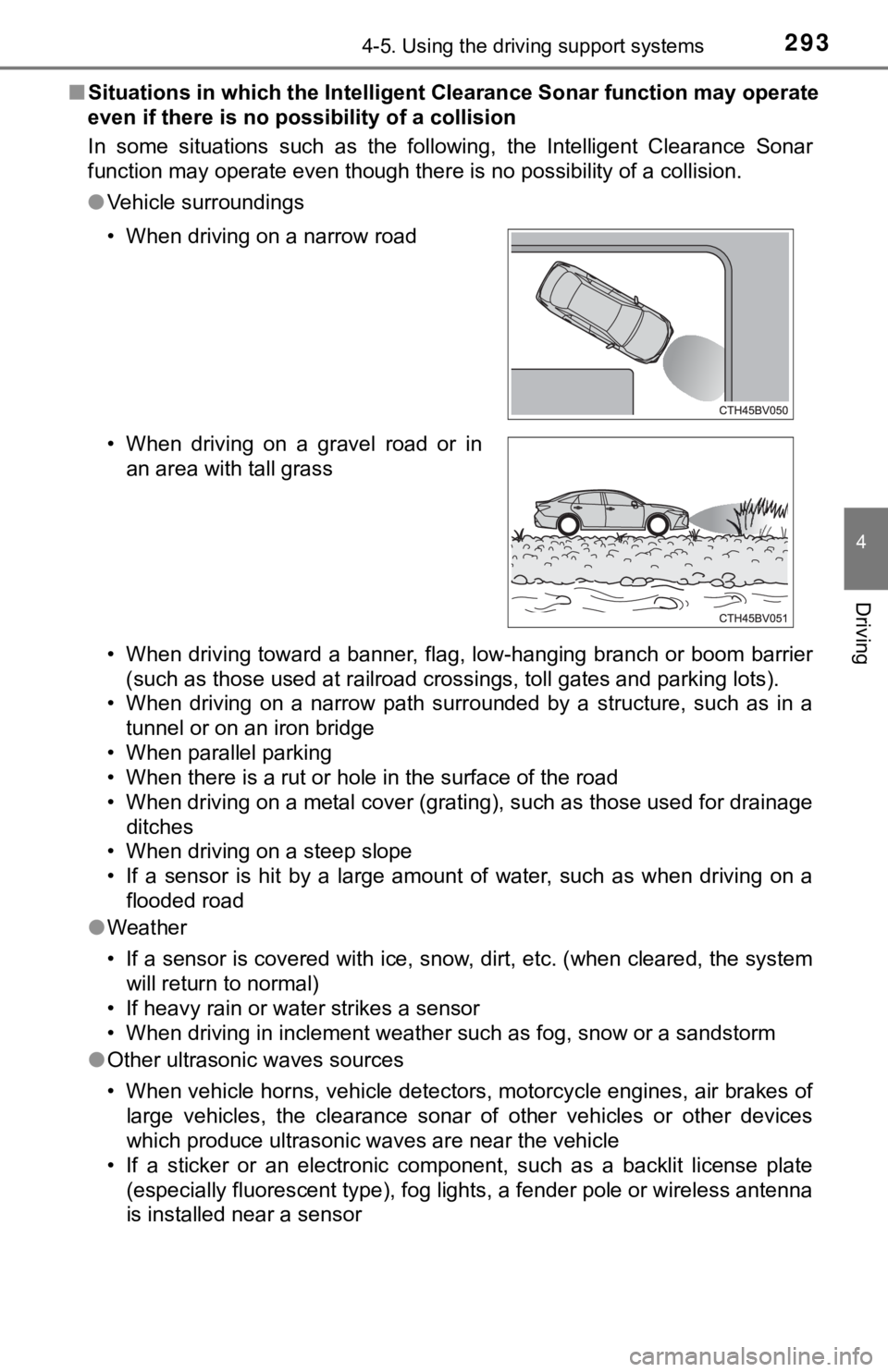
■Situations in which the Intelligent Clearance Sonar function may operate
even if there is no possibility of a collision
In some situations such as the following, the Intelligent Clearance Sonar
function may operate even though there is no possibility of a collision.
●Vehicle surroundings
• When driving toward a banner, flag, low-hanging branch or boom barrier
(such as those used at railroad crossings, toll gates and parking lots).
• When driving on a narrow path surrounded by a structure, such as in a
tunnel or on an iron bridge
• When parallel parking
• When there is a rut or hole in the surface of the road
• When driving on a metal cover (grating), such as those used for drainage
ditches
• When driving on a steep slope
• If a sensor is hit by a large amount of water, such as when driving on a
flooded road
●Weather
• If a sensor is covered with ice, snow, dirt, etc. (when cleared, the system
will return to normal)
• If heavy rain or water strikes a sensor
• When driving in inclement weather such as fog, snow or a sandstorm
●Other ultrasonic waves sources
• When vehicle horns, vehicle detectors, motorcycle engines, air brakes of
large vehicles, the clearance sonar of other vehicles or other devices
which produce ultrasonic waves are near the vehicle
• If a sticker or an electronic component, such as a backlit license plate
(especially fluorescent type), fog lights, a fender pole or wireless antenna
is installed near a sensor • When driving on a narrow road
• When driving on a gravel road or in
an area with tall grass
Page 295 of 548

2954-5. Using the driving support systems
4
Driving
●Other ultrasonic waves sources
• When vehicle horns, vehicle detectors, motorcycle engines, air brakes of
large vehicles, the clearance sonar of other vehicles or other devices
which produce ultrasonic waves are near the vehicle
• If a sticker or an electronic component, such as a backlit license plate
(especially fluorescent type), fog lights, a fender pole or wireless antenna
is installed near a sensor
●Changes in the vehicle posture
• If the vehicle is significantly tilted
• If the front of the vehicle is raised or lowered due to the carried load
• If the orientation of a sensor has been changed due to a collision or other
impact
■If a battery terminal has been disconnected and reconnected
The system needs to be initialized.
To initialize the system, drive the vehicle straight ahead for 5 seconds or more
at a speed of approximately 22 mph (35 km/h) or more.
■If “ICS Unavailable” is displayed on the multi-information display and
the ICS OFF indicator is flashing
Initialization may not have been performed after a battery terminal was dis-
connected and reconnected. Initialize the system. (P. 295)
If this message continues to be displayed even after initialization, have the
vehicle inspected by your Toyota dealer.
■If “ICS Unavailable” and “Parking Assist Unavailable Clean Parking
Assist Sensor” are displayed on the multi-information display and the
ICS OFF indicator is flashing
●A sensor may be covered with ice, snow, dirt, etc. In this case, remove the
ice, snow, dirt, etc., from the sensor to return the system to normal. If this
message is shown even after removing dirt from the sensor, or shown when
the sensor was not dirty to begin with, have the vehicle inspected at your
Toyota dealer.
●A sensor may be frozen. Once the ice melts, the system will return to nor-
mal.
●Water may be continuously flowing over the sensor surface, such as in a
heavy rain. When the system determines that it is normal, the system will
return to normal.
Page 461 of 548
4617-2. Steps to take in an emergency
7
When trouble arises
One of the following may be the cause of the problem:
●There may not be sufficient fuel in the vehicle’s tank.
Refuel the vehicle.
●The engine may be flooded.
Try to restart the engine again following correct starting procedures.
(P. 184)
●There may be a malfunction in the engine immobilizer system.
(P. 77)
One of the following may be the cause of the problem:
●The battery may be discharged. (P. 466)
●The battery terminal connections may be loose or corroded.
The engine starting system may be malfunctioning due to an electrical
problem such as electronic key battery depletion or a blown fuse.
However, an interim measure is available to start the engine.
(P. 462)
If the engine will not star t
If the engine will not start even though correct starting proce-
dures are being followed (P. 184), consider each of the follow-
ing points:
The engine will not start even though the starter motor operates
normally.
The starter motor turns over slowly, the interior lights and head-
lights are dim, or the horn does not sound or sounds at a low
volume.
The starter motor does not turn over
Page 462 of 548
4627-2. Steps to take in an emergency
One of the following may be the cause of the problem:
●One or both of the battery terminals may be disconnected.
●The battery may be discharged. (P. 466)
●There may be a malfunction in the steering lock system.
Contact your Toyota dealer if the problem cannot be repaired, or if repair
procedures are unknown.
When the engine does not start, the following steps can be used as an
interim measure to start the engine if the engine switch is functioning
normally:
Set the parking brake.
Shift the shift lever to P.
Turn the engine switch to ACCESSORY mode.
Press and hold the engine switch for about 15 seconds while
depressing the brake pedal firmly.
Even if the engine can be started using the above steps, the system
may be malfunctioning. Have the vehicle inspected by your Toyota
dealer.
The starter motor does not turn over, the interior lights and head-
lights do not turn on, or the horn does not sound.
Emergency start function
1
2
3
4
Page 532 of 548
532What to do if... (Troubleshooting)
●The seat belt reminder light is flashing
Are the driver and the passenger wearing the seat belts? (P. 438)
●The parking brake indicator is on
Is the parking brake released? (P. 196)
Depending on the situation, other types of warning buzzer may also sound.
(P. 434, 444)
●Did anyone inside the vehicle open a door during setting the alarm?
The sensor detects it and the alarm sounds. (P. 80)
Do one of the following to stop the alarm:
• Unlock the doors.
• Open the trunk using the entry function or wireless remote control.
• Turn the engine switch to ACCESSORY or IGNITION ON mode, or start
the engine.
●Is the message displayed on the multi-information display?
Check the message on the multi-information display. (P. 444)
●When a warning light turns on or a warning message is displayed, refer to
P. 434, 444.
●Stop the vehicle in a safe place and replace the flat tire with the spare
tire. (P. 449)
●Try the procedure for when the vehicle becomes stuck in mud, dirt, or
snow. (P. 474)
A warning buzzer sounds during driving
An alarm is activated and the horn sounds
A warning buzzer sounds when leaving the vehicle
A warning light turns on or a warning message is displayed
When a problem has occurred
If you have a flat tire
The vehicle becomes stuck
Page 538 of 548

538Alphabetical index
Front turn signal lights
Replacing light bulbs............. 421
Turn signal lever ................... 195
Fuel
Capacity ................................ 480
Fuel gauge .............................. 90
Fuel pump shut off system.... 433
Information ............................ 489
Refueling............................... 214
Type .............................. 480, 489
Warning light ......................... 437
Fuel consumption.................... 116
Fuel filler door.......................... 214
If the fuel filler door
cannot be opened............... 217
Refueling............................... 214
Fuel pump shut off system ..... 433
Fuses ........................................ 418
Garage door opener ................ 357
Gauges ....................................... 90
Glove box ................................. 336
Grocery bag hooks .................. 341Head restraints ........................ 151
Head-up display....................... 109
Headlights ................................ 202
Automatic High Beam ........... 206
Light switch ........................... 202
Replacing light bulbs ............ 421
Windshield wiper linked
headlight illumination.......... 205
Heated steering wheel ............ 329
Heaters
Automatic air
conditioning system............ 322
Outside rear view mirrors ..... 324
Seat heaters ......................... 329
High mounted stoplight
Replacing.............................. 421
Hill-start assist control ........... 309
Hood ......................................... 381
Hooks
Coat hooks ........................... 356
Grocery bag hooks ............... 341
Retaining hooks (floor mat) .... 26
Horn .......................................... 154
HUD (Head-up display) ........... 109
G
H