warning TOYOTA AVALON 2022 Owners Manual
[x] Cancel search | Manufacturer: TOYOTA, Model Year: 2022, Model line: AVALON, Model: TOYOTA AVALON 2022Pages: 572, PDF Size: 9.42 MB
Page 257 of 572
2574-5. Using the driving support systems
4
Driving
■Warning message
If the following warning message is displayed on the multi-info rmation display
and the LTA indicator illuminates in orange, follow the appropr iate trouble-
shooting procedure. Also, if a different warning message is displayed, follow
the instructions displayed on the screen.
● “LTA Malfunction Visit Your Dealer”
The system may not be operating properly. Have the vehicle insp ected by
your Toyota dealer.
● “LTA Unavailable”
The system is temporarily canceled due to a malfunction in a se nsor other
than the front camera. Turn the LTA system off, wait for a little while, and then
turn the LTA system back on.
● “LTA Unavailable at Current Speed”
The function cannot be used as the vehicle speed exceeds the LT A operation
range. Drive slower.
■ Customization
Function settings can be changed. ( P. 100)
Page 258 of 572
2584-5. Using the driving support systems
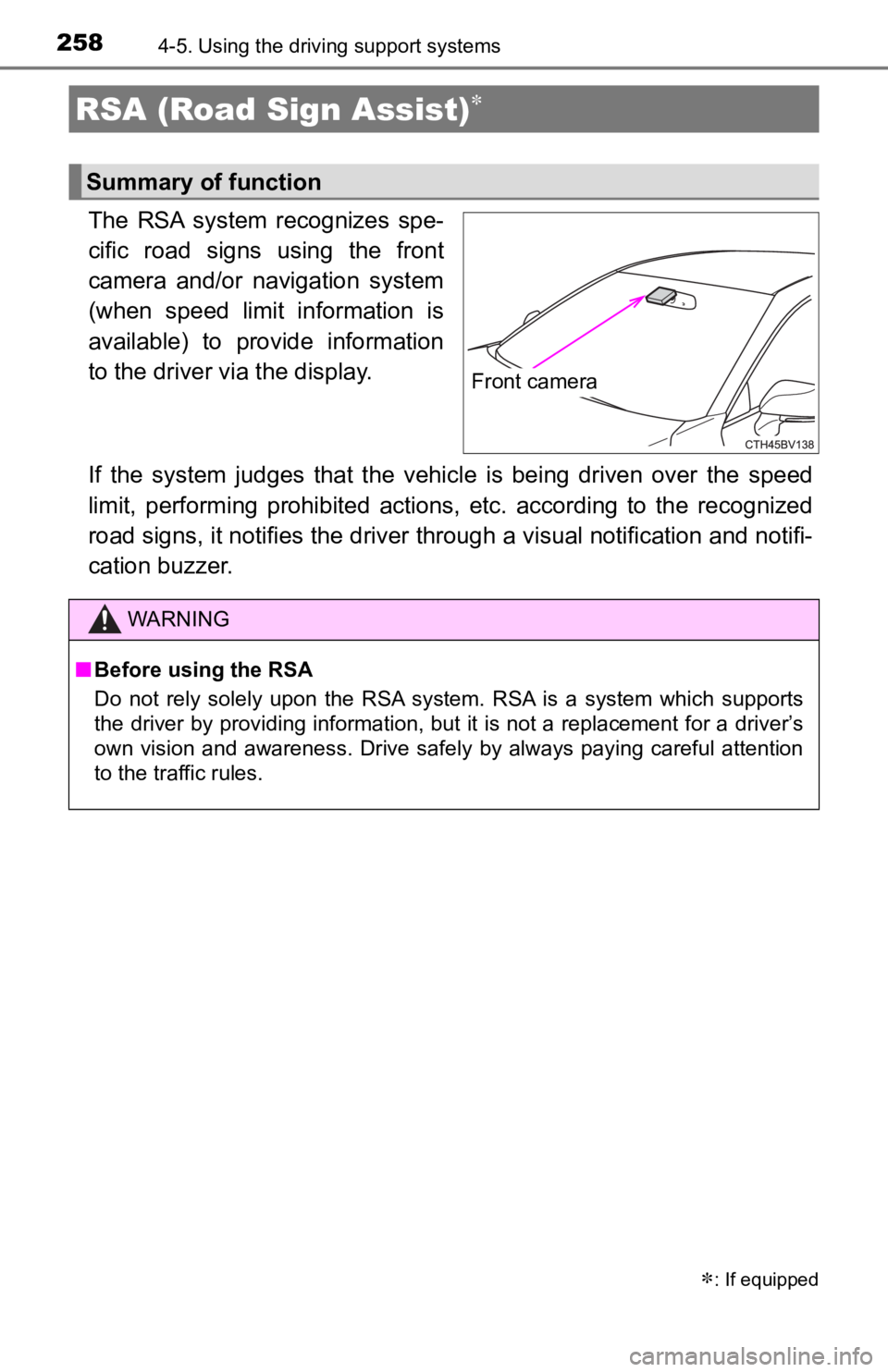
The RSA system recognizes spe-
cific road signs using the front
camera and/or navigation system
(when speed limit information is
available) to provide information
to the driver via the display.
If the system judges that the vehicle is being driven over the speed
limit, performing prohibited ac tions, etc. according to the recognized
road signs, it notifies the driver through a visual notification and notifi-
cation buzzer.
RSA (Road Sign Assist)
: If equipped
Summary of function
Front camera
WARNING
■ Before using the RSA
Do not rely solely upon the RSA system. RSA is a system which supports
the driver by providing information, but it is not a replacement for a driver’s
own vision and awareness. Drive safely by always paying careful attention
to the traffic rules.
Page 264 of 572
2644-5. Using the driving support systems
WARNING
■Before using dynamic radar cruise control with full-speed range
● Driving safely is the sole responsibility of the driver. Do not rely solely on
the system, and drive safely by always paying careful attention to your sur-
roundings.
● The dynamic radar cruise control with full-speed range provides driving
assistance to reduce the driver's burden. However, there are li mitations to
the assistance provided.
Read the following conditions carefully. Do not overly rely on this system
and always drive carefully.
• When the sensor may not be correctly detecting the vehicle ahe ad:
P. 277
• Conditions under which the vehicle-to-vehicle distance control mode
may not function correctly: P. 278
● Set the speed appropriately depending on the speed limit, traffic flow, road
conditions, weather conditions, etc. The driver is responsible for checking
the set speed.
● Even when the system is functioning normally, the condition of the preced-
ing vehicle as detected by the system may differ from the condition
observed by the driver. Therefore, the driver must always remain alert,
assess the danger of each situation and drive safely. Relying s olely on this
system or assuming the system ensures safety while driving can lead to
an accident, resulting in death or serious injury.
● Switch the dynamic radar cruise control with full-speed range s etting to off,
using the cruise control main switch when not in use.
Page 265 of 572
2654-5. Using the driving support systems
4
Driving
WARNING
■Cautions regarding the driving assist systems
Observe the following precautions, as there are limitations to the assistance
provided by the system.
Failure to do so may cause an accident resulting in death or se rious injury.
● Assisting the driver to measure following distance
The dynamic radar cruise control with full-speed range is only intended to
help the driver in determining the following distance between the driver’s
own vehicle and a designated vehicle traveling ahead. It is not a mecha-
nism that allows careless or inattentive driving, and it is not a system that
can assist the driver in low-visibility conditions.
It is still necessary for driver to pay close attention to the vehicle’s sur-
roundings.
● Assisting the driver to judge proper following distance
The dynamic radar cruise control with full-speed range determines
whether the following distance between the driver’s own vehicle and a
designated vehicle traveling ahead is within a set range. It is not capable
of making any other type of judgement. Therefore, it is absolutely neces-
sary for the driver to remain vigilant and to determine whether or not there
is a possibility of danger in any given situation.
● Assisting the driver to operate the vehicle
The dynamic radar cruise control with full-speed range does not include
functions which will prevent or avoid collisions with vehicles ahead of your
vehicle. Therefore, if there is ever any possibility of danger, the driver must
take immediate and direct control of the vehicle and act appropriately in
order to ensure the safety of all involved.
Page 266 of 572
2664-5. Using the driving support systems
WARNING
■Situations unsuitable for dynamic radar cruise control with ful l-speed
range
Do not use dynamic radar cruise control with full-speed range in any of the
following situations.
Doing so may result in inappropriate speed control and could cause an acci-
dent resulting in death or serious injury.
● Roads where there are pedestrians, cyclists, etc.
● In heavy traffic
● On roads with sharp bends
● On winding roads
● On slippery roads, such as those covered with rain, ice or snow
● On steep downhills, or where there are sudden changes between s harp up
and down gradients
Vehicle speed may exceed the set speed when driving down a stee p hill.
● At entrances to freeways and highways
● When weather conditions are bad enough that they may prevent the sen-
sors from detecting correctly (fog, snow, sandstorm, heavy rain, etc.)
● When there is rain, snow, etc. on the front surface of the rada r or front
camera
● In traffic conditions that require frequent repeated acceleration and decel-
eration
● During emergency towing
● When an approach warning buzzer is heard often
Page 267 of 572
2674-5. Using the driving support systems
4
Driving
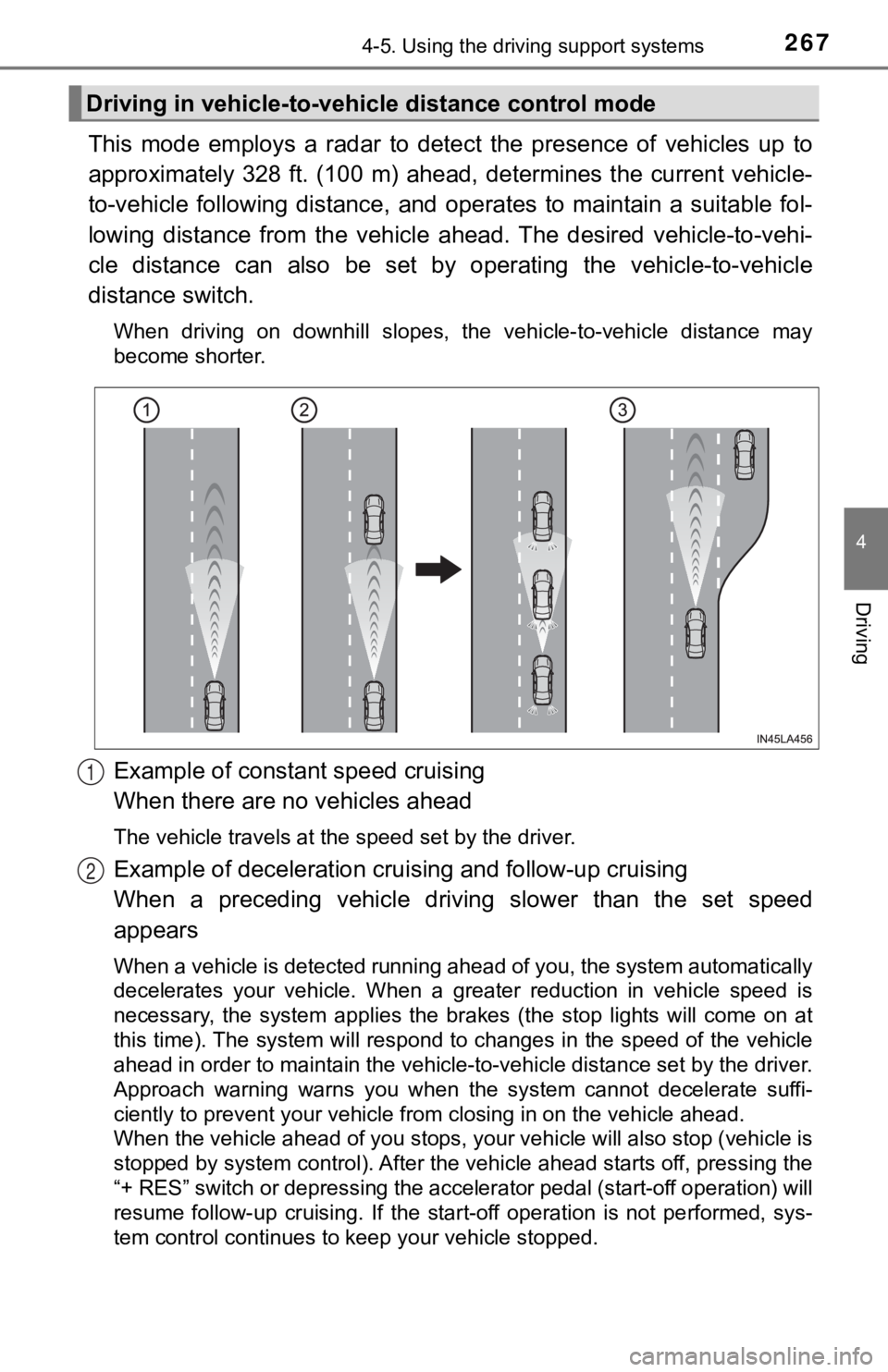
This mode employs a radar to detect the presence of vehicles up to
approximately 328 ft. (100 m) ahead, determines the current veh icle-
to-vehicle following distance, and operates to maintain a suita ble fol-
lowing distance from the vehicle ahead. The desired vehicle-to- vehi-
cle distance can also be set by operating the vehicle-to-vehicl e
distance switch.
When driving on downhill slopes, the vehicle-to-vehicle distance may
become shorter.
Example of constant speed cruising
When there are no vehicles ahead
The vehicle travels at the speed set by the driver.
Example of deceleration crui sing and follow-up cruising
When a preceding vehicle driving slower than the set speed
appears
When a vehicle is detected running ahead of you, the system automatically
decelerates your vehicle. When a greater reduction in vehicle s peed is
necessary, the system applies the brakes (the stop lights will come on at
this time). The system will respond to changes in the speed of the vehicle
ahead in order to maintain the vehicle-to-vehicle distance set by the driver.
Approach warning warns you when the system cannot decelerate su ffi-
ciently to prevent your vehicle from closing in on the vehicle ahead.
When the vehicle ahead of you stops, your vehicle will also stop (vehicle is
stopped by system control). After the vehicle ahead starts off, pressing the
“+ RES” switch or depressing the accelerator pedal (start-off o peration) will
resume follow-up cruising. If the start-off operation is not pe rformed, sys-
tem control continues to keep your vehicle stopped.
Driving in vehicle-to-vehi cle distance control mode
1
2
Page 272 of 572
2724-5. Using the driving support systems
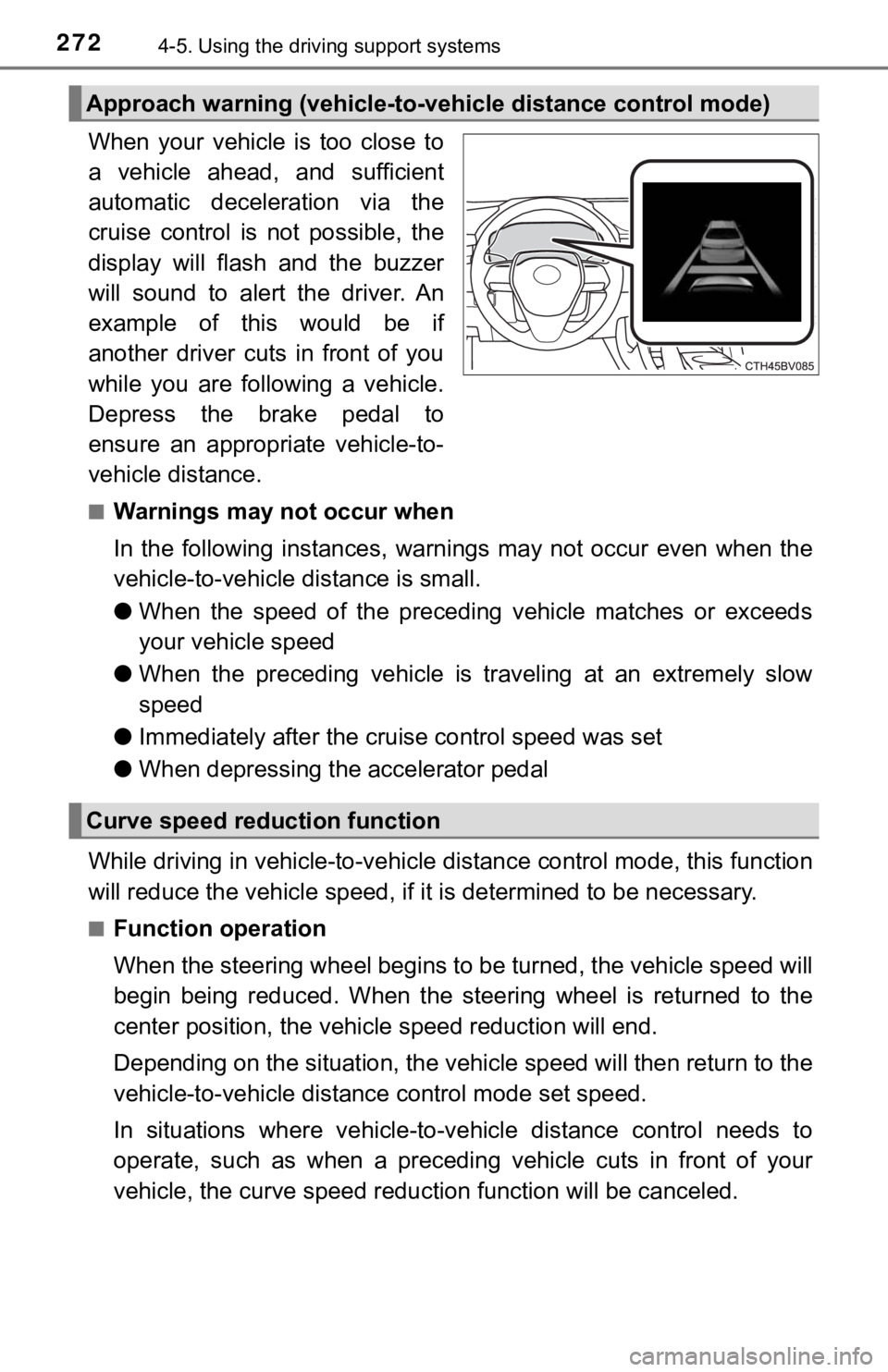
When your vehicle is too close to
a vehicle ahead, and sufficient
automatic deceleration via the
cruise control is not possible, the
display will flash and the buzzer
will sound to alert the driver. An
example of this would be if
another driver cuts in front of you
while you are following a vehicle.
Depress the brake pedal to
ensure an appropriate vehicle-to-
vehicle distance.
■Warnings may not occur when
In the following instances, war nings may not occur even when th e
vehicle-to-vehicle distance is small.
● When the speed of the preceding vehicle matches or exceeds
your vehicle speed
● When the preceding vehicle is traveling at an extremely slow
speed
● Immediately after the cruise control speed was set
● When depressing the accelerator pedal
While driving in vehicle-to-vehi cle distance control mode, this function
will reduce the vehicl e speed, if it is determined to be necess ary.
■Function operation
When the steering wheel begins to be turned, the vehicle speed will
begin being reduced. When the steering wheel is returned to the
center position, the vehicl e speed reduction will end.
Depending on the situat ion, the vehicle speed will then return to the
vehicle-to-vehicle distanc e control mode set speed.
In situations where vehicle-to-v ehicle distance control needs to
operate, such as when a preceding vehicle cuts in front of your
vehicle, the curve speed reduction function will be canceled.
Approach warning (vehicle-to-v ehicle distance control mode)
Curve speed reduction function
Page 276 of 572
2764-5. Using the driving support systems
■Automatic cancelation of c onstant speed control mode
Constant speed control mode is automatically canceled in the following situa-
tions:
● Actual vehicle speed is more than approximately 10 mph (16 km/h ) below
the set vehicle speed.
● Actual vehicle speed falls below approximately 20 mph (30 km/h) .
● VSC is activated.
● TRAC is activated for a period of time.
● When the VSC or TRAC system is turned off.
● When the brake control or output restriction control of a driving support sys-
tem operates. (For example: Pre -Collision System, Drive-Start Control)
If constant speed control mode is automatically canceled for any reasons
other than the above, there may be a malfunction in the system. Contact your
Toyota dealer.
■ Situations in which the curve speed reduction function may not operate
In situations such as the following, the curve speed reduction function may
not operate:
● When the vehicle is being driven around a gentle curve
● When the accelerator pedal is being depressed
● When the vehicle is being driven around an extremely short curve
■ Brake operation
A brake operation sound may be heard and the brake pedal response may
change, but these are not malfunctions.
■ Warning messages and buzzers for d ynamic radar cruise control with
full-speed range
Warning messages and buzzers are used to indicate a system malfunction or
to inform the driver of the need for caution while driving. If a warning message
is shown on the multi-information display, read the message and follow the
instructions. ( P. 226, 465)
Page 277 of 572
2774-5. Using the driving support systems
4
Driving
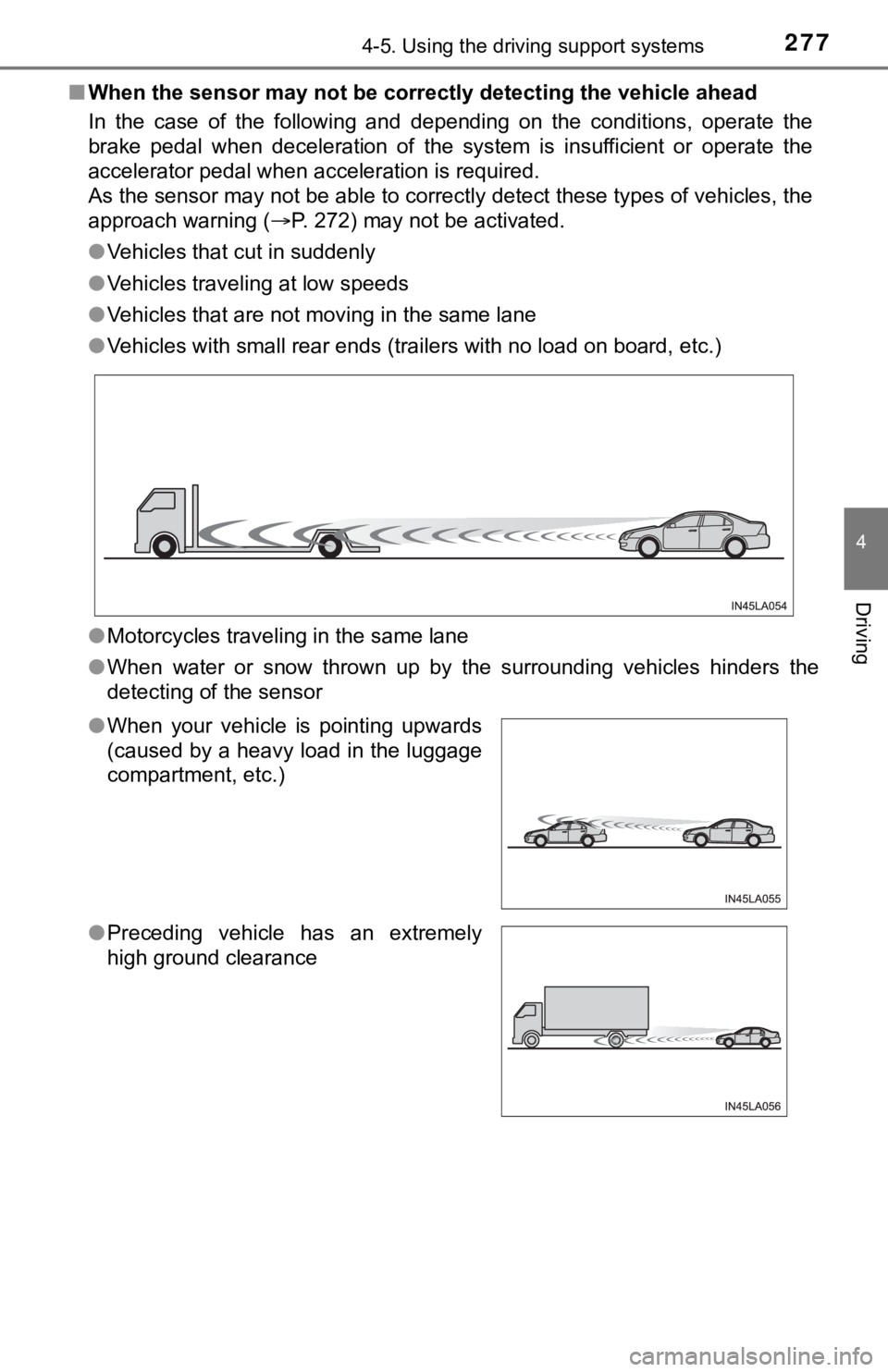
■When the sensor may not be correctly detect ing the vehicle ahead
In the case of the following and depending on the conditions, o perate the
brake pedal when deceleration of the system is insufficient or operate the
accelerator pedal when acceleration is required.
As the sensor may not be able to correctly detect these types o f vehicles, the
approach warning ( P. 272) may not be activated.
● Vehicles that cut in suddenly
● Vehicles traveling at low speeds
● Vehicles that are not moving in the same lane
● Vehicles with small rear ends (trailers with no load on board, etc.)
● Motorcycles traveling in the same lane
● When water or snow thrown up by the surrounding vehicles hinders the
detecting of the sensor
●When your vehicle is pointing upwards
(caused by a heavy load in the luggage
compartment, etc.)
● Preceding vehicle has an extremely
high ground clearance
Page 280 of 572
2804-5. Using the driving support systems
Audio system screen (RCTA function only)
If a vehicle approaching from the right or left at the rear of the vehicle is
detected, the RCTA icon ( P. 287) for the detected side will be displayed.
RCTA
buzzer (RCTA function only)
When a vehicle approaching from the right or left rear of the v ehicle is
detected, a buzzer sounds from behind the rear seat.
Press / of the meter control switches, select .
Press
/ of the meter control sw itched, select or .
Press of the meter control switch.
Each time is pressed, t he function changes on/off.
■The outside rear view mirror indicators visibility
When under strong sunlight, the outside rear view mirror indica tor may be dif-
ficult to see.
■ RCTA buzzer hearing
RCTA function may be difficult to hear over loud noises such as high audio
volume.
■ When “Blind Spot Monitor Unava ilable” or “Rear Cross Traffic Alert
Unavailable” are shown on the multi-information display
Ice, snow, mud, etc., may be attached to the rear bumper around the sensors.
( P. 282)
The system should return to normal operation after removing the ice, snow,
mud, etc., from the rear bumper. Additionally, the sensors may not operate
normally when driving in extremely hot or cold environments.
■ When there is a malfunction in the Blind Spot Monitor
If a system malfunction is detected due to any of the following reasons, a
warning message will be displayed:
● There is a malfunction with the sensors
● The sensors have become dirty
● The outside temperature is extremely high or low
● The sensor voltage has become abnormal
Turning the BSM function/RCTA function on/off
4
5
1
2
3