battery TOYOTA AVALON 2022 Owner's Manual
[x] Cancel search | Manufacturer: TOYOTA, Model Year: 2022, Model line: AVALON, Model: TOYOTA AVALON 2022Pages: 572, PDF Size: 9.42 MB
Page 300 of 572

3004-5. Using the driving support systems
■If “Parking Assist Unavailable” is displayed on the multi-infor mation dis-
play
● Water may be continuously flowing over the sensor surface, such as in a
heavy rain. When the system determines that it is normal, the system will
return to normal.
● Initialization may not have been performed after a battery terminal was dis-
connected and reconnected. Initialize the system. If this messa ge continues
to be displayed even after initialization, have the vehicle ins pected by your
Toyota dealer.
■ Certification
For vehicles sold in Canada
This ISM device complies with Canadian ICES-001.
Cet appareil ISM est conforme a la norme NMB-001 du Canada.
■ Customization
Some functions can be customized. ( P. 100, 526)
WARNING
■When using the intuitive parking assist
Observe the following precautions.
Failing to do so may result in the vehicle being unable to be driven safely
and possibly cause an accident.
● Do not use the sensor at speeds in excess of 6 mph (10 km/h).
● The sensors’ detection areas and reaction times are limited. When moving
forward or reversing, check the areas surrounding the vehicle ( especially
the sides of the vehicle) for safety, and drive slowly, using t he brake to
control the vehicle’s speed.
● Do not install accessories within the sensors’ detection areas.
Page 314 of 572

3144-5. Using the driving support systems
●Other ultrasonic waves sources
• When vehicle horns, vehicle detectors, motorcycle engines, air brakes of
large vehicles, the clearance sonar of other vehicles or other devices
which produce ultrasonic waves are near the vehicle
• If a sticker or an electronic component, such as a backlit license plate
(especially fluorescent type), fog lights, a fender pole or wir eless antenna
is installed near a sensor
● Changes in the vehicle posture
• If the vehicle is significantly tilted
• If the front of the vehicle is raised or lowered due to the ca rried load
• If the orientation of a sensor has been changed due to a collision or other impact
■ If a battery terminal has been disconnected and reconnected
The system needs to be initialized.
To initialize the system, drive the vehicle straight ahead for 5 seconds or more
at a speed of approximately 22 mph (35 km/h) or more.
■ If “ICS Unavailable” is displayed on the multi-information display and
the ICS OFF indicator is flashing
Initialization may not have been performed after a battery term inal was dis-
connected and reconnected. Initialize the system. ( P. 314)
If this message continues to be displayed even after initializa tion, have the
vehicle inspected by your Toyota dealer.
■ If “ICS Unavailable” and “Parking Assist Unavailable Clean Park ing
Assist Sensor” are displayed on th e multi-information display and the
ICS OFF indicator is flashing
● A sensor may be covered with ice, snow, dirt, etc. In this case , remove the
ice, snow, dirt, etc., from the sensor to return the system to normal. If this
message is shown even after removing dirt from the sensor, or s hown when
the sensor was not dirty to begin with, have the vehicle inspec ted at your
Toyota dealer.
● A sensor may be frozen. Once the ice melts, the system will ret urn to nor-
mal.
● Water may be continuously flowing over the sensor surface, such as in a
heavy rain. When the system determines that it is normal, the system will
return to normal.
Page 336 of 572
3364-6. Driving tips
●Use fluids that are appropriate t o the prevailing outside tempera-
tures. • Engine oil
• Engine coolant
• Washer fluid
● Have a service technician inspec t the condition of the battery.
● Have the vehicle fitted with four snow tires or purchase a set of tire
chains for the front tires.
*
Ensure that all tires are the same size and brand, and that cha ins match
the size of the tires.
*: Tire chains cannot be mounted on vehicles with 18 and 19-inch tires.
Perform the following according to the driving conditions:
● Do not try to forcibly open a window or move a wiper that is fr ozen.
Pour warm water over the frozen area to melt the ice. Wipe away
the water immediately to p revent it from freezing.
● To ensure proper operation of the climate control system fan,
remove any snow that has accumulated on the air inlet vents in
front of the windshield.
● Check for and remove any excess ic e or snow that may have accu-
mulated on the exterior lights, vehicle’s roof, chassis, around the
tires or on the brakes.
● Remove any snow or mud from the bottom of your shoes before
getting in the vehicle.
Winter driving tips
Carry out the necessary preparations and inspections before
driving the vehicle in winter. Always drive the vehicle in a ma n-
ner appropriate to the prevailing weather conditions.
Preparation for winter
Before driving the vehicle
Page 348 of 572
3485-1. Using the air conditioning system and defogger
WARNING
■To prevent the windshield from fogging up
● Do not use during cool air operation in extremely humid weathe r.
The difference between the temperature of the outside air and that of the
windshield can cause the outer surface of the windshield to fog up, block-
ing your vision.
■ To prevent burns
Do not touch the rear view mirror surfaces when the outside rea r view mirror
defoggers are on.
NOTICE
■ To prevent battery discharge
Do not leave the air conditioning system on longer than necessa ry when the
engine is stopped.
■ When repairing/replacing parts of the air conditioning system
Have repair/replacement performed by your Toyota dealer.
When a part of the air conditioning system, such as the evapora tor, is to be
replaced, it must be replaced with a new one.
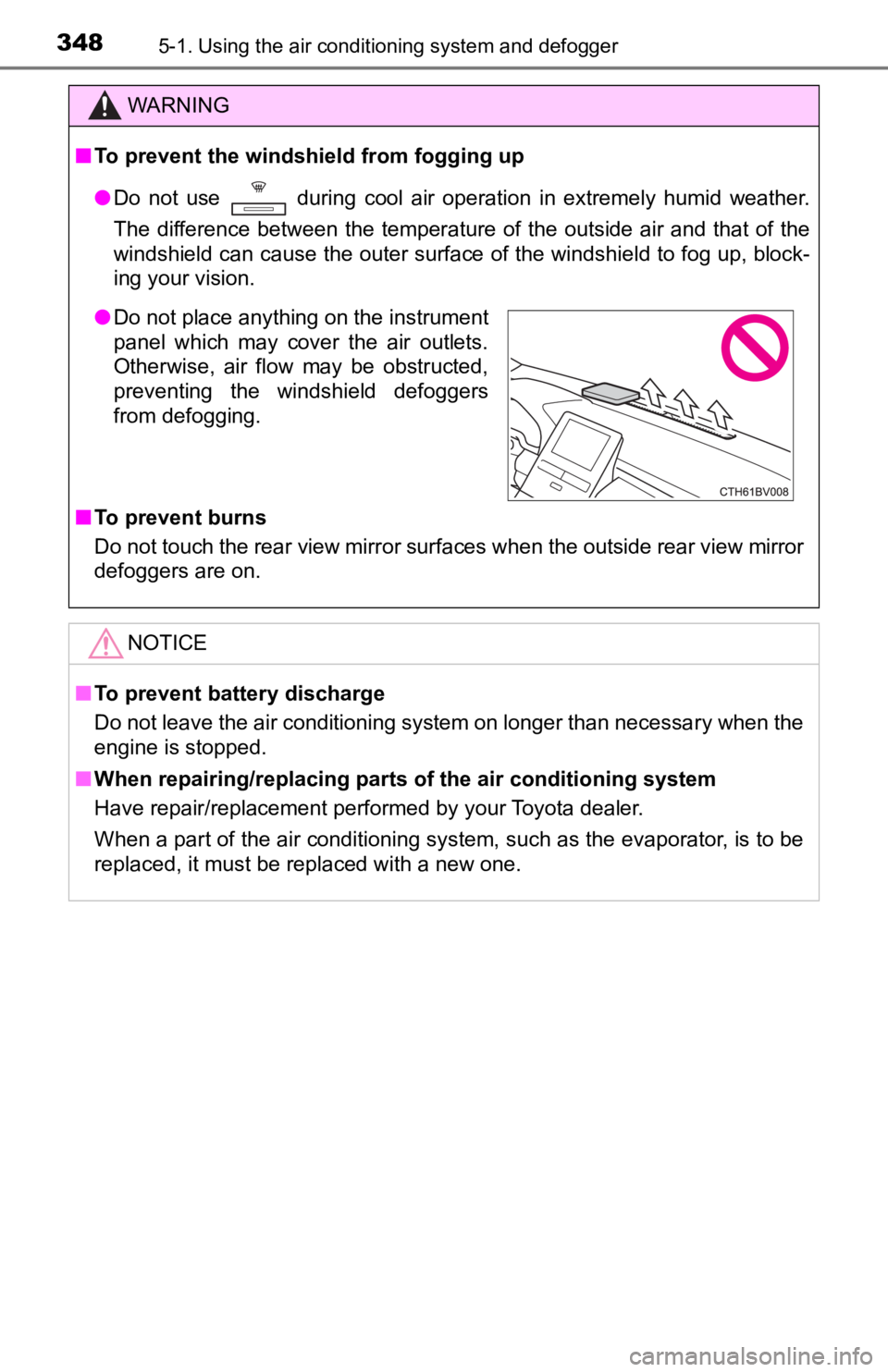
● Do not place anything on the instrument
panel which may cover the air outlets.
Otherwise, air flow may be obstructed,
preventing the windshield defoggers
from defogging.
Page 349 of 572
3495-1. Using the air conditioning system and defogger
5
Interior features
: If equipped
Heated steering wheel/seat heaters/seat
ventilators
Heated steering wheel and seat heaters heat the side grips of t he
steering wheel and seats, respectively. Seat ventilators mainta in
good ventilation by pulling ai r through the seat upholstery.
WARNING
●Care should be taken to prevent injury if anyone in the following categories
comes in contact with the steering wheel and seats when the heater is on:
• Babies, small children, the elderly, the sick and the physically chal-
lenged
• Persons with sensitive skin
• Persons who are fatigued
• Persons who have taken alcohol or drugs that induce sleep (sleeping drugs, cold remedies, etc.)
● Observe the following precautions to prevent minor burns or ove rheating:
• Do not cover the seat with a blanket or cushion when using the seat
heater.
• Do not use seat heater more than necessary.
NOTICE
● Do not put heavy objects that have an uneven surface on the sea t and do
not stick sharp objects (needles, nails, etc.) into the seat.
● To prevent battery discharge, do not use the functions when the engine is
off.
Page 363 of 572
3635-4. Other interior features
5
Interior features
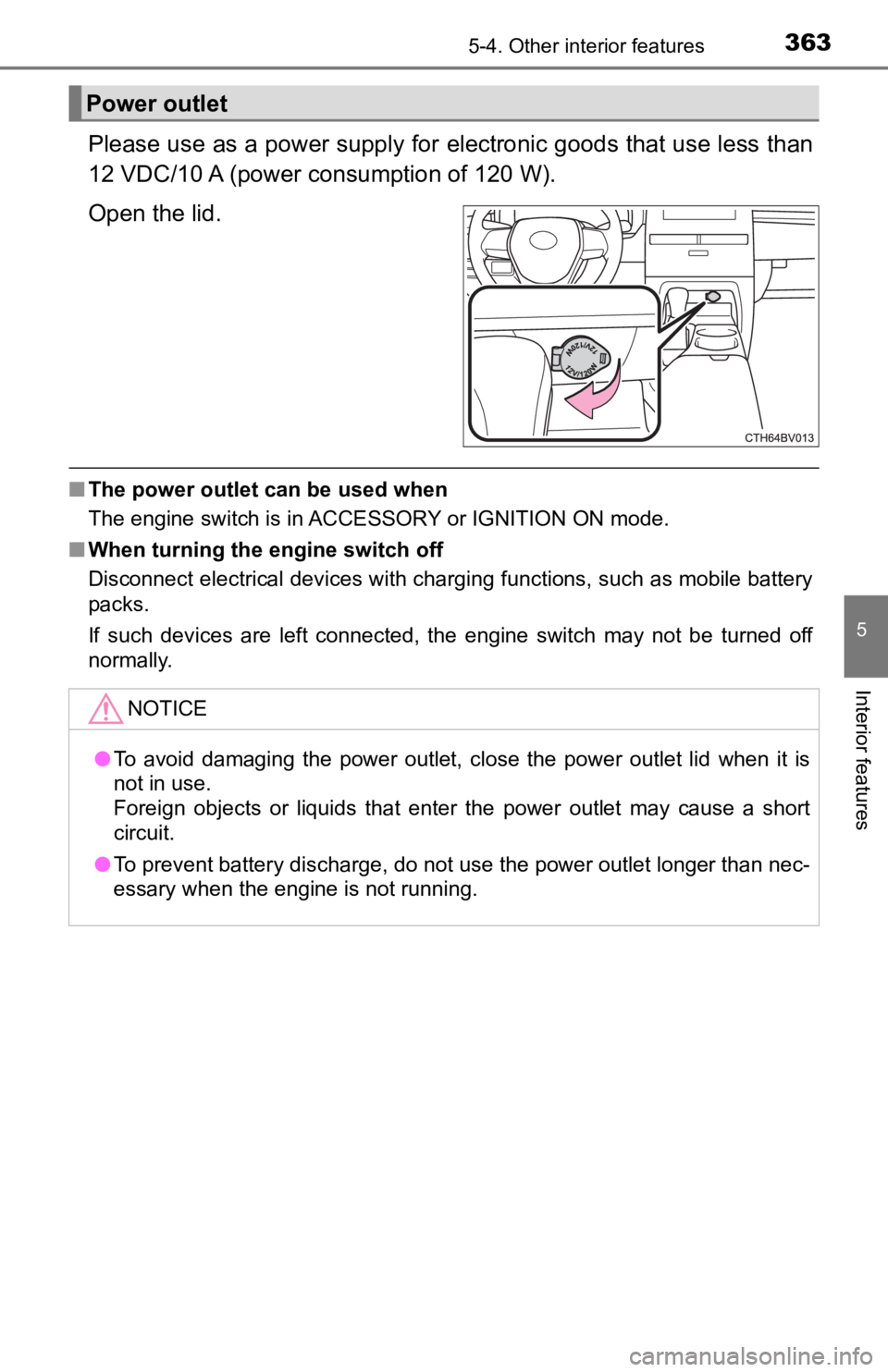
Please use as a power supply for electronic goods that use less than
12 VDC/10 A (power c onsumption of 120 W).
Open the lid.
■ The power outlet can be used when
The engine switch is in ACCESSORY or IGNITION ON mode.
■ When turning the engine switch off
Disconnect electrical devices with charging functions, such as mobile battery
packs.
If such devices are left connected, the engine switch may not b e turned off
normally.
Power outlet
NOTICE
● To avoid damaging the power outlet, close the power outlet lid when it is
not in use.
Foreign objects or liquids that enter the power outlet may cause a short
circuit.
● To prevent battery discharge, do not use the power outlet longer than nec-
essary when the engine is not running.
Page 365 of 572
3655-4. Other interior features
5
Interior features
■Cable pass through
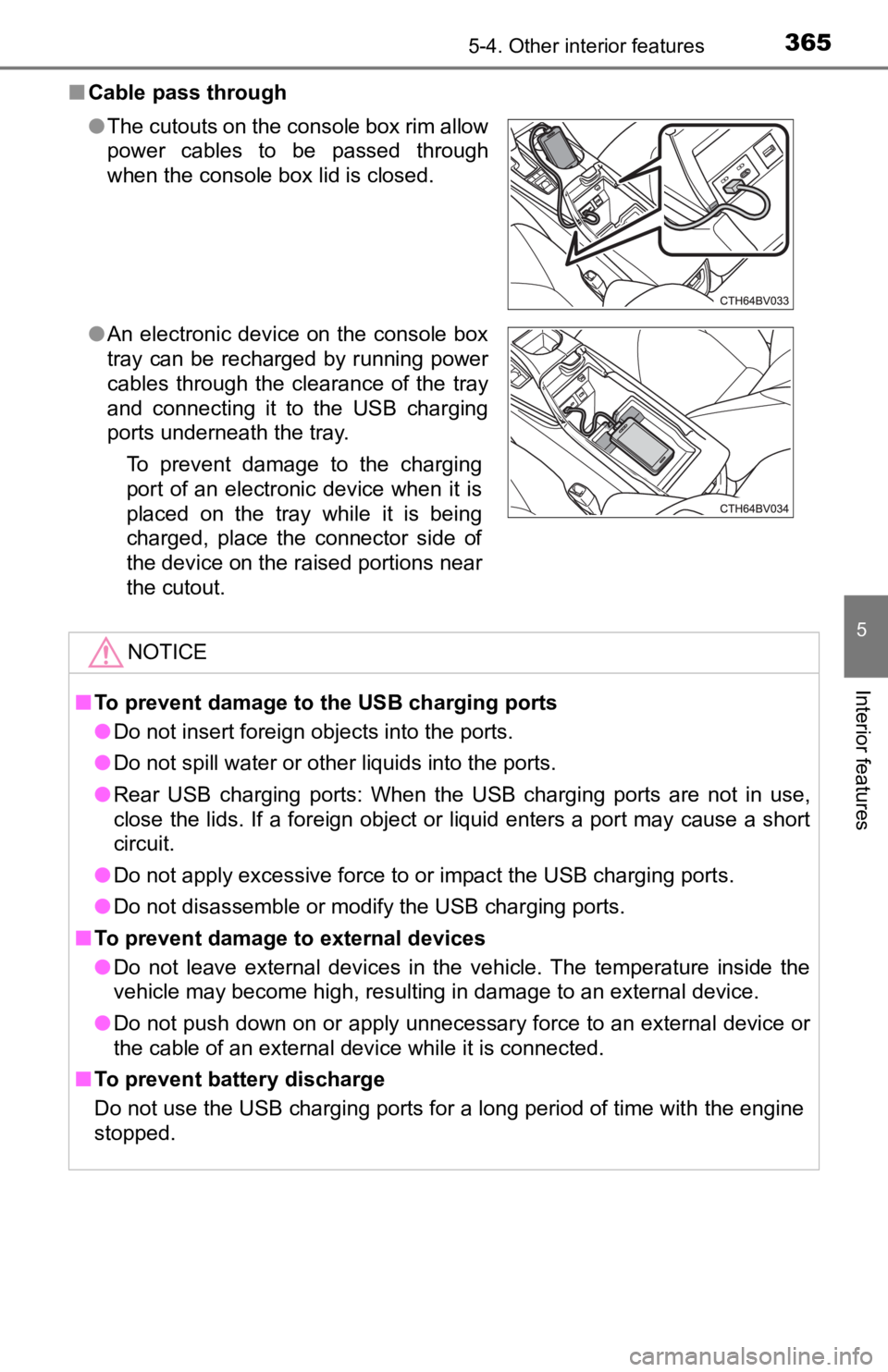
●The cutouts on the console box rim allow
power cables to be passed through
when the console box lid is closed.
● An electronic device on the console box
tray can be recharged by running power
cables through the clearance of the tray
and connecting it to the USB charging
ports underneath the tray.
To prevent damage to the charging
port of an electronic device when it is
placed on the tray while it is being
charged, place the connector side of
the device on the raised portions near
the cutout.
NOTICE
■To prevent damage to the USB charging ports
● Do not insert foreign objects into the ports.
● Do not spill water or other liquids into the ports.
● Rear USB charging ports: When the USB charging ports are not in use,
close the lids. If a foreign object or liquid enters a port may cause a short
circuit.
● Do not apply excessive force to or impact the USB charging ports.
● Do not disassemble or modify the USB charging ports.
■ To prevent damage to external devices
● Do not leave external devices in the vehicle. The temperature i nside the
vehicle may become high, resulting in damage to an external device.
● Do not push down on or apply unnecessary force to an external device or
the cable of an external device while it is connected.
■ To prevent battery discharge
Do not use the USB charging ports for a long period of time wit h the engine
stopped.
Page 366 of 572
3665-4. Other interior features
A portable device, such as a smartphone or mobile battery, can be
charged by just placing it on th e charging area, provided the d evice is
compatible with the Qi wireless charging standard created by th e
Wireless Power Consortium.
The wireless charger cannot be used with a portable device that is
larger than the charging area. Additionally, depending on the p ortable
device, the wireless charger may not operate properly. Refer to the
operation manual of the portable device.
■The “Qi” symbol
The “Qi” symbol is a trademark of the Wireless Power Consortium .
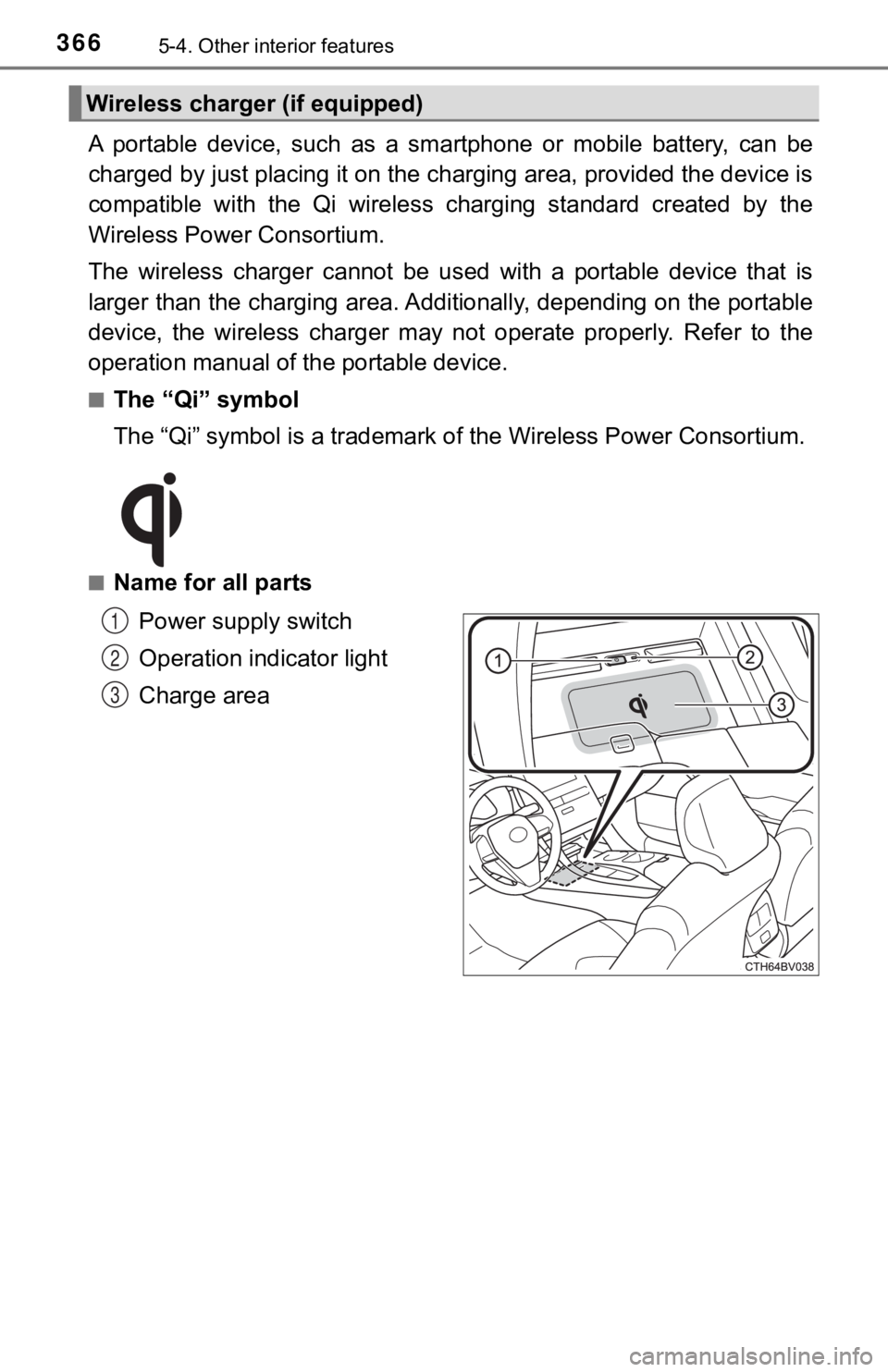
■Name for all parts
Power supply switch
Operation indicator light
Charge area
Wireless charger (if equipped)
1
2
3
Page 374 of 572

3745-4. Other interior features
NOTICE
■Conditions in which the wireless charger may not operate correctly
In the following situations, the wireless charger may not operate correctly:
● When a portable device is fully charged
● When there is a foreign object between the charging area and portable
device
● When a portable device becomes hot while charging
● When a portable device is placed on the wireless area with its charging
surface facing up
● When a portable device is not centered on the charging area
● When the vehicle is near a TV tower, electric power plant, gas station,
radio station, large display, airport or other facility that ge nerates strong
radio waves or electrical noise
● When the portable device is in contact with, or is covered by a ny of the fol-
lowing metallic objects:
• Cards to which aluminum foil is attached
• Cigarette boxes that have aluminum foil inside
• Metallic wallets or bags
• Coins
• Metal hand warmers
• Media such as CDs and DVDs
● When wireless keys (that emit radio waves) other than those of your vehi-
cle are being used nearby.
If in situations other than above the wireless charger does not operate prop-
erly or the operation indicator light is blinking, the wireless charger may be
malfunctioning. Contact your Toyota dealer.
■ To prevent failure or damage to data
● Do not bring magnetic cards, such as a credit card, or magnetic recording
media, close to the wireless charger while charging. Otherwise, data may
be erased due to the influence of magnetism.
Additionally, do not bring precision instruments such as wrist watches,
close to the wireless charger, as such objects may malfunction.
● Do not leave portable devices in the cabin. The temperature ins ide the
cabin may become high when parked in the sun, and cause damage to the
device.
■ To prevent battery discharge
Do not use the wireless charger for a long period of time with the engine
stopped.
Page 378 of 572
3785-4. Other interior features
■Before programming the HomeLink®
●During programming, it is possible that garage doors, gates, or
other devices may operate. For this reason, make sure that peo-
ple and objects are clear of the garage door or other devices t o
prevent injury or other potential harm.
● It is recommended that a new battery be placed in the remote
control transmitter for mo re accurate programming.
● Garage door opener motors manufactured after 1995 may be
equipped with rolling code pro tection. If this is the case, you may
need a stepladder or other sturdy, safe device to reach the
“Learn” or “Smart” button on the garage door opener motor.
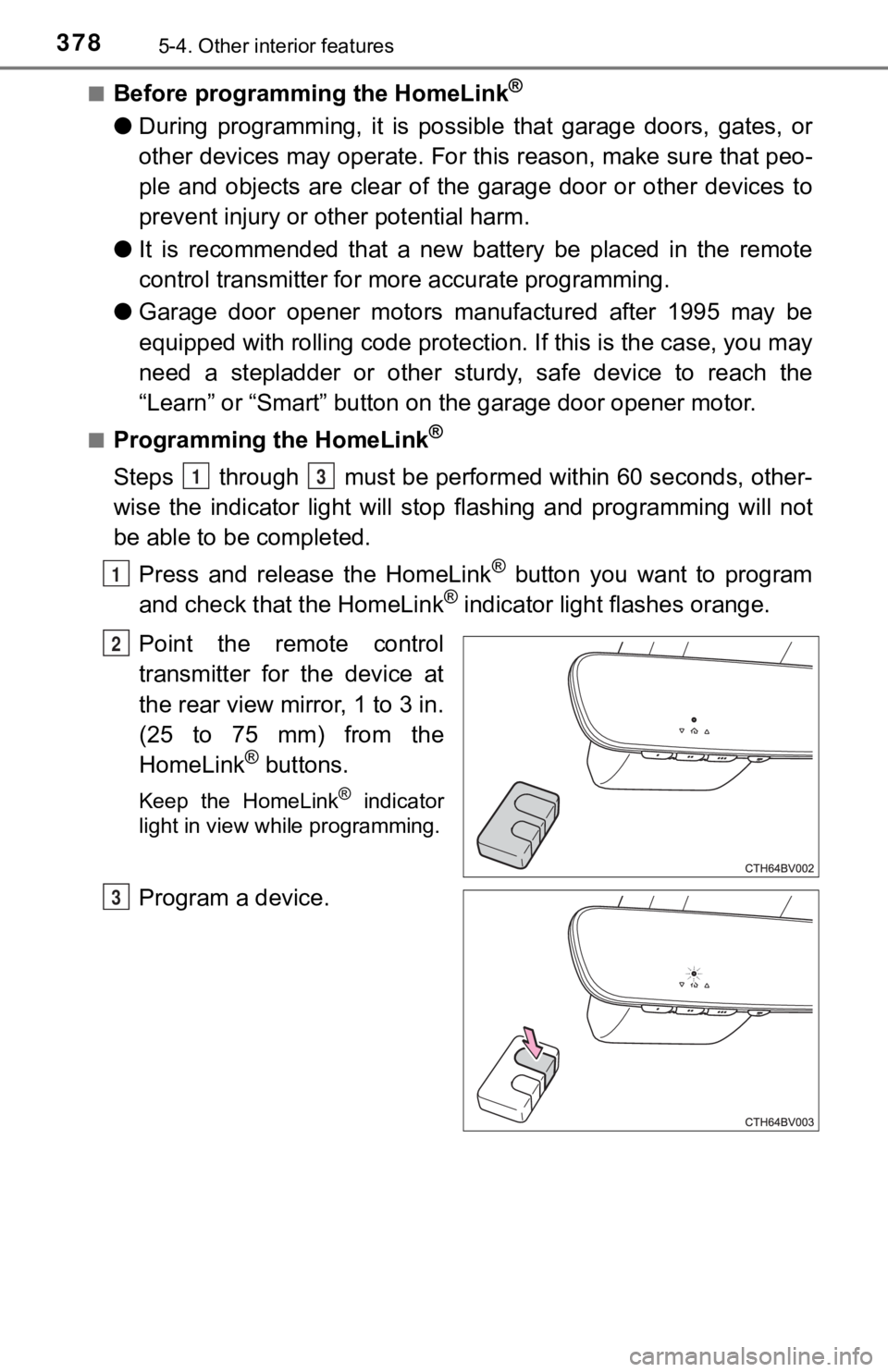
■Programming the HomeLink®
Steps through must be perfo rmed within 60 seconds, other-
wise the indicator light will st op flashing and programming wil l not
be able to be completed.
Press and release the HomeLink
® button you want to program
and check that the HomeLink® indicator light flashes orange.
Point the remote control
transmitter for the device at
the rear view mirror, 1 to 3 in.
(25 to 75 mm) from the
HomeLink
® buttons.
Keep the HomeLink® indicator
light in view while programming.
Program a device.
13
1
2
3