light TOYOTA AVALON 2022 Owner's Guide
[x] Cancel search | Manufacturer: TOYOTA, Model Year: 2022, Model line: AVALON, Model: TOYOTA AVALON 2022Pages: 572, PDF Size: 9.42 MB
Page 85 of 572
852. Instrument cluster
2
Instrument cluster
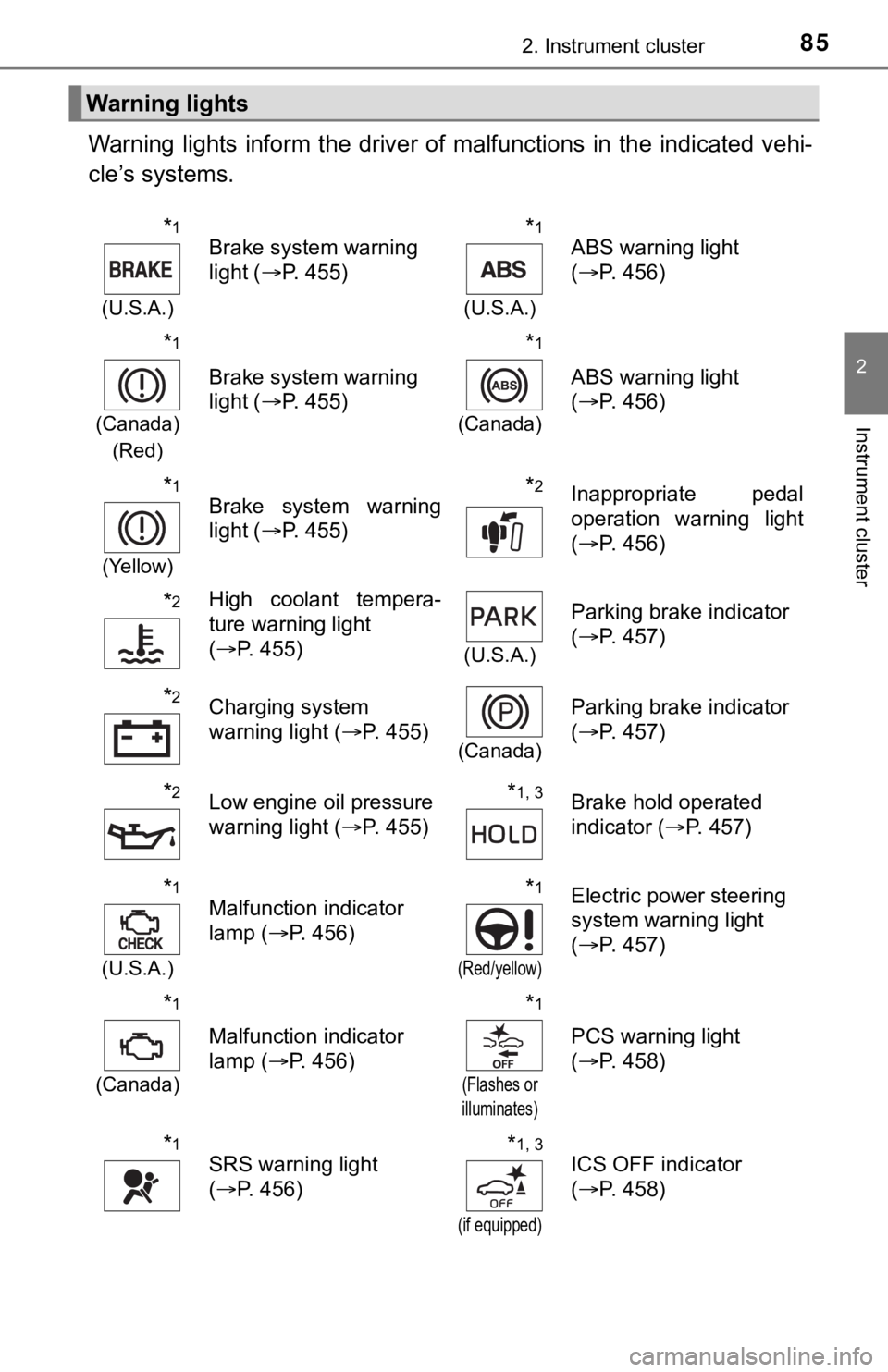
Warning lights inform the driver of malfunctions in the indicated vehi-
cle’s systems.
Warning lights
*1
(U.S.A.)
Brake system warning
light ( P. 455)*1
(U.S.A.)
ABS warning light
(P. 456)
*1
(Canada)
(Red)
Brake system warning
light ( P. 455)
*1
(Canada)
ABS warning light
(P. 456)
*1
(Yellow)
Brake system warning
light ( P. 455)*2Inappropriate pedal
operation warning light
(P. 456)
*2High coolant tempera-
ture warning light
(P. 455)
(U.S.A.)
Parking brake indicator
(P. 457)
*2Charging system
warning light ( P. 455)
(Canada)
Parking brake indicator
(P. 457)
*2Low engine oil pressure
warning light ( P. 455)*1, 3Brake hold operated
indicator ( P. 457)
*1
(U.S.A.)
Malfunction indicator
lamp ( P. 456)*1
(Red/yellow)
Electric power steering
system warning light
(P. 457)
*1
(Canada)
Malfunction indicator
lamp ( P. 456)
*1
(Flashes or
illuminates)
PCS warning light
( P. 458)
*1SRS warning light
(P. 456)*1, 3
(if equipped)
ICS OFF indicator
(P. 458)
Page 86 of 572
862. Instrument cluster
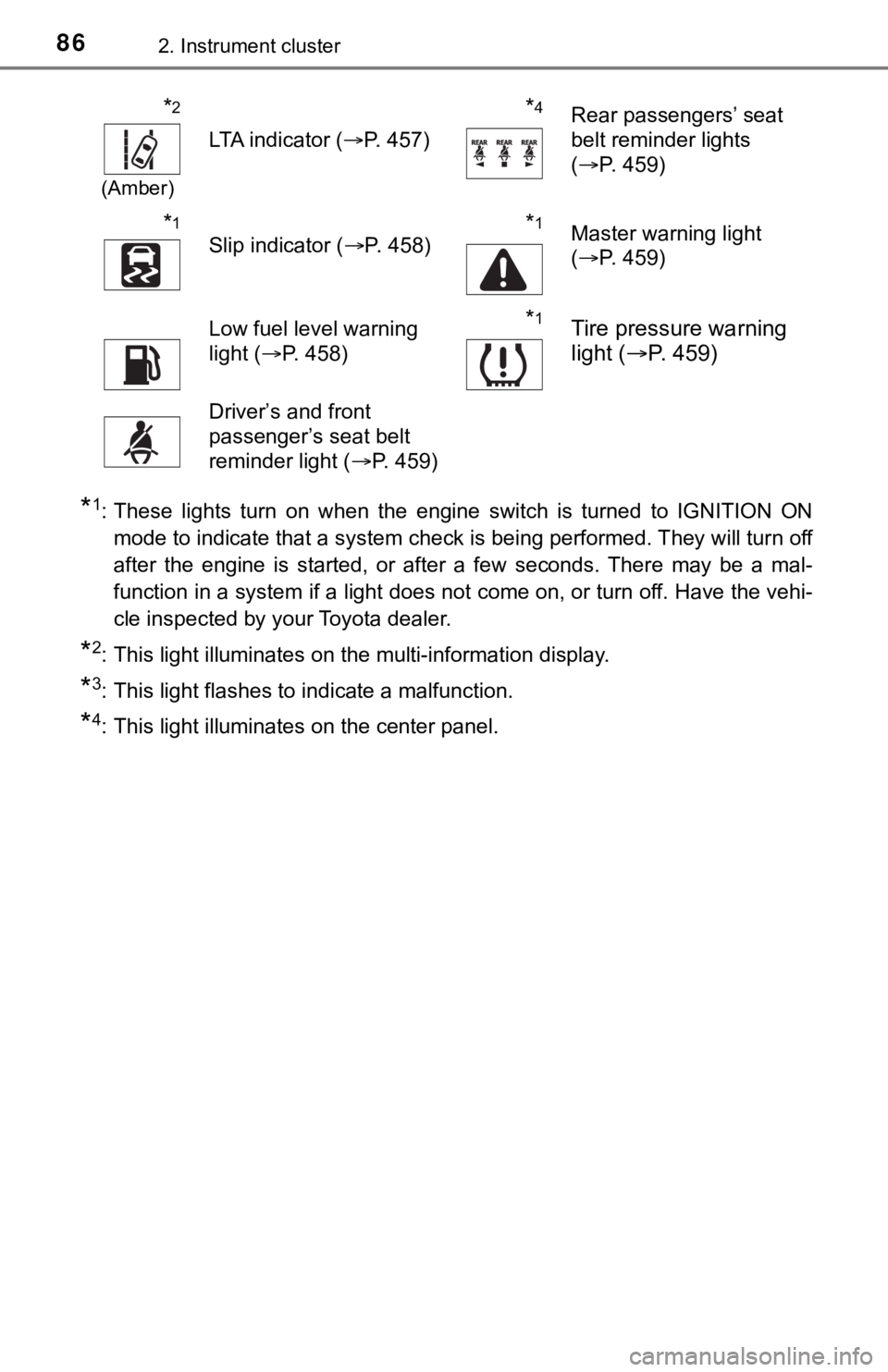
*1: These lights turn on when the engine switch is turned to IGNITION ON
mode to indicate that a system check is being performed. They will turn off
after the engine is started, or after a few seconds. There may be a mal-
function in a system if a light does not come on, or turn off. Have the vehi-
cle inspected by your Toyota dealer.
*2: This light illuminates on the multi-information display.
*3: This light flashes to indicate a malfunction.
*4: This light illuminates on the center panel.
*2
(Amber)
LTA indicator ( P. 457)
*4Rear passengers’ seat
belt reminder lights
(P. 459)
*1
Slip indicator ( P. 458)*1Master warning light
(P. 459)
Low fuel level warning
light ( P. 458)*1Tire pressure warning
light ( P. 459)
Driver’s and front
passenger’s seat belt
reminder light ( P. 459)
Page 87 of 572
872. Instrument cluster
2
Instrument cluster
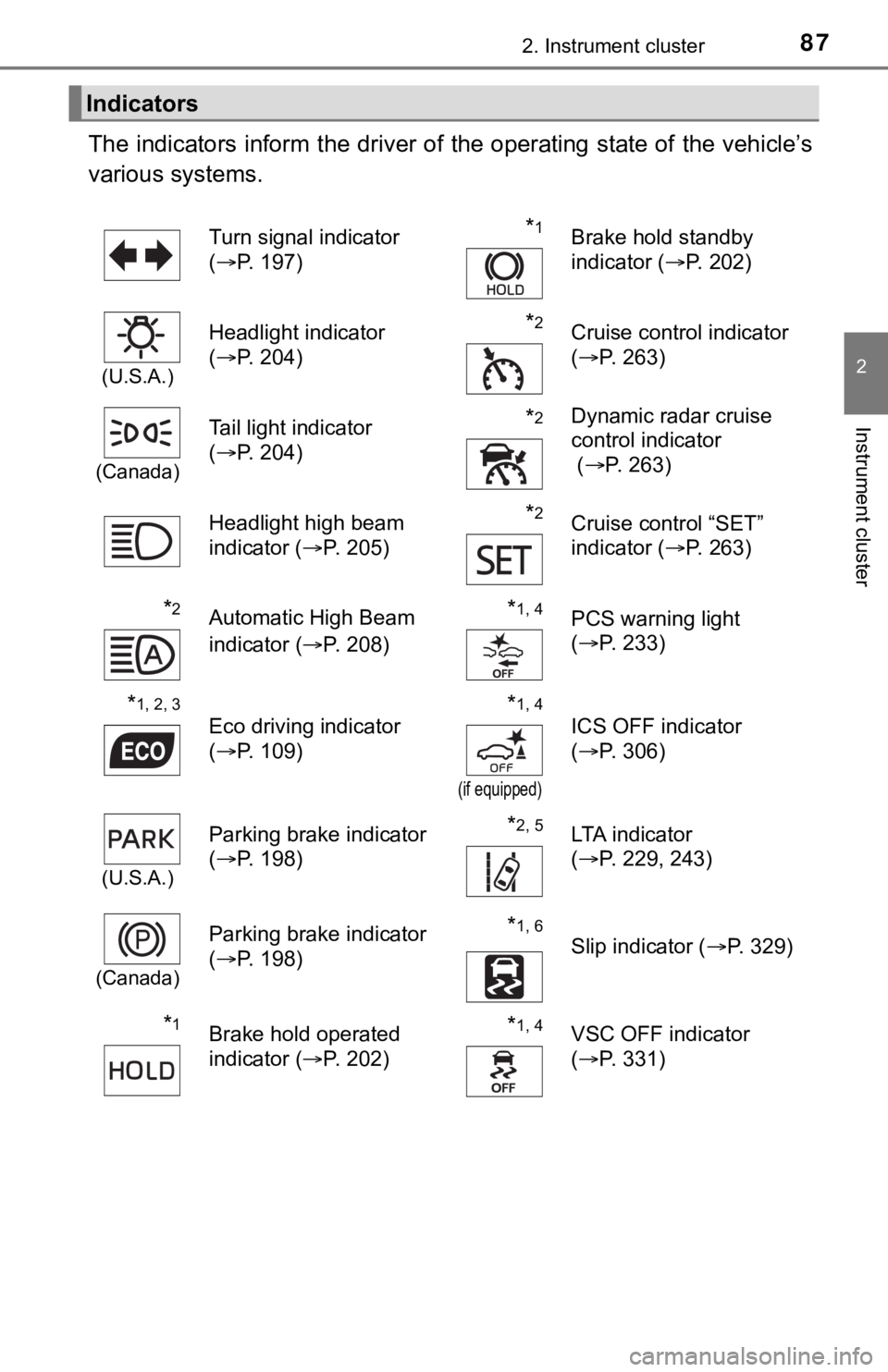
The indicators inform the driver of the operating state of the vehicle’s
various systems.
Indicators
Turn signal indicator
( P. 197)*1Brake hold standby
indicator ( P. 202)
(U.S.A.)
Headlight indicator
(P. 204)*2Cruise control indicator
(P. 263)
(Canada)
Tail light indicator
(P. 204) *2Dynamic radar cruise
control indicator
( P. 263)
Headlight high beam
indicator ( P. 205)
*2Cruise control “SET”
indicator (P. 263)
*2Automatic High Beam
indicator ( P. 208)*1, 4PCS warning light
(P. 233)
*1, 2, 3
Eco driving indicator
(P. 109)*1, 4
(if equipped)
ICS OFF indicator
(P. 306)
(U.S.A.)
Parking brake indicator
(P. 198)*2, 5LTA indicator
(P. 229, 243)
(Canada)
Parking brake indicator
(P. 198)*1, 6
Slip indicator ( P. 329)
*1Brake hold operated
indicator (P. 202)*1, 4VSC OFF indicator
(P. 331)
Page 89 of 572
892. Instrument cluster
2
Instrument cluster
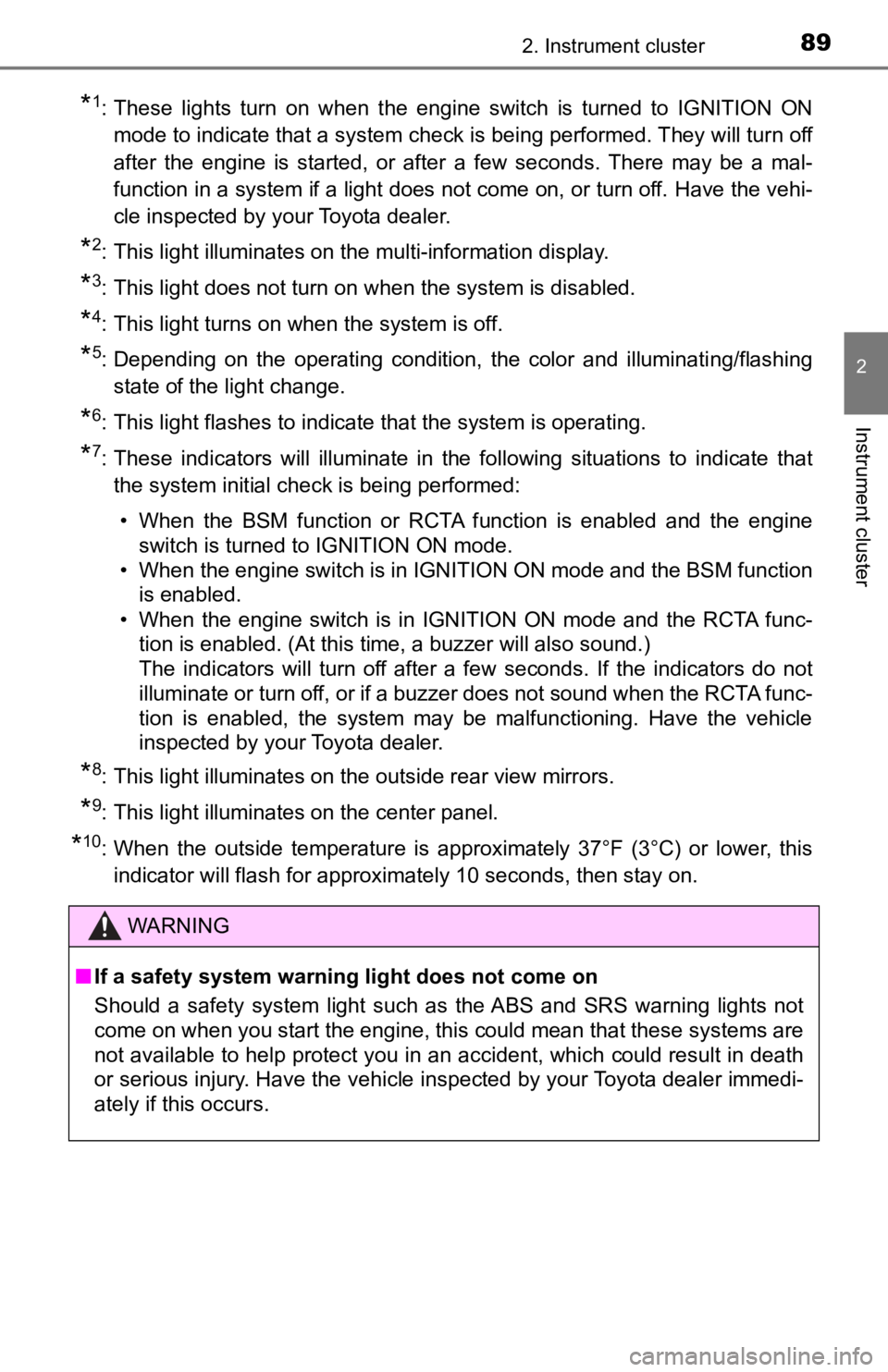
*1: These lights turn on when the engine switch is turned to IGNITION ON
mode to indicate that a system check is being performed. They will turn off
after the engine is started, or after a few seconds. There may be a mal-
function in a system if a light does not come on, or turn off. Have the vehi-
cle inspected by your Toyota dealer.
*2: This light illuminates on the multi-information display.
*3: This light does not turn on when the system is disabled.
*4: This light turns on when the system is off.
*5: Depending on the operating condition, the color and illuminating/flashing state of the light change.
*6: This light flashes to indicate that the system is operating.
*7: These indicators will illuminate in the following situations to indicate thatthe system initial check is being performed:
• When the BSM function or RCTA function is enabled and the engi ne
switch is turned to IGNITION ON mode.
• When the engine switch is in IGNITION ON mode and the BSM function is enabled.
• When the engine switch is in IGNITION ON mode and the RCTA fun c-
tion is enabled. (At this time, a buzzer will also sound.)
The indicators will turn off after a few seconds. If the indicators do not
illuminate or turn off, or if a buzzer does not sound when the RCTA func-
tion is enabled, the system may be malfunctioning. Have the vehicle
inspected by your Toyota dealer.
*8: This light illuminates on the outside rear view mirrors.
*9: This light illuminates on the center panel.
*10: When the outside temperature is approximately 37°F (3°C) or lo wer, this
indicator will flash for approximately 10 seconds, then stay on .
WARNING
■If a safety system warning light does not come on
Should a safety system light such as the ABS and SRS warning lights not
come on when you start the engine, this could mean that these s ystems are
not available to help protect you in an accident, which could result in death
or serious injury. Have the vehicle inspected by your Toyota dealer immedi-
ately if this occurs.
Page 91 of 572
912. Instrument cluster
2
Instrument cluster
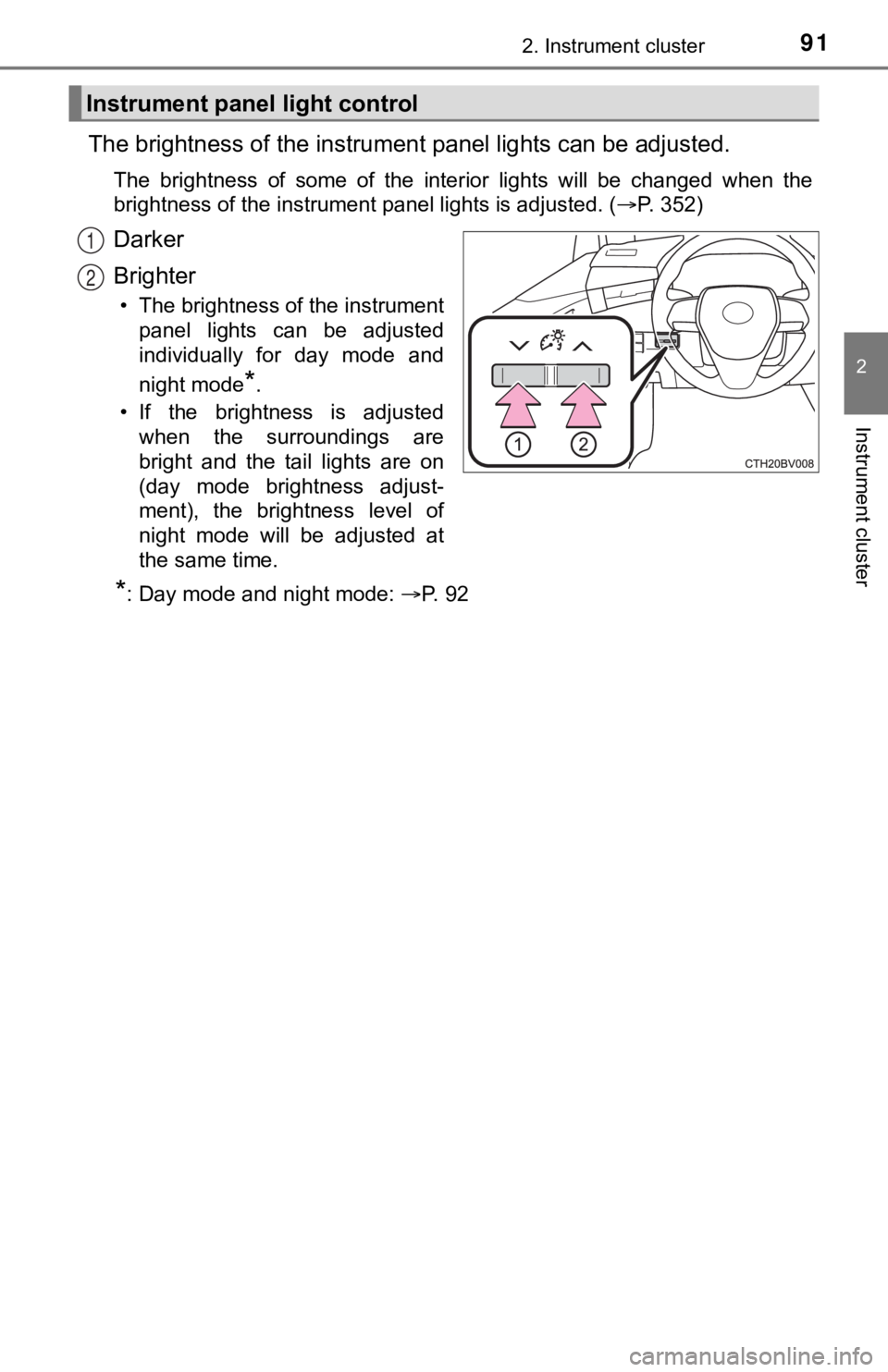
The brightness of the instrument panel lights can be adjusted.
The brightness of some of the interior lights will be changed w hen the
brightness of the instrument panel lights is adjusted. ( P. 352)
Darker
Brighter
• The brightness of the instrument
panel lights can be adjusted
individually for day mode and
night mode
*.
• If the brightness is adjusted when the surroundings are
bright and the tail lights are on
(day mode brightness adjust-
ment), the brightness level of
night mode will be adjusted at
the same time.
*: Day mode and night mode: P. 9 2
Instrument panel light control
1
2
Page 92 of 572
922. Instrument cluster
■The meters and display illuminate when
The engine switch is in IGNITION ON mode.
■ Brightness of the meters (day mode and night mode)
●The brightness of the meters is changed between day mode and ni ght
mode.
• Day mode: When the tail lights are off or when the tail lights are on but
the surrounding area is bright
• Night mode: When the tail lights are on and the surrounding area is dark
● When in night mode, the brightness will be reduced slightly unless the
meters are set to the maximum brightness level.
■ Outside temperature display
In the following situations, the correct outside temperature may not be dis-
played, or the display may take longer than normal to change:
●When stopped, or driving at low speeds (less than 16 mph [25 km/h])
● When the outside temperature has changed suddenly (at the entrance/exit
of a garage, tunnel, etc.)
● When “ ” or “E” is displayed, the system may be malfunctioning.
Take your vehicle to your Toyota dealer.
NOTICE
■To prevent damage to the engine and its components
● Do not let the indicator needle of the tachometer enter the red zone, which
indicates the maximum engine speed.
● The engine may be overheating if the engine coolant temperature gauge is
in the red zone (H). In this case, immediately stop the vehicle in a safe
place, and check the engine after it has cooled completely. ( P. 492)
Page 107 of 572
1072. Instrument cluster
2
Instrument cluster
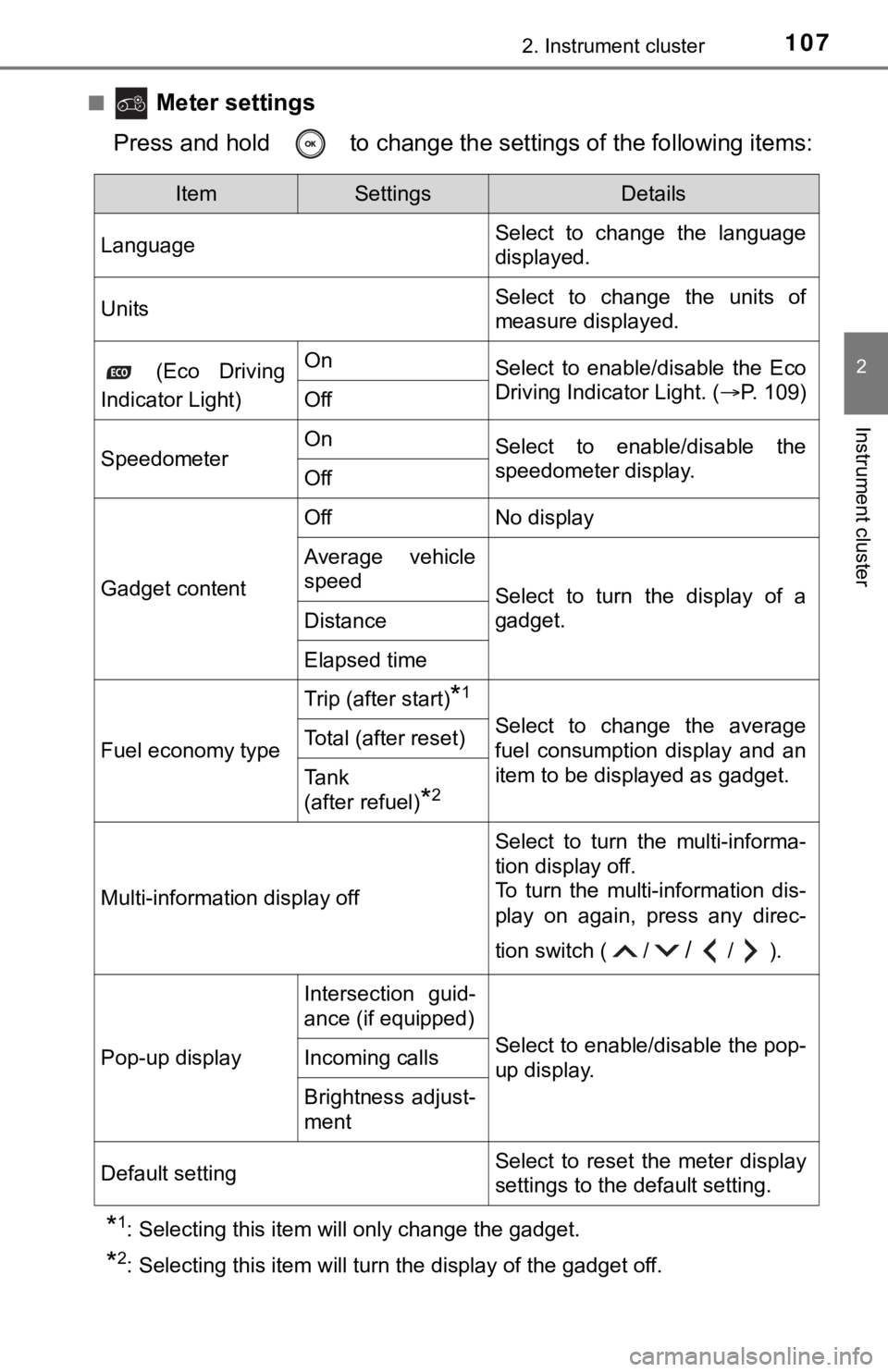
■ Meter settings
Press and hold to change the se ttings of the following items:
*1: Selecting this item will only change the gadget.
*2: Selecting this item will turn the display of the gadget off.
ItemSettingsDetails
Language Select to change the language
displayed.
UnitsSelect to change the units of
measure displayed.
(Eco Driving
Indicator Light)OnSelect to enable/disable the Eco
Driving Indicator Light. ( P. 109)
Off
SpeedometerOnSelect to enable/disable the
speedometer display.
Off
Gadget content
OffNo display
Average vehicle
speed
Select to turn the display of a
gadget.
Distance
Elapsed time
Fuel economy type
Trip (after start)*1
Select to change the average
fuel consumption display and an
item to be displayed as gadget.Total (after reset)
Tank
(after refuel)
*2
Multi-information display off
Select to turn the multi-informa-
tion display off.
To turn the multi-information dis-
play on again, press any direc-
tion switch ( /
//).
Pop-up display
Intersection guid-
ance (if equipped)
Select to enable/disable the pop-
up display.Incoming calls
Brightness adjust-
ment
Default settingSelect to reset the meter display
settings to the default setting.
Page 108 of 572
1082. Instrument cluster
■Odometer
Displays the total distance the vehicle has been driven.
■Trip meter A/trip meter B
Displays the distance the vehicl e has been driven since the met er
was last reset. Trip meters A and B can be used to record and d is-
play different distances independently.
To reset, display the desired trip meter and press and hold the “ODO/
TRIP” switch.
Displays suggestions to the drive r in the following situations. To select
a response to a displayed suggestion, use the meter control swi tches.
The suggestion function can be turned on/off.
(Customizable features:P. 525)
■
Suggestion to turn off the headlights
If the headlights are left on for a certain amount of time afte r the
engine switch has been turned of f, if the headlight switch is in the
“AUTO” position, a suggestion m essage will be displayed asking if
you wish to turn the headlights off. To turn the headlights off , select
“Yes”.
If a front door is opened after the engine switch is turned off, this sug-
gestion message will not be displayed.
Odometer/trip meter
Suggestion function
Page 109 of 572
1092. Instrument cluster
2
Instrument cluster
■Eco Driving Indicator
Eco Driving Indicator will not operate under the following cond itions:
● The shift lever is in any position other than D.
● A paddle shift switch (if equipped) is operated.
● Neither normal mode nor Eco drive mode is selected. ( P. 324)
● The vehicle speed is approximately 80 mph (130 km/h) or higher.
■ Suspension of the settings display
●Some settings cannot be changed while driving. When changing se ttings,
park the vehicle in a safe place.
● If a warning message is displayed, operation of the settings di splay will be
suspended.
■ Tire pressure
●It may take a few minutes to display the tire inflation pressur e after the
engine switch is turned to IGNITION ON mode. It may also take a few min-
utes to display the tire inflation pressure after inflation pre ssure has been
adjusted.
● “---” may be displayed if the tire position information cannot be determined
due to unfavorable radio wave conditions.
● Tire inflation pressure changes with temperature. The displayed values may
also be different from the values measured using a tire pressur e gauge.
■ Liquid crystal display
Small spots or light spots may appear on the display. This phen omenon is
characteristic of liquid crystal displays, and there is no prob lem continuing to
use the display.
■ Customization
Some functions can be customized. ( P. 100, 525)
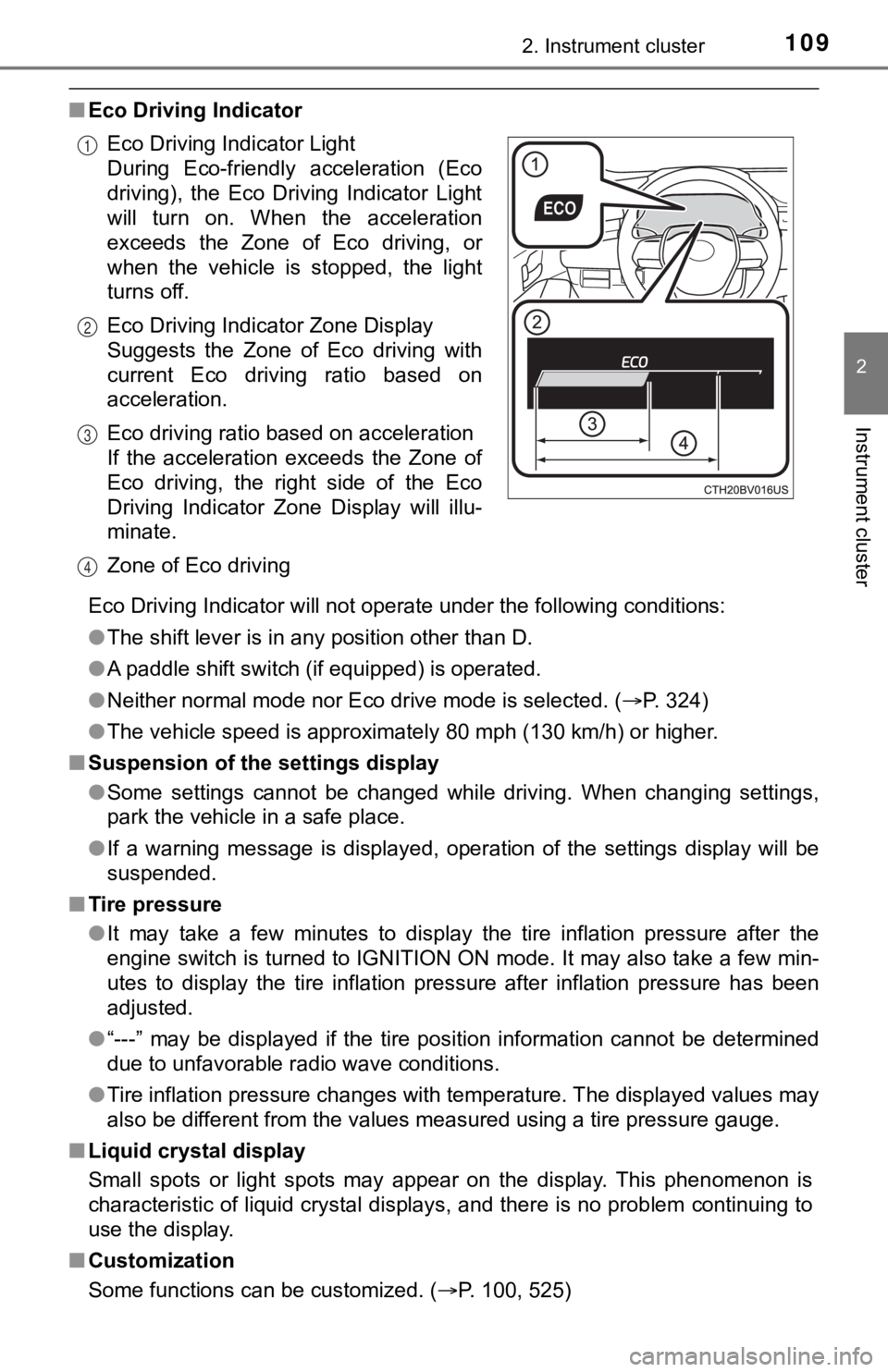
Eco Driving Indicator Light
During Eco-friendly acceleration (Eco
driving), the Eco Driving Indicator Light
will turn on. When the acceleration
exceeds the Zone of Eco driving, or
when the vehicle is stopped, the light
turns off.
Eco Driving Indicator Zone Display
Suggests the Zone of Eco driving with
current Eco driving ratio based on
acceleration.
Eco driving ratio based on acceleration
If the acceleration exceeds the Zone of
Eco driving, the right side of the Eco
Driving Indicator Zone Display will illu-
minate.
Zone of Eco driving
1
2
3
4
Page 125 of 572
1253-1. Key information
3
Operation of each component
■Panic mode
■ If you lose your mechanical keys
New genuine mechanical keys can be made by your Toyota dealer u sing the
other mechanical key and the key number stamped on your key num ber
plate. Keep the plate in a safe place such as your wallet, not in the vehicle.
■ When riding in an aircraft
When bringing an electronic key onto an aircraft, make sure you do not press
any button on the electronic key while inside the aircraft cabi n. If you are car-
rying an electronic key in your bag etc., ensure that the butto ns are not likely
to be pressed accidentally. Pressing a button may cause the electronic key to
emit radio waves that could interfere with the operation of the aircraft.
■ Conditions affecting operation
P. 139
■ Key battery depletion
●The standard battery life is 1 to 2 years.
● If the battery becomes low, an alarm will sound in the cabin wh en the engine
stops.
● As the electronic key always receives radio waves, the battery will become
depleted even if the electronic key is not used. The following symptoms indi-
cate that the electronic key battery may be depleted. Replace the battery
when necessary. ( P. 435)
• The smart key system or the wireless remote control does not o perate.
• The detection area becomes smaller.
• The LED indicator on the key surface does not turn on.
● To reduce key battery depletion when the electronic key is to not be used for
long periods of time, set the electronic key to the battery-sav ing mode.
( P. 139)
● To avoid serious deterioration, do not leave the electronic key within 3 ft. (1
m) of the following electrical appliances that produce a magnet ic field:
•TVs
• Personal computers
• Cellular phones, cordless phones and battery chargers
• Recharging cellular phones or cordless phones
• Table lamps
• Induction cookers
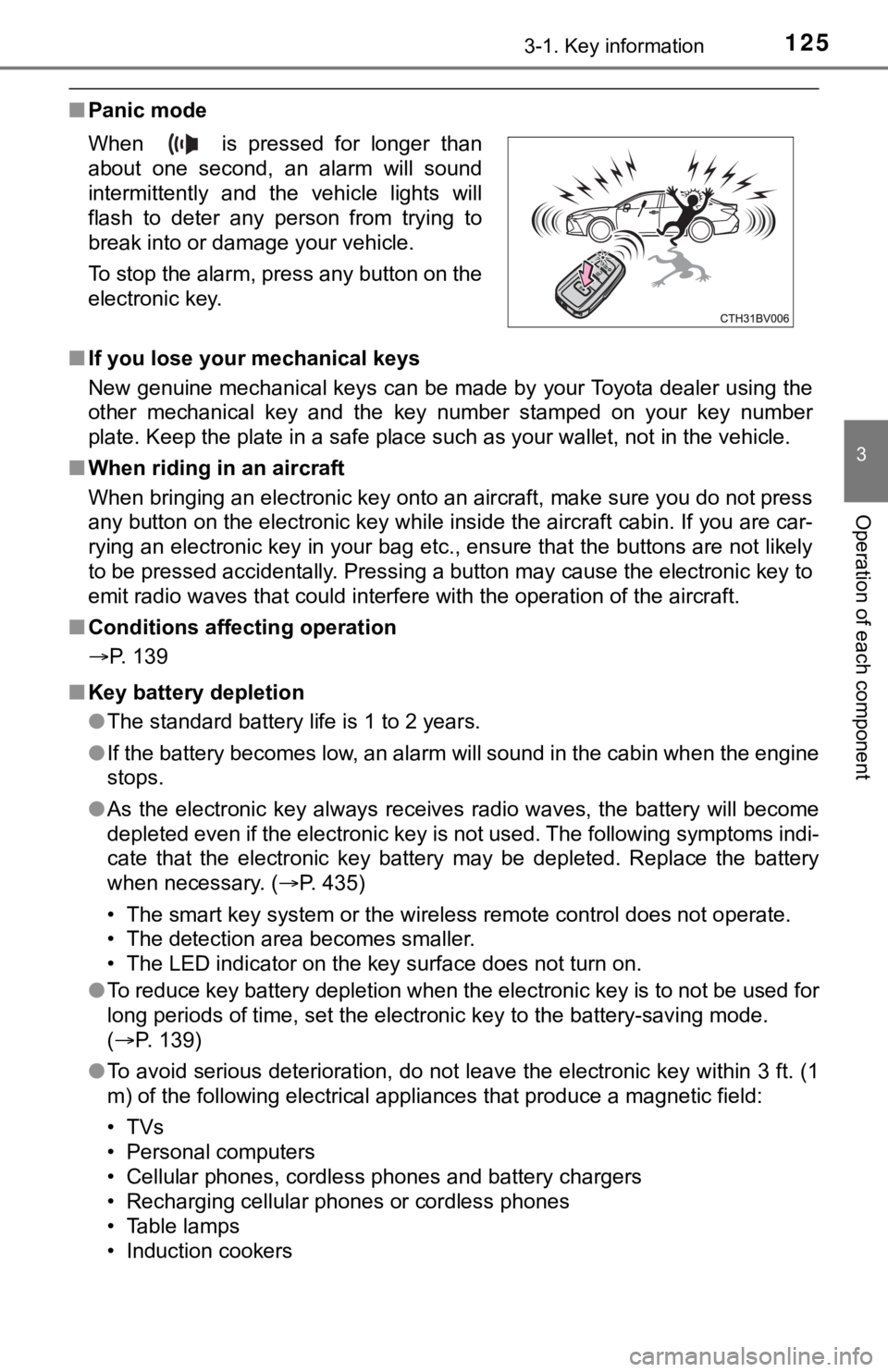
When is pressed for longer than
about one second, an alarm will sound
intermittently and the vehicle lights will
flash to deter any person from trying to
break into or damage your vehicle.
To stop the alarm, press any button on the
electronic key.