belt TOYOTA AVALON 2022 Service Manual
[x] Cancel search | Manufacturer: TOYOTA, Model Year: 2022, Model line: AVALON, Model: TOYOTA AVALON 2022Pages: 572, PDF Size: 9.42 MB
Page 144 of 572
1443-3. Adjusting the seats
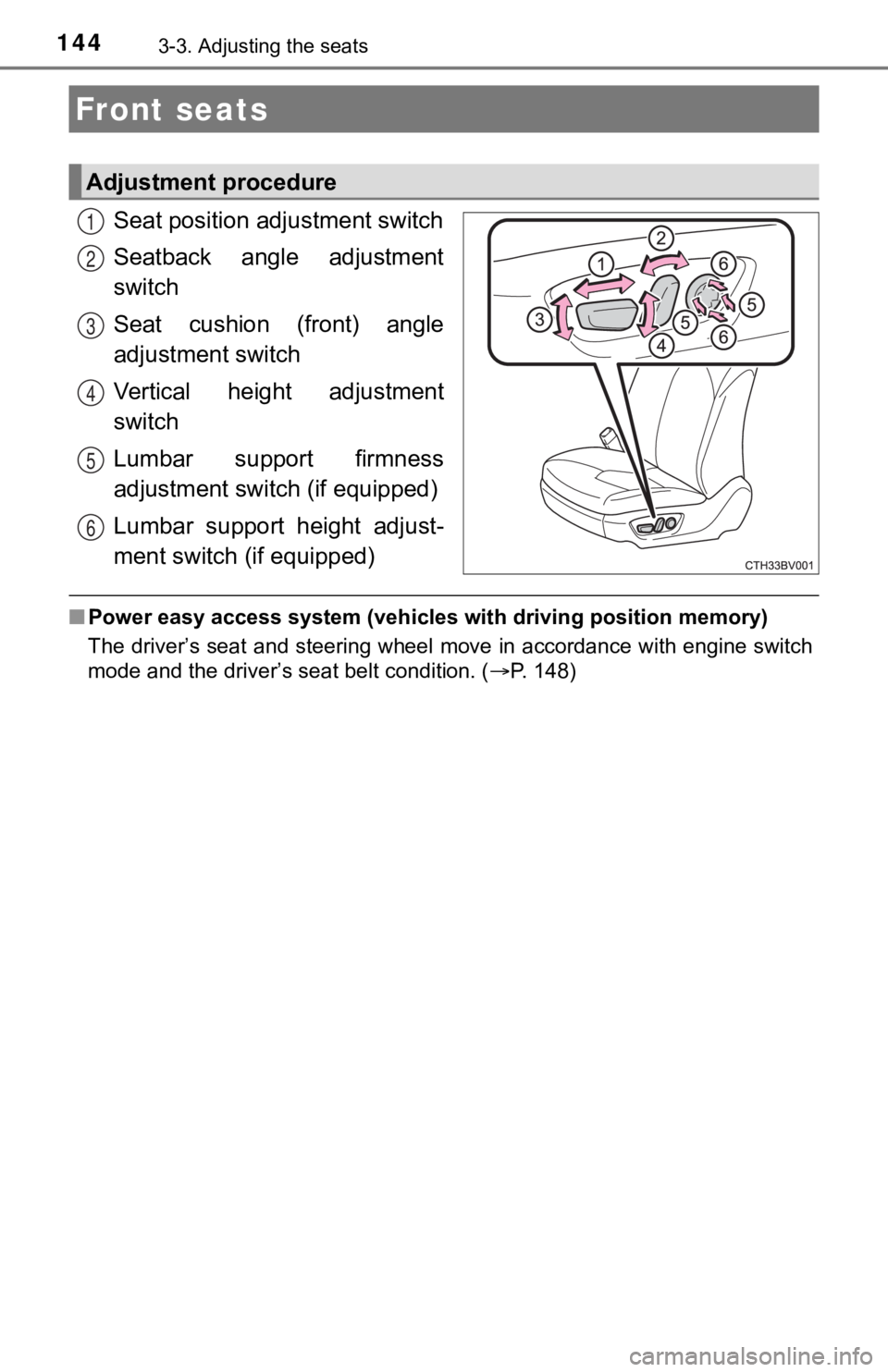
Seat position adjustment switch
Seatback angle adjustment
switch
Seat cushion (front) angle
adjustment switch
Vertical height adjustment
switch
Lumbar support firmness
adjustment switch (if equipped)
Lumbar support height adjust-
ment switch (if equipped)
■ Power easy access system (vehicles with driving position memory )
The driver’s seat and steering wheel move in accordance with en gine switch
mode and the driver’s seat belt condition. ( P. 148)
Front seats
Adjustment procedure
1
2
3
4
5
6
Page 145 of 572
1453-3. Adjusting the seats
3
Operation of each component
WARNING
■When adjusting the seat position
● Take care when adjusting the seat position to ensure that other passen-
gers are not injured by the moving seat.
● Do not put your hands under the seat or near the moving parts to avoid
injury.
Fingers or hands may become jammed in the seat mechanism.
● Make sure to leave enough space around the feet so they do not get stuck.
■ Seat adjustment
● Be careful that the seat does not hit passengers or luggage.
● To reduce the risk of sliding under the lap belt during a collision, do not
recline the seat more than necessary.
If the seat is too reclined, the lap belt may slide past the hips and apply
restraint forces directly to the abdomen, or your neck may contact the
shoulder belt, increasing the risk of death or serious injury in the event of
an accident.
Adjustments should not be made while driving as the seat may un expect-
edly move and cause the driver to lose control of the vehicle.
NOTICE
■ When adjusting a front seat
When adjusting a front seat, make sure that the head restraint does not
contact the headliner. Otherwise, the head restraint and headli ner may be
damaged.
Page 147 of 572
1473-3. Adjusting the seats
3
Operation of each component
WARNING
■When folding the seatbacks down
Observe the following precautions. Failure to do so may result in death or
serious injury.
● Do not fold the seatbacks down while driving.
● Stop the vehicle on level ground, set the parking brake and shi ft the shift
lever to P.
● Do not allow anyone to sit on a folded seatback or in the trunk while driv-
ing.
● Do not allow children to enter the trunk.
■ When returning the seat t o its original position
● Ensure that the seat belt does not get caught between or behind the seats.
● If the seat belt has been released from its guide, pass the sea t belt through
its guide. ( P. 32)
■ Seat adjustment
Be careful not to get hands or feet pinched between the rear co nsole box
and the rear seat when folding down the rear seatback.
■ After returning the seatback to the upright position
Observe the following precautions. Failure to do so may result in death or
serious injury.
● Make sure the seatback is securely locked by pressing it forwar d and rear-
ward on the top.
● Check that the seat belts are not twisted or caught in the seatback.
● Make sure that the seat belt is passed through its guide.
NOTICE
■When the right seatback is folded down
Make sure the luggage loaded in the enlarged trunk will not damage the
webbing of the rear center seat belt.
Page 148 of 572
1483-3. Adjusting the seats
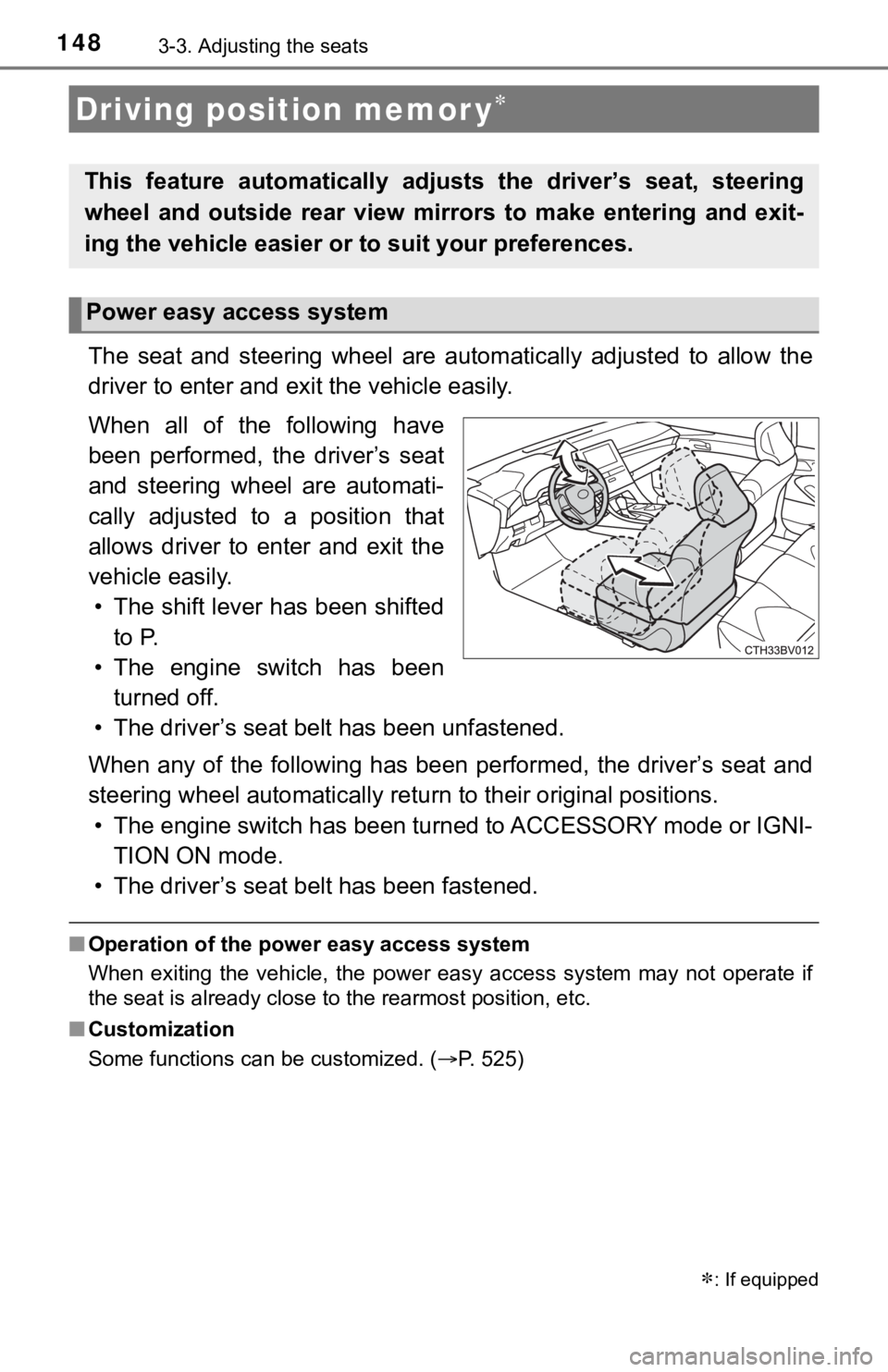
The seat and steering wheel are automatically adjusted to allow the
driver to enter and exi t the vehicle easily.
When all of the following have
been performed, the driver’s seat
and steering wheel are automati-
cally adjusted to a position that
allows driver to enter and exit the
vehicle easily. • The shift lever has been shifted to P.
• The engine switch has been turned off.
• The driver’s seat belt has been unfastened.
When any of the following has be en performed, the driver’s seat and
steering wheel automatically ret urn to their original positions.
• The engine switch has been turned to ACCESSORY mode or IGNI- TION ON mode.
• The driver’s seat belt has been fastened.
■ Operation of the power easy access system
When exiting the vehicle, the power easy access system may not operate if
the seat is already close to the rearmost position, etc.
■ Customization
Some functions can be customized. ( P. 525)
Driving position memor y
This feature automatically adjusts the driver’s seat, steering
wheel and outside rear view mirrors to make entering and exit-
ing the vehicle easier or to suit your preferences.
: If equipped
Power easy access system
Page 156 of 572
1563-4. Adjusting the steering wheel and mirrors
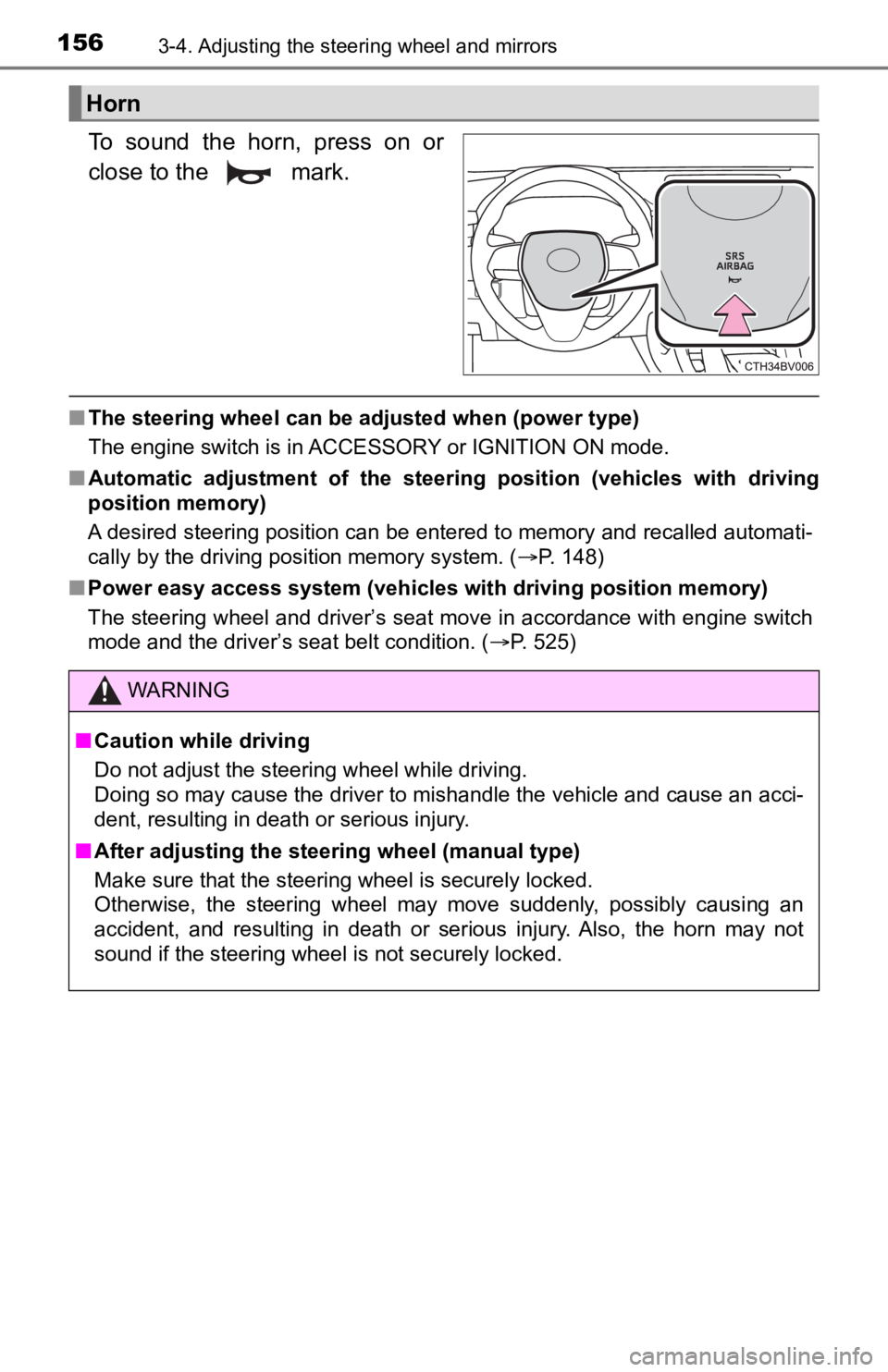
To sound the horn, press on or
close to the mark.
■The steering wheel can be ad justed when (power type)
The engine switch is in ACCESSORY or IGNITION ON mode.
■ Automatic adjustment of the steering position (vehicles with dr iving
position memory)
A desired steering position can be entered to memory and recall ed automati-
cally by the driving position memory system. ( P. 148)
■ Power easy access system (vehicles with driving position memory )
The steering wheel and driver’s seat move in accordance with engine switch
mode and the driver’s seat belt condition. ( P. 525)
Horn
WARNING
■Caution while driving
Do not adjust the steering wheel while driving.
Doing so may cause the driver to mishandle the vehicle and caus e an acci-
dent, resulting in death or serious injury.
■ After adjusting the steering wheel (manual type)
Make sure that the steering wheel is securely locked.
Otherwise, the steering wheel may move suddenly, possibly causi ng an
accident, and resulting in death or serious injury. Also, the horn may not
sound if the steering wheel is not securely locked.
Page 182 of 572

1824-1. Before driving
WARNING
■Things that must not be carried in the trunk
The following things may cause a fire if loaded in the trunk:
● Receptacles containing gasoline
● Aerosol cans
■ Storage precautions
Observe the following precautions.
Failure to do so may prevent the pedals from being depressed properly,
may block the driver’s vision, or may result in items hitting t he driver or pas-
sengers, possibly causing an accident.
● Stow cargo and luggage in the trunk whenever possible.
● To prevent cargo and luggage from sliding forward during brakin g, do not
stack anything in the enlarged trunk. Keep cargo and luggage lo w, as
close to the floor as possible.
● Do not place cargo or luggage in or on the following locations.
• At the feet of the driver
• On the front passenger or rear seats (when stacking items)
• On the package tray
• On the instrument panel
• On the dashboard
• Tray that has no lid
● Secure all items in the occupant compartment.
● When you fold down the rear seats, long items should not be pla ced
directly behind the front seats.
● Never allow anyone to ride in the enlarged trunk. It is not designed for pas-
sengers. They should ride in their seats with their seat belts properly fas-
tened.
■ Capacity and distribution
● Do not exceed the maximum axle weight rating or the total vehicle weight
rating.
● Even if the total load of occupant’s weight and the cargo load is less than
the total load capacity, do not apply the load unevenly. Improp er loading
may cause deterioration of steering or braking control which may cause
death or serious injury.
Page 200 of 572

2004-2. Driving procedures
■Parking the vehicle
P. 172
■ Parking brake operation
●When the engine switch is not in IGNITION ON mode, the parking brake
cannot be released using the parking brake switch.
● When the engine switch is not in IGNITION ON mode, automatic mode
(automatic brake setting and releasing) is not available.
■ Automatic release function
The parking brake is automatica lly released when slowly depress the acceler-
ator pedal.
The parking brake will be released automatically under the foll owing condi-
tions:
● The driver’s door is closed.
● The driver’s seat belt is fastened.
● Shift the shift lever is in a forward or reverse position.
● The malfunction indicator lamp or brake system warning light is not illumi-
nated.
If the automatic release function does not operate, manually re lease the park-
ing brake.
■ If “Parking Brake Temporarily Un available” is displayed on the multi-
information display
If the parking brake is operated repeatedly over a short period of time, the
system may restrict operation to prevent overheating. If this happens, refrain
from operating the parking brake. Normal operation will return after about 1
minute.
■ If “Parking Brake Unavailable” is displayed on the multi-information dis-
play
Operate the parking brake switch. If the message does not disappear after
operating the switch several times, the system may be malfuncti oning. Have
the vehicle inspected by your Toyota dealer immediately.
■ Parking brake operation sound
When the parking brake operates, a motor sound (whirring sound) may be
heard. This does not indicate a malfunction.
■ Parking brake indicator light and parking brake light
●Depending on the engine switch mode, the parking brake indicato r light and
parking brake light will turn on and stay on as described below:
IGNITION ON mode: Comes on until the parking brake is released.
Not in IGNITION ON mode: Stays on for approximately 15 seconds.
● When the engine switch is turned off with the parking brake set, the parking
brake indicator light and parking brake light will stay on for about 15 sec-
onds. This does not indicate a malfunction.
Page 202 of 572
2024-2. Driving procedures
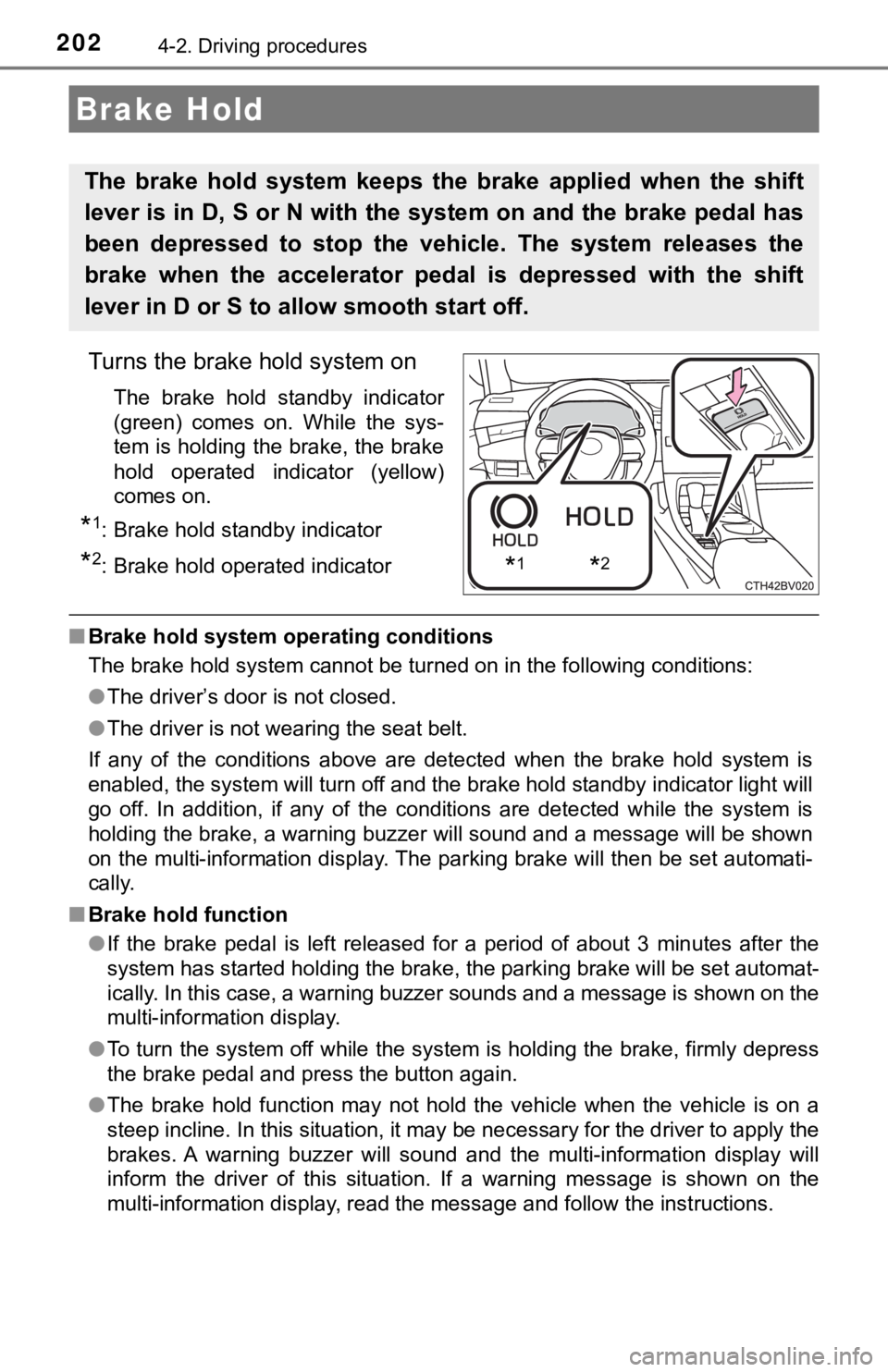
Turns the brake hold system on
The brake hold standby indicator
(green) comes on. While the sys-
tem is holding the brake, the brake
hold operated indicator (yellow)
comes on.
*1: Brake hold standby indicator
*2: Brake hold operated indicator
■Brake hold system operating conditions
The brake hold system cannot be turned on in the following cond itions:
● The driver’s door is not closed.
● The driver is not wearing the seat belt.
If any of the conditions above are detected when the brake hold system is
enabled, the system will turn off and the brake hold standby in dicator light will
go off. In addition, if any of the conditions are detected whil e the system is
holding the brake, a warning buzzer will sound and a message will be shown
on the multi-information display. The parking brake will then b e set automati-
cally.
■ Brake hold function
●If the brake pedal is left released for a period of about 3 min utes after the
system has started holding the brake, the parking brake will be set automat-
ically. In this case, a warning buzzer sounds and a message is shown on the
multi-information display.
● To turn the system off while the system is holding the brake, f irmly depress
the brake pedal and press the button again.
● The brake hold function may not hold the vehicle when the vehic le is on a
steep incline. In this situation, it may be necessary for the d river to apply the
brakes. A warning buzzer will sound and the multi-information d isplay will
inform the driver of this situation. If a warning message is sh own on the
multi-information display, read the message and follow the inst ructions.
Brake Hold
The brake hold system keeps the brake applied when the shift
lever is in D, S or N with the system on and the brake pedal has
been depressed to stop the vehicle. The system releases the
brake when the accelerator pedal is depressed with the shift
lever in D or S to allow smooth start off.
*1*2
Page 203 of 572
2034-2. Driving procedures
4
Driving
■When the parking brake is set automatically while the system is holding
the brakes
Perform any of the following operations to release the parking brake.
● Depress the accelerator pedal. (The parking brake will not be released auto-
matically if the seat belt is not fastened.)
● Operate the parking brake switch with the brake pedal depressed .
Make sure that the parking brake indicator light goes off. ( P. 198)
■ When an inspection at your Toyota dealer is necessary
When the brake hold standby indicator (green) does not illumina te even when
the brake hold switch is pressed with the brake hold system ope rating condi-
tions met, the system may be malfunctioning. Have the vehicle inspected at
your Toyota dealer.
■ Warning messages and buzzers
Warning messages and buzzers are used to indicate a system malfunction or
to inform the driver of the need for caution. If a warning message is shown on
the multi-information display, read the message and follow the instructions.
■ If the brake hold operated indicator flashes
P. 457
WARNING
■When the vehicle is on a steep incline
When using the brake hold system on a steep incline, exercise caution. The
brake hold function may not hold the vehicle in such a situatio n.
■ When stopped on a slippery road
The system cannot stop the vehicle when the gripping ability of the tires has
been exceeded. Do not use the system when stopped on a slippery road.
NOTICE
■When parking the vehicle
The brake hold system is not designed for use when parking the vehicle for
a long period of time. Turning the engine switch off while the system is hold-
ing the brake may release the brake, which would cause the vehi cle to
move. When operating the engine switch, depress the brake pedal, shift the
shift lever to P and set the parking brake.
Page 275 of 572

2754-5. Using the driving support systems
4
Driving
■Dynamic radar cruise control wi th full-speed range can be set when
● The shift lever is in D.
● The desired set speed can be set when the vehicle speed is approximately
20 mph (30 km/h) or more.
(However, when the vehicle speed is set while driving at below approxi-
mately 20 mph [30 km/h], the set speed will be set to approximately 20 mph
[30 km/h].)
■ Accelerating after setting the vehicle speed
The vehicle can accelerate by operating the accelerator pedal. After acceler-
ating, the set speed resumes. However, during vehicle-to-vehicl e distance
control mode, the vehicle speed may decrease below the set spee d in order
to maintain the distance to the preceding vehicle.
■ When the vehicle stops while follow-up cruising
●Pressing the “+ RES” switch while the vehicle ahead stops will resume fol-
low-up cruising if the vehicle ahead starts off within approxim ately 3 sec-
onds after the switch is pressed.
● If the vehicle ahead starts off within 3 seconds after your vehicle stops, fol-
low-up cruising will be resumed.
■ Automatic cancelation of vehicle-to-vehicle distance control mo de
Vehicle-to-vehicle distance control mode is automatically cance led in the fol-
lowing situations.
● VSC is activated.
● TRAC is activated for a period of time.
● When the VSC or TRAC system is turned off.
● The sensor cannot detect correctly because it is covered in some way.
● When the brake control or output restriction control of a driving support sys-
tem operates. (For example: Pre -Collision System, Drive-Start Control)
● The parking brake is operated.
● The vehicle is stopped by system control on a steep incline.
● The following are detected when the vehicle has been stopped by system
control:
• The driver is not wearing a seat belt.
• The driver’s door is opened.
• The vehicle has been stopped for about 3 minutes
If vehicle-to-vehicle distance control mode is automatically ca nceled for any
reasons other than the above, there may be a malfunction in the system.
Contact your Toyota dealer.