apple carplay TOYOTA AVALON HYBRID 2020 Accessories, Audio & Navigation (in English)
[x] Cancel search | Manufacturer: TOYOTA, Model Year: 2020, Model line: AVALON HYBRID, Model: TOYOTA AVALON HYBRID 2020Pages: 326, PDF Size: 7.79 MB
Page 61 of 326
61
2. CONNECTIVITY SETTINGS
BASIC FUNCTION
2
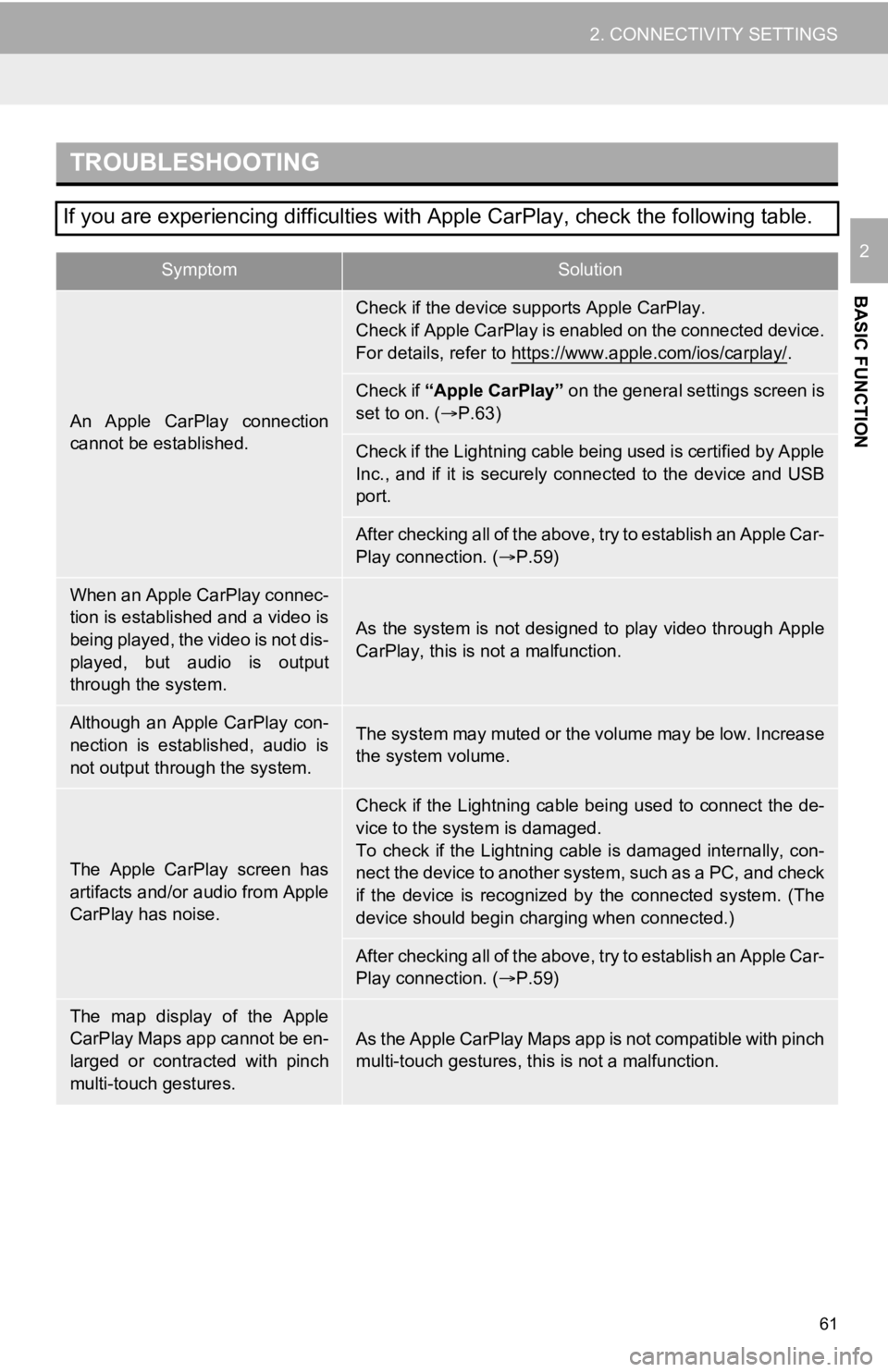
TROUBLESHOOTING
If you are experiencing difficulties with Apple CarPlay, check the following table.
SymptomSolution
An Apple CarPlay connection
cannot be established.
Check if the device supports Apple CarPlay.
Check if Apple CarPlay is enabled on the connected device.
For details, refer to https://www.apple.com/ios/carplay/
.
Check if “Apple CarPlay” on the general settings screen is
set to on. ( P.63)
Check if the Lightning cable being used is certified by Apple
Inc., and if it is securely connected to the device and USB
port.
After checking all of the above, try to establish an Apple Car-
Play connection. ( P.59)
When an Apple CarPlay connec-
tion is established and a video is
being played, the video is not dis-
played, but audio is output
through the system.
As the system is not designed to play video through Apple
CarPlay, this is not a malfunction.
Although an Apple CarPlay con-
nection is established, audio is
not output through the system.The system may muted or the volume may be low. Increase
the system volume.
The Apple CarPlay screen has
artifacts and/or audio from Apple
CarPlay has noise.
Check if the Lightning cable being used to connect the de-
vice to the system is damaged.
To check if the Lightning cable is damaged internally, con-
nect the device to another system, such as a PC, and check
if the device is recognized by the connected system. (The
device should begin charging when connected.)
After checking all of the above, try to establish an Apple Car-
Play connection. ( P.59)
The map display of the Apple
CarPlay Maps app cannot be en-
larged or contracted with pinch
multi-touch gestures.As the Apple CarPlay Maps app is not compatible with pinch
multi-touch gestures, th is is not a malfunction.
Page 62 of 326
62
2. CONNECTIVITY SETTINGS
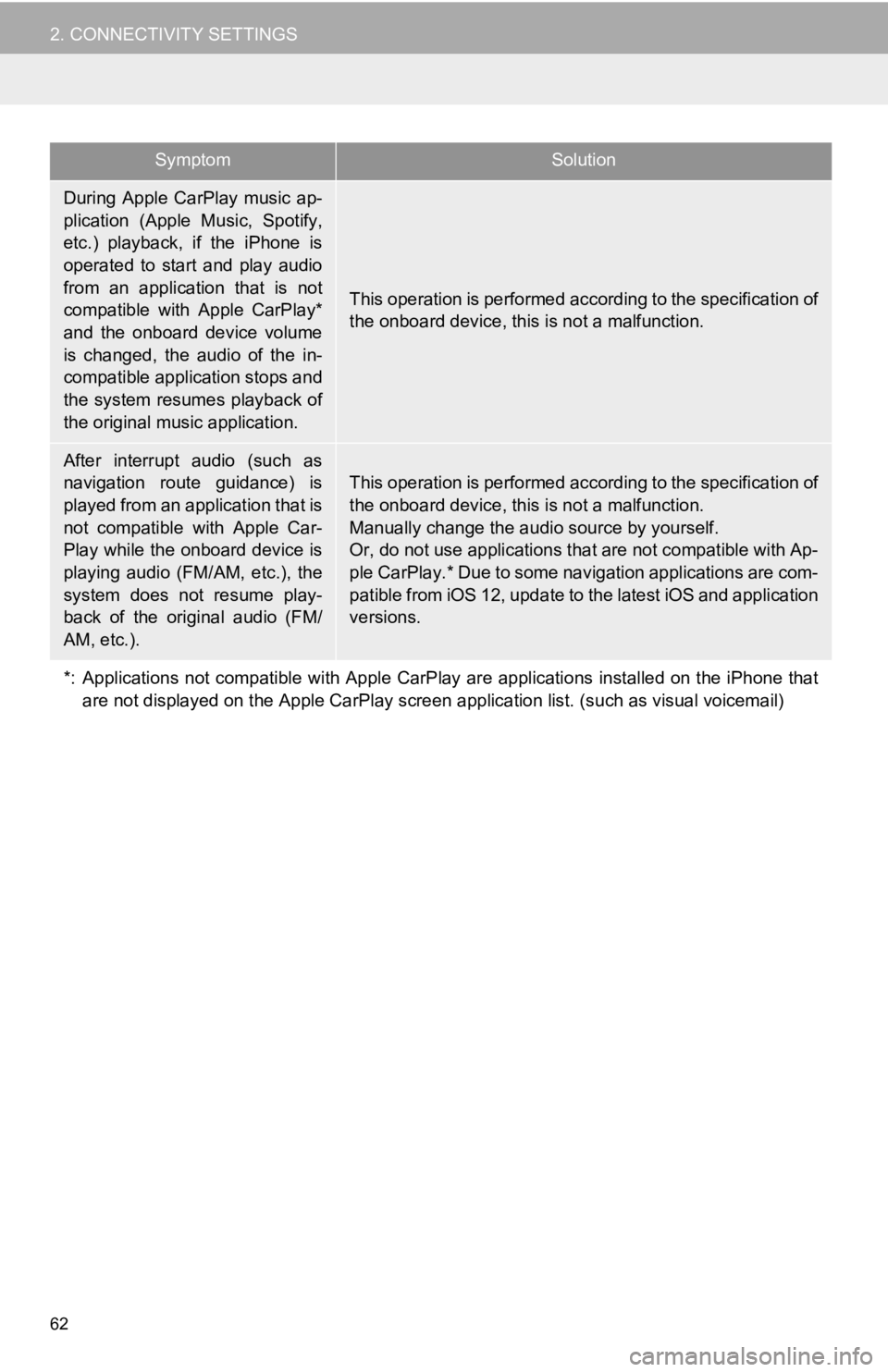
During Apple CarPlay music ap-
plication (Apple Music, Spotify,
etc.) playback, if the iPhone is
operated to start and play audio
from an application that is not
compatible with Apple CarPlay*
and the onboard device volume
is changed, the audio of the in-
compatible application stops and
the system resumes playback of
the original music application.
This operation is performed according to the specification of
the onboard device, this is not a malfunction.
After interrupt audio (such as
navigation route guidance) is
played from an application that is
not compatible with Apple Car-
Play while the onboard device is
playing audio (FM/AM, etc.), the
system does not resume play-
back of the original audio (FM/
AM, etc.).
This operation is performed acc ording to the specification of
the onboard device, this is not a malfunction.
Manually change the audio source by yourself.
Or, do not use applications that are not compatible with Ap-
ple CarPlay.* Due to some navigation applications are com-
patible from iOS 12, update to the latest iOS and application
versions.
*: Applications not compatible w ith Apple CarPlay are applications installed on the iPhone that
are not displayed on the Apple Ca rPlay screen application list. (such as visual voicemail)
SymptomSolution
Page 64 of 326
64
3. OTHER SETTINGS
No.Function
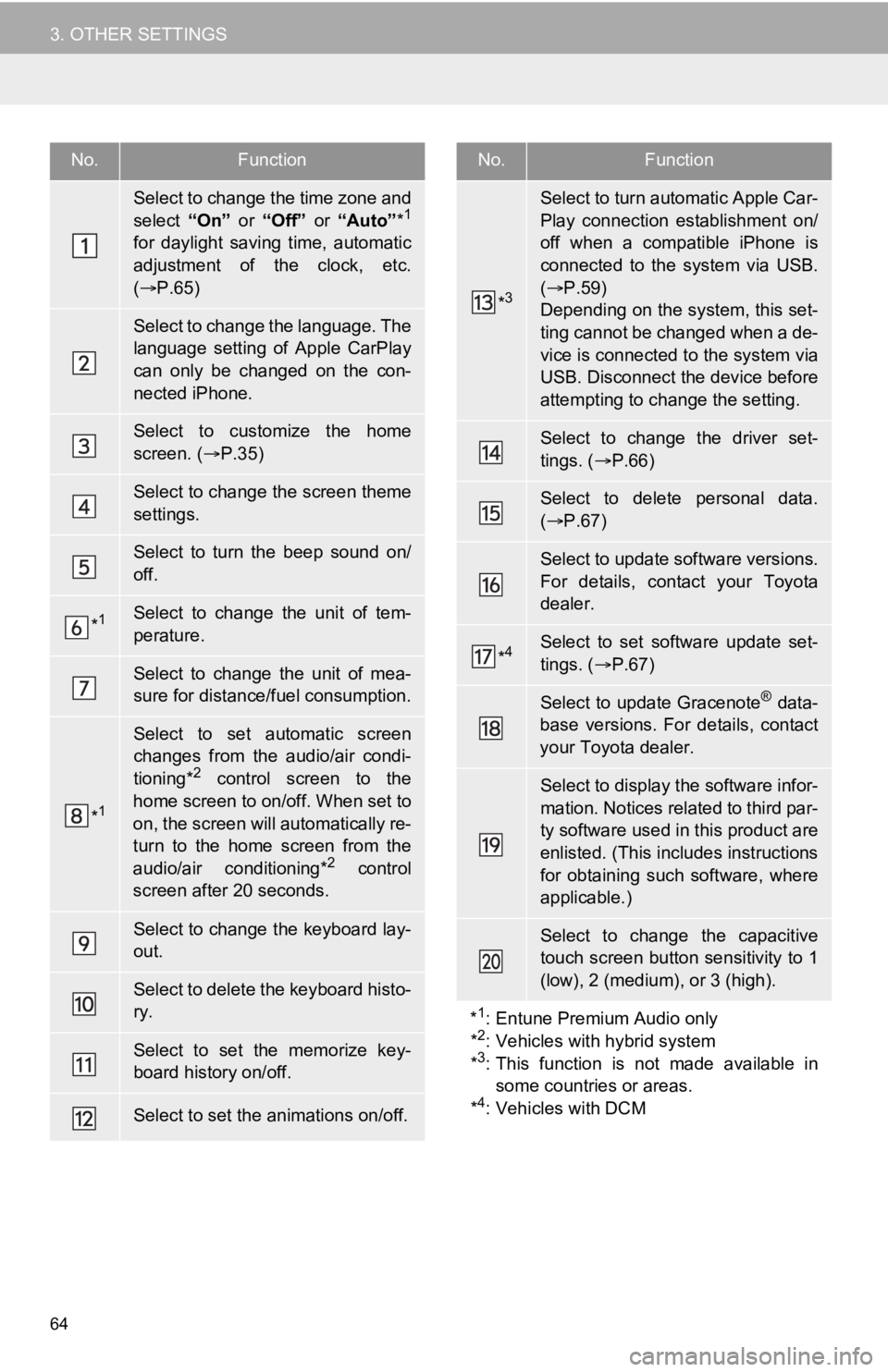
Select to change the time zone and
select “On” or “Off” or “Auto” *1
for daylight saving time, automatic
adjustment of the clock, etc.
( P.65)
Select to change the language. The
language setting of Apple CarPlay
can only be changed on the con-
nected iPhone.
Select to customize the home
screen. ( P.35)
Select to change the screen theme
settings.
Select to turn the beep sound on/
off.
*1Select to change the unit of tem-
perature.
Select to change the unit of mea-
sure for distance/fuel consumption.
*1
Select to set automatic screen
changes from the audio/air condi-
tioning*
2 control screen to the
home screen to on/off. When set to
on, the screen will automatically re-
turn to the home screen from the
audio/air conditioning*
2 control
screen after 20 seconds.
Select to change the keyboard lay-
out.
Select to delete the keyboard histo-
ry.
Select to set the memorize key-
board history on/off.
Select to set the animations on/off.
*3
Select to turn automatic Apple Car-
Play connection establishment on/
off when a compatible iPhone is
connected to the system via USB.
( P.59)
Depending on the system, this set-
ting cannot be changed when a de-
vice is connected to the system via
USB. Disconnect the device before
attempting to change the setting.
Select to change the driver set-
tings. ( P.66)
Select to delete personal data.
( P.67)
Select to update software versions.
For details, contact your Toyota
dealer.
*4Select to set software update set-
tings. ( P.67)
Select to update Gracenote® data-
base versions. For details, contact
your Toyota dealer.
Select to display the software infor-
mation. Notices related to third par-
ty software used in this product are
enlisted. (This includes instructions
for obtaining such software, where
applicable.)
Select to change the capacitive
touch screen button sensitivity to 1
(low), 2 (medium), or 3 (high).
*
1: Entune Premium Audio only
*2: Vehicles with hybrid system
*3: This function is not made available in some countries or areas.
*
4: Vehicles with DCM
No.Function
Page 75 of 326
3
75
4
5
6
7
8
9
1
2
3
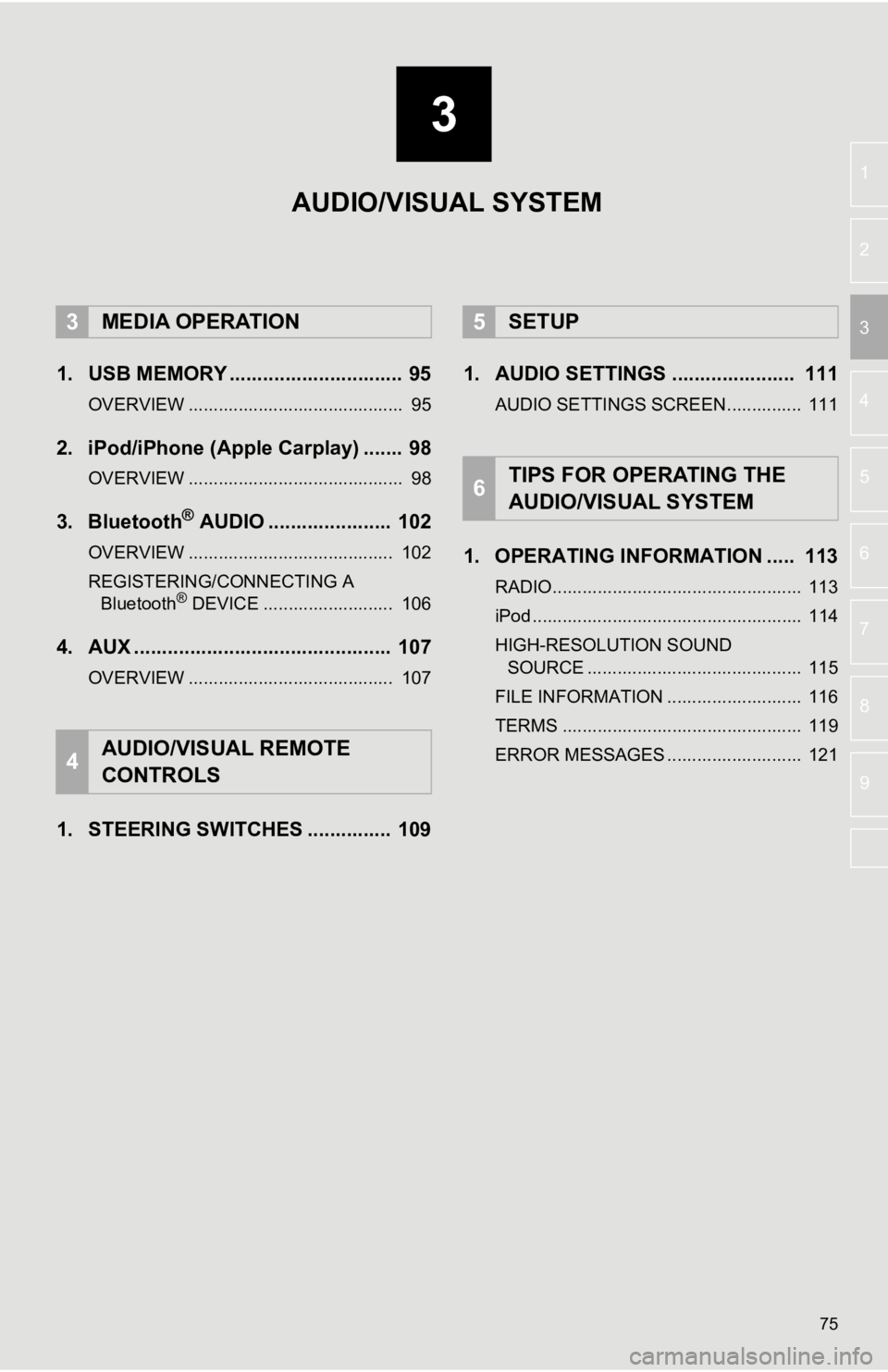
1. USB MEMORY ............................... 95
OVERVIEW ........................................... 95
2. iPod/iPhone (Apple Carplay) ....... 98
OVERVIEW ........................................... 98
3. Bluetooth® AUDIO ...................... 102
OVERVIEW ......................................... 102
REGISTERING/CONNECTING A Bluetooth
® DEVICE .......................... 106
4. AUX .............................................. 107
OVERVIEW ......................................... 107
1. STEERING SWITCHES ............... 109 1. AUDIO SETTINGS ...................... 111
AUDIO SETTINGS SCREEN............... 111
1. OPERATING INFORMATION ..... 113
RADIO.................................................. 113
iPod ...................................................... 114
HIGH-RESOLUTION SOUND
SOURCE ........................................... 115
FILE INFORMATION ........................... 116
TERMS ................................................ 119
ERROR MESSAGES ........................... 121
3MEDIA OPERATION
4AUDIO/VISUAL REMOTE
CONTROLS
5SETUP
6TIPS FOR OPERATING THE
AUDIO/VISUAL SYSTEM
AUDIO/VISUAL SYSTEM
Page 76 of 326
76
1. BASIC OPERATION
1. QUICK REFERENCE
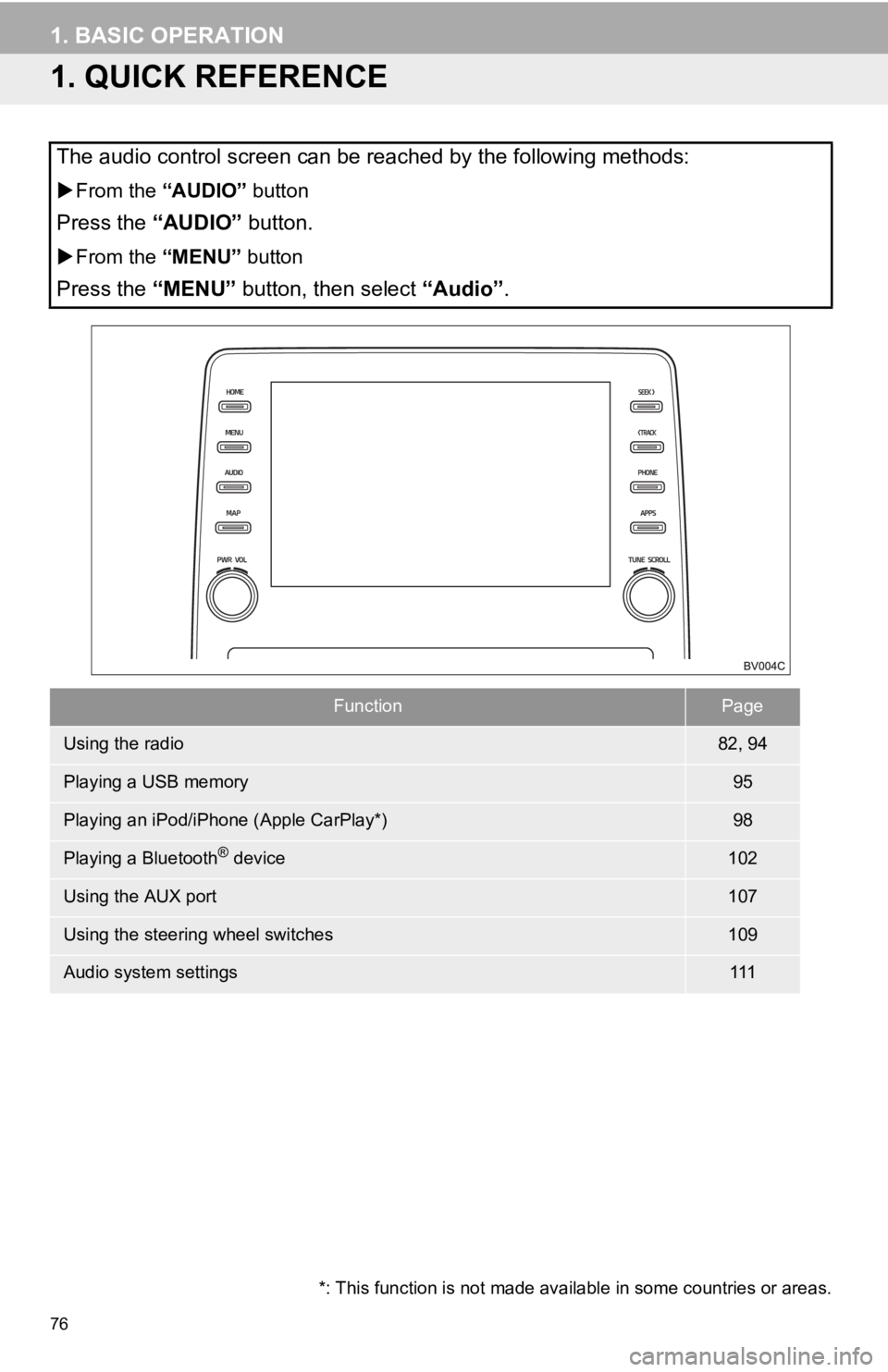
The audio control screen can be reached by the following methods:
From the “AUDIO” button
Press the “AUDIO” button.
From the “MENU” button
Press the “MENU” button, then select “Audio” .
FunctionPage
Using the radio82, 94
Playing a USB memory95
Playing an iPod/iPhone (Apple CarPlay*)98
Playing a Bluetooth® device102
Using the AUX port107
Using the steering wheel switches109
Audio system settings111
*: This function is not made avai lable in some countries or areas.
Page 77 of 326
77
1. BASIC OPERATION
AUDIO/VISUAL SYSTEM
3
2. SOME BASICS
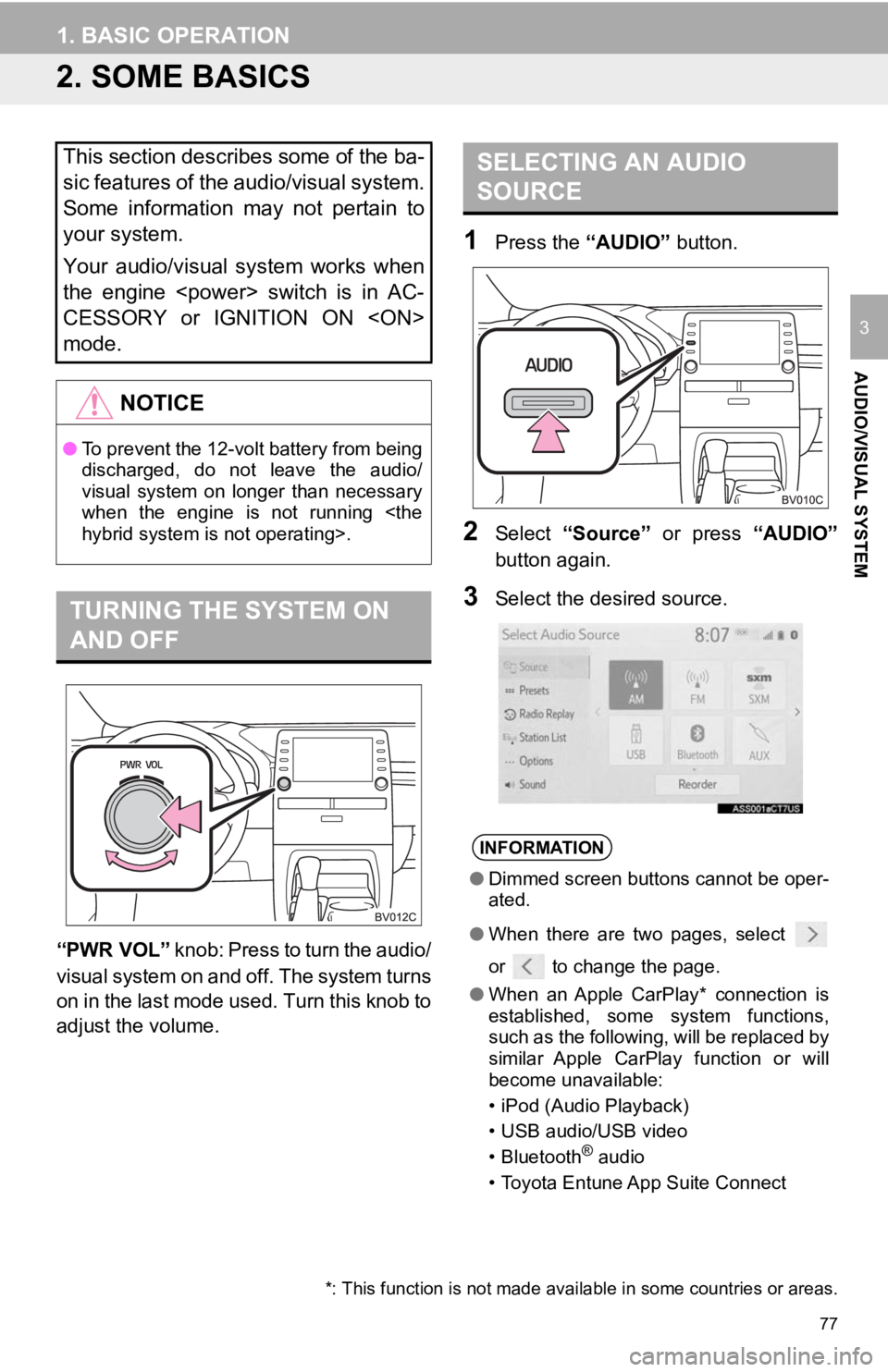
“PWR VOL” knob: Press to turn the audio/
visual system on and off. The system turns
on in the last mode used. Turn this knob to
adjust the volume.
1Press the “AUDIO” button.
2Select “Source” or press “AUDIO”
button again.
3Select the desired source.
This section describes some of the ba-
sic features of the audio/visual system.
Some information may not pertain to
your system.
Your audio/visual system works when
the engine
CESSORY or IGNITION ON
mode.
NOTICE
● To prevent the 12-volt battery from being
discharged, do not leave the audio/
visual system on longer than necessary
when the engine is not running
TURNING THE SYSTEM ON
AND OFF
SELECTING AN AUDIO
SOURCE
INFORMATION
●Dimmed screen buttons cannot be oper-
ated.
● When there are two pages, select
or to change the page.
● When an Apple CarPlay* connection is
established, some system functions,
such as the following, will be replaced by
similar Apple CarPlay function or will
become unavailable:
• iPod (Audio Playback)
• USB audio/USB video
• Bluetooth
® audio
• Toyota Entune App Suite Connect
*: This function is not made avai lable in some countries or areas.
Page 95 of 326
95
AUDIO/VISUAL SYSTEM
3
3. MEDIA OPERATION
1. USB MEMORY
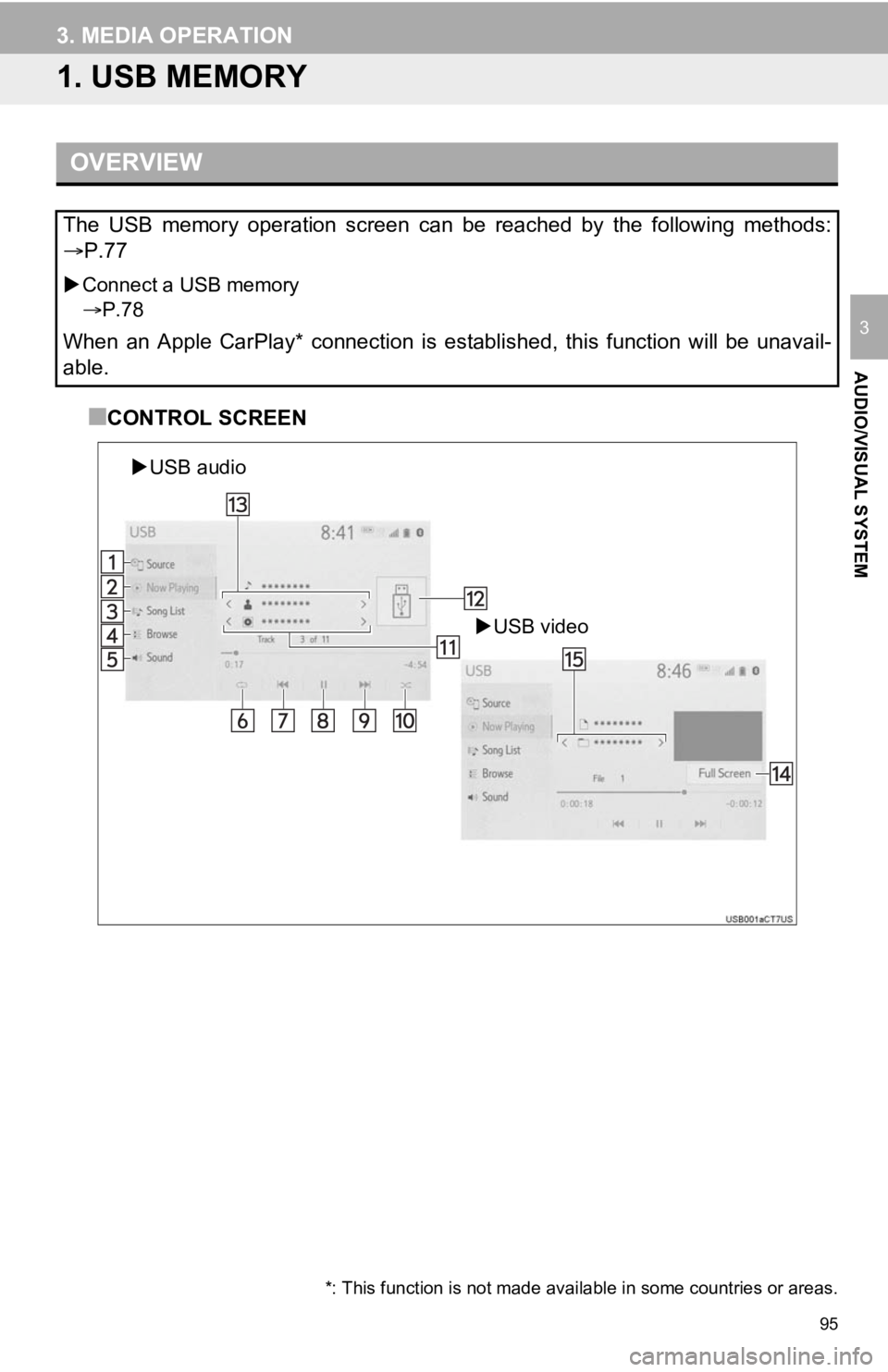
■CONTROL SCREEN
OVERVIEW
The USB memory operation screen can be reached by the following methods:
P.77
Connect a USB memory
P.78
When an Apple CarPlay* connection is established, this function will be unavail-
able.
USB video
USB audio
*: This function is not made avai lable in some countries or areas.
Page 98 of 326
98
3. MEDIA OPERATION
2. iPod/iPhone (Apple Carplay*)
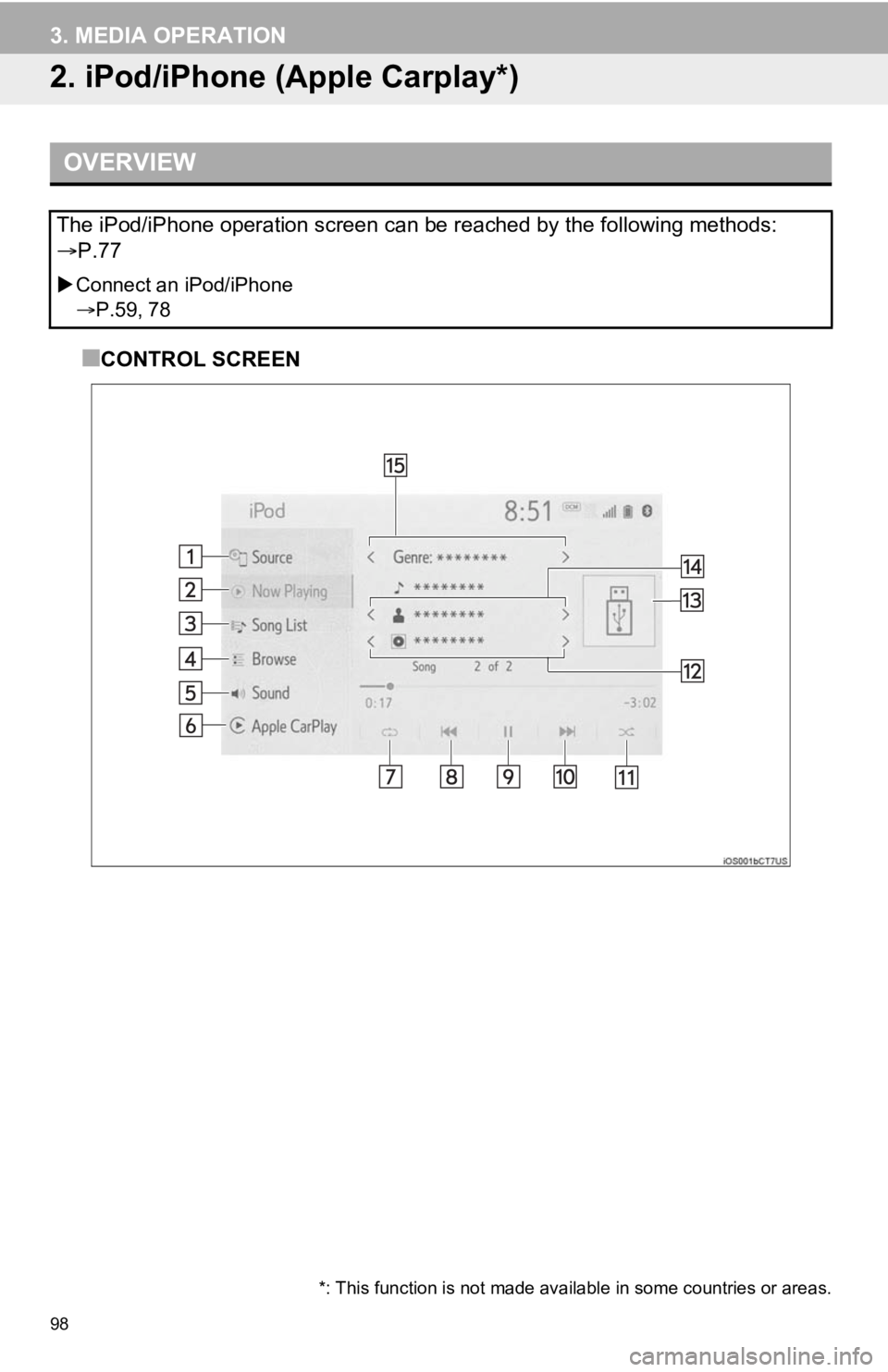
■CONTROL SCREEN
OVERVIEW
The iPod/iPhone operation screen can be reached by the following methods:
P.77
Connect an iPod/iPhone
P.59, 78
*: This function is not made avai lable in some countries or areas.
Page 99 of 326
99
3. MEDIA OPERATION
AUDIO/VISUAL SYSTEM
3
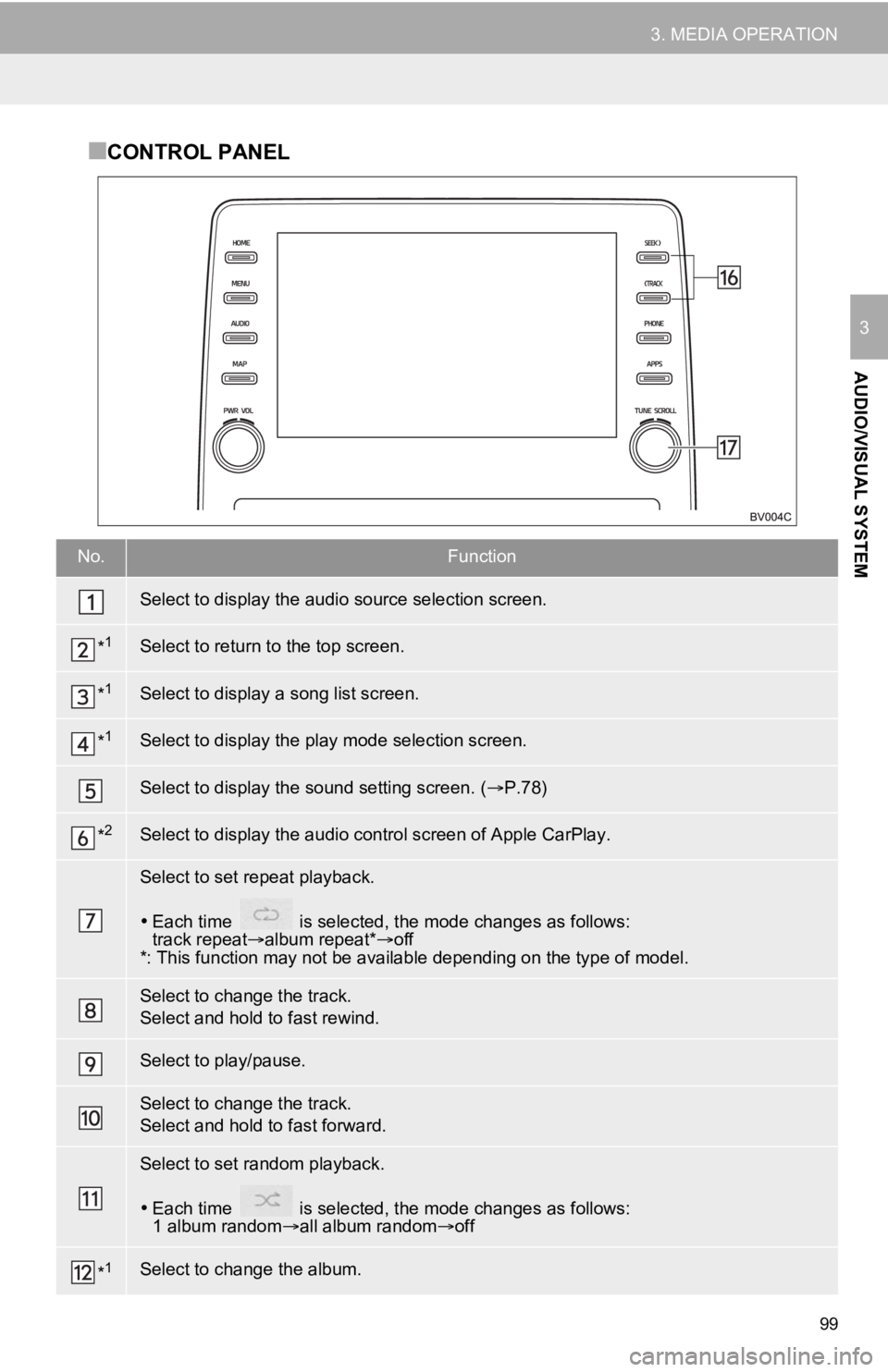
■CONTROL PANEL
No.Function
Select to display the audio source selection screen.
*1Select to return to the top screen.
*1Select to display a song list screen.
*1Select to display the pl ay mode selection screen.
Select to display the sound setting screen. ( P.78)
*2Select to display the audio control screen of Apple CarPlay.
Select to set repeat playback.
Each time is selected, the mode changes as follows:
track repeat album repeat*off
*: This function may not be available depending on the type of model.
Select to change the track.
Select and hold to fast rewind.
Select to play/pause.
Select to change the track.
Select and hold to fast forward.
Select to set random playback.
Each time is selected, the mode changes as follows:
1 album random all album random off
*1Select to change the album.
Page 100 of 326
100
3. MEDIA OPERATION
Displays cover art
*1Select to change the artist.
*1Select to change the playlist.
Press to change the track.
Press and hold to fast forward/rewind.
Turn to change the track.
Turn to move up/down the list. Also, the knob can be used to en ter selections on the
list screens by pressing it.
*
1: When an Apple CarPlay connecti on is established, this switch will not be displayed.
*2: This switch will only be displayed when an Apple CarPlay connection is established.
No.Function