air condition TOYOTA AVALON HYBRID 2020 (in English) User Guide
[x] Cancel search | Manufacturer: TOYOTA, Model Year: 2020, Model line: AVALON HYBRID, Model: TOYOTA AVALON HYBRID 2020Pages: 560, PDF Size: 11.03 MB
Page 287 of 560
2874-5. Using the driving support systems
4
Driving
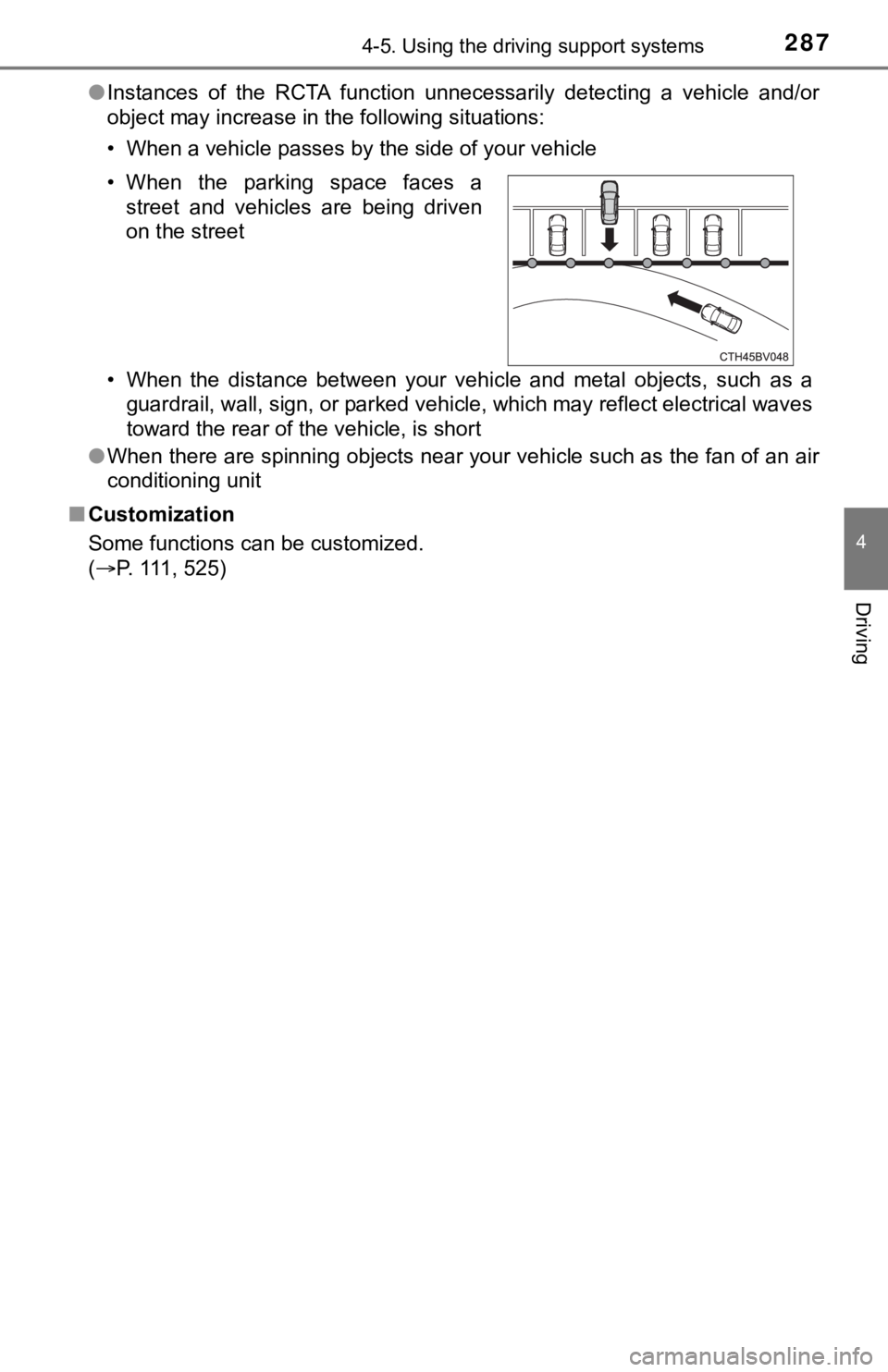
●Instances of the RCTA function unnecessarily detecting a vehicl e and/or
object may increase in the following situations:
• When a vehicle passes by the side of your vehicle
• When the distance between your vehicle and metal objects, such as a
guardrail, wall, sign, or parked vehicle, which may reflect electrical waves
toward the rear of the vehicle, is short
● When there are spinning objects near your vehicle such as the f an of an air
conditioning unit
■ Customization
Some functions can be customized.
(P. 111, 525) • When the parking space faces a
street and vehicles are being driven
on the street
Page 291 of 560

2914-5. Using the driving support systems
4
Driving
●In some situations, such as the following, the rear camera dete ction function
may operate even though there are no pedestrians in the detection area.
• When a three dimensional object, such as a pole, traffic cone, fence, or parked vehicle, is detected
• When a moving object, such as a car or motorcycle is detected
• When backing up toward moving objects such as flags or puddles , or air-
borne matter, such as smoke, steam, rain, or snow
• When there is a pattern on the road, due to the road being mad e of cob-
blestone or gravel or having tram rails, traces of repair, white lines,
pedestrian crossings or fallen leaves on the surface
• When backing up on a metal cover (grating), such as those used for
drainage ditches
• When backing up toward the roadside or a bump in the road
• When an object is reflected in a puddle or on a wet road surfa ce
• When there are shadows on the road
• When backing up over a bump in the road
• If the vehicle is significantly tilted, such as when carrying a heavy load
• When backing up toward an incline/decline
• If the suspension has been modified or tires of a size other than specified are installed
• If the rear of the vehicle is raised or lowered due to the carried load
• If an electronic component, such as a backlit license plate or rear fog
light, is installed near the rear camera
• If a bumper protector, such as an additional trim strip, is installed to the rear bumper
• If the orientation of the rear camera has been changed due to a collision
or other impact, or removal and installation
• If a towing eyelet is installed to the rear of the vehicle
• When the rear camera is obscured (dirt, snow, ice, etc. are at tached) or
scratched
• When water is flowing over the rear camera lens
• If there is a flashing light in the detection area, such as th e emergency
flashers of another vehicle
■ Situations in which the rear cam era detection function may be difficult to
notice
● If buzzer may be difficult to hear if the surrounding area is noisy, the volume
of the audio system volume is high, the air conditioning system is being
used, etc.
● If the temperature in the cabin is extremely high or low, the a udio system
screen may not operate correctly.
Page 296 of 560

2964-5. Using the driving support systems
■The intuitive parking assist can be operated when
●Front corner sensors:
• The power switch is in ON mode.
• The shift lever is in other than P.
• The vehicle speed is less than about 6 mph (10 km/h).
● Front center sensors:
• The power switch is in ON mode.
• The shift lever is in other than P or R.
• The vehicle speed is less than about 6 mph (10 km/h).
● Rear corner and rear center sensors:
• The power switch is in ON mode.
• The shift lever is in R.
• The vehicle speed is less than about 6 mph (10 km/h).
■ Intuitive parking assist display
When an object is detected while the Toyota parking assist moni tor or pan-
oramic view monitor is in use, the warning indicator will appea r in the upper
part of the screen even if the display setting has been set to off.
■ Sensor detection information
●The sensor’s detection areas are limited to the areas around th e vehicle’s
bumper.
● Depending on the shape of the object and other factors, the det ection dis-
tance may shorten, or detection may be impossible.
● Objects may not be detected if they are too close to the sensor .
● There will be a short delay between object detection and displa y. Even at
slow speeds, there is a possibility that the object will come w ithin the sen-
sor’s detection areas before the display is shown and the buzze r sounds.
● Thin posts or objects lower than the sensor may not be detected when
approached, even if they have been detected once.
● It might be difficult to hear beeps due to the volume of audio system or air
flow noise of the air conditioning system.
■ If a battery terminal has been disconnected and reconnected
The system needs to be initialized.
To initialize the system, drive the vehicle straight ahead for 5 seconds or more
at a speed of approximately 22 mph (35 km/h) or more.
■ If “Parking Assist Unavailable Please Clean Parking Assist Sens or” is
displayed on the multi-information display
A sensor may be dirty or covered with snow or ice. In such case s, if it is
removed from the sensor, the system should return to normal.
Also, due to the sensor being frozen at low temperatures, a mal function dis-
play may appear or an object may not be detected. If the sensor thaws out,
the system should return to normal.
Page 298 of 560

2984-5. Using the driving support systems
WARNING
■Sensors
Certain vehicle conditions and the surrounding environment may affect the
ability of a sensor to correctly detect an object. Particular instances where
this may occur are listed below.
● There is dirt, snow or ice on the sensor. (Wiping the sensors w ill resolve
this problem.)
● The sensor is frozen. (Thawing the area will resolve this probl em.)
In especially cold weather, if a sensor is frozen the screen ma y show an
abnormal display, or objects may not be detected.
● The sensor is covered in any way.
● The vehicle is leaning considerably to one side.
● On an extremely bumpy road, on an incline, on gravel, or on grass.
● The vicinity of the vehicle is noisy due to vehicle horns, moto rcycle
engines, air brakes of large vehicles, or other loud noises pro ducing ultra-
sonic waves.
● There is another vehicle equipped with parking assist sensors i n the vicin-
ity.
● The sensor is coated with a sheet of spray or heavy rain.
● The sensor is drenched with water on a flooded road.
● The vehicle is equipped with a fender pole or wireless antenna.
● Towing eyelets are installed.
● The bumper or sensor receives a strong impact.
● The vehicle is approaching a tall or curved curb.
● The detection range is reduced due to an object such as a sign.
● In harsh sunlight or intense cold weather.
● The area directly under the bumpers is not detected.
● If objects draw too close to the sensor.
● A non-genuine Toyota suspension (lowered suspension, etc.) is i nstalled.
● A backlit license plate is installed.
In addition to the examples above, there are instances in which , because of
their shape, signs and other objects may be judged by a sensor to be closer
than they are.
Page 318 of 560
3184-5. Using the driving support systems
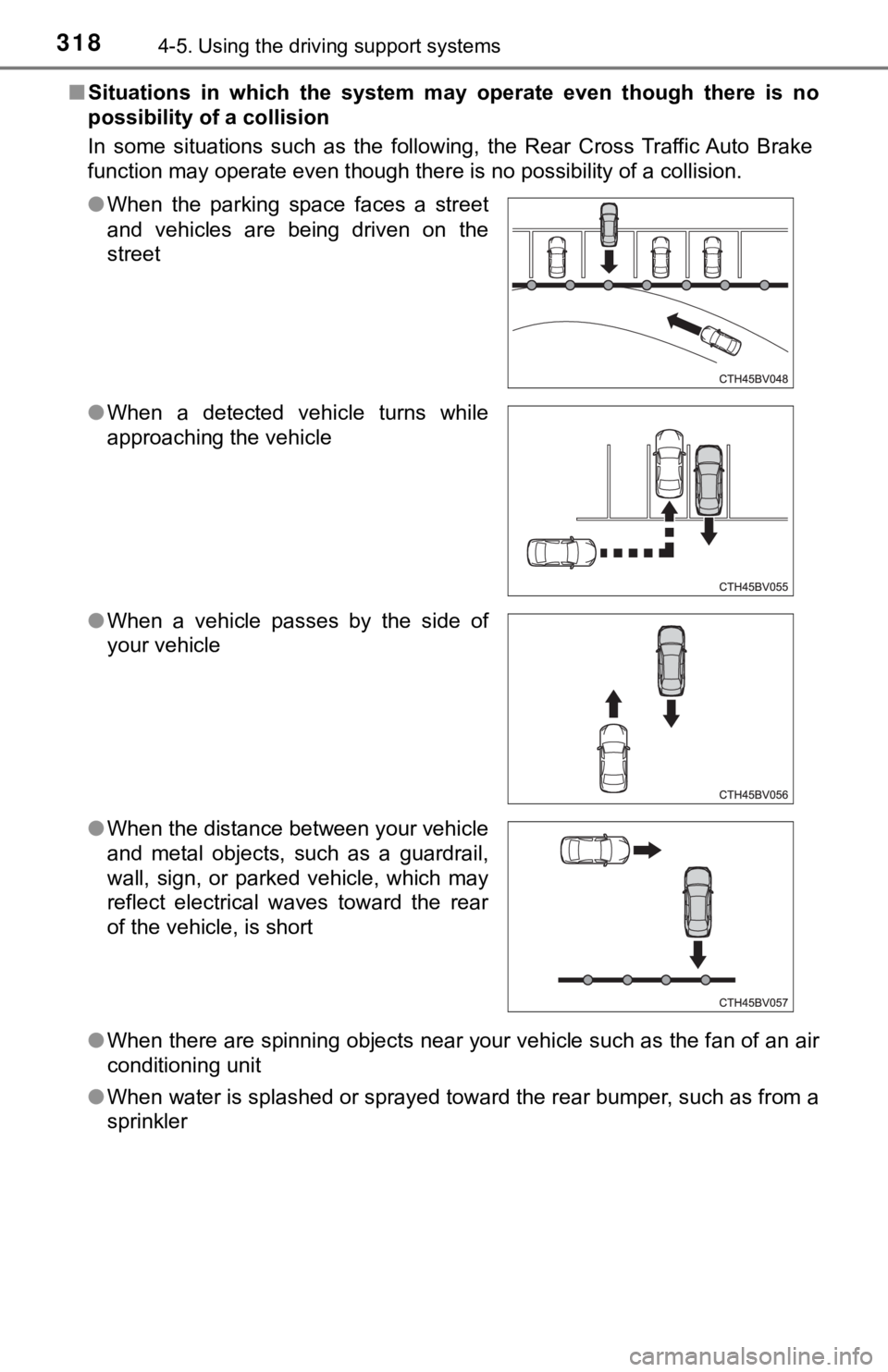
■Situations in which the system m ay operate even though there is no
possibility of a collision
In some situations such as the following, the Rear Cross Traffic Auto Brake
function may operate even though there is no possibility of a c ollision.
● When there are spinning objects near your vehicle such as the f an of an air
conditioning unit
● When water is splashed or sprayed toward the rear bumper, such as from a
sprinkler
●
When the parking space faces a street
and vehicles are being driven on the
street
● When a detected vehicle turns while
approaching the vehicle
● When a vehicle passes by the side of
your vehicle
● When the distance between your vehicle
and metal objects, such as a guardrail,
wall, sign, or parked vehicle, which may
reflect electrical waves toward the rear
of the vehicle, is short
Page 322 of 560

3224-5. Using the driving support systems
■Operation of the air conditioning system in Eco drive mode
Eco drive mode controls the heating/cooling operations and fan speed of the
air conditioning system to enhance fuel efficiency ( P. 338). To improve air
conditioning performance, adjust the fan speed or turn off Eco drive mode.
■ Auto Glide Control
When Auto Glide Control operates, the AGC indicator light will illuminate.
● Auto Glide Control may not operate in the following situations:
• When the brake pedal is depressed
• When a shift position other than D is selected
• When the vehicle speed is approximately 10 mph (15 km/h) or lo wer
• When the vehicle is accelerating on a downward slope
• When the PCS (Pre-Collision System) is operating
• When the dynamic radar cruise control with full-speed range is operating
• When the Intelligent Clearance Sonar system is operating
• When the TRAC or VSC system is operating
• When the TRAC or VSC system is disabled by pressing the VSC OF F
switch
■ Sport mode automatic deactivation
Sport mode is automatically deactivated if the power switch is turned off after
driving in sport mode. ● While driving in Eco drive mode with D
selected, releasing the accelerator
pedal will activate Auto Glide Control
under certain conditions. (Auto Glide
Control may activate before the acceler-
ator pedal is fully released.)
When Auto Glide Control operates, the
electric motor (traction motor) will be
controlled, reducing the deceleration
force and allowing the vehicle to coast,
enhancing fuel economy.
Page 327 of 560

3274-5. Using the driving support systems
4
Driving
■Automatic reactivation of TRAC and VSC systems
After turning the TRAC and VSC systems off, the systems will be automati-
cally re-enabled in the following situations:
● When the power switch is turned off
● If only the TRAC system is turned off, the TRAC will turn on wh en vehicle
speed increases
If both the TRAC and VSC systems are turned off, automatic re-e nabling will
not occur when vehicle speed increases
■ Secondary Collision Brake operating conditions
The system operates when the SRS airbag sensor detects a collis ion while
the vehicle is in motion.
However, the system does not operate in any of the following si tuations.
● The vehicle speed is below 6 mph (10 km/h)
● Components are damaged
■ Secondary Collision Brake automatic cancellation
The system is automatically canceled in any of the following si tuations.
● The vehicle speed drops below approximately 6 mph (10 km/h)
● A certain amount of time elapses during operation
● The accelerator pedal is depressed a large amount
■ Reduced effectiveness of the EPS system
The effectiveness of the EPS system is reduced to prevent the s ystem from
overheating when there is frequent steering input over an exten ded period of
time. The steering wheel may feel heavy as a result. Should thi s occur, refrain
from excessive steering input or stop the vehicle and turn the hybrid system
off. The EPS system should return to normal within 10 minutes.
Page 330 of 560
3304-6. Driving tips
◆Using Eco drive mode
When using Eco drive mode, the torque corresponding to the accel-
erator pedal depression amount can be generated more smoothly
than it is in normal conditions. In addition, the operation of the air
conditioning system (heating/coo ling) will be minimized, improving
the fuel economy. ( P. 321)
◆Use of Hybrid System Indicator
The Eco-friendly driving is possible by keeping the needle of H ybrid
System Indicator within Eco area. ( P. 100)
◆Shift lever operation
Shift the shift lever to D when stopped at a traffic light, or driving in
heavy traffic etc. Shift the shift lever to P when parking. When using
the N, there is no positive effe ct on fuel consumption. In the N, the
gasoline engine operates but e lectricity cannot be generated. A lso,
when using the air conditioning s ystem, etc., the hybrid battery
(traction battery) power is consumed.
◆Accelerator pedal/brake pedal operation
● Drive your vehicle smoothly. Avoid abrupt acceleration and
deceleration. Gradual accelerat ion and deceleration will make
more effective use of the electric motor (traction motor) witho ut
having to use gaso line engine power.
● Avoid repeated acceleration. Repeated acceleration consumes
hybrid battery (tracti on battery) power, resulting in poor fuel con-
sumption. Battery power can be restored by driving with the
accelerator pedal slightly released.
Hybrid vehicle driving tips
For economical and ecological dri ving, pay attention to the fol-
lowing points:
Page 331 of 560

3314-6. Driving tips
4
Driving
◆When braking
Make sure to operate the brakes gently and in a timely manner. A
greater amount of electrical energy can be regenerated when slow-
ing down.
◆Delays
Repeated acceleration and deceleration, as well as long waits a t
traffic lights, will lead to bad fuel economy. Check traffic re ports
before leaving and avoid delays as much as possible. When drivi ng
in a traffic jam, gently release the brake pedal to allow the v ehicle to
move forward slightly while avoiding overuse of the accelerator
pedal. Doing so can help control excessive gasoline consumption.
◆Highway driving
Control and maintain the vehicle at a constant speed. Before st op-
ping at a toll booth or similar, allow plenty of time to releas e the
accelerator and gently apply the brakes. A greater amount of el ec-
trical energy can be regenerated when slowing down.
◆Air conditioning
Use the air conditioning only when necessary. Doing so can help
reduce excessive gasoline consumption.
In summer: When the ambient tempe rature is high, use the recircu-
lated air mode. Doing so will help to reduce the burden on the air
conditioning system and reduce fuel consumption as well.
In winter: Because the gasolin e engine will not automatically cut out
until it and the interior of the vehicle are warm, it will cons ume fuel.
Also, fuel consumption can be improved by avoiding overuse of t he
heater.
◆Checking tire inflation pressure
Make sure to check the tire inflation pressure frequently. Impr oper
tire inflation pressure can cause poor fuel economy.
Also, as snow tires can cause large amounts of friction, their use on
dry roads can lead to poor fuel economy. Use tires that are app ro-
priate for the season.
Page 333 of 560
3334-6. Driving tips
4
Driving
●Use fluids that are appropriate t o the prevailing outside tempera-
tures. • Engine oil
• Engine/power control unit coolant
• Washer fluid
● Have a service technician inspect the condition of the 12-volt bat-
tery.
● Have the vehicle fitted with four snow tires or purchase a set of tire
chains for the front tires.
*
Ensure that all tires are the specified size and brand, and tha t chains
match the size of the tires.
*: Tire chains cannot be mounted on vehicles with 18 and 19-inch tires.
Perform the following according to the driving conditions:
● Do not try to forcibly open a window or move a wiper that is fr ozen.
Pour warm water over the frozen area to melt the ice. Wipe away
the water immediately to p revent it from freezing.
● To ensure proper operation of the climate control system fan,
remove any snow that has accumulated on the air inlet vents in
front of the windshield.
● Check for and remove any excess ic e or snow that may have accu-
mulated on the exterior lights, vehicle’s roof, chassis, around the
tires or on the brakes.
● Remove any snow or mud from the bottom of your shoes before
getting in the vehicle.
Winter driving tips
Carry out the necessary preparations and inspections before
driving the vehicle in winter. Always drive the vehicle in a ma n-
ner appropriate to the prevailing weather conditions.
Preparation for winter
Before driving the vehicle