code TOYOTA AVENSIS 2005 Service Repair Manual
[x] Cancel search | Manufacturer: TOYOTA, Model Year: 2005, Model line: AVENSIS, Model: TOYOTA AVENSIS 2005Pages: 5135, PDF Size: 95.28 MB
Page 4308 of 5135

05DVX−02
05−292
− DIAGNOSTICSECD SYSTEM (1CD−FTV)(From September, 2003)
AVENSIS Supplement (RM1045E)
FAIL−SAFE CHART
1. FAIL−SAFE CHART
If any of the following codes is recorded, the engine ECM enters the fail−safe mode.
DTC No.Detection ItemFail−Safe OperationFail−Safe Deactivation Conditions
P0031Oxygen (A/F) Sensor heater Control
Circuit Low (Bank1Sensor1)Limits the engine power”Pass” condition detected
P0087Fuel Rail/System Pressure−Too LowLimits the engine powerIgnition switch OFF
P0088Fuel Rail/System Pressure−To o
HighLimits the engine powerIgnition switch OFF
P0093Fuel System Leak Detected−Large
LeakAfter shunt driving control is performed for1minute,
engine stallsIgnition switch OFF
P0095Intake Air Temperature Sensor 2 Cir-
cuit
P0097Intake Air Temperature Sensor 2 Cir-
cuit LowIntake air (intake manifold) temperature is fixed at
145_C (293_F)”Pass” condition detected
P0098Intake Air Temperature Sensor 2 Cir-
cuit High
145C(293F)
P0100Mass or Volume Air Flow Circuit
P0102Mass or Volume Air Flow Meter Cir-
cuit Low Input
Limits the engine power”Pass” condition detected
P0103Mass or Volume Air Flow Meter Cir-
cuit High Input
LimitstheenginepowerPassconditiondetected
P0105Manifold Absolute Pressure/Baromet-
ric Pressure Circuit
P0107Manifold Absolute Pressure/Baromet-
ric Pressure Circuit Low InputTurbo pressure is fixed value”Pass” condition detected
P0108Manifold Absolute Pressure/Baromet-
ric Pressure Circuit High Input
P0110Intake Air Temperature Circuit
P0112Intake Air Temperature Circuit Low
InputIntake air (built in mass air flow meter) temperature is
fixedvalue”Pass” condition detected
P0113Intake Air Temperature Circuit High
Inputfixed valuePassconditiondetected
P0115Engine Coolant Temperature Circuit
P0117Engine Coolant Temperature Circuit
Low Input
Fuel temperature sensor is specified value”Pass” condition detected
P0118Engine Coolant Temperature Circuit
High Input
FueltemperaturesensorisspecifiedvaluePassconditiondetected
P0120Throttle/Pedal Position Sensor/Switch
”A” Circuit
P0122Throttle/Pedal Position Sensor/Switch
”A” Circuit Low InputLimits the engine powerIgnition switch OFF
P0123Throttle/Pedal Position Sensor/Switch
”A” Circuit High Input
P0168Fuel Temperature Too HighLimits the engine power”Pass” condition detected
P0180Fuel Temperature Sensor ”A” Circuit
P0182Fuel Temperature Sensor ”A” Circuit
Low Input
Fuel temperature is fixed at 40_C(104_F)”Pass” condition detected
P0183Fuel Temperature Sensor ”A” Circuit
High Input
Fueltemperatureisfixedat40C(104F)Passconditiondetected
Page 4311 of 5135

05DVS−02
A84766
Hand−held
Tester
DLC3
− DIAGNOSTICSECD SYSTEM (1CD−FTV)(From September, 2003)
05−291
AVENSIS Supplement (RM1045E)
CHECK MODE PROCEDURE
HINT:
Hand−held tester only:
Check mode has a higher sensitivity to detect malfunctions and
can detect malfunctions that normal mode cannot detect.
Check mode can also detect all the malfunctions that normal
mode can detect.
1. CHECK MODE PROCEDURE(Using the hand−held
tester)
(a) Turn the ignition switch to OFF.
(b) Connect the hand−held tester to the DLC3.
(c) Turn the ignition switch to ON and turn the hand−held tes-
ter ON.
(d) Select the item: DIAGNOSIS / OBD/MOBD / CHECK
MODE.
NOTICE:
All DTCs and freeze frame data recorded will be erased if:
1) the hand−held tester is used to change the ECM from
normal mode to check mode or vice versa; or 2) during
check mode, the ignition switch is turned from ON to ACC
or OFF.
(e) Start the engine. The CHK ENG should turn off after the
engine starts.
(f) Simulate condition of the malfunction described by the
customer or freeze frame data.
(g) After simulating the malfunction condition, use the hand−
held tester diagnosis selector to check the DTCs, freeze
frame data and other data.
(h) After checking the DTCs, inspect the applicable parts.
2. CLEAR DTCs (Using the hand−held tester)
(a) Connect the hand−held tester to the DLC3.
(b) Turn the ignition switch to ON and turn the hand−held tes-
ter ON. (Do not start the engine)
(c) Select the item: DIAGNOSIS / OBD/MOBD / DTC INFO
/ CLEAR CODES.
(d) Clear DTCs and freeze frame data.
HINT:
If you need help with the hand−held tester, refer to its instruction
book.
(e) Disconnect the battery terminal or remove the ECD fuse
from the engine room R/B for more than 60 seconds.
Page 4312 of 5135
05I7I−01
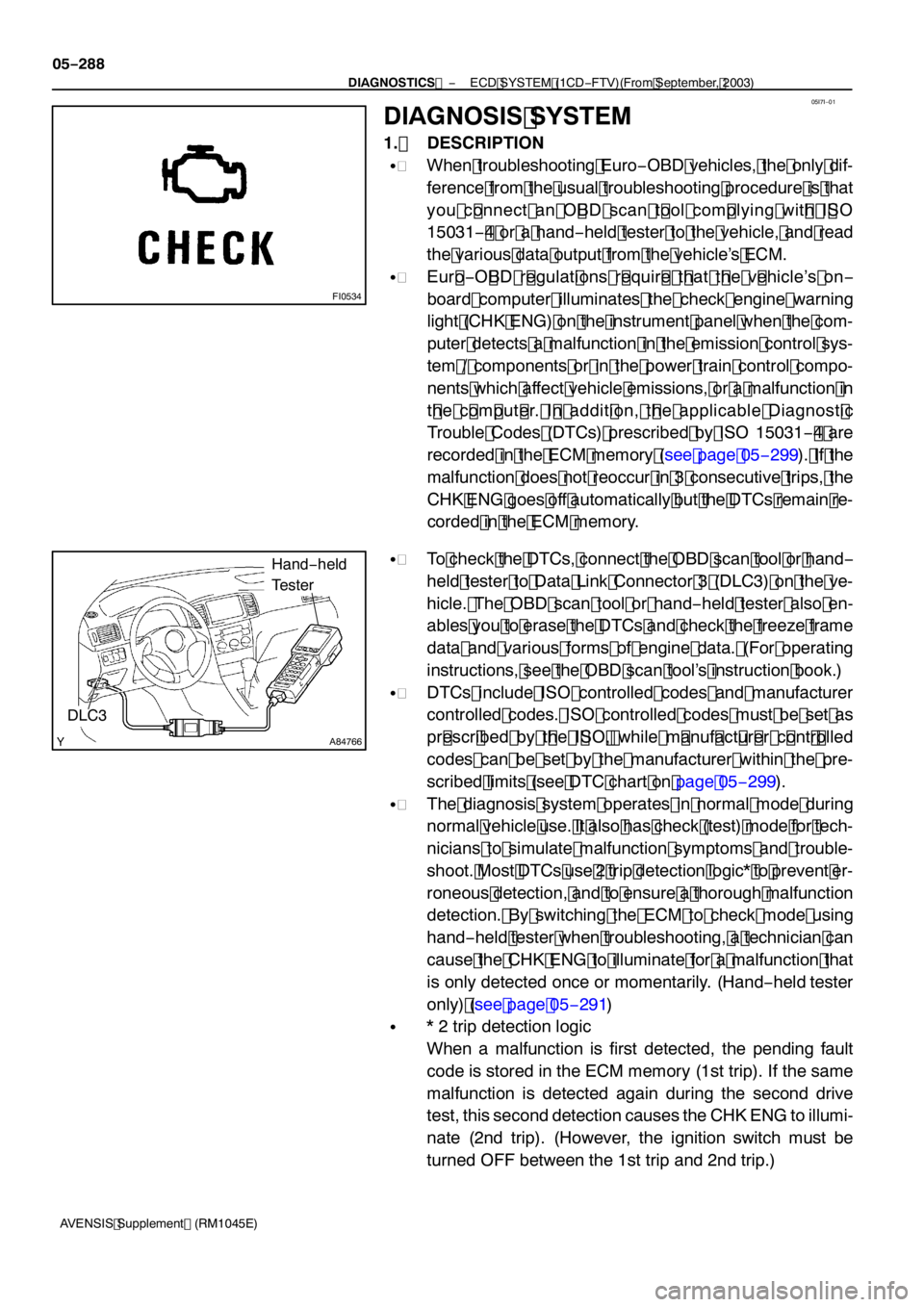
FI0534
A84766
Hand −held
Tester
DLC3
05 −288
−
DIAGNOSTICS ECD SYSTEM (1CD −FTV)(From September, 2003)
AVENSIS Supplement (RM 1045E)
DIAGNOSIS SYSTEM
1. DESCRIPTION
S When troubleshooting Euro −OBD vehicles, the only dif-
ference from the usual troubleshooting procedure is that
you c onnect an O BD scan t ool com plying wit h I SO
1 503 1− 4 or a hand −held tester to the vehicle, and read
the various data output from the vehicle’s ECM.
S Eur o −O BD r egulat ions r equir e t hat t he v ehicle’s on −
board computer illuminates the check engine warning
light (CHK ENG) on the instrument panel when the com-
puter detects a malfunction in the emission control sys-
tem / components or in the power train control compo-
nents which affect vehicle emissions, or a malfunction in
t he c om put er. I n addit ion, t he applicable Diagnost ic
Trouble Codes (DTCs) prescribed by ISO 1503 1− 4 are
recorded in the ECM memory (see page 05 −299). If the
malfunction does not reoccur in 3 consecutive trips, the
CHK ENG goes off automatically but the DTCs remain re-
corded in the ECM memory.
S To check the DTCs, connect the OBD scan tool or hand −
held tester to Data Link Connector 3 (DLC3) on the ve-
hicle. The OBD scan tool or hand −held tester also en-
ables you to erase the DTCs and check the freeze frame
data and various forms of engine data. (For operating
instructions, see the OBD scan tool’s instruction book.)
S DTCs include ISO controlled codes and manufacturer
controlled codes. ISO controlled codes must be set as
pr escr ibed by t he I SO , while m anuf act ur er c ont r olled
codes can be set by the manufacturer within the pre-
scribed limits (see DTC chart on page 05 −299).
S The diagnosis system operates in normal mode during
normal vehicle use. It also has check (test) mode for tech-
nicians to simulate malfunction symptoms and trouble-
shoot. Most DTCs use 2 trip detection logic* to prevent er-
roneous detection, and to ensure a thorough malfunction
detection. By switching the ECM to check mode using
hand −held tester when troubleshooting, a technician can
cause the CHK ENG to illuminate for a malfunction that
is only detected once or momentarily. (Hand −held tester
only) (see page 05 −29 1)
S* 2 trip detection logic
When a malfunction is first detected, the pending fault
code is stored in the ECM memory ( 1st trip). If the same
malfunction is detected again during the second drive
test, this second detection causes the CHK ENG to illumi-
nate (2nd trip). (However, the ignition switch must be
turned OFF between the 1st trip and 2nd trip.)
Page 4317 of 5135

05DVW−02
−
DIAGNOSTICS ECD SYSTEM (1CD −FTV)(From September, 2003)
05 −277
AVENSIS Supplement (RM 1045E)
REGISTRATION
NOTICE:
S The injector compensation code will be required to register with the ECM when replacing injec-
tors or the ECM.
S If an incorrect injector compensation code was registered with the ECM, it may rattle the engine
assembly or the engine idling may become rough. In addition, it may become a cause of engine
failure or shorten the life of the engine.
1 . If you replace the ECM with a new one, register all the injector compensation codes with the
new ECM as follows:
(a) Prior to replacing the ECM, read all the compensation codes stored in the existing ECM using the hand−held tester, and then write them down (see page 05 −273).
(b) After replacing the ECM, enter the written compensation codes into the ECM using the hand −held tes-
ter (see page 05 −277).
(c) Turn the ignition switch to OFF and turn the hand −held tester OFF, then wait for 30 seconds or more.
(d) Turn the ignition switch to ON and turn the hand −held tester ON, then clear DTC P 160 1using the
hand −held tester (see page 05 −290).
HINT:
SIn order to optimize the injector’s fuel injection characteristic, the ECM compensates the injection dura-
tion by each cylinder. The ECM stores and uses compensating data in the form of a 30 −digit −alphanu-
meric value that is imprinted on the head portion of each injector as the injector compensation code.
SIf you installed a new injector, its own injector compensation code is needed to register with the ECM.
Also, if you replaced the ECM, the compensation codes of all the injectors are needed to register be-
cause the new ECM dose not have the codes until they are registered.
SOnce the ECM is replaced, DTC P 160 1will be present when turning the ignition switch to ON. This
is to inform you that the injector compensation codes are required to register with the ECM. In order
to clear the DTC, register the compensation codes first, then turn the ignition switch to OFF and wait
for 30 seconds or more.
Page 4318 of 5135

Register the injector compensation code
(Setting the injector compensation code is end)other cylinders? Will you set injector
compensation codes to the
A91212
Process of setting injector compensation code(s): 05−278
− DIAGNOSTICSECD SYSTEM (1CD−FTV)(From September, 2003)
AVENSIS Supplement (RM1045E)
2. SET INJECTOR COMPENSATION CODE
(a) Connect the hand−held tester to the DLC 3.
(b) Turn the ignition switch to ON.
(c) Turn the hand−held tester ON.
NOTICE:
Do not start the engine in this operation.
HINT:
Injector compensation code is imprinted on the head portion of
the injector.
Page 4319 of 5135

A80985
A66061
A66062
A66068
A66069
− DIAGNOSTICSECD SYSTEM (1CD−FTV)(From September, 2003)
05−279
AVENSIS Supplement (RM1045E)
(d) Enter ”DIAGNOSIS / OBD/MOBD / DIAGNOSTIC MENU
ECD” and select the item ”INJECTOR COMP”.
(e) Press the ”ENTER” button on the hand−held tester.
(f) Press the ”Enter” button again.
(g) Select ”SET COMP VALUE” and press the ”ENTER” but-
ton.
(h) Press the ”ENTER” button.
(i) Select a cylinder number which you want to register the
compensation code.
(j) Press the ”ENTER” button.
Page 4320 of 5135

A66070
A66071
A66072
A66073
05−280
− DIAGNOSTICSECD SYSTEM (1CD−FTV)(From September, 2003)
AVENSIS Supplement (RM1045E)
(k) Input the compensation code (30−digit−alphanumeric
value).
(l) After inputting, press the ”ENTER” button.
(m) Press the ”ENTER” button again.
(n) Confirm the injection compensation code displayed on
the hand−held tester.
NOTICE:
Be careful not to register a wrong compensation code to
the ECM. If a wrong code is set to the ECM, rough idling or
engine rattling may result. In addition, it may become a
cause of engine failure or shorten the life of the engine.
HINT:
SThe code shown in the illustration is an example.
SIf a wrong compensation code was entered on the hand−
held tester, select the ”NO” button to correct the error
(Back to step [g]).
(o) Press the ”YES” button to set the code to the ECM.
(p) Wait until the next screen comes up.
Page 4321 of 5135

A66074
− DIAGNOSTICSECD SYSTEM (1CD−FTV)(From September, 2003)
05−281
AVENSIS Supplement (RM1045E)
(q) Press the ”NO” button to complete the registration.
HINT:
SIf you want to register other compensation codes for the
other cylinders, press the ”YES” button instead of ”NO”.
SBy pressing the ”NO” button, the hand−held tester returns
to the ”DIAGNOSTIC MENU ECD” screen.
(r) Turn the ignition switch to OFF and wait for 30 seconds
or more.
Page 4322 of 5135

05DVV−02
−
DIAGNOSTICS ECD SYSTEM (1CD −FTV)(From September, 2003)
05 −273
AVENSIS Supplement (RM 1045E)
READING REGISTERED DATA
NOTICE:
S The injector compensation code will be required to register with the ECM when replacing injec-
tors or the ECM.
S If an incorrect injector compensation code was registered with the ECM, it may rattle the engine
assembly or the engine idling may become rough. In addition, it may become a cause of engine
failure or shorten the life of the engine.
1 . If you replace the ECM with a new one, register all the injector compensation codes with the
new ECM as follows:
(a) Prior to replacing the ECM, read all the injector compensation codes stored in the existing ECM using the hand −held tester, and then write them down (see page 05 −273).
(b) After replacing the ECM, enter the written injector compensation codes into the ECM using the hand −
held tester (see page 05 −277).
(c) Turn the ignition switch to OFF and turn the hand −held tester OFF, then wait for 30 seconds or more.
(d) Turn the ignition switch to ON and turn the hand −held tester ON, then clear DTC P 160 1 using the
hand −held tester (see page 05 −290).
2. If you replace the injector with a new one, register its compensation code of the new injector as follows:
(a) Replace an injector.
(b) Read a new injector ’s compensation code which is imprinted on the head portion of the injector.
(c) Enter the compensation code into the ECM using the hand −held tester (see page 05 −277).
(d) Turn the ignition switch to OFF and turn the hand −held tester OFF, then wait for 30 seconds or more.
(e) Turn the ignition switch to ON and turn the hand −held tester ON, then clear DTC P 160 1 using the
hand −held tester (see page 05 −290).
HINT:
SIn order to optimize the injector’s fuel injection characteristic, the ECM compensates the injection dura-
tion by each cylinder. The ECM stores and uses compensating data in the form of a 30 −digit −alphanu-
meric value that is imprinted on the head portion of each injector as the injector compensation code.
SIf you installed a new injector, its own injector compensation code is needed to register with the ECM.
Also, if you replaced the ECM, the compensation codes of all the injectors are needed to register be-
cause the new ECM dose not have the codes until they are registered.
SOnce the ECM is replaced, DTC P 160 1will be present when turning the ignition switch to ON. This
is to inform you that the injector compensation codes are required to register with the ECM. In order
to clear the DTC, register the compensation codes first, then turn the ignition switch to OFF and wait
for 30 seconds or more.
Page 4323 of 5135

Read the injector compensation code from the ECM
END
(Reading injector compensation code is end)Do you want to read the injector
compensation code of the another
cylinder ?
A91211
Process of reading injector compensation code(s):
A85701
Sample:
Injector
Compensation Code
05−274
− DIAGNOSTICSECD SYSTEM (1CD−FTV)(From September, 2003)
AVENSIS Supplement (RM1045E)
3. READ INJECTOR COMPENSATION CODE
(a) Connect the hand−held tester to the DLC 3.
(b) Turn the ignition switch to ON.
(c) Turn the hand−held tester ON.
NOTICE:
Do not start the engine in this operation.
HINT:
Injector compensation code is imprinted on the head portion of
the injector.