ignition TOYOTA AVENSIS 2015 User Guide
[x] Cancel search | Manufacturer: TOYOTA, Model Year: 2015, Model line: AVENSIS, Model: TOYOTA AVENSIS 2015Pages: 648, PDF Size: 39.64 MB
Page 150 of 648
1503-2. Opening, closing and locking the doors
AVENSIS_OM_OM20C20E_(EE)■
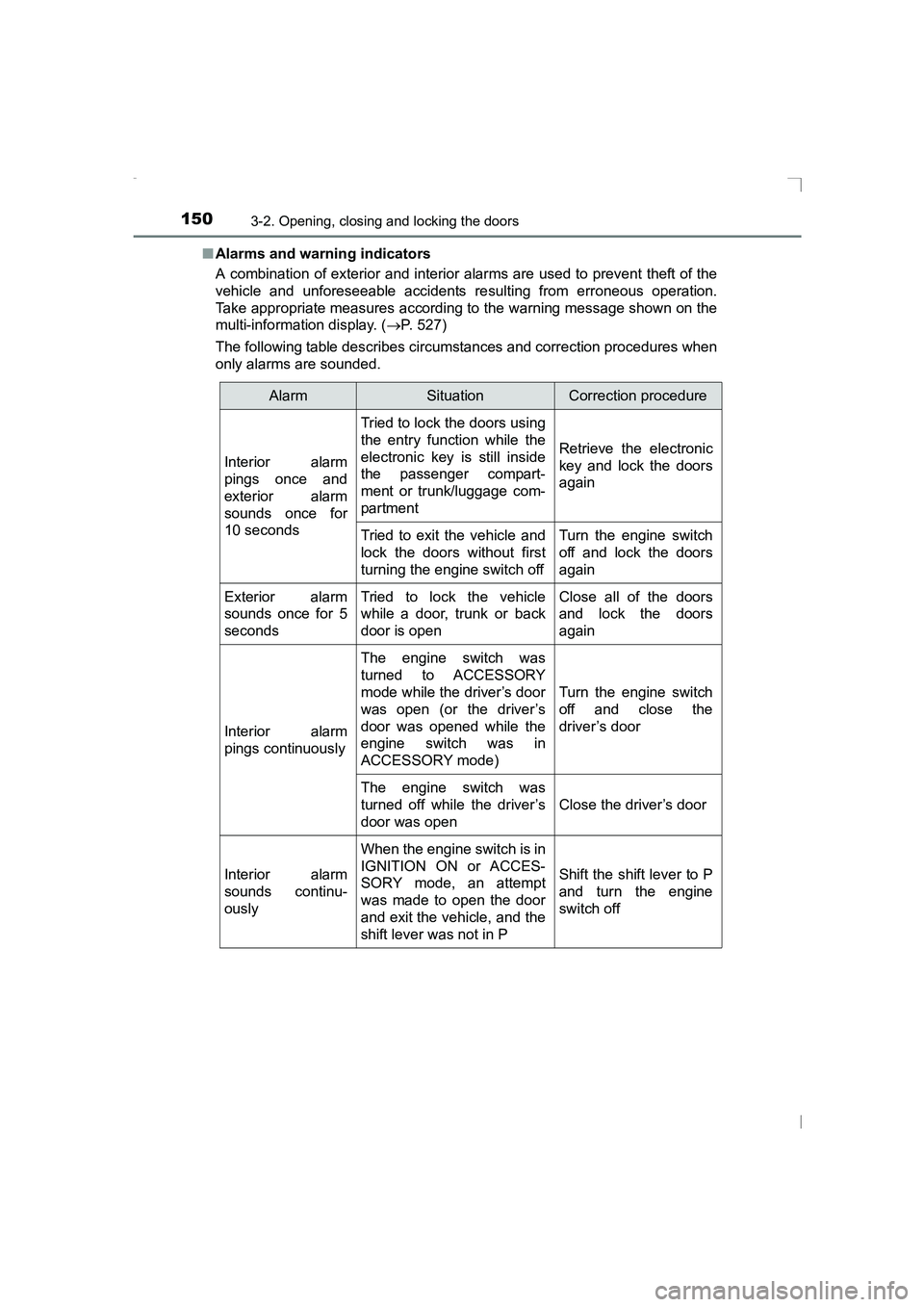
Alarms and warning indicators
A combination of exterior and interior alarms are used to prevent theft of the
vehicle and unforeseeable accidents re sulting from erroneous operation.
Take appropriate measures according to the warning message shown on the
multi-information display. ( →P. 527)
The following table describes circumstances and correction procedures when
only alarms are sounded.
AlarmSituationCorrection procedure
Interior alarm
pings once and
exterior alarm
sounds once for
10 seconds
Tried to lock the doors using
the entry function while the
electronic key is still inside
the passenger compart-
ment or trunk/luggage com-
partment
Retrieve the electronic
key and lock the doors
again
Tried to exit the vehicle and
lock the doors without first
turning the engine switch offTurn the engine switch
off and lock the doors
again
Exterior alarm
sounds once for 5
secondsTried to lock the vehicle
while a door, trunk or back
door is openClose all of the doors
and lock the doors
again
Interior alarm
pings continuously
The engine switch was
turned to ACCESSORY
mode while the driver’s door
was open (or the driver’s
door was opened while the
engine switch was in
ACCESSORY mode)
Turn the engine switch
off and close the
driver’s door
The engine switch was
turned off while the driver’s
door was open
Close the driver’s door
Interior alarm
sounds continu-
ously
When the engine switch is in
IGNITION ON or ACCES-
SORY mode, an attempt
was made to open the door
and exit the vehicle, and the
shift lever was not in P
Shift the shift lever to P
and turn the engine
switch off
AVENSIS_OM_OM20C20E_(EE).book Page 150 Thursday, January 29, 2015 1:47 PM
Page 151 of 648
1513-2. Opening, closing and locking the doors
3
Operation of each component
AVENSIS_OM_OM20C20E_(EE)
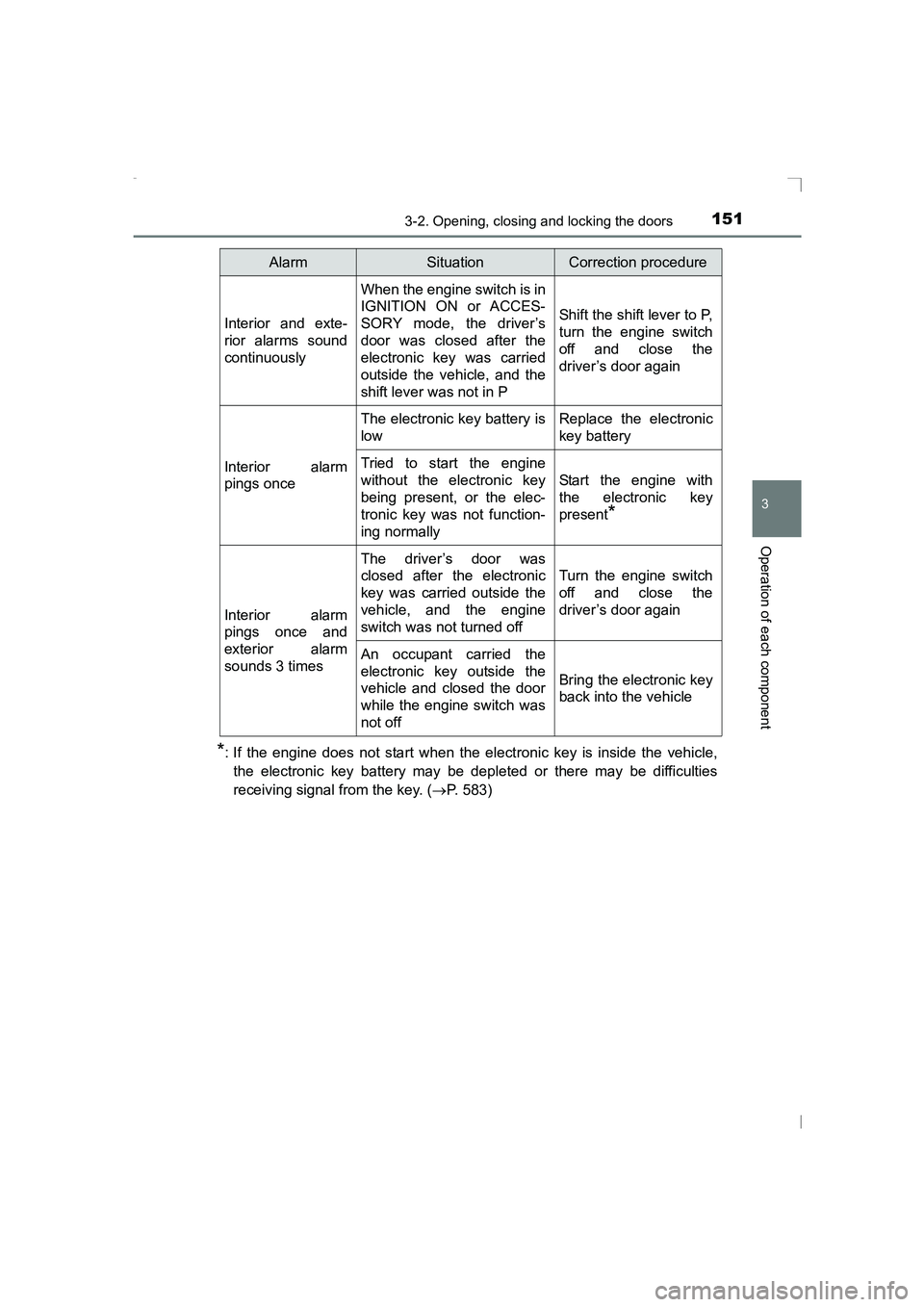
*: If the engine does not start when the electronic key is inside the vehicle,the electronic key battery may be depleted or there may be difficulties
receiving signal from the key. ( →P. 583)
Interior and exte-
rior alarms sound
continuously
When the engine switch is in
IGNITION ON or ACCES-
SORY mode, the driver’s
door was closed after the
electronic key was carried
outside the vehicle, and the
shift lever was not in P
Shift the shift lever to P,
turn the engine switch
off and close the
driver’s door again
Interior alarm
pings once
The electronic key battery is
lowReplace the electronic
key battery
Tried to start the engine
without the electronic key
being present, or the elec-
tronic key was not function-
ing normally
Start the engine with
the electronic key
present
*
Interior alarm
pings once and
exterior alarm
sounds 3 times
The driver’s door was
closed after the electronic
key was carried outside the
vehicle, and the engine
switch was not turned off
Turn the engine switch
off and close the
driver’s door again
An occupant carried the
electronic key outside the
vehicle and closed the door
while the engine switch was
not off
Bring the electronic key
back into the vehicle
AlarmSituationCorrection procedure
AVENSIS_OM_OM20C20E_(EE).book Page 151 Thursday, January 29, 2015 1:47 PM
Page 170 of 648
1703-3. Adjusting the seats
AVENSIS_OM_OM20C20E_(EE)
Driving position memor y∗
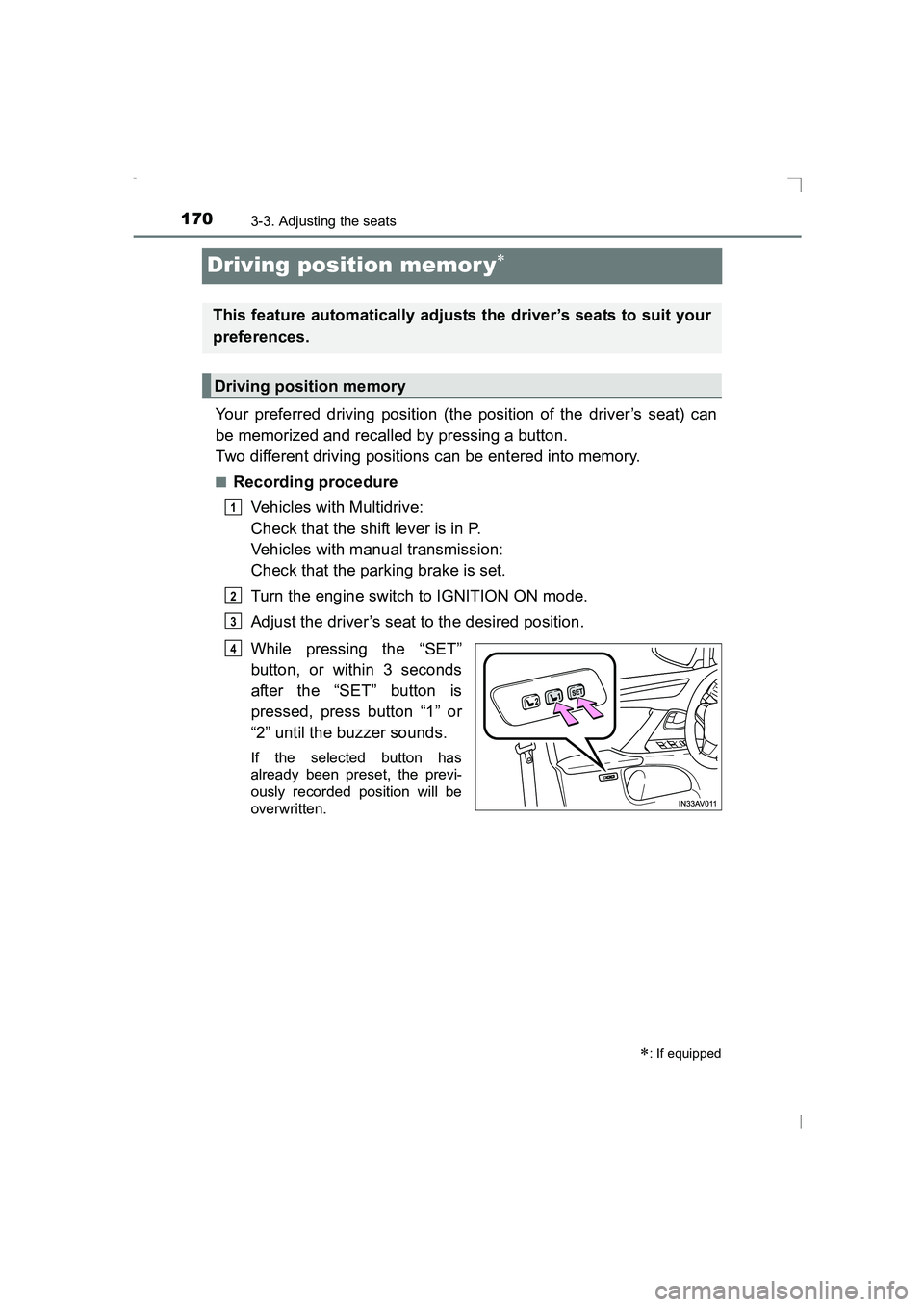
Your preferred driving position (the position of the driver’s seat) can
be memorized and recalled by pressing a button.
Two different driving positions can be entered into memory.
■Recording procedureVehicles with Multidrive:
Check that the shift lever is in P.
Vehicles with manual transmission:
Check that the parking brake is set.
Turn the engine switch to IGNITION ON mode.
Adjust the driver’s seat to the desired position.
While pressing the “SET”
button, or within 3 seconds
after the “SET” button is
pressed, press button “1” or
“2” until the buzzer sounds.
If the selected button has
already been preset, the previ-
ously recorded position will be
overwritten.
∗: If equipped
This feature automatically adjusts the driver’s seats to suit your
preferences.
Driving position memory
1
2
3
4
AVENSIS_OM_OM20C20E_(EE).book Page 170 Thursday, January 29, 2015 1:47 PM
Page 171 of 648
1713-3. Adjusting the seats
3
Operation of each component
AVENSIS_OM_OM20C20E_(EE)■
Recall procedure
Vehicles with Multidrive:
Check that the shift lever is in P.
Vehicles with manual transmission:
Check that the parking brake is set.
Turn the engine switch to IGNITION ON mode.
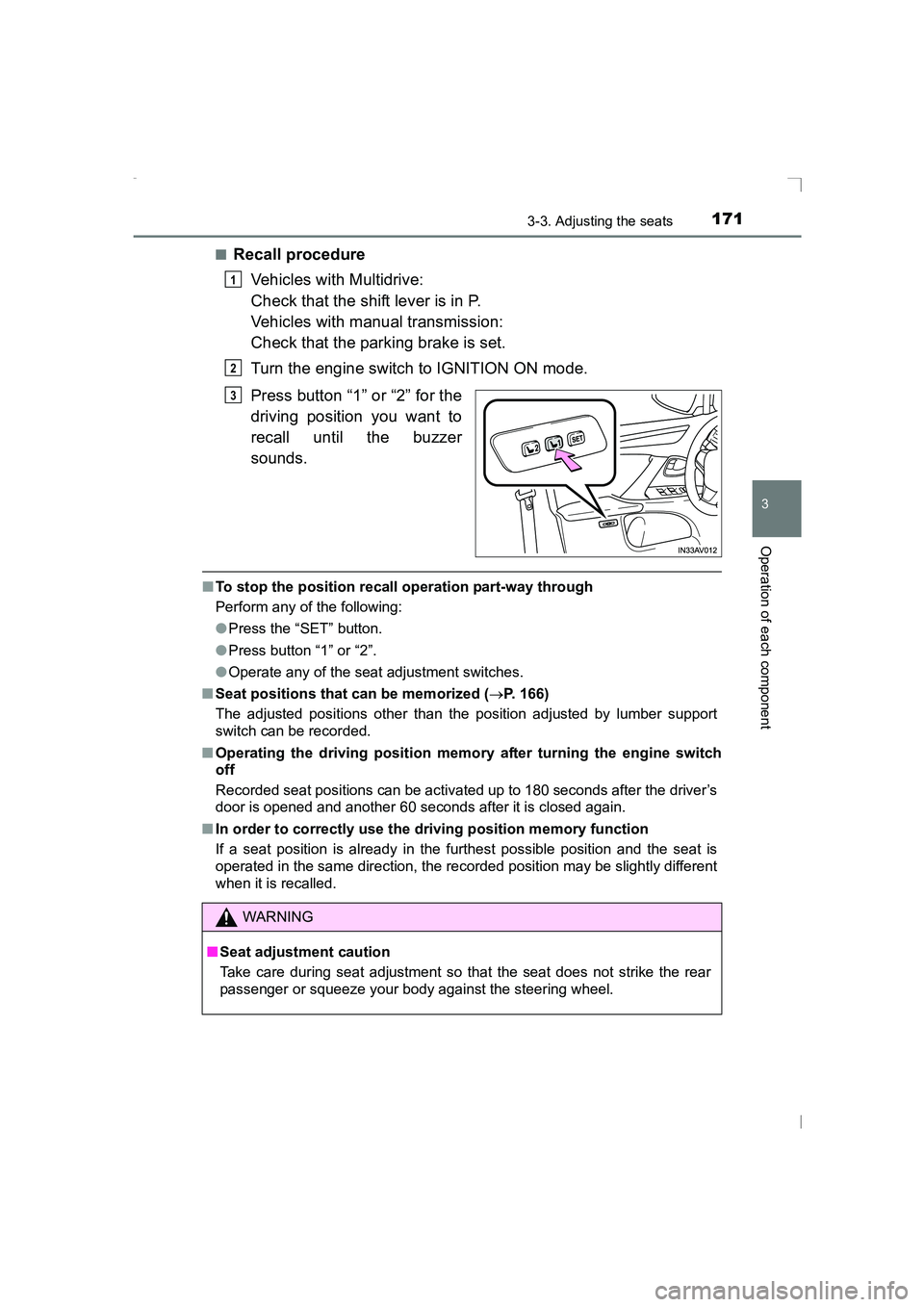
Press button “1” or “2” for the
driving position you want to
recall until the buzzer
sounds.
■To stop the position recall operation part-way through
Perform any of the following:
●Press the “SET” button.
● Press button “1” or “2”.
● Operate any of the seat adjustment switches.
■ Seat positions that can be memorized ( →P. 166)
The adjusted positions other than the position adjusted by lumber support
switch can be recorded.
■ Operating the driving position memory after turning the engine switch
off
Recorded seat positions can be activated up to 180 seconds after the driver’s
door is opened and another 60 seconds after it is closed again.
■ In order to correctly use the driving position memory function
If a seat position is already in the furthest possible position and the seat is
operated in the same direction, the recorded position may be slightly different
when it is recalled.
1
2
3
WARNING
■ Seat adjustment caution
Take care during seat adjustment so that the seat does not strike the rear
passenger or squeeze your body against the steering wheel.
AVENSIS_OM_OM20C20E_(EE).book Page 171 Thursday, January 29, 2015 1:47 PM
Page 177 of 648
1773-4. Adjusting the steering wheel and mirrors
3
Operation of each component
AVENSIS_OM_OM20C20E_(EE)
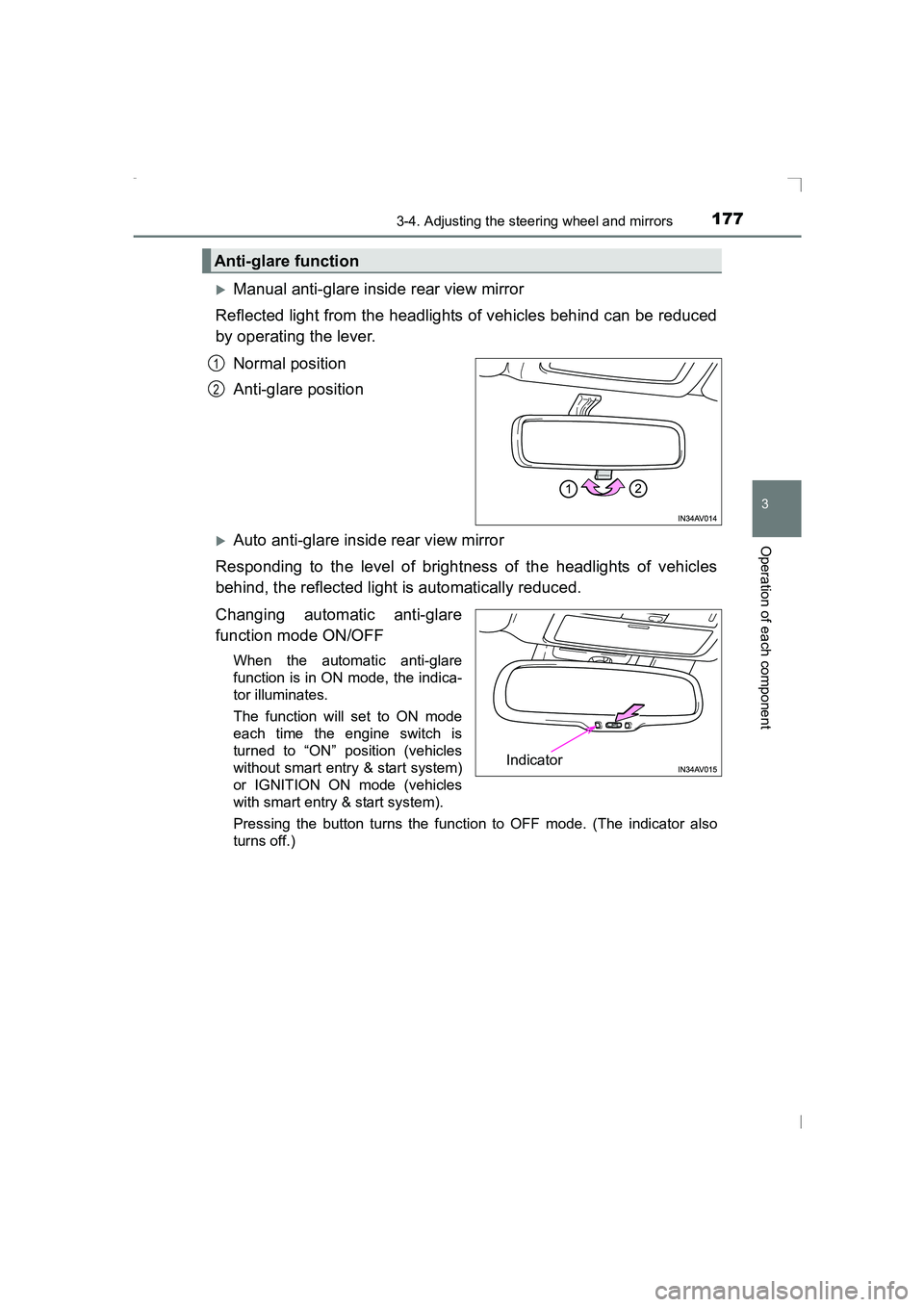
XManual anti-glare inside rear view mirror
Reflected light from the headlights of vehicles behind can be reduced
by operating the lever.
Normal position
Anti-glare position
XAuto anti-glare inside rear view mirror
Responding to the level of brightness of the headlights of vehicles
behind, the reflected light is automatically reduced.
Changing automatic anti-glare
function mode ON/OFF
When the automatic anti-glare
function is in ON mode, the indica-
tor illuminates.
The function will set to ON mode
each time the engine switch is
turned to “ON” position (vehicles
without smart entry & start system)
or IGNITION ON mode (vehicles
with smart entry & start system).
Pressing the button turns the function to OFF mode. (The indicator also
turns off.)
Anti-glare function
1
2
Indicator
AVENSIS_OM_OM20C20E_(EE).book Page 177 Thursday, January 29, 2015 1:47 PM
Page 180 of 648
1803-4. Adjusting the steering wheel and mirrors
AVENSIS_OM_OM20C20E_(EE)
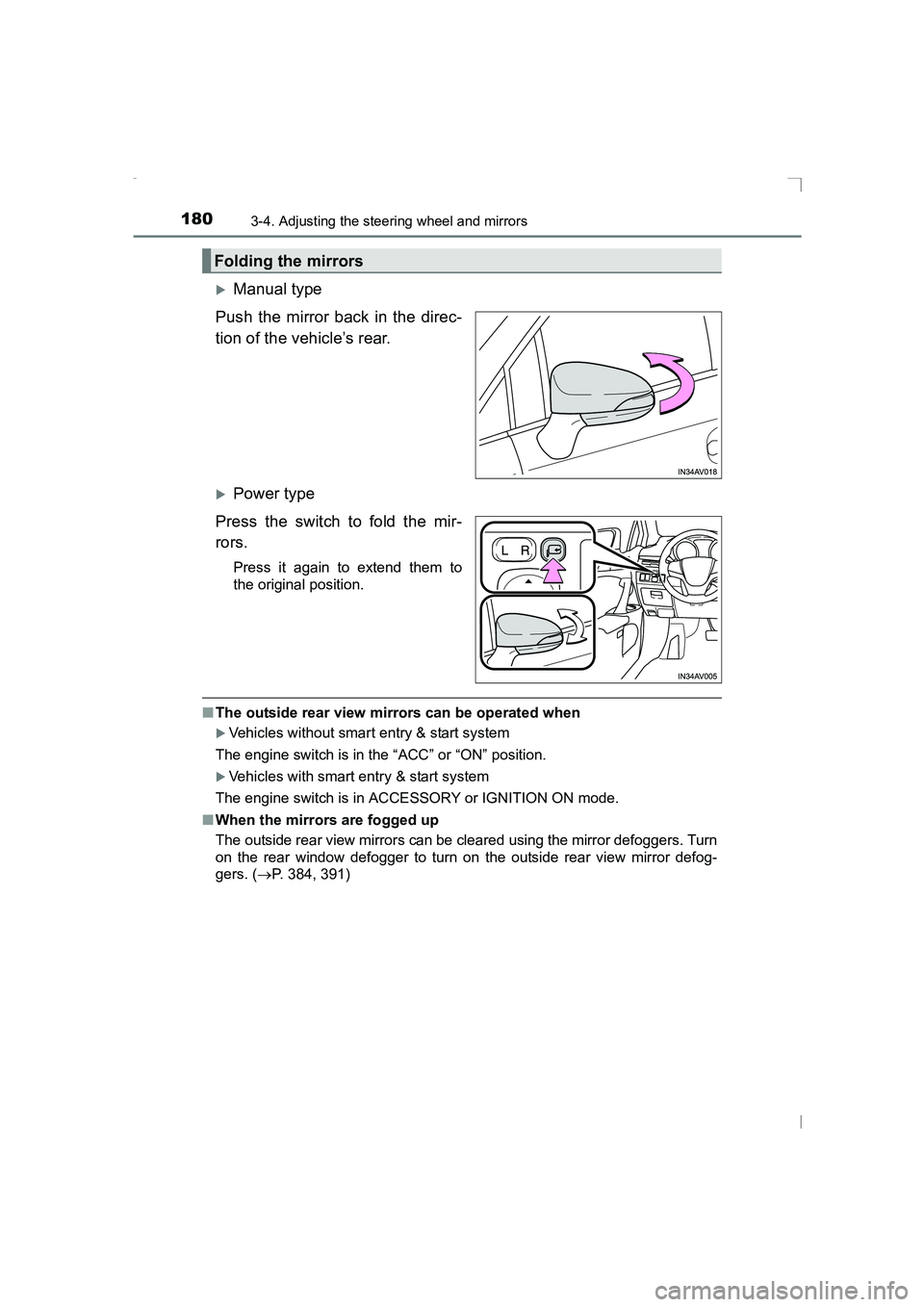
XManual type
Push the mirror back in the direc-
tion of the vehicle’s rear.
XPower type
Press the switch to fold the mir-
rors.
Press it again to extend them to
the original position.
■ The outside rear view mirrors can be operated when
XVehicles without smart entry & start system
The engine switch is in the “ACC” or “ON” position.
XVehicles with smart entry & start system
The engine switch is in ACCESSORY or IGNITION ON mode.
■ When the mirrors are fogged up
The outside rear view mirrors can be cleared using the mirror defoggers. Turn
on the rear window defogger to turn on the outside rear view mirror defog-
gers. ( →P. 384, 391)
Folding the mirrors
AVENSIS_OM_OM20C20E_(EE).book Page 180 Thursday, January 29, 2015 1:47 PM
Page 183 of 648
1833-5. Opening and closing the windows
3
Operation of each component
AVENSIS_OM_OM20C20E_(EE)
■The power windows can be operated when
The engine switch is in the “ON” position (vehicles without smart entry & start
system) or IGNITION ON mode (vehicles with smart entry & start system).
■ Operating the power windows after turning the engine off
XVehicles without smart entry & start system
The power windows can be operated for approximately 45 seconds even
after the engine switch is turned to the “ACC” or “LOCK” position. They can-
not, however, be operated once either front door is opened.
XVehicles with smart entry & start system
The power windows can be operated for approximately 45 seconds even
after the engine switch is turned to ACCESSORY mode or turned off. They
cannot, however, be operated once either front door is opened.
■ Jam protection function
If an object becomes caught between the window and the window frame, win-
dow travel is stopped and the window is opened slightly.
■ When the power window does not close normally
If the jam protection function is operating abnormally and a window cannot be
closed, perform the following operations using the power window switch on
the relevant door.
●After stopping the vehicle, the window can be closed by holding the power
window switch in the one-touch closing position while the engine switch is
turned to the “ON” position (vehicles without smart entry & start system) or
IGNITION ON mode (vehicles with smart entry & start system).
● If the window still cannot be closed even by carrying out the operation
explained above, initialize the function by performing the following proce-
dure.
Hold the power window switch in the one-touch closing position. Continue
holding the switch for a further 6 seconds after the window has closed.
Hold the power window switch in the one-touch opening position. Con-
tinue holding the switch for a further 2 seconds after the window has
opened completely.
Hold the power window switch in the one-touch closing position once
again. Continue holding the switch for a further 2 seconds after the win-
dow has closed.
1
2
3
AVENSIS_OM_OM20C20E_(EE).book Page 183 Thursday, January 29, 2015 1:47 PM
Page 185 of 648
185
4Driving
AVENSIS_OM_OM20C20E_(EE)4-1. Before driving
Driving the vehicle ............. 186
Cargo and luggage ............ 198
Trailer towing ..................... 200
4-2. Driving procedures Engine (ignition) switch (vehicles without smart
entry & start system)........ 209
Engine (ignition) switch (vehicles with smart
entry & start system)........ 212
Multidrive ........................... 219
Manual transmission.......... 225
Turn signal lever ................ 228
Parking brake .................... 229
4-3. Operating the lights and wipers
Headlight switch ................ 232
Fog light switch .................. 240
Windshield wipers and washer ............................. 242
Rear window wiper and washer ............................. 246 4-4. Refueling
Opening the fuel tank cap ........................... 247
4-5. Toyota Safety Sense Toyota Safety Sense ......... 251
PCS (Pre-Crash Safety system) ............................ 255
LDA (Lane Departure Alert) ................................ 263
Automatic High Beam ........ 269
RSA (Road Sign Assist)..... 275
4-6. Using the driving support systems
Cruise control..................... 280
Speed limiter ......................283
Stop & Start system ........... 286
Driving assist systems ....... 297
4-7. Driving tips Winter driving tips .............. 303
AVENSIS_OM_OM20C20E_(EE).book Page 185 Thursday, January 29, 2015 1:47 PM
Page 209 of 648
209
4
4-2. Driving procedures
Driving
AVENSIS_OM_OM20C20E_(EE)
Engine (ignition) switch (vehicles without
smar t entr y & start system)
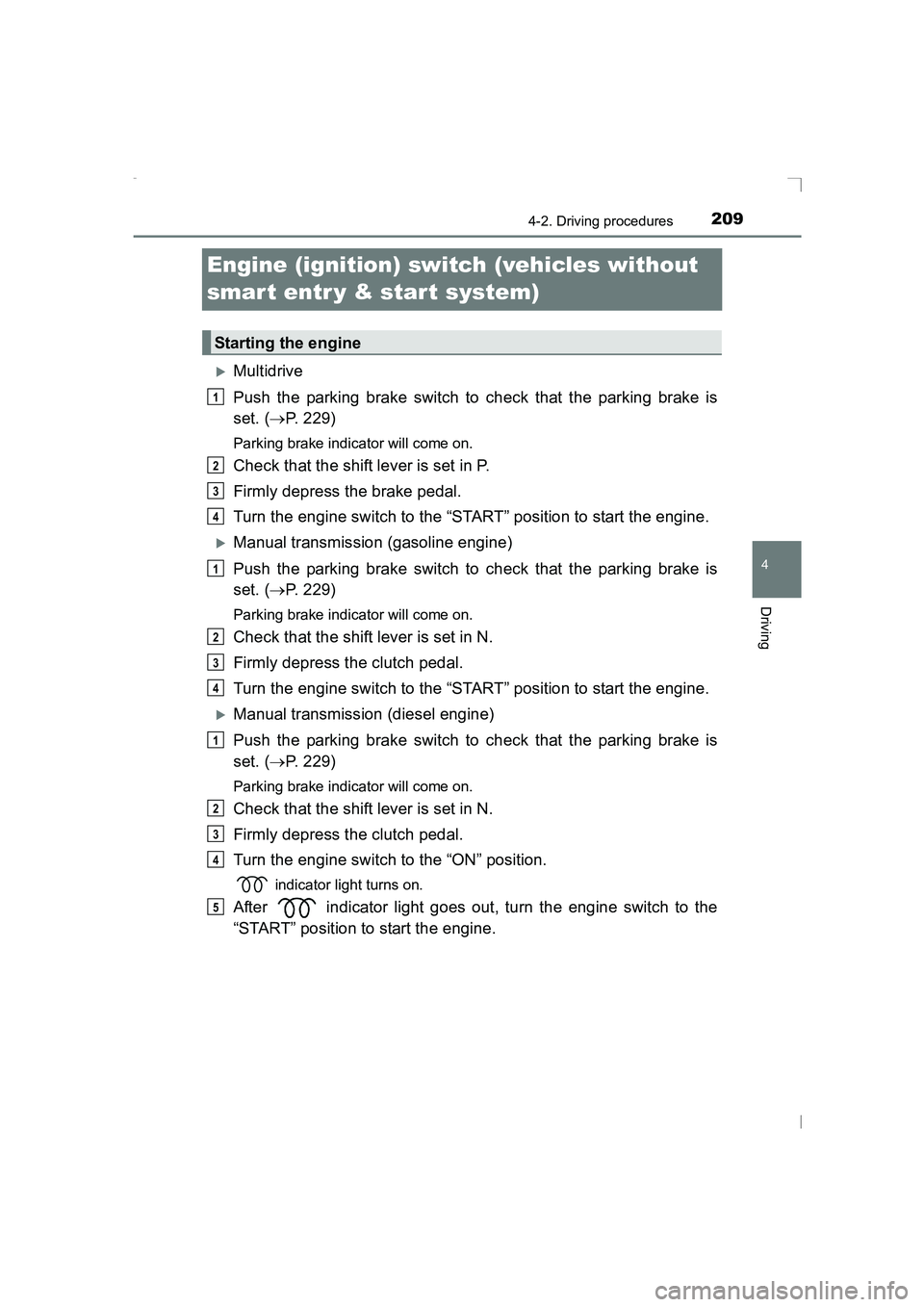
XMultidrive
Push the parking brake switch to check that the parking brake is
set. (→P. 229)
Parking brake indicator will come on.
Check that the shift lever is set in P.
Firmly depress the brake pedal.
Turn the engine switch to the “START” position to start the engine.
XManual transmission (gasoline engine)
Push the parking brake switch to check that the parking brake is
set. ( →P. 229)
Parking brake indicator will come on.
Check that the shift lever is set in N.
Firmly depress the clutch pedal.
Turn the engine switch to the “START” position to start the engine.
XManual transmission (diesel engine)
Push the parking brake switch to check that the parking brake is
set. ( →P. 229)
Parking brake indicator will come on.
Check that the shift lever is set in N.
Firmly depress the clutch pedal.
Turn the engine switch to the “ON” position.
indicator light turns on.
After indicator light goes out, turn the engine switch to the
“START” position to start the engine.
Starting the engine
1
2
3
4
1
2
3
4
1
2
3
4
5
AVENSIS_OM_OM20C20E_(EE).book Page 209 Thursday, January 29, 2015 1:47 PM
Page 212 of 648
2124-2. Driving procedures
AVENSIS_OM_OM20C20E_(EE)
Engine (ignition) switch (vehicles with
smar t entr y & start system)
XMultidrive
Push the parking brake switch to check that the parking brake is
set. (→P. 229)
Parking brake indicator will come on.
Check that the shift lever is set in P.
Firmly depress the brake pedal.
The engine switch indicator will turn green. If the indicator does not turn
green, the engine cannot be started.
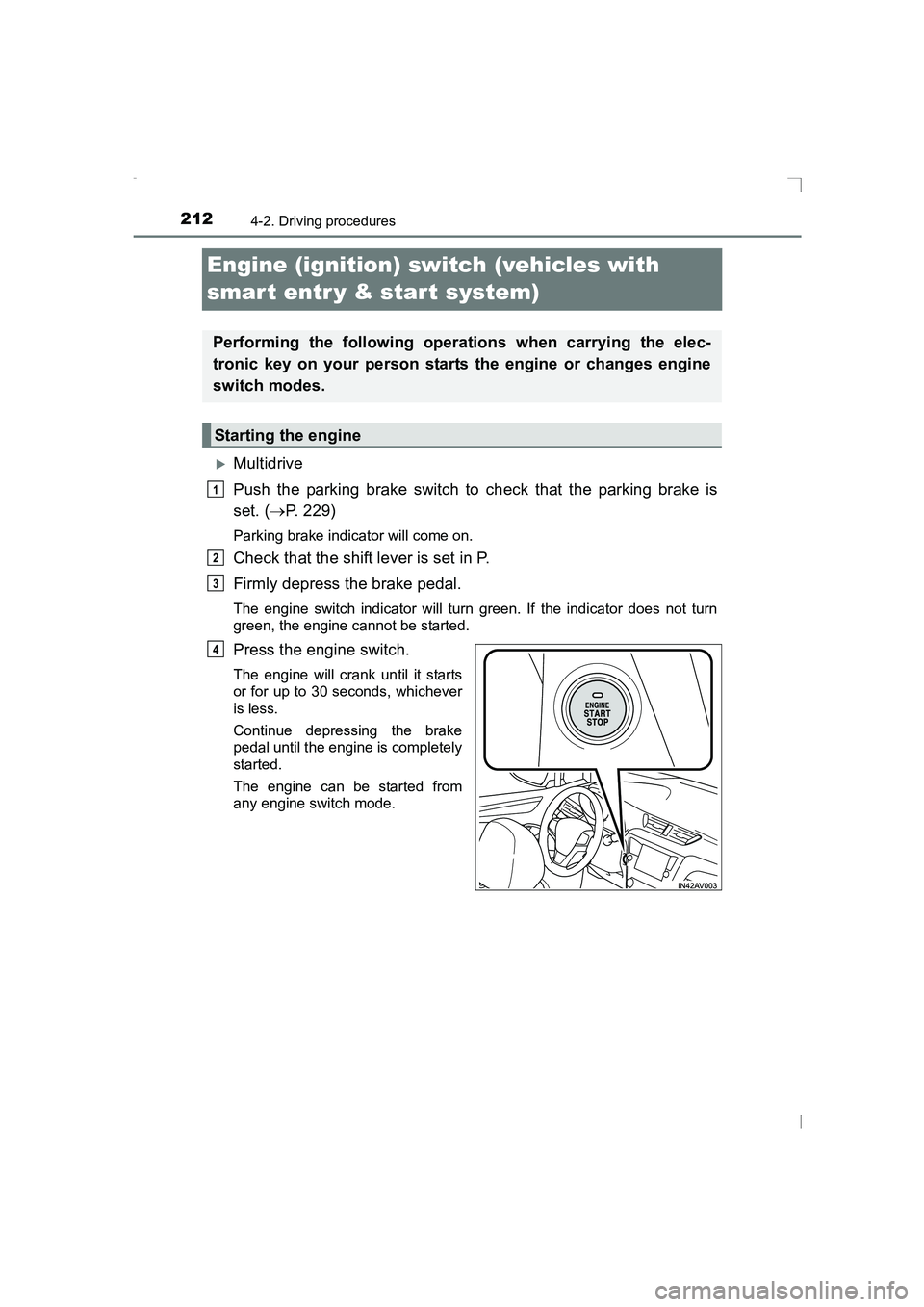
Press the engine switch.
The engine will crank until it starts
or for up to 30 seconds, whichever
is less.
Continue depressing the brake
pedal until the engine is completely
started.
The engine can be started from
any engine switch mode.
Performing the following operations when carrying the elec-
tronic key on your person starts the engine or changes engine
switch modes.
Starting the engine
1
2
3
4
AVENSIS_OM_OM20C20E_(EE).book Page 212 Thursday, January 29, 2015 1:47 PM