reset TOYOTA AVENSIS 2015 User Guide
[x] Cancel search | Manufacturer: TOYOTA, Model Year: 2015, Model line: AVENSIS, Model: TOYOTA AVENSIS 2015Pages: 648, PDF Size: 39.64 MB
Page 282 of 648
2824-6. Using the driving support systems
AVENSIS_OM_OM20C20E_(EE)■
Accelerating after setting the vehicle speed
●The vehicle can be accelerated normally. After acceleration, the set speed
resumes.
● Even without canceling the cruise control, the set speed can be increased
by first accelerating the vehicle to the desired speed and then pushing the
lever down to set the new speed.
■ Automatic cruise control cancelation
Cruise control will stop maintaining the vehicle speed in any of the following
situations.
●Actual vehicle speed falls more than approximately 16 km/h (10 mph) below
the preset vehicle speed.
At this time, the memorized set speed is not retained.
● Actual vehicle speed is below approximately 40 km/h (25 mph).
● VSC+ is activated.
● Speed limiter is activated (if equipped).
■ If the warning message for the crui se control is shown on the multi-
information display
Press the “ON-OFF” button once to deactivate the system, and then press
the button again to reactivate the system.
If the cruise control speed cannot be set or if the cruise control cancels imme-
diately after being activated, there may be a malfunction in the cruise control
system. Have the vehicle inspected by any authorized Toyota dealer or
repairer, or another duly qualified and equipped professional.
WARNING
■ To avoid operating the cruise control by mistake
Switch the cruise control off using the “ON-OFF” button when not in use.
■ Situations unsuitable for cruise control
Do not use cruise control in any of the following situations.
Doing so may result in loss of control and could cause an accident resulting
in death or serious injury.
●In heavy traffic
● On roads with sharp bends
● On winding roads
● On slippery roads, such as those covered with rain, ice or snow
● On steep hills
Vehicle speed may exceed the set speed when driving down a steep hill.
● When your vehicle is towing a trailer or during emergency towing
AVENSIS_OM_OM20C20E_(EE).book Page 282 Thursday, January 29, 2015 1:47 PM
Page 293 of 648
2934-6. Using the driving support systems
4
Driving
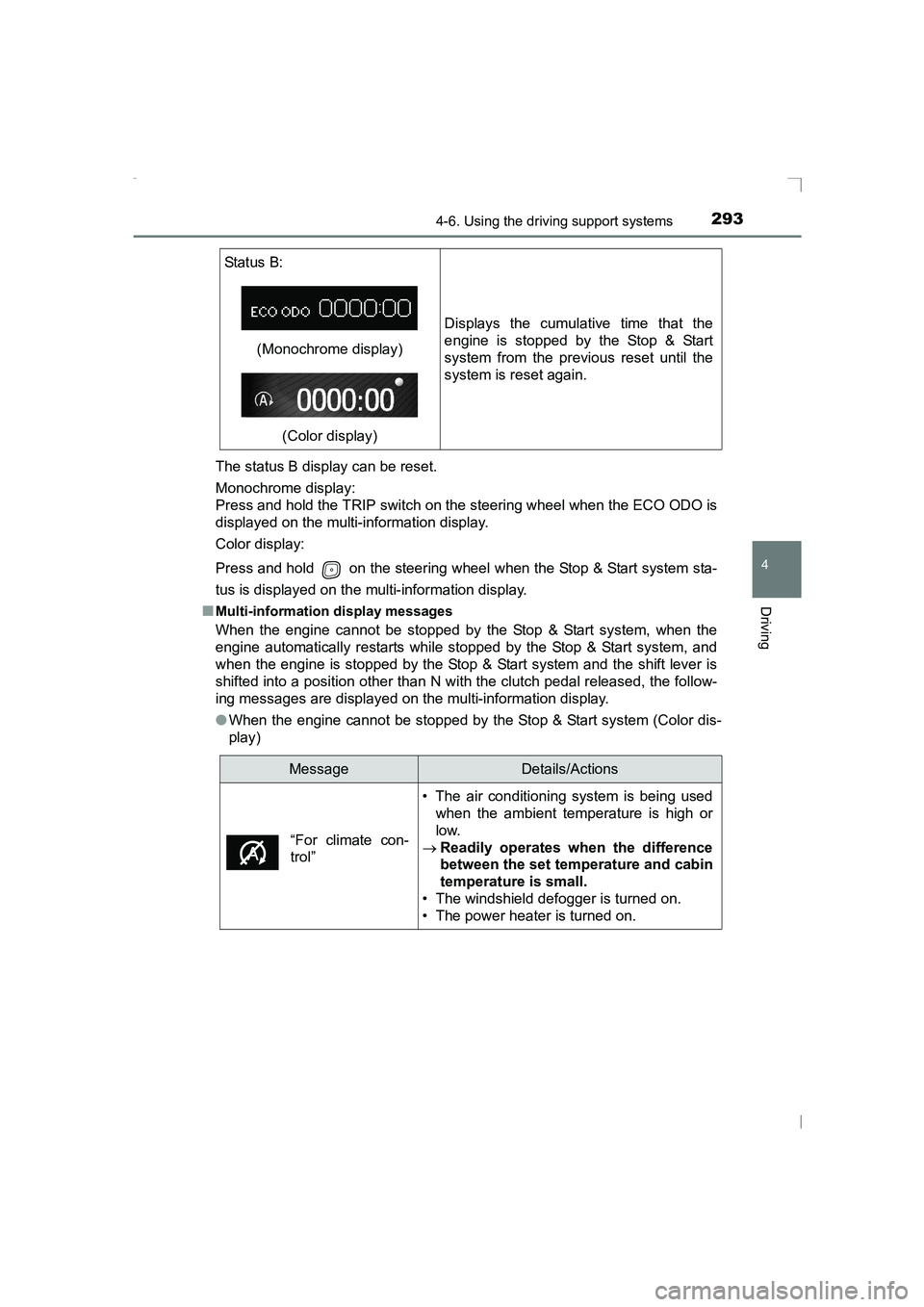
AVENSIS_OM_OM20C20E_(EE)The status B display can be reset.
Monochrome display:
Press and hold the TRIP switch on the steering wheel when the ECO ODO is
displayed on the multi-information display.
Color display:
Press and hold on the steering wheel when the Stop & Start system sta-
tus is displayed on the multi-information display.
■
Multi-information display messages
When the engine cannot be stopped by the Stop & Start system, when the
engine automatically restarts while stopped by the Stop & Start system, and
when the engine is stopped by the Stop & Start system and the shift lever is
shifted into a position other than N with the clutch pedal released, the follow-
ing messages are displayed on the multi-information display.
● When the engine cannot be stopped by the Stop & Start system (Color dis-
play)
Status B:
(Monochrome display)
(Color display) Displays the cumulative time that the
engine is stopped by the Stop & Start
system from the previous reset until the
system is reset again.
MessageDetails/Actions
• The air conditioning system is being used when the ambient temperature is high or
low.
→ Readily operates when the difference
between the set temperature and cabin
temperature is small.
• The windshield defogger is turned on.
• The power heater is turned on.
“For climate con-
trol”
AVENSIS_OM_OM20C20E_(EE).book Page 293 Thursday, January 29, 2015 1:47 PM
Page 317 of 648
3175-3. Using the radio
5
Audio system
AVENSIS_OM_OM20C20E_(EE)
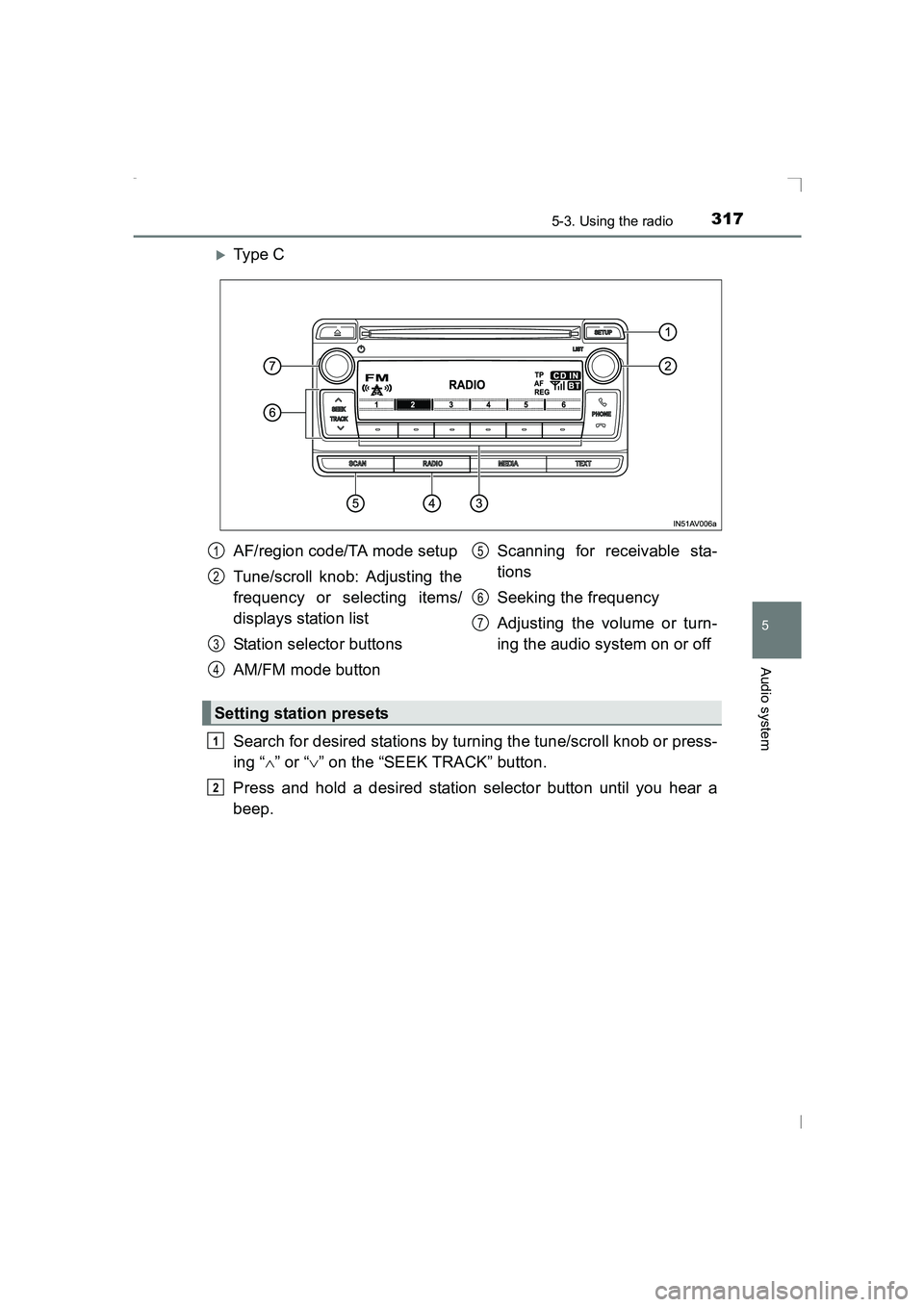
XTy pe C
Search for desired stations by turning the tune/scroll knob or press-
ing “∧” or “ ∨” on the “SEEK TRACK” button.
Press and hold a desired station selector button until you hear a
beep.
AF/region code/TA mode setup
Tune/scroll knob: Adjusting the
frequency or selecting items/
displays station list
Station selector buttons
AM/FM mode button Scanning for receivable sta-
tions
Seeking the frequency
Adjusting the volume or turn-
ing the audio system on or off1
2
3
4
5
6
7
Setting station presets
1
2
AVENSIS_OM_OM20C20E_(EE).book Page 317 Thursday, January 29,
2015 1:47 PM
Page 318 of 648
3185-3. Using the radio
AVENSIS_OM_OM20C20E_(EE)■
Scanning the preset radio stations
Press and hold the “SCAN” button until you hear a beep.
When the desired station is reached, press the button once
again.
■Scanning all radio stations within rangePress the “SCAN” button.
All stations with reception will be played for 5 seconds each.
When the desired station is reached, press the button once
again.
■Updating the station list
Press the “LIST” button (type A and B) or the tune/scroll knob
(type C).
The station list will be displayed.
Press [UPDATE] to update the list.
“Updating” is displayed while the searching is in process, and then avail-
able stations will be listed on the display.
To cancel the updating process, press the back button (type A and B) or [BACK] (type C).
■
Selecting a station from the station list
Press the “LIST” button (type A and B) or the tune/scroll knob
(type C).
The station list will be displayed.
Turn the tune/scroll knob to select a station.
Press the knob to tune in the station.
To return to the previous display, press the back button (type A and B)
or [BACK] (type C).
Scanning radio stations (type C only)
Using the station list
1
2
1
2
1
2
1
2
3
AVENSIS_OM_OM20C20E_(EE).book Page 318 Thursday, January 29, 2015 1:47 PM
Page 320 of 648
3205-3. Using the radio
AVENSIS_OM_OM20C20E_(EE)
■EON (Enhanced Other Network) system (for traffic announcement func-
tion)
If the RDS station (with EON data) you are listening to is not broadcasting a
traffic information program and the audio system is in the TA (traffic
announcement) mode, the radio will be switched automatically to a station
broadcasting a traffic information program in the EON AF list when traffic
information begins.
■ When the battery is disconnected
Stations presets are erased.
■ Reception sensitivity
●Maintaining perfect radio reception at a ll times is difficult due to the continu-
ally changing position of the antenna, differences in signal strength and sur-
rounding objects, such as trains, transmitters, etc.
● Sedan: The radio antenna is mounted inside the rear window. To maintain
clear radio reception, do not attach me tallic window tinting or other metallic
objects to the antenna wire mounted inside the rear window.
● Short pole type antenna: The radio antennas are mounted inside the rear
quarter window and on the rear roof. To maintain clear radio reception, do
not attach metallic window tinting or other metallic objects to the antenna
wire mounted inside the rear quarter window. The rear roof antenna can be
removed from the base by turning.
● Shark fin type antenna: The radio antenna is mounted on the rear roof.
■ Digital Audio Broadcast (DAB) radio
The optional radio antenna and tuner are necessary for the use of Digital
Audio Broadcast (DAB) radio.
AVENSIS_OM_OM20C20E_(EE).book Page 320 Thursday, January 29, 2015 1:47 PM
Page 337 of 648
3375-5. Using an external device
5
Audio system
AVENSIS_OM_OM20C20E_(EE)
Press the tune/scroll knob (type A and B) or the “TEXT” button (type
C).
Track title, Artist name and Album title are shown on the display.
To return to the previous display, press the knob or the back button (type A
and B), or the “TEXT” button or [BACK] (type C).
■ About iPod
●“Made for iPod” and “Made for iPhone” mean that an electronic accessory
has been designed to connect specifically to iPod, or iPhone, respectively,
and has been certified by the developer to meet Apple performance stan-
dards.
● Apple is not responsible for the operation of this device or its compliance
with safety and regulatory standards. Please note that the use of this acces-
sory with iPod or iPhone may affect wireless performance.
● iPhone, iPod, iPod classic, iPod nano, iPod shuffle, and iPod touch are
trademarks of Apple Inc., registered in the U.S. and other countries.
■ iPod functions
●When an iPod is connected and the audio source is changed to iPod mode,
the iPod will resume play from the same point in which it was last used.
● Depending on the iPod that is connected to the system, certain functions
may not be available. Disconnecting the device and reconnecting it once
again may resolve some malfunctions.
● While connected to the system, the iPod cannot be operated with its own
controls. It is necessary to use the controls of the vehicle’s audio system
instead.
■ iPod problems
To resolve most problems encountered when using your iPod, disconnect
your iPod from the vehicle iPod connection and reset it.
For instructions on how to reset your iPod, refer to your iPod Owner’s Man-
ual.
Switching the display
AVENSIS_OM_OM20C20E_(EE).book Page 337 Thursday, January 29, 2015 1:47 PM
Page 354 of 648
3545-6. Using Bluetooth® devices
AVENSIS_OM_OM20C20E_(EE)
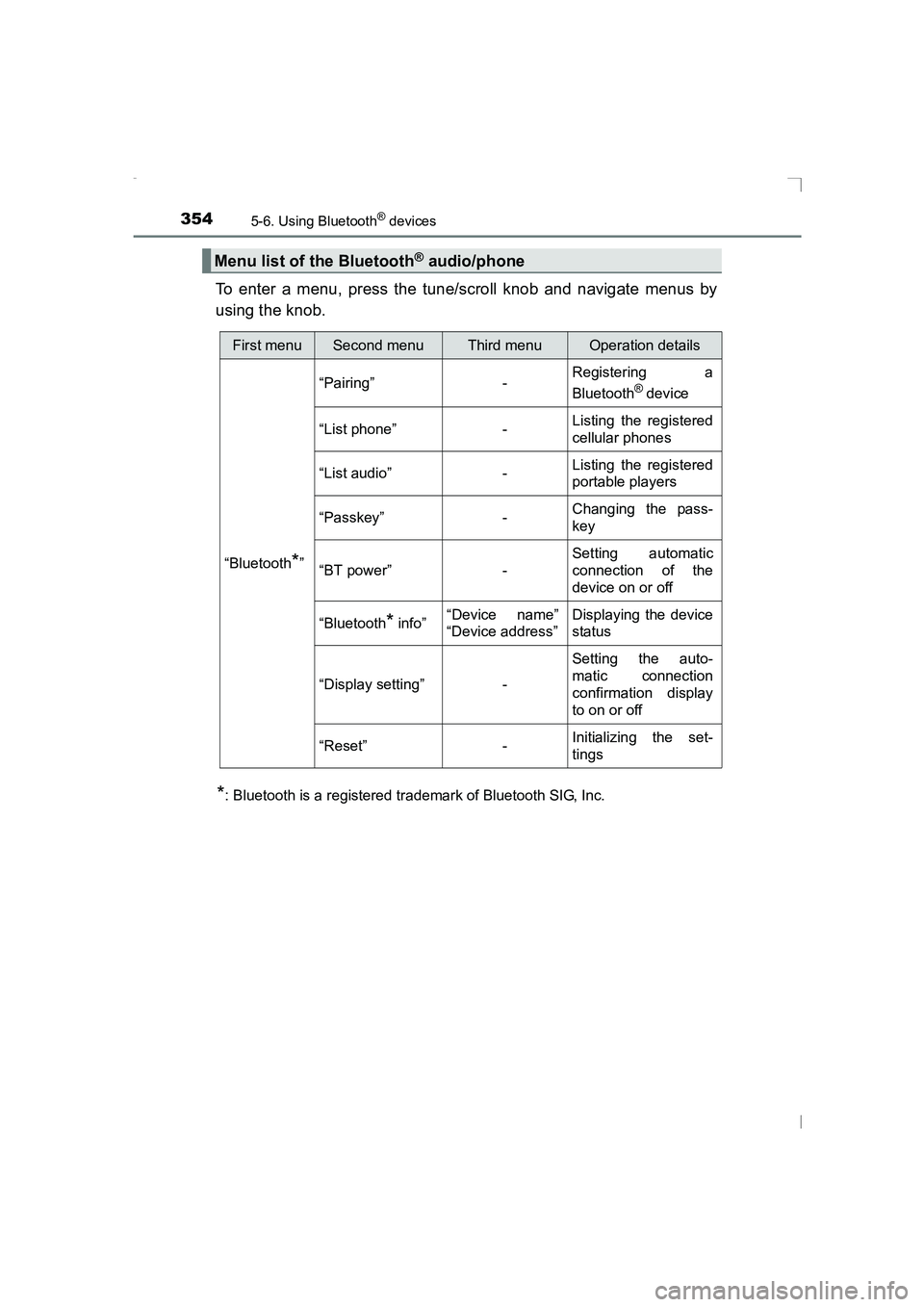
To enter a menu, press the tune/scroll knob and navigate menus by
using the knob.
*: Bluetooth is a registered trademark of Bluetooth SIG, Inc.
Menu list of the Bluetooth® audio/phone
First menuSecond menuThird menuOperation details
“Bluetooth
*” “Pairing” -
Registering a
Bluetooth
® device
“List phone” - Listing the registered
cellular phones
“List audio” - Listing the registered
portable players
“Passkey” - Changing the pass-
key
“BT power” - Setting automatic
connection of the
device on or off
“Bluetooth
* info” “Device name”
“Device address” Displaying the device
status
“Display setting” - Setting the auto-
matic connection
confirmation display
to on or off
“Reset” - Initializing the set-
tings
AVENSIS_OM_OM20C20E_(EE).book Page 354 Thursday, January 29,
2015 1:47 PM
Page 360 of 648
3605-7. “SETUP” menu
AVENSIS_OM_OM20C20E_(EE)
Select “Bluetooth* info” using the tune/scroll knob. (→P. 354)
● Displaying the device name
Select “Device name” using the knob.
● Displaying the device address
Select “Device address” using the knob.
*: Bluetooth is a registered trademark of Bluetooth SIG, Inc.
If the “Display setting” is set to on, the portable player connection sta-
tus will be displayed when the engine switch is turned to the “ACC” or
“ON” position (vehicles without smart entry & start system), or
ACCESSORY or IGNITION ON mode (vehicles with smart entry &
start system).
Select “Display setting” using the tune/scroll knob. ( →P. 354)
Select “ON” or “OFF” using the knob.
Select “Reset” using the tune/scroll knob. ( →P. 354)
● Initializing the sound settings
Select “Sound Setting” using the knob and press [YES].
For details about sound settings: →P. 313
● Initializing the device information
Select “Car Device Info” using the knob and press [YES].
Automatic connection of a portable device, automatic connection confirma-
tion display and the passkey will be initialized.
●Initializing the all settings
Select “All Initialize” using the knob and press [YES].
Displaying the device status
Setting the automatic connection confirmation display to on or off
Initialization
1
2
AVENSIS_OM_OM20C20E_(EE).book Page 360 Thursday, January 29, 2015 1:47 PM
Page 361 of 648
361
5
5-7. “SETUP” menu
Audio system
AVENSIS_OM_OM20C20E_(EE)
Using the “SETUP” menu (“TEL” menu)∗
Select “Add contacts” using the tune/scroll knob. (→P. 354)
● Transferring all contacts from the cellular phone
Select “Overwrite all” using the knob and press [YES].
● Transferring one contact from the cellular phone
Select “Add one contact” using the knob and press [YES].
Select “Add SD” using the tune/scroll knob. ( →P. 354)
Select the desired data using the knob.
Press the desired preset button (from [1] to [5]).
For details about setting speed dials from the call history: →P. 369
For details about deleting speed dials: →P. 368
Select “Delete call history” using the tune/scroll knob. ( →P. 354)
● Deleting outgoing call history
Select “Outgoing Calls” using the tune/scroll knob.
Select the desired phone number using the knob and press [YES].
To delete all outgoing call history data, press [ALL] and
then press [YES].
● Deleting incoming call history
Select “Incoming Calls” using the tune/scroll knob.
Select the desired phone number using the knob and press [YES].
To delete all incoming call history data, press [ALL] and
then press [YES].
∗: If equipped
Adding a new phone number
Setting speed dials
Deleting call histories
1
2
3
1
2
1
2
AVENSIS_OM_OM20C20E_(EE).book Page 361 Thursday, January 29, 2015 1:47 PM
Page 368 of 648
3685-9. Bluetooth® Phone
AVENSIS_OM_OM20C20E_(EE)
Making a phone call∗
Select “Phonebook” using the tune/scroll knob.
Select the desired name using the knob and press the off-hook
switch.
By pressing [Add S. Dial] and one of the speed dial buttons
(from [1] to [5]) while the desired name is selected, it
can be registered as a speed dial.
Select “Speed Dials” using the tune/scroll knob.
Press the desired preset button (from [1] to [5])
and press the off-hook switch.
To delete a registered speed dial, after selecting the desired preset
button (from [1] to [5]) press [DELETE] and
then press [YES].
Select “Speed Dials” using the tune/scroll knob.
Enter the phone number and press the off-hook switch.
∗: If equipped
To enter the “TEL” mode, press the off-hook switch.
Dialing by selecting a name
Speed dialing
Dialing by entering the number
1
2
1
2
1
2
AVENSIS_OM_OM20C20E_(EE).book Page 368 Thursday, January 29, 2015 1:47 PM