key TOYOTA AVENSIS 2015 Service Manual
[x] Cancel search | Manufacturer: TOYOTA, Model Year: 2015, Model line: AVENSIS, Model: TOYOTA AVENSIS 2015Pages: 648, PDF Size: 39.64 MB
Page 153 of 648
1533-2. Opening, closing and locking the doors
3
Operation of each component
AVENSIS_OM_OM20C20E_(EE)■
Note for the entry function
●Even when the electronic key is within the effective range (detection areas),
the system may not operate properly in the following cases.
• The electronic key is too close to the window or outside door handle, near
the ground, or in a high place w hen the doors are locked or unlocked.
• The electronic key is near the ground or in a high place, or too close to the rear bumper center when the tr unk or back door is locked/unlocked.
• The electronic key is on the instrument panel, package tray (sedan), lug-
gage cover (wagon), floor or in the glove box when the engine is started
or engine switch modes are changed.
● Do not leave the electronic key on top of the instrument panel or near the
door pockets when exiting the vehicle. Depending on the radio wave recep-
tion conditions, it may be detected by the antenna outside the cabin and the
door will become lockable from the outside, possibly trapping the electronic
key inside the vehicle.
● As long as the electronic key is within the effective range, the doors may be
locked or unlocked by anyone.
● Even if the electronic key is not inside the vehicle, it may be possible to start
the engine if the electronic key is near the window.
● The doors may unlock or lock if a large amount of water splashes on the
door handle, such as in the rain or in a car wash when the electronic key is
within the effective range. (The doors will automatically be locked after
approximately 30 seconds if the doors are not opened and closed.)
● If the key is kept near the vehicle while it is being washed, water applied to a
door handle may cause the door to lock and unlock repeatedly. In this event,
place the key in a location 2 m (6 ft.) or more from the vehicle, taking care
not to lose the key.
● If the key is inside the vehicle while it is being washed, water applied to a
door handle may cause a buzzer to sound and a message to be displayed.
In this event, locking all doors will cause the message to extinguish and the
buzzer to stop sounding.
● It may not be possible to lock the doors if the sensor area is covered by
mud, ice, snow etc. In this event, try locking again after cleaning the area, or
lock by touching the sensor area on the underside of the door handle.
● Gripping the door handle when wearing a glove may not unlock or lock the
door.
● If the wireless remote control is used to lock the doors when the electronic
key is near the vehicle, there is a possibility that the door may not be
unlocked by the smart entry & start system. (Use the wireless remote control
to unlock the doors.)
● A sudden approach to the effective ra nge or door handle operation may pre-
vent the doors from being unlocked. In this case, return the door handle to
the original position and check that the doors unlock before pulling the door
handle again.
AVENSIS_OM_OM20C20E_(EE).book Page 153 Thursday, January 29, 2015 1:47 PM
Page 154 of 648
1543-2. Opening, closing and locking the doors
AVENSIS_OM_OM20C20E_(EE)■
When the vehicle is not driven for extended periods
To prevent theft of the vehicle, do not leave the electronic key within 2 m (6 ft.)
of the vehicle.
■ To operate the system properly
Make sure to carry the electronic key when operating the system. Do not get
the electronic key too close to the vehicle when operating the system from the
outside of the vehicle.
Depending on the position and holding condition of the electronic key, the key
may not be detected correctly and the system may not operate properly. (The
alarm may go off accidentally, or the door lock prevention may not function.)
■ If the smart entry & start system does not operate properly
●Locking and unlocking the doors: Use the mechanical key. ( →P. 582)
● Starting the engine: →P. 583
■ Customization
Settings (e.g. smart entry & start system) can be changed.
(Customizable features →P. 619)
■ If the smart entry & start system h as been deactivated in a customized
setting
● Locking and unlocking the doors:
Use the wireless remote control or mechanical key. ( →P. 121, 582)
● Starting the engine and changing engine switch modes: →P. 583
● Stopping the engine: →P. 214
AVENSIS_OM_OM20C20E_(EE).book Page 154 Thursday, January 29, 2015 1:47 PM
Page 184 of 648
1843-5. Opening and closing the windows
AVENSIS_OM_OM20C20E_(EE)If you release the switch while the window is moving, start again from the
beginning. If the window continues to close but then re-open slightly even
after performing the above procedure correctly, have the vehicle inspected by
any authorized Toyota dealer or re
pairer, or another duly qualified and
equipped professional.
WARNING
Observe the following precautions.
Failing to do so may result in death or serious injury.
■ When closing the windows
●The driver is responsible for all t he power window operations, including the
operation for the passengers. In order to prevent accidental operation,
especially by a child, do not let a child operate the power windows. It is
possible for children and other passengers to have body parts caught in
the power window. Also, when riding with a child, it is recommended to use
the window lock switch. ( →P. 182)
● Check to make sure that all passengers do not have any part of their body
in a position where it could be caught when a window is being operated.
● When exiting the vehicle, turn the engine switch to the “LOCK” position
(vehicles without smart entry & start system) or off (vehicles with smart
entry & start system), carry the key and exit the vehicle along with the
child. There may be accidental operation, due to mischief, etc., that may
possibly lead to an accident.
■ Jam protection function
●Never use any part of your body to intentionally activate the jam protection
function.
● The jam protection function may not work if something gets caught just
before the window fully closes.
AVENSIS_OM_OM20C20E_(EE).book Page 184 Thursday, January 29, 2015 1:47 PM
Page 187 of 648
1874-1. Before driving
4
Driving
AVENSIS_OM_OM20C20E_(EE)
XMultidrive
With the shift lever in D or M, depress the brake pedal.
Shift the shift lever to P. (→P. 219)
Set the parking brake. ( →P. 229)
Turn the engine switch to the “LOCK” position (vehicles without
smart entry & start system) or off (vehicles with smart entry & start
system) to stop the engine.
Lock the door, making sure that you have the key on your person.
If parking on a hill, block the wheels as needed.
XManual transmission
While depressing the clutch pedal, depress the brake pedal.
Shift the shift lever to N. ( →P. 225)
If parking on a hill, shift the shift lever to 1 or R as needed.
Set the parking brake. ( →P. 229)
Turn the engine switch to the “LOCK” position (vehicles without
smart entry & start system) or off (vehicles with smart entry & start
system) to stop the engine.
Lock the door, making sure that you have the key on your person.
If parking on a hill, block the wheels as needed.
Parking the vehicle
1
2
3
4
5
1
2
3
4
5
AVENSIS_OM_OM20C20E_(EE).book Page 187 Thursday, January 29, 2015 1:47 PM
Page 210 of 648
2104-2. Driving procedures
AVENSIS_OM_OM20C20E_(EE)
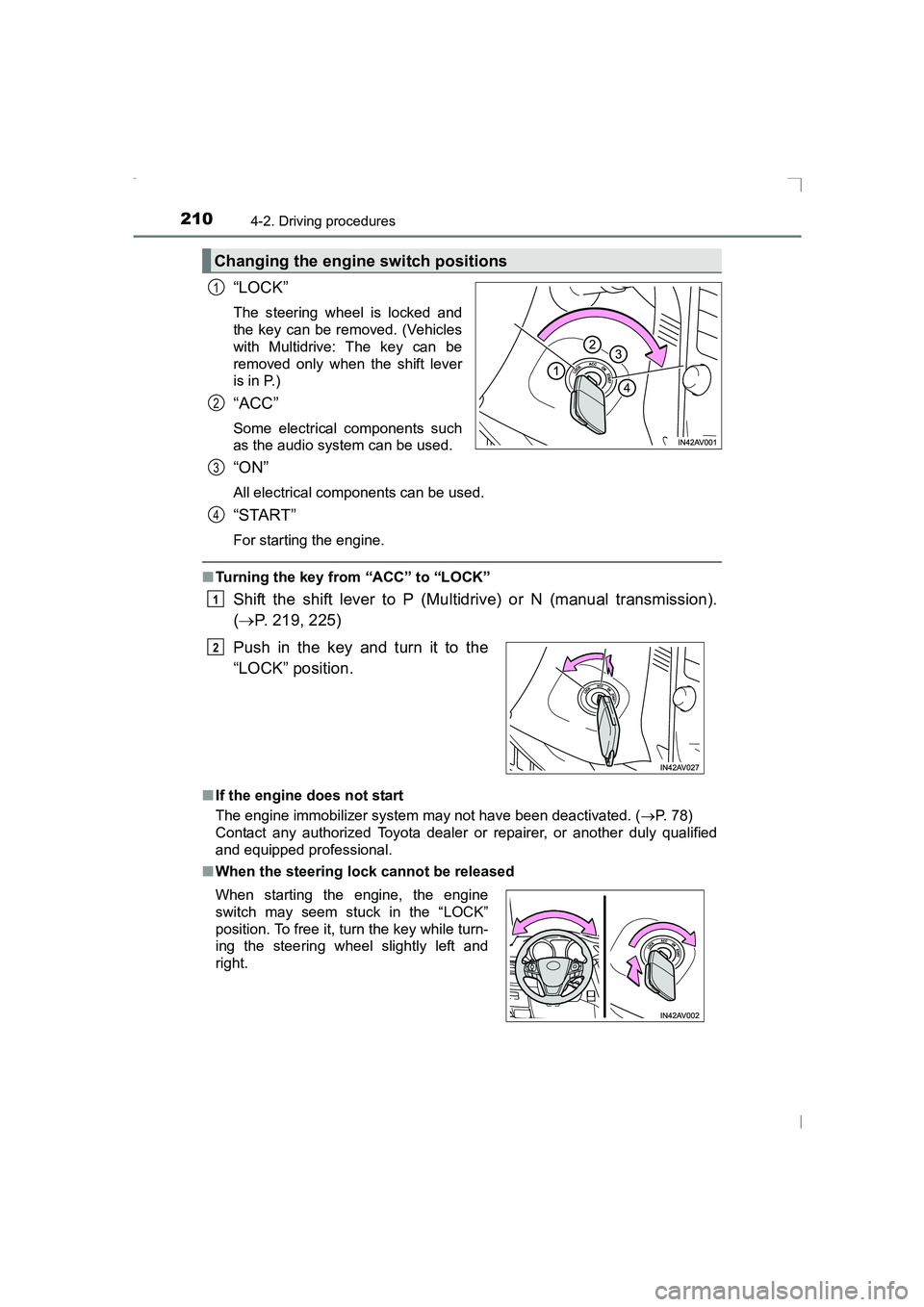
“LOCK”
The steering wheel is locked and
the key can be removed. (Vehicles
with Multidrive: The key can be
removed only when the shift lever
is in P.)
“ACC”
Some electrical components such
as the audio system can be used.
“ON”
All electrical components can be used.
“START”
For starting the engine.
■Turning the key from “ACC” to “LOCK”
Shift the shift lever to P (Multidrive) or N (manual transmission).
(→ P. 219, 225)
■If the engine does not start
The engine immobilizer system may not have been deactivated. ( →P. 78)
Contact any authorized Toyota dealer or repairer, or another duly qualified
and equipped professional.
■ When the steering lock cannot be released
Changing the engine switch positions
1
2
Push in the key and turn it to the
“LOCK” position.
When starting the engine, the engine
switch may seem stuck in the “LOCK”
position. To free it, turn the key while turn-
ing the steering wheel slightly left and
right.
3
4
1
2
AVENSIS_OM_OM20C20E_(EE).book Page 210 Thursday, January 29, 2015 1:47 PM
Page 211 of 648
2114-2. Driving procedures
4
Driving
AVENSIS_OM_OM20C20E_(EE)■
Key reminder function
A buzzer sounds if the driver’s door is opened, while the engine switch is in
the “LOCK” or “ACC” position to remind you to remove the key.
WARNING
■ When starting the engine
Always start the engine while sitting in the driver’s seat. Do not depress the
accelerator pedal while starting the engine under any circumstances.
Doing so may cause an accident resulting in death or serious injury.
■ Caution when driving
Do not turn the engine switch to the “LOCK” position while driving. If, in an
emergency, you must turn the engine off while the vehicle is moving, turn
the engine switch only to the “ACC” position to stop the engine. An accident
may result if the engine is stopped while driving. ( →P. 509)
NOTICE
■ To prevent battery discharge
Do not leave the engine switch in the “ACC” or “ON” position for long peri-
ods of time without the engine running.
■ When starting the engine
●Do not crank for more than 30 seconds at a time. This may overheat the
starter and wiring systems.
● Do not race a cold engine.
● If the engine becomes difficult to start or stalls frequently, have your vehi-
cle checked by any authorized Toyota dealer or repairer, or another duly
qualified and equipped professional immediately.
AVENSIS_OM_OM20C20E_(EE).book Page 211 Thursday, January 29, 2015 1:47 PM
Page 212 of 648
2124-2. Driving procedures
AVENSIS_OM_OM20C20E_(EE)
Engine (ignition) switch (vehicles with
smar t entr y & start system)
XMultidrive
Push the parking brake switch to check that the parking brake is
set. (→P. 229)
Parking brake indicator will come on.
Check that the shift lever is set in P.
Firmly depress the brake pedal.
The engine switch indicator will turn green. If the indicator does not turn
green, the engine cannot be started.
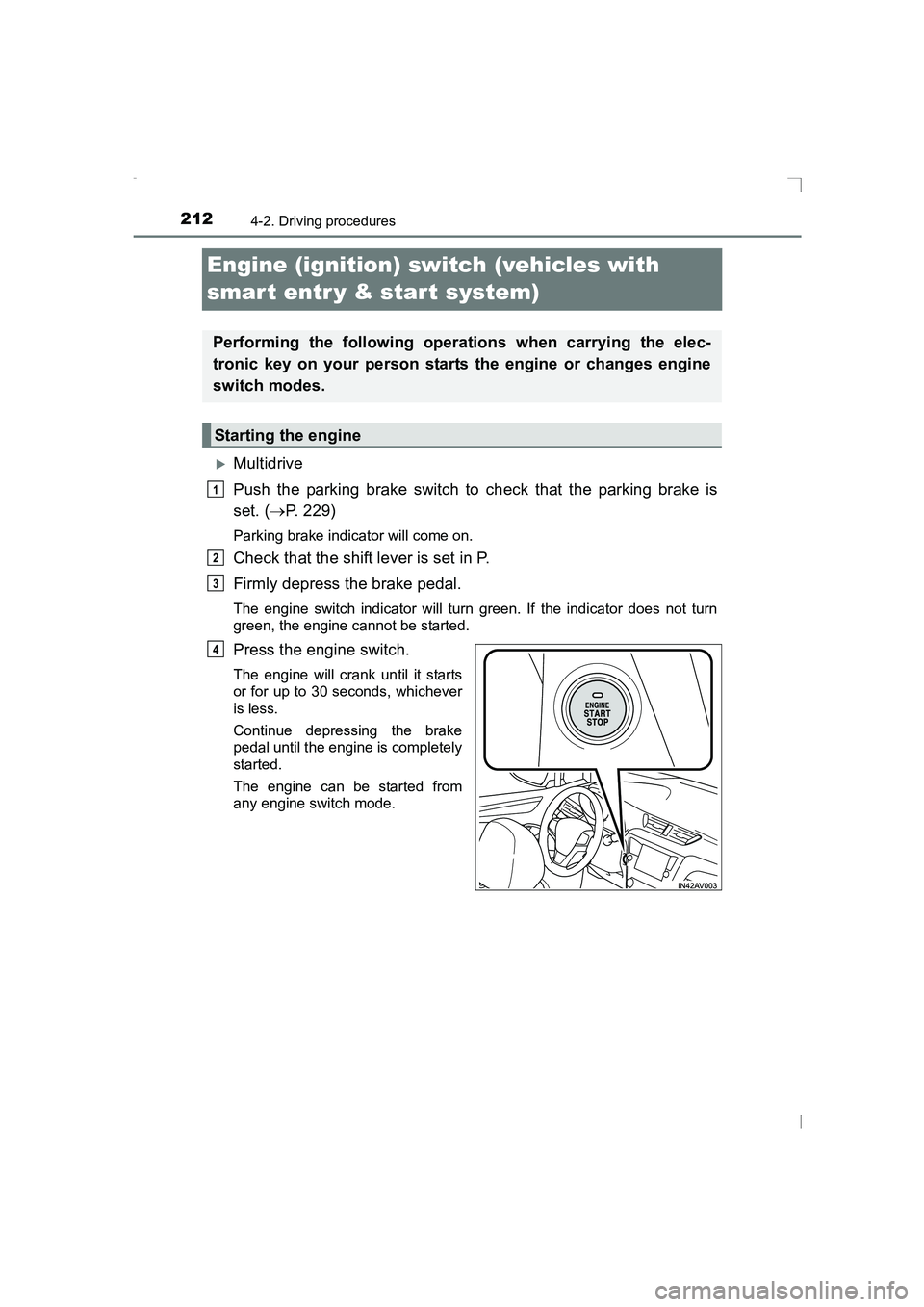
Press the engine switch.
The engine will crank until it starts
or for up to 30 seconds, whichever
is less.
Continue depressing the brake
pedal until the engine is completely
started.
The engine can be started from
any engine switch mode.
Performing the following operations when carrying the elec-
tronic key on your person starts the engine or changes engine
switch modes.
Starting the engine
1
2
3
4
AVENSIS_OM_OM20C20E_(EE).book Page 212 Thursday, January 29, 2015 1:47 PM
Page 216 of 648
2164-2. Driving procedures
AVENSIS_OM_OM20C20E_(EE)
■Auto power off function
XVehicles with Multidrive
If the vehicle is left in ACCESSORY mode for more than 20 minutes or IGNI-
TION ON mode (the engine is not running) for more than an hour with the
shift lever in P, the engine switch will automatically turn off. However, this
function cannot entirely prevent battery discharge. Do not leave the vehicle
with the engine switch in ACCESSORY or IGNITION ON mode for long peri-
ods of time when the engine is not running.
XVehicles with manual transmission
If the vehicle is left in ACCESSORY mode for more than 20 minutes or IGNI-
TION ON mode (the engine is not running) for more than an hour, the engine
switch will automatically turn off. However, this function cannot entirely pre-
vent battery discharge. Do not leave the vehicle with the engine switch in
ACCESSORY or IGNITION ON mode for long periods of time when the
engine is not running.
■ Operation of the engine switch
When operating the engine switch, one short, firm press is enough. If the
switch is pressed improperly, the engi ne may not start or the engine switch
mode may not change. It is not necessary to press and hold the switch.
■ Electronic key battery depletion
→ P. 124
■ Conditions affecting operation
→ P. 152
■ Note for the smart entry & start system
→ P. 153
■ If the engine does not start
The engine immobilizer system may not have been deactivated. ( →P. 78)
Contact any authorized Toyota dealer or repairer, or another duly qualified
and equipped professional.
■ Steering lock
After turning the engine switch off and opening and closing the doors, the
steering wheel will be locked due to the steering lock function. Operating the
engine switch again automatically cancels the steering lock.
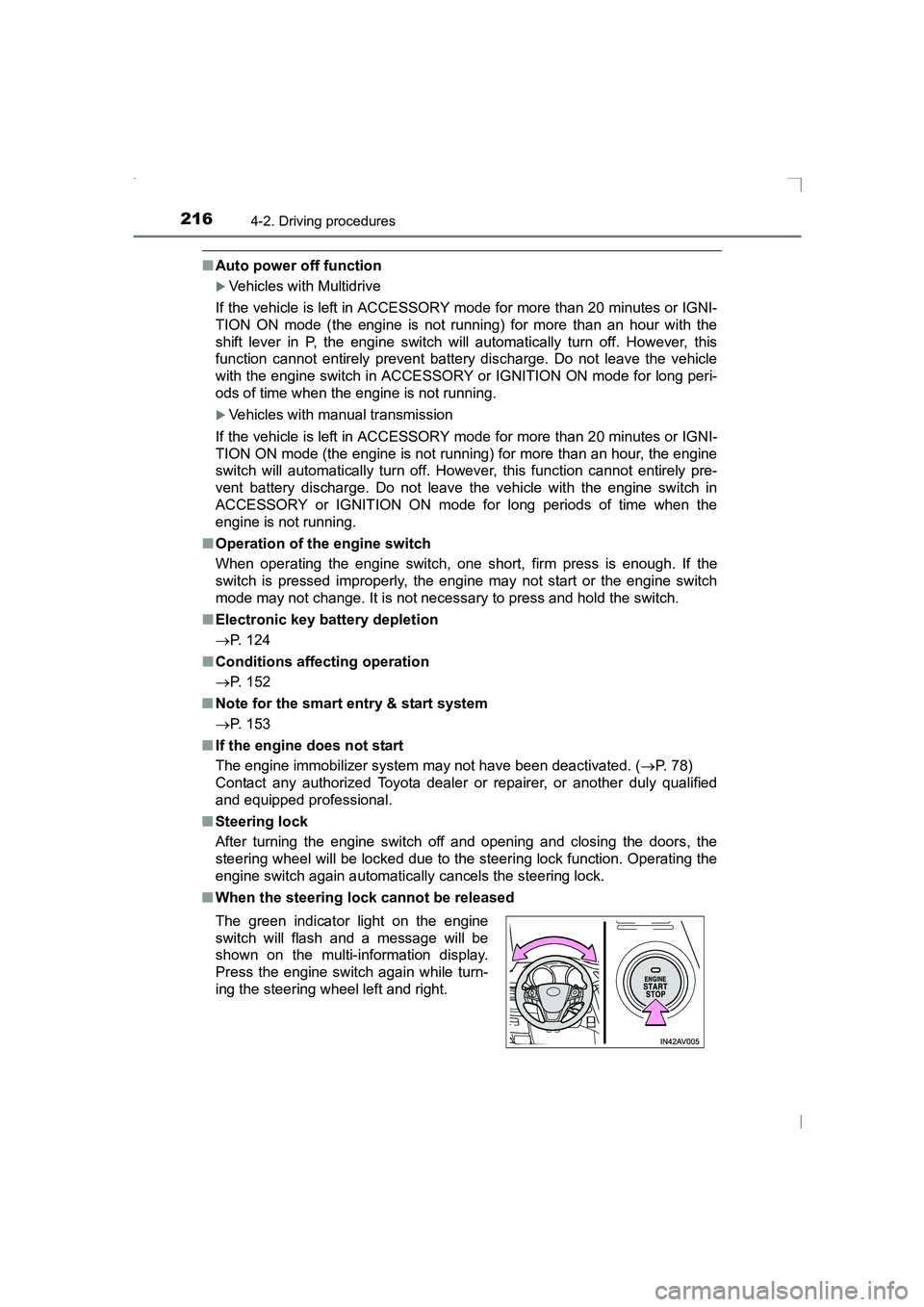
■ When the steering lock cannot be released
The green indicator light on the engine
switch will flash and a message will be
shown on the multi-information display.
Press the engine switch again while turn-
ing the steering wheel left and right.
AVENSIS_OM_OM20C20E_(EE).book Page 216 Thursday, January 29, 2015 1:47 PM
Page 217 of 648
2174-2. Driving procedures
4
Driving
AVENSIS_OM_OM20C20E_(EE)■
Steering lock motor overheating prevention
To prevent the steering lock motor from overheating, the motor may be sus-
pended if the engine is turned on and off repeatedly in a short period of time.
In this case, refrain from running the engine. After about 10 seconds, the
steering lock motor will resume functioning.
■ When the engine switch in dicator flashes in amber
The system may be malfunctioning. Have the vehicle inspected by any autho-
rized Toyota dealer or repairer, or another duly qualified and equipped profes-
sional, immediately.
■ When the electronic key battery is depleted
→ P. 582
WARNING
■ When starting the engine
Always start the engine while sitting in the driver’s seat. Do not depress the
accelerator pedal while starting the engine under any circumstances.
Doing so may cause an accident resulting in death or serious injury.
■ Caution while driving
If engine failure occurs while the vehicle is moving, do not lock or open the
doors until the vehicle reaches a safe and complete stop. Activation of the
steering lock in this circumstance may lead to an accident, resulting in
death or serious injury.
■ Stopping the engine in an emergency
If you want to stop the engine in an emergency while driving the vehicle,
press and hold the engine switch for more than 2 seconds, or press it briefly
3 times or more in succession. ( →P. 509)
However, do not touch the engine switch while driving except in an emer-
gency. Turning the engine off while driving will not cause loss of steering or
braking control, but the power assist to these systems will be lost. This will
make it more difficult to steer and brake, so you should pull over and stop
the vehicle as soon as it is safe to do so.
AVENSIS_OM_OM20C20E_(EE).book Page 217 Thursday, January 29, 2015 1:47 PM
Page 354 of 648
3545-6. Using Bluetooth® devices
AVENSIS_OM_OM20C20E_(EE)
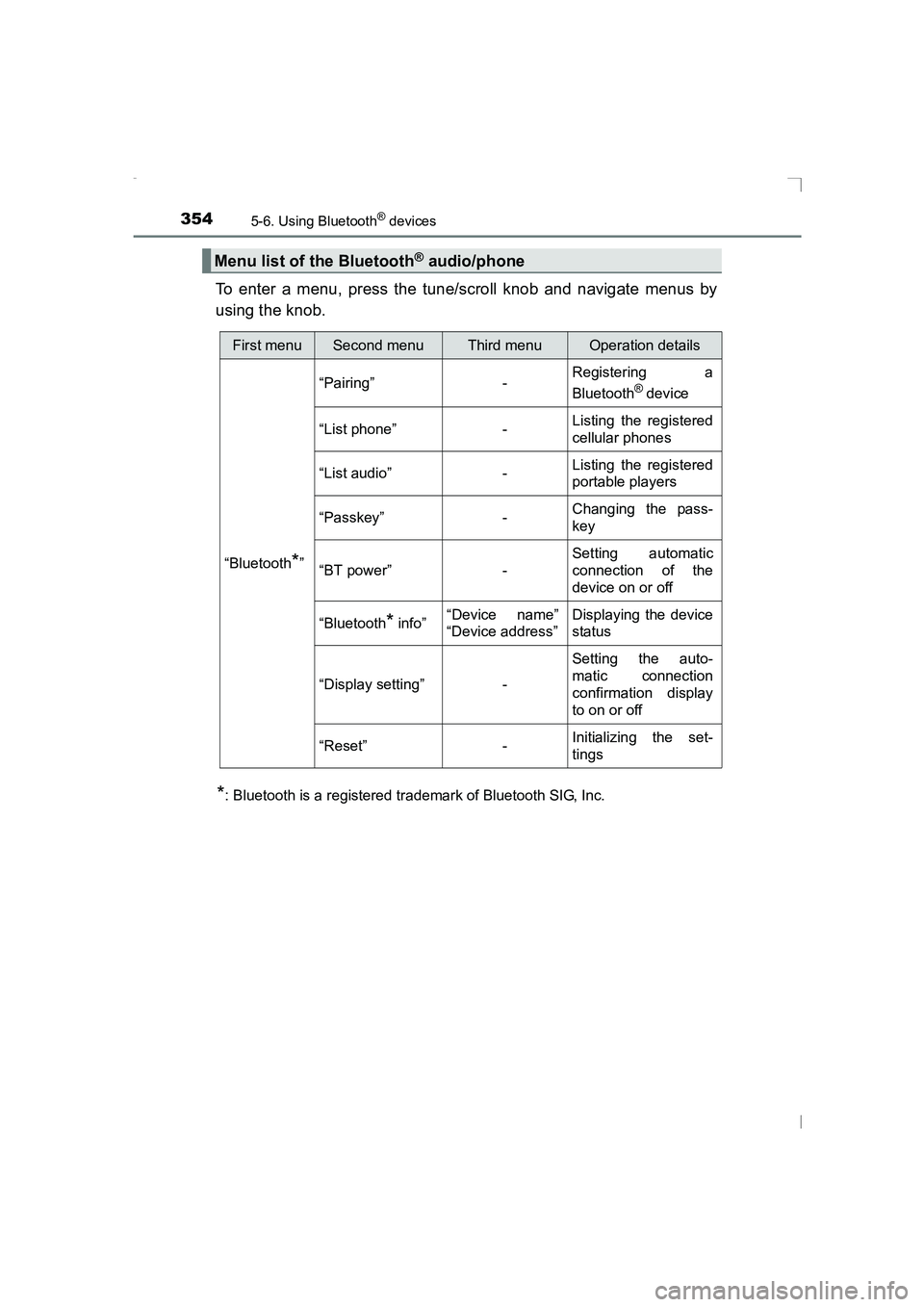
To enter a menu, press the tune/scroll knob and navigate menus by
using the knob.
*: Bluetooth is a registered trademark of Bluetooth SIG, Inc.
Menu list of the Bluetooth® audio/phone
First menuSecond menuThird menuOperation details
“Bluetooth
*” “Pairing” -
Registering a
Bluetooth
® device
“List phone” - Listing the registered
cellular phones
“List audio” - Listing the registered
portable players
“Passkey” - Changing the pass-
key
“BT power” - Setting automatic
connection of the
device on or off
“Bluetooth
* info” “Device name”
“Device address” Displaying the device
status
“Display setting” - Setting the auto-
matic connection
confirmation display
to on or off
“Reset” - Initializing the set-
tings
AVENSIS_OM_OM20C20E_(EE).book Page 354 Thursday, January 29,
2015 1:47 PM