key TOYOTA AVENSIS 2015 Repair Manual
[x] Cancel search | Manufacturer: TOYOTA, Model Year: 2015, Model line: AVENSIS, Model: TOYOTA AVENSIS 2015Pages: 648, PDF Size: 39.64 MB
Page 510 of 648
5108-1. Essential information
AVENSIS_OM_OM20C20E_(EE)
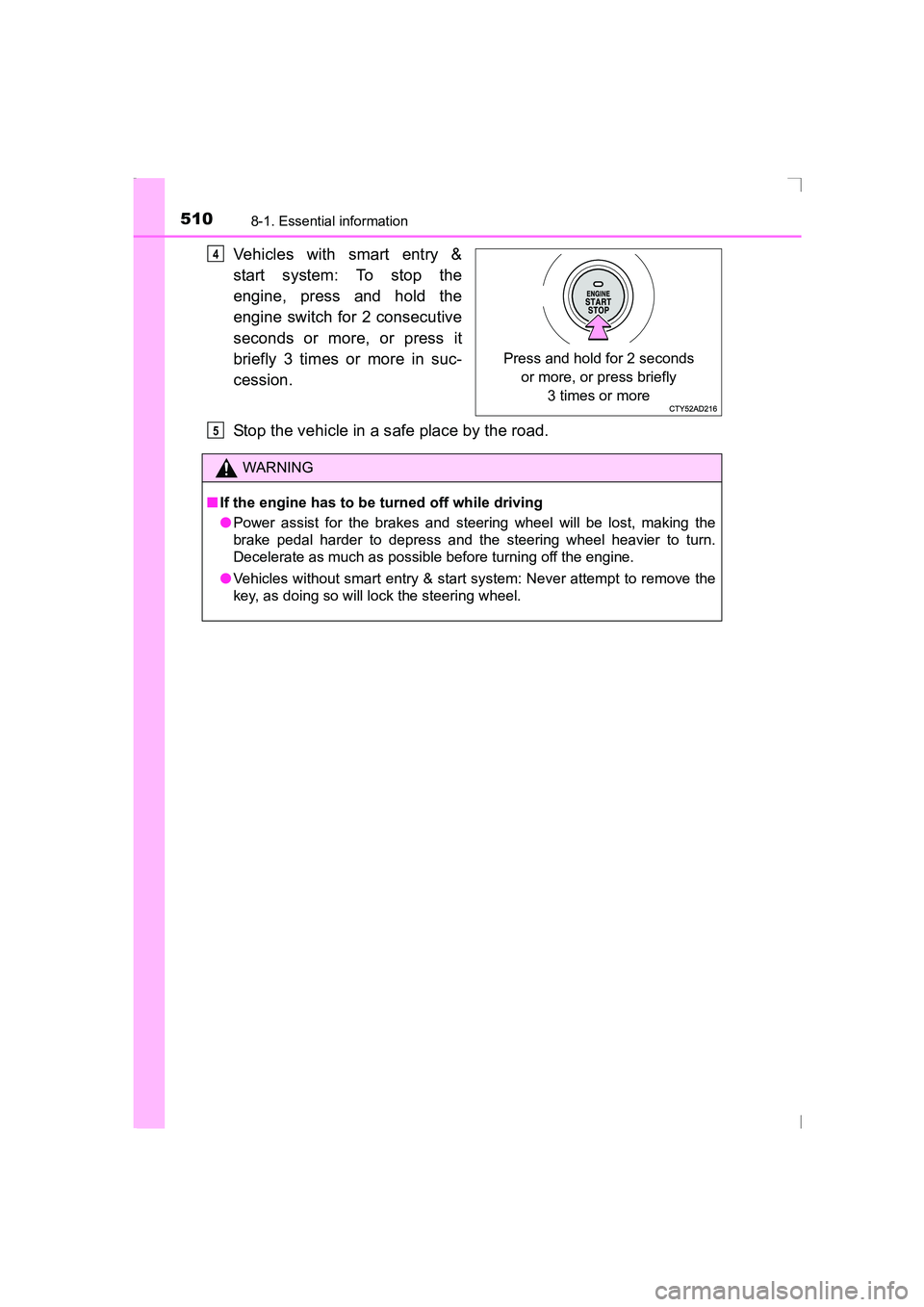
Vehicles with smart entry &
start system: To stop the
engine, press and hold the
engine switch for 2 consecutive
seconds or more, or press it
briefly 3 times or more in suc-
cession.
Stop the vehicle in a safe place by the road.
Press and hold for 2 seconds or more, or press briefly 3 times or more
4
WARNING
■ If the engine has to be turned off while driving
●Power assist for the brakes and steering wheel will be lost, making the
brake pedal harder to depress and the steering wheel heavier to turn.
Decelerate as much as possible before turning off the engine.
● Vehicles without smart entry & start system: Never attempt to remove the
key, as doing so will lock the steering wheel.
5
AVENSIS_OM_OM20C20E_(EE).book Page 510 Thursday, January 29, 2015 1:47 PM
Page 517 of 648
5178-2. Steps to take in an emergency
AVENSIS_OM_OM20C20E_(EE)
8
When trouble arises
NOTICE
■To prevent damage to the vehicle when towing using a wheel-lift type
truck
●Vehicles without smart entry & start system: Do not tow the vehicle from
the rear when the engine switch is in the “LOCK” position or the key is
removed. The steering lock mechanism is not strong enough to hold the
front wheels straight.
● Vehicles with smart entry & start system: Do not tow the vehicle from the
rear when the engine switch is off. The steering lock mechanism is not
strong enough to hold the front wheels straight.
● When raising the vehicle, ensure adequate ground clearance for towing at
the opposite end of the raised vehicle. Without adequate clearance, the
vehicle could be damaged while being towed.
■ To prevent damage to the vehicle when towing with a sling-type truck
Do not tow with a sling-type truck, either from the front or rear.
■ To prevent damage to the vehicle during emergency towing
Do not secure cables or chains to the suspension components.
■ To prevent damage to the vehicle when using a flatbed truck
●Do not drive over the wheel chocks, as doing so may damage the tires.
● When lashing the front tires, do not tie down the vehicle over any parts
other than the tires (do not use parts such as the suspension).
AVENSIS_OM_OM20C20E_(EE).book Page 517 Thursday, January 29, 2015 1:47 PM
Page 538 of 648
5388-2. Steps to take in an emergency
AVENSIS_OM_OM20C20E_(EE)
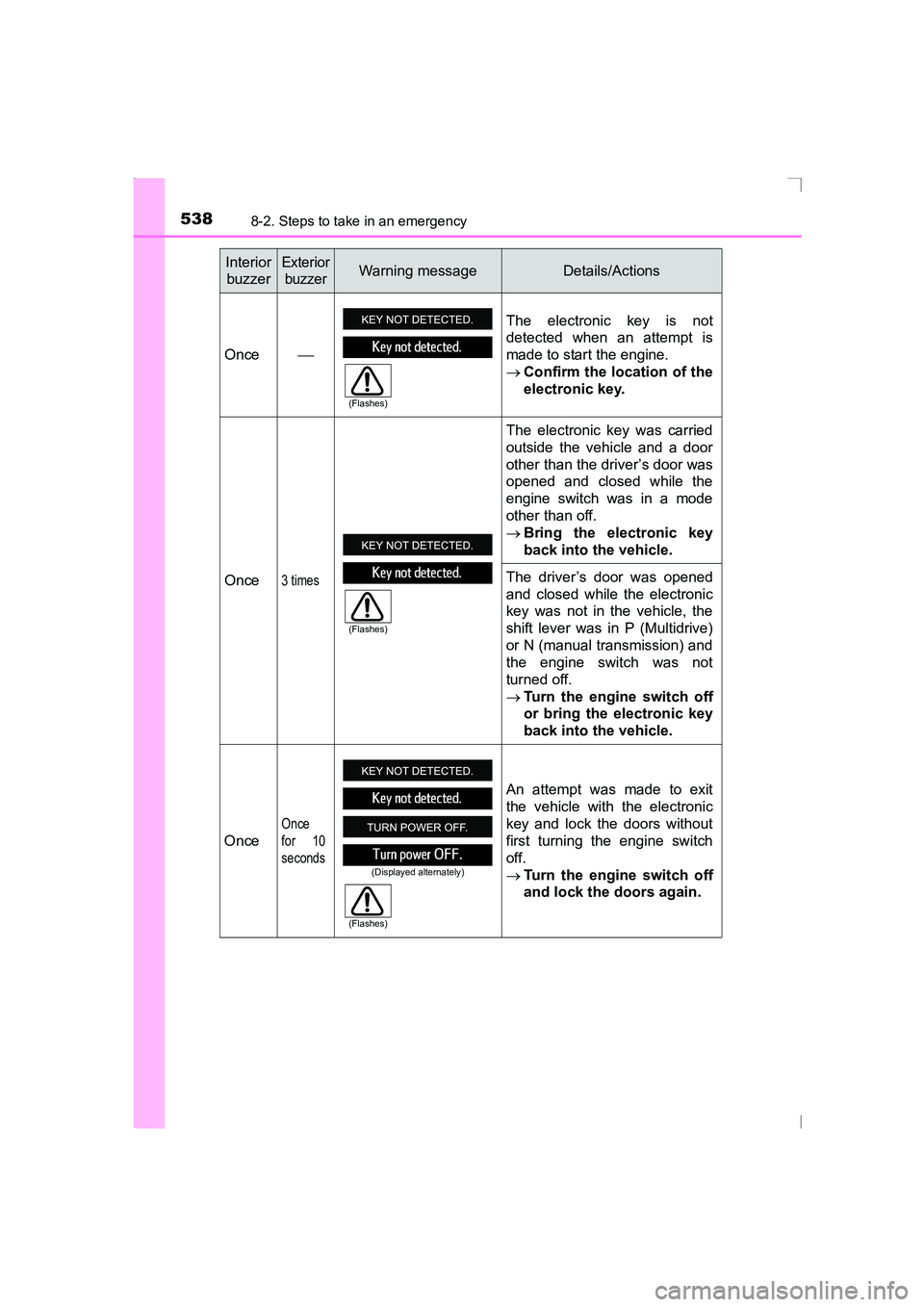
Interior buzzerExterior buzzerWarning messageDetails/Actions
Once The electronic key is not
detected when an attempt is
made to start the engine.
→
Confirm the location of the
electronic key.
Once
3 times
The electronic key was carried
outside the vehicle and a door
other than the driver’s door was
opened and closed while the
engine switch was in a mode
other than off.
→ Bring the electronic key
back into the vehicle.
The driver’s door was opened
and closed while the electronic
key was not in the vehicle, the
shift lever was in P (Multidrive)
or N (manual transmission) and
the engine switch was not
turned off.
→ Turn the engine switch off
or bring the electronic key
back into the vehicle.
Once
Once
for 10
seconds
An attempt was made to exit
the vehicle with the electronic
key and lock the doors without
first turning the engine switch
off.
→ Turn the engine switch off
and lock the doors again.
(Flashes)
(Flashes)
(Displayed alternately)
(Flashes)
AVENSIS_OM_OM20C20E_(EE).book Page 538 Thursday, January 29, 2015 1:47 PM
Page 539 of 648
5398-2. Steps to take in an emergency
AVENSIS_OM_OM20C20E_(EE)
8
When trouble arises
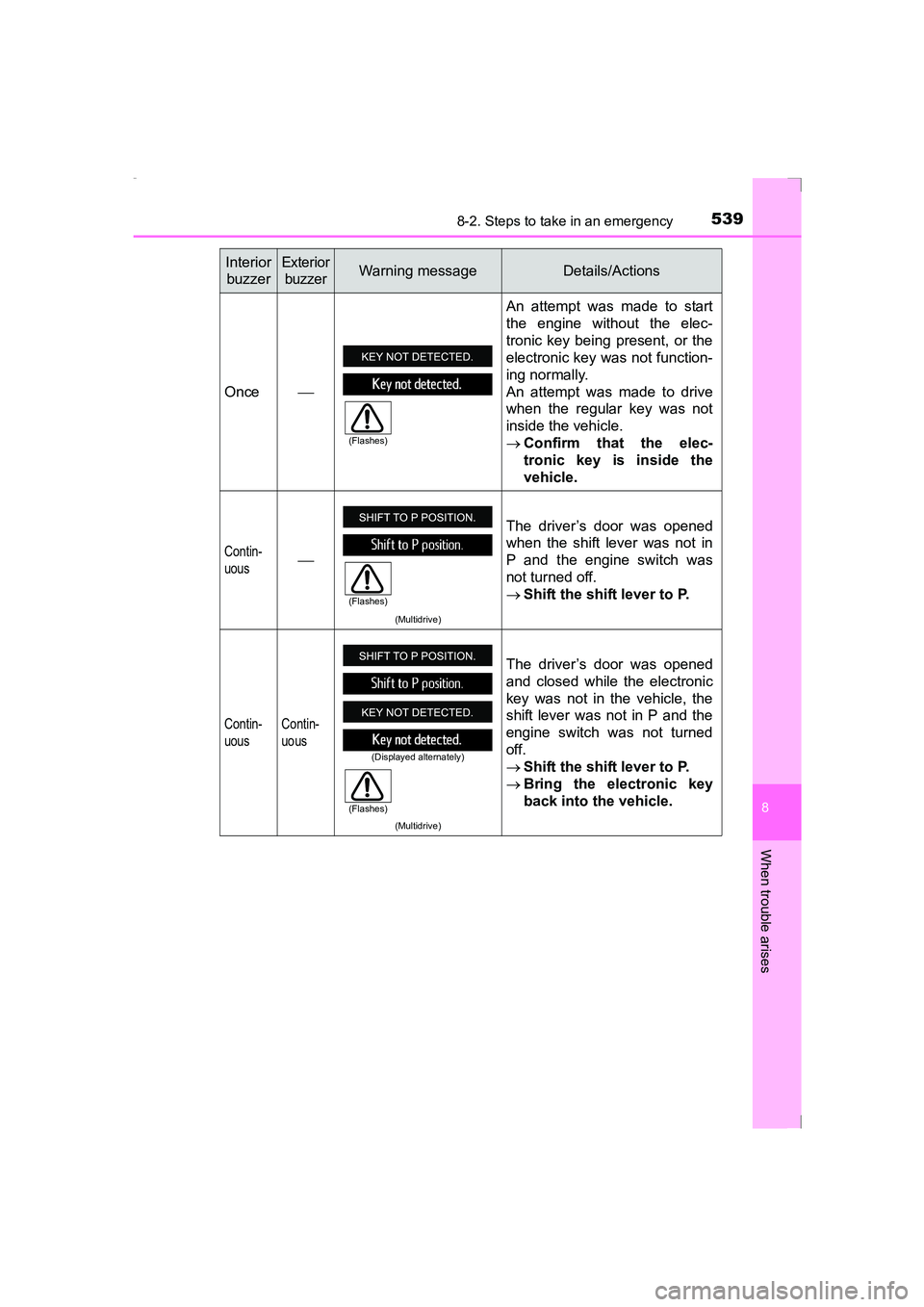
Once An attempt was made to start
the engine without the elec-
tronic key being present, or the
electronic key was not function-
ing normally.
An attempt was made to drive
when the regular key was not
inside the vehicle.
→
Confirm that the elec-
tronic key is inside the
vehicle.
Contin-
uous
(Multidrive)
The driver’s door was opened
when the shift lever was not in
P and the engine switch was
not turned off.
→Shift the shift lever to P.
Contin-
uous Contin-
uous
(Multidrive)
The driver’s door was opened
and closed while the electronic
key was not in the vehicle, the
shift lever was not in P and the
engine switch was not turned
off.
→
Shift the shift lever to P.
→ Bring the electronic key
back into the vehicle.
Interior
buzzerExterior buzzerWarning messageDetails/Actions
(Flashes)
(Flashes)
(Displayed alternately)
(Flashes)
AVENSIS_OM_OM20C20E_(EE).book Page 539 Thursday, January 29, 2015 1:47 PM
Page 540 of 648
5408-2. Steps to take in an emergency
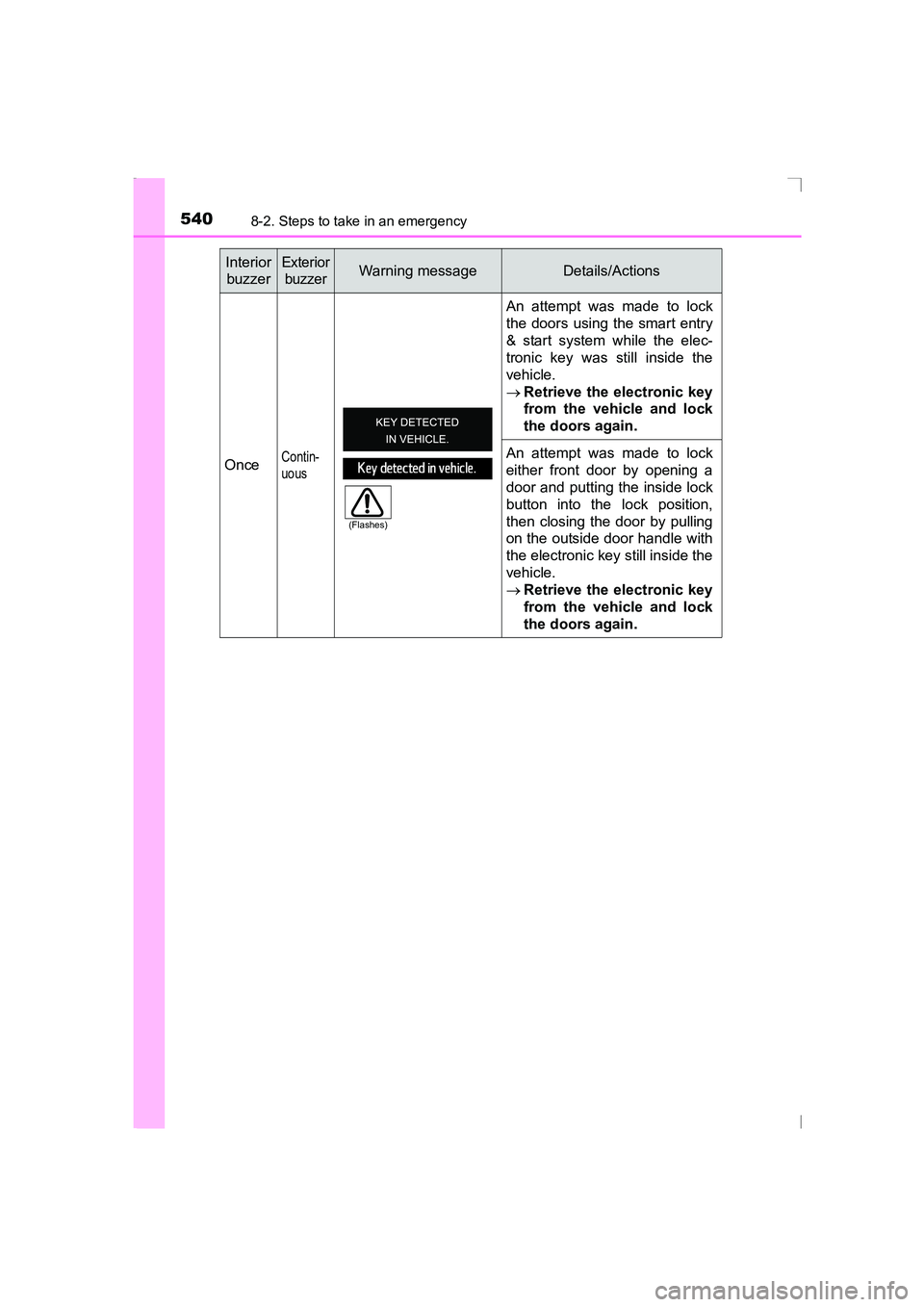
AVENSIS_OM_OM20C20E_(EE)Once
Contin-
uous
An attempt was made to lock
the doors using the smart entry
& start system while the elec-
tronic key was still inside the
vehicle.
→
Retrieve the electronic key
from the vehicle and lock
the doors again.
An attempt was made to lock
either front door by opening a
door and putting the inside lock
button into the lock position,
then closing the door by pulling
on the outside door handle with
the electronic key still inside the
vehicle.
→ Retrieve the electronic key
from the vehicle and lock
the doors again.
Interior
buzzerExterior buzzerWarning messageDetails/Actions
(Flashes)
AVENSIS_OM_OM20C20E_(EE).book Page 540 Thursday, January 29, 2015 1:47 PM
Page 541 of 648
5418-2. Steps to take in an emergency
AVENSIS_OM_OM20C20E_(EE)
8
When trouble arises
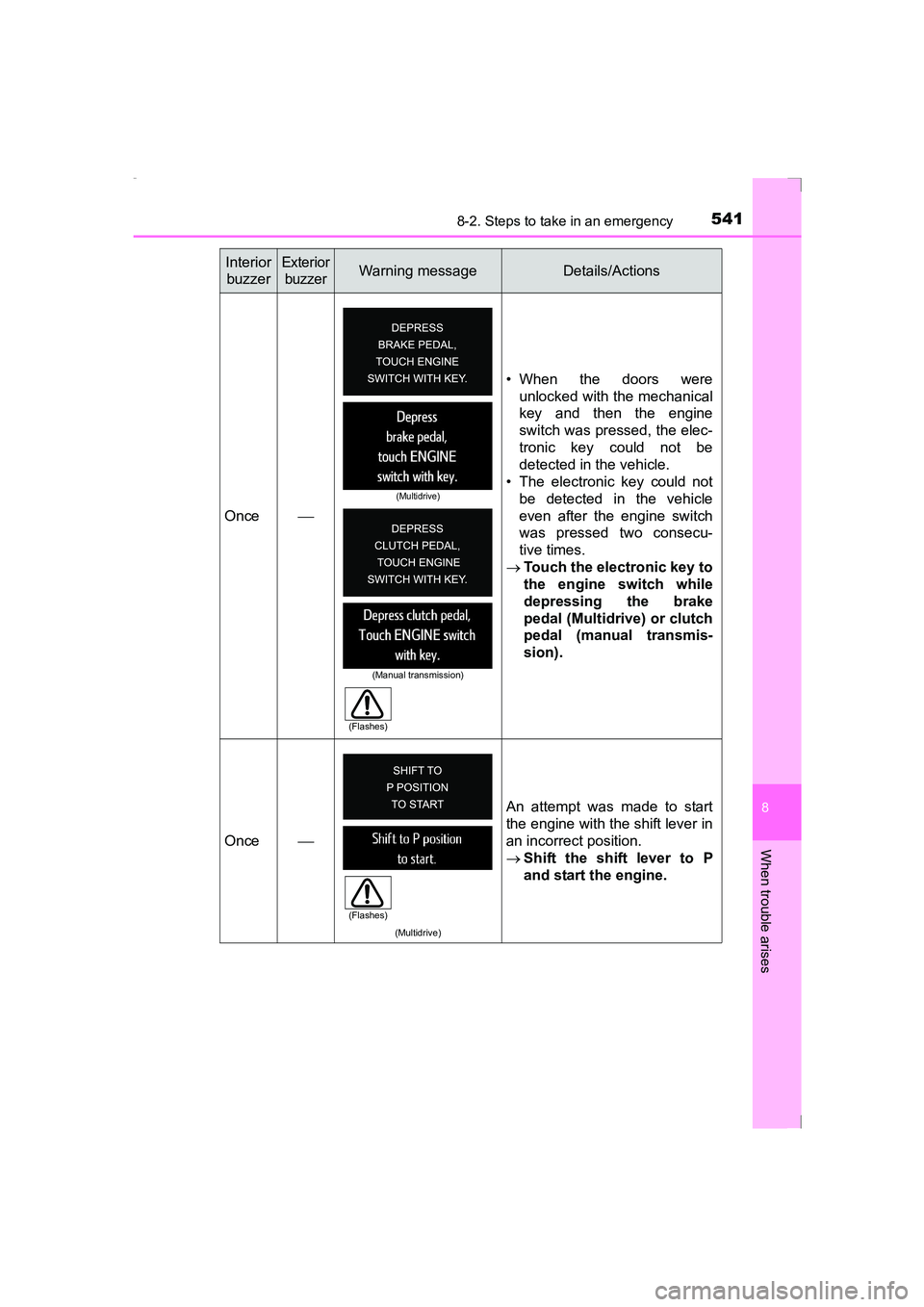
Once • When the doors were
unlocked with the mechanical
key and then the engine
switch was pressed, the elec-
tronic key could not be
detected in the vehicle.
• The electronic key could not
be detected in the vehicle
even after the engine switch
was pressed two consecu-
tive times.
→ Touch the electronic key to
the engine switch while
depressing the brake
pedal (Multidrive) or clutch
pedal (manual transmis-
sion).
Once
(Multidrive)
An attempt was made to start
the engine with the shift lever in
an incorrect position.
→Shift the shift lever to P
and start the engine.
Interior
buzzerExterior buzzerWarning messageDetails/Actions
(Multidrive)
(Manual transmission)
(Flashes)
(Flashes)
AVENSIS_OM_OM20C20E_(EE).book Page 541 Thursday, January 29, 2015 1:47 PM
Page 542 of 648
5428-2. Steps to take in an emergency
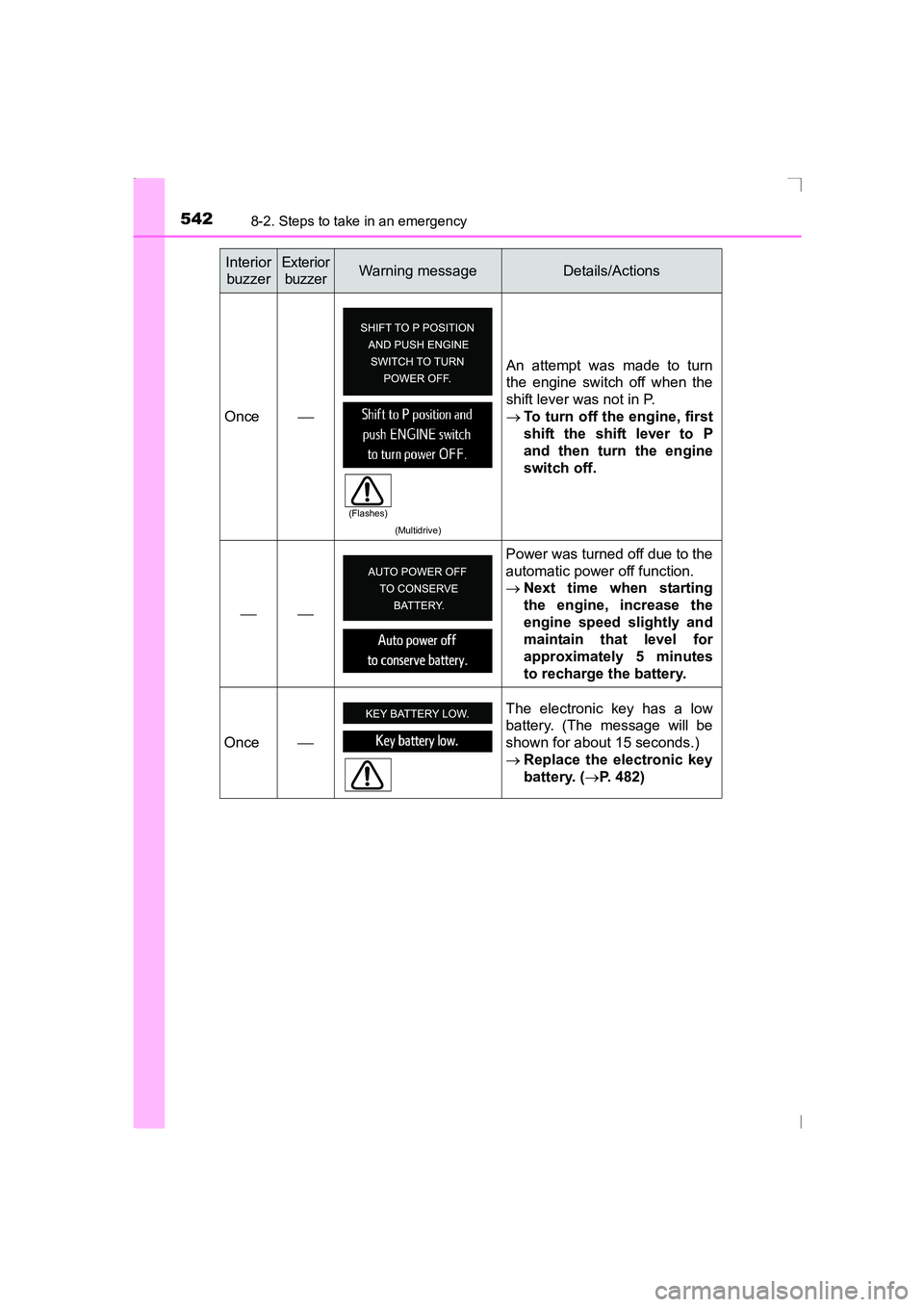
AVENSIS_OM_OM20C20E_(EE)Once
(Multidrive)
An attempt was made to turn
the engine switch off when the
shift lever was not in P.
→To turn off the engine, first
shift the shift lever to P
and then turn the engine
switch off.
Power was turned off due to the
automatic power off function.
→
Next time when starting
the engine, increase the
engine speed slightly and
maintain that level for
approximately 5 minutes
to recharge the battery.
Once The electronic key has a low
battery. (The message will be
shown for about 15 seconds.)
→
Replace the electronic key
battery. ( →P. 482)
Interior
buzzerExterior buzzerWarning messageDetails/Actions
(Flashes)
AVENSIS_OM_OM20C20E_(EE).book Page 542 Thursday, January 29, 2015 1:47 PM
Page 543 of 648
5438-2. Steps to take in an emergency
AVENSIS_OM_OM20C20E_(EE)
8
When trouble arises
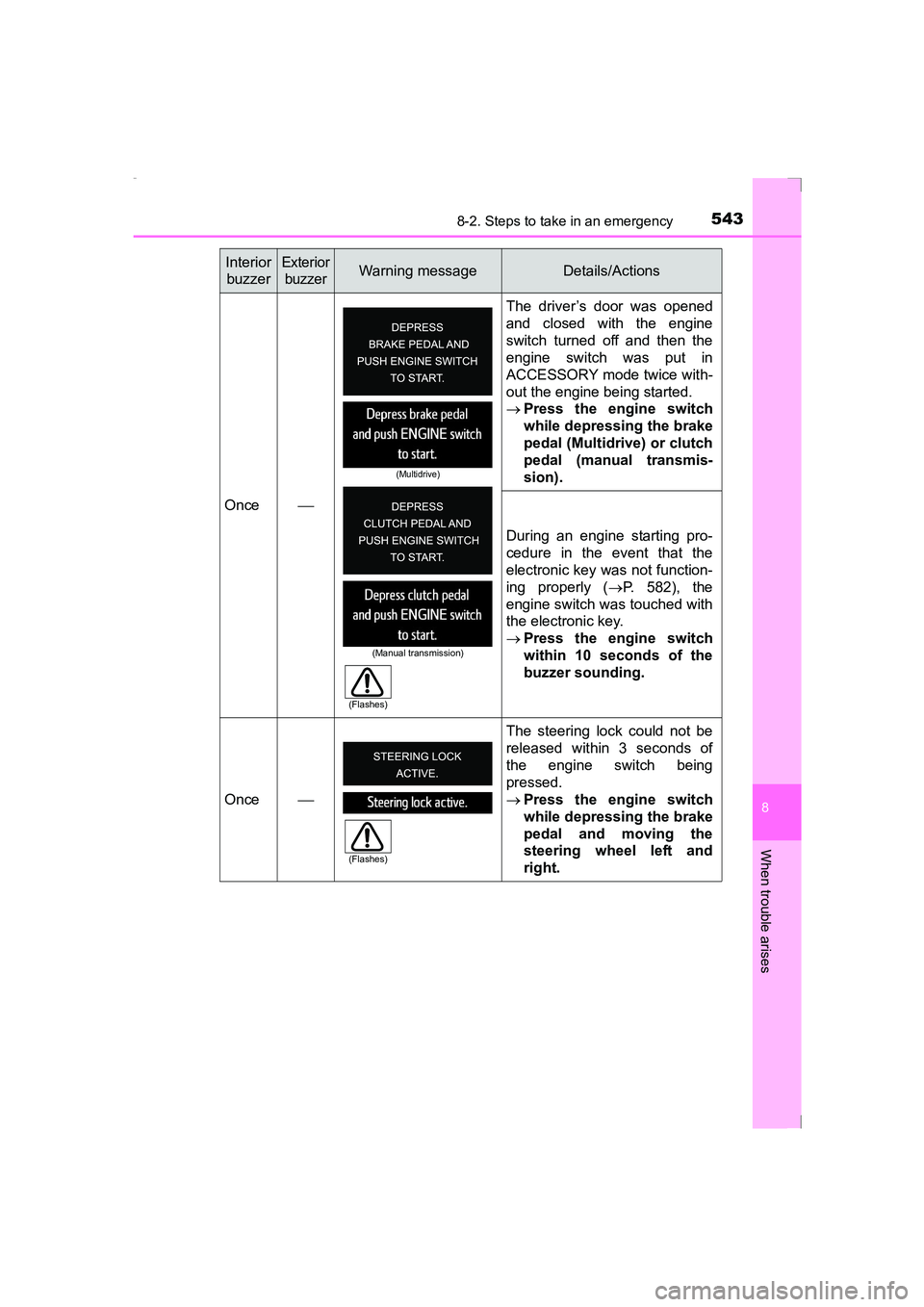
Once The driver’s door was opened
and closed with the engine
switch turned off and then the
engine switch was put in
ACCESSORY mode twice with-
out the engine being started.
→
Press the engine switch
while depressing the brake
pedal (Multidrive) or clutch
pedal (manual transmis-
sion).
During an engine starting pro-
cedure in the event that the
electronic key was not function-
ing properly ( →P. 582), the
engine switch was touched with
the electronic key.
→ Press the engine switch
within 10 seconds of the
buzzer sounding.
Once The steering lock could not be
released within 3 seconds of
the engine switch being
pressed.
→
Press the engine switch
while depressing the brake
pedal and moving the
steering wheel left and
right.
Interior
buzzerExterior buzzerWarning messageDetails/Actions
(Multidrive)
(Manual transmission)
(Flashes)
(Flashes)
AVENSIS_OM_OM20C20E_(EE).book Page 543 Thursday, January 29, 2015 1:47 PM
Page 582 of 648
5828-2. Steps to take in an emergency
AVENSIS_OM_OM20C20E_(EE)
If the electronic key does not operate properly
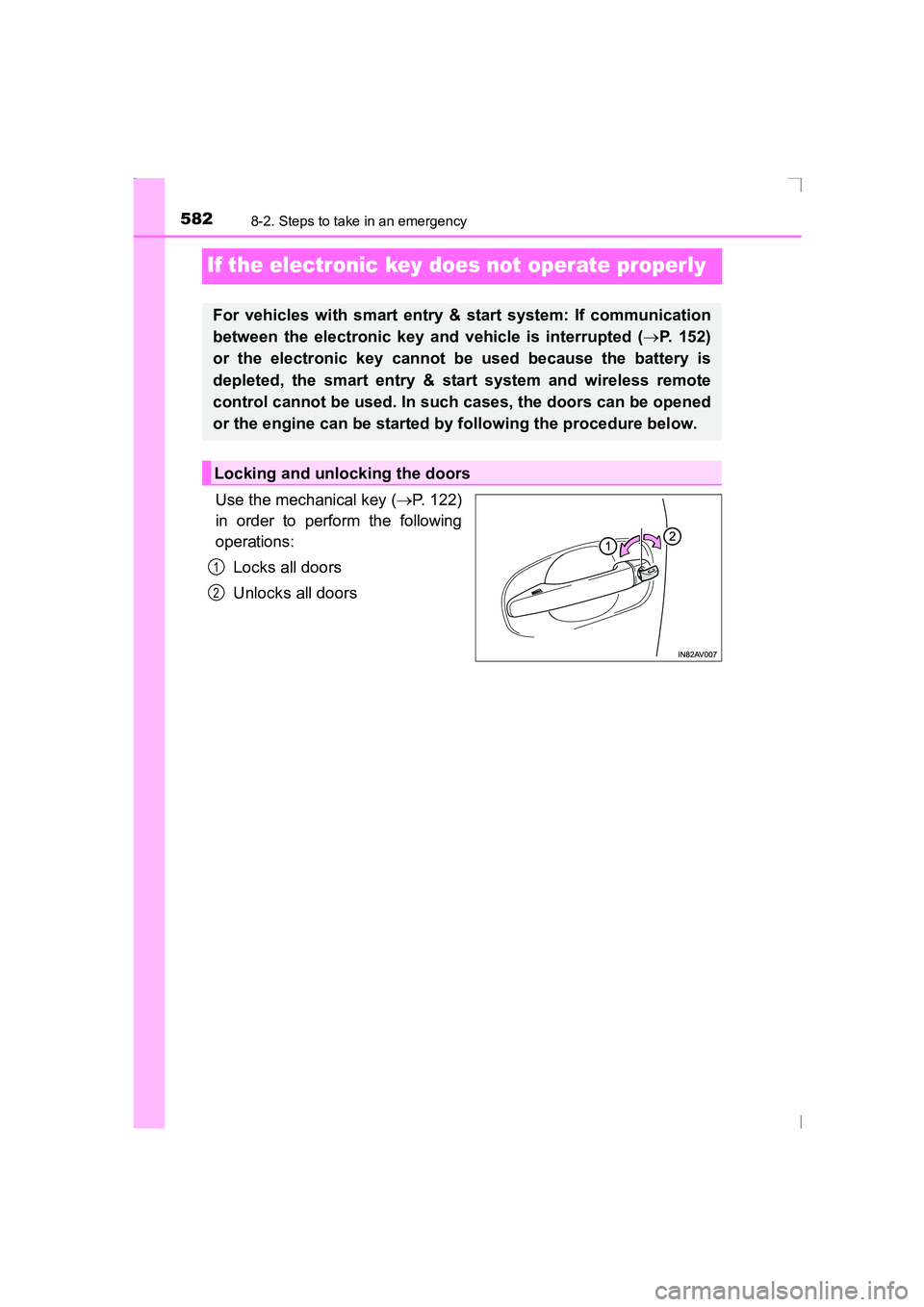
Use the mechanical key (→P. 122)
in order to perform the following
operations:
Locks all doors
Unlocks all doors
For vehicles with smart entry & start system: If communication
between the electronic key and vehicle is interrupted ( →P. 152)
or the electronic key cannot be used because the battery is
depleted, the smart entry & start system and wireless remote
control cannot be used. In such cases, the doors can be opened
or the engine can be started by following the procedure below.
Locking and unlocking the doors
1
2
AVENSIS_OM_OM20C20E_(EE).book Page 582 Thursday, January 29, 2015 1:47 PM
Page 583 of 648
5838-2. Steps to take in an emergency
AVENSIS_OM_OM20C20E_(EE)
8
When trouble arises
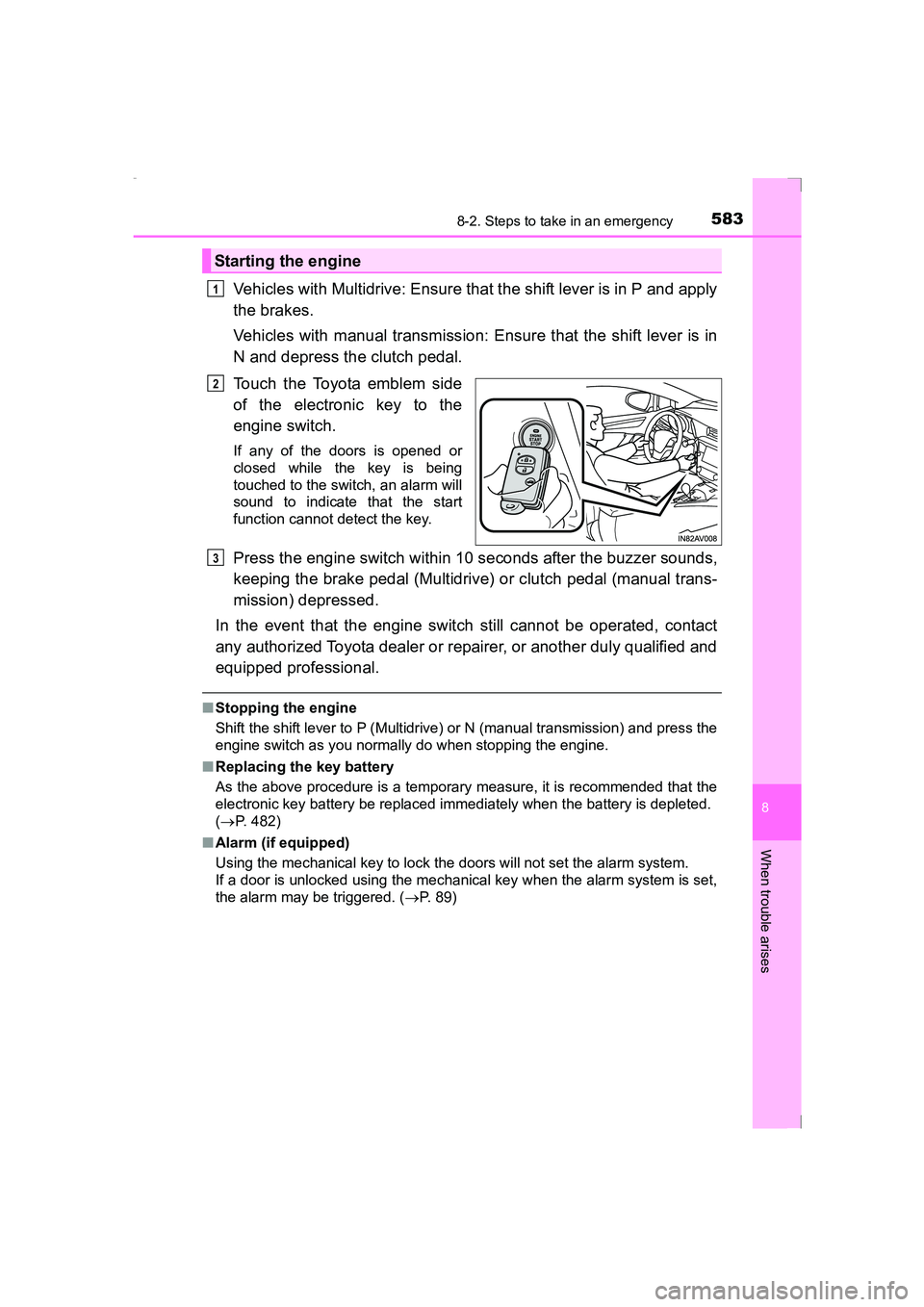
Vehicles with Multidrive: Ensure that the shift lever is in P and apply
the brakes.
Vehicles with manual transmission: Ensure that the shift lever is in
N and depress the clutch pedal.
Touch the Toyota emblem side
of the electronic key to the
engine switch.
If any of the doors is opened or
closed while the key is being
touched to the switch, an alarm will
sound to indicate that the start
function cannot detect the key.
Press the engine switch within 10 seconds after the buzzer sounds,
keeping the brake pedal (Multidrive) or clutch pedal (manual trans-
mission) depressed.
In the event that the engine switch still cannot be operated, contact
any authorized Toyota dealer or repairer, or another duly qualified and
equipped professional.
■ Stopping the engine
Shift the shift lever to P (Multidrive) or N (manual transmission) and press the
engine switch as you normally do when stopping the engine.
■ Replacing the key battery
As the above procedure is a temporary measure, it is recommended that the
electronic key battery be replaced imm ediately when the battery is depleted.
( → P. 482)
■ Alarm (if equipped)
Using the mechanical key to lock the doors will not set the alarm system.
If a door is unlocked using the mechanical key when the alarm system is set,
the alarm may be triggered. ( →P. 89)
Starting the engine
1
2
3
AVENSIS_OM_OM20C20E_(EE).book Page 583 Thursday, January 29, 2015 1:47 PM