display TOYOTA AVENSIS 2018 Owners Manual
[x] Cancel search | Manufacturer: TOYOTA, Model Year: 2018, Model line: AVENSIS, Model: TOYOTA AVENSIS 2018Pages: 660, PDF Size: 63.16 MB
Page 375 of 660
3755-8. Bluetooth® Audio
5
Audio system
AVENSIS_OM_OM20C79E_(EE)
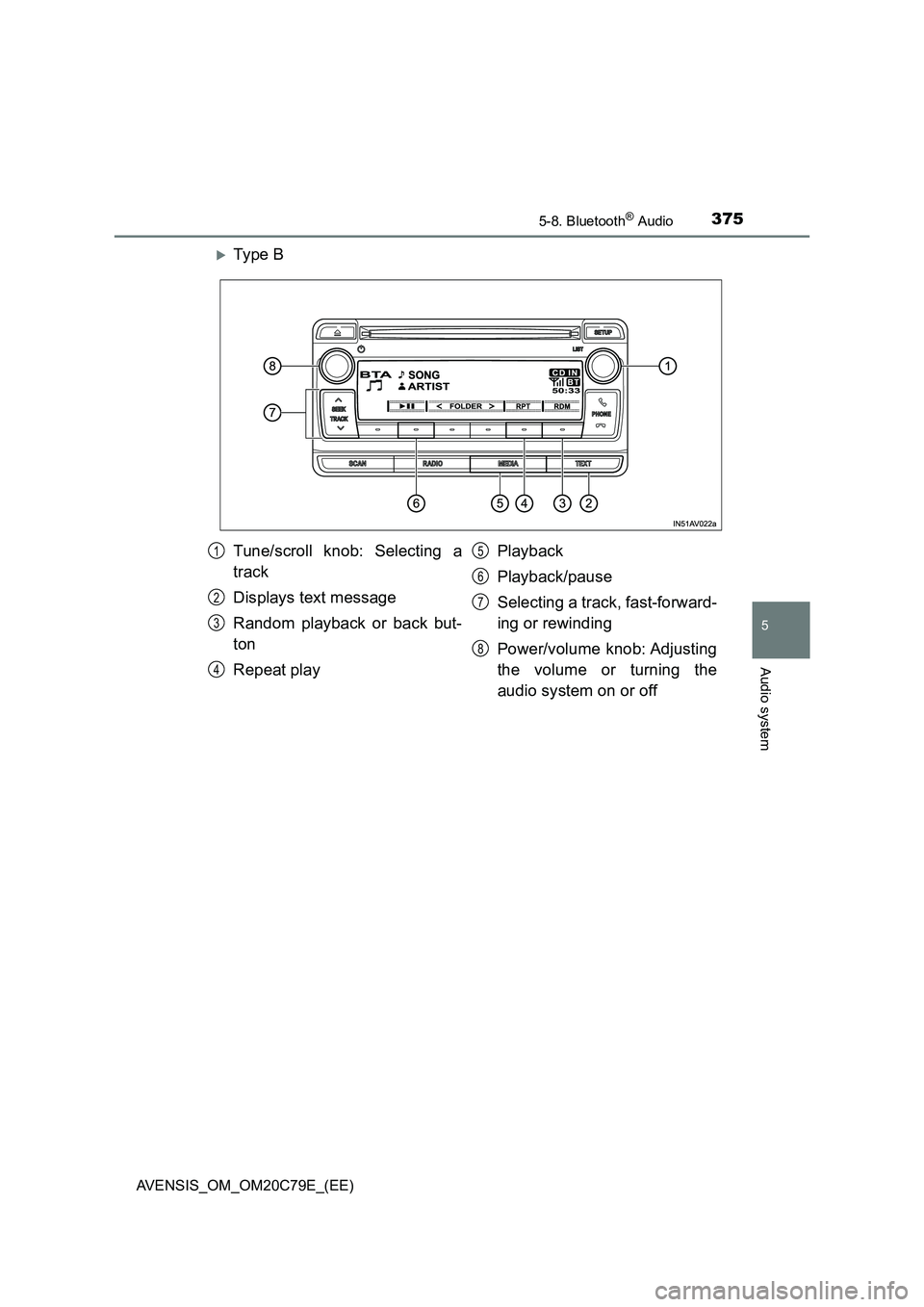
Ty pe B
Tune/scroll knob: Selecting a
track
Displays text message
Random playback or back but-
ton
Repeat playPlayback
Playback/pause
Selecting a track, fast-forward-
ing or rewinding
Power/volume knob: Adjusting
the volume or turning the
audio system on or off1
2
3
4
5
6
7
8
Page 377 of 660
3775-8. Bluetooth® Audio
5
Audio system
AVENSIS_OM_OM20C79E_(EE)
Press ( ).
Press the tune/scroll knob (type A) or the “TEXT” button (type B).
Track title and Artist name are displayed on the display.
To return to the previous display, press the knob or the back button (type
A) or the “TEXT” button or [BACK] (type B).
■ Bluetooth® audio system functions
Depending on the portable player that is connected to the system, certain
functions may not be available.
■ Display
P. 337
Playing and pausing tracks
Switching the display
Page 399 of 660
3996-1. Using the air conditioning system and defogger
AVENSIS_OM_OM20C79E_(EE)
6
Interior features
■Adjusting the temperature setting
Turning to the right increases the temperature and turning
the knob to the left decreases the temperature.
The temperature for the driver’s and front passenger’s seats can be set
separately. ( P. 400)
■Adjusting the fan speed
Press “ ” (decrease) or “” (increase) on .
The fan speed is shown on the display. (7 levels)
Press or to turn the fan off.
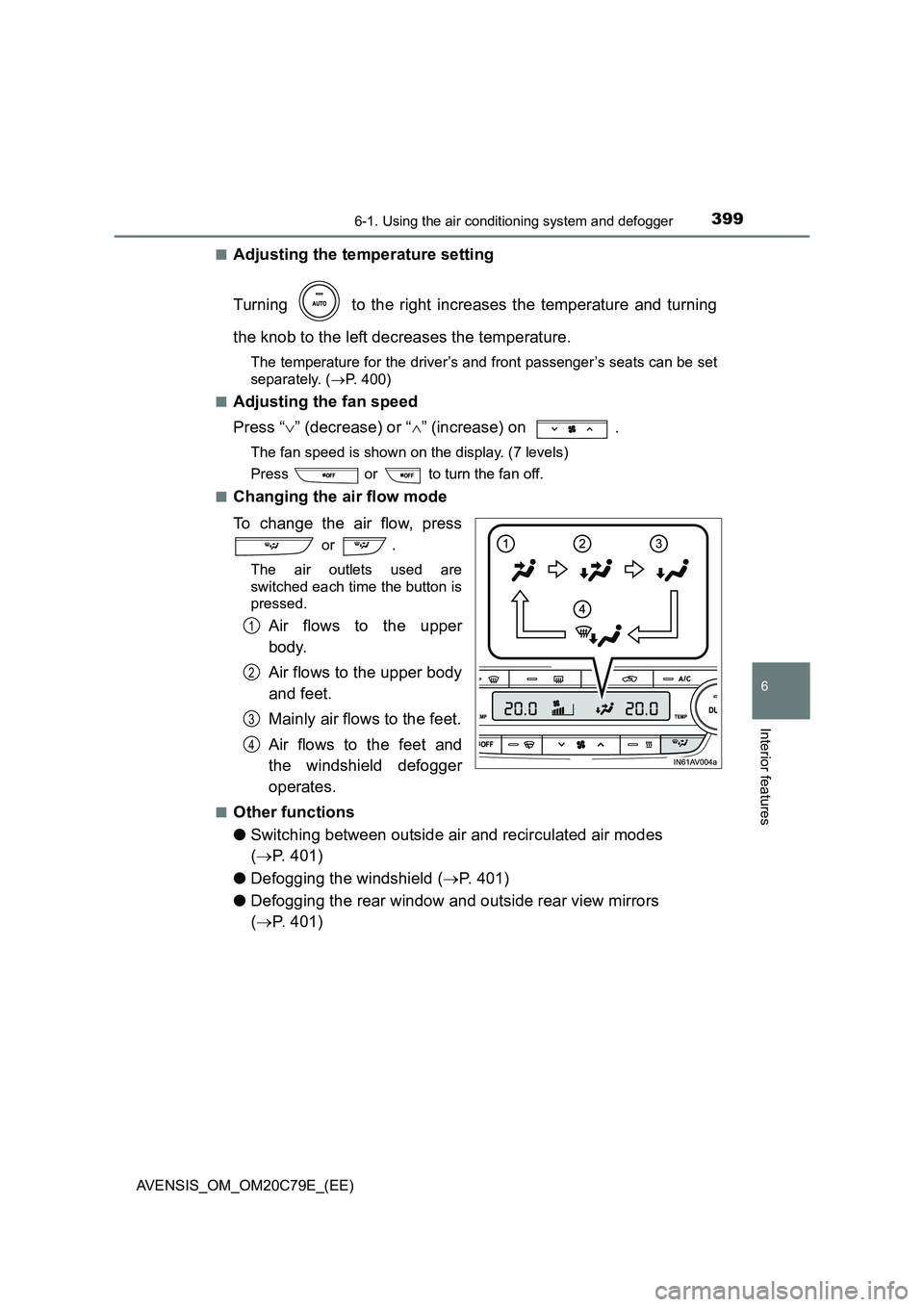
■Changing the air flow mode
To change the air flow, press
or .
The air outlets used are
switched each time the button is
pressed.
Air flows to the upper
body.
Air flows to the upper body
and feet.
Mainly air flows to the feet.
Air flows to the feet and
the windshield defogger
operates.
■Other functions
● Switching between outside air and recirculated air modes
( P. 401)
● Defogging the windshield (P. 401)
● Defogging the rear window and outside rear view mirrors
( P. 401)
1
2
3
4
Page 459 of 660
4597-3. Do-it-yourself maintenance
AVENSIS_OM_OM20C79E_(EE)
7
Maintenance and care
■After changing the engine oil (diesel engine)
The engine oil maintenance data should be reset. Perform the following pro-
cedures:
Switch the display to the maintenance required information (P. 107),
when the engine switch is in the “ON” position (vehicles without smart entry
& start system) or IGNITION ON mode (vehicles with smart entry & start
system).
Turn the engine switch to the “LOCK” position (vehicles without smart entry
& start system) or off (vehicles with smart entry & start system).
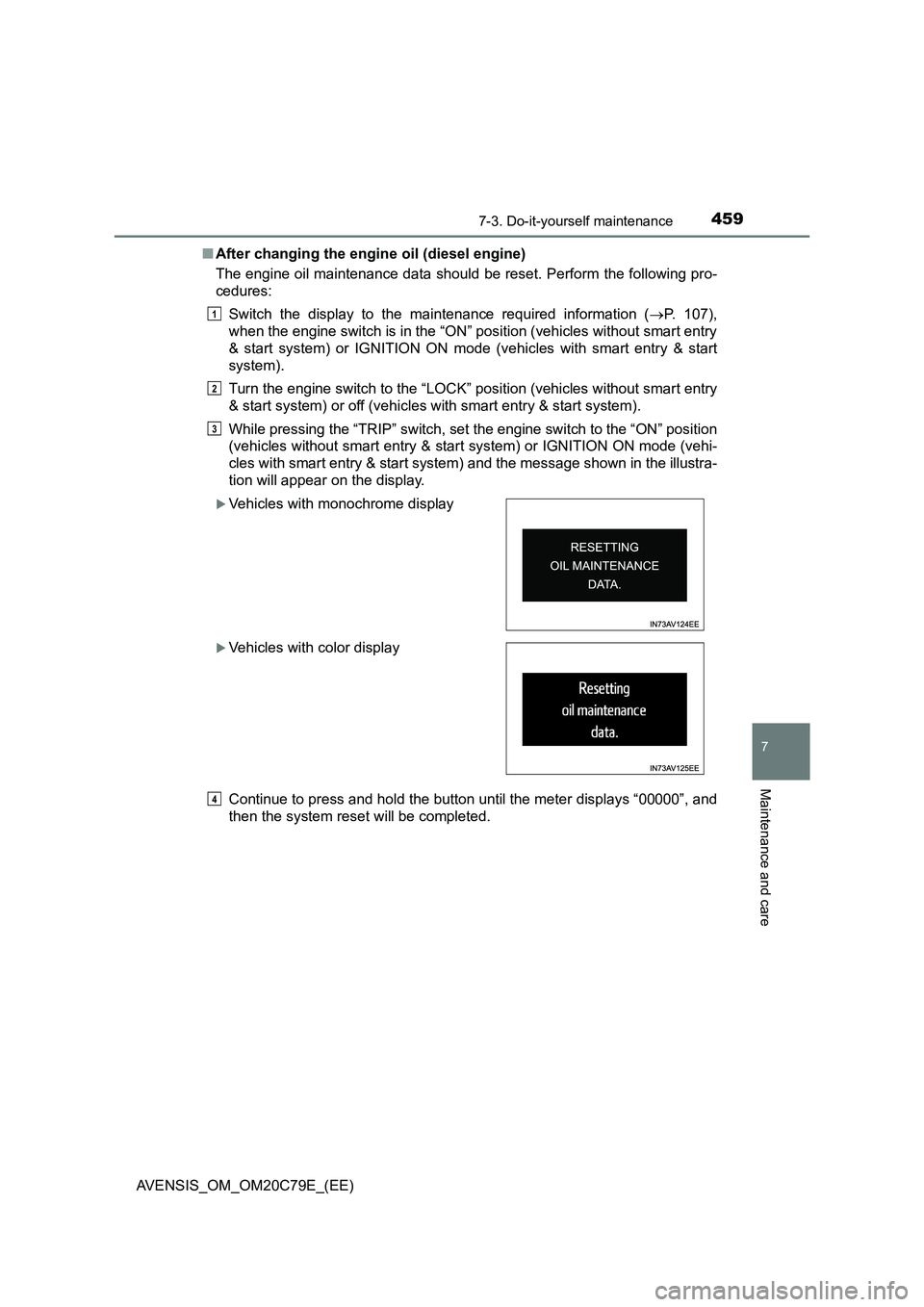
While pressing the “TRIP” switch, set the engine switch to the “ON” position
(vehicles without smart entry & start system) or IGNITION ON mode (vehi-
cles with smart entry & start system) and the message shown in the illustra-
tion will appear on the display.
Continue to press and hold the button until the meter displays “00000”, and
then the system reset will be completed.
Vehicles with monochrome display
Vehicles with color display
1
2
3
4
Page 467 of 660
4677-3. Do-it-yourself maintenance
AVENSIS_OM_OM20C79E_(EE)
7
Maintenance and care
It is necessary to drain water from the fuel filter in the following situa-
tions:
Fuel filter type A*: Every 20000 km (12000 miles)
Fuel filter type B*: A warning message is displayed on the multi-infor-
mation display and a buzzer sounds. ( P. 543)
*: Contact any authorized Toyota retailer or Toyota authorized repairer, or any
reliable repairer for identifying the fuel filter type.
Have the fuel filter drained by any authorized Toyota retailer or Toyota
authorized repairer, or any reliable repairer.
Fuel filter (diesel engine)
NOTICE
■ When there is water in the fuel filter
Do not drive continuously with water accumulated in the fuel filter. This will
cause damage to the fuel injection pump.
Page 471 of 660
4717-3. Do-it-yourself maintenance
AVENSIS_OM_OM20C79E_(EE)
7
Maintenance and care
■How to initialize the tire pressure warning system
Park the vehicle in a safe place and turn the engine switch to the
“LOCK” position (vehicles without smart entry & start system) or
off (vehicles with smart entry & start system).
Initialization cannot be performed while the vehicle is moving.
Adjust the tire inflation pressure to the specified cold tire inflation
pressure level. (P. 623)
Make sure to adjust the tire pressure to the specified cold tire inflation
pressure level. The tire pressure warning system will operate based on
this pressure level.
Turn the engine switch to the “ON” position (vehicles without
smart entry & start system) or IGNITION ON mode (vehicles with
smart entry & start system).
Vehicles with monochrome display
Press the “DISP” switch until the settings screen appears.
(P. 108)
Press and hold the “DISP” switch to enter the adjustment mode.
Press the “DISP” switch until the menu of tire pressure warning
system appears.
Press and hold the “DISP” switch to display the menu.
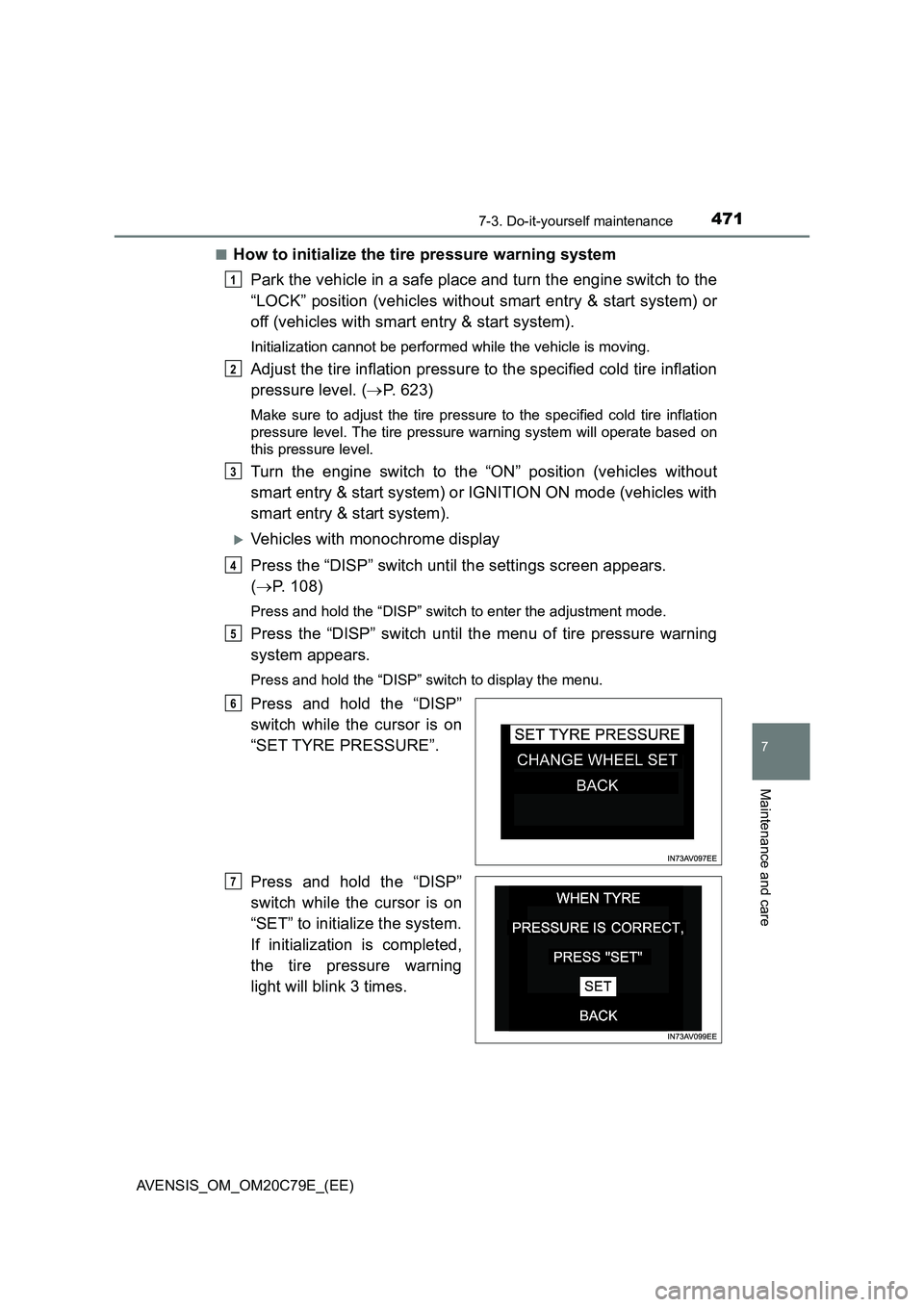
Press and hold the “DISP”
switch while the cursor is on
“SET TYRE PRESSURE”.
Press and hold the “DISP”
switch while the cursor is on
“SET” to initialize the system.
If initialization is completed,
the tire pressure warning
light will blink 3 times.
1
2
3
4
5
6
7
Page 472 of 660
4727-3. Do-it-yourself maintenance
AVENSIS_OM_OM20C79E_(EE)
Vehicles with color display
Press or of the meter control switch to select .
(P. 1 1 2 )
Press or of the meter control switch to select the settings
menu and then press to display the menu.
Select “ Setup” and then press to display the menu.
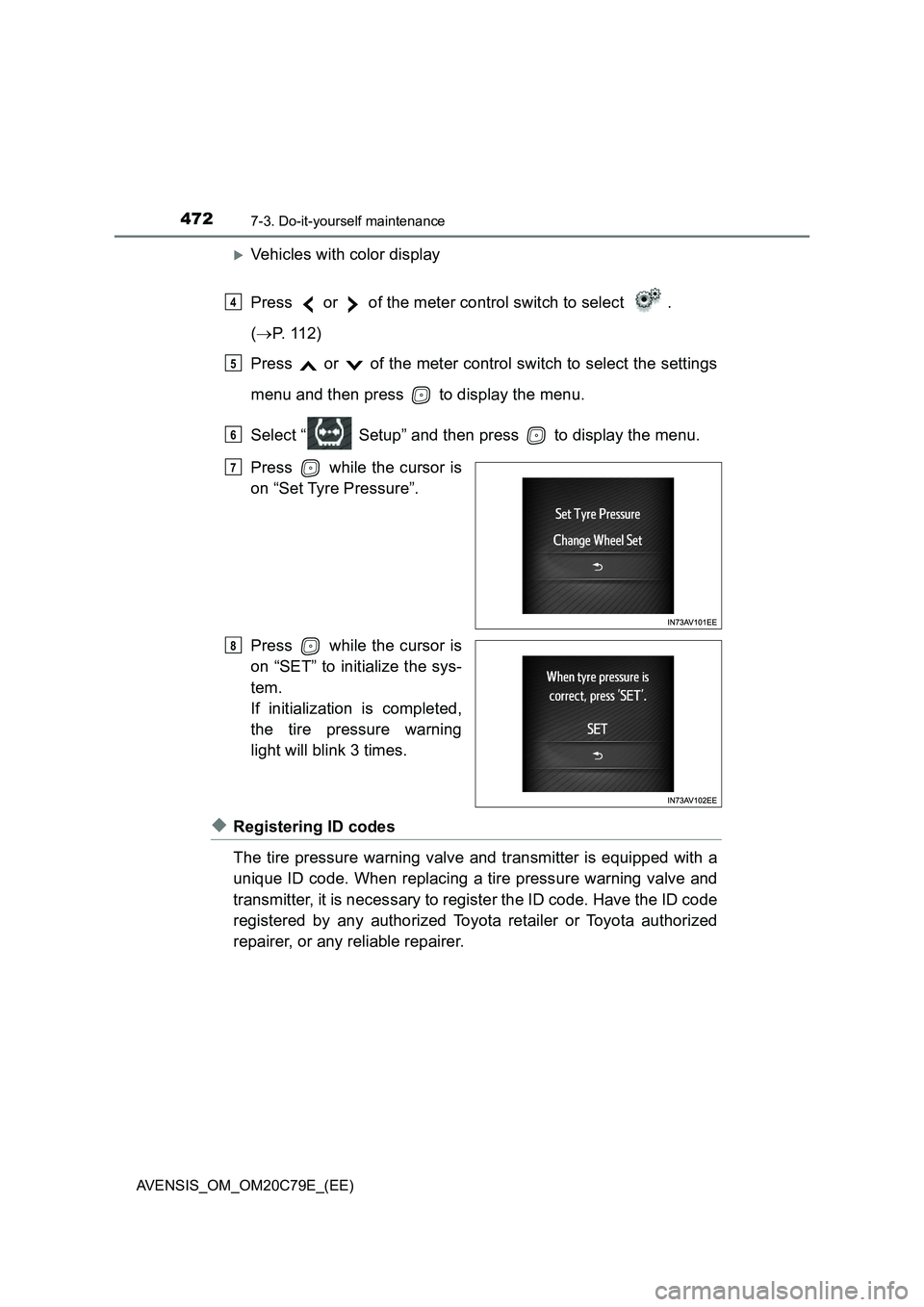
Press while the cursor is
on “Set Tyre Pressure”.
Press while the cursor is
on “SET” to initialize the sys-
tem.
If initialization is completed,
the tire pressure warning
light will blink 3 times.
◆Registering ID codes
The tire pressure warning valve and transmitter is equipped with a
unique ID code. When replacing a tire pressure warning valve and
transmitter, it is necessary to register the ID code. Have the ID code
registered by any authorized Toyota retailer or Toyota authorized
repairer, or any reliable repairer.
4
5
6
7
8
Page 473 of 660
4737-3. Do-it-yourself maintenance
AVENSIS_OM_OM20C79E_(EE)
7
Maintenance and care
◆Selecting wheel set
Your vehicle is equipped with tire pressure warning system with the
function to have ID codes registered for a second wheel set, for
example a winter set, by any authorized Toyota retailer or Toyota
authorized repairer, or any reliable repairer.
After registration of a second wheel set, either of these two wheel
sets can be selected for usage with the tire pressure warning sys-
tem.
■Operating conditions for the function
●This function will perform the change of wheel set only if a sec-
ond wheel set has been registered. If no second wheel set has
been registered, no change will be made when selecting this
function in the menu.
●Only a change between both registered wheel set is possible,
mixing between these wheel sets is not supported.
■How to change between wheel sets
Have the vehicle fitted with the preferred wheel set.
Vehicles with monochrome display
Press the “DISP” switch until the settings screen appears.
(P. 108)
Press and hold the “DISP” switch to enter the adjustment mode.
Press the “DISP” switch until the menu of tire pressure warning
system appears.
Press and hold the “DISP” switch to display the menu.
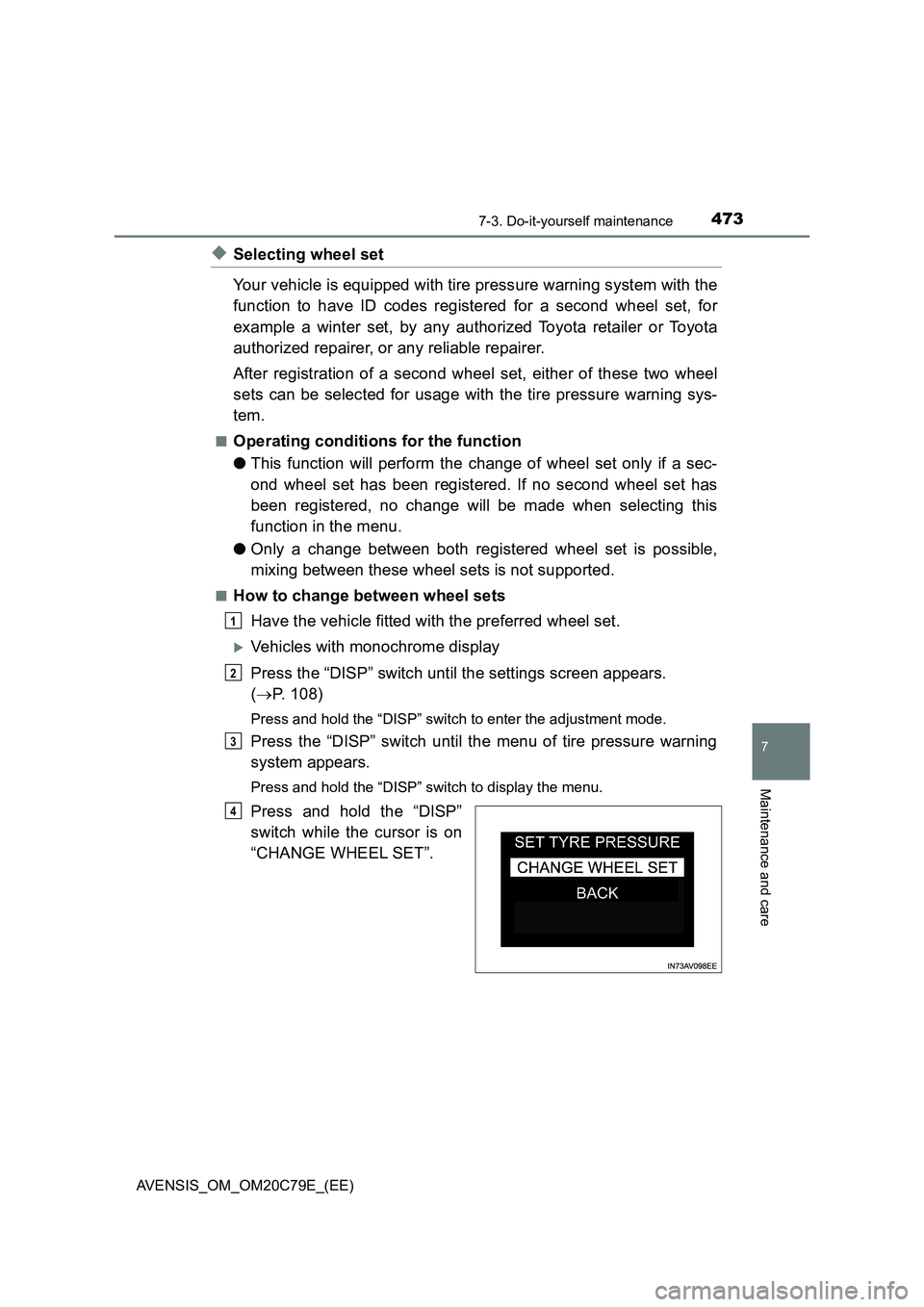
Press and hold the “DISP”
switch while the cursor is on
“CHANGE WHEEL SET”.
1
2
3
4
Page 474 of 660
4747-3. Do-it-yourself maintenance
AVENSIS_OM_OM20C79E_(EE)
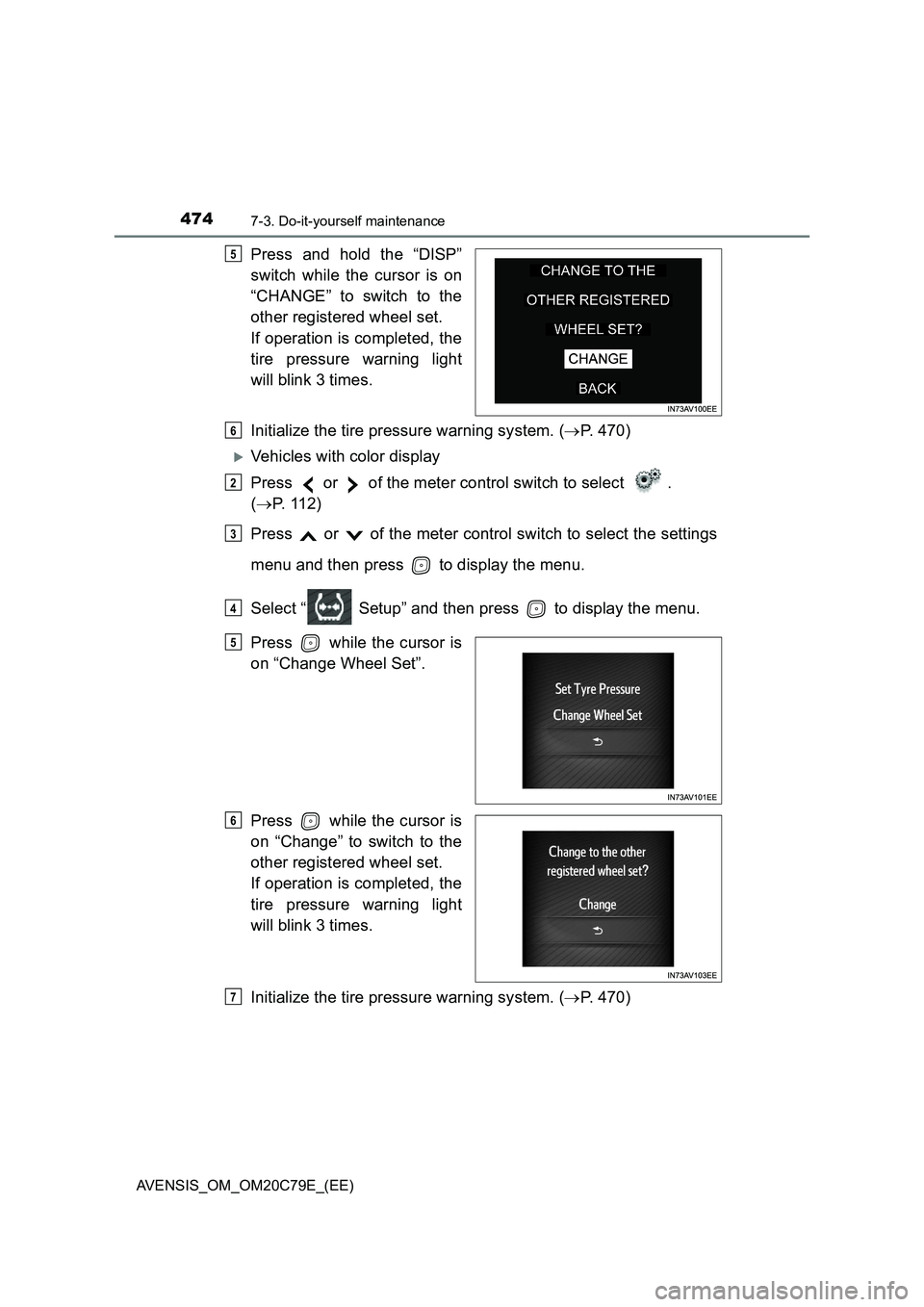
Press and hold the “DISP”
switch while the cursor is on
“CHANGE” to switch to the
other registered wheel set.
If operation is completed, the
tire pressure warning light
will blink 3 times.
Initialize the tire pressure warning system. (P. 470)
Vehicles with color display
Press or of the meter control switch to select .
(P. 1 1 2 )
Press or of the meter control switch to select the settings
menu and then press to display the menu.
Select “ Setup” and then press to display the menu.
Press while the cursor is
on “Change Wheel Set”.
Press while the cursor is
on “Change” to switch to the
other registered wheel set.
If operation is completed, the
tire pressure warning light
will blink 3 times.
Initialize the tire pressure warning system. (P. 470)
5
6
2
3
4
5
6
7
Page 517 of 660
517
8When trouble arises
AVENSIS_OM_OM20C79E_(EE)
8-1. Essential information
Emergency flashers ........... 518
If your vehicle has to
be stopped in an
emergency ....................... 519
8-2. Steps to take in an
emergency
If your vehicle needs to
be towed .......................... 521
If you think something is
wrong ............................... 528
Fuel pump shut off system
(gasoline engine) ............. 529
If a warning light turns on
or a warning buzzer
sounds ............................. 530
If a warning message is
displayed ......................... 537
If you have a flat tire
(vehicles with
emergency tire
puncture repair kit)........... 554
If you have a flat tire
(vehicles with spare
tire) .................................. 570
If the engine will not
start.................................. 586
If the parking brake
cannot be released .......... 588
If the electronic key does
not operate properly ........ 592
If the vehicle battery is
discharged ....................... 595
If your vehicle overheats .... 600
If the vehicle becomes
stuck ................................ 603