display TOYOTA AVENSIS 2018 Owners Manual
[x] Cancel search | Manufacturer: TOYOTA, Model Year: 2018, Model line: AVENSIS, Model: TOYOTA AVENSIS 2018Pages: 660, PDF Size: 63.16 MB
Page 537 of 660
5378-2. Steps to take in an emergency
AVENSIS_OM_OM20C79E_(EE)
8
When trouble arises
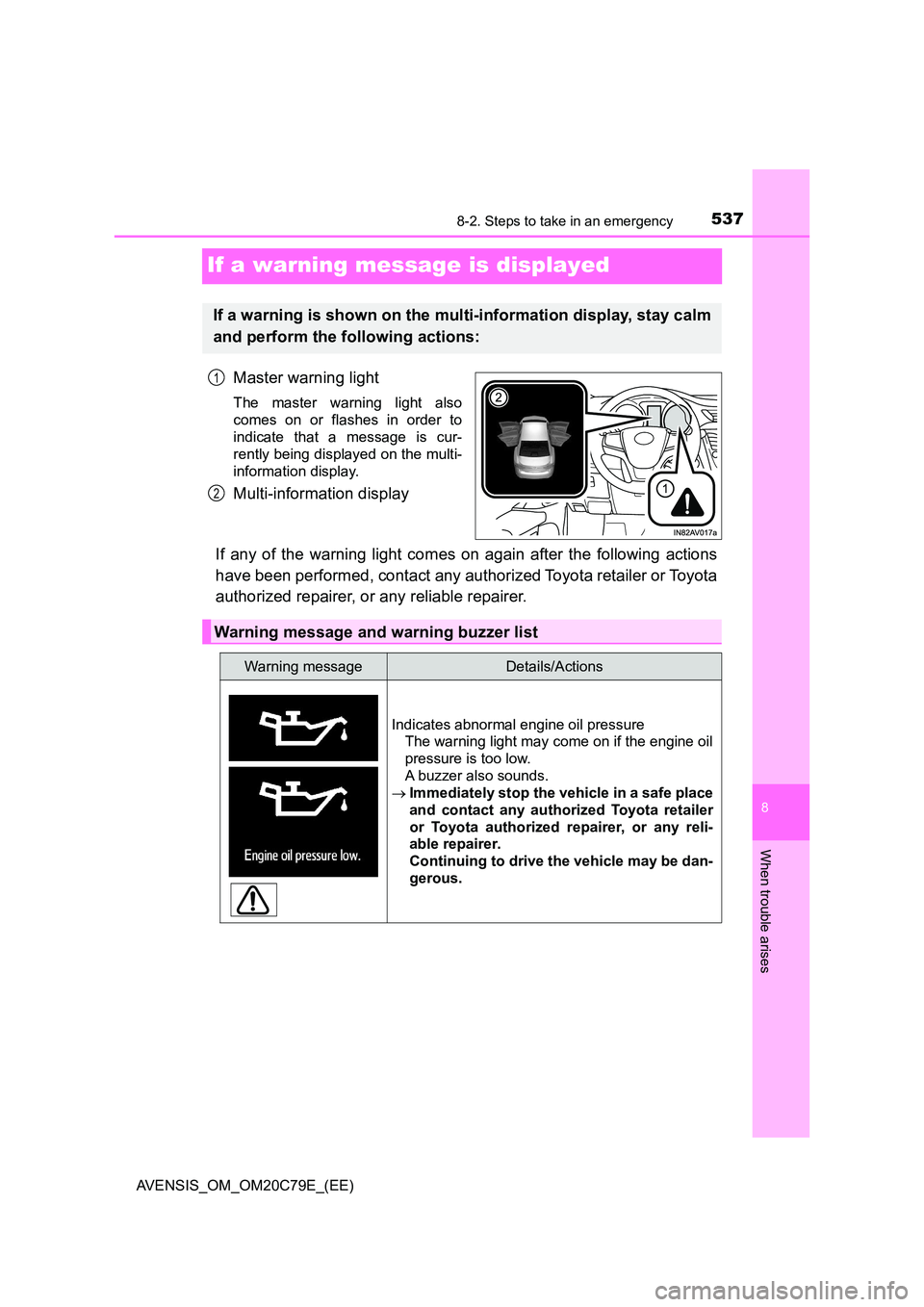
If a warning message is displayed
Master warning light
The master warning light also
comes on or flashes in order to
indicate that a message is cur-
rently being displayed on the multi-
information display.
Multi-information display
If any of the warning light comes on again after the following actions
have been performed, contact any authorized Toyota retailer or Toyota
authorized repairer, or any reliable repairer.
If a warning is shown on the multi-information display, stay calm
and perform the following actions:
1
2
Warning message and warning buzzer list
Warning messageDetails/Actions
Indicates abnormal engine oil pressure
The warning light may come on if the engine oil
pressure is too low.
A buzzer also sounds.
Immediately stop the vehicle in a safe place
and contact any authorized Toyota retailer
or Toyota authorized repairer, or any reli-
able repairer.
Continuing to drive the vehicle may be dan-
gerous.
Page 542 of 660
5428-2. Steps to take in an emergency
AVENSIS_OM_OM20C79E_(EE)
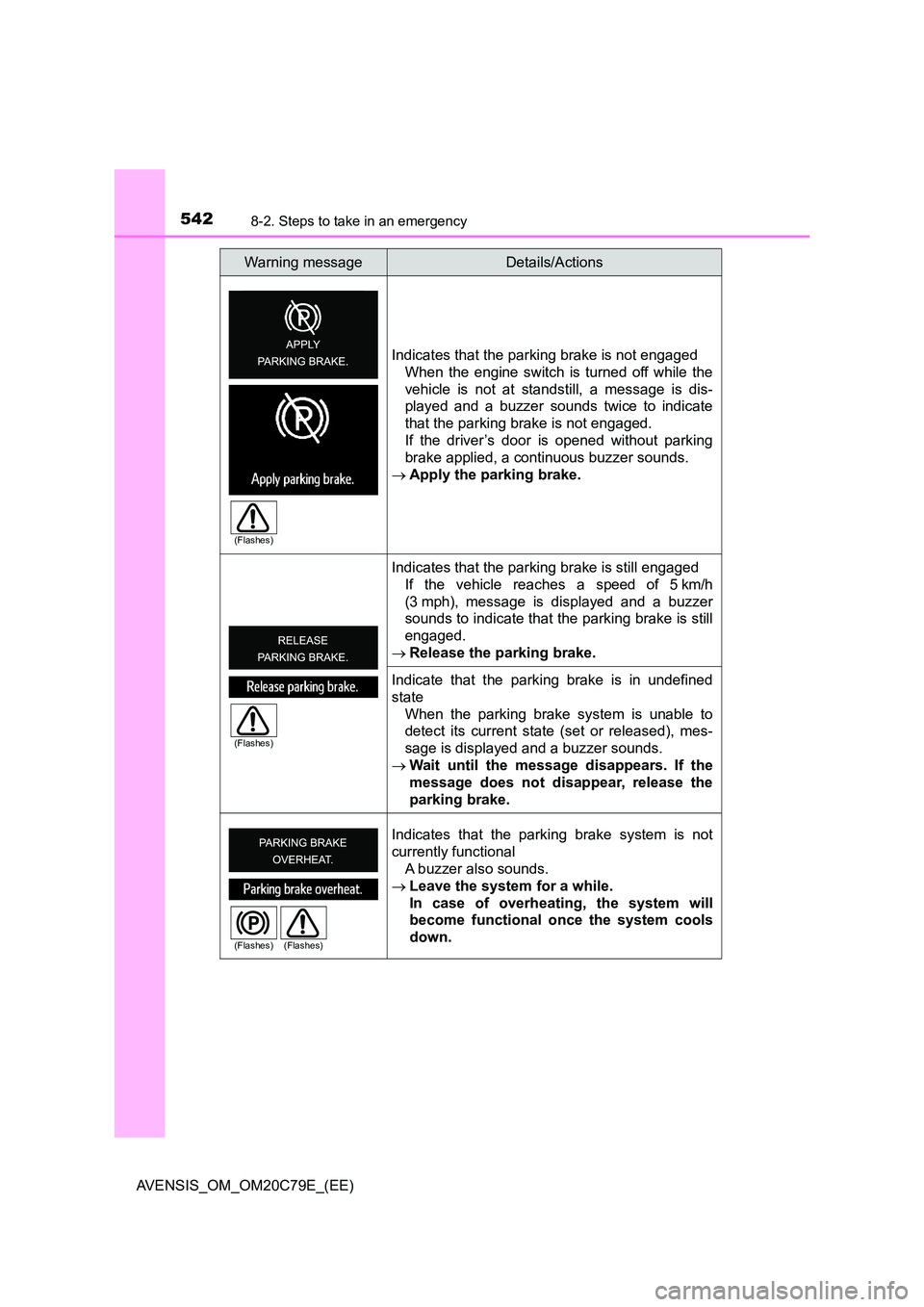
Indicates that the parking brake is not engaged
When the engine switch is turned off while the
vehicle is not at standstill, a message is dis-
played and a buzzer sounds twice to indicate
that the parking brake is not engaged.
If the driver’s door is opened without parking
brake applied, a continuous buzzer sounds.
Apply the parking brake.
Indicates that the parking brake is still engaged
If the vehicle reaches a speed of 5 km/h
(3 mph), message is displayed and a buzzer
sounds to indicate that the parking brake is still
engaged.
Release the parking brake.
Indicate that the parking brake is in undefined
state
When the parking brake system is unable to
detect its current state (set or released), mes-
sage is displayed and a buzzer sounds.
Wait until the message disappears. If the
message does not disappear, release the
parking brake.
Indicates that the parking brake system is not
currently functional
A buzzer also sounds.
Leave the system for a while.
In case of overheating, the system will
become functional once the system cools
down.
Warning messageDetails/Actions
(Flashes)
(Flashes)
(Flashes) (Flashes)
Page 547 of 660
5478-2. Steps to take in an emergency
AVENSIS_OM_OM20C79E_(EE)
8
When trouble arises
■After changing the engine oil (diesel engine)
Make sure to reset the oil maintenance data. ( P. 459)
■ If the message “DPF FULL SEE OWNER’S MANUAL”/“DPF full. See
owner’s manual.” appears on the display (diesel engine)
The deposit collected in the filter needs to be regenerated.
To regenerate the filter, the following driving methods are recommended*:
● By driving continuously (for example, at around 65 km/h [40 mph] for 20 to
30 minutes).
● By avoiding short trips, or by driving continuously (leaving the engine run-
ning for long periods of time).
The warning message will disappear w hen regeneration is complete. How-
ever, if this driving cannot be carried out, or if the message does not disap-
pear even after driving, have the vehicle inspected by any authorized Toyota
retailer or Toyota authorized repairer, or any reliable repairer immediately.
*: When driving, pay sufficient attention to weather, road conditions, terrain
and traffic conditions, and drive according to traffic laws.
■ The LDA (Lane Departure Alert) system (if equipped)
In the following cases, the warning message will not be displayed even if the
vehicle deviates from the lane markers.
● When the vehicle speed deviates from the operating range of the LDA sys-
tem functions
● When the lane markers cannot be recognized
NOTICE
■Engine oil maintenance message (diesel engine)
The warning message is based on the projected driving range after engine
oil maintenance message is reset.
The system does not monitor the purity of the engine oil.
Page 548 of 660
5488-2. Steps to take in an emergency
AVENSIS_OM_OM20C79E_(EE)
Interior
buzzer
Exterior
buzzerWarning messageDetails/Actions
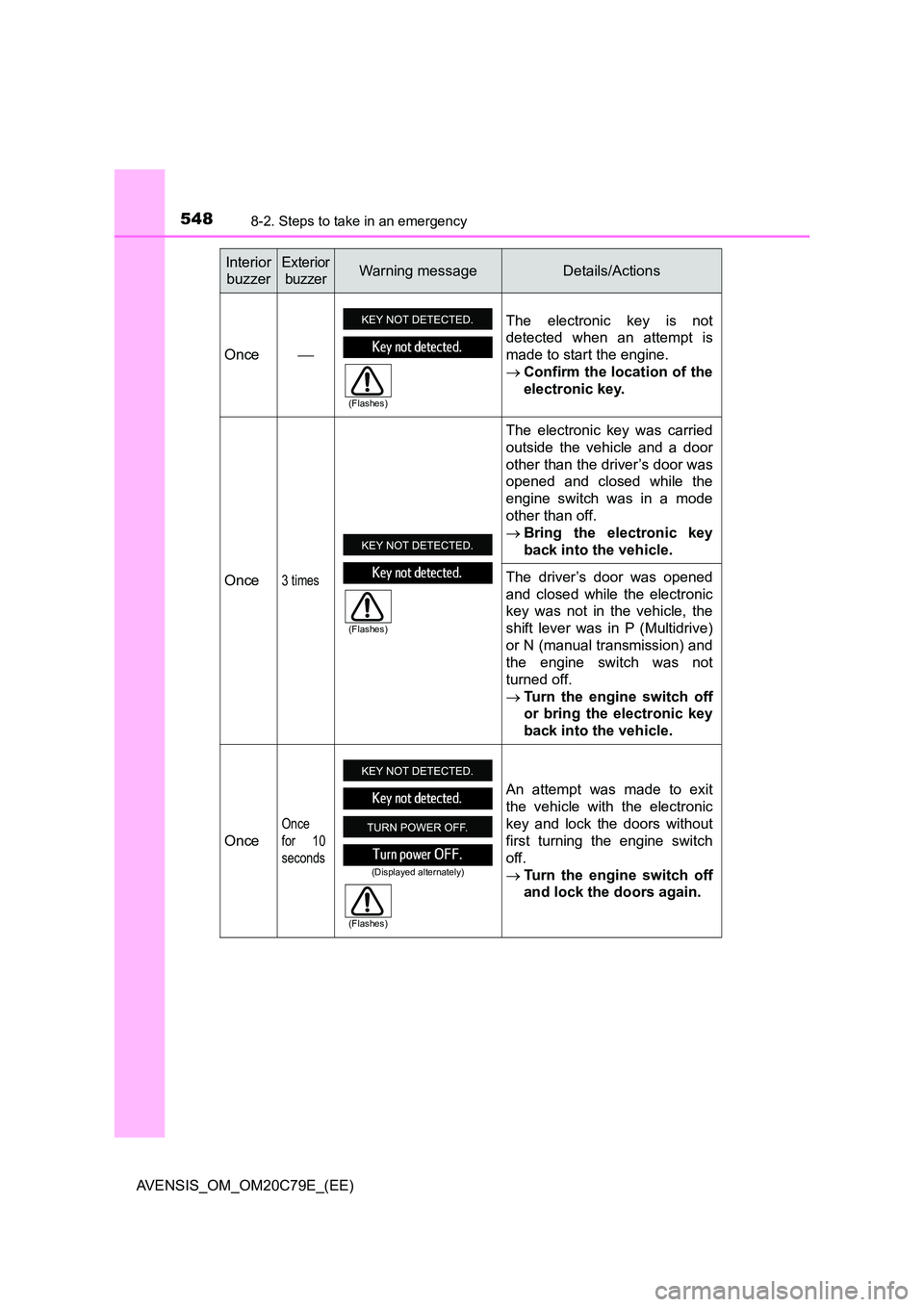
Once
The electronic key is not
detected when an attempt is
made to start the engine.
Confirm the location of the
electronic key.
Once3 times
The electronic key was carried
outside the vehicle and a door
other than the driver’s door was
opened and closed while the
engine switch was in a mode
other than off.
Bring the electronic key
back into the vehicle.
The driver’s door was opened
and closed while the electronic
key was not in the vehicle, the
shift lever was in P (Multidrive)
or N (manual transmission) and
the engine switch was not
turned off.
Turn the engine switch off
or bring the electronic key
back into the vehicle.
Once
Once
for 10
seconds
An attempt was made to exit
the vehicle with the electronic
key and lock the doors without
first turning the engine switch
off.
Turn the engine switch off
and lock the doors again.
(Flashes)
(Flashes)
(Displayed alternately)
(Flashes)
Page 549 of 660
5498-2. Steps to take in an emergency
AVENSIS_OM_OM20C79E_(EE)
8
When trouble arises
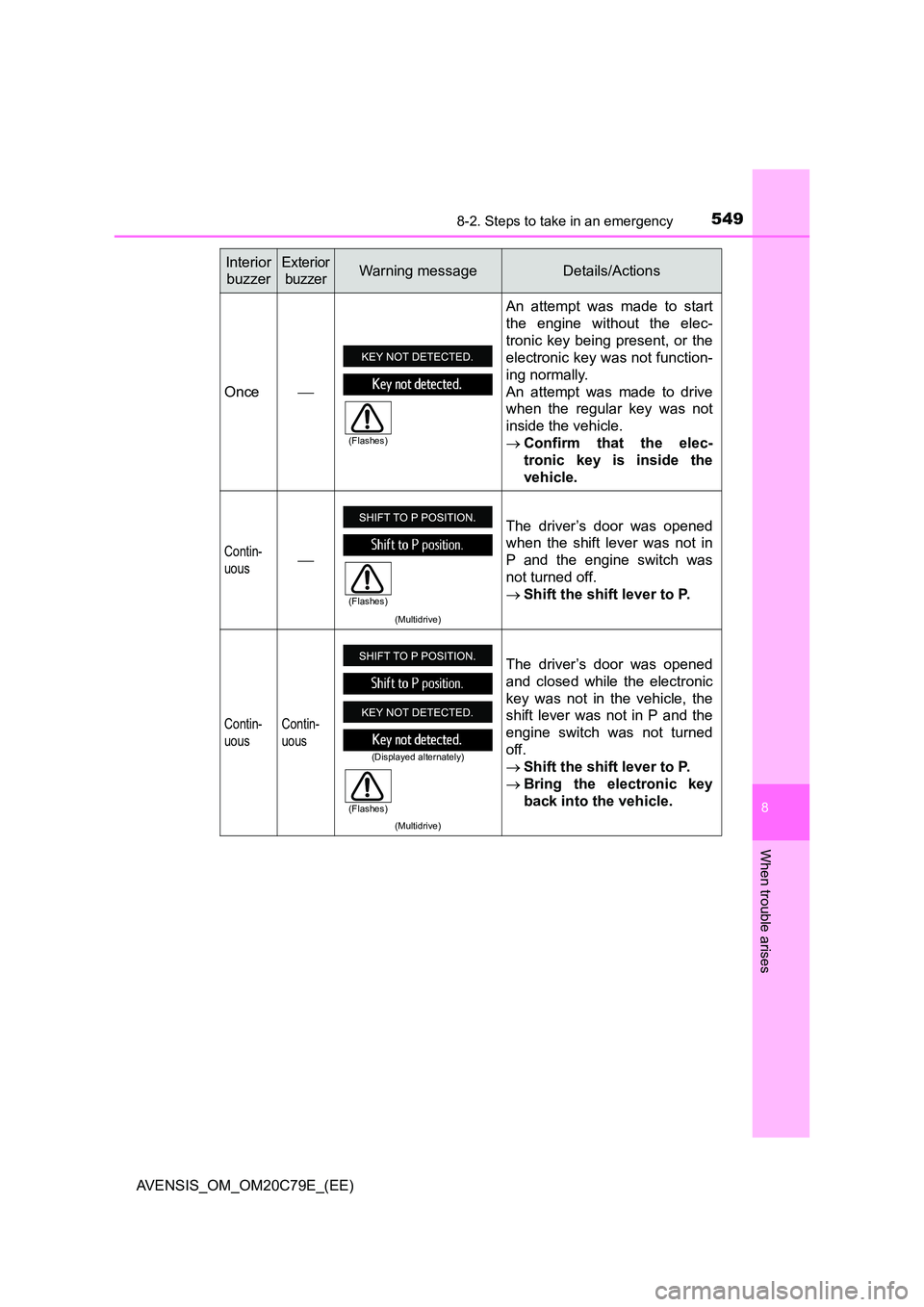
Once
An attempt was made to start
the engine without the elec-
tronic key being present, or the
electronic key was not function-
ing normally.
An attempt was made to drive
when the regular key was not
inside the vehicle.
Confirm that the elec-
tronic key is inside the
vehicle.
Contin-
uous
(Multidrive)
The driver’s door was opened
when the shift lever was not in
P and the engine switch was
not turned off.
Shift the shift lever to P.
Contin-
uous
Contin-
uous
(Multidrive)
The driver’s door was opened
and closed while the electronic
key was not in the vehicle, the
shift lever was not in P and the
engine switch was not turned
off.
Shift the shift lever to P.
Bring the electronic key
back into the vehicle.
Interior
buzzer
Exterior
buzzerWarning messageDetails/Actions
(Flashes)
(Flashes)
(Displayed alternately)
(Flashes)
Page 562 of 660
5628-2. Steps to take in an emergency
AVENSIS_OM_OM20C79E_(EE)
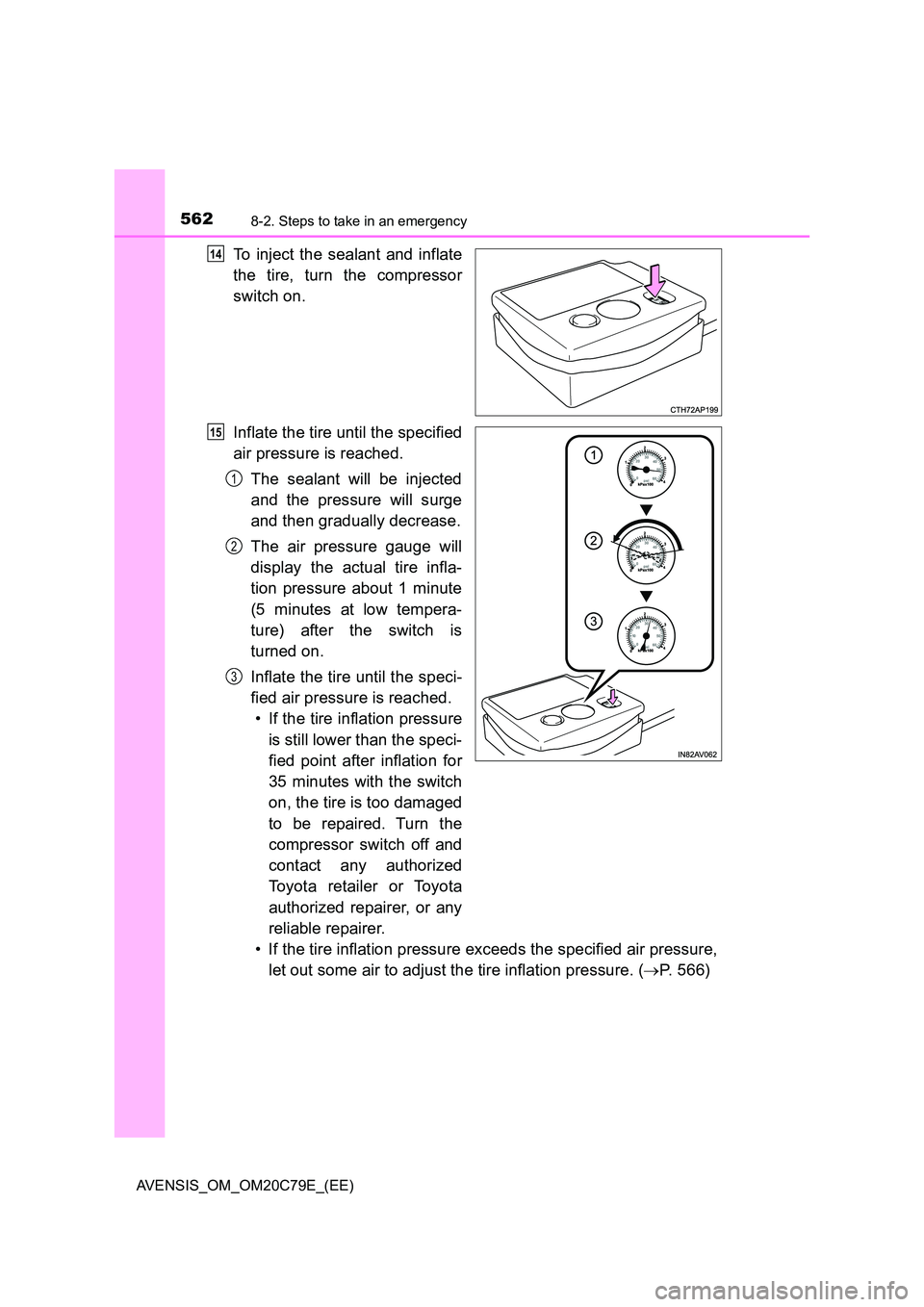
To inject the sealant and inflate
the tire, turn the compressor
switch on.
Inflate the tire until the specified
air pressure is reached.
The sealant will be injected
and the pressure will surge
and then gradually decrease.
The air pressure gauge will
display the actual tire infla-
tion pressure about 1 minute
(5 minutes at low tempera-
ture) after the switch is
turned on.
Inflate the tire until the speci-
fied air pressure is reached.
• If the tire inflation pressure
is still lower than the speci-
fied point after inflation for
35 minutes with the switch
on, the tire is too damaged
to be repaired. Turn the
compressor switch off and
contact any authorized
To y o t a r e t a i l e r o r To y o t a
authorized repairer, or any
reliable repairer.
• If the tire inflation pressure exceeds the specified air pressure,
let out some air to adjust the tire inflation pressure. ( P. 566)
14
15
1
2
3
Page 614 of 660
6149-1. Specifications
AVENSIS_OM_OM20C79E_(EE)
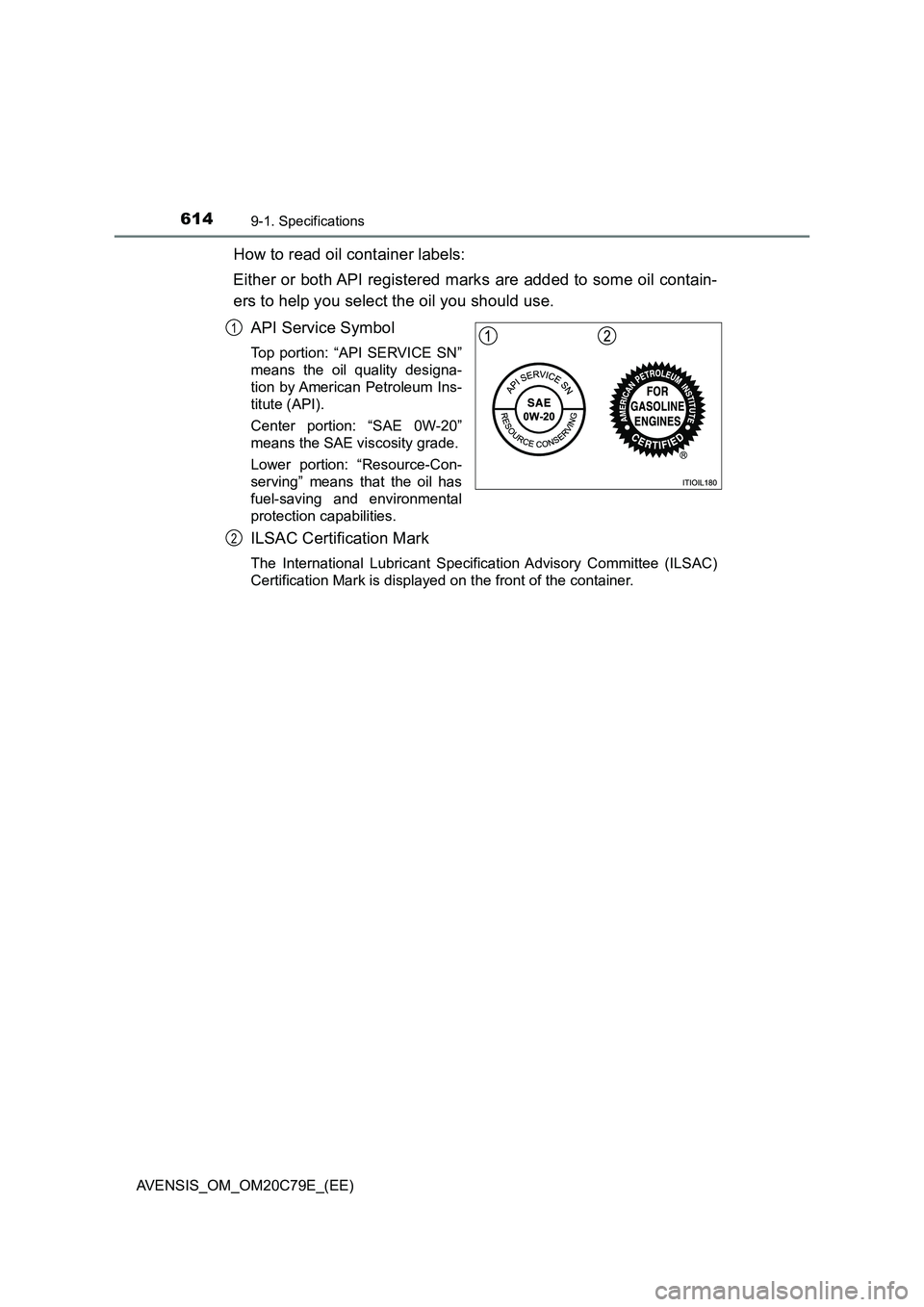
How to read oil container labels:
Either or both API registered marks are added to some oil contain-
ers to help you select the oil you should use.
API Service Symbol
Top portion: “API SERVICE SN”
means the oil quality designa-
tion by American Petroleum Ins-
titute (API).
Center portion: “SAE 0W-20”
means the SAE viscosity grade.
Lower portion: “Resource-Con-
serving” means that the oil has
fuel-saving and environmental
protection capabilities.
ILSAC Certification Mark
The International Lubricant Specification Advisory Committee (ILSAC)
Certification Mark is displayed on the front of the container.
1
2
Page 616 of 660
6169-1. Specifications
AVENSIS_OM_OM20C79E_(EE)
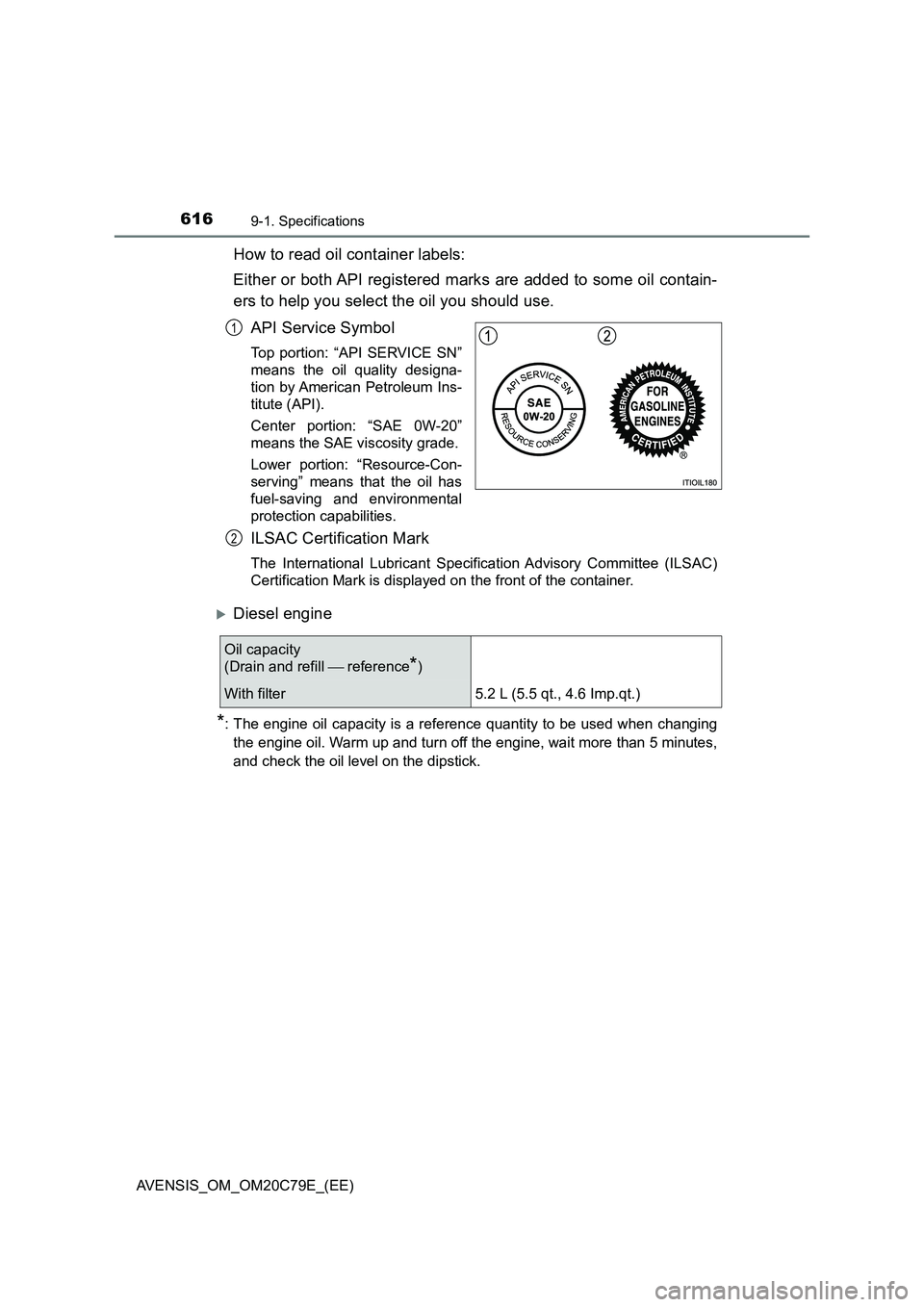
How to read oil container labels:
Either or both API registered marks are added to some oil contain-
ers to help you select the oil you should use.
API Service Symbol
Top portion: “API SERVICE SN”
means the oil quality designa-
tion by American Petroleum Ins-
titute (API).
Center portion: “SAE 0W-20”
means the SAE viscosity grade.
Lower portion: “Resource-Con-
serving” means that the oil has
fuel-saving and environmental
protection capabilities.
ILSAC Certification Mark
The International Lubricant Specification Advisory Committee (ILSAC)
Certification Mark is displayed on the front of the container.
Diesel engine
*: The engine oil capacity is a reference quantity to be used when changing
the engine oil. Warm up and turn off the engine, wait more than 5 minutes,
and check the oil level on the dipstick.
1
2
Oil capacity
(Drain and refill reference
*)
With filter 5.2 L (5.5 qt., 4.6 Imp.qt.)
Page 629 of 660
629
9
9-2. Customization
Vehicle specifications
AVENSIS_OM_OM20C79E_(EE)
Customizable features
Some function settings are changed simultaneously with other func-
tions being customized. Contact any authorized Toyota retailer or
Toyota authorized repairer, or any reliable repairer for further details.
■Changing using a navigation system or multimedia system
When customizing vehicle features, ensure that the vehicle is
parked in a safe place with the shift lever in P (Multidrive) or N
(manual transmission) and the parking brake set.
Press the “SETUP” button on the navigation system or multime-
dia system.
Select “Vehicle” on the “Setup” screen and select “Vehicle custo-
misation”, or select “General” on the “Setup” screen.
Various setting can be changed. Refer to the list of settings that can
be changed for details.
Your vehicle includes a variety of electronic features that can be
personalized to suit your preferences. The settings of these fea-
tures can be changed using navigation system or the multime-
dia system, the multi-information display or at any authorized
Toyota retailer or Toyota authorized repairer, or any reliable
repairer.
Customizing vehicle features
1
2
Page 630 of 660
6309-2. Customization
AVENSIS_OM_OM20C79E_(EE)■
Changing using the multi-information display
Vehicles with monochrome display
Press the “DISP” switch to display the setting screen while the
vehicle is stopped, and then press and hold the “DISP” switch to
display the customize mode screen.
Press the “DISP” switch and select the item, and then press and
hold the “DISP” switch.
Press the “DISP” switch and select the desired setting, and then
press and hold the “DISP” switch.
To exit the customize mode, press the “DISP” switch to select the
“EXIT”, and then press and hold the “DISP” switch.
Vehicles with color display
Use the meter control switches to select while the vehicle
is stopped.
Select the desired item, and then press .
Select the desired setting, and then press .
To go back to the previous screen or exit the customize mode,
press .
1
2
3
1
2
3