display TOYOTA AVENSIS 2018 Manual PDF
[x] Cancel search | Manufacturer: TOYOTA, Model Year: 2018, Model line: AVENSIS, Model: TOYOTA AVENSIS 2018Pages: 660, PDF Size: 63.16 MB
Page 343 of 660
3435-5. Using an external device
5
Audio system
AVENSIS_OM_OM20C79E_(EE)
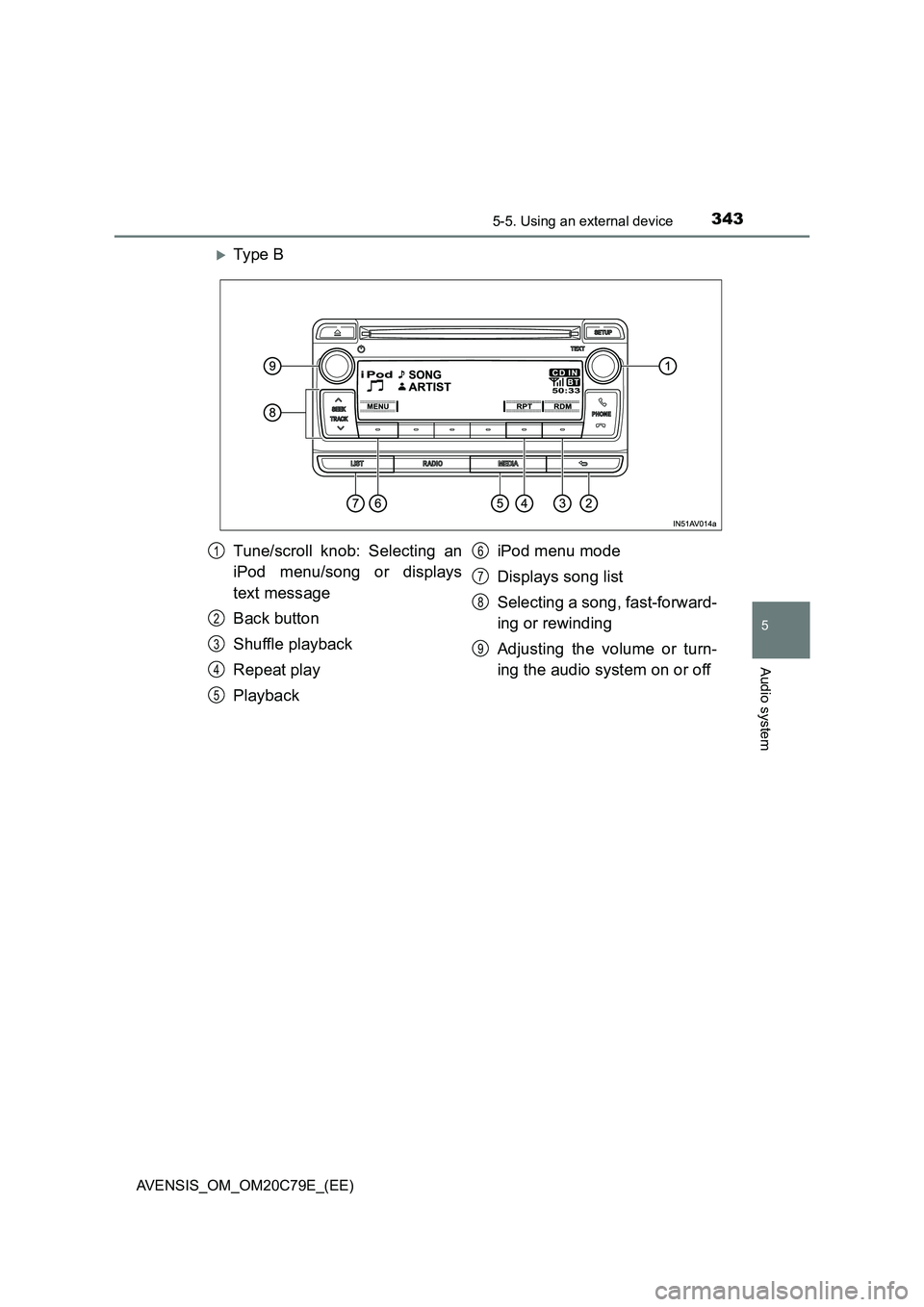
Ty pe B
Tune/scroll knob: Selecting an
iPod menu/song or displays
text message
Back button
Shuffle playback
Repeat play
PlaybackiPod menu mode
Displays song list
Selecting a song, fast-forward-
ing or rewinding
Adjusting the volume or turn-
ing the audio system on or off1
2
3
4
5
6
7
8
9
Page 344 of 660
3445-5. Using an external device
AVENSIS_OM_OM20C79E_(EE)
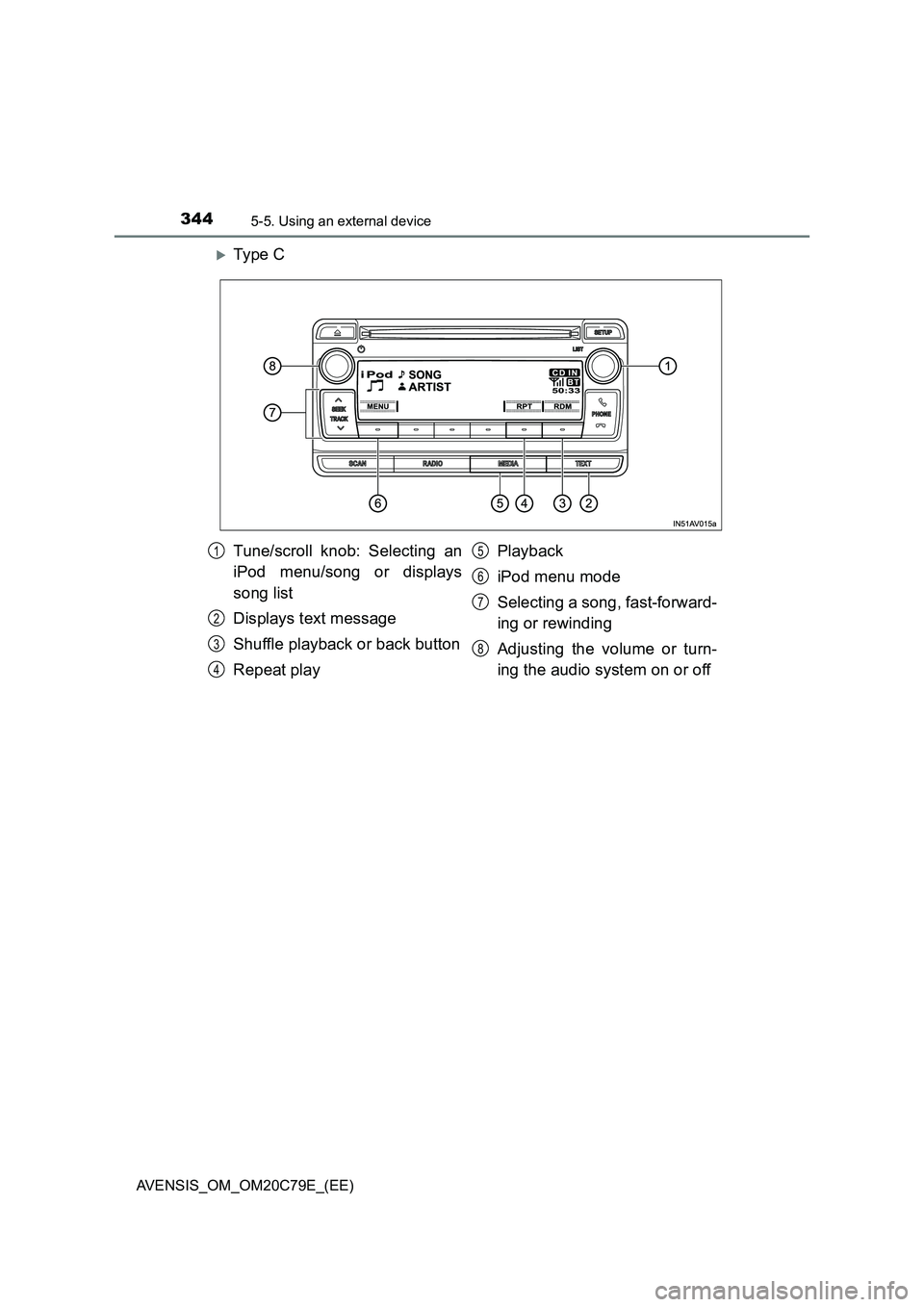
Ty pe C
Tune/scroll knob: Selecting an
iPod menu/song or displays
song list
Displays text message
Shuffle playback or back button
Repeat playPlayback
iPod menu mode
Selecting a song, fast-forward-
ing or rewinding
Adjusting the volume or turn-
ing the audio system on or off1
2
3
4
5
6
7
8
Page 346 of 660
3465-5. Using an external device
AVENSIS_OM_OM20C79E_(EE)
■Selecting a list
Turn the tune/scroll knob to display the first selection list.
Press the knob to select the desired item.
Pressing the knob changes to the second selection list.
Repeat the same procedure to select the desired item.
To return to the previous selection list, press the back button (type A and
B) or [BACK] (type C).
Turn the tune/scroll knob or press “ ” or “” on the “SEEK TRACK”
button to select the desired song.
Press the “LIST” button (type A and B) or the tune/scroll knob (type
C).
The song list will be displayed.
Turn the tune/scroll knob to select a song.
Press the knob to play the song.
To return to the previous display, press the back button (type A and B) or
[BACK] (type C).
Press and hold “ ” or “” on the “SEEK TRACK” button.
Pressing [RDM] changes modes in the following order:
Track shuffle Album shuffleOff.
Press [RPT].
To cancel, press [RPT] again.
Selecting songs
Selecting a song from the song list
Fast-forwarding and rewinding songs
Shuffle playback
Repeat play
1
2
3
1
2
3
Page 347 of 660
3475-5. Using an external device
5
Audio system
AVENSIS_OM_OM20C79E_(EE)
Press the tune/scroll knob (type A and B) or the “TEXT” button (type
C).
Track title, Artist name and Album title are shown on the display.
To return to the previous display, press the knob or the back button (type A
and B), or the “TEXT” button or [BACK] (type C).
■ About iPod
● “Made for iPod” and “Made for iPhone” mean that an electronic accessory
has been designed to connect specifically to iPod, or iPhone, respectively,
and has been certified by the developer to meet Apple performance stan-
dards.
● Apple is not responsible for the operation of this device or its compliance
with safety and regulatory standards. Please note that the use of this acces-
sory with iPod or iPhone may affect wireless performance.
● iPhone, iPod, iPod classic, iPod nano, iPod shuffle, and iPod touch are
trademarks of Apple Inc., registered in the U.S. and other countries.
■ iPod functions
● When an iPod is connected and the audio source is changed to iPod mode,
the iPod will resume play from the same point in which it was last used.
● Depending on the iPod that is connected to the system, certain functions
may not be available. Disconnecting the device and reconnecting it once
again may resolve some malfunctions.
● While connected to the system, the iPod cannot be operated with its own
controls. It is necessary to use the controls of the vehicle’s audio system
instead.
■ iPod problems
To resolve most problems encountered when using your iPod, disconnect
your iPod from the vehicle iPod connection and reset it.
For instructions on how to reset your iPod, refer to your iPod Owner’s Man-
ual.
Switching the display
Page 348 of 660
3485-5. Using an external device
AVENSIS_OM_OM20C79E_(EE)■Display
P. 337
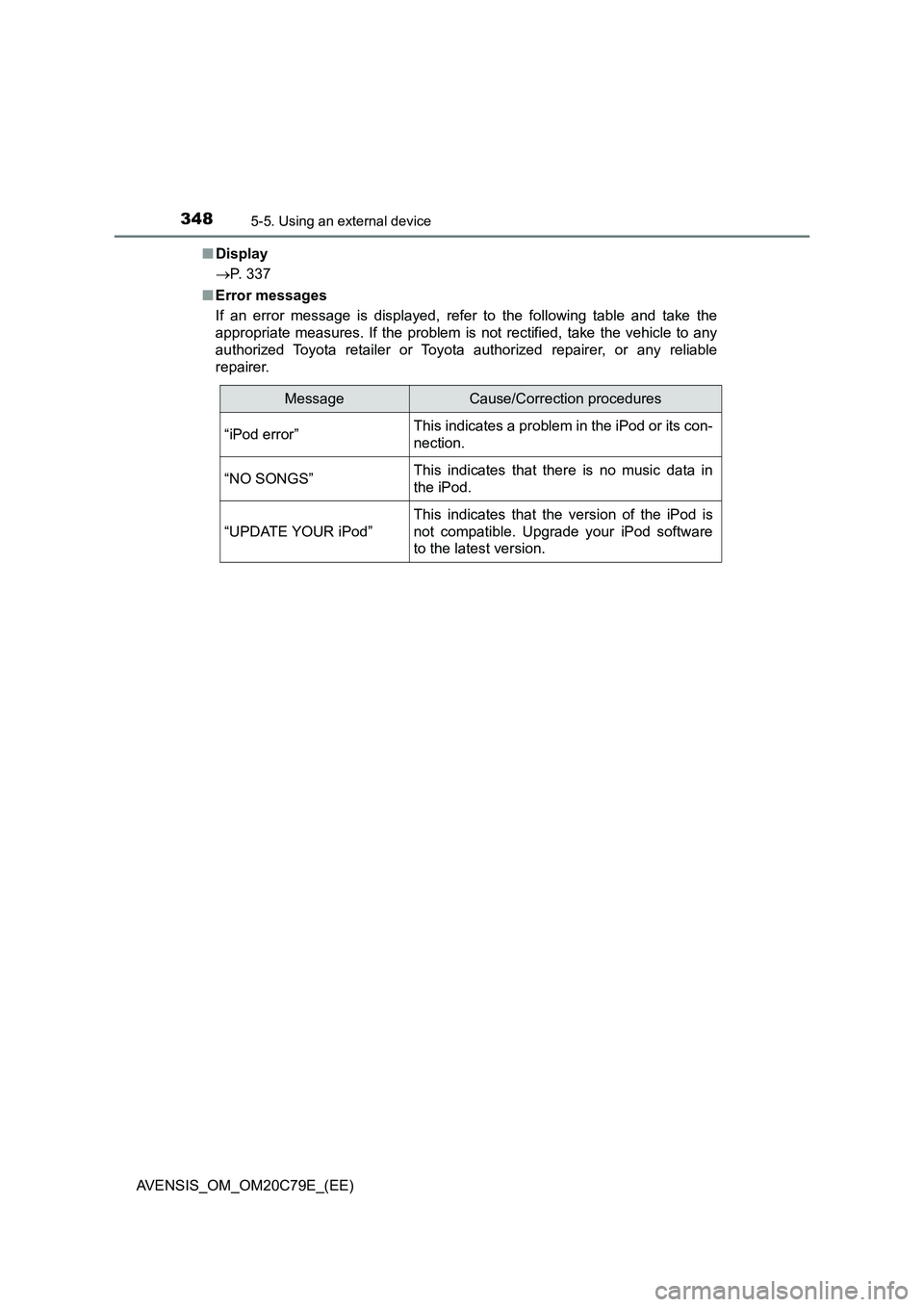
■Error messages
If an error message is displayed, refer to the following table and take the
appropriate measures. If the problem is not rectified, take the vehicle to any
authorized Toyota retailer or Toyota authorized repairer, or any reliable
repairer.
MessageCause/Correction procedures
“iPod error”This indicates a problem in the iPod or its con-
nection.
“NO SONGS”This indicates that there is no music data in
the iPod.
“UPDATE YOUR iPod”
This indicates that the version of the iPod is
not compatible. Upgrade your iPod software
to the latest version.
Page 351 of 660
351
5
5-5. Using an external device
Audio system
AVENSIS_OM_OM20C79E_(EE)
Listening USB memory device
P. 3 2 2
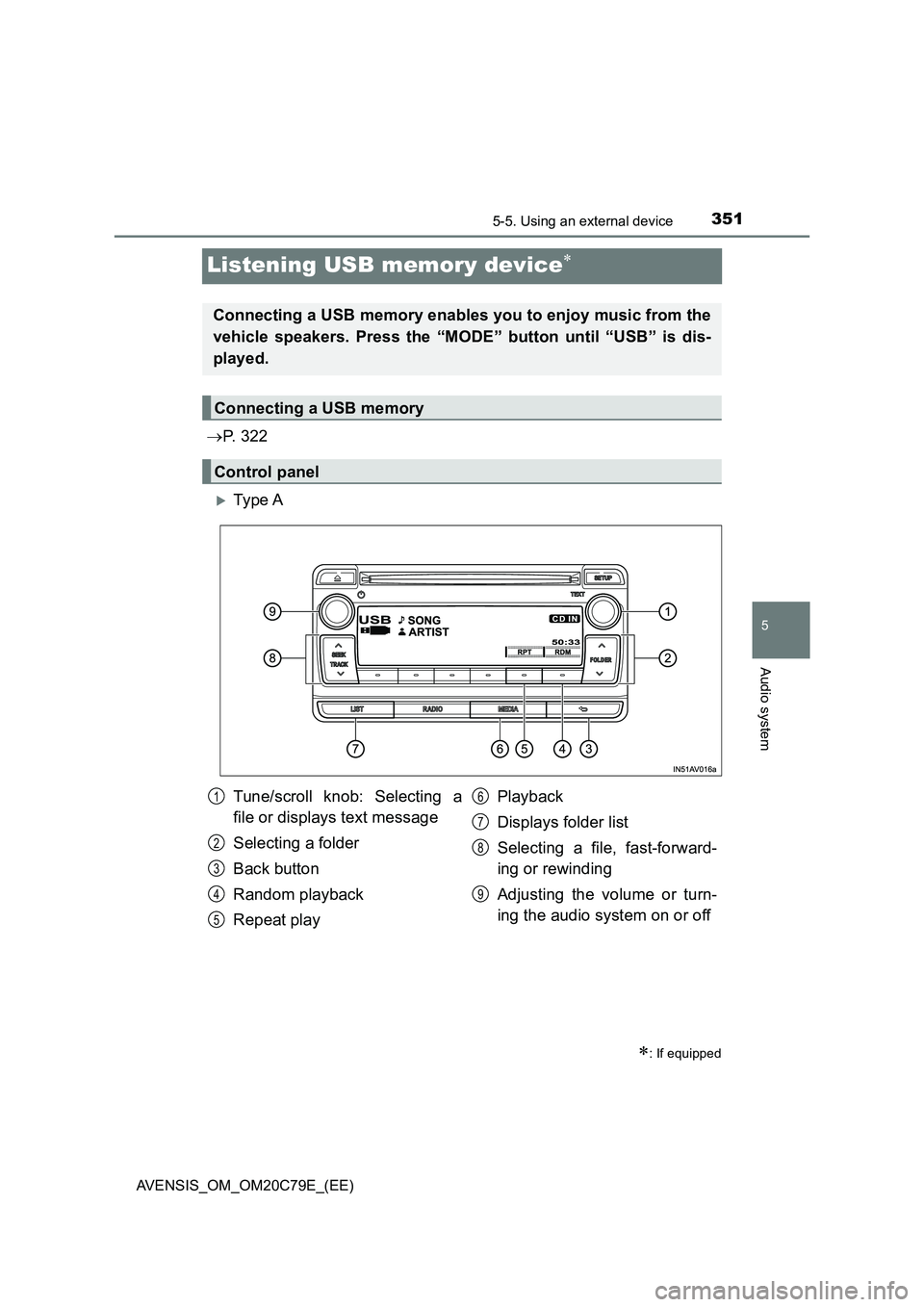
Ty pe A
: If equipped
Connecting a USB memory enables you to enjoy music from the
vehicle speakers. Press the “MODE” button until “USB” is dis-
played.
Connecting a USB memory
Control panel
Tune/scroll knob: Selecting a
file or displays text message
Selecting a folder
Back button
Random playback
Repeat playPlayback
Displays folder list
Selecting a file, fast-forward-
ing or rewinding
Adjusting the volume or turn-
ing the audio system on or off1
2
3
4
5
6
7
8
9
Page 352 of 660
3525-5. Using an external device
AVENSIS_OM_OM20C79E_(EE)
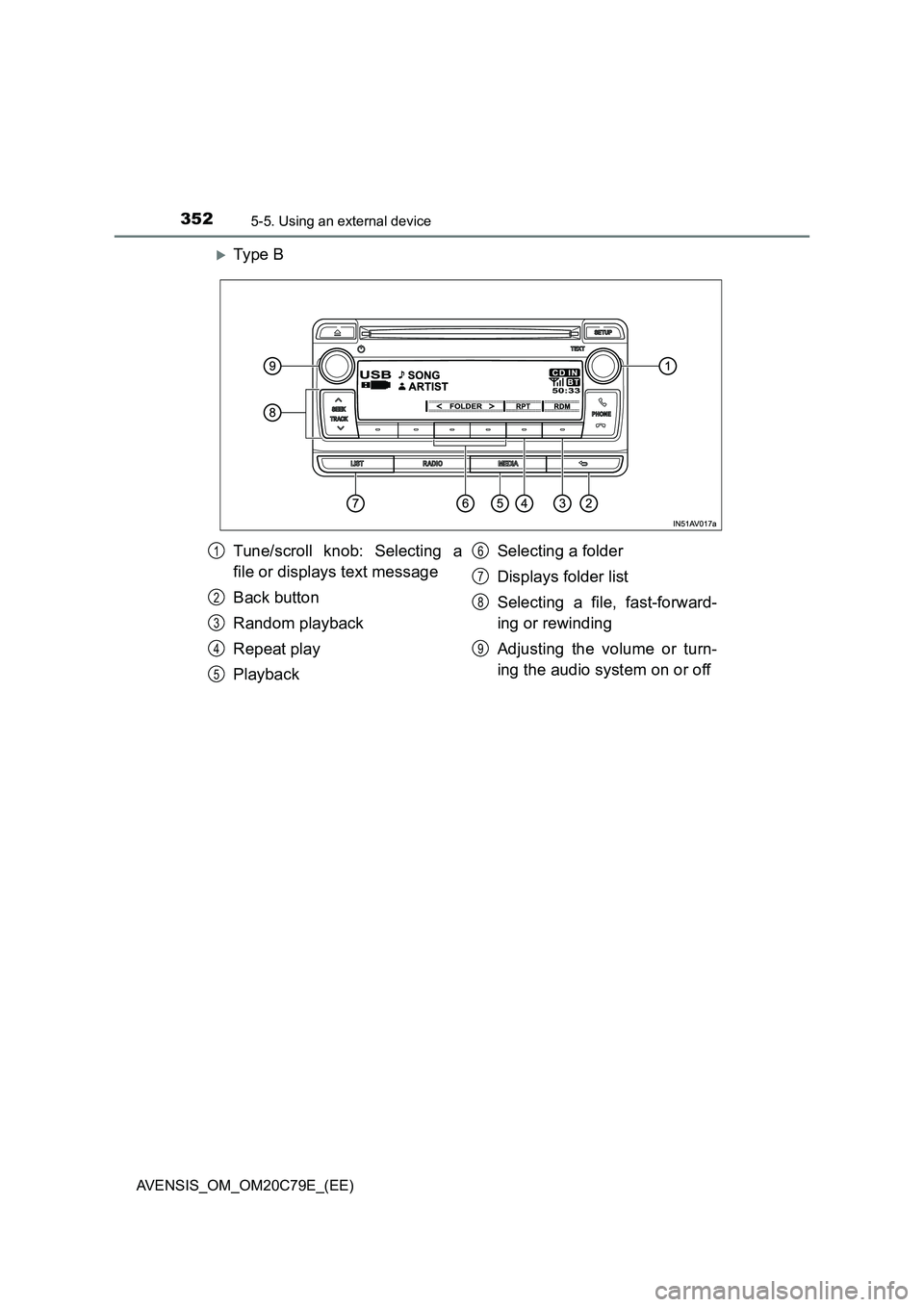
Ty pe B
Tune/scroll knob: Selecting a
file or displays text message
Back button
Random playback
Repeat play
PlaybackSelecting a folder
Displays folder list
Selecting a file, fast-forward-
ing or rewinding
Adjusting the volume or turn-
ing the audio system on or off1
2
3
4
5
6
7
8
9
Page 353 of 660
3535-5. Using an external device
5
Audio system
AVENSIS_OM_OM20C79E_(EE)
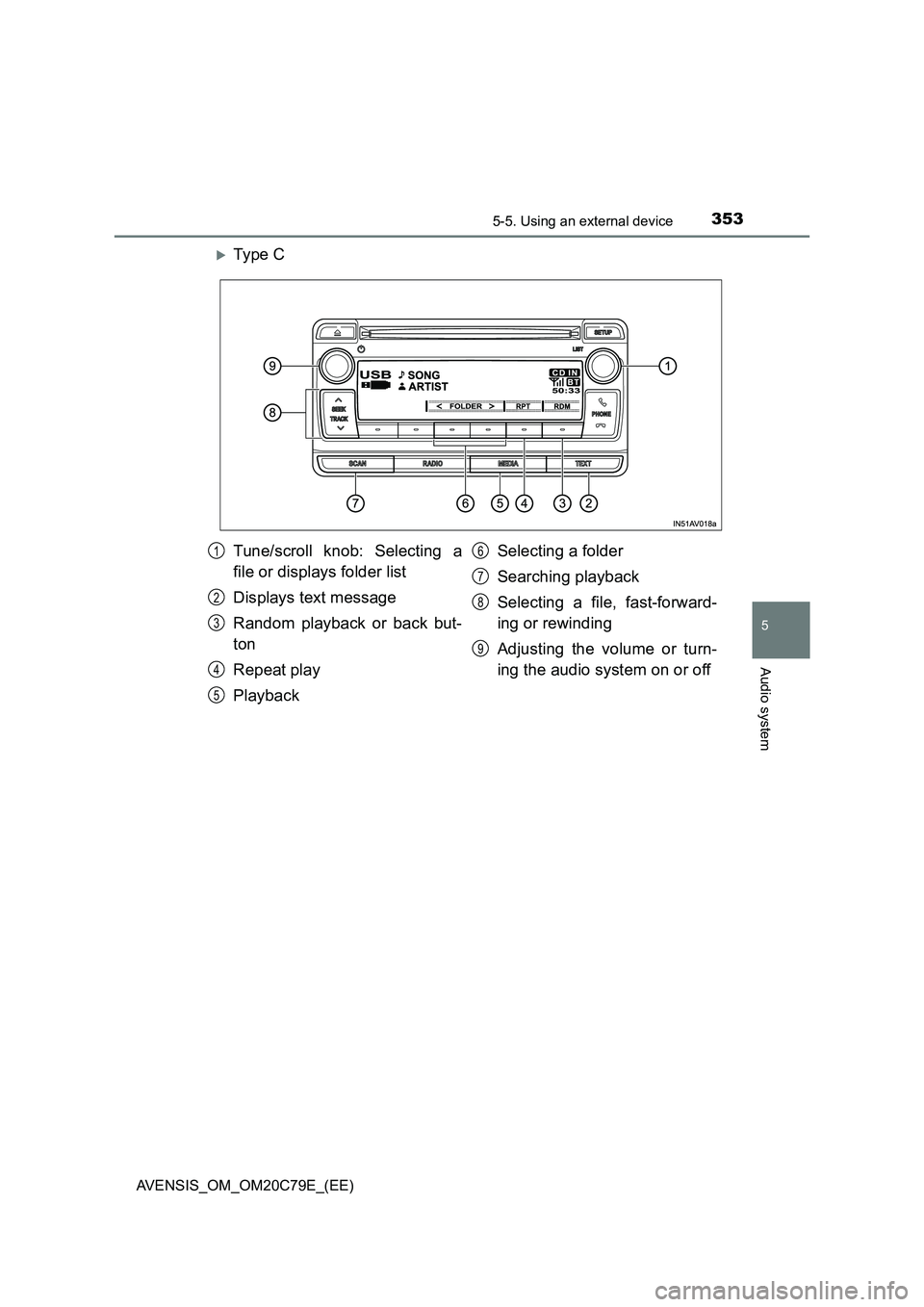
Ty pe C
Tune/scroll knob: Selecting a
file or displays folder list
Displays text message
Random playback or back but-
ton
Repeat play
PlaybackSelecting a folder
Searching playback
Selecting a file, fast-forward-
ing or rewinding
Adjusting the volume or turn-
ing the audio system on or off1
2
3
4
5
6
7
8
9
Page 354 of 660
![TOYOTA AVENSIS 2018 Manual PDF 3545-5. Using an external device
AVENSIS_OM_OM20C79E_(EE)
■Selecting folders one at a time
Press “ ” or “” on the “FOLDER” button (type A), or [<] or
[>] (type B and C) to se](/img/14/66864/w960_66864-353.png "TOYOTA AVENSIS 2018 Manual PDF 3545-5. Using an external device
AVENSIS_OM_OM20C79E_(EE)
■Selecting folders one at a time
Press “ ” or “” on the “FOLDER” button (type A), or [<] or
[>] (type B and C) to se")
3545-5. Using an external device
AVENSIS_OM_OM20C79E_(EE)
■Selecting folders one at a time
Press “ ” or “” on the “FOLDER” button (type A), or [<] or
[>] (type B and C) to select the desired folder.
■Selecting a folder and file from folder list
Press the “LIST” button (type A and B) or the tune/scroll knob
(type C).
The folder list will be displayed.
Turn and press the tune/scroll knob to select a folder and file.
To return to the previous display, press the back button (type A and B)
or [BACK] (type C).
To exit, press the “LIST” button (type A and B) or the knob (type C).
Press and hold the “SCAN” button until you hear a beep.
The first 10 seconds of the first file in each folder will be played.
When the desired folder is reached, press the button again.
Turn the tune/scroll knob or press “ ” or “” on the “SEEK TRACK”
button to select the desired file.
Selecting a folder
Scanning the first file of all the folders (type C only)
Selecting files
1
2
1
2
Page 355 of 660
3555-5. Using an external device
5
Audio system
AVENSIS_OM_OM20C79E_(EE)
Press the “SCAN” button.
The first 10 seconds of each file will be played.
When the desired file is reached, press the button again.
To fast-forward or rewind, press and hold “ ” or “” on the “SEEK
TRACK” button.
Pressing [RDM] changes modes in the following order:
Folder random Disc randomOff
Pressing [RPT] changes modes in the following order:
File repeat Folder repeat*Off
*: Available except when RDM (random playback) is selected
Press the tune/scroll knob (type A and B) or the “TEXT” button (type
C).
Track title, Artist name and Album ti tle (MP3 only) are shown on the dis-
play.
To return to the previous display, press the back button (type A and B) or
[BACK] (type C).
Scanning the files in a folder (type C only)
Fast-forwarding and rewinding files
Random playback
Repeat play
Switching the display
1
2