warning light TOYOTA AVENSIS 2018 User Guide
[x] Cancel search | Manufacturer: TOYOTA, Model Year: 2018, Model line: AVENSIS, Model: TOYOTA AVENSIS 2018Pages: 660, PDF Size: 63.16 MB
Page 40 of 660
401-1. For safe use
AVENSIS_OM_OM20C79E_(EE)
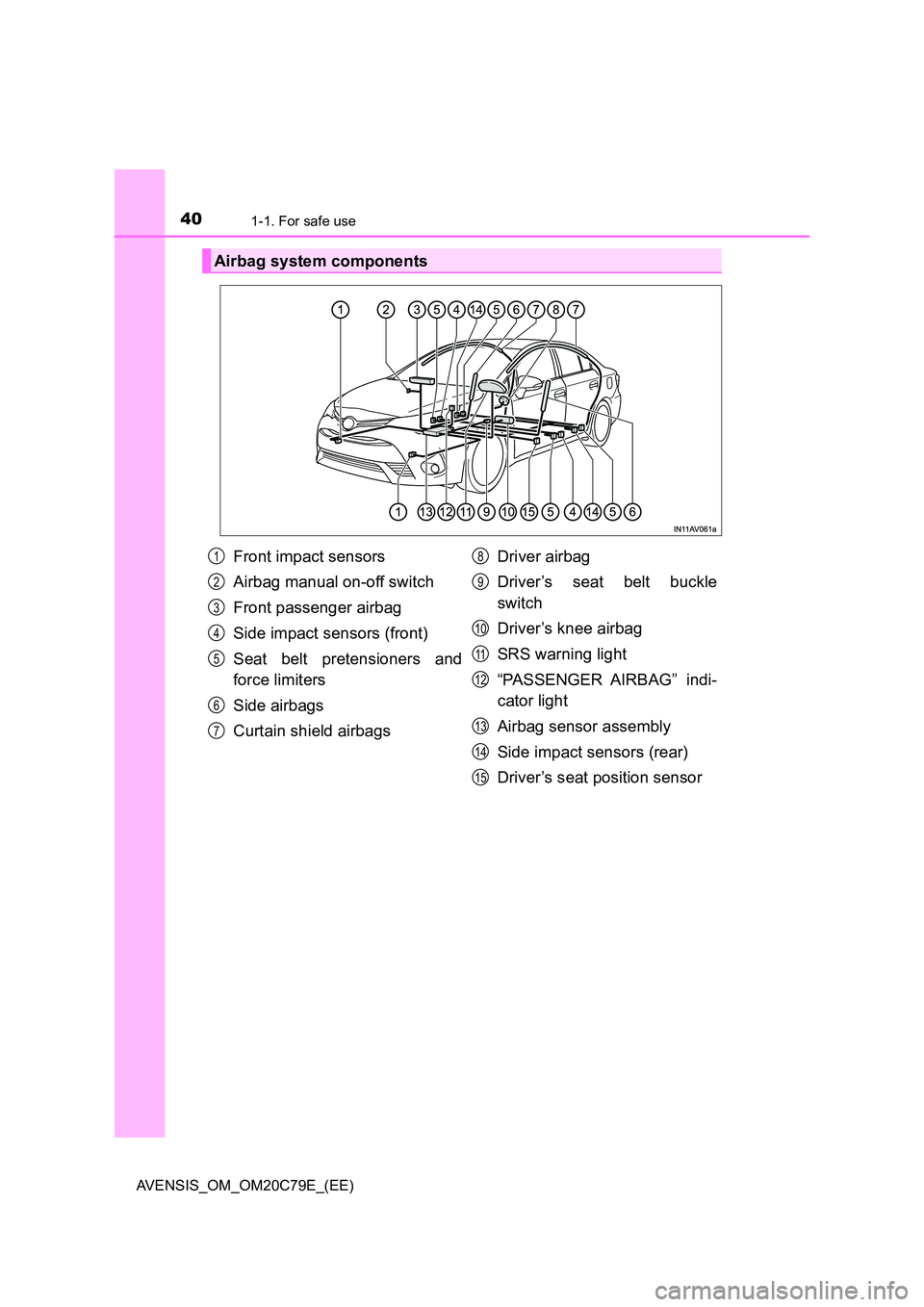
Airbag system components
Front impact sensors
Airbag manual on-off switch
Front passenger airbag
Side impact sensors (front)
Seat belt pretensioners and
force limiters
Side airbags
Curtain shield airbags
Driver airbag
Driver’s seat belt buckle
switch
Driver’s knee airbag
SRS warning light
“PASSENGER AIRBAG” indi-
cator light
Airbag sensor assembly
Side impact sensors (rear)
Driver’s seat position sensor
1
2
3
4
5
6
7
8
9
10
11
12
13
14
15
Page 41 of 660
411-1. For safe use
1
AVENSIS_OM_OM20C79E_(EE)
For safety and security
The main SRS airbag system components are shown above. The
SRS airbag system is controlled by the airbag sensor assembly. As
the airbags deploy, a chemical reaction in the inflators quickly fills the
airbags with non-toxic gas to help restrain the motion of the occu-
pants.
WARNING
■ SRS airbag precautions
Observe the following precautions regarding the SRS airbags.
Failure to do so may cause death or serious injury.
● The driver and all passengers in the vehicle must wear their seat belts
properly.
The SRS airbags are supplemental devic es to be used with the seat belts.
● The SRS driver airbag deploys with considerable force, and can cause
death or serious injury especially if the driver is very close to the airbag.
Since the risk zone for the driver’s airbag is the first 50 - 75 mm (2 - 3 in.)
of inflation, placing yourself 250 mm ( 10 in.) from your driver airbag pro-
vides you with a clear margin of safety. This distance is measured from
the center of the steering wheel to your breastbone. If you sit less than
250 mm (10 in.) away now, you can change your driving position in sev-
eral ways:
• Move your seat to the rear as far as you can while still reaching the
pedals comfortably.
• Slightly recline the back of the seat. Although vehicle designs vary,
many drivers can achieve the 250 mm (10 in.) distance, even with the
driver seat all the way forward, simply by reclining the back of the seat
somewhat. If reclining the back of your seat makes it hard to see the
road, raise yourself by using a firm , non-slippery cushion, or raise the
seat if your vehicle has that feature.
• If your steering wheel is adjustable, tilt it downward. This points the air-
bag toward your chest instead of your head and neck.
The seat should be adjusted as recommended above, while still maintaining
control of the foot pedals, steering wheel, and your view of the instrument
panel controls.
Page 51 of 660
511-1. For safe use
1
For safety and security
AVENSIS_OM_OM20C79E_(EE)
Exhaust gas precautions
Harmful substance to the human body is included in exhaust
gases if inhaled.
WARNING
Exhaust gases include harmful carbon monoxide (CO), which is colorless and
odorless. Observe the following precautions.
Failure to do so may cause exhaust gases enter the vehicle and may lead to
an accident caused by light-headedness, or may lead to death or a serious
health hazard.
■ Important points while driving
● Keep the trunk lid (sedan) or back door (wagon) closed.
● If you smell exhaust gases in the vehicle even when the trunk lid (sedan)
or back door (wagon) is closed, open the windows and have the vehicle
inspected at any authorized Toyota retailer or Toyota authorized repairer,
or any reliable repairer as soon as possible.
■ When parking
● If the vehicle is in a poorly ventilated area or a closed area, such as a
garage, stop the engine.
● Do not leave the vehicle with the engine running for a long time.
If such a situation cannot be avoided, park the vehicle in an open space
and ensure that exhaust fumes do not enter the vehicle interior.
● Do not leave the engine running in an area with snow build-up, or where it
is snowing. If snowbanks build up around the vehicle while the engine is
running, exhaust gases may collect and enter the vehicle.
■ Exhaust pipe
The exhaust system needs to be checked periodically. If there is a hole or
crack caused by corrosion, damage to a joint or abnormal exhaust noise, be
sure to have the vehicle inspected and repaired by any authorized Toyota
retailer or Toyota authorized repairer, or any reliable repairer.
Page 97 of 660
97
2Instrument cluster
AVENSIS_OM_OM20C79E_(EE)2. Instrument cluster
Warning lights and
indicators ........................... 98
Gauges and meters ........... 104
Multi-information display
(with monochrome
display) ............................ 108
Multi-information display
(with color display) ........... 111
Fuel consumption
information ....................... 117
Page 98 of 660
982. Instrument cluster
AVENSIS_OM_OM20C79E_(EE)
Warning lights and indicators
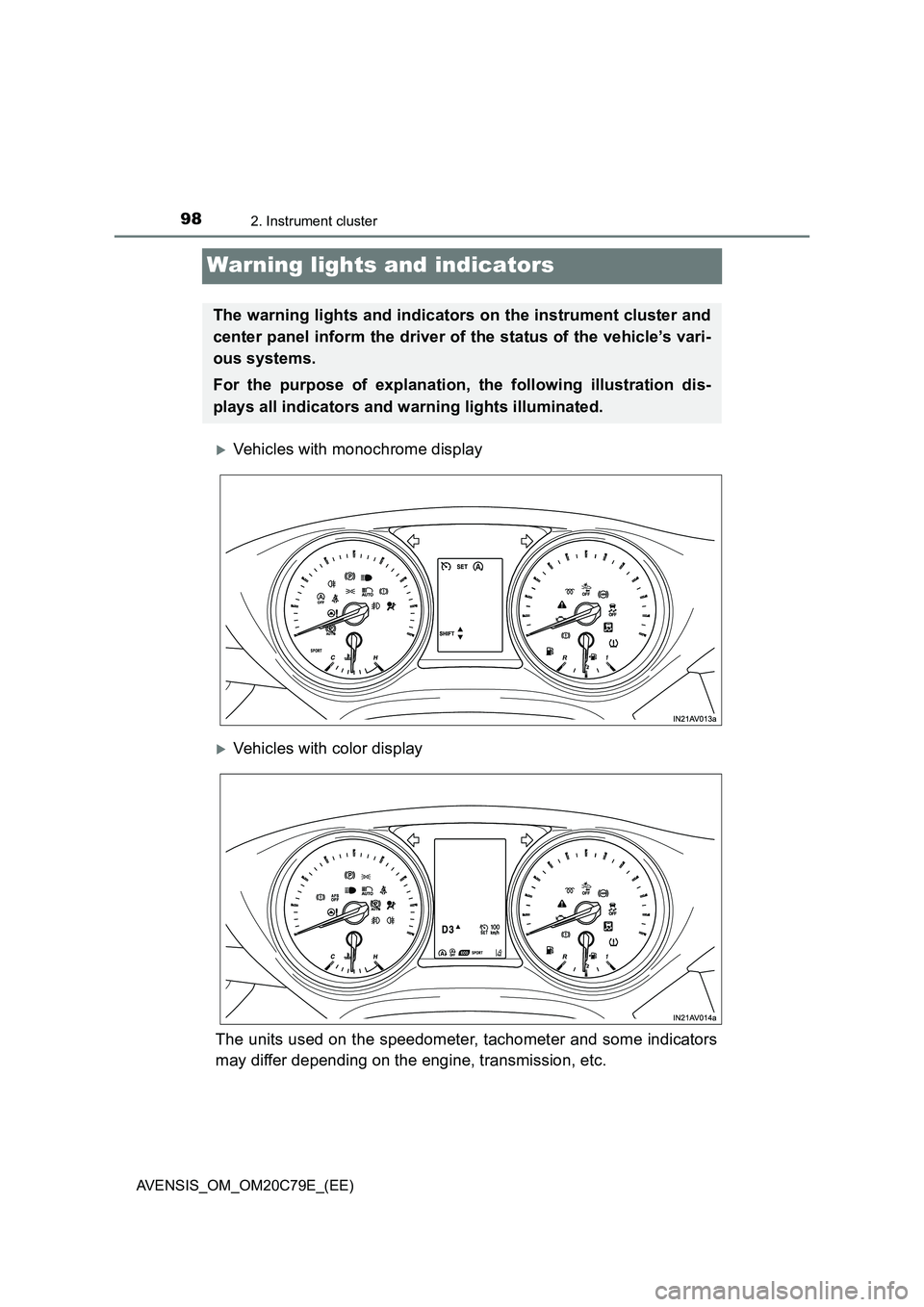
Vehicles with monochrome display
Vehicles with color display
The units used on the speedometer, tachometer and some indicators
may differ depending on the engine, transmission, etc.
The warning lights and indicators on the instrument cluster and
center panel inform the driver of the status of the vehicle’s vari-
ous systems.
For the purpose of explanation, the following illustration dis-
plays all indicators and warning lights illuminated.
Page 99 of 660
992. Instrument cluster
2
Instrument cluster
AVENSIS_OM_OM20C79E_(EE)
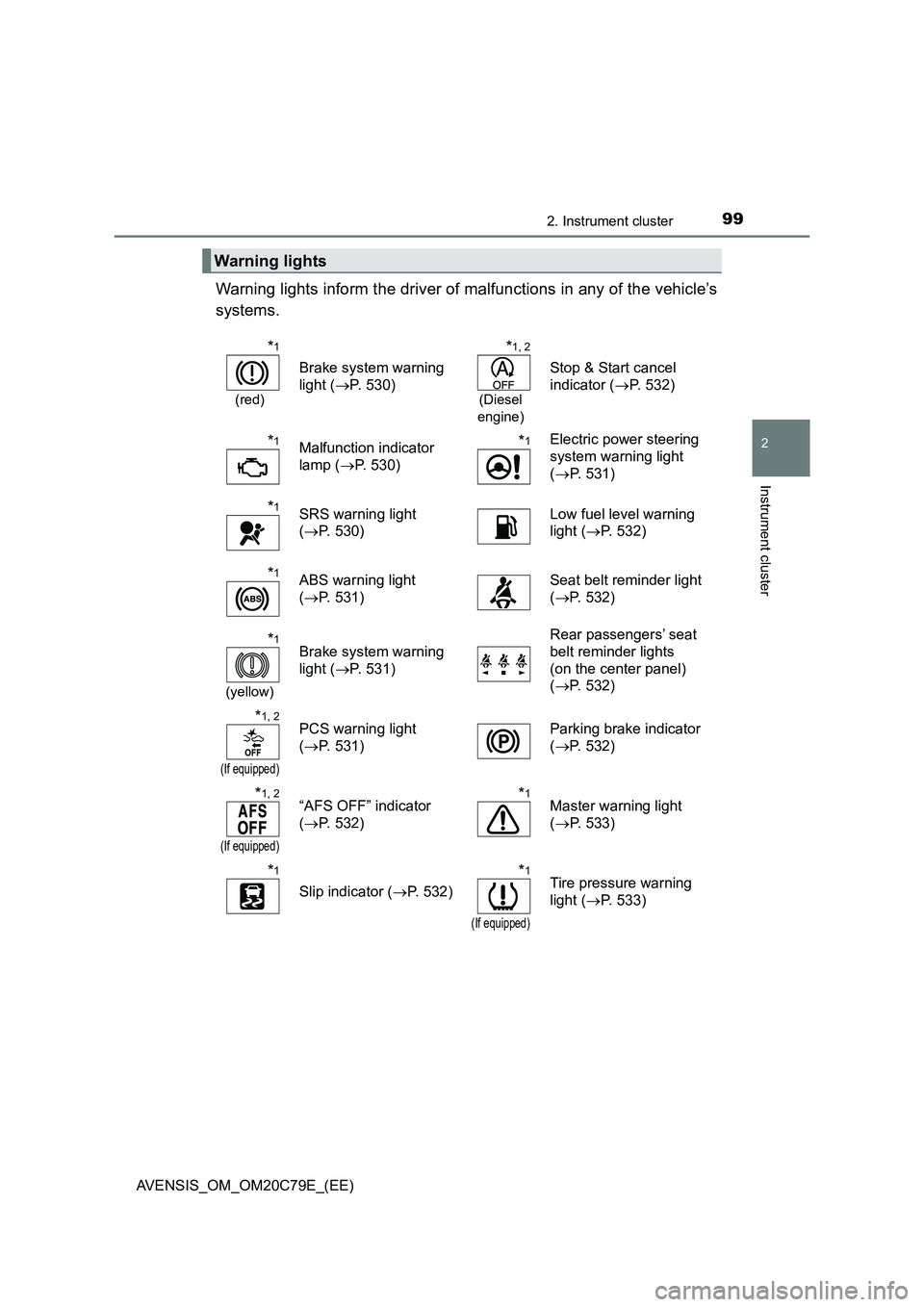
Warning lights inform the driver of malfunctions in any of the vehicle’s
systems.
Warning lights
*1
(red)
Brake system warning
light (P. 530)
*1, 2
(Diesel
engine)
Stop & Start cancel
indicator (P. 532)
*1Malfunction indicator
lamp (P. 530)*1Electric power steering
system warning light
(P. 531)
*1SRS warning light
(P. 530)Low fuel level warning
light (P. 532)
*1ABS warning light
(P. 531)Seat belt reminder light
(P. 532)
*1
(yellow)
Brake system warning
light (P. 531)Rear passengers’ seat
belt reminder lights
(on the center panel)
(P. 532)
*1, 2
(If equipped)
PCS warning light
(P. 531)Parking brake indicator
(P. 532)
*1, 2
(If equipped)
“AFS OFF” indicator
(P. 532)*1Master warning light
(P. 533)
*1
Slip indicator (P. 532)
*1
(If equipped)
Tire pressure warning
light (P. 533)
Page 102 of 660
1022. Instrument cluster
AVENSIS_OM_OM20C79E_(EE)
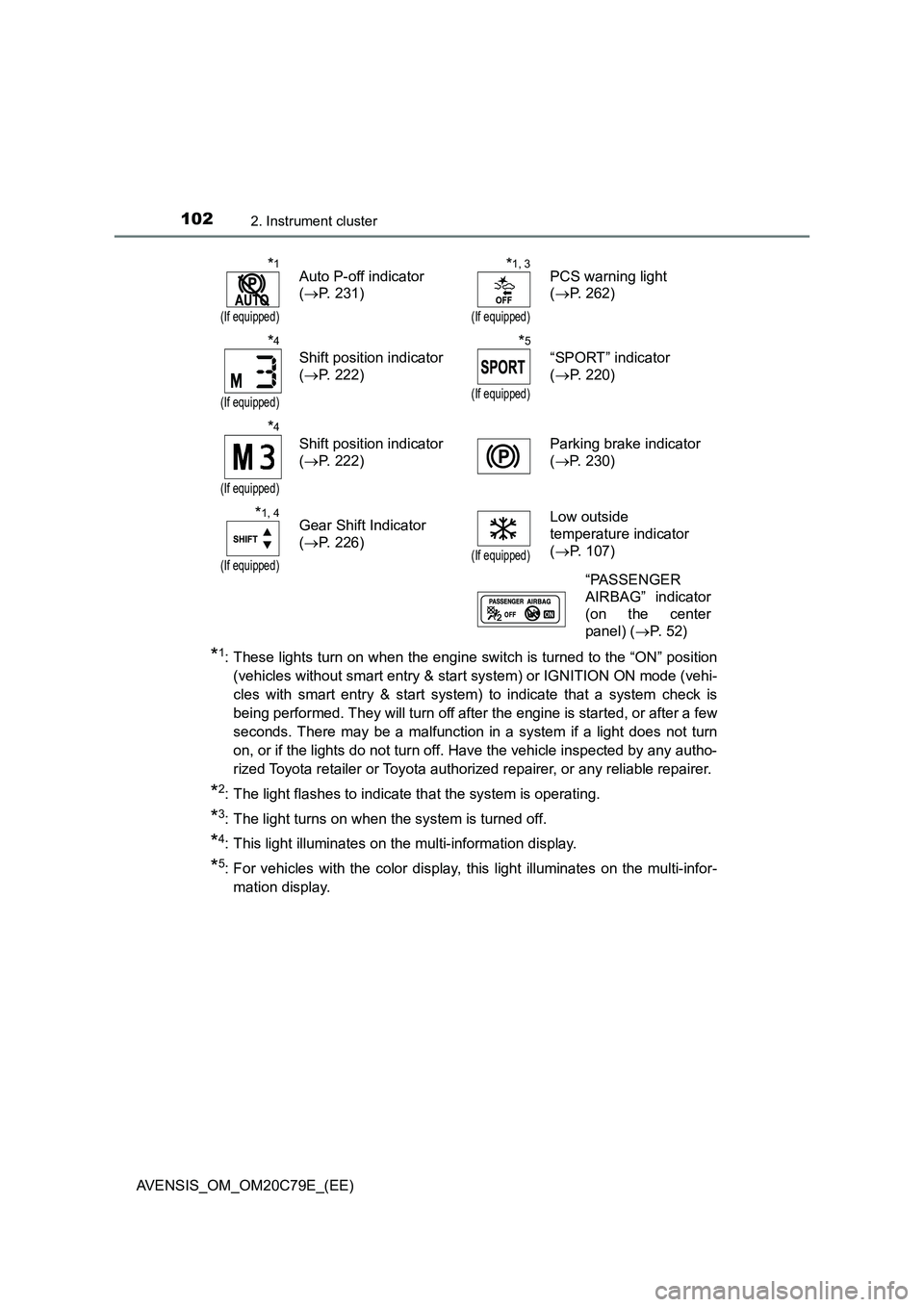
*1: These lights turn on when the engine switch is turned to the “ON” position
(vehicles without smart entry & start system) or IGNITION ON mode (vehi-
cles with smart entry & start system) to indicate that a system check is
being performed. They will turn off after the engine is started, or after a few
seconds. There may be a malfunction in a system if a light does not turn
on, or if the lights do not turn off. Have the vehicle inspected by any autho-
rized Toyota retailer or Toyota authorized repairer, or any reliable repairer.
*2: The light flashes to indicate that the system is operating.
*3: The light turns on when the system is turned off.
*4: This light illuminates on the multi-information display.
*5: For vehicles with the color display, this light illuminates on the multi-infor-
mation display.
*1
(If equipped)
Auto P-off indicator
( P. 231)
*1, 3
(If equipped)
PCS warning light
( P. 262)
*4
(If equipped)
Shift position indicator
( P. 222)
*5
(If equipped)
“SPORT” indicator
( P. 220)
*4
(If equipped)
Shift position indicator
( P. 222)
Parking brake indicator
( P. 230)
*1, 4
(If equipped)
Gear Shift Indicator
( P. 226)(If equipped)
Low outside
temperature indicator
( P. 107)
“PASSENGER
AIRBAG” indicator
(on the center
panel) ( P. 5 2 )
Page 103 of 660
1032. Instrument cluster
2
Instrument cluster
AVENSIS_OM_OM20C79E_(EE)
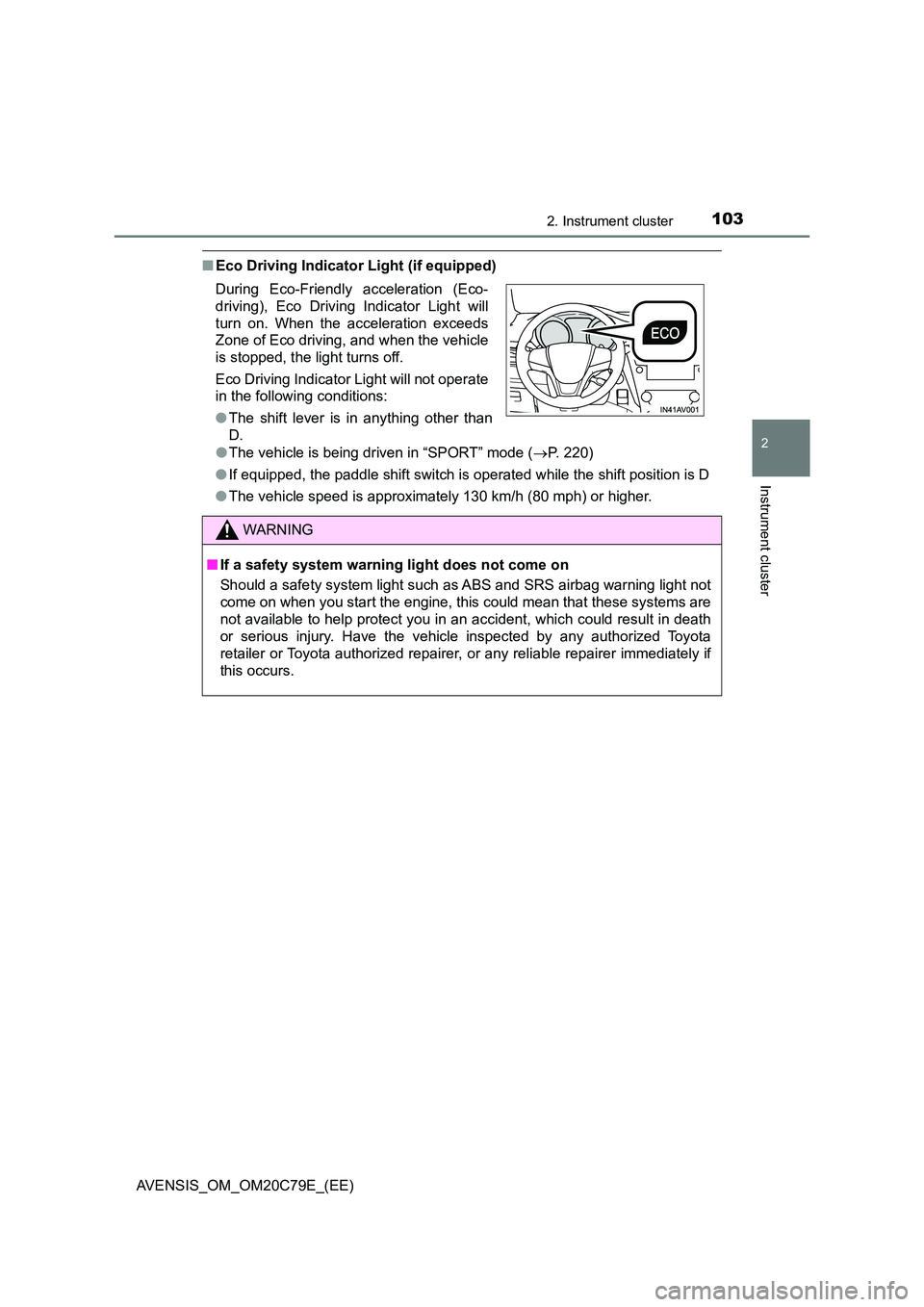
■Eco Driving Indicator Light (if equipped)
● The vehicle is being driven in “SPORT” mode (P. 220)
● If equipped, the paddle shift switch is operated while the shift position is D
● The vehicle speed is approximately 130 km/h (80 mph) or higher.
During Eco-Friendly acceleration (Eco-
driving), Eco Driving Indicator Light will
turn on. When the acceleration exceeds
Zone of Eco driving, and when the vehicle
is stopped, the light turns off.
Eco Driving Indicator Light will not operate
in the following conditions:
● The shift lever is in anything other than
D.
WARNING
■ If a safety system warning light does not come on
Should a safety system light such as ABS and SRS airbag warning light not
come on when you start the engine, this could mean that these systems are
not available to help protect you in an accident, which could result in death
or serious injury. Have the vehicle inspected by any authorized Toyota
retailer or Toyota authorized repairer, or any reliable repairer immediately if
this occurs.
Page 109 of 660
1092. Instrument cluster
2
Instrument cluster
AVENSIS_OM_OM20C79E_(EE)When refueling, turn the engine switch to the “LOCK” position (vehicles
without smart entry & start system) or off (vehicles with smart entry &
start system).
If the vehicle is refueled without turning the engine switch to the “LOCK”
position or off, the display may not be updated.
●Average vehicle speed
Displays the average vehicle speed since the engine was last
started.
●Elapsed time
Displays the elapsed time since the engine was started.
●Setting
The settings of the following items can be changed.
• Language
Select to change the language on the display. (P. 629)
•Units
Select to change the units for measure of the fuel consumption and out-
side temperature. (P. 629)
• Eco Driving Indicator Light
Select to activate/deactivate the Eco Driving Indicator Light. (P. 109)
• Stop & start system
Select to change the stop & start system setting. (P. 295)
•Clock
Select to adjust the hours and minutes. (P. 110)
•Clock format
Select to change the clock format.
• Tire pressure warning system
Select to set up the tire pressure warning system. (P. 470)
●Average fuel consumption and Eco Driving Indicator Zone Display
(if equipped)
Displays the average fuel consumption since the function was reset.
Suggests Zone of Eco driving and Eco driving ratio based on accel-
eration.
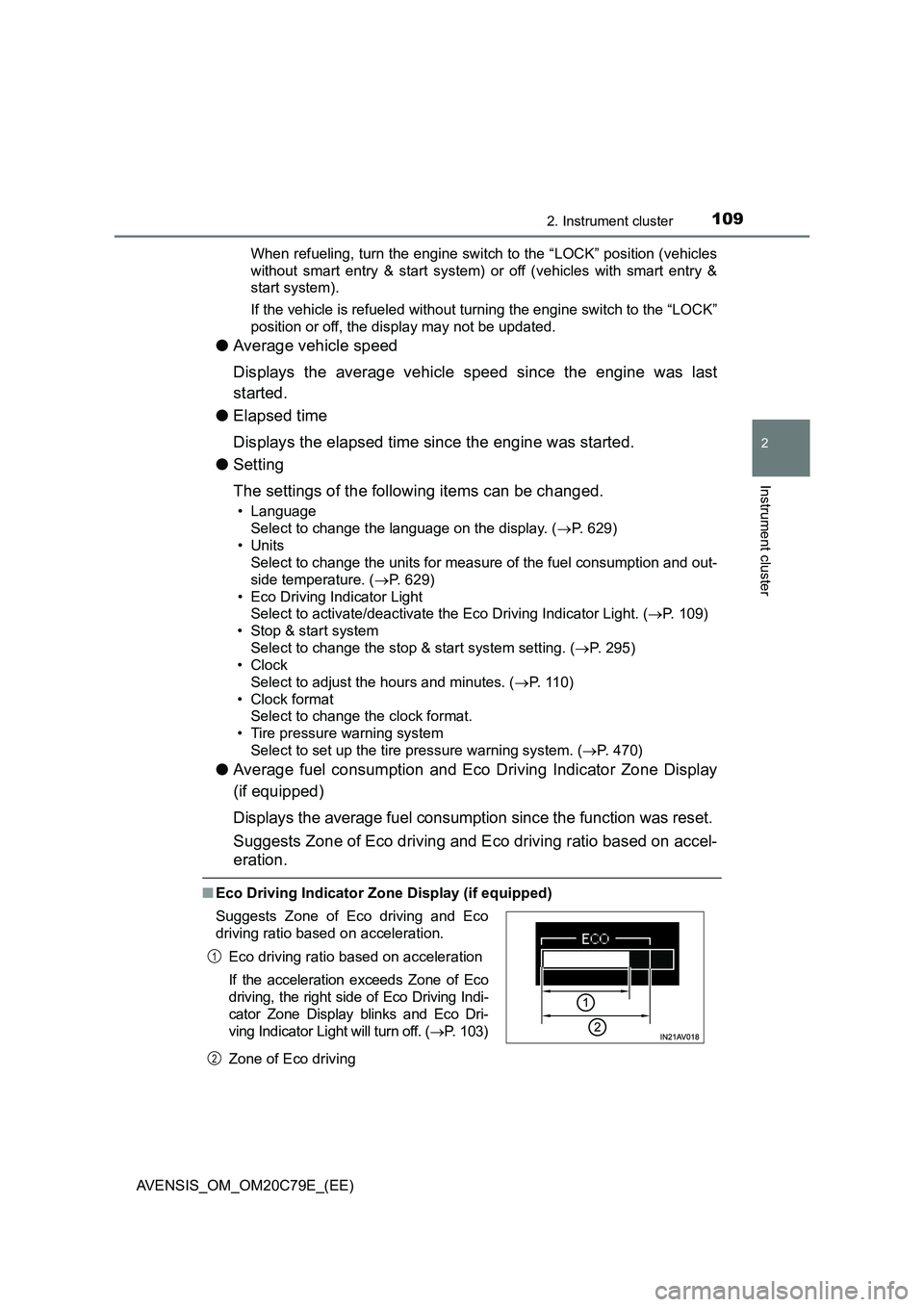
■Eco Driving Indicator Zone Display (if equipped)
Zone of Eco driving Suggests Zone of Eco driving and Eco
driving ratio based on acceleration.
Eco driving ratio based on acceleration
If the acceleration exceeds Zone of Eco
driving, the right side of Eco Driving Indi-
cator Zone Display blinks and Eco Dri-
ving Indicator Light will turn off. (P. 103)
1
2
Page 110 of 660
1102. Instrument cluster
AVENSIS_OM_OM20C79E_(EE)
■ When disconnecting and reconnecting battery terminals
The following information data will be reset:
● Elapsed time
● Average fuel consumption
● Driving range
● Average vehicle speed
■ Liquid crystal display
Small spots or light spots may appear on the display. This phenomenon is
characteristic of liquid crystal displays, and there is no problem to continue
using the display.
■ Setting display automatic suspension
In the following situations, the setting display will be suspended.
● When a message appears
● When the vehicle begins to move
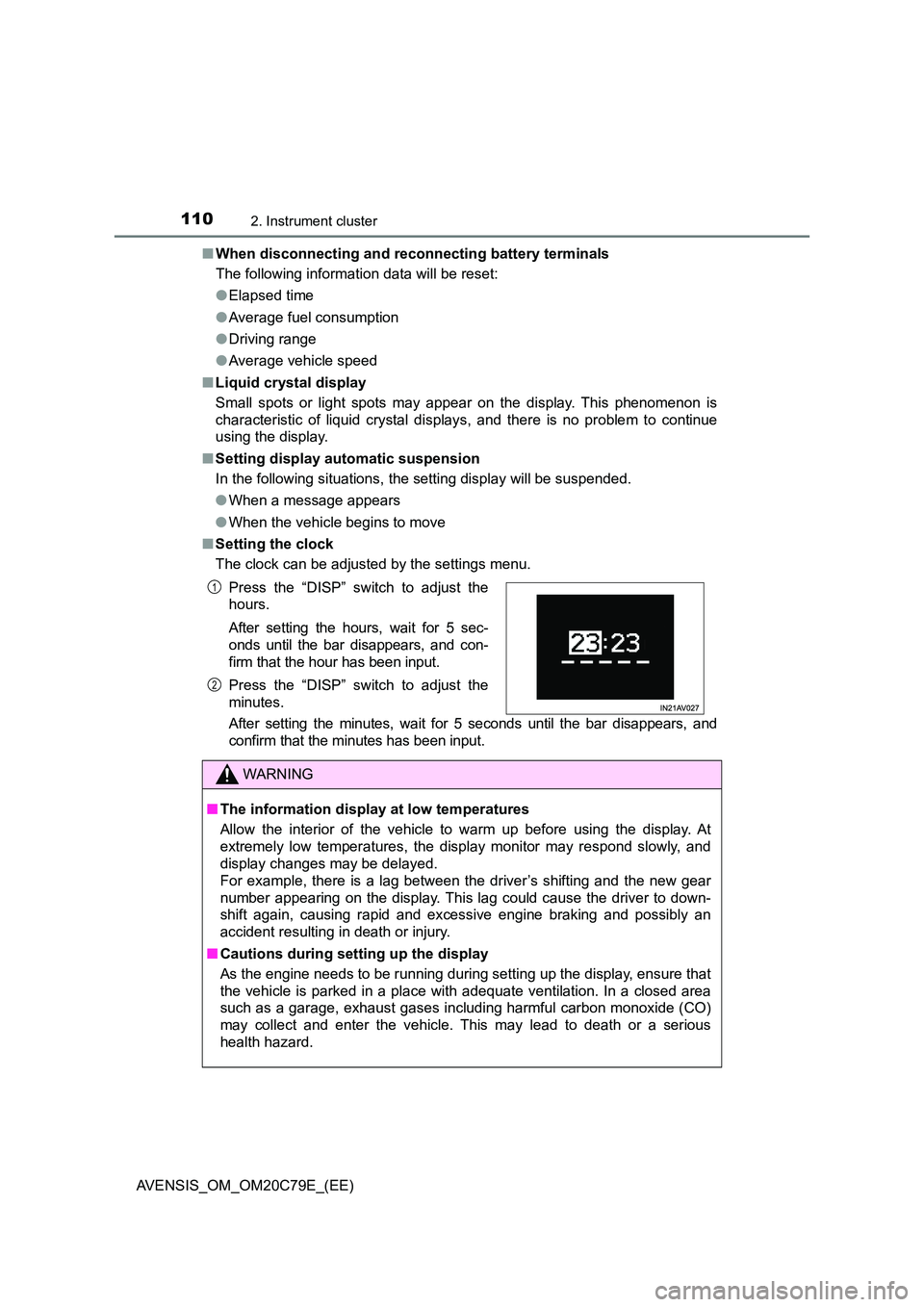
■ Setting the clock
The clock can be adjusted by the settings menu.
After setting the minutes, wait for 5 seconds until the bar disappears, and
confirm that the minutes has been input.
Press the “DISP” switch to adjust the
hours.
After setting the hours, wait for 5 sec-
onds until the bar disappears, and con-
firm that the hour has been input.
Press the “DISP” switch to adjust the
minutes.
WARNING
■ The information display at low temperatures
Allow the interior of the vehicle to warm up before using the display. At
extremely low temperatures, the display monitor may respond slowly, and
display changes may be delayed.
For example, there is a lag between the driver’s shifting and the new gear
number appearing on the display. This lag could cause the driver to down-
shift again, causing rapid and exce ssive engine braking and possibly an
accident resulting in death or injury.
■ Cautions during setting up the display
As the engine needs to be running during setting up the display, ensure that
the vehicle is parked in a place with adequate ventilation. In a closed area
such as a garage, exhaust gases including harmful carbon monoxide (CO)
may collect and enter the vehicle. This may lead to death or a serious
health hazard.
1
2