ignition TOYOTA AVENSIS 2018 Owner's Manual
[x] Cancel search | Manufacturer: TOYOTA, Model Year: 2018, Model line: AVENSIS, Model: TOYOTA AVENSIS 2018Pages: 660, PDF Size: 63.16 MB
Page 215 of 660
2154-2. Driving procedures
4
Driving
AVENSIS_OM_OM20C79E_(EE)
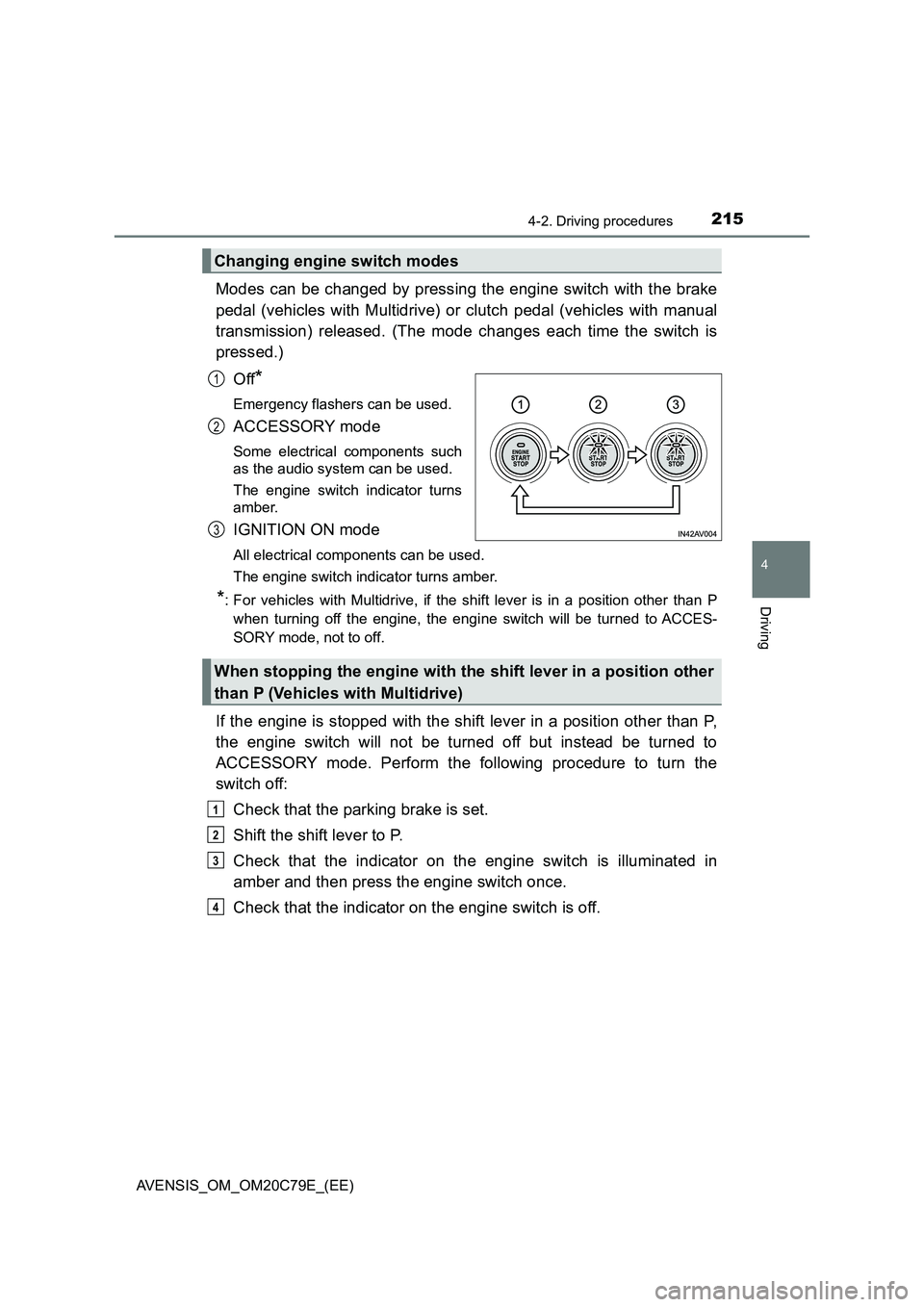
Modes can be changed by pressing the engine switch with the brake
pedal (vehicles with Multidrive) or clutch pedal (vehicles with manual
transmission) released. (The mode changes each time the switch is
pressed.)
Off
*
Emergency flashers can be used.
ACCESSORY mode
Some electrical components such
as the audio system can be used.
The engine switch indicator turns
amber.
IGNITION ON mode
All electrical components can be used.
The engine switch indicator turns amber.
*: For vehicles with Multidrive, if the shift lever is in a position other than P
when turning off the engine, the engine switch will be turned to ACCES-
SORY mode, not to off.
If the engine is stopped with the shift lever in a position other than P,
the engine switch will not be turned off but instead be turned to
ACCESSORY mode. Perform the following procedure to turn the
switch off:
Check that the parking brake is set.
Shift the shift lever to P.
Check that the indicator on the engine switch is illuminated in
amber and then press the engine switch once.
Check that the indicator on the engine switch is off.
Changing engine switch modes
1
2
3
When stopping the engine with the shift lever in a position other
than P (Vehicles with Multidrive)
1
2
3
4
Page 216 of 660
2164-2. Driving procedures
AVENSIS_OM_OM20C79E_(EE)
■Auto power off function
Vehicles with Multidrive
If the vehicle is left in ACCESSORY mode for more than 20 minutes or IGNI-
TION ON mode (the engine is not running) for more than an hour with the
shift lever in P, the engine switch will automatically turn off. However, this
function cannot entirely prevent battery discharge. Do not leave the vehicle
with the engine switch in ACCESSORY or IGNITION ON mode for long peri-
ods of time when the engine is not running.
Vehicles with manual transmission
If the vehicle is left in ACCESSORY mode for more than 20 minutes or IGNI-
TION ON mode (the engine is not running) for more than an hour, the engine
switch will automatically turn off. However, this function cannot entirely pre-
vent battery discharge. Do not leave the vehicle with the engine switch in
ACCESSORY or IGNITION ON mode for long periods of time when the
engine is not running.
■Operation of the engine switch
●If the switch is not pressed shortly and firmly, the engine switch mode may
not change or the engine may not start.
●If attempting to restart the engine immediately after turning the engine
switch off, the engine may not start in some cases. After turning the engine
off, please wait a few seconds before restarting the engine.
■Electronic key battery depletion
P. 124
■Conditions affecting operation
P. 152
■Note for the smart entry & start system
P. 153
■If the engine does not start
The engine immobilizer system may not have been deactivated. (P. 78)
Contact any authorized Toyota retailer or Toyota authorized repairer, or any
reliable repairer.
■Steering lock
After turning the engine switch off and opening and closing the doors, the
steering wheel will be locked due to the steering lock function. Operating the
engine switch again automatically cancels the steering lock.
Page 218 of 660
2184-2. Driving procedures
AVENSIS_OM_OM20C79E_(EE)
NOTICE
■To prevent battery discharge
● Do not leave the engine switch in ACCESSORY or IGNITION ON mode
for long periods of time without the engine running.
● If the indicator on the engine switch is illuminated, the engine switch is not
off. When exiting the vehicle, always check that the engine switch is off.
● On vehicles with Multidrive, do not stop the engine when the shift lever is
in a position other than P. If the engine is stopped in another shift lever
position, the engine switch will not be turned off but instead be turned to
ACCESSORY mode. If the vehicle is left in ACCESSORY mode, battery
discharge may occur.
■ When starting the engine
● Do not race a cold engine.
● If the engine becomes difficult to start or stalls frequently, have your vehi-
cle checked by any authorized Toyota retailer or Toyota authorized
repairer, or any reliable repairer immediately.
■ Symptoms indicating a malfunction with the engine switch
If the engine switch seems to be operating somewhat differently than usual,
such as the switch sticking slightly, there may be a malfunction. Contact any
authorized Toyota retailer or Toyota authorized repairer, or any reliable
repairer immediately.
Page 219 of 660
219
4
4-2. Driving procedures
Driving
AVENSIS_OM_OM20C79E_(EE)
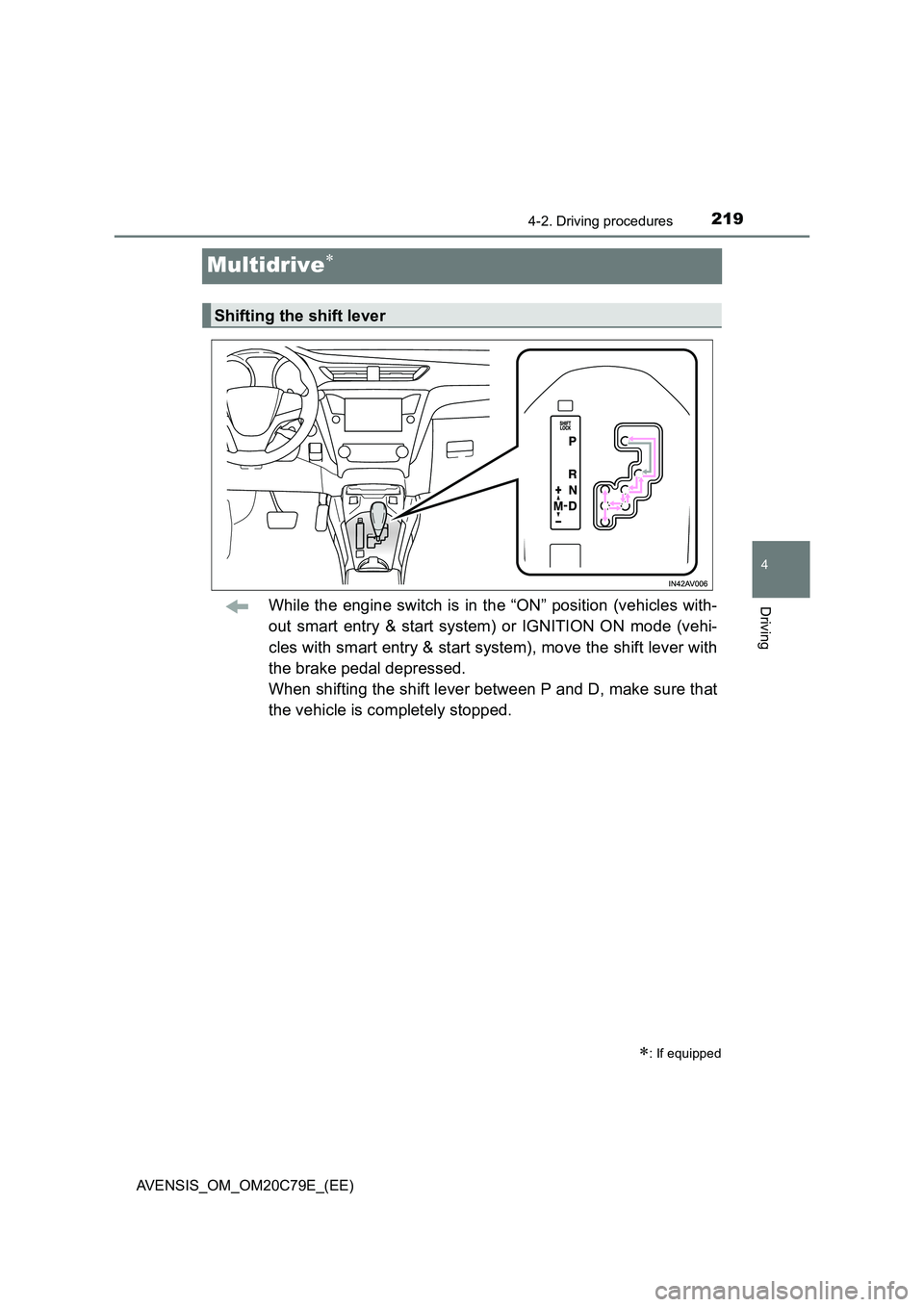
Multidrive
While the engine switch is in the “ON” position (vehicles with-
out smart entry & start system) or IGNITION ON mode (vehi-
cles with smart entry & start system), move the shift lever with
the brake pedal depressed.
When shifting the shift lever between P and D, make sure that
the vehicle is completely stopped.
: If equipped
Shifting the shift lever
Page 229 of 660
229
4
4-2. Driving procedures
Driving
AVENSIS_OM_OM20C79E_(EE)
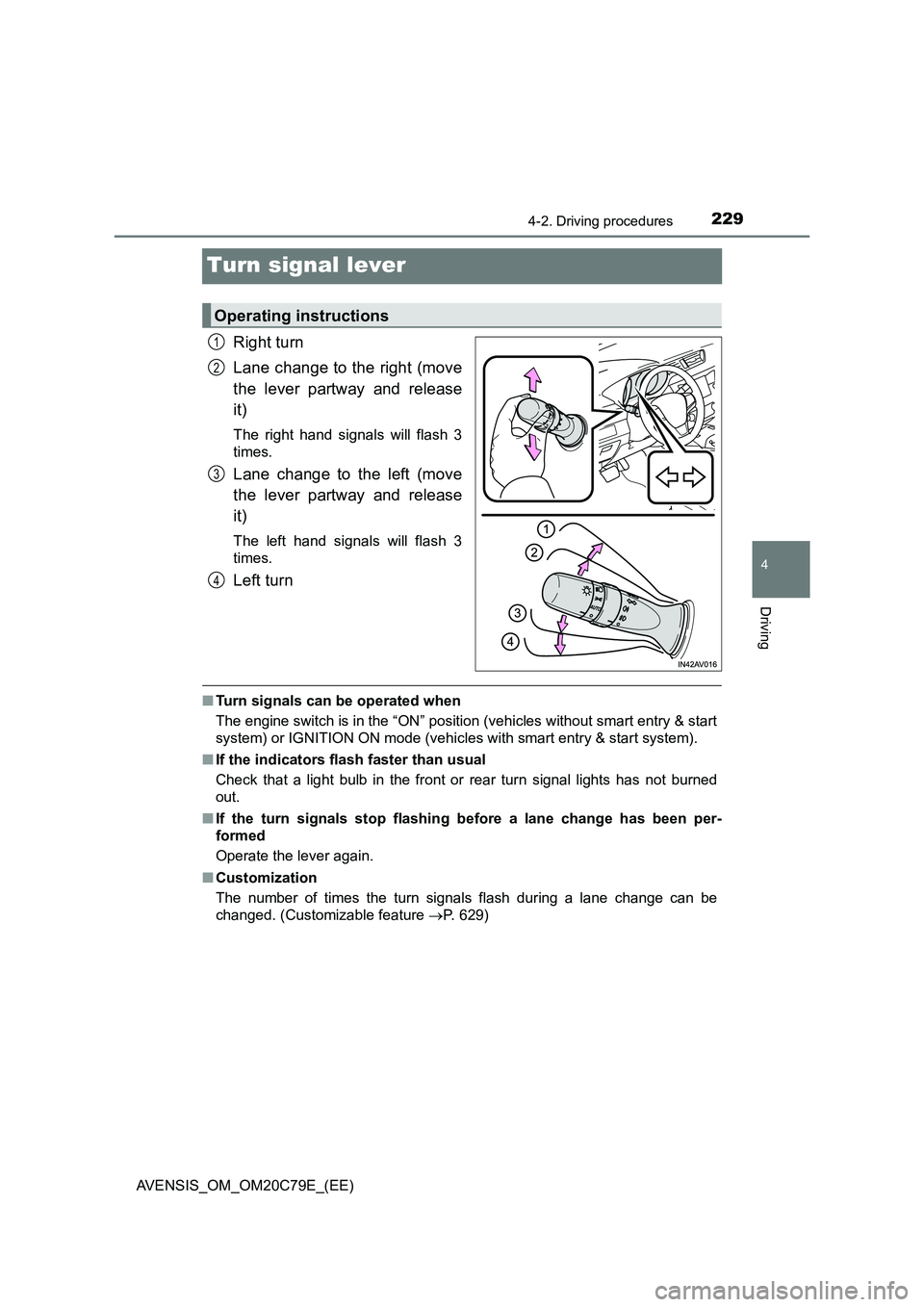
Turn signal lever
Right turn
Lane change to the right (move
the lever partway and release
it)
The right hand signals will flash 3
times.
Lane change to the left (move
the lever partway and release
it)
The left hand signals will flash 3
times.
Left turn
■ Turn signals can be operated when
The engine switch is in the “ON” position (vehicles without smart entry & start
system) or IGNITION ON mode (vehicles with smart entry & start system).
■ If the indicators flash faster than usual
Check that a light bulb in the front or rear turn signal lights has not burned
out.
■ If the turn signals stop flashing before a lane change has been per-
formed
Operate the lever again.
■ Customization
The number of times the turn signals flash during a lane change can be
changed. (Customizable feature P. 629)
Operating instructions
1
2
3
4
Page 230 of 660
2304-2. Driving procedures
AVENSIS_OM_OM20C79E_(EE)
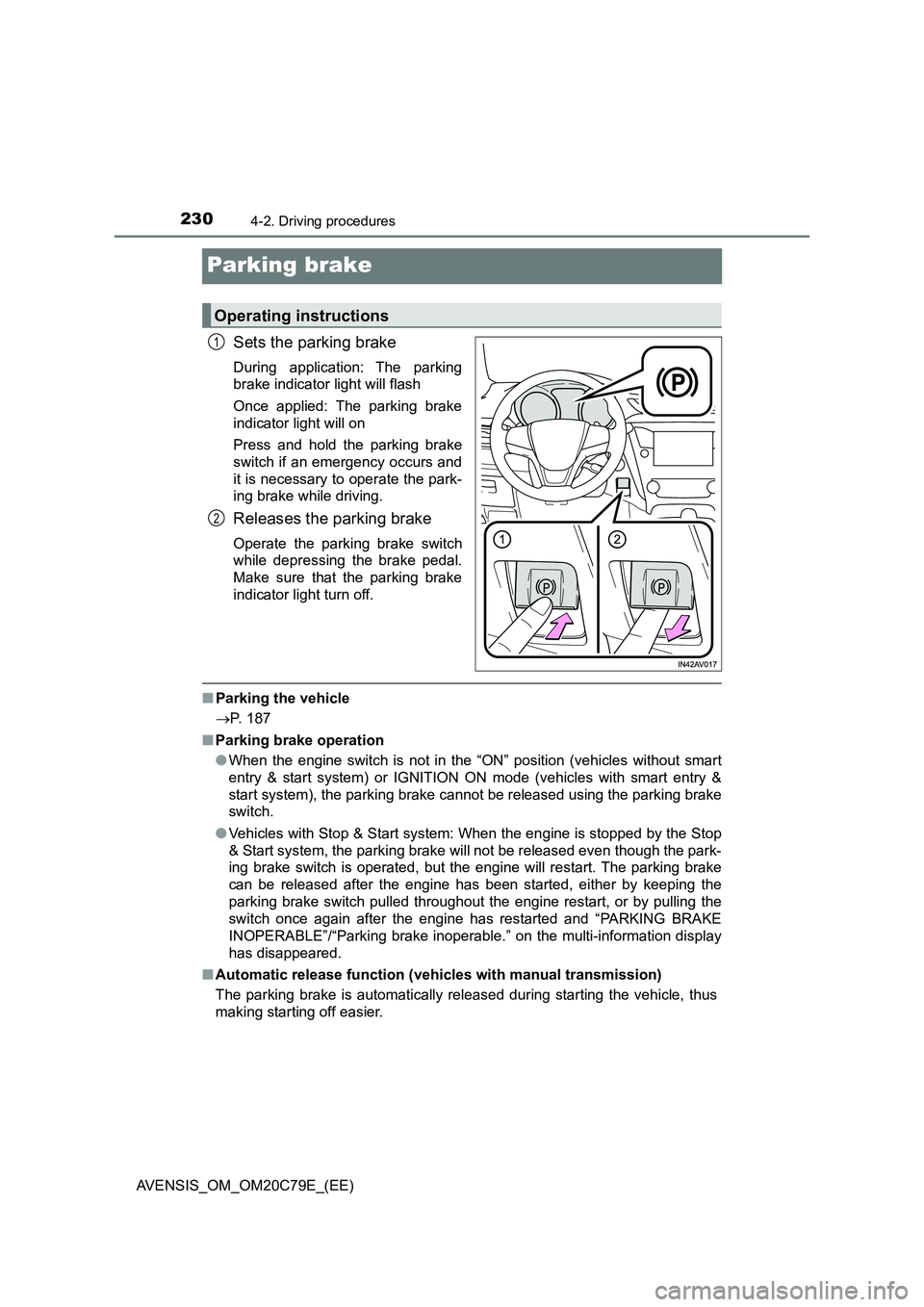
Parking brake
Sets the parking brake
During application: The parking
brake indicator light will flash
Once applied: The parking brake
indicator light will on
Press and hold the parking brake
switch if an emergency occurs and
it is necessary to operate the park-
ing brake while driving.
Releases the parking brake
Operate the parking brake switch
while depressing the brake pedal.
Make sure that the parking brake
indicator light turn off.
■Parking the vehicle
P. 187
■Parking brake operation
●When the engine switch is not in the “ON” position (vehicles without smart
entry & start system) or IGNITION ON mode (vehicles with smart entry &
start system), the parking brake cannot be released using the parking brake
switch.
●Vehicles with Stop & Start system: When the engine is stopped by the Stop
& Start system, the parking brake will not be released even though the park-
ing brake switch is operated, but the engine will restart. The parking brake
can be released after the engine has been started, either by keeping the
parking brake switch pulled throughout the engine restart, or by pulling the
switch once again after the engine has restarted and “PARKING BRAKE
INOPERABLE”/“Parking brake inoperable.” on the multi-information display
has disappeared.
■Automatic release function (vehicles with manual transmission)
The parking brake is automatically released during starting the vehicle, thus
making starting off easier.
Operating instructions
1
2
Page 233 of 660
233
4
4-3. Operating the lights and wipers
Driving
AVENSIS_OM_OM20C79E_(EE)
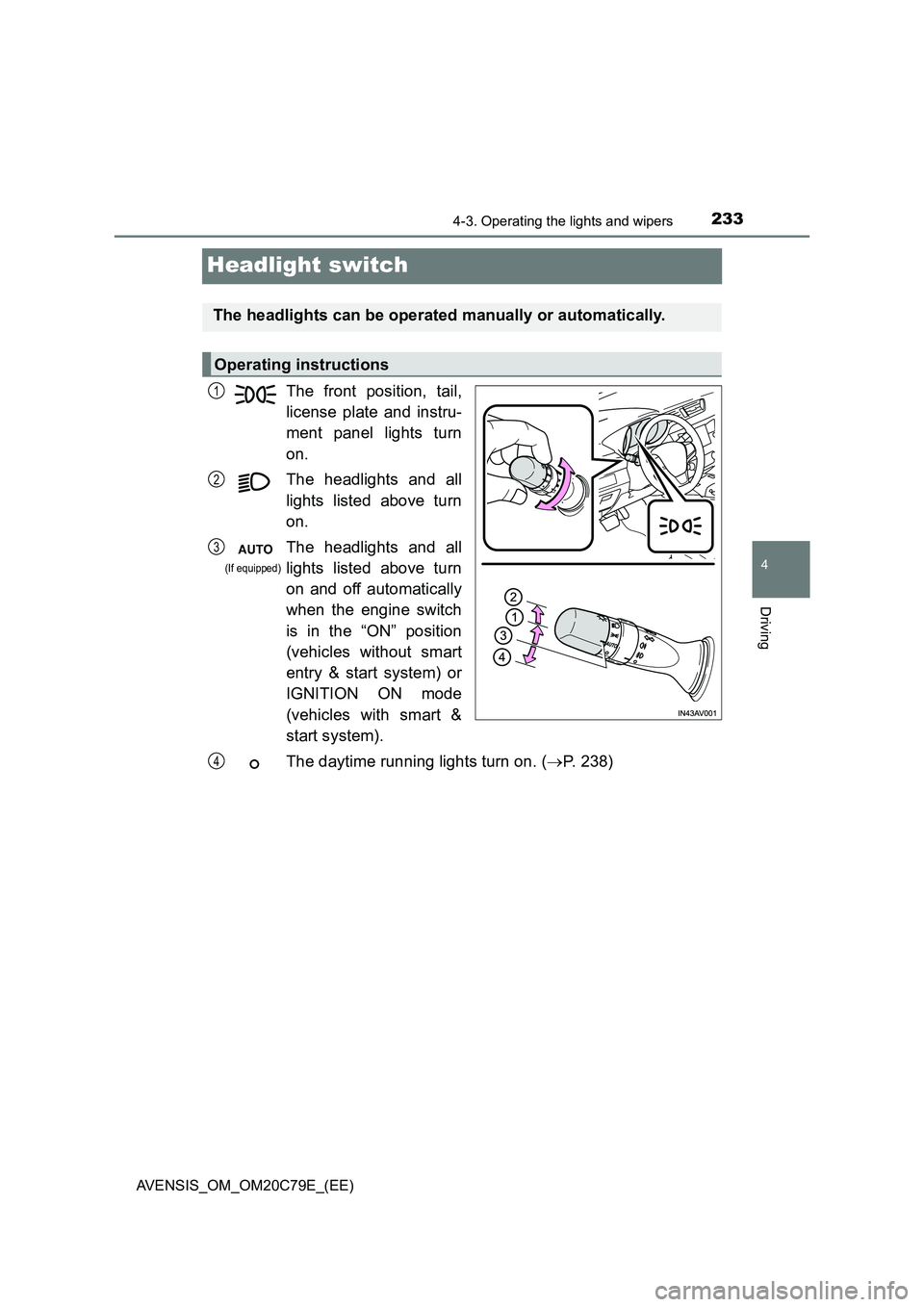
Headlight switch
The front position, tail,
license plate and instru-
ment panel lights turn
on.
The headlights and all
lights listed above turn
on.
The headlights and all
lights listed above turn
on and off automatically
when the engine switch
is in the “ON” position
(vehicles without smart
entry & start system) or
IGNITION ON mode
(vehicles with smart &
start system).
The daytime running lights turn on. ( P. 238)
The headlights can be operated manually or automatically.
Operating instructions
1
2
3
(If equipped)
4
Page 239 of 660
2394-3. Operating the lights and wipers
4
Driving
AVENSIS_OM_OM20C79E_(EE)■Automatic light off system
Vehicles without smart entry & start system
●When the light switch is in the “AUTO” position, the headlight and all the
lights turn off automatically if the engine switch is turned to the “ACC” or
“LOCK” position.
●When the light switch is in the position, the front fog lights turn off
automatically if the engine switch is turned to the “ACC” or “LOCK” position.
●When the light switch is in the
position, the headlights and front fog
lights turn off automatically if the engine switch is turned to “ACC” or “LOCK”
position.
The front position and tail lights turn off automatically after 20 minutes.
To turn the lights on again, turn the engine switch to the “ON” position, or turn
the light switch to the position once and then back to the or
position.
Vehicles with smart entry & start system
●When the light switch is in the “AUTO” position, the headlight and all the
lights turn off automatically if the engine switch is turned to ACCESSORY
mode or turned off.
●When the light switch is in the position, the front fog lights turn off
automatically if the engine switch is turned to ACCESSORY mode or turned
off.
●When the light switch is in the
position, the headlights and front fog
lights turn off automatically if the engine switch is turned to ACCESSORY
mode or turned off.
The front position and tail lights turn off automatically after 20 minutes.
To turn the lights on again, turn the engine switch to IGNITION ON mode, or
turn the light switch to the position once and then back to the or
position.
■Light reminder buzzer
Vehicles without smart entry & start system
A buzzer sounds when the engine switch is turned to the “LOCK” or “ACC”
position and the driver’s door is opened while the lights are turned on.
Vehicles with smart entry & start system
A buzzer sounds when the engine switch is turned off or to ACCESSORY
mode and the driver’s door is opened while the lights are turned on.
Page 245 of 660
2454-3. Operating the lights and wipers
4
Driving
AVENSIS_OM_OM20C79E_(EE)
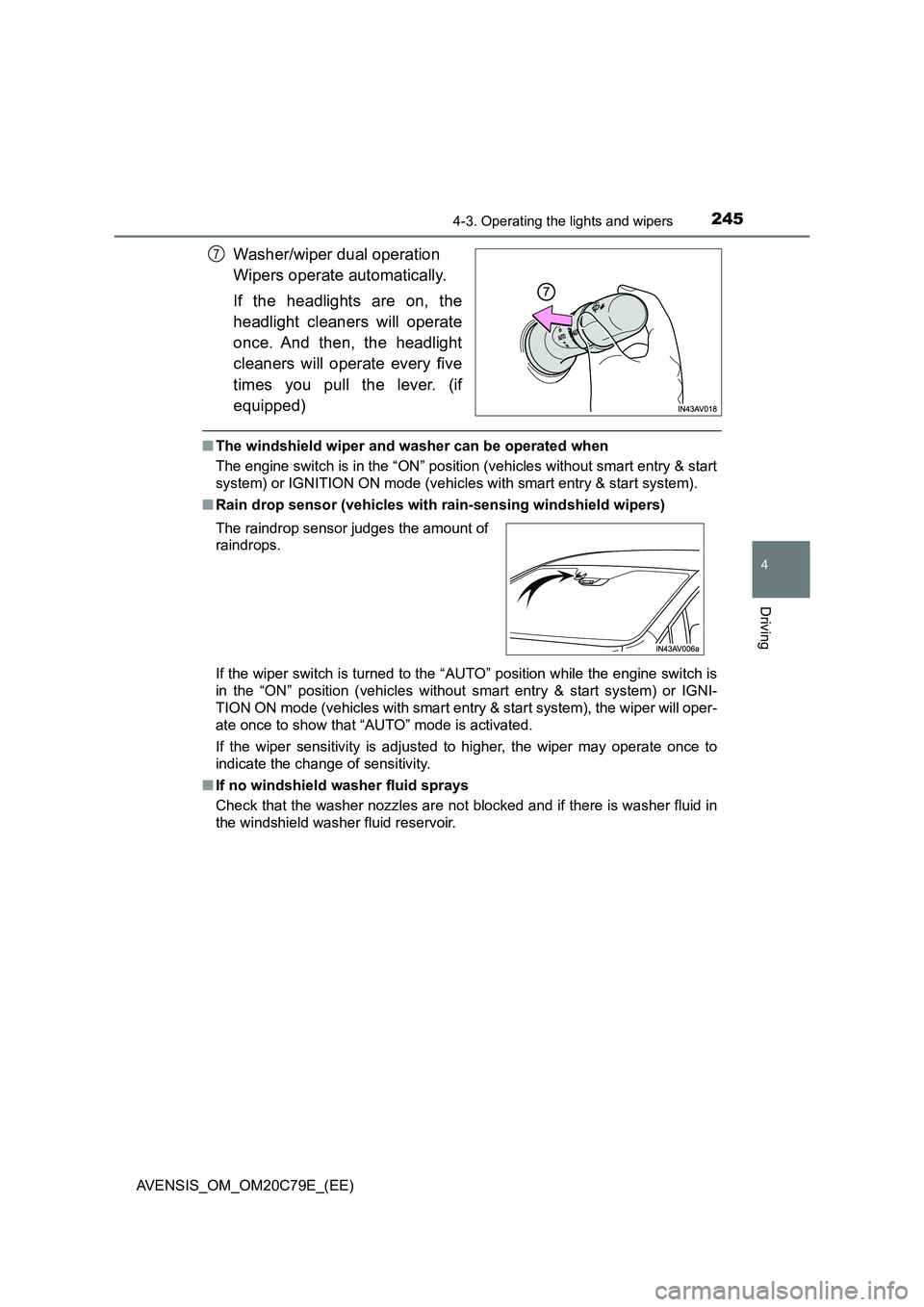
Washer/wiper dual operation
Wipers operate automatically.
If the headlights are on, the
headlight cleaners will operate
once. And then, the headlight
cleaners will operate every five
times you pull the lever. (if
equipped)
■The windshield wiper and washer can be operated when
The engine switch is in the “ON” position (vehicles without smart entry & start
system) or IGNITION ON mode (vehicles with smart entry & start system).
■Rain drop sensor (vehicles with rain-sensing windshield wipers)
If the wiper switch is turned to the “AUTO” position while the engine switch is
in the “ON” position (vehicles without smart entry & start system) or IGNI-
TION ON mode (vehicles with smart entry & start system), the wiper will oper-
ate once to show that “AUTO” mode is activated.
If the wiper sensitivity is adjusted to higher, the wiper may operate once to
indicate the change of sensitivity.
■If no windshield washer fluid sprays
Check that the washer nozzles are not blocked and if there is washer fluid in
the windshield washer fluid reservoir.
7
The raindrop sensor judges the amount of
raindrops.
Page 247 of 660
247
4
4-3. Operating the lights and wipers
Driving
AVENSIS_OM_OM20C79E_(EE)
Rear window wiper and washer
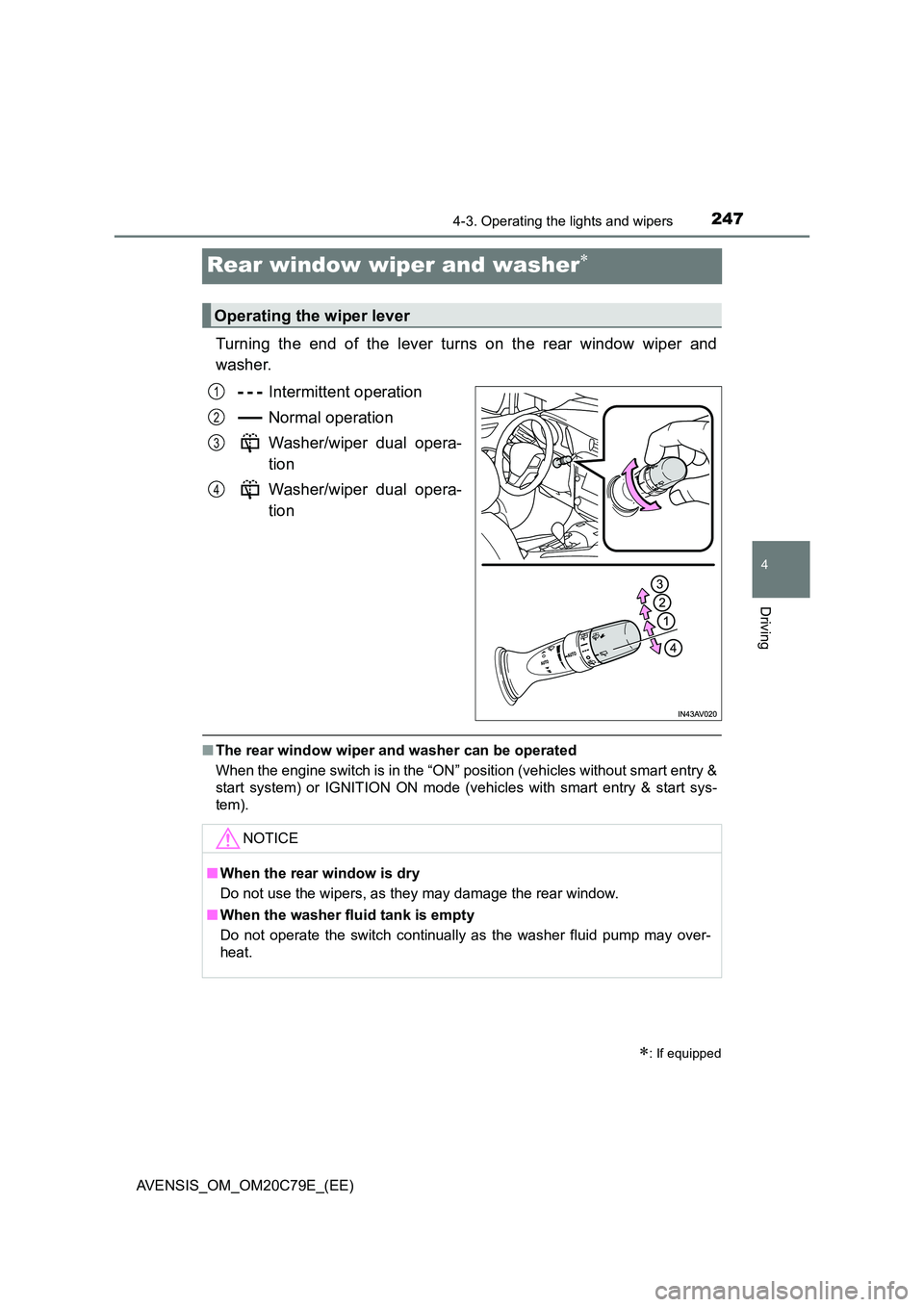
Turning the end of the lever turns on the rear window wiper and
washer.
Intermittent operation
Normal operation
Washer/wiper dual opera-
tion
Washer/wiper dual opera-
tion
■ The rear window wiper and washer can be operated
When the engine switch is in the “ON” position (vehicles without smart entry &
start system) or IGNITION ON mode (vehicles with smart entry & start sys-
tem).
: If equipped
Operating the wiper lever
1
2
3
4
NOTICE
■ When the rear window is dry
Do not use the wipers, as they may damage the rear window.
■ When the washer fluid tank is empty
Do not operate the switch continually as the washer fluid pump may over-
heat.