ignition TOYOTA AVENSIS 2018 Service Manual
[x] Cancel search | Manufacturer: TOYOTA, Model Year: 2018, Model line: AVENSIS, Model: TOYOTA AVENSIS 2018Pages: 660, PDF Size: 63.16 MB
Page 459 of 660
4597-3. Do-it-yourself maintenance
AVENSIS_OM_OM20C79E_(EE)
7
Maintenance and care
■After changing the engine oil (diesel engine)
The engine oil maintenance data should be reset. Perform the following pro-
cedures:
Switch the display to the maintenance required information (P. 107),
when the engine switch is in the “ON” position (vehicles without smart entry
& start system) or IGNITION ON mode (vehicles with smart entry & start
system).
Turn the engine switch to the “LOCK” position (vehicles without smart entry
& start system) or off (vehicles with smart entry & start system).
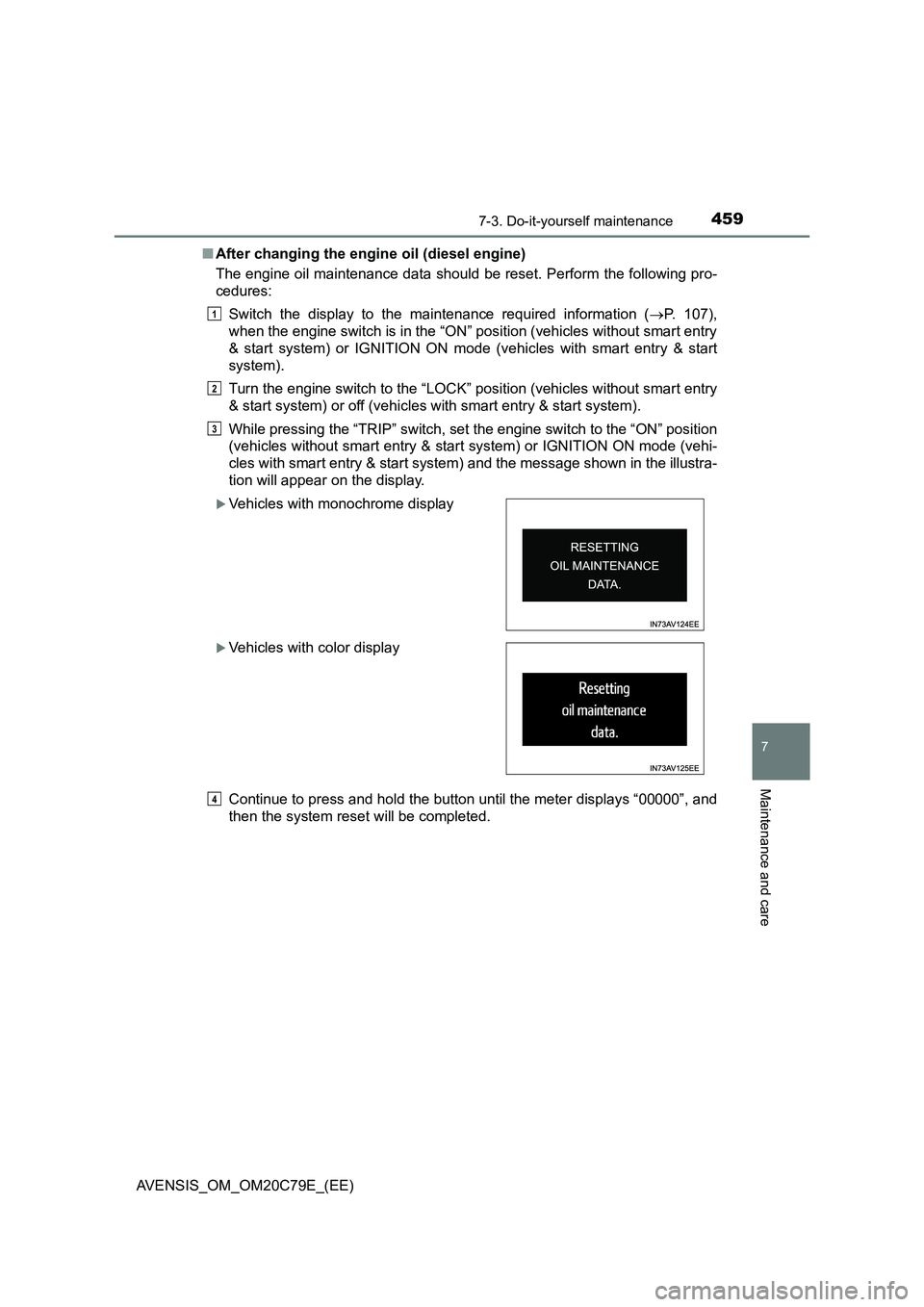
While pressing the “TRIP” switch, set the engine switch to the “ON” position
(vehicles without smart entry & start system) or IGNITION ON mode (vehi-
cles with smart entry & start system) and the message shown in the illustra-
tion will appear on the display.
Continue to press and hold the button until the meter displays “00000”, and
then the system reset will be completed.
Vehicles with monochrome display
Vehicles with color display
1
2
3
4
Page 471 of 660
4717-3. Do-it-yourself maintenance
AVENSIS_OM_OM20C79E_(EE)
7
Maintenance and care
■How to initialize the tire pressure warning system
Park the vehicle in a safe place and turn the engine switch to the
“LOCK” position (vehicles without smart entry & start system) or
off (vehicles with smart entry & start system).
Initialization cannot be performed while the vehicle is moving.
Adjust the tire inflation pressure to the specified cold tire inflation
pressure level. (P. 623)
Make sure to adjust the tire pressure to the specified cold tire inflation
pressure level. The tire pressure warning system will operate based on
this pressure level.
Turn the engine switch to the “ON” position (vehicles without
smart entry & start system) or IGNITION ON mode (vehicles with
smart entry & start system).
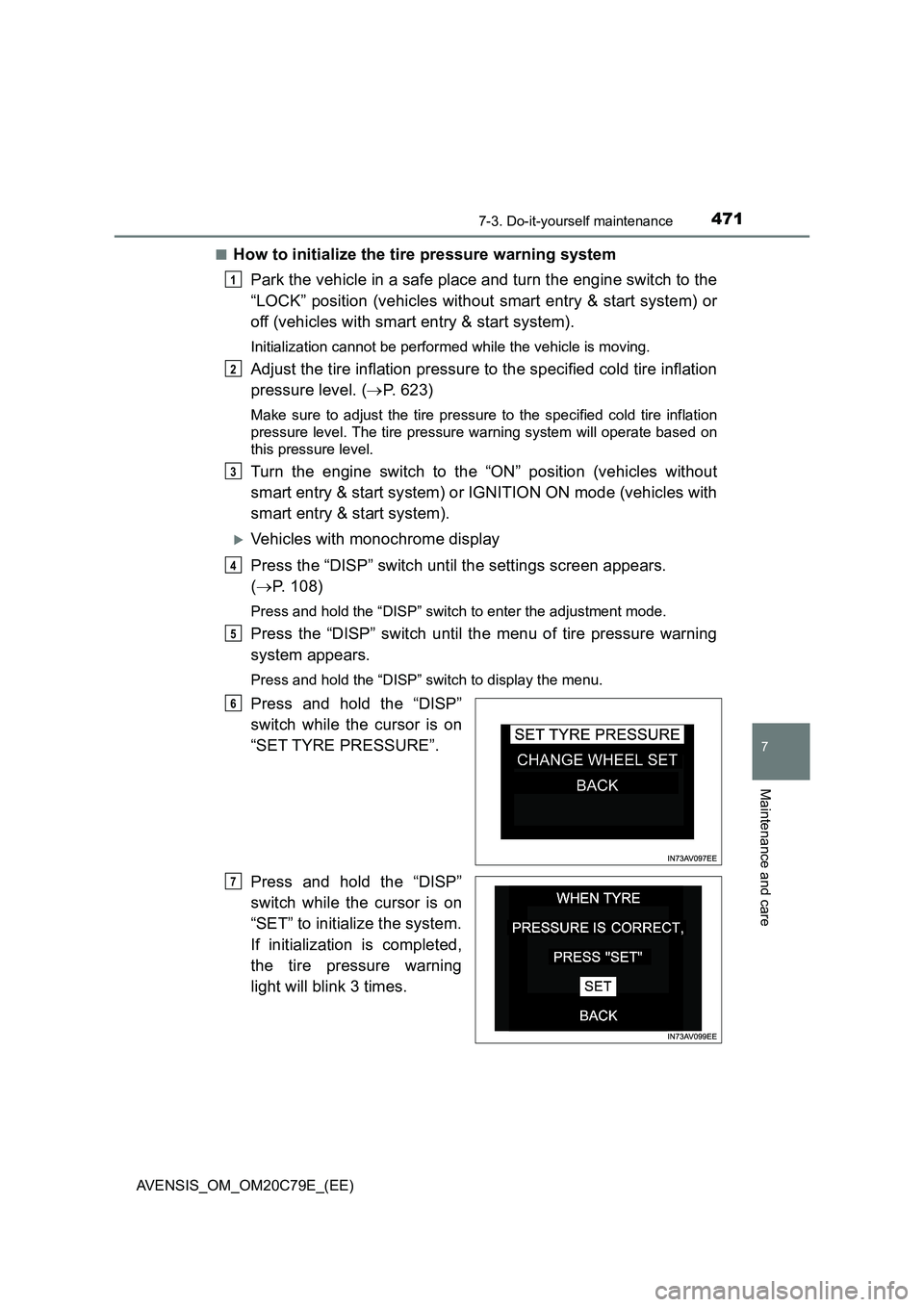
Vehicles with monochrome display
Press the “DISP” switch until the settings screen appears.
(P. 108)
Press and hold the “DISP” switch to enter the adjustment mode.
Press the “DISP” switch until the menu of tire pressure warning
system appears.
Press and hold the “DISP” switch to display the menu.
Press and hold the “DISP”
switch while the cursor is on
“SET TYRE PRESSURE”.
Press and hold the “DISP”
switch while the cursor is on
“SET” to initialize the system.
If initialization is completed,
the tire pressure warning
light will blink 3 times.
1
2
3
4
5
6
7
Page 476 of 660
4767-3. Do-it-yourself maintenance
AVENSIS_OM_OM20C79E_(EE)■Situations in which the tire pressure warning system may not operate
properly (if equipped)
●In the following cases, the tire pressure warning system may not operate
properly.
• If non-genuine Toyota wheels are used.
• A tire has been replaced with a tire that is not an OE (Original Equipment)
tire.
• A tire has been replaced with a tire that is not of the specified size.
• Tire chains etc. are equipped.
• An auxiliary-supported run-flat tire is equipped.
• If a window tint that affects the radio wave signals is installed.
• If there is a lot of snow or ice on the vehicle, particularly around the
wheels or wheel housings.
• If the tire inflation pressure is extremely higher than the specified level.
• If tires not equipped with the tire pressure warning valves and transmit-
ters are used.
• If the ID code on the tire pressure warning valves and transmitters is not
registered in the tire pressure warning computer.
• If the wheel set selected does not match the wheel set fitted to the vehi-
cle, in case a second wheel set has been registered.
●Performance may be affected in the following situations.
• Near a TV tower, electric power plant, gas station, radio station, large dis-
play, airport or other facility that generates strong radio waves or electri-
cal noise
• When carrying a portable radio, cellular phone, cordless phone or other
wireless communication device
●When the vehicle is parked, the time taken for the warning to start or go off
could be extended.
●When tire inflation pressure declines rapidly for example when a tire has
burst, the warning may not function.
■The initialization operation (vehicles with the tire pressure warning sys-
tem)
●Make sure to carry out initialization after adjusting the tire inflation pressure.
Also, make sure the tires are cold before carrying out initialization or tire
inflation pressure adjustment.
●If you have accidentally turned the engine switch to the “LOCK” position
(vehicles without a smart entry & start system) or off (vehicles with a smart
entry & start system) during initialization, it is not necessary to restart the ini-
tialization again as initialization will restart automatically when the engine
switch has been turned to the “ON” position (vehicles without a smart entry
& start system) or IGNITION ON mode (vehicles with a smart entry & start
system) for the next time.
●If you accidentally start the initialization when initialization is not necessary,
adjust the tire inflation pressure to the specified level when the tires are
cold, and conduct initialization again.
Page 525 of 660
5258-2. Steps to take in an emergency
AVENSIS_OM_OM20C79E_(EE)
8
When trouble arises
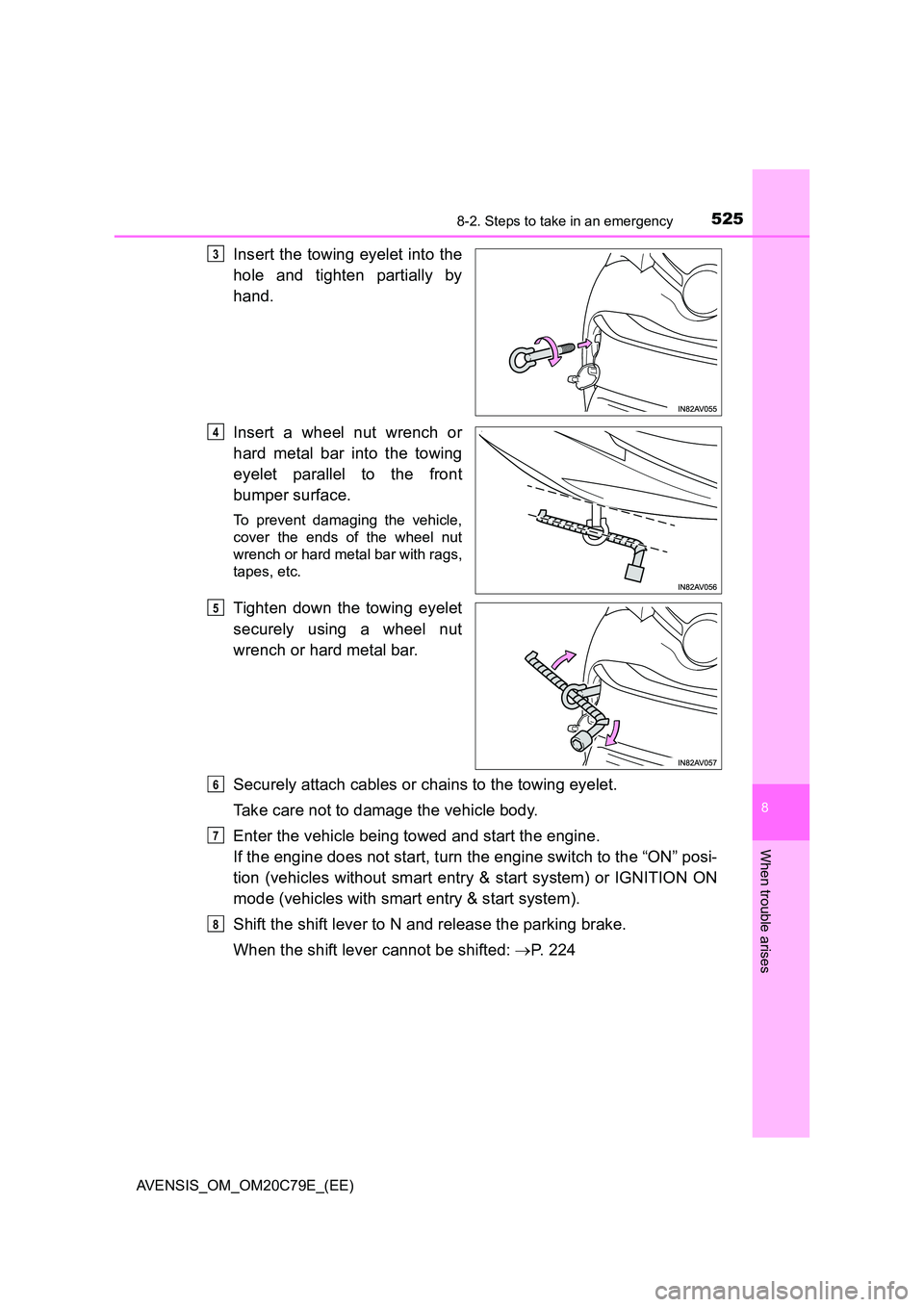
Insert the towing eyelet into the
hole and tighten partially by
hand.
Insert a wheel nut wrench or
hard metal bar into the towing
eyelet parallel to the front
bumper surface.
To prevent damaging the vehicle,
cover the ends of the wheel nut
wrench or hard metal bar with rags,
tapes, etc.
Tighten down the towing eyelet
securely using a wheel nut
wrench or hard metal bar.
Securely attach cables or chains to the towing eyelet.
Take care not to damage the vehicle body.
Enter the vehicle being towed and start the engine.
If the engine does not start, turn the engine switch to the “ON” posi-
tion (vehicles without smart entry & start system) or IGNITION ON
mode (vehicles with smart entry & start system).
Shift the shift lever to N and release the parking brake.
When the shift lever cannot be shifted: P. 2 2 4
3
4
5
6
7
8
Page 535 of 660
5358-2. Steps to take in an emergency
AVENSIS_OM_OM20C79E_(EE)
8
When trouble arises
■If the tire pressure warning light frequently comes on after blinking for 1
minute (vehicles with tire pressure warning system)
If the tire pressure warning light frequently comes on after blinking for 1 min-
ute when the engine switch is turned to the “ON” position (vehicles without
smart entry & start system) or IGNITION ON mode (vehicles with smart entry
& start system), have it checked by any authorized Toyota retailer or Toyota
authorized repairer, or any reliable repairer.
If the tire pressure warning light frequently comes on after blinking for 1 min-
ute when you change between registered wheel sets, confirm the correct
wheel set has been selected.
■ If the malfunction indicator lamp comes on while driving
For some models, the malfunction indicator lamp will come on if the fuel tank
becomes completely empty. If the fuel tank is empty, refuel the vehicle imme-
diately. The malfunction indicator lamp will go off after several trips.
If the malfunction indicator lamp does not go off, contact any authorized
Toyota retailer or Toyota authorized repairer, or any reliable repairer.
■ Front passenger detection sensor, seat belt reminder and warning
buzzer
● If luggage is placed on the front passenger seat, the front passenger detec-
tion sensor may cause the warning light to flash and the warning buzzer to
sound even if a passenger is not sitting in the seat.
● If a cushion is placed on the seat, the sensor may not detect a passenger,
and the warning light may not operate properly.
Page 540 of 660

5408-2. Steps to take in an emergency
AVENSIS_OM_OM20C79E_(EE)
(If equipped)
Indicates a malfunction in the LDA (Lane Depar-
ture Alert)
A buzzer also sounds.
Stop the vehicle in a safe place. Turn the
engine switch off and then turn it to the
“ON” position (vehicles without smart
entry & start system) or IGNITION ON mode
(vehicles with smart entry & start system)
again to reset the LDA system. Or restart
the LDA system by pressing LDA switch. If
the LDA system becomes normal, the sys-
tem can be activated.
(If equipped)
Indicates a malfunction in the RSA (Road Sign
Assist)
A buzzer also sounds.
Have the vehicle inspected by any autho-
rized Toyota retailer or Toyota authorized
repairer, or any reliable repairer.
(Manual transmission)
Indicates a malfunction in the clutch switch
A buzzer also sounds.
Have the vehicle inspected by any autho-
rized Toyota retailer or Toyota authorized
repairer, or any reliable repairer.
Indicates that the electric parking brake system
cannot perform a request
A buzzer also sounds.
Have the vehicle inspected by any autho-
rized Toyota retailer or Toyota authorized
repairer, or any reliable repairer.
Vehicles with Stop & Start system: indicates that
the electric parking brake system cannot perform
a release request when the Stop & Start system
is operating (engine stopped or starting).
A buzzer also sounds.
If the parking brake is not released once
the engine has restarted and the warning
message has disappeared, pull the parking
brake switch again to release the parking
brake.
Warning messageDetails/Actions
(Flashes)
Page 596 of 660
5968-2. Steps to take in an emergency
AVENSIS_OM_OM20C79E_(EE)
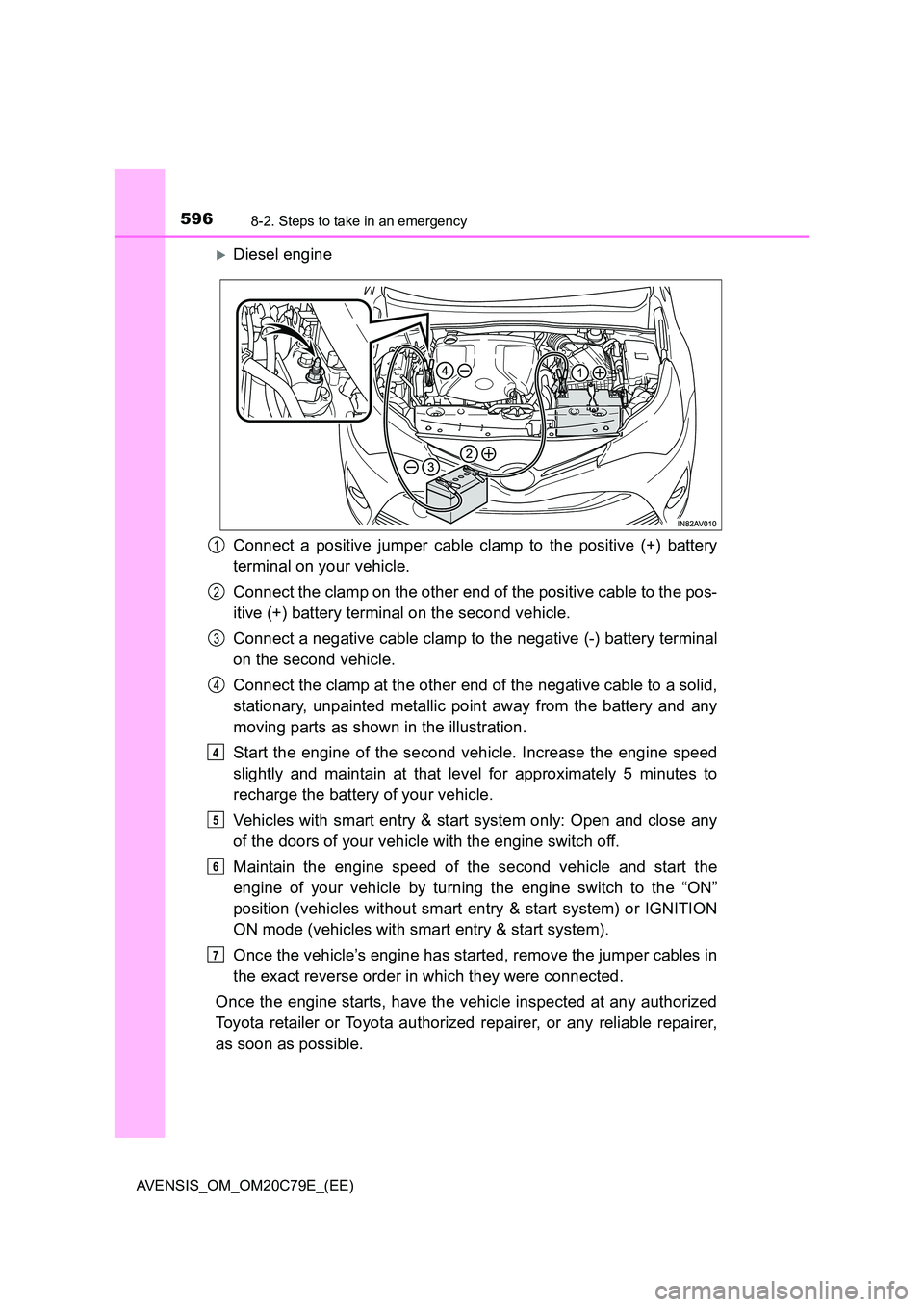
Diesel engine
Connect a positive jumper cable clamp to the positive (+) battery
terminal on your vehicle.
Connect the clamp on the other end of the positive cable to the pos-
itive (+) battery terminal on the second vehicle.
Connect a negative cable clamp to the negative (-) battery terminal
on the second vehicle.
Connect the clamp at the other end of the negative cable to a solid,
stationary, unpainted metallic point away from the battery and any
moving parts as shown in the illustration.
Start the engine of the second vehicle. Increase the engine speed
slightly and maintain at that level for approximately 5 minutes to
recharge the battery of your vehicle.
Vehicles with smart entry & start system only: Open and close any
of the doors of your vehicle with the engine switch off.
Maintain the engine speed of the second vehicle and start the
engine of your vehicle by turning the engine switch to the “ON”
position (vehicles without smart entry & start system) or IGNITION
ON mode (vehicles with smart entry & start system).
Once the vehicle’s engine has started, remove the jumper cables in
the exact reverse order in which they were connected.
Once the engine starts, have the vehicle inspected at any authorized
Toyota retailer or Toyota authorized repairer, or any reliable repairer,
as soon as possible.
1
2
3
4
4
5
6
7
Page 619 of 660
6199-1. Specifications
AVENSIS_OM_OM20C79E_(EE)
9
Vehicle specifications
Ignition system (gasoline engine)
Spark plug
Make DENSO SC20HR11, SC16HR11
Gap 1.1 mm (0.043 in.)
NOTICE
■ Iridium-tipped spark plugs
Use only iridium-tipped spark plugs. Do not adjust the spark plug gap.
Page 640 of 660
640What to do if... (Troubleshooting)
AVENSIS_OM_OM20C79E_(EE)
What to do if... (Troubleshooting)
●If you lose your keys or mechanical keys, new genuine keys or mechanical
keys can be made by any authorized Toyota retailer or Toyota authorized
repairer, or any reliable repairer. (P. 122)
●Vehicles with smart entry & start system
If you lose your electronic keys, the risk of vehicle theft increases signifi-
cantly. Contact any authorized Toyota retailer or Toyota authorized
repairer, or any reliable repairer immediately. (P. 122)
●Is the key battery weak or depleted? (P. 493)
●Vehicles with smart entry & start system
Is the engine switch in IGNITION ON mode?
When locking the doors, turn the engine switch off. (P. 215)
●Vehicles with smart entry & start system
Is the electronic key left inside the vehicle?
When locking the doors, make sure that you have the electronic key on
your person.
●The function may not operate properly due to the condition of the radio
wave. (P. 123, 152)
●Is the child-protector lock set?
The rear door cannot be opened from inside the vehicle when the lock is
set. Open the rear door from outside and then unlock the child-protector
lock. (P. 136)
If you have a problem, check the following before contacting any
authorized Toyota retailer or Toyota authorized repairer, or any
reliable repairer.
The doors cannot be locked, unlocked, opened or closed
You lose your keys
The doors cannot be locked or unlocked
The rear door cannot be opened
Page 641 of 660
641What to do if... (Troubleshooting)
AVENSIS_OM_OM20C79E_(EE)
●Vehicles with Multidrive
Is the shift lever in P? ( P. 2 0 9 )
●Vehicles with manual transmission
Do you turn the key with the clutch pedal depressed firmly? ( P. 209)
●Is the battery discharged? (P. 595)
●Vehicles with Multidrive
Did you press the engine switch while firmly depressing the brake pedal?
( P. 212)
●Vehicles with manual transmission
Did you press the engine switch while firmly depressing the clutch pedal?
( P. 212)
●Vehicles with Multidrive
Is the shift lever in P? ( P. 2 1 2 )
●Is the electronic key anywhere detectable inside the vehicle? (P. 149)
●Is the steering wheel unlocked? (P. 217)
●Is the electronic key battery weak or depleted?
In this case, the engine can be started in a temporary way. ( P. 592)
●Is the battery discharged? (P. 595)
●Vehicles without smart entry & start system
Is the engine switch in the “ON” position?
If you cannot release the shift lever by depressing the brake pedal with the
engine switch in the “ON” position. ( P. 224)
●Vehicles with smart entry & start system
Is the engine switch in IGNITION ON mode?
If you cannot release the shift lever by depressing the brake pedal with the
engine switch in IGNITION ON mode. ( P. 224)
If you think something is wrong
The engine does not start
(vehicles without smart entry & start system)
The engine does not start
(vehicles with smart entry & start system)
The shift lever cannot be shifted from P even if you depress
the brake pedal (vehicles with Multidrive)