light TOYOTA AVENSIS 2018 Service Manual
[x] Cancel search | Manufacturer: TOYOTA, Model Year: 2018, Model line: AVENSIS, Model: TOYOTA AVENSIS 2018Pages: 660, PDF Size: 63.16 MB
Page 118 of 660
1182. Instrument cluster
AVENSIS_OM_OM20C79E_(EE)
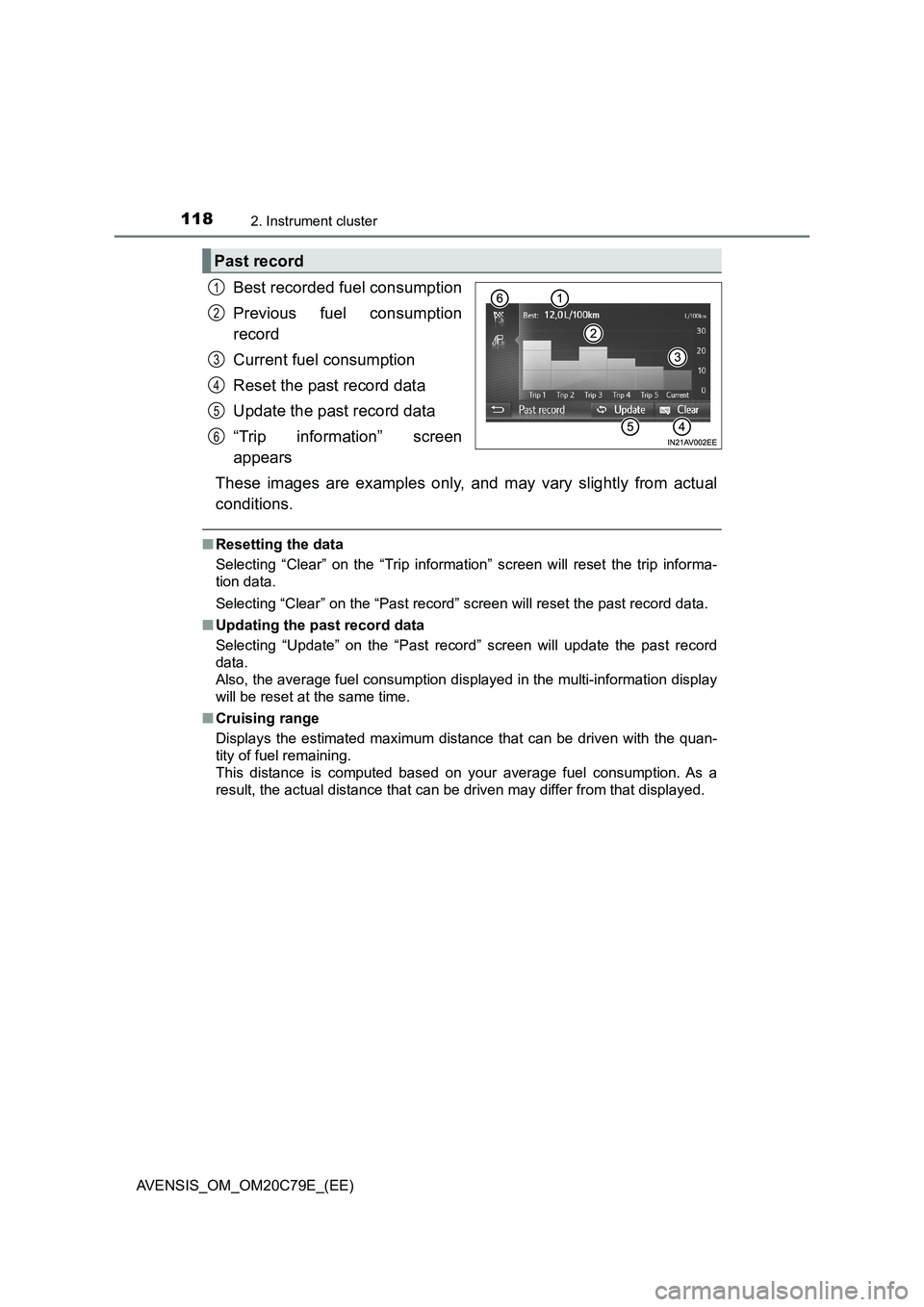
Best recorded fuel consumption
Previous fuel consumption
record
Current fuel consumption
Reset the past record data
Update the past record data
“Trip information” screen
appears
These images are examples only, and may vary slightly from actual
conditions.
■Resetting the data
Selecting “Clear” on the “Trip information” screen will reset the trip informa-
tion data.
Selecting “Clear” on the “Past record” screen will reset the past record data.
■Updating the past record data
Selecting “Update” on the “Past record” screen will update the past record
data.
Also, the average fuel consumption displayed in the multi-information display
will be reset at the same time.
■Cruising range
Displays the estimated maximum distance that can be driven with the quan-
tity of fuel remaining.
This distance is computed based on your average fuel consumption. As a
result, the actual distance that can be driven may differ from that displayed.
Past record
1
2
3
4
5
6
Page 140 of 660
1403-2. Opening, closing and locking the doors
AVENSIS_OM_OM20C79E_(EE)
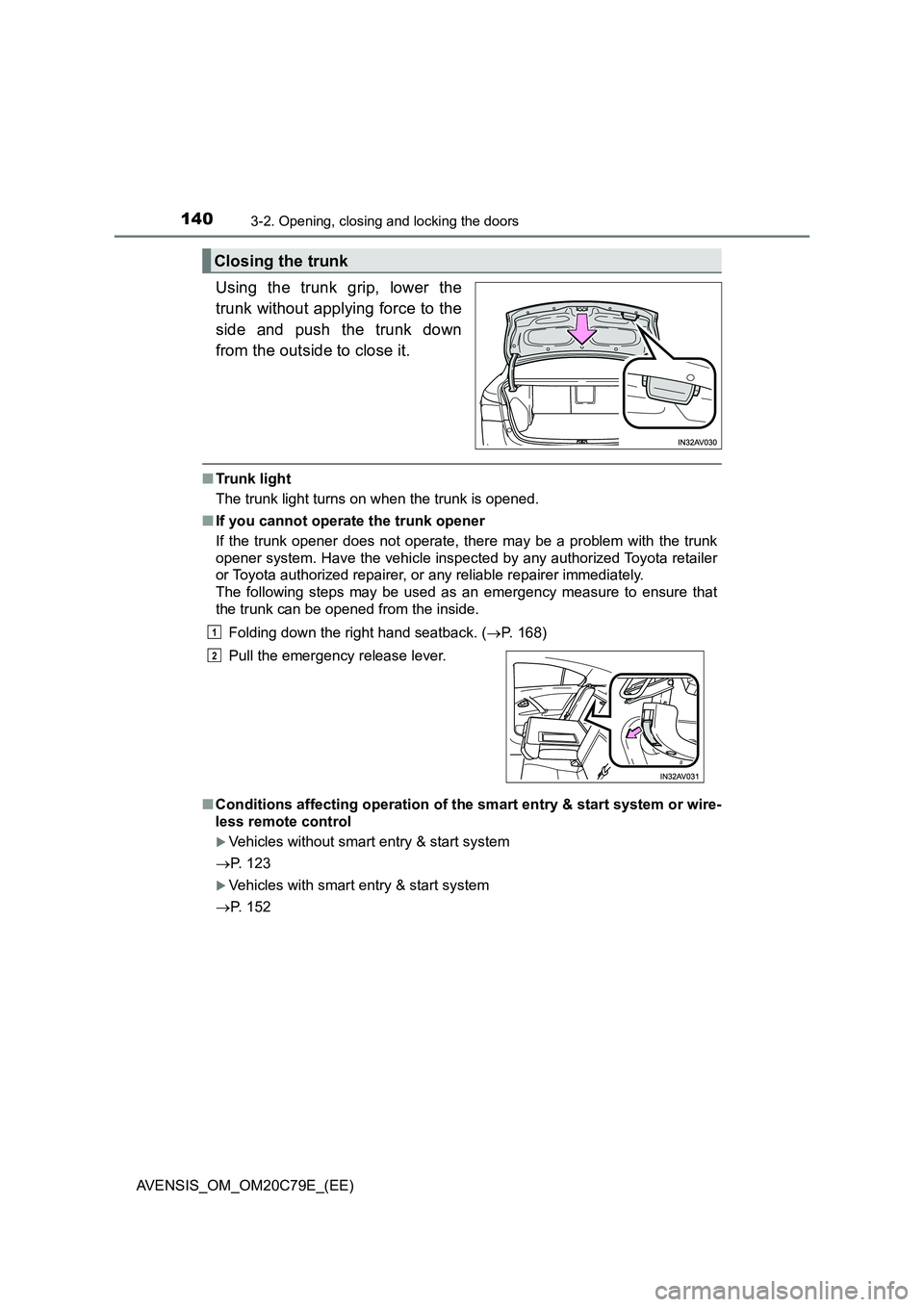
Using the trunk grip, lower the
trunk without applying force to the
side and push the trunk down
from the outside to close it.
■Trunk light
The trunk light turns on when the trunk is opened.
■If you cannot operate the trunk opener
If the trunk opener does not operate, there may be a problem with the trunk
opener system. Have the vehicle inspected by any authorized Toyota retailer
or Toyota authorized repairer, or any reliable repairer immediately.
The following steps may be used as an emergency measure to ensure that
the trunk can be opened from the inside.
Folding down the right hand seatback. (P. 168)
■Conditions affecting operation of the smart entry & start system or wire-
less remote control
Vehicles without smart entry & start system
P. 123
Vehicles with smart entry & start system
P. 152
Closing the trunk
Pull the emergency release lever.
1
2
Page 142 of 660
1423-2. Opening, closing and locking the doors
AVENSIS_OM_OM20C79E_(EE)
WARNING
■Using the trunk
Observe the following precautions.
Failure to do so may cause parts of the body to be caught, resulting in seri-
ous injury.
● Remove any heavy loads, such as snow and ice, from the trunk lid before
opening it. Failure to do so may cause the trunk lid to suddenly shut again
after it is opened.
● When opening or closing the trunk lid, thoroughly check to make sure the
surrounding area is safe.
● If anyone is in the vicinity, make sure they are safe and let them know that
the trunk is about to open or close.
● Use caution when opening or closing the trunk lid in windy weather as it
may move abruptly in strong wind.
● Do not attach any accessories other than genuine Toyota parts to the trunk
lid. Such additional weight on the tr unk lid may cause the lid to suddenly
shut again after it is opened.
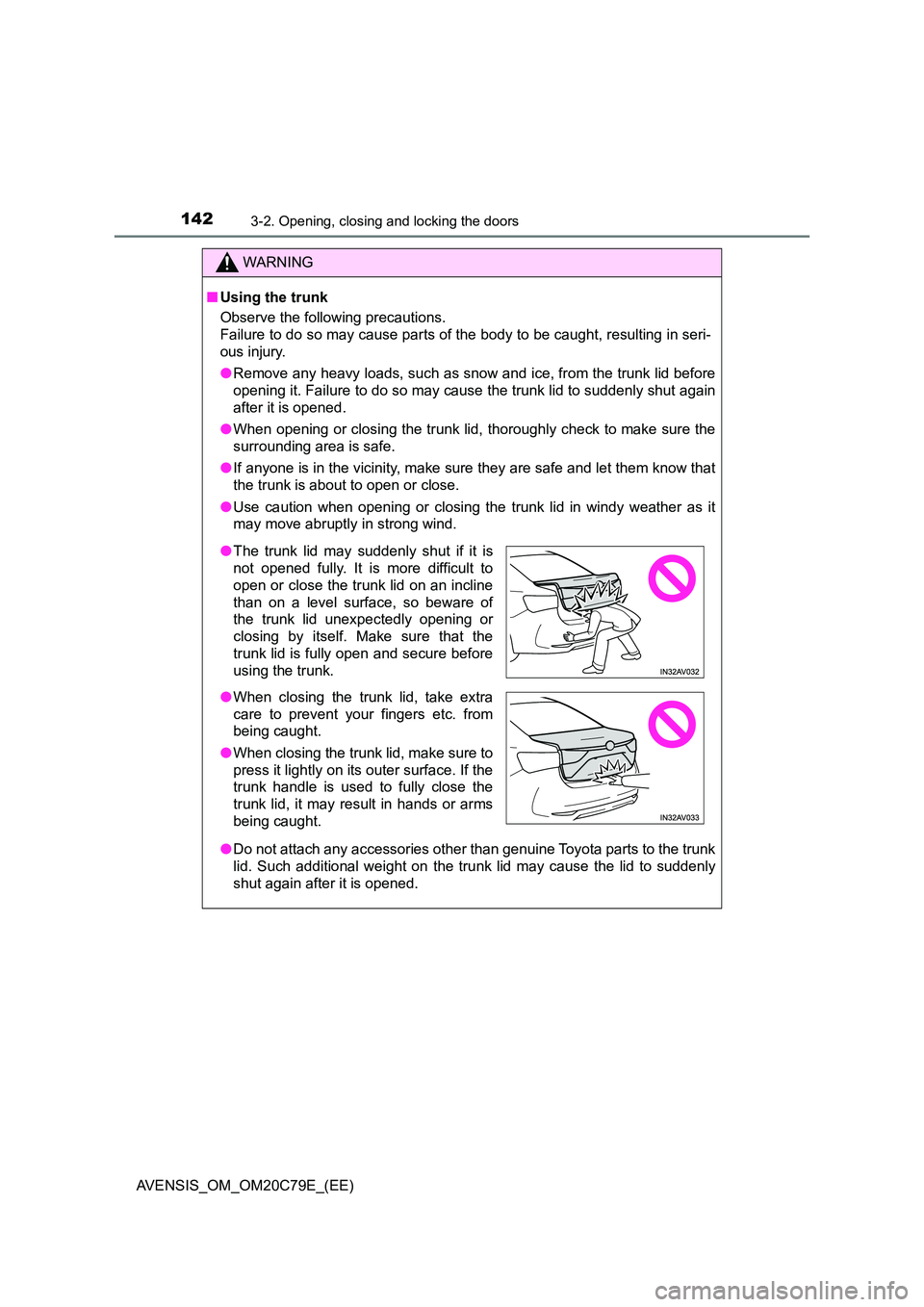
● The trunk lid may suddenly shut if it is
not opened fully. It is more difficult to
open or close the trunk lid on an incline
than on a level surface, so beware of
the trunk lid unexpectedly opening or
closing by itself. Make sure that the
trunk lid is fully open and secure before
using the trunk.
● When closing the trunk lid, take extra
care to prevent your fingers etc. from
being caught.
● When closing the trunk lid, make sure to
press it lightly on its outer surface. If the
trunk handle is used to fully close the
trunk lid, it may result in hands or arms
being caught.
Page 144 of 660
1443-2. Opening, closing and locking the doors
AVENSIS_OM_OM20C79E_(EE)
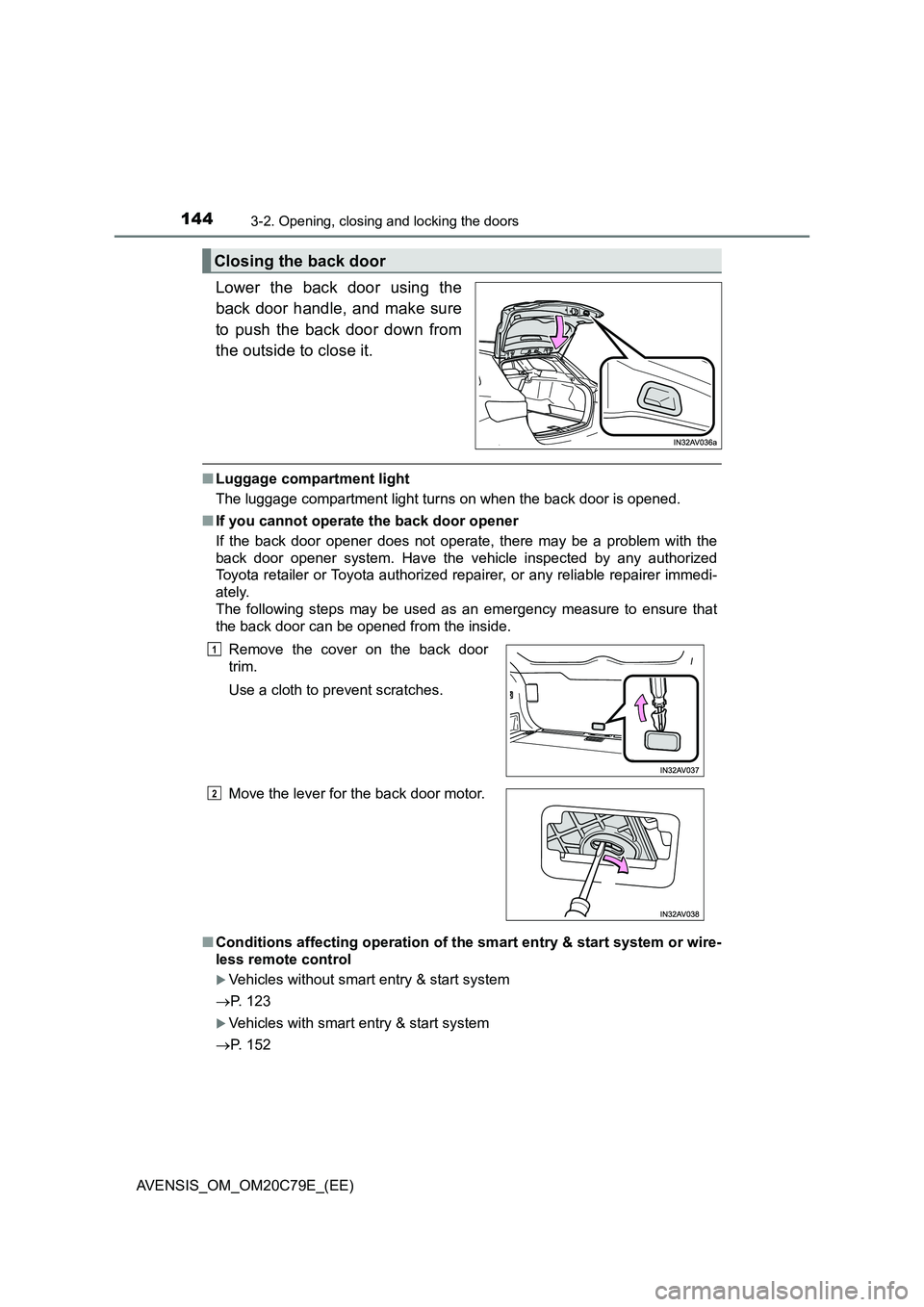
Lower the back door using the
back door handle, and make sure
to push the back door down from
the outside to close it.
■Luggage compartment light
The luggage compartment light turns on when the back door is opened.
■If you cannot operate the back door opener
If the back door opener does not operate, there may be a problem with the
back door opener system. Have the vehicle inspected by any authorized
Toyota retailer or Toyota authorized repairer, or any reliable repairer immedi-
ately.
The following steps may be used as an emergency measure to ensure that
the back door can be opened from the inside.
■Conditions affecting operation of the smart entry & start system or wire-
less remote control
Vehicles without smart entry & start system
P. 123
Vehicles with smart entry & start system
P. 152
Closing the back door
Remove the cover on the back door
trim.
Use a cloth to prevent scratches.
Move the lever for the back door motor.1
2
Page 146 of 660
1463-2. Opening, closing and locking the doors
AVENSIS_OM_OM20C79E_(EE)
WARNING
●Do not pull on the back door damper stay to close the back door, and do
not hang on the back door damper stay.
Doing so may cause hands to be caught or the back door damper stay to
break, causing an accident.
● If a bicycle carrier or similar heavy object is attached to the back door, it
may suddenly shut again after being opened, causing someone’s hands,
head or neck to be caught and injured. When installing an accessory part
to the back door, using a genuine Toyota part is recommended.
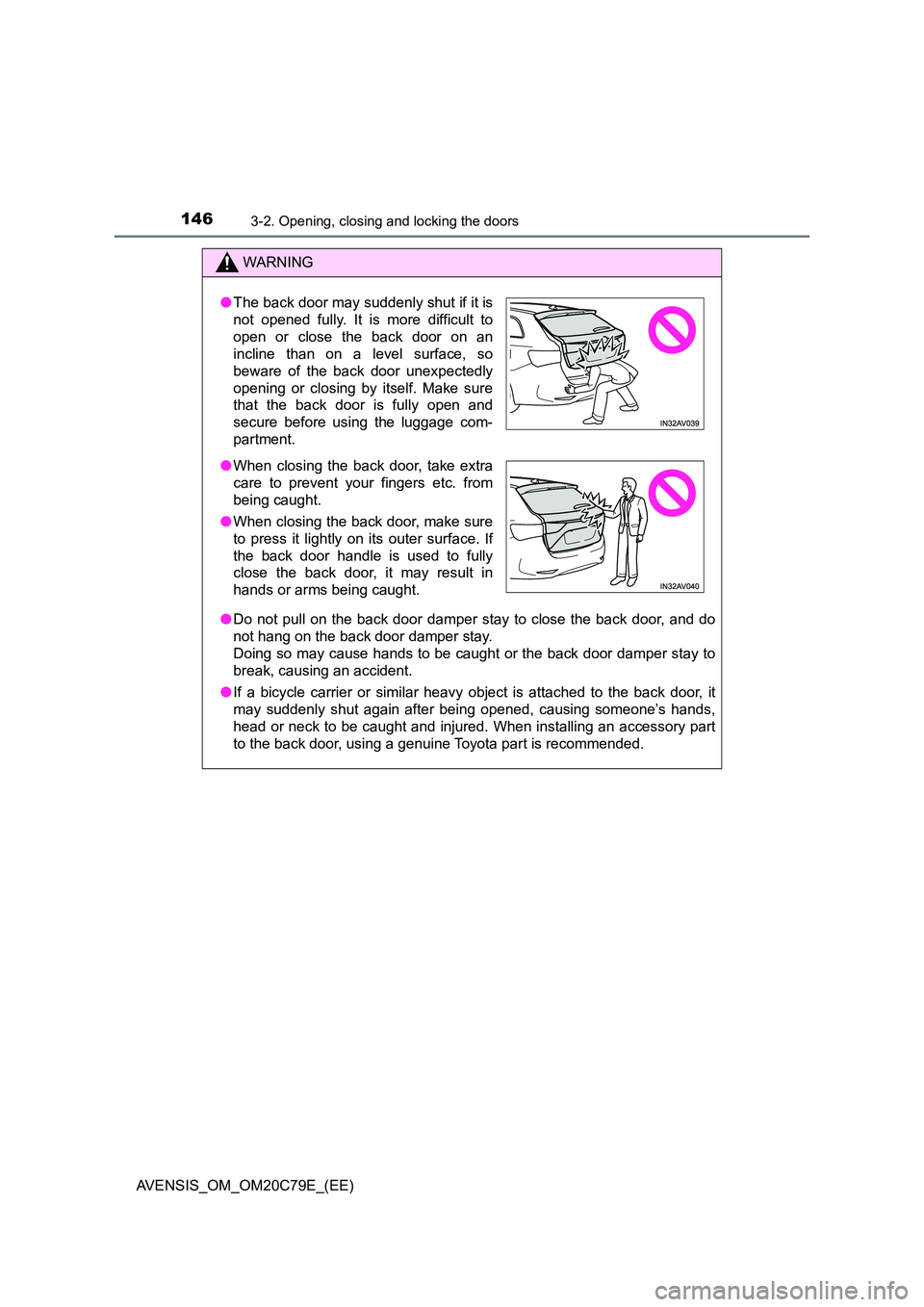
● The back door may suddenly shut if it is
not opened fully. It is more difficult to
open or close the back door on an
incline than on a level surface, so
beware of the back door unexpectedly
opening or closing by itself. Make sure
that the back door is fully open and
secure before using the luggage com-
partment.
● When closing the back door, take extra
care to prevent your fingers etc. from
being caught.
● When closing the back door, make sure
to press it lightly on its outer surface. If
the back door handle is used to fully
close the back door, it may result in
hands or arms being caught.
Page 169 of 660
1693-3. Adjusting the seats
3
Operation of each component
AVENSIS_OM_OM20C79E_(EE)
■Returning the seatbacks (sedan)
Tilt the seatback up until it locks, making
sure that you hold the seat belt to prevent
it from getting caught between the seat-
back and the inner side of the vehicle.
Make sure the shoulder belt passes
through the guide and that the seat belt
is in position before folding down the
seat when returning the seatback up.
WARNING
Observe the following precautions. Failure to do so may result in death or
serious injury.
■ When folding the rear seatbacks down
● Do not fold the seatbacks down while driving.
● Stop the vehicle on level ground, set the parking brake and shift the shift
lever to P (Multidrive) or N (manual transmission).
● Do not allow anyone to sit on a folded seatback, or in the trunk/luggage
compartment while driving.
● Do not allow children to enter the trunk/luggage compartment.
■ After returning the rear seatbacks to the upright position
● Check that the seat belts are not twisted or caught in the seatback.
NOTICE
■Stowing the seat belt buckles
The rear seat belt buckles and the armrest must be stowed before you fold
down the rear seatbacks. ( P. 168, 429)
■ When the rear right seatback is folded down (sedan)
Make sure the luggage loaded in the enlarged trunk will not damage the
webbing of the rear center seat belt.
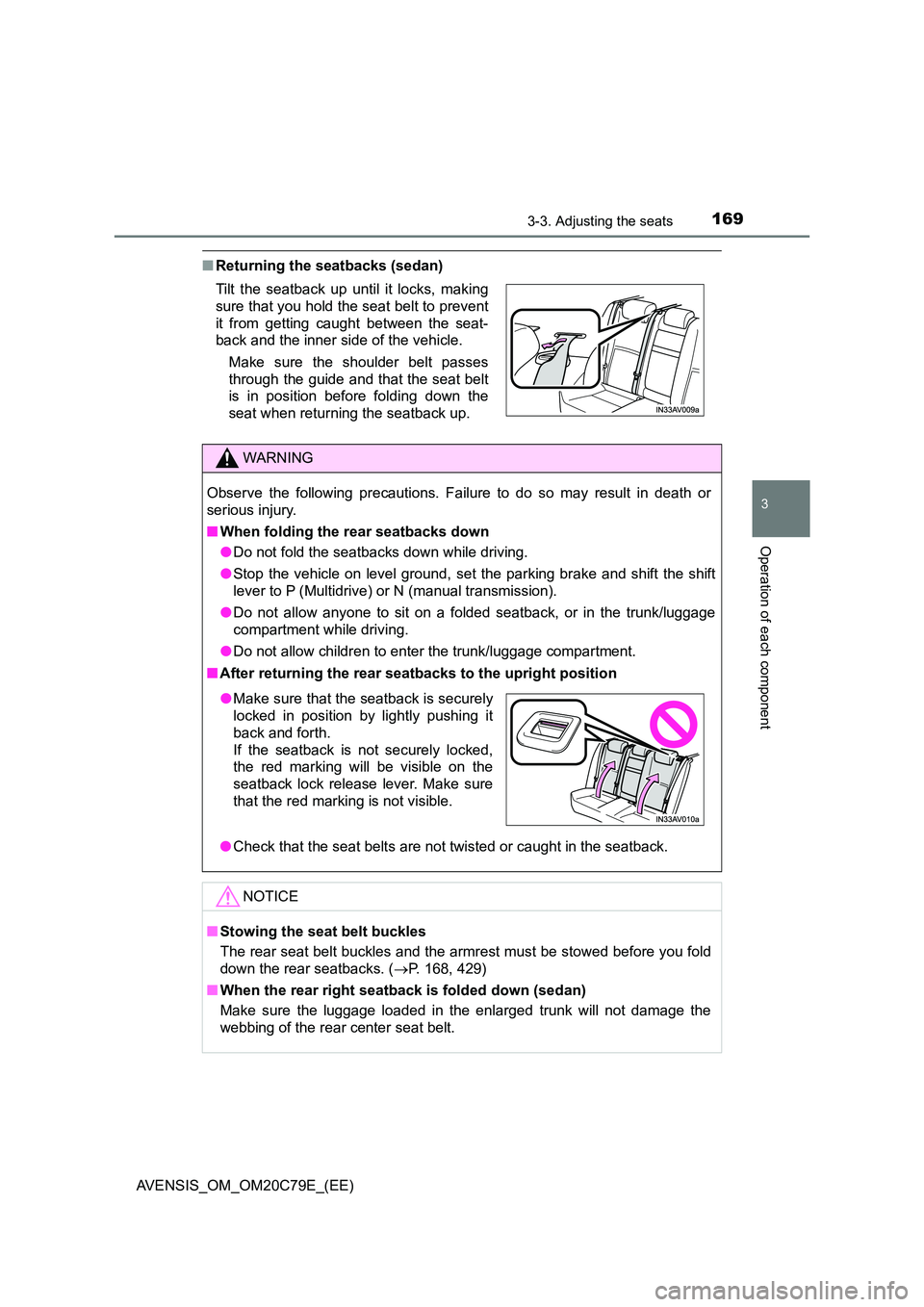
● Make sure that the seatback is securely
locked in position by lightly pushing it
back and forth.
If the seatback is not securely locked,
the red marking will be visible on the
seatback lock release lever. Make sure
that the red marking is not visible.
Page 171 of 660
1713-3. Adjusting the seats
3
Operation of each component
AVENSIS_OM_OM20C79E_(EE)
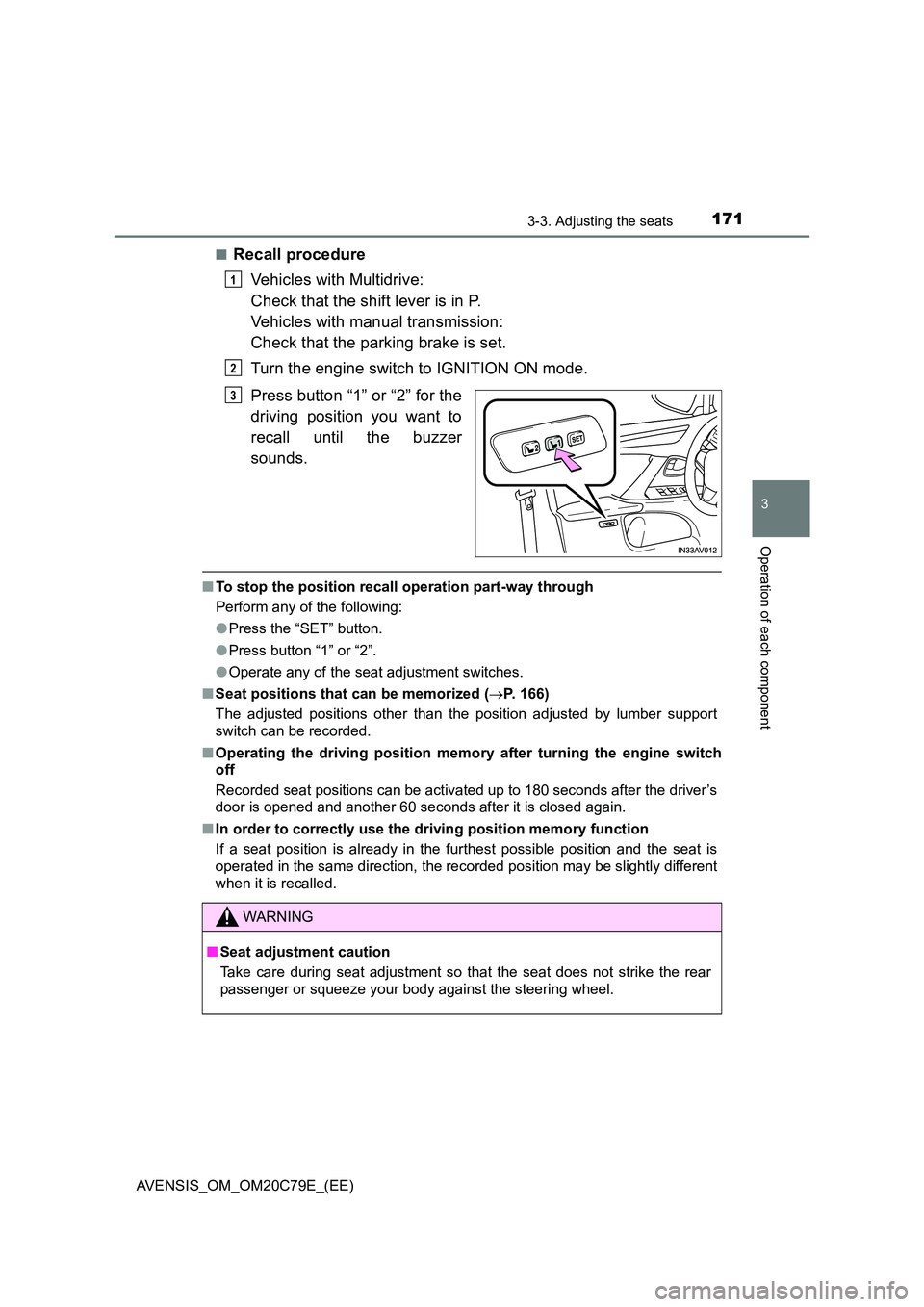
■Recall procedure
Vehicles with Multidrive:
Check that the shift lever is in P.
Vehicles with manual transmission:
Check that the parking brake is set.
Turn the engine switch to IGNITION ON mode.
Press button “1” or “2” for the
driving position you want to
recall until the buzzer
sounds.
■ To stop the position recall operation part-way through
Perform any of the following:
● Press the “SET” button.
● Press button “1” or “2”.
● Operate any of the seat adjustment switches.
■ Seat positions that can be memorized (P. 166)
The adjusted positions other than the position adjusted by lumber support
switch can be recorded.
■ Operating the driving position memory after turning the engine switch
off
Recorded seat positions can be activated up to 180 seconds after the driver’s
door is opened and another 60 seconds after it is closed again.
■ In order to correctly use the driving position memory function
If a seat position is already in the furthest possible position and the seat is
operated in the same direction, the recorded position may be slightly different
when it is recalled.
1
2
3
WARNING
■ Seat adjustment caution
Take care during seat adjustment so that the seat does not strike the rear
passenger or squeeze your body against the steering wheel.
Page 177 of 660
1773-4. Adjusting the steering wheel and mirrors
3
Operation of each component
AVENSIS_OM_OM20C79E_(EE)
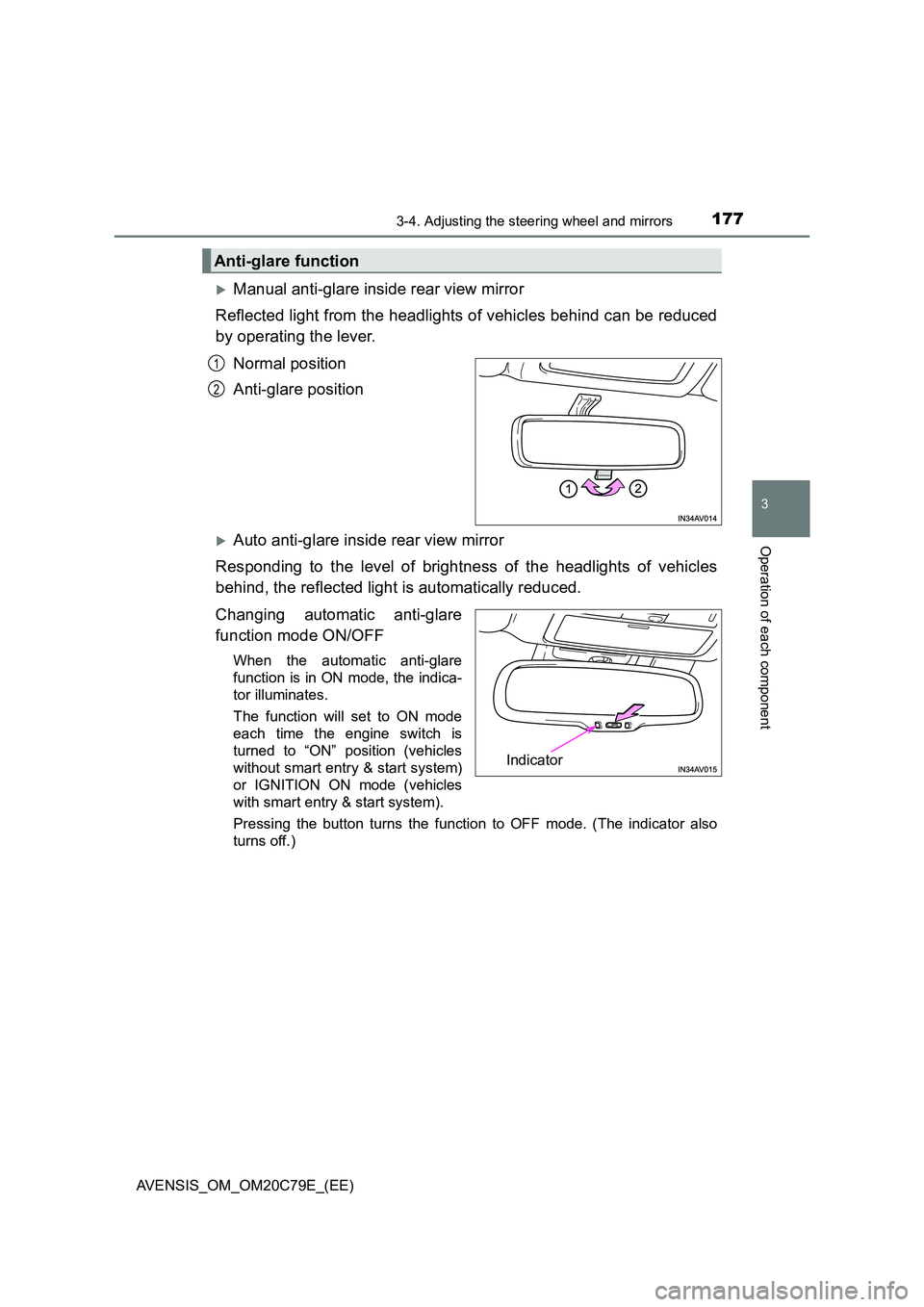
Manual anti-glare inside rear view mirror
Reflected light from the headlights of vehicles behind can be reduced
by operating the lever.
Normal position
Anti-glare position
Auto anti-glare inside rear view mirror
Responding to the level of brightness of the headlights of vehicles
behind, the reflected light is automatically reduced.
Changing automatic anti-glare
function mode ON/OFF
When the automatic anti-glare
function is in ON mode, the indica-
tor illuminates.
The function will set to ON mode
each time the engine switch is
turned to “ON” position (vehicles
without smart entry & start system)
or IGNITION ON mode (vehicles
with smart entry & start system).
Pressing the button turns the function to OFF mode. (The indicator also
turns off.)
Anti-glare function
1
2
Indicator
Page 183 of 660
1833-5. Opening and closing the windows
3
Operation of each component
AVENSIS_OM_OM20C79E_(EE)
■The power windows can be operated when
The engine switch is in the “ON” position (vehicles without smart entry & start
system) or IGNITION ON mode (vehicles with smart entry & start system).
■Operating the power windows after turning the engine off
Vehicles without smart entry & start system
The power windows can be operated for approximately 45 seconds even
after the engine switch is turned to the “ACC” or “LOCK” position. They can-
not, however, be operated once either front door is opened.
Vehicles with smart entry & start system
The power windows can be operated for approximately 45 seconds even
after the engine switch is turned to ACCESSORY mode or turned off. They
cannot, however, be operated once either front door is opened.
■Jam protection function
If an object becomes caught between the window and the window frame, win-
dow travel is stopped and the window is opened slightly.
■When the power window does not close normally
If the jam protection function is operating abnormally and a window cannot be
closed, perform the following operations using the power window switch on
the relevant door.
●After stopping the vehicle, the window can be closed by holding the power
window switch in the one-touch closing position while the engine switch is
turned to the “ON” position (vehicles without smart entry & start system) or
IGNITION ON mode (vehicles with smart entry & start system).
●If the window still cannot be closed even by carrying out the operation
explained above, initialize the function by performing the following proce-
dure.
Hold the power window switch in the one-touch closing position. Continue
holding the switch for a further 6 seconds after the window has closed.
Hold the power window switch in the one-touch opening position. Con-
tinue holding the switch for a further 2 seconds after the window has
opened completely.
Hold the power window switch in the one-touch closing position once
again. Continue holding the switch for a further 2 seconds after the win-
dow has closed.
1
2
3
Page 184 of 660
1843-5. Opening and closing the windows
AVENSIS_OM_OM20C79E_(EE)
If you release the switch while the window is moving, start again from the
beginning. If the window continues to close but then re-open slightly even
after performing the above procedure correctly, have the vehicle inspected by
any authorized Toyota retailer or Toyota authorized repairer, or any reliable
repairer.
WARNING
Observe the following precautions.
Failing to do so may result in death or serious injury.
■ When closing the windows
● The driver is responsible for all the power window operations, including the
operation for the passengers. In order to prevent accidental operation,
especially by a child, do not let a child operate the power windows. It is
possible for children and other passengers to have body parts caught in
the power window. Also, when riding with a child, it is recommended to use
the window lock switch. ( P. 182)
● Check to make sure that all passengers do not have any part of their body
in a position where it could be caught when a window is being operated.
● When exiting the vehicle, turn the engine switch to the “LOCK” position
(vehicles without smart entry & start system) or off (vehicles with smart
entry & start system), carry the key and exit the vehicle along with the
child. There may be accidental operation, due to mischief, etc., that may
possibly lead to an accident.
■ Jam protection function
● Never use any part of your body to intentionally activate the jam protection
function.
● The jam protection function may not work if something gets caught just
before the window fully closes.