light TOYOTA AVENSIS 2018 Manual Online
[x] Cancel search | Manufacturer: TOYOTA, Model Year: 2018, Model line: AVENSIS, Model: TOYOTA AVENSIS 2018Pages: 660, PDF Size: 63.16 MB
Page 247 of 660
247
4
4-3. Operating the lights and wipers
Driving
AVENSIS_OM_OM20C79E_(EE)
Rear window wiper and washer
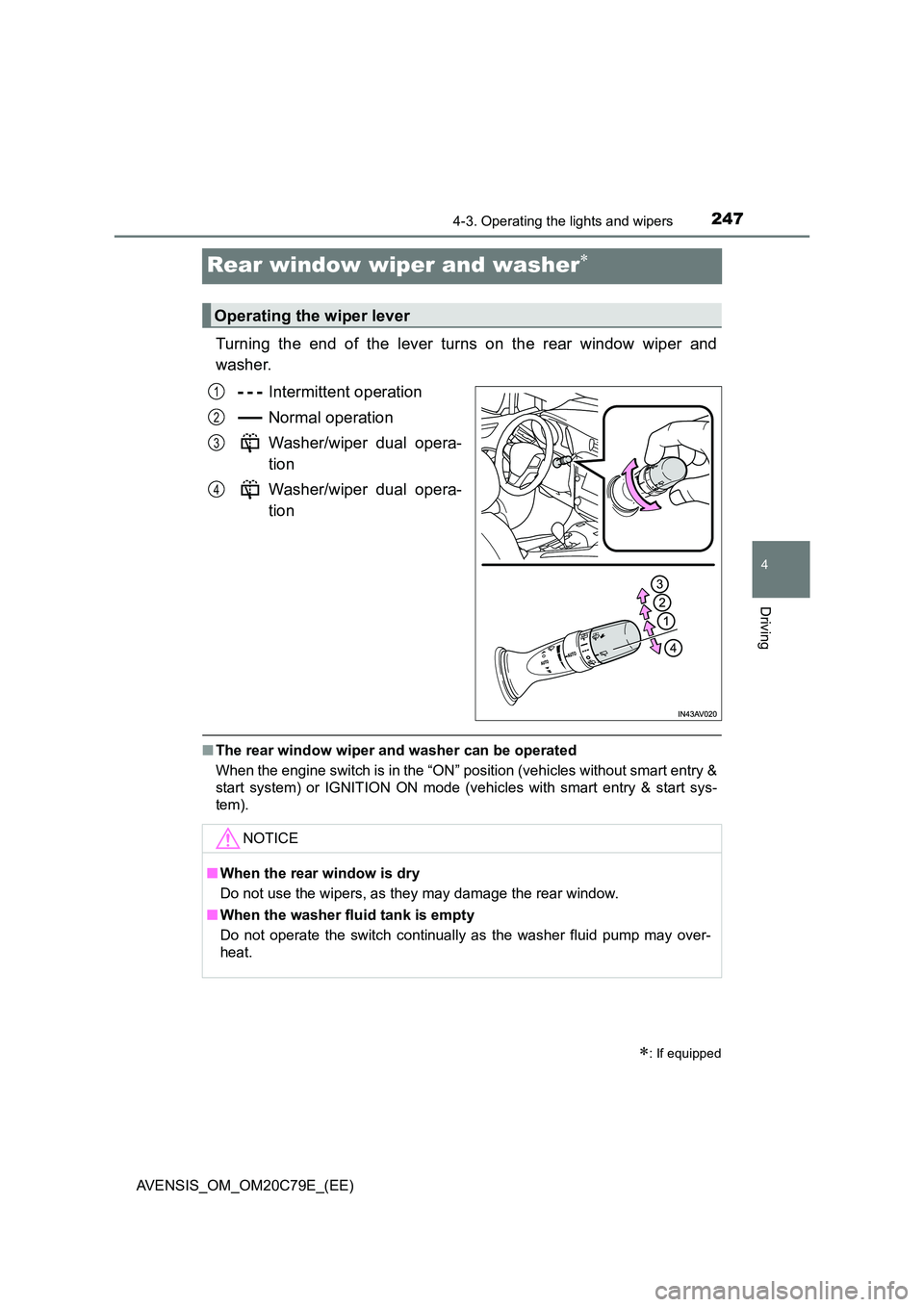
Turning the end of the lever turns on the rear window wiper and
washer.
Intermittent operation
Normal operation
Washer/wiper dual opera-
tion
Washer/wiper dual opera-
tion
■ The rear window wiper and washer can be operated
When the engine switch is in the “ON” position (vehicles without smart entry &
start system) or IGNITION ON mode (vehicles with smart entry & start sys-
tem).
: If equipped
Operating the wiper lever
1
2
3
4
NOTICE
■ When the rear window is dry
Do not use the wipers, as they may damage the rear window.
■ When the washer fluid tank is empty
Do not operate the switch continually as the washer fluid pump may over-
heat.
Page 251 of 660
2514-4. Refueling
4
Driving
AVENSIS_OM_OM20C79E_(EE)
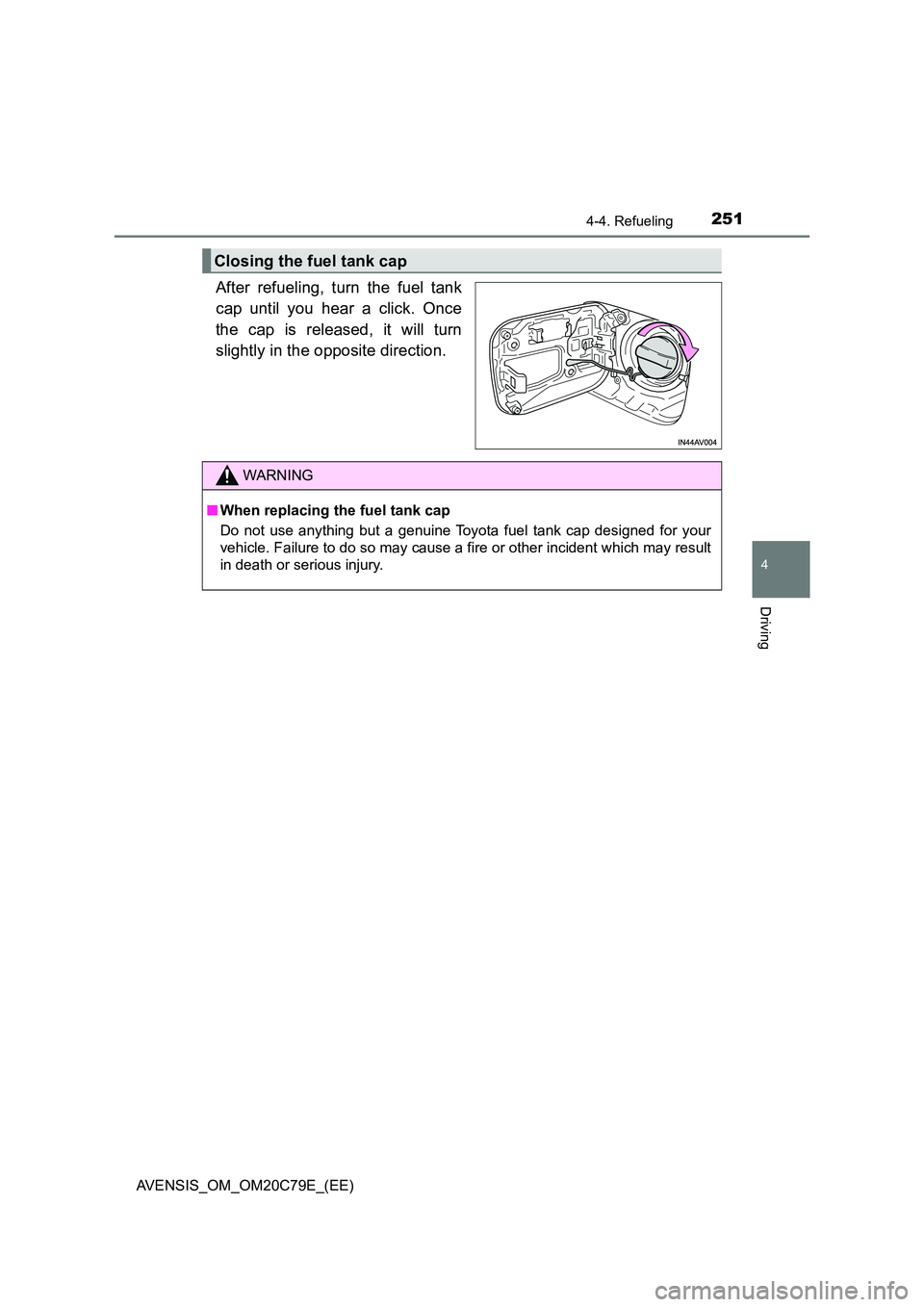
After refueling, turn the fuel tank
cap until you hear a click. Once
the cap is released, it will turn
slightly in the opposite direction.
Closing the fuel tank cap
WARNING
■ When replacing the fuel tank cap
Do not use anything but a genuine Toyota fuel tank cap designed for your
vehicle. Failure to do so may cause a fire or other incident which may result
in death or serious injury.
Page 256 of 660
2564-5. Toyota Safety Sense
AVENSIS_OM_OM20C79E_(EE)
WARNING
■To avoid malfunction of the front sensor
Observe the following precautions.
Otherwise, the front sensor may not operate properly, possibly leading to an
accident resulting in death or serious injury.
● Keep the windshield clean at all times. If the windshield is dirty or covered
with an oily film, water droplets, snow, etc., clear the windshield. If the
inner side of the windshield in front of the front sensor is dirty, contact any
authorized Toyota retailer or Toyota authorized repairer, or any reliable
repairer.
● If there is a large difference in temperature between the inside and outside
of the vehicle, such as in winter, t he windshield is likely to fog up easily. If
the part of the windshield in front of the front sensor is fogged up or cov-
ered with condensation or ice, the PCS warning light may illuminate and
the system may be temporarily disabled. In this case, use the windshield
defogger to remove the fog, etc. ( P. 394, 401)
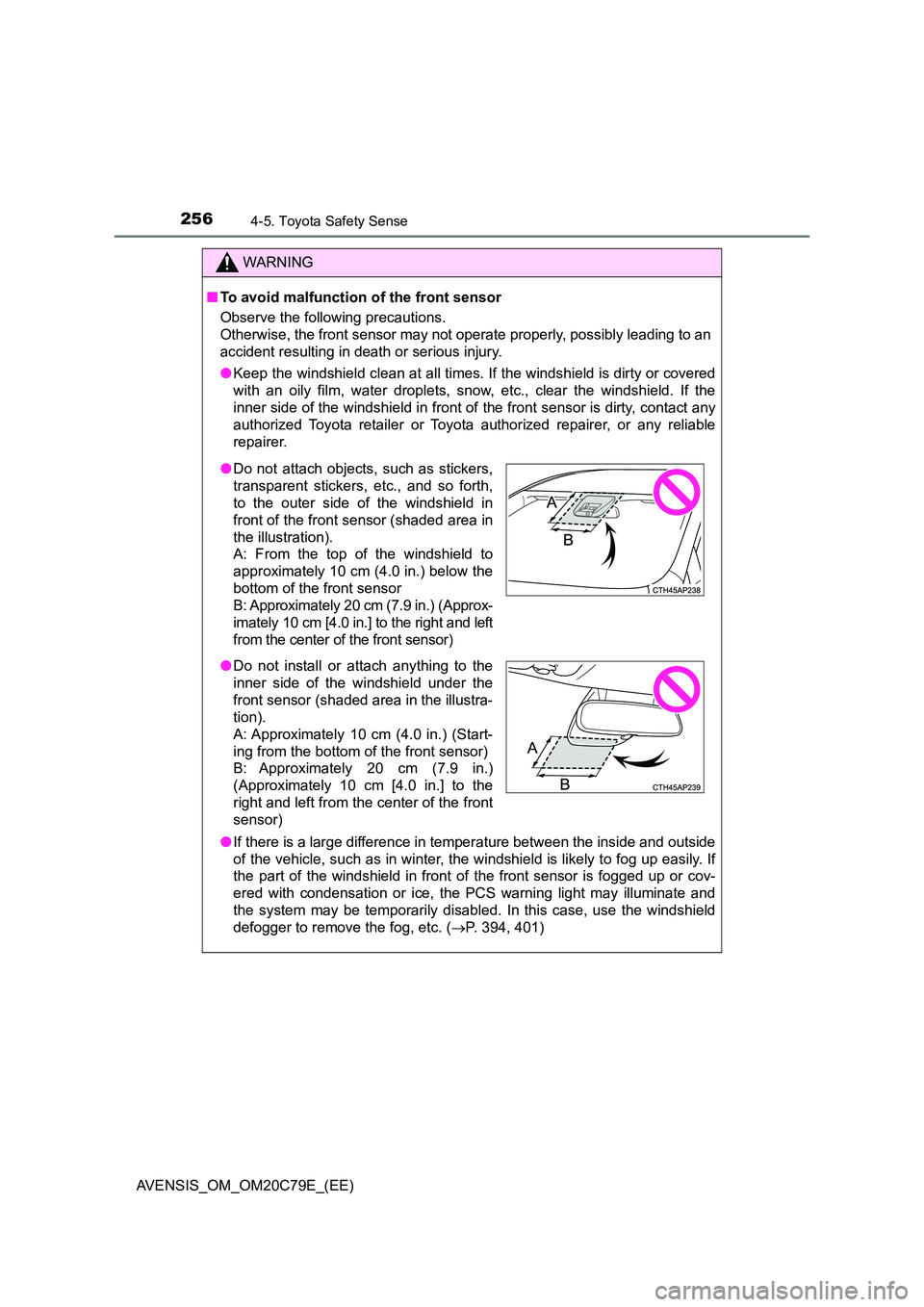
●Do not attach objects, such as stickers,
transparent stickers, etc., and so forth,
to the outer side of the windshield in
front of the front sensor (shaded area in
the illustration).
A: From the top of the windshield to
approximately 10 cm (4.0 in.) below the
bottom of the front sensor
B: Approximately 20 cm (7.9 in.) (Approx-
imately 10 cm [4.0 in.] to the right and left
from the center of the front sensor)
● Do not install or attach anything to the
inner side of the windshield under the
front sensor (shaded area in the illustra-
tion).
A: Approximately 10 cm (4.0 in.) (Start-
ing from the bottom of the front sensor)
B: Approximately 20 cm (7.9 in.)
(Approximately 10 cm [4.0 in.] to the
right and left from the center of the front
sensor)
Page 257 of 660
2574-5. Toyota Safety Sense
4
Driving
AVENSIS_OM_OM20C79E_(EE)
WARNING
●If the area of the windshield in front of the front sensor is covered with
water droplets, use the windshield wipers to remove them.
If the water droplets are not sufficiently removed, the performance of the
front sensor may be reduced.
● If water droplets cannot be properly removed from the area of the wind-
shield in front of the front sensor by the windshield wipers, replace the
wiper insert or wiper blade.
If the wiper inserts or wiper blades need to be replaced, contact any autho-
rized Toyota retailer or Toyota authorized repairer, or any reliable repairer.
● Do not attach window tinting to the windshield.
● Replace the windshield if it is damaged or cracked.
If the windshield needs to be replaced, contact any authorized Toyota
retailer or Toyota authorized repairer, or any reliable repairer.
● Do not install an antenna in front of the sensor.
● Do not get the front sensor wet.
● Do not allow bright lights to shine into the front sensor.
● Do not dirty or damage the front sensor.
When cleaning the inside of the windshi eld, do not allow glass cleaner to
contact the lens. Also, do not touch the lens.
If the lens is dirty or damaged, contact any authorized Toyota retailer or
Toyota authorized repairer, or any reliable repairer.
● Do not subject the front sensor to a strong impact.
● Do not change the installation position or direction of the front sensor or
remove it.
● Do not disassemble the front sensor.
● Do not install an electronic device or device that emits strong electric
waves near the front sensor.
● Do not modify any components of the vehicle around the front sensor
(inside rear view mirror, sun visors, etc.) or ceiling.
● Do not attach any accessories that may obstruct the front sensor to the
hood, front grille or front bumper. C ontact any authorized Toyota retailer or
Toyota authorized repairer, or any reliable repairer for details.
● If a surfboard or other long object is to be mounted on the roof, make sure
that it will not obstruct the front sensor.
● Do not modify the headlights or other lights.
● Do not attach anything to or place anything on the dashboard.
Page 262 of 660
2624-5. Toyota Safety Sense
AVENSIS_OM_OM20C79E_(EE)■
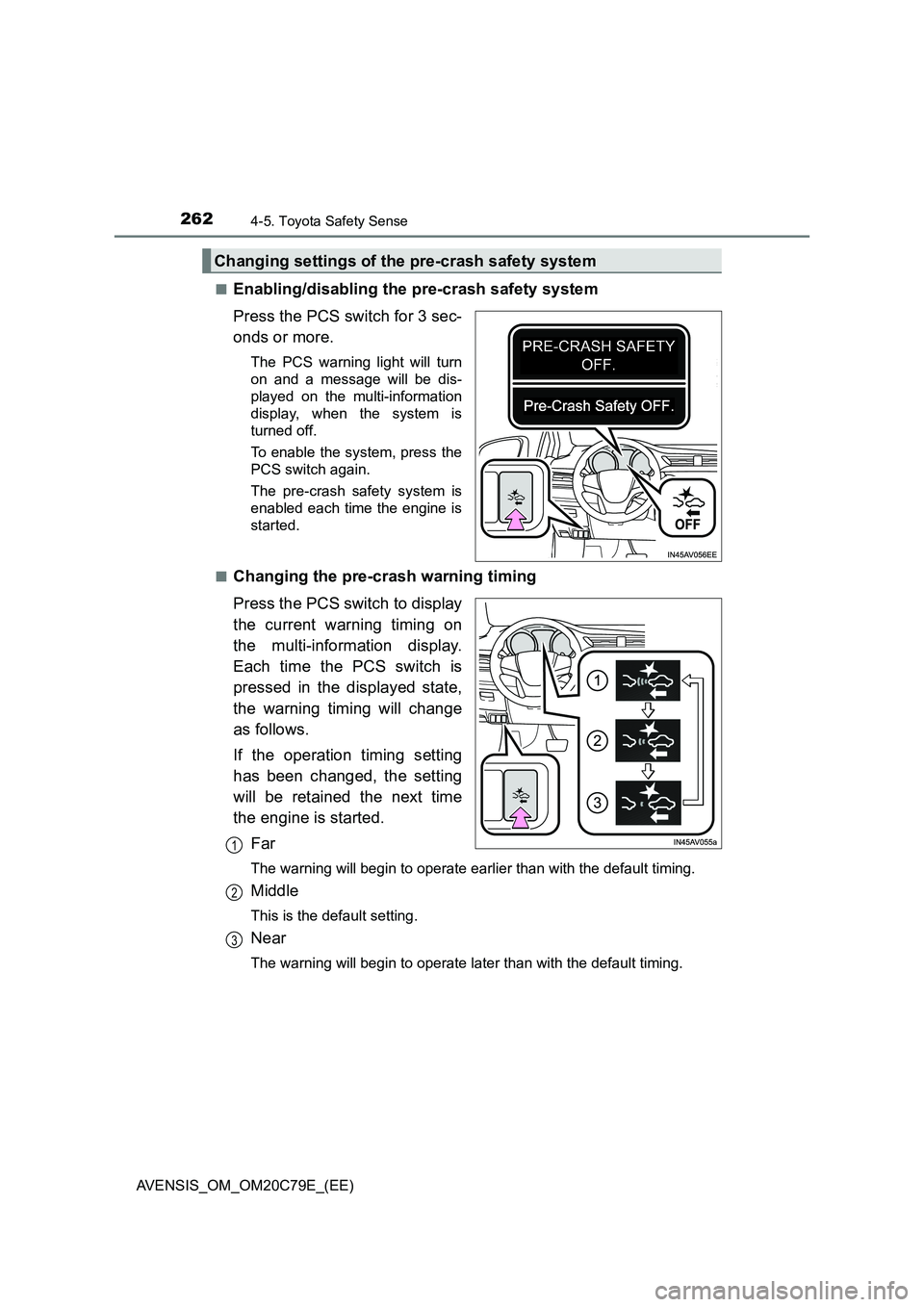
Enabling/disabling the pre-crash safety system
Press the PCS switch for 3 sec-
onds or more.
The PCS warning light will turn
on and a message will be dis-
played on the multi-information
display, when the system is
turned off.
To enable the system, press the
PCS switch again.
The pre-crash safety system is
enabled each time the engine is
started.
■
Changing the pre-crash warning timing
Press the PCS switch to display
the current warning timing on
the multi-information display.
Each time the PCS switch is
pressed in the displayed state,
the warning timing will change
as follows.
If the operation timing setting
has been changed, the setting
will be retained the next time
the engine is started.
Far
The warning will begin to operate earlier than with the default timing.
Middle
This is the default setting.
Near
The warning will begin to operate later than with the default timing.
Changing settings of the pre-crash safety system
1
2
3
Page 265 of 660
2654-5. Toyota Safety Sense
4
Driving
AVENSIS_OM_OM20C79E_(EE)
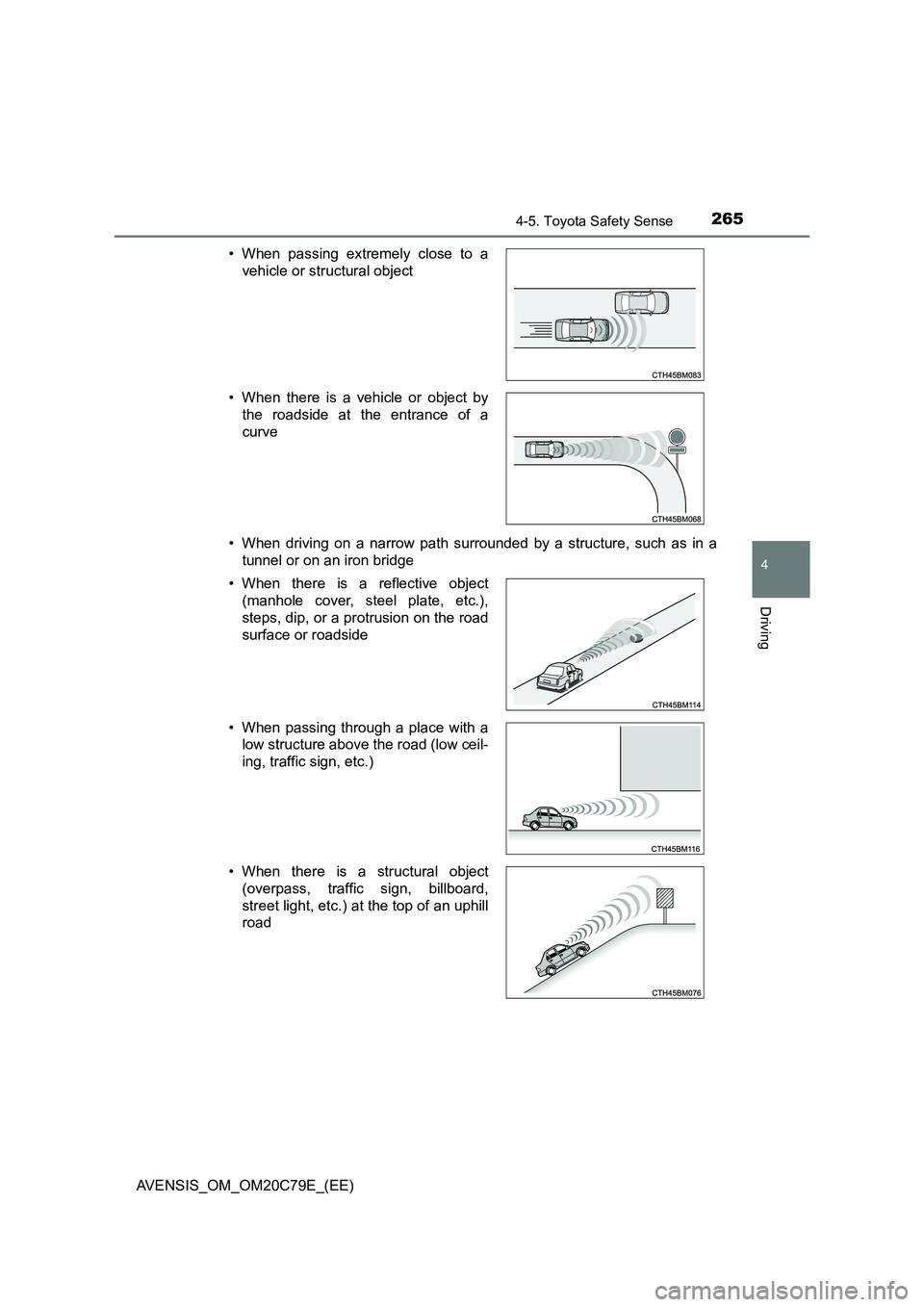
• When driving on a narrow path surrounded by a structure, such as in a
tunnel or on an iron bridge
• When passing extremely close to a
vehicle or structural object
• When there is a vehicle or object by
the roadside at the entrance of a
curve
• When there is a reflective object
(manhole cover, steel plate, etc.),
steps, dip, or a protrusion on the road
surface or roadside
• When passing through a place with a
low structure above the road (low ceil-
ing, traffic sign, etc.)
• When there is a structural object
(overpass, traffic sign, billboard,
street light, etc.) at the top of an uphill
road
Page 268 of 660
2684-5. Toyota Safety Sense
AVENSIS_OM_OM20C79E_(EE)
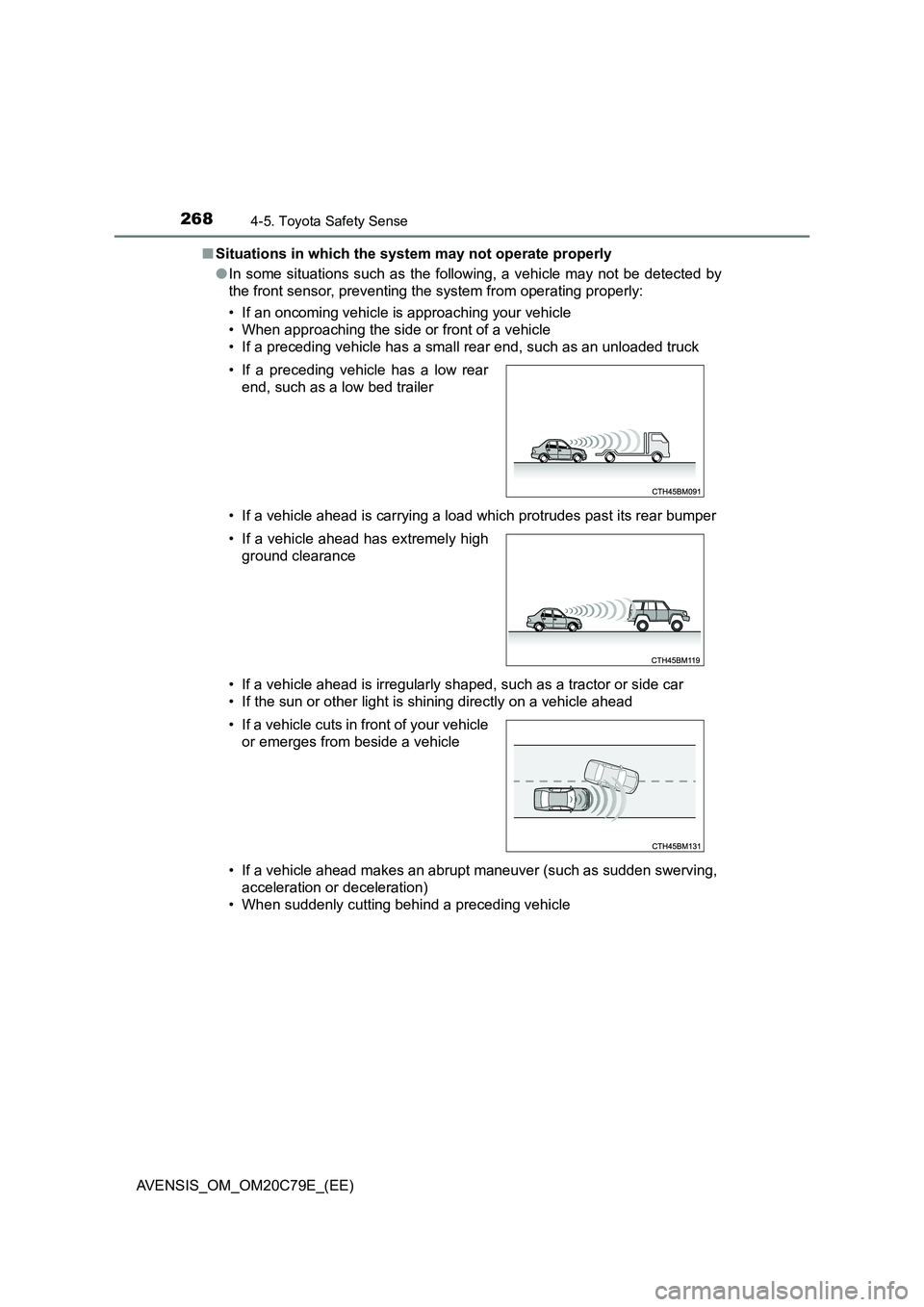
■ Situations in which the system may not operate properly
● In some situations such as the following, a vehicle may not be detected by
the front sensor, preventing the system from operating properly:
• If an oncoming vehicle is approaching your vehicle
• When approaching the side or front of a vehicle
• If a preceding vehicle has a small rear end, such as an unloaded truck
• If a vehicle ahead is carrying a load which protrudes past its rear bumper
• If a vehicle ahead is irregularly shaped, such as a tractor or side car
• If the sun or other light is shining directly on a vehicle ahead
• If a vehicle ahead makes an abrupt maneuver (such as sudden swerving,
acceleration or deceleration)
• When suddenly cutting behind a preceding vehicle
• If a preceding vehicle has a low rear
end, such as a low bed trailer
• If a vehicle ahead has extremely high
ground clearance
• If a vehicle cuts in front of your vehicle
or emerges from beside a vehicle
Page 269 of 660
2694-5. Toyota Safety Sense
4
Driving
AVENSIS_OM_OM20C79E_(EE)
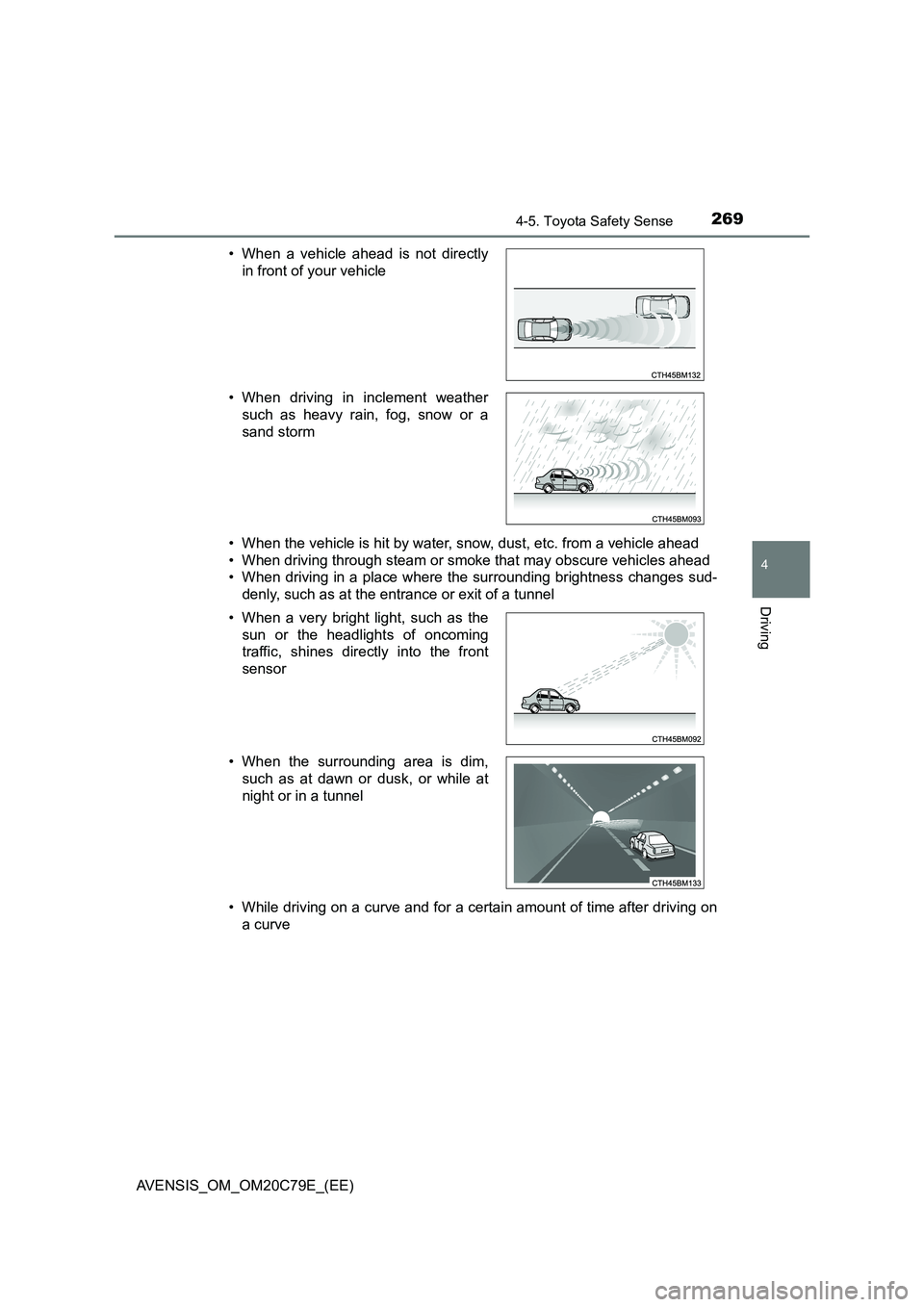
• When the vehicle is hit by water, snow, dust, etc. from a vehicle ahead
• When driving through steam or smoke that may obscure vehicles ahead
• When driving in a place where the surrounding brightness changes sud-
denly, such as at the entrance or exit of a tunnel
• While driving on a curve and for a certain amount of time after driving on
a curve
• When a vehicle ahead is not directly
in front of your vehicle
• When driving in inclement weather
such as heavy rain, fog, snow or a
sand storm
• When a very bright light, such as the
sun or the headlights of oncoming
traffic, shines directly into the front
sensor
• When the surrounding area is dim,
such as at dawn or dusk, or while at
night or in a tunnel
Page 271 of 660
2714-5. Toyota Safety Sense
4
Driving
AVENSIS_OM_OM20C79E_(EE)■If the PCS warning light flashes or illuminates and a warning message is
displayed on the multi-information display
The pre-crash safety system may be temporarily unavailable or there may be
a malfunction in the system.
●In the following situations, the warning light will turn off, the message will
disappear and the system will become operational when normal operating
conditions return:
• When the area around the front sensor is hot, such as in the sun
• When the windshield is fogged up or covered with condensation or ice
(P. 394, 401)
• When driving in conditions where the front sensor cannot detect an
object, such as in the dark (at night on a road without street lights or other
lights, etc.), when bright light is shining into the sensor, or in snow or fog.
• When the front sensor or the area around either sensor is cold, such as in
an extremely cold environment
• If the area in front of the front sensor is obstructed, such as when the
hood is open
●If the PCS warning light continues to flash or illuminate or the warning mes-
sage does not disappear, the system may be malfunctioning. Have the vehi-
cle inspected by any authorized Toyota retailer or Toyota authorized
repairer, or any reliable repairer immediately.
■If VSC is disabled
●If TRC and VSC are disabled (P. 308), the pre-crash brake assist and pre-
crash braking functions are also disabled. However, the pre-crash warning
function will still operate.
●The PCS warning light will turn on and a warning message will be displayed
on the multi-information display. (P. 544)
Page 275 of 660
2754-5. Toyota Safety Sense
4
Driving
AVENSIS_OM_OM20C79E_(EE)■Conditions in which the function may not operate correctly
In the following situations, the front sensor may be unable to recognize lane
markers causing the lane departure warning function to operate incorrectly.
However, this does not indicate a malfunction.
●When driving through an area, such as a tollbooth, a crossing or before a
ticket checkpoint
●When driving on a sharp curve
●When lane markers are extremely narrow or extremely wide
●When the vehicle leans to one side an unusual amount due to a heavy load
or improper tire inflation pressure
●When the following distance between your vehicle and the vehicle ahead is
extremely short
●When the lane markers are yellow (These may be more difficult for the sys-
tem to recognize compared to white markers.)
●When the lane markers are broken, Botts’ dots (raised pavement markers)
or stones
●When the lane markers are on a curb etc.
●When lane markers are obscured or partially obscured by sand, dirt, etc.
●When there are shadows on the road running parallel with lane markers, or
if a shadow covers the lane markers
●When driving on a particularly bright road surface, such as concrete
●When driving on a road surface that is bright due to reflected light
●When driving in a location where the light level changes rapidly, such as the
entrance to or exit from a tunnel
●When sunlight or the headlights of oncoming vehicles are shining directly
into the camera lens
●When driving on roads that are branching or merging
●When driving on a road surface that is wet due to rain, previous rainfall,
standing water, etc.
●When the vehicle experiences strong up-and-down motion such as when
driving on an extremely rough road or on a seam in the pavement
●When headlight brightness at nighttime is reduced due to dirt on the lenses,
or when the headlights are misaligned
●When driving on winding roads or roads that are uneven
●When driving on rough or unpaved roads
●When the windshield is dirty, or if raindrops, condensation or ice are adher-
ing to the windshield.
●When the heater is blowing to the feet, the upper part of the windshield may
get fogged up and have a negative effect.
●When cleaning the inside of the windshield, touching the lens or getting
glass cleaner on the lens may have a negative effect.