light TOYOTA AVENSIS 2018 Repair Manual
[x] Cancel search | Manufacturer: TOYOTA, Model Year: 2018, Model line: AVENSIS, Model: TOYOTA AVENSIS 2018Pages: 660, PDF Size: 63.16 MB
Page 217 of 660
2174-2. Driving procedures
4
Driving
AVENSIS_OM_OM20C79E_(EE)
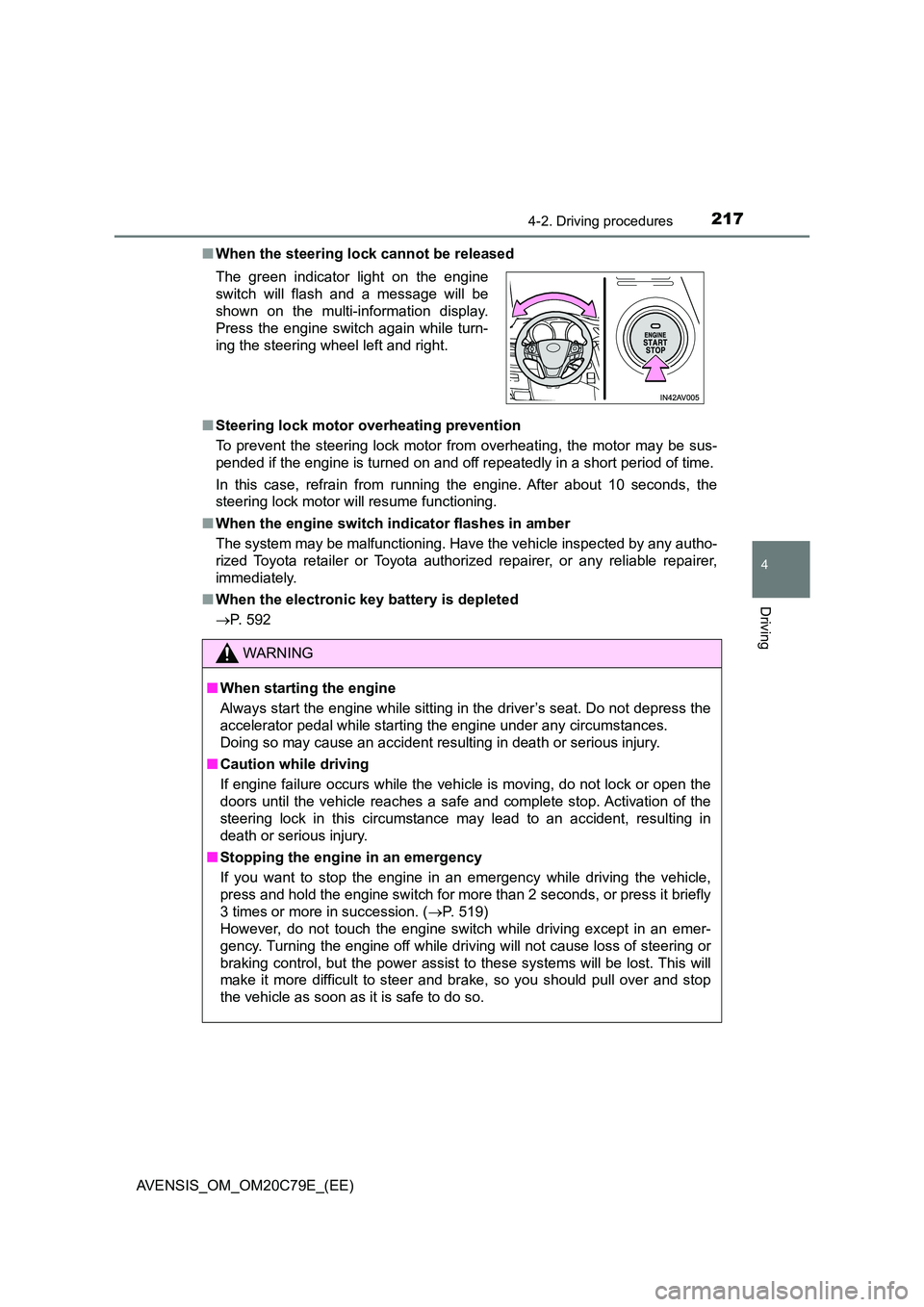
■ When the steering lock cannot be released
■ Steering lock motor overheating prevention
To prevent the steering lock motor from overheating, the motor may be sus-
pended if the engine is turned on and off repeatedly in a short period of time.
In this case, refrain from running the engine. After about 10 seconds, the
steering lock motor will resume functioning.
■ When the engine switch indicator flashes in amber
The system may be malfunctioning. Have the vehicle inspected by any autho-
rized Toyota retailer or Toyota author ized repairer, or any reliable repairer,
immediately.
■ When the electronic key battery is depleted
P. 592
The green indicator light on the engine
switch will flash and a message will be
shown on the multi-information display.
Press the engine switch again while turn-
ing the steering wheel left and right.
WARNING
■ When starting the engine
Always start the engine while sitting in the driver’s seat. Do not depress the
accelerator pedal while starting the engine under any circumstances.
Doing so may cause an accident resulting in death or serious injury.
■ Caution while driving
If engine failure occurs while the vehicle is moving, do not lock or open the
doors until the vehicle reaches a safe and complete stop. Activation of the
steering lock in this circumstance may lead to an accident, resulting in
death or serious injury.
■ Stopping the engine in an emergency
If you want to stop the engine in an emergency while driving the vehicle,
press and hold the engine switch for more than 2 seconds, or press it briefly
3 times or more in succession. ( P. 519)
However, do not touch the engine switch while driving except in an emer-
gency. Turning the engine off while driving will not cause loss of steering or
braking control, but the power assist to these systems will be lost. This will
make it more difficult to steer and brake, so you should pull over and stop
the vehicle as soon as it is safe to do so.
Page 218 of 660
2184-2. Driving procedures
AVENSIS_OM_OM20C79E_(EE)
NOTICE
■To prevent battery discharge
● Do not leave the engine switch in ACCESSORY or IGNITION ON mode
for long periods of time without the engine running.
● If the indicator on the engine switch is illuminated, the engine switch is not
off. When exiting the vehicle, always check that the engine switch is off.
● On vehicles with Multidrive, do not stop the engine when the shift lever is
in a position other than P. If the engine is stopped in another shift lever
position, the engine switch will not be turned off but instead be turned to
ACCESSORY mode. If the vehicle is left in ACCESSORY mode, battery
discharge may occur.
■ When starting the engine
● Do not race a cold engine.
● If the engine becomes difficult to start or stalls frequently, have your vehi-
cle checked by any authorized Toyota retailer or Toyota authorized
repairer, or any reliable repairer immediately.
■ Symptoms indicating a malfunction with the engine switch
If the engine switch seems to be operating somewhat differently than usual,
such as the switch sticking slightly, there may be a malfunction. Contact any
authorized Toyota retailer or Toyota authorized repairer, or any reliable
repairer immediately.
Page 229 of 660
229
4
4-2. Driving procedures
Driving
AVENSIS_OM_OM20C79E_(EE)
Turn signal lever
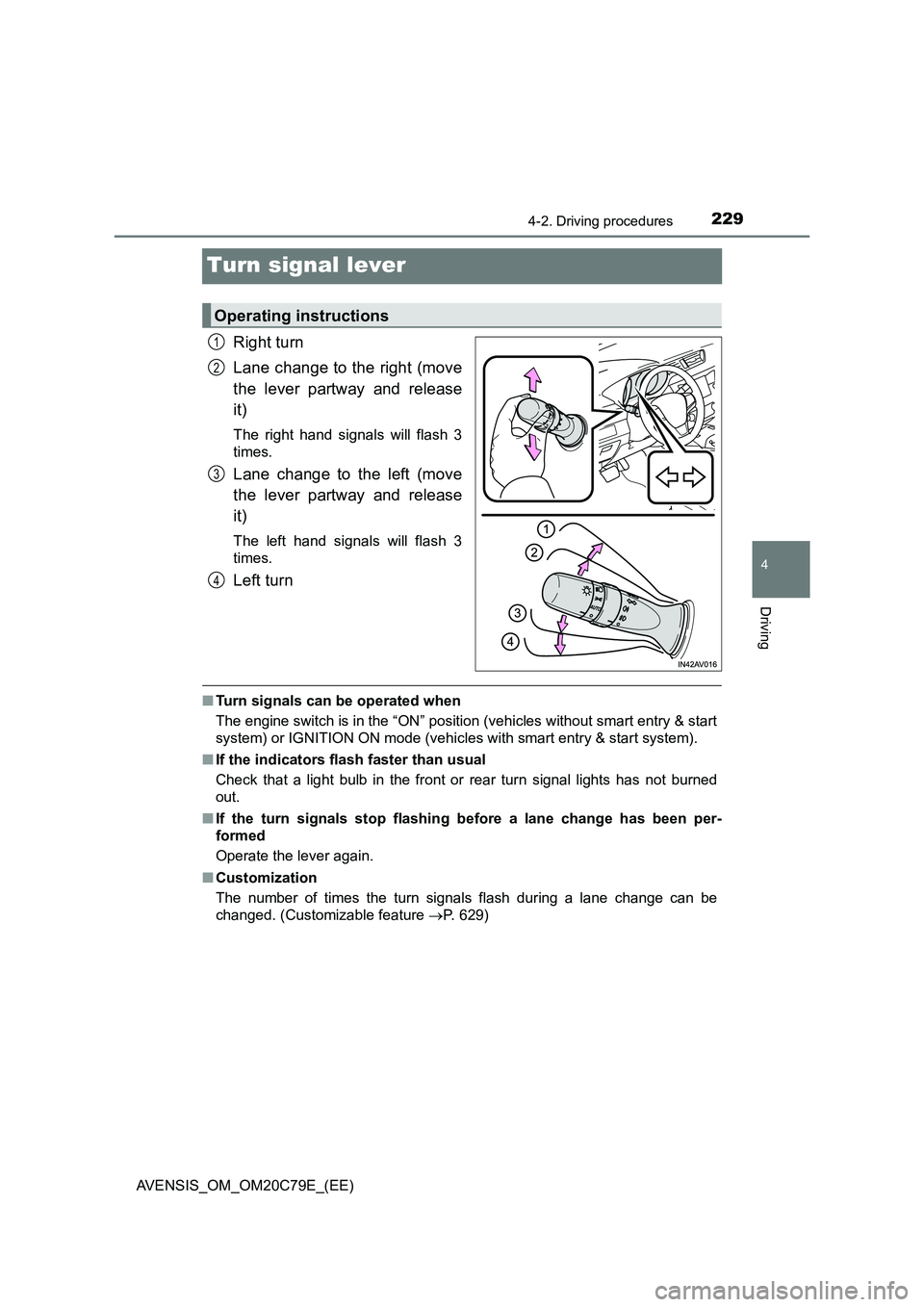
Right turn
Lane change to the right (move
the lever partway and release
it)
The right hand signals will flash 3
times.
Lane change to the left (move
the lever partway and release
it)
The left hand signals will flash 3
times.
Left turn
■ Turn signals can be operated when
The engine switch is in the “ON” position (vehicles without smart entry & start
system) or IGNITION ON mode (vehicles with smart entry & start system).
■ If the indicators flash faster than usual
Check that a light bulb in the front or rear turn signal lights has not burned
out.
■ If the turn signals stop flashing before a lane change has been per-
formed
Operate the lever again.
■ Customization
The number of times the turn signals flash during a lane change can be
changed. (Customizable feature P. 629)
Operating instructions
1
2
3
4
Page 230 of 660
2304-2. Driving procedures
AVENSIS_OM_OM20C79E_(EE)
Parking brake
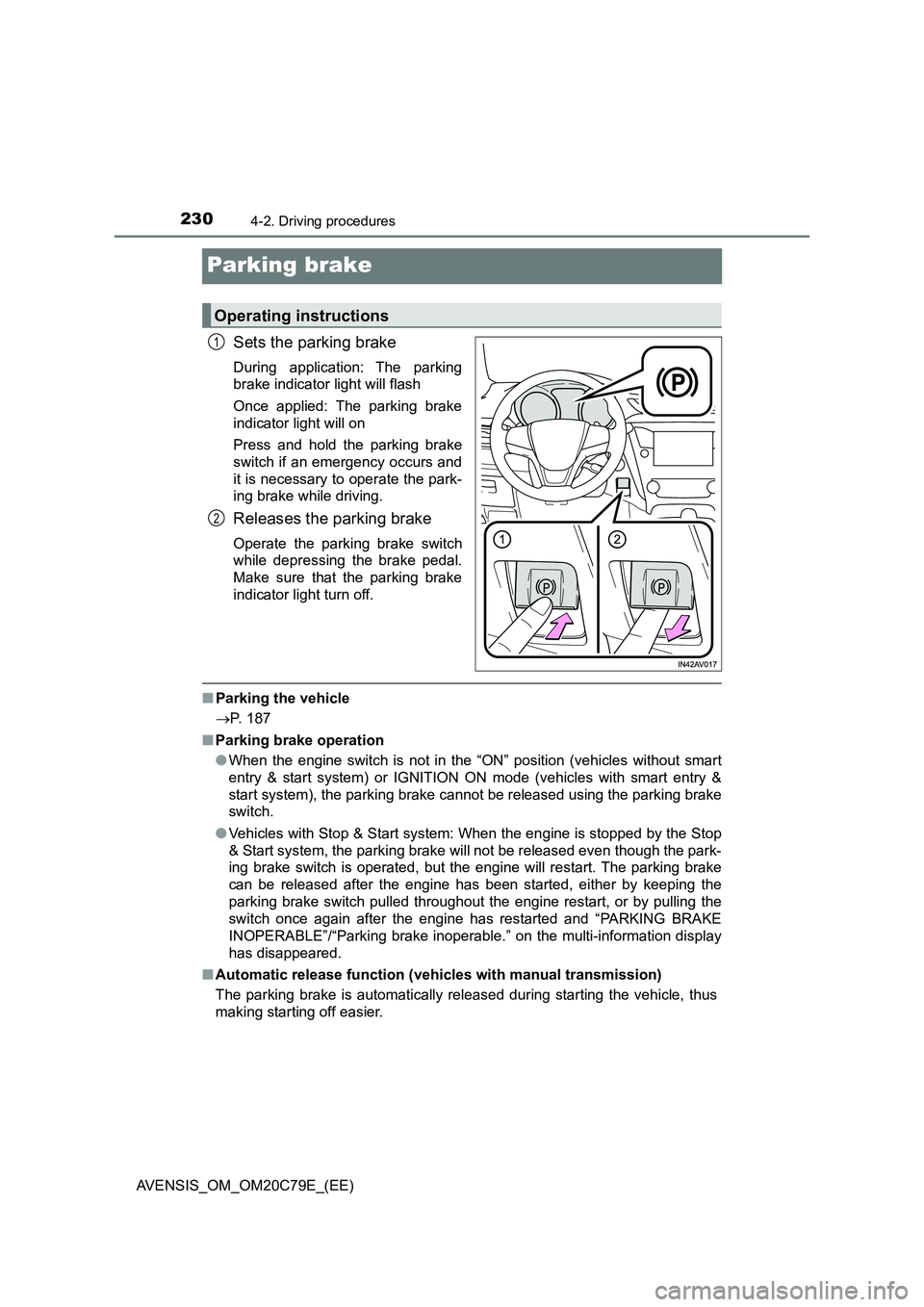
Sets the parking brake
During application: The parking
brake indicator light will flash
Once applied: The parking brake
indicator light will on
Press and hold the parking brake
switch if an emergency occurs and
it is necessary to operate the park-
ing brake while driving.
Releases the parking brake
Operate the parking brake switch
while depressing the brake pedal.
Make sure that the parking brake
indicator light turn off.
■Parking the vehicle
P. 187
■Parking brake operation
●When the engine switch is not in the “ON” position (vehicles without smart
entry & start system) or IGNITION ON mode (vehicles with smart entry &
start system), the parking brake cannot be released using the parking brake
switch.
●Vehicles with Stop & Start system: When the engine is stopped by the Stop
& Start system, the parking brake will not be released even though the park-
ing brake switch is operated, but the engine will restart. The parking brake
can be released after the engine has been started, either by keeping the
parking brake switch pulled throughout the engine restart, or by pulling the
switch once again after the engine has restarted and “PARKING BRAKE
INOPERABLE”/“Parking brake inoperable.” on the multi-information display
has disappeared.
■Automatic release function (vehicles with manual transmission)
The parking brake is automatically released during starting the vehicle, thus
making starting off easier.
Operating instructions
1
2
Page 231 of 660
2314-2. Driving procedures
4
Driving
AVENSIS_OM_OM20C79E_(EE)■Automatic apply function (vehicles with manual transmission)
To prevent the parking brake from being left accidentally unapplied, the park-
ing brake will be applied automatically under the following conditions:
●The vehicle is stopped.
●The engine switch is turned to the “ACC” position (vehicles without smart
entry & start system) or off (vehicles with smart entry & start system).
■Automatic apply mode (vehicles with manual transmission)
Automatic apply function (mode) is initially set to ON, but it can be switched
between ON and OFF as the situation demands.
●Switching automatic apply mode from ON to OFF:
Stop the vehicle in a horizontal condition and switch the engine switch to
the “ON” position (vehicles without smart entry & start system) or IGNI-
TION ON mode (vehicles with smart entry & start system).
●Switching automatic apply mode from OFF to ON:
Stop the vehicle in a horizontal condition and switch the engine switch to
the “ON” position (vehicles without smart entry & start system) or IGNI-
TION ON mode (vehicles with smart entry & start system).
Push and hold the parking brake switch for 5 seconds or more
The Auto P-off indicator light will go off.
●Temporary cancelation of the automatic apply function is available for spe-
cific circumstances (car wash, towing vehicle, etc.).
To temporarily cancel the automatic apply function of the parking brake, pull
the parking brake switch at the same time as you are switching off the vehi-
cle.
When switch is being pulled for 5 seconds or more, automatic apply mode
changes from ON to OFF.
■Parking brake operation sound
When the parking brake operates, a motor sound (whirring sound) may be
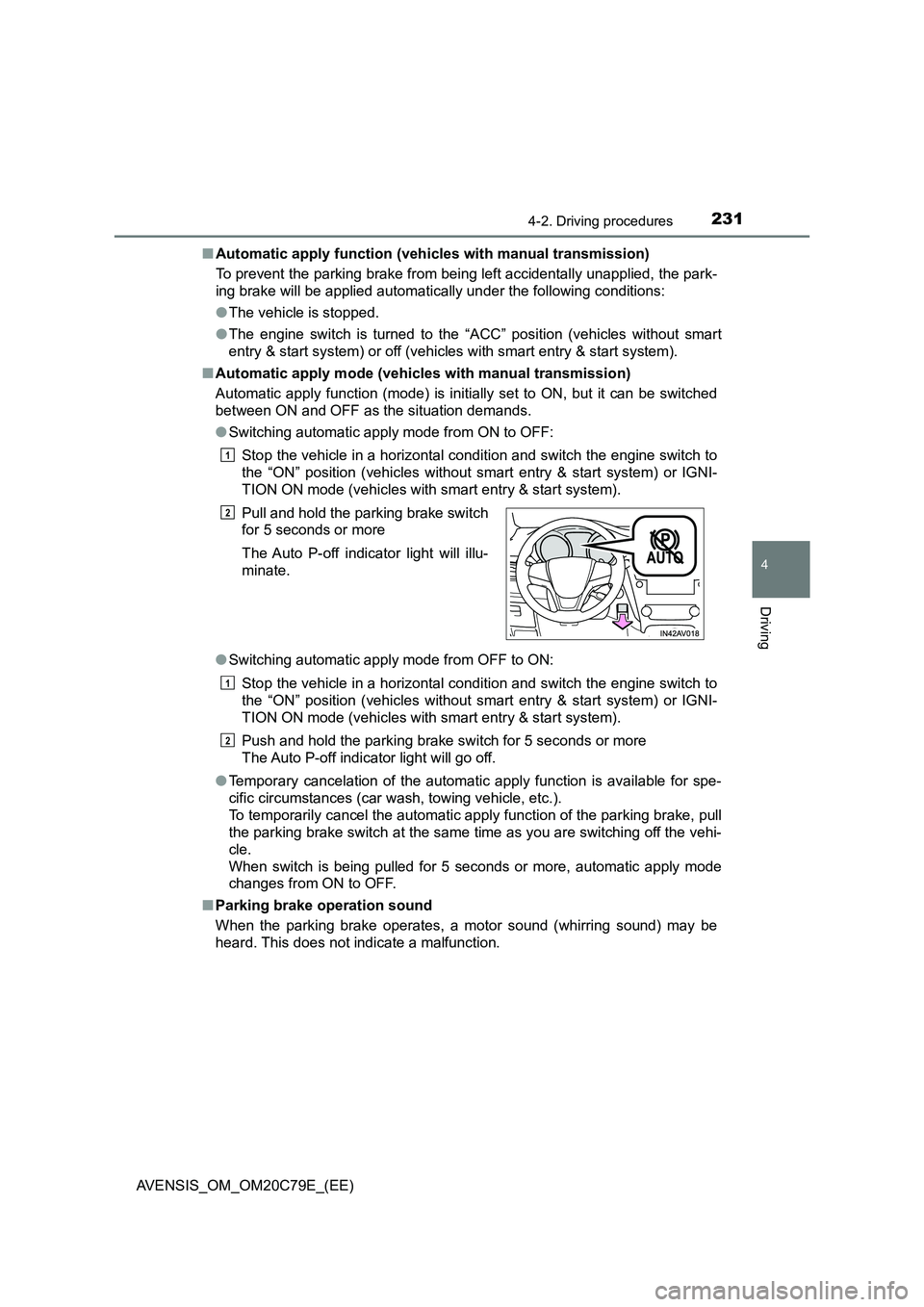
heard. This does not indicate a malfunction.Pull and hold the parking brake switch
for 5 seconds or more
The Auto P-off indicator light will illu-
minate.
1
2
1
2
Page 232 of 660
2324-2. Driving procedures
AVENSIS_OM_OM20C79E_(EE)
■ When the system is overheating
The system may become temporarily unavailable in order to prevent over-
heating caused by repeated unnecessary switch operation.
In this event, leaving the system to cool down for a short time will allow nor-
mal operation to resume.
■ When there is a malfunction in the system
Warning light will turn on or flash. ( P. 530)
■ Usage in winter time
P. 312
WARNING
■When parking the vehicle
● Make sure that the parking brake indicator light is illuminated. If the park-
ing brake is not applied, the vehicle could move, possibly leading to an
accident.
● Do not leave a child in the vehicle alone. The parking brake may be
released unintentionally and there is the danger of the vehicle moving that
may lead to an accident resulting in death or serious injury.
NOTICE
■ When parking the vehicle
Before you leave the vehicle, set the parking brake, shift the shift lever to P
(Multidrive) or 1 or R (manual transmi ssion) and make sure that the vehicle
does not move.
■ When the system malfunctions
Stop the vehicle in a safe place and check the warning messages.
( P. 5 3 7 )
■ When the parking brake cannot be released due to a malfunction
Use the parking brake release tool to manually release the parking brake.
( P. 5 8 8 )
Driving the vehicle with the parking brake set will lead to brake components
overheating, which may affect braking performance and increase brake
wear.
Page 233 of 660
233
4
4-3. Operating the lights and wipers
Driving
AVENSIS_OM_OM20C79E_(EE)
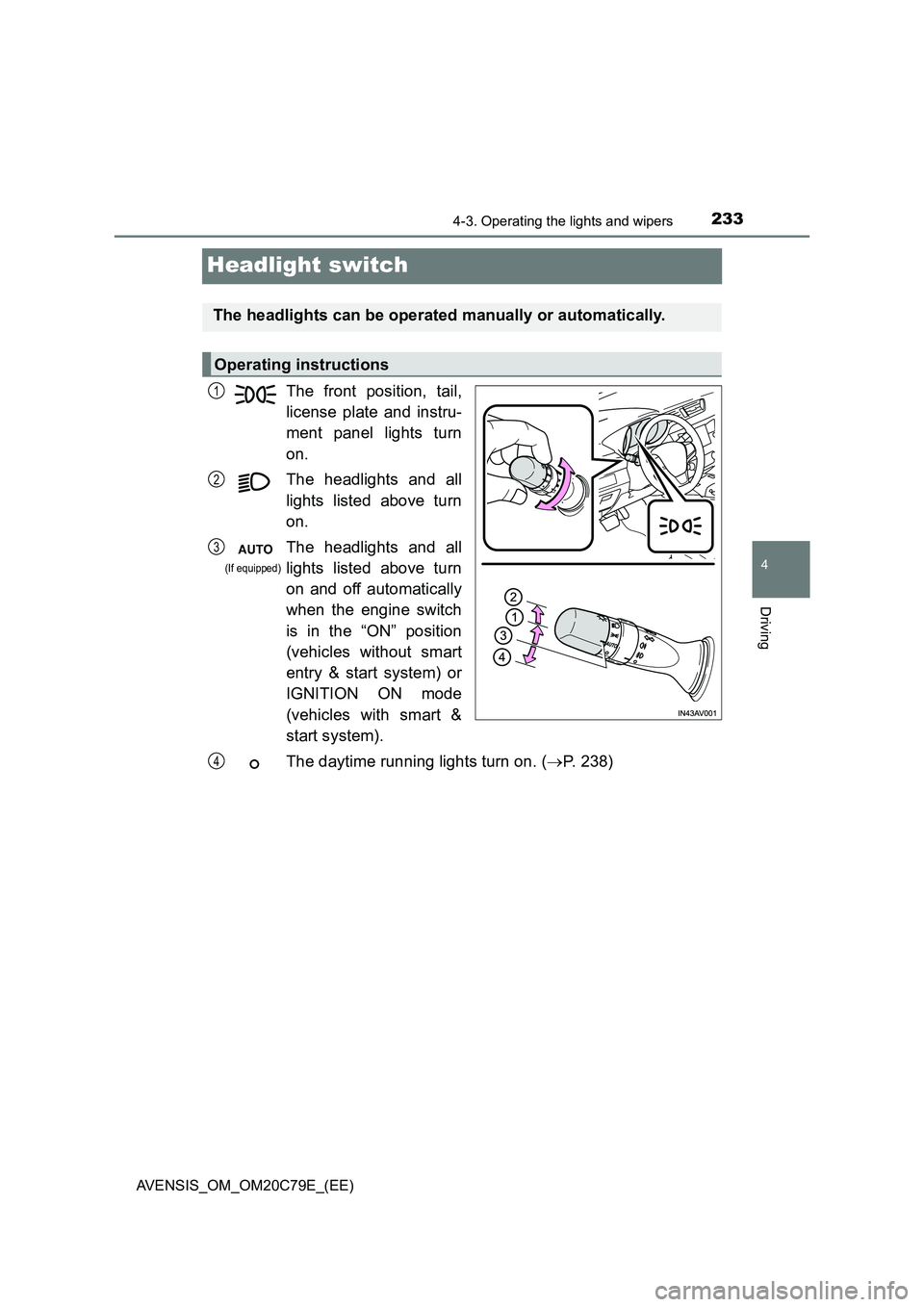
Headlight switch
The front position, tail,
license plate and instru-
ment panel lights turn
on.
The headlights and all
lights listed above turn
on.
The headlights and all
lights listed above turn
on and off automatically
when the engine switch
is in the “ON” position
(vehicles without smart
entry & start system) or
IGNITION ON mode
(vehicles with smart &
start system).
The daytime running lights turn on. ( P. 238)
The headlights can be operated manually or automatically.
Operating instructions
1
2
3
(If equipped)
4
Page 234 of 660
2344-3. Operating the lights and wipers
AVENSIS_OM_OM20C79E_(EE)
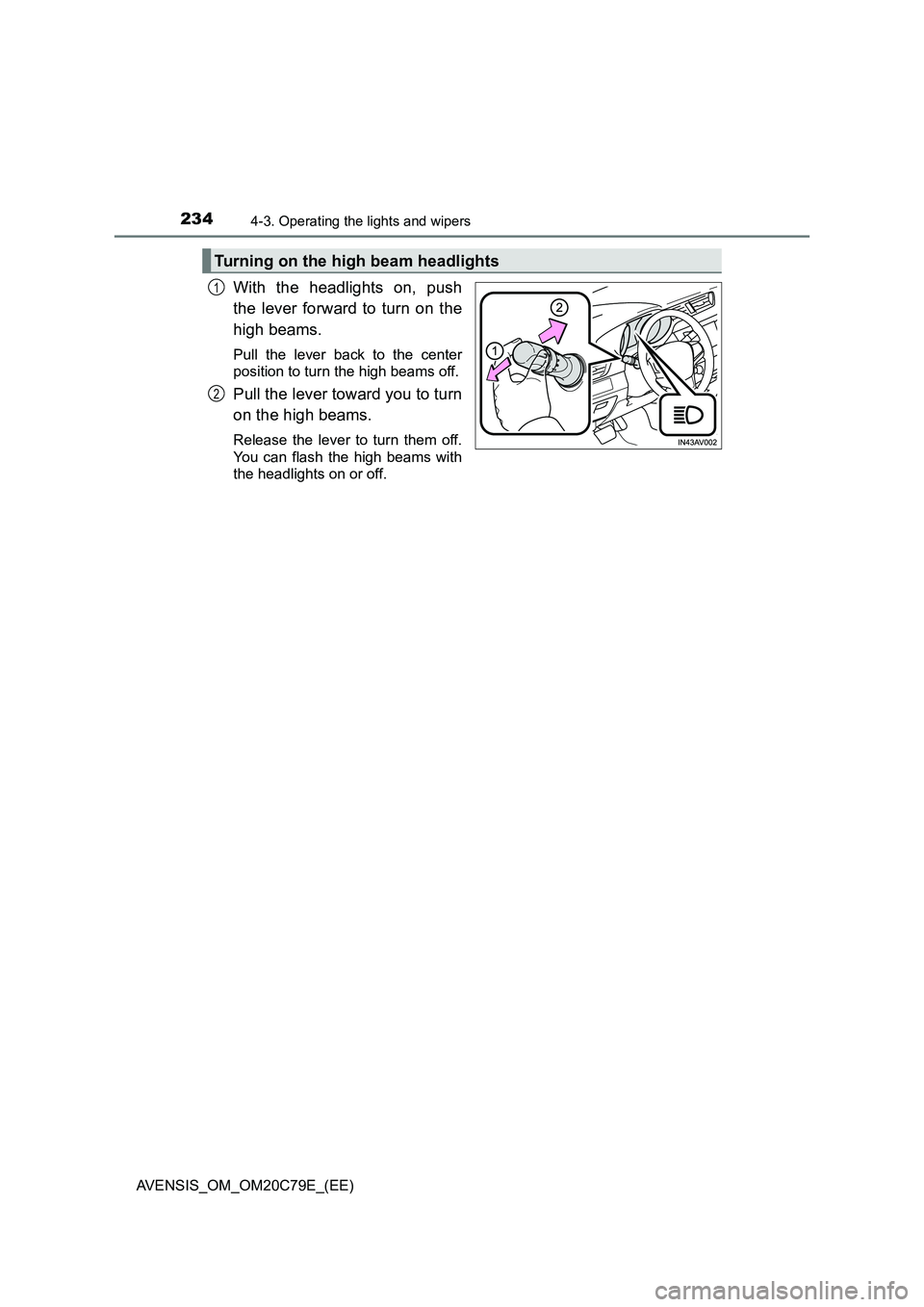
With the headlights on, push
the lever forward to turn on the
high beams.
Pull the lever back to the center
position to turn the high beams off.
Pull the lever toward you to turn
on the high beams.
Release the lever to turn them off.
You can flash the high beams with
the headlights on or off.
Turning on the high beam headlights
1
2
Page 235 of 660
2354-3. Operating the lights and wipers
4
Driving
AVENSIS_OM_OM20C79E_(EE)
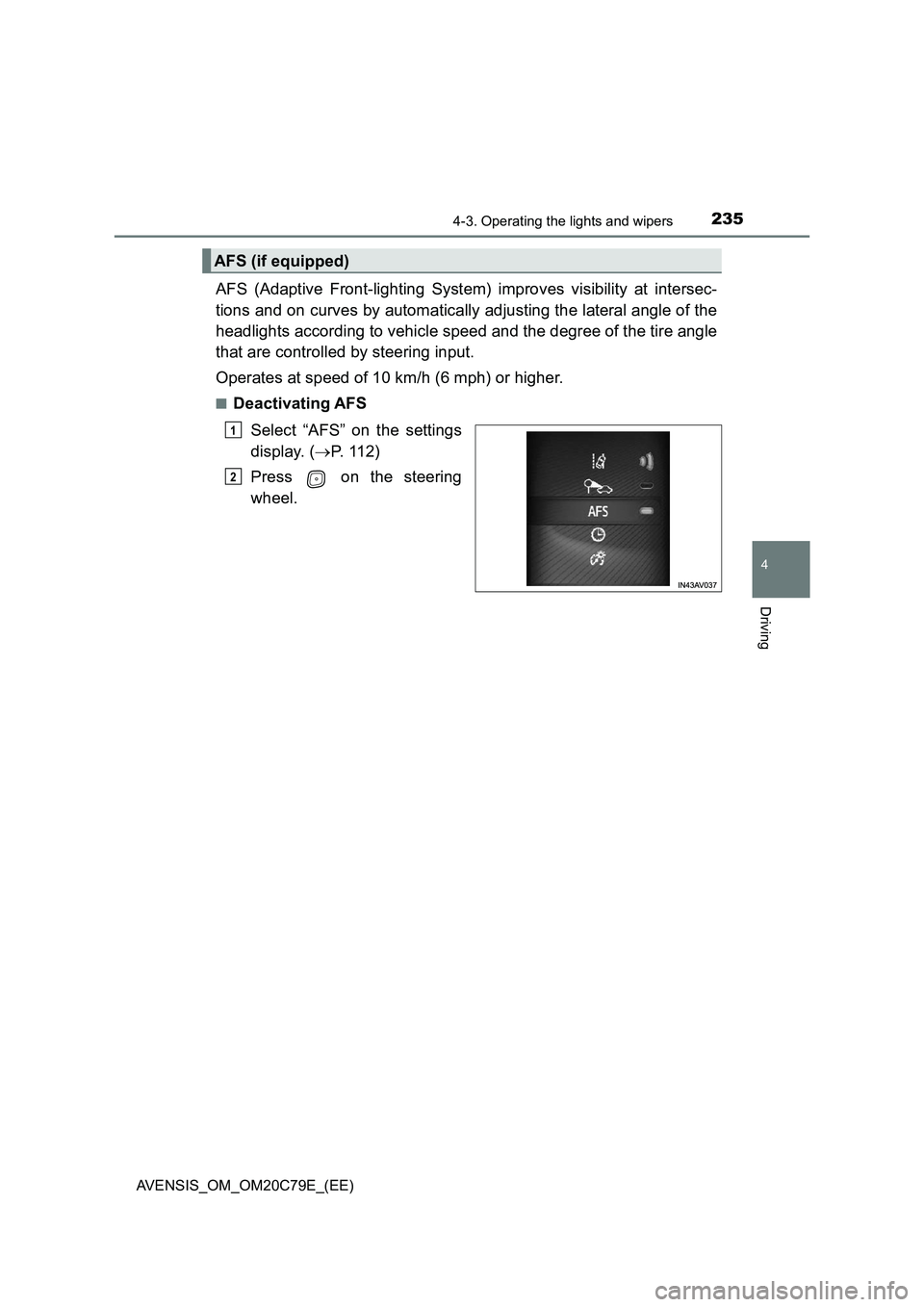
AFS (Adaptive Front-lighting System) improves visibility at intersec-
tions and on curves by automatically adjusting the lateral angle of the
headlights according to vehicle speed and the degree of the tire angle
that are controlled by steering input.
Operates at speed of 10 km/h (6 mph) or higher.
■Deactivating AFS
Select “AFS” on the settings
display. (P. 1 1 2 )
Press on the steering
wheel.
AFS (if equipped)
1
2
Page 236 of 660
2364-3. Operating the lights and wipers
AVENSIS_OM_OM20C79E_(EE)
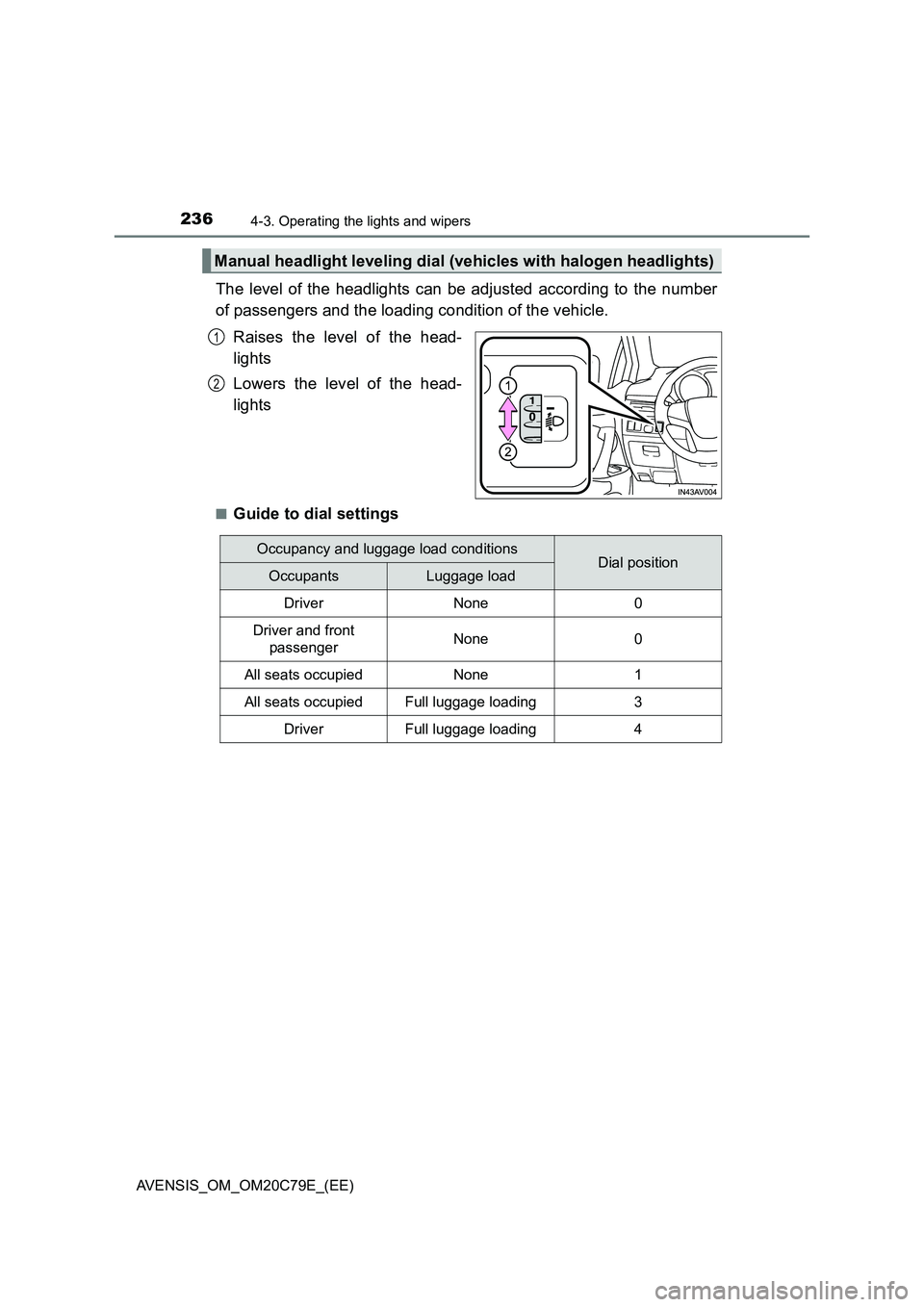
The level of the headlights can be adjusted according to the number
of passengers and the loading condition of the vehicle.
Raises the level of the head-
lights
Lowers the level of the head-
lights
■Guide to dial settings
Manual headlight leveling dial (vehicles with halogen headlights)
1
2
Occupancy and luggage load conditionsDial positionOccupantsLuggage load
DriverNone0
Driver and front
passengerNone0
All seats occupiedNone1
All seats occupiedFull luggage loading3
DriverFull luggage loading4