audio TOYOTA AYGO 2015 (in English) Owner's Manual
[x] Cancel search | Manufacturer: TOYOTA, Model Year: 2015, Model line: AYGO, Model: TOYOTA AYGO 2015Pages: 440, PDF Size: 22.97 MB
Page 207 of 440
2075-3. Using the radio
5
Audio system
AYGO_EE_OM99J92E
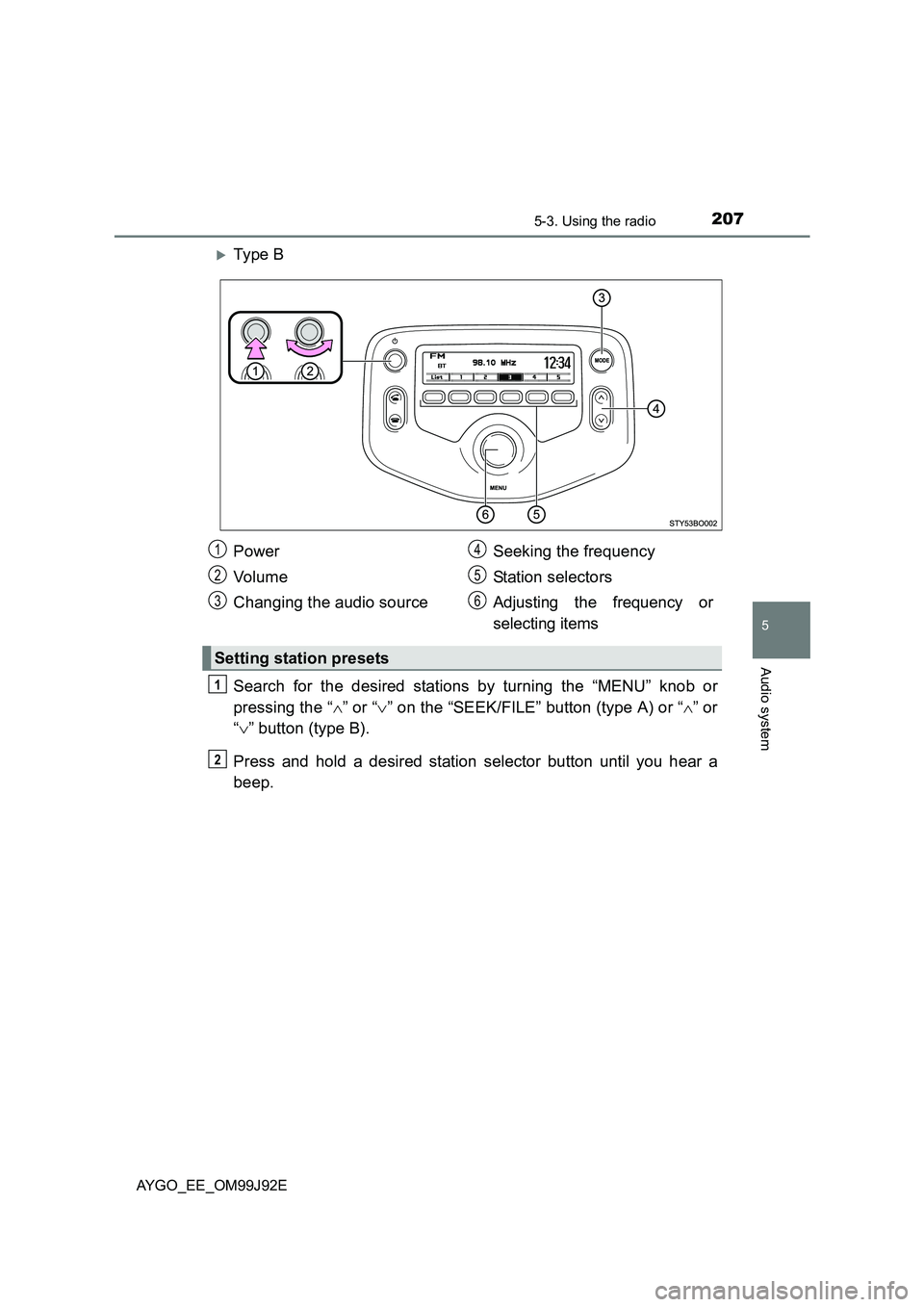
XTy pe B
Search for the desired stations by turning the “MENU” knob or
pressing the “ ∧” or “∨” on the “SEEK/FILE” button (type A) or “∧” or
“ ∨” button (type B).
Press and hold a desired station selector button until you hear a
beep.
Power
Vo lu m e
Changing the audio source
Seeking the frequency
Station selectors
Adjusting the frequency or
selecting items
Setting station presets
1
2
3
4
5
6
1
2
Page 209 of 440
2095-3. Using the radio
5
Audio system
AYGO_EE_OM99J92E
■Traffic information
Press the “MENU” knob.
Turn the knob to “Radio” and press the knob.
Turn the knob to “FM TA” mode.
Press the knob to select “On” or “Off”.
TP mode:
The system automatically switches to traffic information when a
broadcast with a traffic information signal is received.
The station returns to the previous one when the traffic information
ends.
TA mode:
The system automatically switches to traffic information when a
broadcast with a traffic information signal is received. In FM
modes, the system will be mute unless traffic information is being
broadcast.
The audio system returns to the previous mode when the traffic informa-
tion ends.
■ EON (Enhanced Other Network) system (for traffic announcement func-
tion)
If the RDS station (with EON data) you are listening to is not broadcasting a
traffic information program and the audio system is in the TA (traffic
announcement) mode, the radio will be switched automatically to a station
broadcasting a traffic information program in the EON AF list when traffic
information begins.
■ When the battery is disconnected
Stations presets are erased.
■ Reception sensitivity
● Maintaining perfect radio reception at all times is difficult due to the continu-
ally changing position of the antenna, differences in signal strength and sur-
rounding objects, such as trains, transmitters, etc.
● The radio antenna is mounted on the roof. The antenna can be removed
from the base by turning it.
■ Digital Audio Broadcast (DAB) radio (if equipped)
The optional radio antenna and tuner are necessary for the use of Digital
Audio Broadcast (DAB) radio.
1
2
3
4
Page 211 of 440
211
5
5-4. Using an external device
Audio system
AYGO_EE_OM99J92E
Listening to an iPod∗
→P. 2 0 3
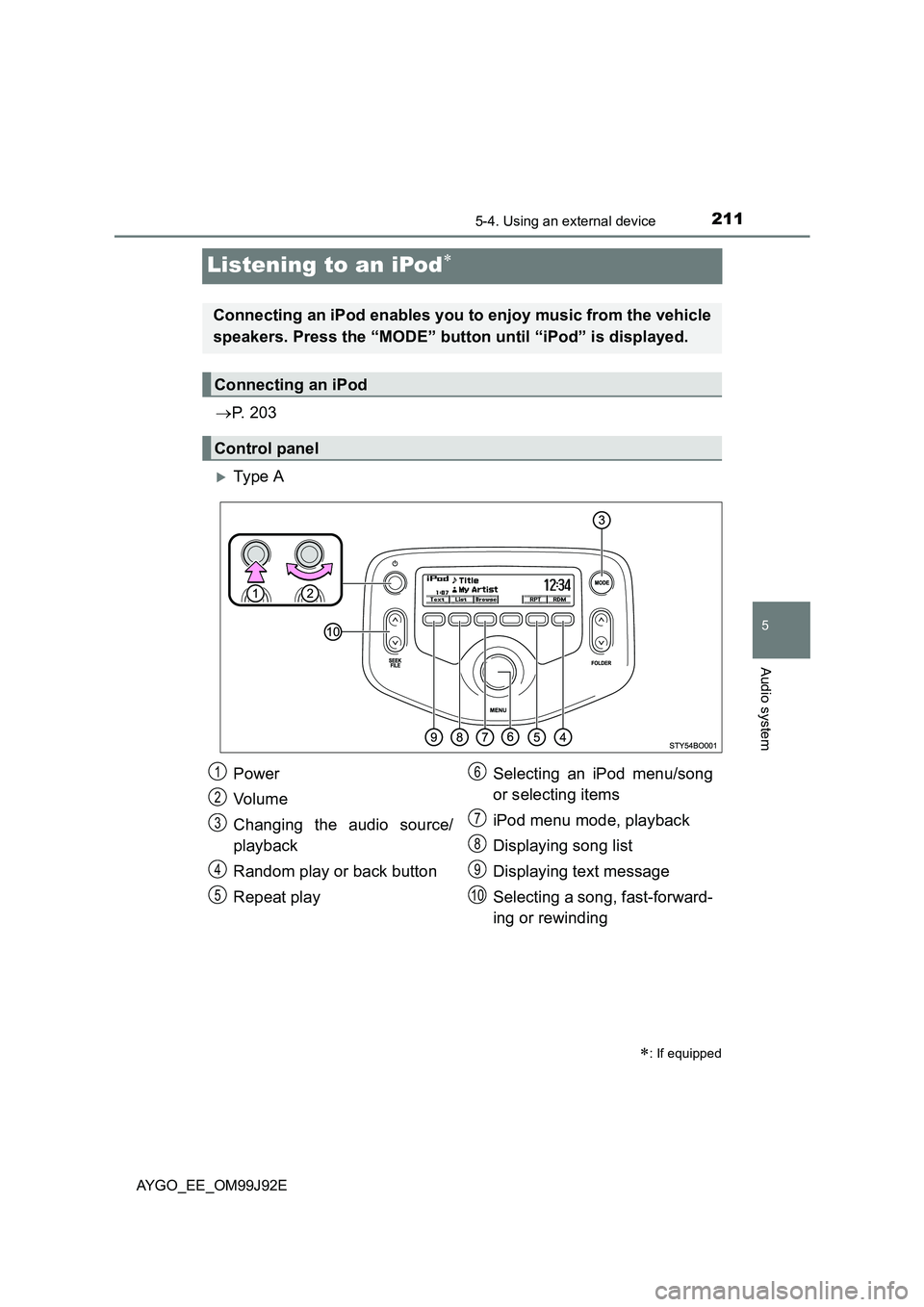
XTy pe A
∗: If equipped
Connecting an iPod enables you to enjoy music from the vehicle
speakers. Press the “MODE” button until “iPod” is displayed.
Connecting an iPod
Control panel
Power
Vo lu m e
Changing the audio source/
playback
Random play or back button
Repeat play
Selecting an iPod menu/song
or selecting items
iPod menu mode, playback
Displaying song list
Displaying text message
Selecting a song, fast-forward-
ing or rewinding
1
2
3
4
5
6
7
8
9
10
Page 212 of 440
2125-4. Using an external device
AYGO_EE_OM99J92E
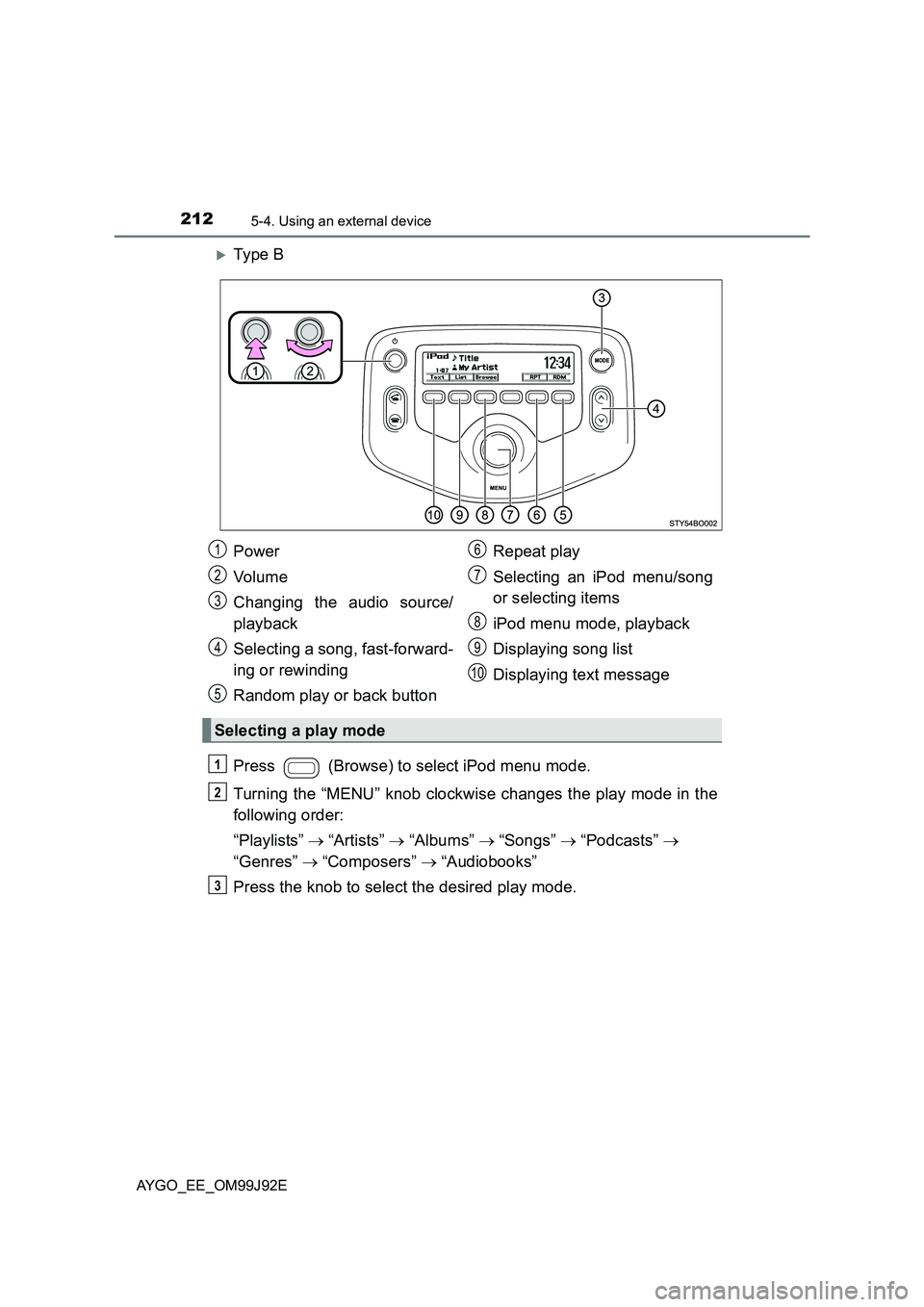
XTy pe B
Press (Browse) to select iPod menu mode.
Turning the “MENU” knob clockwise changes the play mode in the
following order:
“Playlists” → “Artists” → “Albums” → “Songs” → “Podcasts” →
“Genres” → “Composers” → “Audiobooks”
Press the knob to select the desired play mode.
Power
Vo lu m e
Changing the audio source/
playback
Selecting a song, fast-forward-
ing or rewinding
Random play or back button
Repeat play
Selecting an iPod menu/song
or selecting items
iPod menu mode, playback
Displaying song list
Displaying text message
Selecting a play mode
1
2
3
4
5
6
7
8
9
10
1
2
3
Page 213 of 440
2135-4. Using an external device
5
Audio system
AYGO_EE_OM99J92E
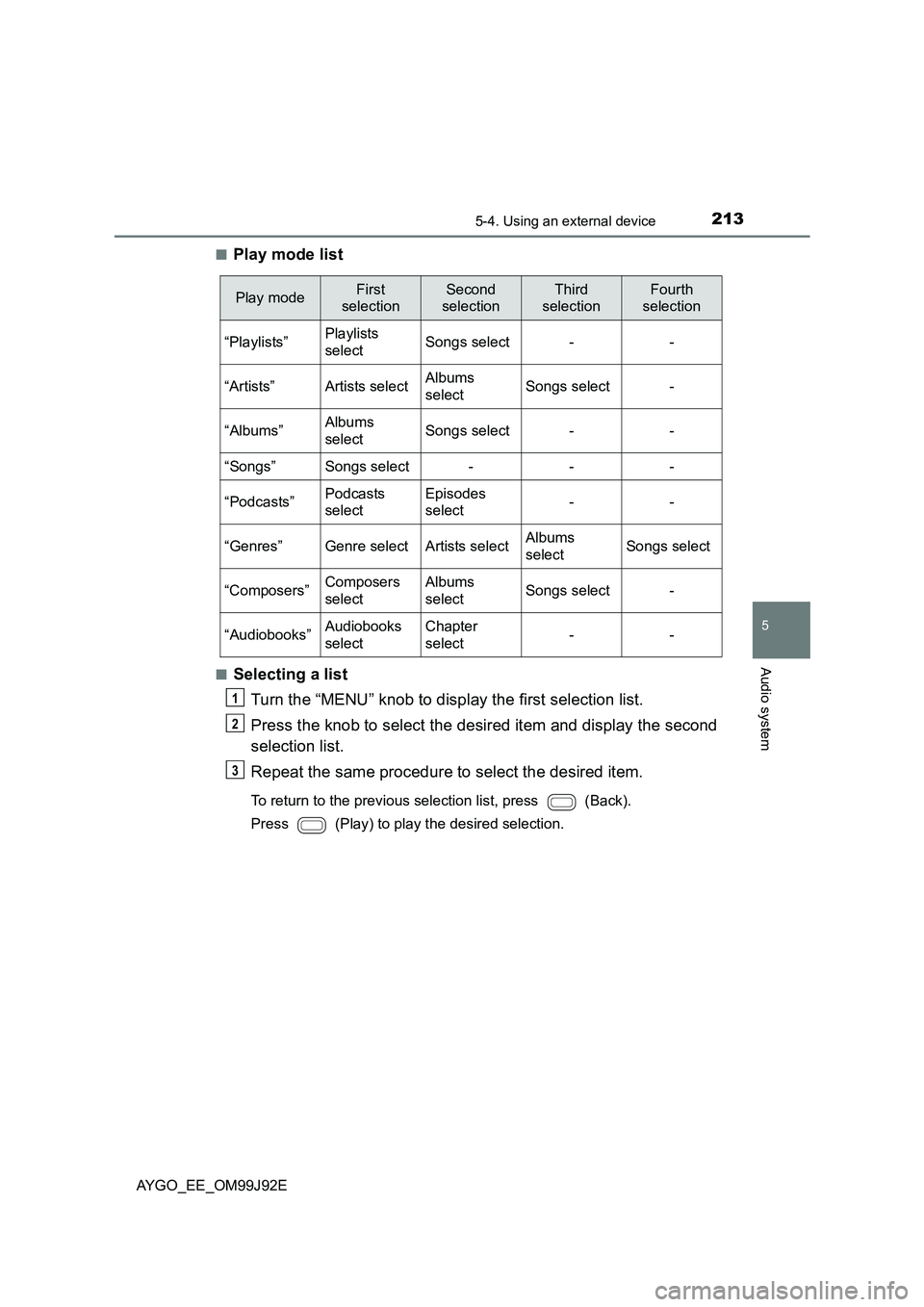
■Play mode list
■Selecting a list
Turn the “MENU” knob to display the first selection list.
Press the knob to select the desired item and display the second
selection list.
Repeat the same procedure to select the desired item.
To return to the previous selection list, press (Back).
Press (Play) to play the desired selection.
Play modeFirst
selection
Second
selection
Third
selection
Fourth
selection
“Playlists”Playlists
selectSongs select--
“Artists”Artists selectAlbums
selectSongs select-
“Albums”Albums
selectSongs select--
“Songs”Songs select---
“Podcasts”Podcasts
select
Episodes
select--
“Genres”Genre selectArtists selectAlbums
selectSongs select
“Composers”Composers
select
Albums
selectSongs select-
“Audiobooks”Audiobooks
select
Chapter
select--
1
2
3
Page 215 of 440
2155-4. Using an external device
5
Audio system
AYGO_EE_OM99J92E
■About iPod
● “Made for iPod” and “Made for iPhone” mean that an electronic accessory
has been designed to connect specifically to iPod, or iPhone, respectively,
and has been certified by the developer to meet Apple performance stan-
dards.
● Apple is not responsible for the operation of this device or its compliance
with safety and regulatory standards. Please note that the use of this acces-
sory with iPod or iPhone may affect wireless performance.
● iPhone, iPod, iPod classic, iPod nano and iPod touch are trademarks of
Apple Inc., registered in the U.S. and other countries.
■ iPod functions
● When an iPod is connected and the audio source is changed to iPod mode,
the iPod will resume play from the same point in which it was last used.
● Depending on the iPod that is connected to the system, certain functions
may not be available. Disconnecting the device and reconnecting it once
again may resolve some malfunctions.
● While connected to the system, the iPod cannot be operated with its own
controls. It is necessary to use the controls of the vehicle’s audio system
instead.
■ iPod problems
To resolve most problems encountered when using your iPod, disconnect
your iPod from the vehicle iPod connection and reset it.
For instructions on how to reset your iPod, refer to your iPod Owner’s Man-
ual.
■ Display
Depending on the contents recorded, the characters may not be displayed
properly or may not be displayed at all.
Page 217 of 440
2175-4. Using an external device
5
Audio system
AYGO_EE_OM99J92E
■ Compatible models
The following iPod®, iPod nano®, iPod classic®, iPod touch® and iPhone®
devices can be used with this system.
● Made for
• iPod touch (5th generation)
• iPod touch (4th generation)
• iPod touch (3rd generation)
• iPod touch (2nd generation)
• iPod touch (1st generation)
• iPod classic
• iPod with video
• iPod nano (7th generation)
• iPod nano (6th generation)
• iPod nano (5th generation)
• iPod nano (4th generation)
• iPod nano (3rd generation)
• iPod nano (2nd generation)
• iPod nano (1st generation)
• iPhone 5
• iPhone 4S
• iPhone 4
• iPhone 3GS
• iPhone 3G
• iPhone
Depending on differences between models or software versions etc., some
models might be incompatible with this system.
Items related to standards and limitations are as follows:
● Maximum number of lists in device: 9999
● Maximum number of songs in device: 65535
● Maximum number of songs per list: 65535
WARNING
■ While driving
Do not connect iPod or operate the controls. Doing so may cause an acci-
dent, resulting in death or serious injury.
Page 219 of 440
219
5
5-4. Using an external device
Audio system
AYGO_EE_OM99J92E
Listening USB memor y device∗
→P. 2 0 3
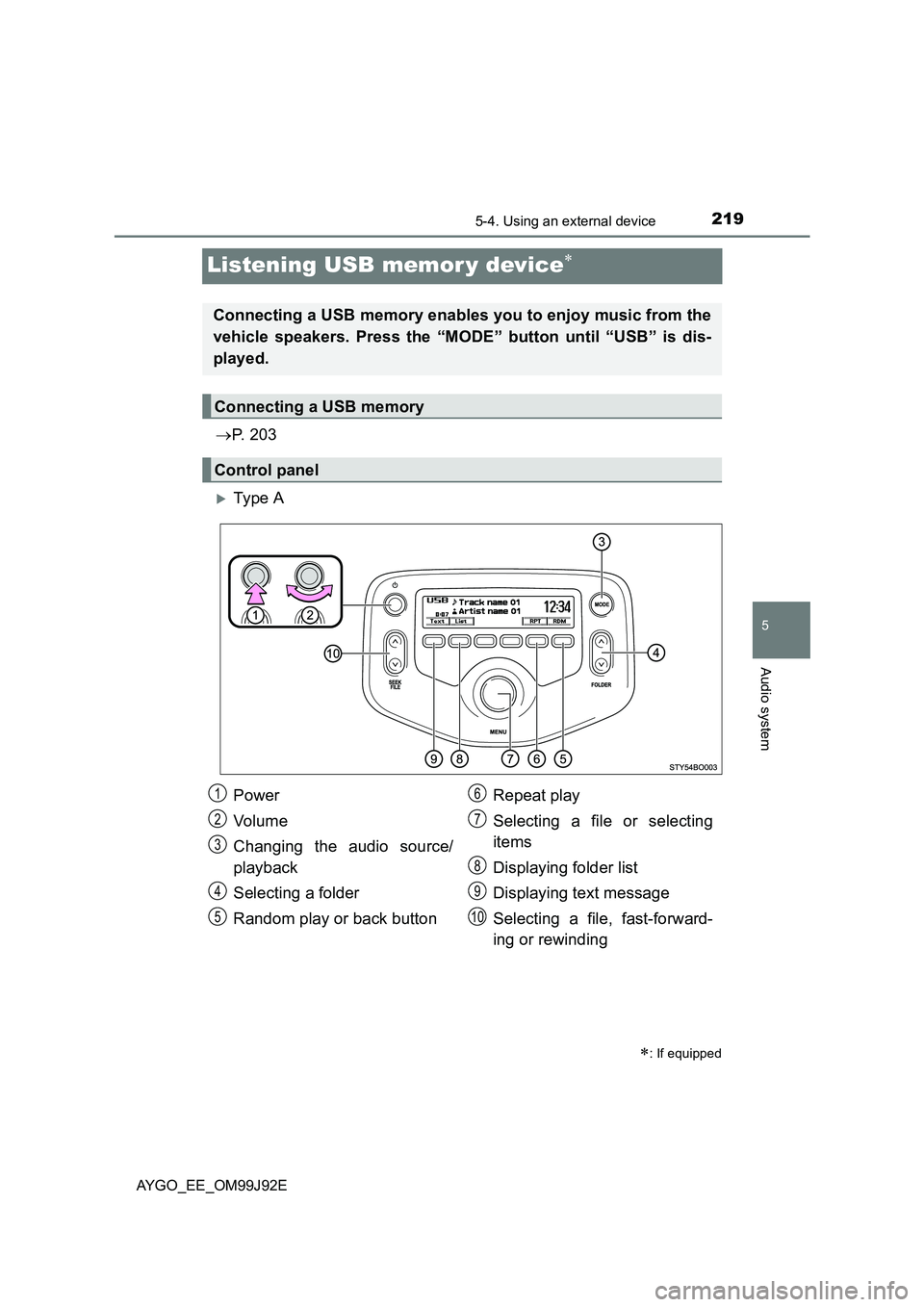
XTy pe A
∗: If equipped
Connecting a USB memory enables you to enjoy music from the
vehicle speakers. Press the “MODE” button until “USB” is dis-
played.
Connecting a USB memory
Control panel
Power
Vo lu m e
Changing the audio source/
playback
Selecting a folder
Random play or back button
Repeat play
Selecting a file or selecting
items
Displaying folder list
Displaying text message
Selecting a file, fast-forward-
ing or rewinding
1
2
3
4
5
6
7
8
9
10
Page 220 of 440
2205-4. Using an external device
AYGO_EE_OM99J92E
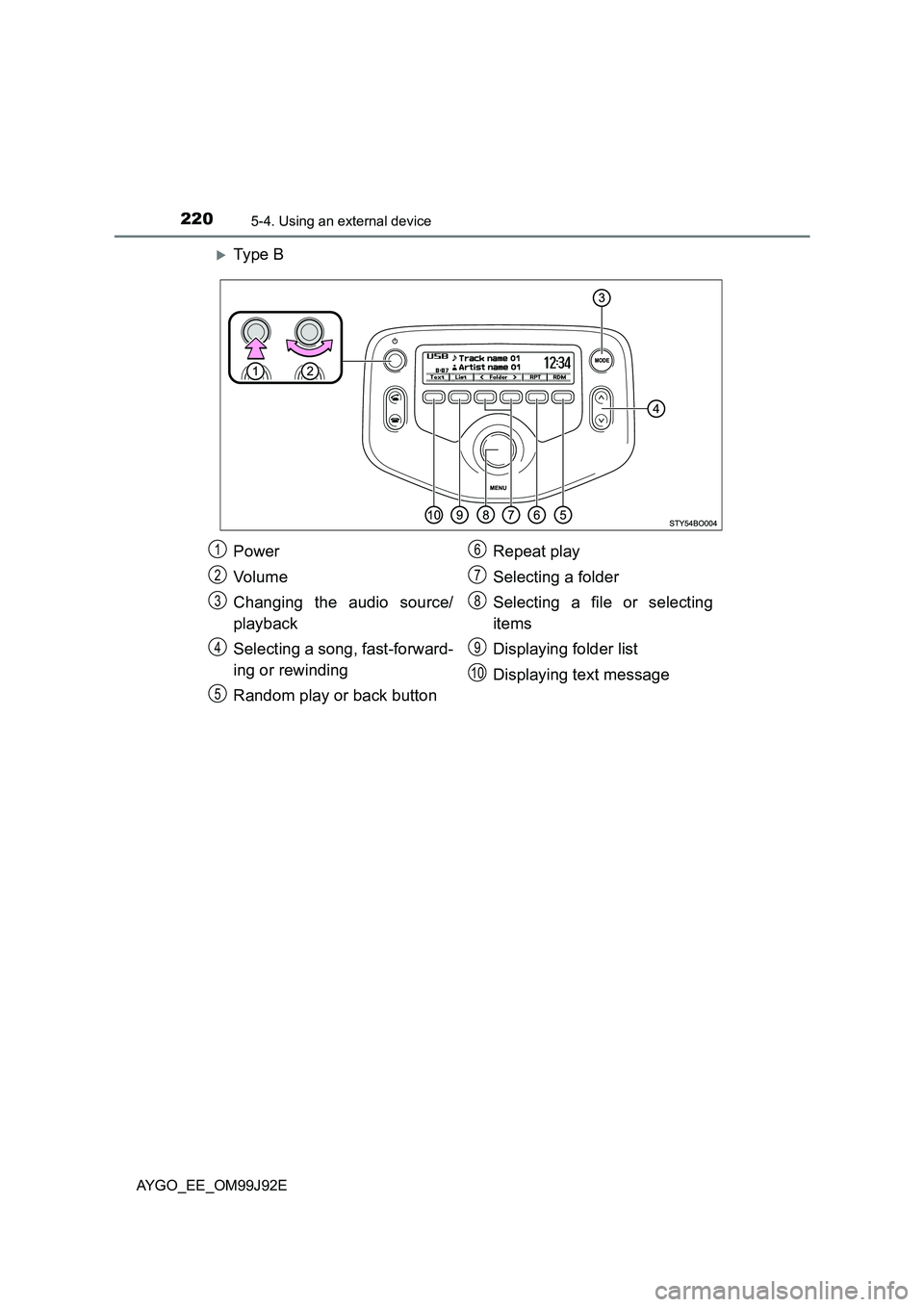
XTy pe B
Power
Vo lu m e
Changing the audio source/
playback
Selecting a song, fast-forward-
ing or rewinding
Random play or back button
Repeat play
Selecting a folder
Selecting a file or selecting
items
Displaying folder list
Displaying text message
1
2
3
4
5
6
7
8
9
10
Page 221 of 440
2215-4. Using an external device
5
Audio system
AYGO_EE_OM99J92E
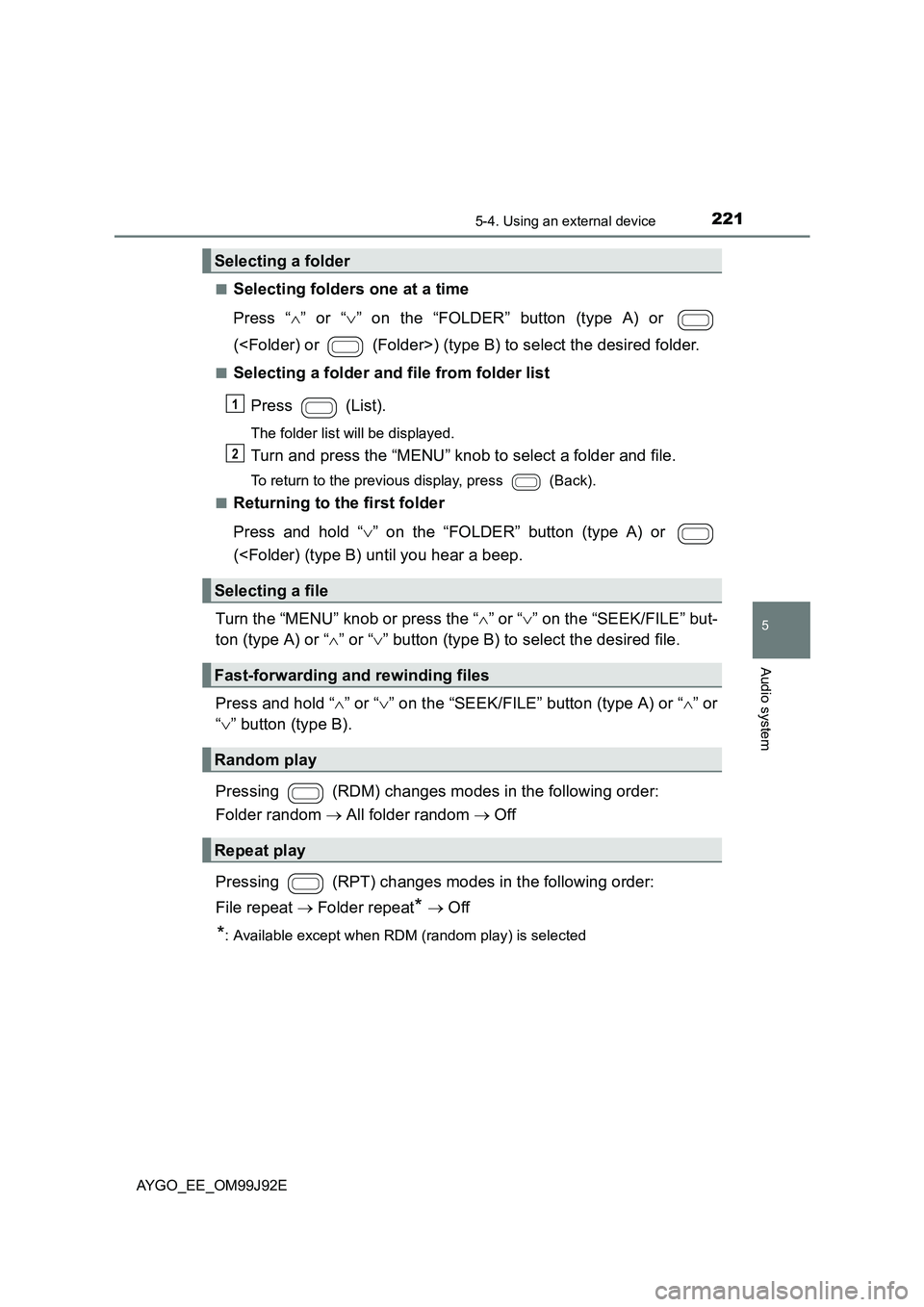
■Selecting folders one at a time
Press “ ∧” or “∨” on the “FOLDER” button (type A) or
(
■Selecting a folder and file from folder list
Press (List).
The folder list will be displayed.
Turn and press the “MENU” knob to select a folder and file.
To return to the previous display, press (Back).
■Returning to the first folder
Press and hold “ ∨” on the “FOLDER” button (type A) or
(
ton (type A) or “ ∧” or “∨” button (type B) to select the desired file.
Press and hold “ ∧” or “∨” on the “SEEK/FILE” button (type A) or “∧” or
“ ∨” button (type B).
Pressing (RDM) changes modes in the following order:
Folder random → All folder random → Off
Pressing (RPT) changes modes in the following order:
File repeat → Folder repeat* → Off
*: Available except when RDM (random play) is selected
Selecting a folder
Selecting a file
Fast-forwarding and rewinding files
Random play
Repeat play
1
2